


 Video Converter Ultimate
 ضبط صفحه
 تعمیر ویدیو
MPG به MP3: راهنمای جامع برای تبدیل و بهبود فایل های صوتی
فرمت ویدئویی MPG غالباً برای ذخیرهسازی فیلمها و سایر انواع محتوای ویدیویی استفاده میشود. در برخی موارد، ممکن است بخواهید بخش صوتی یک فایل با فرمت MPG را استخراج کرده و آن را بهصورت یک فایل MP3 ذخیره کنید. در این زمینه، یک مبدل MPG به MP3 ابزار بسیار مفیدی است.
با استفاده از یک مبدل ماهر، میتوان فایلهای MPG خود را بدون دردسر به فرمت MP3 تبدیل کرد و از این طریق آنها را قادر میسازد از محتوای صوتی دلخواه خود در طیف متنوعی از دستگاهها لذت ببرند. مبدل های متعددی وجود دارد، هم رایگان و هم پولی، که می توانند به انجام این کار کمک کنند. برنامه ها برای کاربران بر اساس ترجیح آنها برای دسترسی آنلاین یا آفلاین دسته بندی شدند. لطفاً آنها را برای مرجع خود در لیست زیر بیابید.

قسمت 1. تبدیل MPG به MP3 یا MP3 به MPG با Video Converter Ultimate
تبدیل فرمت MPG به MP3 فقط یکی از بسیاری از فرمتهای ویدیویی است که با نرمافزار Video Converter Ultimate قابل تبدیل است. علاوه بر این، برنامه میتواند ویدیوهای باکیفیت HD را در عرض چند ثانیه بدون افت کیفیت تبدیل کند و در عین حال امکاناتی مانند تبدیل دستهای، مدیریت سابقه و تنظیم پارامترها را ارائه میدهد. وقتی صحبت از تبدیل ویدیوها به فرمتهای دیگر میشود، FVC Video Converter Ultimate بهترین گزینهی موجود است.
مرحله ۱. دریافت برنامه
FVC Video Converter Ultimate را دانلود کرده و روی رایانه خود نصب کنید. کافی است روی دکمه Free Download در زیر کلیک کنید. برنامه را اجرا کرده و با استفاده از دکمه Add Files، فایل MPG را وارد کنید.
دانلود رایگانبرای ویندوز 7 یا بالاتردانلود امن
دانلود رایگانبرای MacOS 10.7 یا بالاتردانلود امن
مرحله 2. انتخاب فرمت خروجی
از منوی کشویی گزینه Profile، فرمت MP3 را بهعنوان فرمت خروجی مورد نظر انتخاب کنید. در صورت تمایل میتوانید تنظیمات فایل صوتی را تغییر دهید.
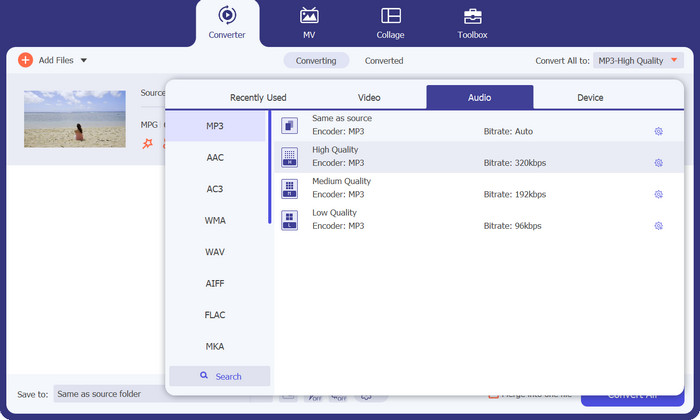
مرحله 3. تبدیل به MP3
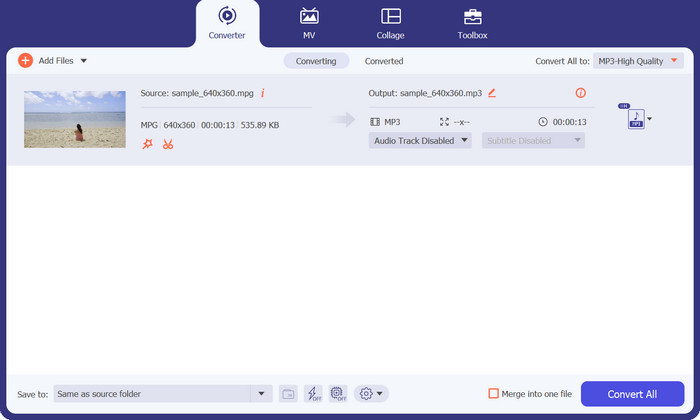
محلی را روی رایانه خود برای ذخیره فایل تبدیلشده مشخص کنید. فرایند تبدیل را آغاز کنید. اکنون روی دکمه Convert All کلیک کنید. لطفاً منتظر بمانید تا فرآیند تبدیل به پایان برسد.
طرفداران
- سرعت تبدیل سریع با حفظ کیفیت.
- برش دهید، برش دهید، زیرنویس اضافه کنید و موارد دیگر.
- از تبدیل دسته ای پشتیبانی می کند.
منفی ها
- برای دسترسی به تمام ویژگی های آن به یک اشتراک پولی نیاز دارد.
قسمت 2. تبدیل MPG به MP3 یا MP3 به MPG با تبدیل رایگان MP3 آنلاین
برنامه مبدل MPG به MP3 دیگری که میتواند در تبدیل MPG به MP3 یا MP3 به MPG به شما کمک کند، Free MP3 Converter Online است. این برنامه کاملاً رایگان است و هیچگونه محدودیتی ندارد. این ابزار به کاربران اجازه میدهد فایلهای صوتی را بدون هیچگونه هزینه یا کارمزد پنهان، به فرمتهای صوتی شناختهشدهای مانند MP3، AAC، AC3، WMA، WAV و فرمتهای دیگر تبدیل کنند. این ابزار همچنین خروجی بدون واترمارک را در قالبهای صوتی متنوع ارائه میدهد و سرعت آن میتواند بهاندازه سرعت آپلود و دانلود اینترنت شما بالا باشد. برای تبدیل رایگان MPG به MP3 بهصورت آنلاین، مراحل زیر را دنبال کنید:
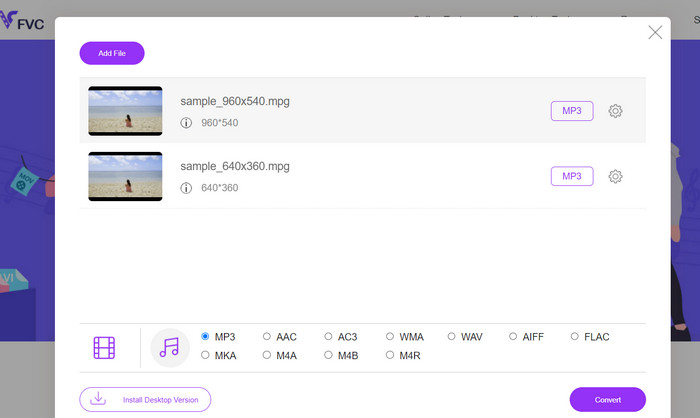
مرحله 1. با استفاده از هر مرورگری روی رایانه خود، به سایت رسمی Free MP3 Converter Online بروید. برای افزودن فایل صوتی، روی دکمه Add Files to Convert کلیک کرده و فایل موسیقی مورد نظر خود را انتخاب کنید.
مرحله 2. پس از بارگذاری فایل صوتی، همه فرمتهای صوتی موجود را مشاهده خواهید کرد. از منوی Profile، گزینه MP3 را انتخاب کنید.
مرحله 3. برای شروع فرایند تبدیل، روی دکمه Convert کلیک کنید. صبر کنید تا فرایند تغییر کامل شود.
طرفداران
- از تنظیم پارامتر پشتیبانی می کند.
- رمزگذاری صدای با کیفیت بالا بدون از دست دادن کیفیت.
- بدون هزینه یا هزینه پنهان
منفی ها
- نیاز به یک اتصال اینترنتی خوب دارد.
- زمان بارگذاری کندتر در فایل های صوتی بزرگ.
قسمت 3. تبدیل MPG به MP3 با VLC
VLC Media Player یک پخش کننده رسانه ای رایگان و منبع باز است که می تواند تقریباً هر فایل صوتی و تصویری موجود را باز کند. همچنین کاملاً همه کاره است. از طرف دیگر، نه تنها در پخش فایل های رسانه ای عالی است، بلکه دارای عملکردی است که به کاربران امکان می دهد فایل های رسانه ای را از یک فرمت به فرمت دیگر تبدیل کنند.
هنگام تبدیل یک فایل با استفاده از VLC، کاربران این امکان را دارند که تعدادی از تنظیمات مانند نرخ بیت، کانال ها و نرخ نمونه را تغییر دهند تا به بهترین کیفیت صوتی ممکن دست یابند. به دلیل این تطبیق پذیری، می توان خروجی یک فایل MP3 را طوری تنظیم کرد که بتوان از آن در زمینه های مختلف استفاده کرد.
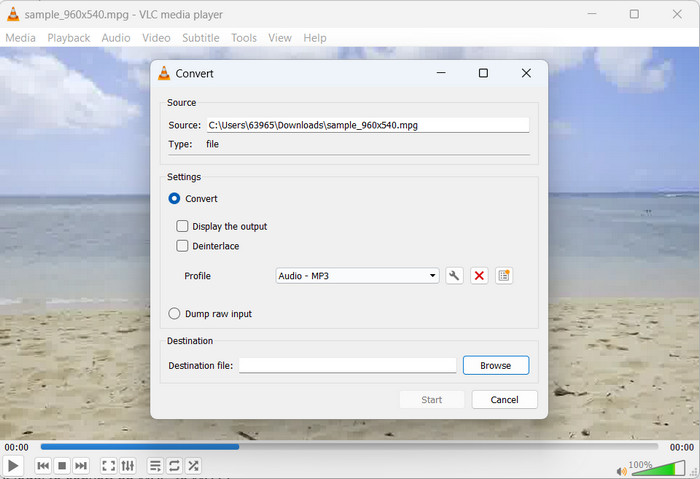
مرحله 1. ابتدا پخشکننده رسانه VLC را اجرا کرده و در گوشه بالا سمت چپ، روی گزینه Media کلیک کنید.
مرحله 2. سپس از منوی کشویی، گزینه Convert/Save را انتخاب کنید. بعد روی Add کلیک کرده و فایل MPG موردنظر برای تبدیل را انتخاب کنید.
مرحله 3. در پایین صفحه روی Convert/Save علامت بزنید. از منوی کشویی زیر بخش Profile، گزینه Audio-MP3 را انتخاب کنید. در نهایت محل ذخیره فایل تبدیلشده را مشخص کرده و روی Start کلیک کنید. به این ترتیب، MP3 را با استفاده از VLC از فایل MPG استخراج میکنید.
طرفداران
- برای چندین پلتفرم در دسترس است.
- از کدک های صوتی و تصویری پیشرفته استفاده می کند.
- تنظیمات سفارشی را ارائه می دهد.
منفی ها
- فقط از چند فرمت خروجی پشتیبانی می کند.
- ویژگی های ویرایش محدود
مطالعه بیشتر:
3 روش برتر برای تبدیل سریع MPG به MP4
نکات و ترفندهایی برای تبدیل فایلهای MKV به MP3 [2023]
بخش 4. سوالات متداول در مورد تبدیل MP3 و MPG
آیا تبدیل MPG به MP3 قانونی است؟
برای پاسخ به سوال شما، تبدیل یک فایل MPG به MP3 برای استفاده غیرتجاری قانونی است. اگر میخواهید صدای تبدیلشده را به اشتراک بگذارید یا بفروشید، به مجوزها یا مجوزهای مناسب نیاز دارید.
چه عواملی بر کیفیت صدای فایل MP3 خروجی تأثیر می گذارد؟
وفاداری شنیداری فایل MP3 حاصل به عوامل مختلفی بستگی دارد، از جمله، اما نه محدود به نرخ بیت، فرکانس نمونه برداری، و حالت کانال. با افزایش فرکانس نمونه برداری و نرخ بیت می توان کیفیت صوتی فایل خروجی را افزایش داد.
چگونه می توانم نرخ بیت مناسب را برای فایل MP3 تبدیل شده خود انتخاب کنم؟
کیفیت صدا و اندازه فایل یک فایل MP3 با نرخ بیت آن تعیین می شود که معمولاً بر حسب کیلوبیت بر ثانیه (kbps) بیان می شود. افزایش نرخ بیت به طور مثبت با بهبود وفاداری صوتی مرتبط است، البته به قیمت افزایش حجم فایل.
نتیجه
تبدیل MPG به MP3 راهکاری عملی برای بهبود سازگاری صوتی و دستیابی به پخش بدون وقفه روی دستگاههای مختلف ارائه میدهد. با پیروی از روشهای توضیحدادهشده در این راهنما، میتوانید فایلهای MPG خود را بهصورت روان و بیدردسر به فرمت بسیار رایج MP3 تبدیل کنید.
-
 3 روش آسان برای تبدیل MPG به MOV در Mac/Windows/Online
 آیا می خواهید فایل های MPG خود را تبدیل کنید و بعداً آنها را روی iOS، iPod، iPad یا Mac خود انتقال دهید؟ این مقاله به نحوه تبدیل MPG به MOV با مراحل کمک می کند.
-
 نحوه پیوستن به چندین فایل ویدیویی MPG به یکی در ویندوز و مک
 پیوستن چند کلیپ MPG در یک فایل ممکن است برای شما مشکل ساز شود. در این مقاله می توانید در مورد چگونگی ادغام فیلمهای MPG با هم در رایانه خود بیشتر بدانید.
-
 5 برش MP3 برای برش آسان هر صدایی [به روز رسانی 2023]
 آیا برای برش صدا به کاتر MP3 نیاز دارید؟ در این صورت، این مقاله را بخوانید زیرا ما ابزارهایی را ارائه میدهیم که میتوانید به آنها وابسته باشید که برش آسان صدا را فراهم میکنند.
