


 Video Converter Ultimate
 ضبط صفحه
 تعمیر ویدیو
MOV به MPG: راهنمای سریع نحوه تبدیل این فرمت ها در سال 2023
برای اطلاع شما، فایلهای MOV امروزه بازخوردهای قابلتوجهی دریافت میکنند، زیرا یکی از فرمتهای مناسب برای ذخیره فیلمها به شمار میروند. این نوع فایل به طور گسترده به عنوان فرمت پیشفرض برای محصولات اپل مانند iPhone، iPad و MacBook شناخته شده است. با این حال، وقتی تلاش میکنید فایلهای MOV را در اینترنت بارگذاری کنید، ممکن است با مشکل مواجه شوید، زیرا در مقایسه با سایر فرمتهای ویدئویی حجم بزرگتری دارند. برای رفع این مشکل، میتوانید انتخاب کنید که فرمت MOV را به MPG تبدیل کنید. پس همراه این راهنما بمانید تا به شما کمک کنیم یاد بگیرید چطور این کار را بهخوبی انجام دهید.

قسمت 1. تبدیل MOV به MPG
1. Video Converter Ultimate
Video Converter Ultimate یک راهحل آفلاین کامل برای برآوردهکردن تمام نیازهای شما در تبدیل MOV به MPG است. تنها با چند کلیک، این برنامه به شما امکان میدهد فایلها را، چه بزرگ و چه کوچک، تبدیل کنید. علاوه بر این، این ابزار به تنظیمات شخصیسازی خروجی مجهز است و به کاربران اجازه میدهد فرمت خروجی باکیفیتی داشته باشند و آن را مطابق سلیقه خود تنظیم کنند. در ادامه، راهنمای ساده تبدیل سریع MOV به MPG را مشاهده میکنید.
مرحله 1. نصب برنامه
برای شروع، روی دکمه دانلود متناسب با دستگاه خود در پایین کلیک کنید. سپس روی فایل نصب کلیک کرده و آن را اجرا کنید تا برنامه روی صفحه شما اجرا شود.
دانلود رایگانبرای ویندوز 7 یا بالاتردانلود امن
دانلود رایگانبرای macOS 10.7 یا بالاتردانلود امن
مرحله 2. آپلود فایلهای MOV برای تبدیل
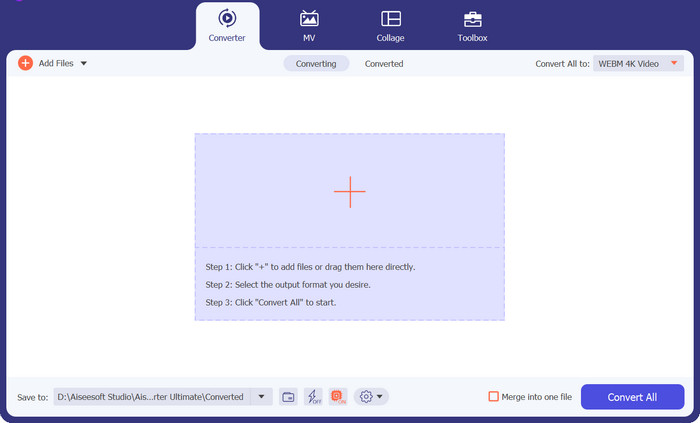
پس از نصب برنامه، دکمه علامت مثبت را در مرکز رابط کاربری انتخاب کنید. بعد از باز شدن پوشههای کامپیوتر، فایل MOV موردنظر را برای آپلود انتخاب کنید. همچنین میتوانید بیش از یک فایل را برای تبدیل دستهای بارگذاری کنید.
مرحله 3. انتخاب خروجی
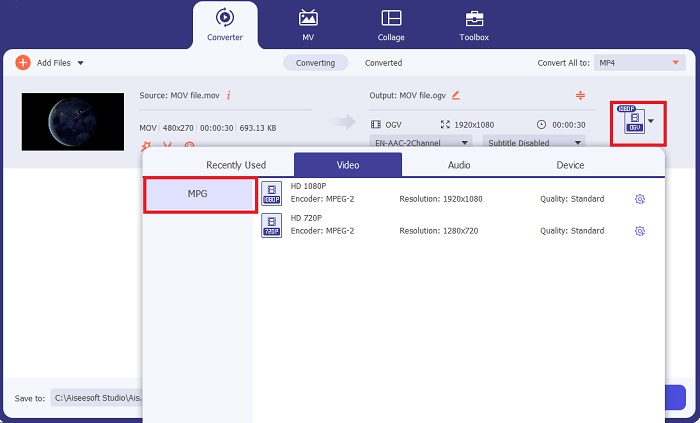
تصویر بندانگشتی فایل MOV شما در برنامه نمایش داده میشود که تأیید میکند آپلود با موفقیت انجام شده است. برای انتخاب فرمت خروجی، زبانه خروجی (Output) را باز کنید و روی بخش ویدئو (Video) کلیک کنید. از آنجا، لیست را مرور کرده و MPG را انتخاب کنید.
مرحله 4. شروع تبدیل
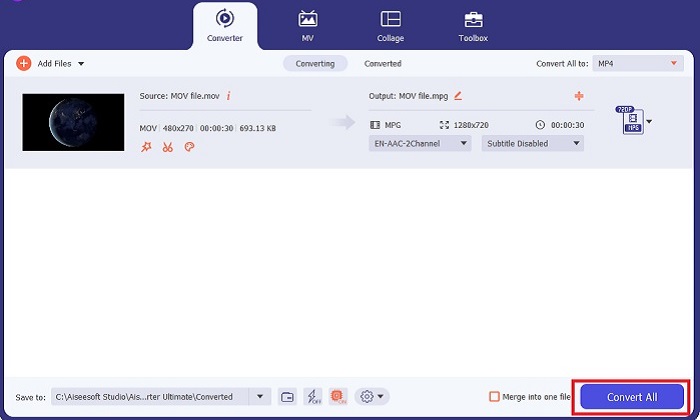
در نهایت، با تنظیم گزینههای خروجی، کیفیت دلخواه خود را برای فایل تنظیم کنید. پس از پایان، روی دکمه Convert کلیک کنید تا فرآیند تبدیل MOV به MPG آغاز شود.
ویژگیهای کلیدی
◆ تبدیل بدون درز MOV به MPG: یکی از چیزهایی که در مورد Video Converter Ultimate دوست داریم، رابط کاربر پسند آن است. این ابزار برای همه افراد مبتدی یا ماهر بهترین است.
◆ 50 برابر سرعت تبدیل بیشتر: به لطف کمک فناوری رمزگذاری شتاب GPU، Video Converter Ultimate به دلیل تبدیل سریع بدون تاخیر و خرابی، از هر مبدل آفلاین دیگری پیشی می گیرد.
◆ ویژگی تبدیل انبوه: با Video Converter Ultimate، میتوانید پوشهای از فایلهای MOV را نیز به فرمتهای 100o+ غیر از MPG تبدیل کنید.
2. تبدیل رایگان ویدیو آنلاین
Free Video Converter Online یک نرمافزار دیگر است که روند تبدیل فرمتها را متحول میکند. هرچند این برنامه آنلاین ابزارهای جامع نرمافزارهای آفلاین را ارائه نمیدهد، اما به عنوان یک برنامه قابلاعتماد برای تبدیل آنلاین MOV به MPG از آزمون سربلند بیرون میآید. این ابزار قابلیت تبدیل دستهای دارد و کنترل کامل خروجی را در اختیار شما میگذارد.
مرحله 1. ابتدا به وبسایت اصلی Free Video Converter Online بروید. پیش از آپلود فایل MOV، روی Add Files کلیک کنید؛ در این مرحله ابتدا از شما خواسته میشود ابزار آنلاین را راهاندازی کنید.
مرحله 2. برای آپلود فایلی که میخواهید تبدیل کنید، دوباره دکمه Add Files را انتخاب کرده و فایل خود را بارگذاری کنید. همچنین میتوانید از قابلیت کشیدن و رها کردن (Drag-and-Drop) استفاده کنید.
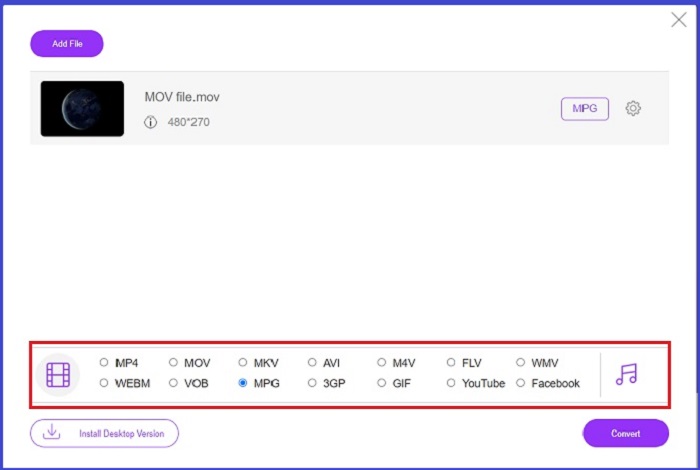
مرحله 3. وقتی فایل خام شما ظاهر شد، در گوشه پایینی صفحه فرمت خروجی را انتخاب کنید. در بخش ویدئو، همه فرمتهای ممکن را خواهید دید و در اینجا، فرمت MPG را برگزینید. در نهایت، روی دکمه Convert کلیک کرده و منتظر بمانید تا فایل شما دانلود شود.
ویژگیهای کلیدی
◆ مبدل آنلاین چند پلتفرمی: چه در تلفن، تبلت یا رایانه خود کار کنید، این ابزار کاملاً خوب کار می کند، که تبدیل ویدیو یا صدا را ممکن می کند.
◆ ضمانت حفظ حریم خصوصی: چه کسی می خواهد اطلاعات خصوصی را مورد تهاجم قرار دهد؟ با تبدیل رایگان ویدیو آنلاین، شما باید در مورد این موضوع با دوراهی صفر مواجه شوید. این ابزار آنلاین به کاربران اجازه می دهد بدون نیاز به فرآیندهای ثبت نام، MOV را به MPG تبدیل کنند.
◆ بدون نیاز به نصب: این ابزار یکی دیگر از مبدل های بدون دردسر است که به شما کمک می کند تا از نصب های گیج کننده دور شوید، به خصوص اگر فضای دیجیتالی شما تمام شود.
قسمت 2. تبدیل MPG به MOV
1. Video Converter Ultimate
باز هم Video Converter Ultimate همچنان بهترین راهحلی است که میتوانیم برای تبدیل MOV به MPG در دستگاههای مک و ویندوز به شما پیشنهاد کنیم. این ابزار بیش از 1000 فرمت ویدئویی و صوتی را پشتیبانی میکند، از جمله فرمتهایی که به طور اختصاصی برای دستگاههایی مانند سامسونگ، اپل، سونی و دیگر برندها طراحی شدهاند. راهنمای زیر را دنبال کنید تا هر یک از فایلهای MPG خود را به MOV تبدیل کنید.
دانلود رایگانبرای ویندوز 7 یا بالاتردانلود امن
دانلود رایگانبرای macOS 10.7 یا بالاتردانلود امن
مرحله 1. روی دکمه Add Files کلیک کنید تا فایل MPG را در برنامه وارد کنید.
مرحله 2. پس از اینکه فایل شما روی صفحه بارگذاری شد، با کلیک روی Output > Video > MOV فرمت خروجی را انتخاب کنید. برای کیفیت بهتر، میتوانید پارامترهای ویدئو را نیز تنظیم کنید.
مرحله 3. دکمه Convert را انتخاب کنید تا به برنامه دستور دهید فایلها را از MPG به MOV تبدیل کند. پس از پایان تبدیل، میتوانید خروجی را در خود برنامه بررسی کنید.
2. AnyConv
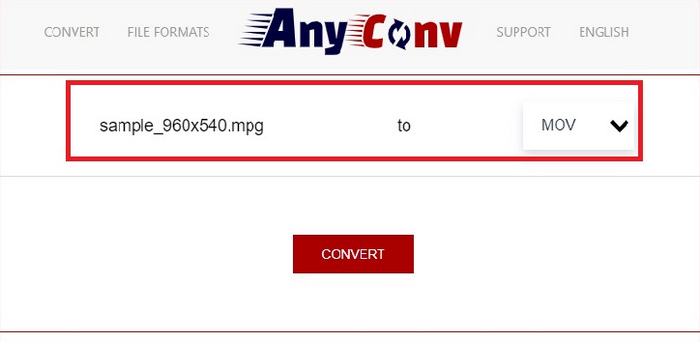
AnyConv یک مبدل MPG به MOV به صورت آنلاین است. این برنامه بر روی هر دستگاهی به خوبی کار می کند و هنگام آپلود فایل های MPG، قابلیت کشیدن و رها کردن را ارائه می دهد. علاوه بر این، این راه حل آنلاین با حذف فایل های تبدیل شده کاربران پس از یک ساعت، اطلاعات کاربران را ایمن می کند. به غیر از MOV، می توانید فایل های MPG خود را به 3GP، AVCHD، MP4، MKV و غیره تبدیل کنید.
مرحله 1. ابتدا وبسایت AnyConv را باز کنید. وقتی صفحه ظاهر شد، روی Choose File کلیک کرده و ویدئوی MOV موردنظر خود را برای تبدیل انتخاب کنید.
مرحله 2. وقتی فایل MOV شما آپلود شد، در ستون وسطی خروجی، از فهرست فرمتهای خروجی، MPG را انتخاب کنید.
مرحله 3. در پایان، روی دکمه Convert کلیک کرده و منتظر بمانید تا فایل شما دانلود شود.
مطالعه بیشتر:
3 روش برتر برای تبدیل سریع MPG به MP4
5 مبدل برتر MOV به 3GP که نباید از دست بدهید
بخش 3. سوالات متداول در مورد نحوه تبدیل MPG به MOV
آیا مبدل MOV به MPG رایگان وجود دارد؟
قطعا، بله! مبدل های آنلاین بهترین انتخاب شما برای جلوگیری از پرداخت هزینه هستند. شما می توانید مبدل ویدیوی آنلاین رایگان را برای تبدیل MOV به MPG به صورت رایگان انتخاب کنید.
آیا MPG بهتر از MOV است؟
MOV به دلیل تفاوت در نوع آنها بهتر از MPG است. MOV یک فرمت کانتینری است که تمام داده های اصلی شما را ذخیره می کند. در عین حال، MPG یک کدک فشرده است که برای کاهش حجم فایل ویدیویی برای انتقال سریعتر فایل از طریق اینترنت استفاده می شود.
مزیت فایل MOV چیست؟
فایل های MOV برای ویرایش مناسب هستند و استانداردهایی برای انتخاب بهترین فرمت ویدیویی محسوب می شوند. یکی از نکات منفی این فایل این است که تنها چند پخش کننده رسانه این فرمت را باز می کنند.
آیا MOV به MPG کیفیت را کاهش می دهد؟
آره. تبدیل فایل های خود از MOV به MPG نه تنها حجم فایل ویدیوی شما را کاهش می دهد بلکه کیفیت را نیز کاهش می دهد. هر دو فایل عالی هستند در هر صورت ممکن است به آنها نیاز داشته باشید.
آیا می توانم MOV را در Windows Media Player بازی کنم؟
خوشبختانه فایل های MOV در Windows Media Player تا زمانی که در نسخه 12 یا بالاتر باشد قابل پخش هستند.
نتیجه
اکنون با روشهای ممکن برای تبدیل MPG به MOV یا برعکس آشنا شدید. هر دو فرمت میتوانند به خوبی نیازهای مختلف شما را برآورده کنند. با مبدلهای آنلاین، میتوانید تبدیل را به شکلی ساده و سرراست انجام دهید. از سوی دیگر، اگر میخواهید با تنظیم کیفیت و حتی ویرایش، فایلهای خود را حرفهایتر کنید، ما استفاده از Video Converter Ultimate را پیشنهاد میکنیم.
-
 FLV به MPG - نحوه تبدیل FLV به MPG در Mac ، PC و آنلاین رایگان
 چگونه FLV را به MPEG تبدیل کنیم؟ آیا می توانم FLV را به MPG به صورت رایگان تبدیل کنم؟ این پست دارای 3 مبدل ویدیوی رایگان است که به شما کمک می کند FLV را بدون افت کیفیت به MPG تبدیل کنید.
-
 نحوه تبدیل MPG به M4V در مک و با استفاده از ابزار آنلاین
 آیا شما یک کاربر جدید مک هستید و نمی دانید چگونه MPG را به M4V تبدیل کنید؟ سپس میتوانید این مقاله را بخوانید تا بیشتر بدانید و نحوه تبدیل فایلها را با استفاده از Mac خود بیابید.
-
 8 بهترین بازیکن MOV برای پخش فایلهای QuickTime MOV با کیفیت اصلی
 فقط در مورد 8 بهترین پخش کننده MOV که هم برای ویندوز و هم برای مک در دسترس است بیشتر بدانید. می توانید یکی از موارد دلخواه و مناسب را برای پخش فایلهای MOV با کیفیت اصلی انتخاب کنید.
