


 Video Converter Ultimate
 ضبط صفحه
 تعمیر ویدیو
نحوه تبدیل MTS به FLV با 3 مبدل MTS به FLV
میخواهید فایلهای MTS را به FLV تبدیل کنید؟ ویدیوهایی که با دوربینهای فیلمبرداری AVCHD ضبط میشوند، معمولاً در قالب MTS یا M2TS ذخیره میشوند. فایلهای MTS توسط برخی پلیرهای چندرسانهای به طور معمول پشتیبانی نمیشوند و همچنین قابل آپلود مستقیم در یوتیوب یا فیسبوک نیستند. اگر یک دوربین AVCHD مانند سونی، پاناسونیک یا کانن دارید، ممکن است بخواهید ویدیوهای MTS ضبطشده را به قالب ویدیوی فلش تبدیل کنید تا بتوانند روی اغلب پخشکنندهها اجرا شوند. به همین دلیل لازم است این مطلب را ادامه دهید، زیرا ما ۳ روش برای تبدیل فایلهای MTS به FLV در ویندوز و مک ارائه خواهیم کرد.

قسمت 1. روش حرفه ای تبدیل MTS به FLV به صورت رایگان
برای تبدیل فایل MTS خود به ویدیوی فلش جهت آپلود کردن، به یک ابزار حرفهای مانند FVC Free MTS Converter نیاز دارید. این یک مبدل MTS به FLV است که میتواند به صورت دستهای فایلهای MTS را به FLV، MP4، WMV، MOV و سایر فرمتهای ویدئویی و صوتی تبدیل کند. با ابزارهای ویرایش ویدیوی داخلی، میتوانید قبل از تبدیل، فایلهای MTS را ویرایش کنید.

مبدل FVC رایگان MTS
1،286،400+ بارگیری- MTS را در ویندوز 10/8/7 / Vista / XP و Mac OS X به FLV تبدیل کنید.
- فشرده سازی ، ادغام و افزودن جلوه های ویدیویی دیگر به پرونده های MTS.
- مضامین ویژه ای را به پرونده های MTS خود اضافه کنید ، مانند تعطیلات ، خانواده ، تولد.
- دسته ای MTS را با سرعت 50 برابر سریعتر به FLV ، MP4 ، MKV و ... تبدیل کنید.
دانلود رایگانبرای ویندوز 7 یا بالاتردانلود امن
دانلود رایگانبرای MacOS 10.7 یا بالاتردانلود امن
مرحله 1. افزودن فایل MTS
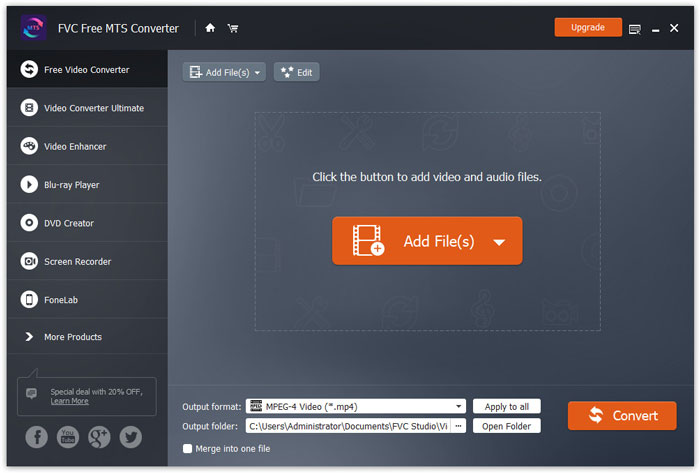
برنامه FVC Free MTS Converter را به صورت رایگان دانلود، نصب و اجرا کنید. روی دکمه Add File(s) کلیک کنید تا فایل MTS خود را وارد کنید. همچنین میتوانید بیش از یک فایل MTS را برای استفاده رایگان به داخل برنامه بکشید و رها کنید.
مرحله 2. ویرایش فایل MTS
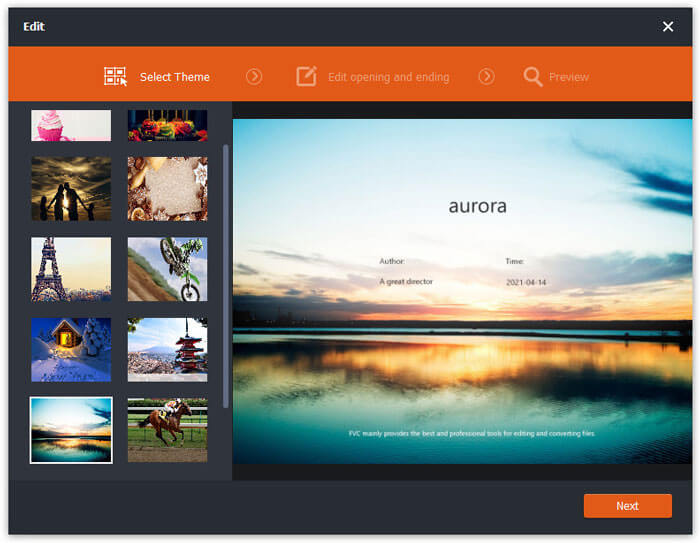
روی دکمه Edit کلیک کنید تا ویرایش فایل MTS خود را آغاز کنید. میتوانید یک تم مشخص انتخاب کنید و عنوان، نویسنده و زمان شروع و پایان را ویرایش کنید.
مرحله 3. تنظیم FLV بهعنوان خروجی
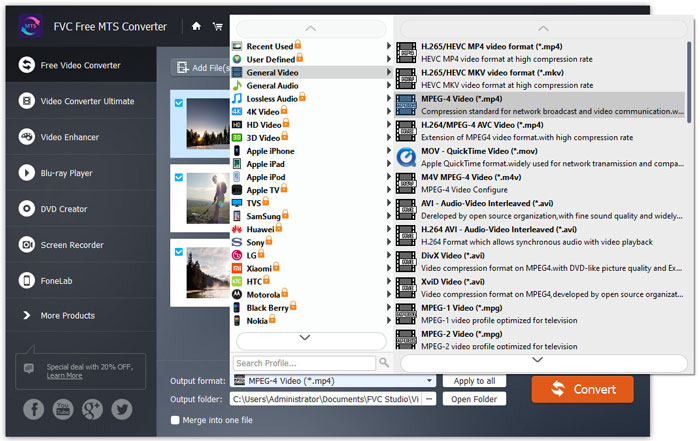
سپس به بخش Output format بروید و دسته General Video را انتخاب کنید. گزینه FLV - Flash Video Format (.flv) را پیدا کرده و آن را بهعنوان قالب خروجی تنظیم کنید. این قالب، یک فرمت پراستفاده برای استریم ویدئوی تحت شبکه است.
مرحله 4. تبدیل MTS به FLV
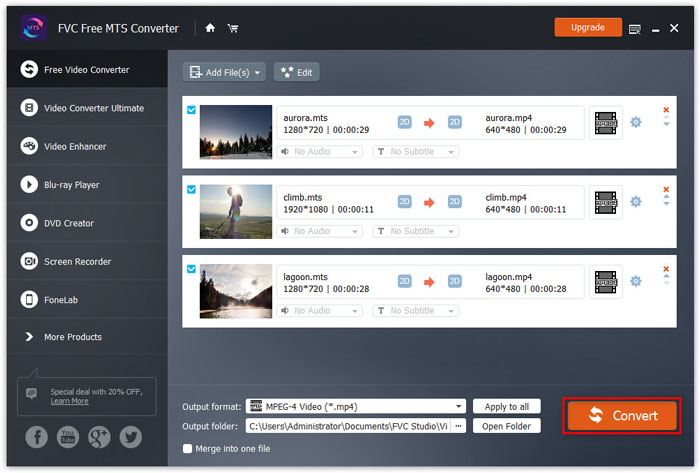
در نهایت، به بخش Output folder بروید و مقصدی را که فایل FLV تبدیلشده در آن ذخیره میشود انتخاب کنید. سپس میتوانید روی دکمه Convert کلیک کنید تا تبدیل فایل MTS به FLV را به صورت رایگان آغاز کنید.
پس از آن ، می توانید فایل FLV تبدیل شده را در YouTube ، Vimeo ، Facebook ، Google video یا سایر سیستم عامل های رسانه بارگذاری کنید.
قسمت 2. نحوه تغییر MTS به FLV رایگان آنلاین
اگر میخواهید بدون دانلود هیچ نرمافزاری از یک ابزار آنلاین استفاده کنید، میتوانید به FVC Free Online Video Converter مراجعه کنید. این یک مبدل آنلاین رایگان و کاربرپسند MTS به FLV است که کمک میکند هر فرمت محبوب ویدئو/صوت مانند MTS به FLV، MP4، WMV، AVI، MOV، MP3 و غیره را به طور کاملاً رایگان در ویندوز و مک تبدیل کنید. میتوانید مراحل دقیق تبدیل MTS به FLV با این ابزار آنلاین رایگان را بررسی کنید.
مرحله 1. به وبسایت رسمی FVC Free Online Video Converter (https://www.free-videoconverter.net/free-online-video-converter/) مراجعه کنید. روی دکمه Add Files to Convert کلیک کنید تا لانچر را دانلود و نصب کنید.

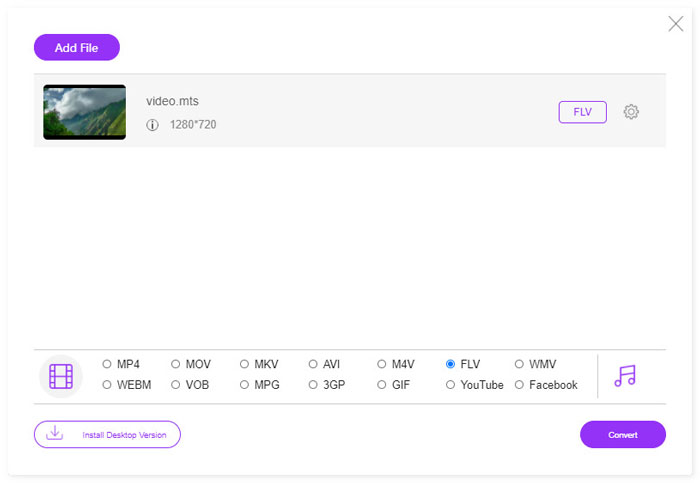
مرحله 2. فایلهای MTS موردنظر برای تبدیل را از روی کامپیوتر خود انتخاب کنید.
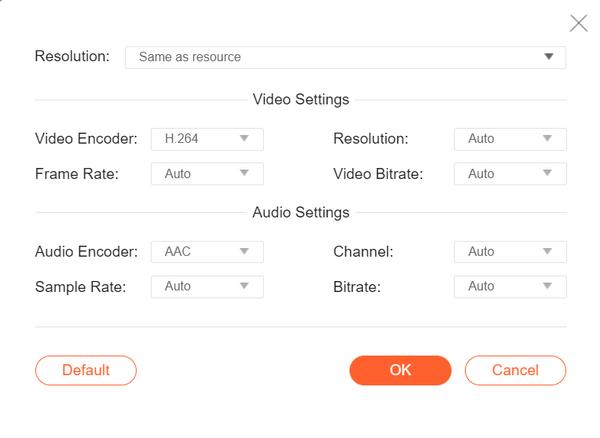
مرحله 3. در پایین، FLV را بهعنوان فرمت خروجی تنظیم کنید. اگر میخواهید تنظیمات بیشتری را تغییر دهید، میتوانید روی آیکون چرخدنده کلیک کنید تا کُدک ویدیو، وضوح تصویر، نرخ فریم، بیتریت و سایر تنظیمات صوتی مانند کُدک صدا، کانال، نرخ نمونهبرداری و بیتریت را تنظیم کنید.
مرحله 4. روی دکمه Covert کلیک کنید تا تبدیل فایل MTS خود به FLV را آغاز کنید.
قسمت 3. صادرات رایگان فیلم فلش از پرونده MTS با VLC
VLC Media Player فقط یک پخشکننده ساده ویدئو/صوت نیست، بلکه یک مبدل ویدیو با امکانات مفید فراوان نیز هست. این برنامه بهعنوان یک مبدل مناسب MTS به FLV عمل میکند که مجموعه گستردهای از فایلهای پشتیبانیشده را برای تبدیل مدیریت میکند. این نرمافزار کاملاً رایگان و بدون هیچ محدودیتی است. با VLC میتوانید ویدیوهای فلش را از فایل MTS در ویندوز یا مک به صورت رایگان خروجی بگیرید. برای تبدیل فایل MTS به FLV، باید VLC را روی کامپیوتر خود دانلود و نصب کنید.
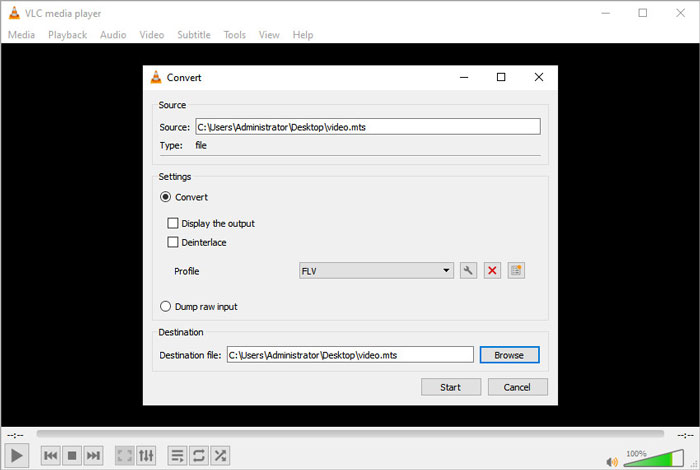
مرحله 1. VLC Media Player را اجرا کنید، به منوی Media بروید و روی دکمه Convert / Save کلیک کنید.
مرحله 2. روی دکمه Add کلیک کنید تا فایل MTS را اضافه کنید، سپس روی دکمه Convert / Save کلیک کنید تا ادامه دهید.
مرحله 3. در بخش Settings گزینه Convert را علامت بزنید و روی فلش کشویی کلیک کنید تا FLV را بهعنوان قالب خروجی انتخاب کنید. اگر گزینه خروجی FLV وجود نداشت، میتوانید روی آیکون ایجاد پروفایل جدید کلیک کرده و یک پروفایل جدید FLV بسازید.
مرحله 4. سپس به بخش Destination بروید و روی دکمه Browse کلیک کنید تا پوشه خروجی را تنظیم کنید.
مرحله 5. مطمئن شوید همه تنظیمات را انجام دادهاید، سپس روی دکمه Start کلیک کنید تا فرایند تبدیل MTS به FLV در VLC آغاز شود.
قسمت 4. سQالات متداول در تبدیل MTS به FLV
فرمت ویدئویی MTS چیست؟
فایل MTS یک ویدئو است که در قالب Advanced Video Coding Definition (AVCHD) ذخیره شده است. فایل MTS فرمت ویدیوی استانداردی است که توسط بسیاری از دوربینهای فیلمبرداری HD سونی و پاناسونیک استفاده میشود. همچنین برای ذخیرهسازی ویدئوی باکیفیت روی دیسکهای بلوری نیز به کار میرود.
چگونه می توانم فایل های MTS را به MP4 تبدیل کنم؟
با FVC Free MTS Converter میتوانید فایل MTS را به MP4 تبدیل کنید. روی دکمه Add File(s) کلیک کنید تا فایلهای MTS را وارد کنید. سپس به بخش Output format رفته و MP4 را بهعنوان فرمت خروجی انتخاب کنید. بعد از آن، روی دکمه Convert کلیک کنید تا تبدیل MTS به MP4 را به صورت رایگان آغاز کنید.
آیا ویندوز 10 می تواند پرونده های MTS را پخش کند؟
آره. برای پخش پرونده های MTS خود می توانید از Windows Media Player استفاده کنید. اگر پرونده MTS برای پخش ناموفق بود ، می توانید سایر پخش کننده های MTS مانند VLC Media Player ، 5K Player ، FVC Free Video Player و موارد دیگر را امتحان کنید.
نتیجه
در این مقاله ، ما به طور عمده در مورد 3 روش تبدیل فایل های MTS به FLV به صورت رایگان صحبت کردیم. می توانید برای تبدیل فایل های ویدیویی فلش برای بارگذاری ، تمام مبدل های MTS به FLV فوق را امتحان کنید. این مبدل رایگان MTS می تواند به راحتی فایل های MTS شما را با سرعت سریع به FLV ، MP4 ، WMV ، VOB ، MP3 و موارد دیگر تغییر دهد.
-
 10 بازیکن برتر FLV برای ویندوز ، مک ، iOS و Android در سال 2021
 پخش کننده FLV به شما کمک می کند تا به راحتی به پرونده های FLV خود در دستگاه ویندوز ، Mac ، Android ، iOS دسترسی پیدا کنید. بهترین پخش کننده های فایل FLV را که هم اکنون می توانید بارگیری کنید ، بررسی کنید.
-
 بهترین راه برای تبدیل VOB به FLV
 آیا می خواهید یک فایل VOB را به یک فایل FLV تبدیل کنید؟ به راحتی می توانید کار را با مبدل های دسک تاپ یا آنلاین انجام دهید. این راهنما را بخوانید و یاد بگیرید که چگونه VOB را به راحتی و به سرعت به FLV تبدیل کنید.
-
 MTS VS M2TS - تفاوت بین MTS و M2TS
 پرونده MTS یا M2TS چیست؟ تفاوت M2TS با MTS چیست؟ چگونه می توانم فایل فیلمبرداری ضبط شده MTS یا M2TS را تماشا کنم؟ تمام پاسخ ها را در این پست پیدا کنید.
