


 Video Converter Ultimate
 ضبط صفحه
 تعمیر ویدیو
چگونه می توان فایل های ویدئویی MPEG را در یک - 2 روش نهایی که باید بدانید ترکیب کنید
How to join MPEG files? You just downloaded an old TV series in the MPEG format, such as 8 short episodes and each of them has a redundant opening and ending. How to merge these MPEG files into one like a movie? Whether you simply need to combine the videos into one, or merge the MPEG files with advanced features, here are 2 efficient methods you should never miss.

قسمت 1: چگونه فایل های MPEG را به صورت آنلاین ترکیب کنیم
FVC Free Online Video Merger is a free online MPEG combiner that enables you to merge MPEG, MP4, AVI, and more video files without size limitations. It allows you to combine multiple MPEG files to impressive videos with no watermark added. Moreover, the uploaded files will be deleted within 24 hours to protect your privacy.
Step 1: Go to the FVC Free Online Video Merger with any web browser. Click the Upload Videos to Merge button in the middle webpage to get the installer. After that, you can click the button again to upload the MPEG files you want to combine into the online program.

Step 2: When you get into the Merging videos interface, you can arrange the sequence of the MPEG videos you want to merge. It enables you to manage the position of the video, delete the file, or add more MPEG files by clicking the insert new button in the proper place.
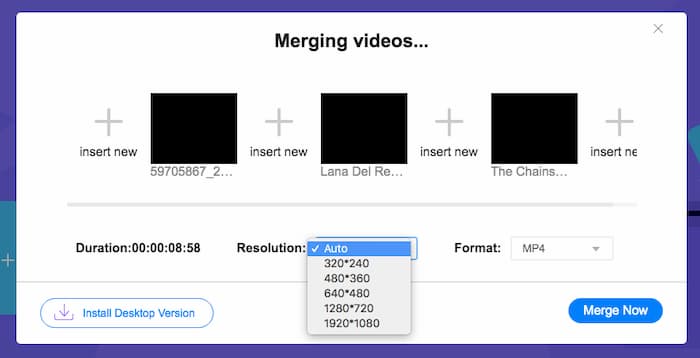
Step 3: After that, you can decide the resolution and format of the output video. You can combine the MPEG files into an MP4 file before clicking the Merge now button to start the process. It enables you to get the desired video within a short period.

استفاده از ترکیب کننده ویدیوی آنلاین آسان است. با این حال ، اگر می خواهید قسمتهای باز و پایان قسمتهای زائد را برش دهید ، نمی تواند بیشتر به شما کمک کند. شما باید از ادغام قدرتمندتر MPEG استفاده کنید.
Further Reading:
قسمت 2: روش همه کاره برای ادغام فیلم های MPEG
Aiseesoft Video Converter Ultimate is a professional MPEG joiner that enables you to combine the desired parts of MPEG files into one movie. It enables you to trim the desired part of the MPEG files, adjust the video quality, customize the watermark, or even make a movie with different themes.
- 1. فایل های MPEG را در MPEG ، MP4 و بیش از 300 فرمت ویدیویی ترکیب کنید.
- 2. وضوح تصویر را تغییر دهید یا حتی کیفیت فیلم را برای ادغام فایل افزایش دهید.
- 3. قسمتهای مورد نظر فایلهای MPEG را برش داده و در یک فیلم ترکیب کنید.
- 4. افکت ها و فیلترها را اضافه کنید و علامت های آبی را به فیلم های MPEG اختصاص دهید.
دانلود رایگانبرای ویندوز 7 یا بالاتردانلود امن
دانلود رایگانبرای MacOS 10.7 یا بالاتردانلود امن
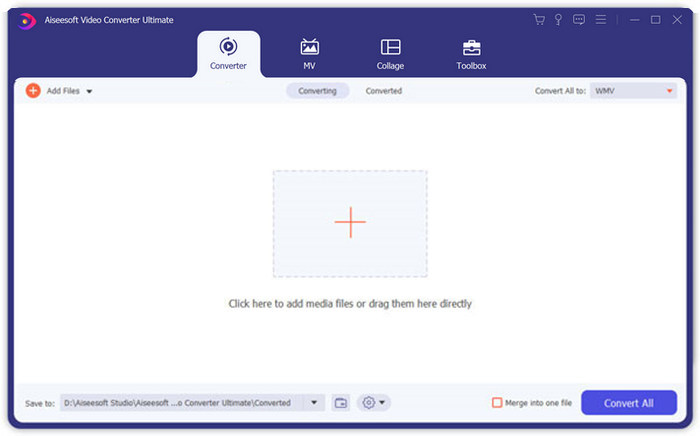
Step 1: Launch the Aiseesoft Video Converter Ultimate on your computer. Go to the Converter menu and click the big “+” button in the middle of the main interface to add the MPEG files you want to merge. Click the Add Files button to import all the files you want to combine.
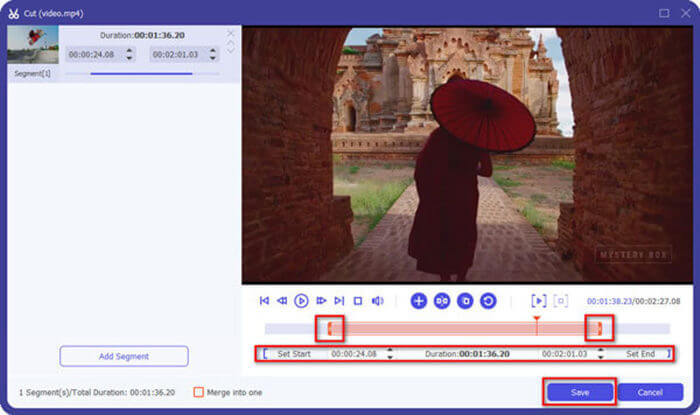
Step 2: For the MPEG clips that need to be trimmed, click the Cut button next to the video. You can set up the start and end points to delete the openings and endings of your MPEG videos. After that, you can click the Save button at the bottom to save the file.
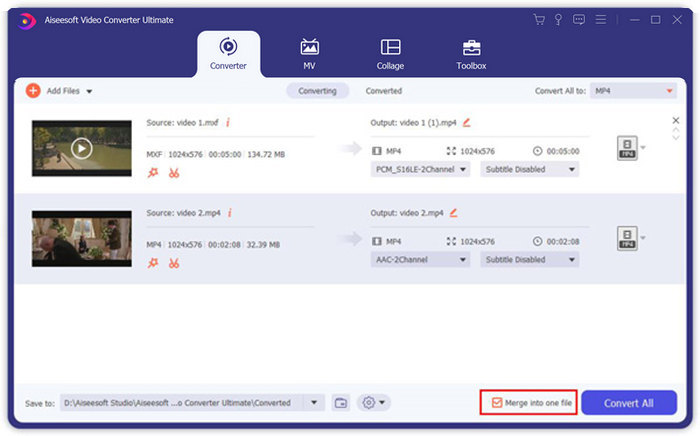
Step 3: After that, you can drag the trimmed video into the program. Adjust the sequence of the MPEG videos. When everything is ready, you need to check the Merge into one file box beside the Convert All. Click the Convert All button to start merging the MPEG files.
قسمت 3: س FAالات متداول درباره پیوستن به پرونده های MPEG
چگونه فایل های MPEG را با بهترین کیفیت ادغام کنیم؟
وقتی می خواهید فایل های MPEG را با کیفیت مشابه ادغام کنید ، می توانید پارامترها را به عنوان فیلم اصلی انتخاب کنید. اما اگر فایل های MPEG از نظر کیفیت فیلم متفاوت هستند ، باید برخی از پرونده های MPEG را با کیفیت پایین از قبل با ترکیب کننده ویدیوی حرفه ای ارتقا دهید.
آیا می توانم فایل های MPEG را با تلفن iPhone یا Android ترکیب کنم؟
آره. قبل از بارگیری برنامه های ترکیب کننده ویدیو برای پیوستن به پرونده های MPEG ، باید مطمئن شوید که برنامه با MPEG یا سایر فیلم هایی که می خواهید ترکیب کنید سازگار است. کلیپ Adobe Premiere ، Viva Video و Splice Video موارد پیشنهادی هستند که می توانید در نظر بگیرید.
فرمت فایل MPEG چیست؟
MPEG یک فرمت فایل ویدیویی است که از فشرده سازی فایل MPEG-1 یا MPEG-2 استفاده می کند. این یک قالب محبوب برای فیلم های توزیع شده در اینترنت است که جریان و بارگیری را بسیار سریعتر از سایر قالب های ویدیویی محبوب انجام می دهد.
نتیجه
در این مقاله ، 2 روش کارآمد برای ادغام فایل های ویدئویی MPEG ، به ویژه هنگامی که نیاز به اصلاح قطعات اضافی دارید ، معرفی می شود. FVC Free Video Merger یک روش آسان برای ادغام فایل های MPEG به صورت آنلاین است ، اما شما نمی توانید کلیپ های ویدئویی را ویرایش کنید. بنابراین ، اگر می خواهید فیلم های MPEG را اصلاح و ویرایش کنید ، Aiseesoft Video Converter Ultimate باید بهترین راه حل باشد.
-
 بهترین 6 عضو ویدئو MP4 برتر برای ترکیب فیلم های MP4 به صورت رایگان
 بسیاری از وصال های MP4 برای اتصال کلیپ های مختلف MP4 در دسترس هستند. در این مقاله ، ما برخی از وصال کنندگان MP4 رایگان را برای Windows 10/8/7 و Mac انتخاب کرده ایم.
-
 چگونه می توان فایل های M4V را ادغام کرد؟ در اینجا 2 راه حل سریع وجود دارد
 اگر به دنبال راه حلی برای ترکیب فایلهای ویدئویی M4V در یک مورد هستید ، هرگز این قسمت را از دست ندهید. در اینجا ما در مورد دو بهترین روش برای ترکیب فایل های ویدئویی M4V صحبت خواهیم کرد.
-
 چگونه فیلم های 3GP را از تلفن همراه در یک فایل ادغام کنیم
 وقتی می خواهید چند فیلم 3GP از BlackBerry خود را در یک ویدیو ترکیب کنید ، می توانید در مورد 2 روش کارآمد برای ادغام فایل های 3GP از مقاله بیشتر بدانید.
