


 Video Converter Ultimate
 ضبط صفحه
 تعمیر ویدیو
بهترین تبدیل MPG به GIF برای تبدیل MPG به GIF [نسخه بدون هزینه و پرمیوم]
بهترین راه برای بیان احساسات خود به عزیزانتان ایجاد یک پیام معنادار است. اما آیا می خواهید بدانید چه چیزی بهتر است به روشی متفاوت بیان شود؟ می توانید از GIF استفاده کنید. همچنین به عنوان فرمت تبادل گرافیکی شناخته می شود، این تصاویری هستند که شما ارسال می کنید اما ارتقا یافته اند. این تصاویر متحرک برای بیان احساسات شما نسبت به شخصی به طور مستقیم یا غیرمستقیم ایجاد شده اند. آیا می دانستید که اکثر برنامه های پیام رسان از GIF و همچنین پیام رسان داخلی ما پشتیبانی می کنند؟ اما در برخی از نسخه های قدیمی گوشی، این فرمت را ارائه نمی دهد. اگرچه GIF سرگرم کننده است، اما همیشه احساسی را که می خواهید ابراز کنید به شما ارائه نمی دهد.
پس شما اینجا هستید تا بدانید بهترین راه برای تغییر فرمت MPG به GIF چیست. اینکه گیف مخصوص خودتان را بسازید هیجانانگیز نیست؟ بهجای اینکه مدام بگردید ببینید باید از چه چیزی استفاده کنید، چرا خودتان گیف نسازید و به آن حالوهوای شخصیتان را اضافه نکنید؟ بهترین راه برای فهمیدن اینکه چطور این کار را انجام دهید، خواندن این مقاله است؛ چون اطلاعات کافی، مراحل و ابزار لازم برای این کار را در اختیارتان میگذارد. پس بدون مقدمهچینی بیش از حد، برویم سراغ نکات مهم این مقاله. برای آشنایی بیشتر با این فهرست مبدّلها، به خواندن ادامه دهید.

قسمت 1. 4 بهترین ابزار برای تبدیل MPG به فرمت GIF PC یا Mac
1. FVC Video Converter Ultimate
اگر میخواهید پیام طنزتان را بدون تایپ کردن جزئیات زیاد به اشتراک بگذارید، این ابزار به شما کمک میکند. این ابزار امکان تبدیل MPG به GIF متحرک را به شما میدهد و توسط FVC توسعه داده شده است. FVC Video Converter Ultimate به کاربر اجازه میدهد هر نوع فرمتی را به یک فرمت قابل پخشِ دلخواه تبدیل کند. شاید از خودتان بپرسید چرا باید این ابزار را انتخاب کنید. آیا چیز خاصی در آن وجود دارد؟ بله، این ابزار چندمنظوره است. میتواند قابلاعتمادترین ریپر شما، سازنده MV، کلاژساز و خیلی چیزهای دیگر باشد. یعنی این ابزار میتواند کارهایی انجام دهد که فراتر از امکانات بسیاری از ابزارهای دیگر است. ویژگی شگفتانگیز دیگر آن تبدیل فوقسریع است؛ با کمک این ابزار، ویدیوهایتان را در زمان بسیار کوتاهی تبدیل میکنید. برای اینکه یاد بگیرید چطور از این ابزار استفاده کنید، این مراحل را با دقت دنبال کنید تا تبدیل فایلها با کیفیت مورد نظرتان با موفقیت انجام شود.
گام 1. ابزار را روی رایانه ویندوز یا مک خود نصب کنید. پس از نصب، دستورالعملها را دنبال کرده و روی Finish کلیک کنید تا برنامه اجرا شود.
دانلود رایگانبرای ویندوز 7 یا بالاتردانلود امن
دانلود رایگانبرای MacOS 10.7 یا بالاتردانلود امن
گام 2. پس از پایان فرایند نصب، یک رابط کوچک مانند این روی صفحهنمایش شما ظاهر میشود.
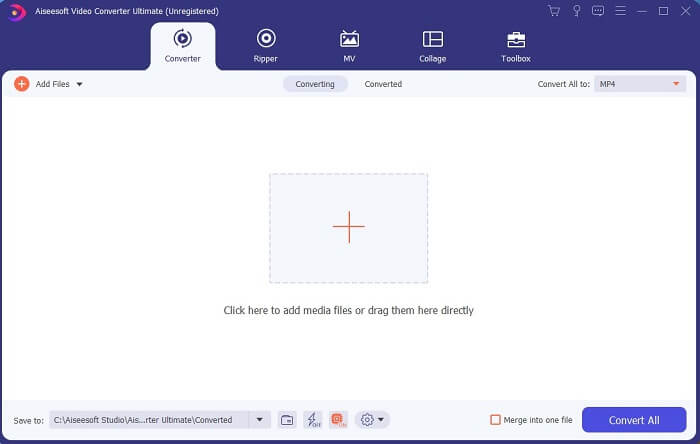
گام 3. روی علامت بهعلاوه کلیک کنید تا فایل را اضافه کنید و سپس روی Open کلیک کنید تا فرایند تبدیل شروع شود، یا میتوانید ویدیو را بهسادگی به داخل برنامه بکشید و رها کنید. حجم یا تعداد ویدیوها اصلاً مهم نیست.
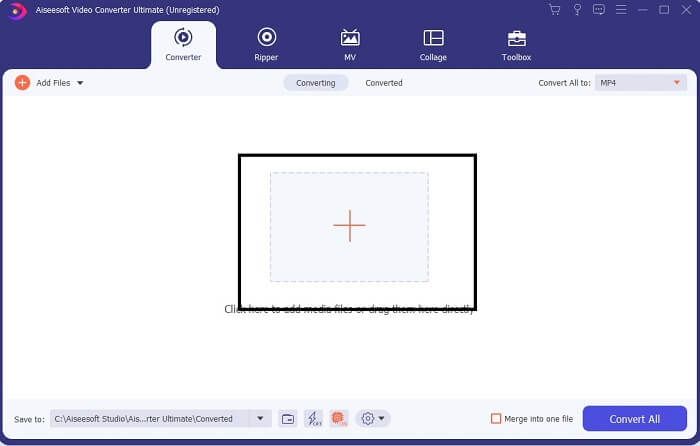
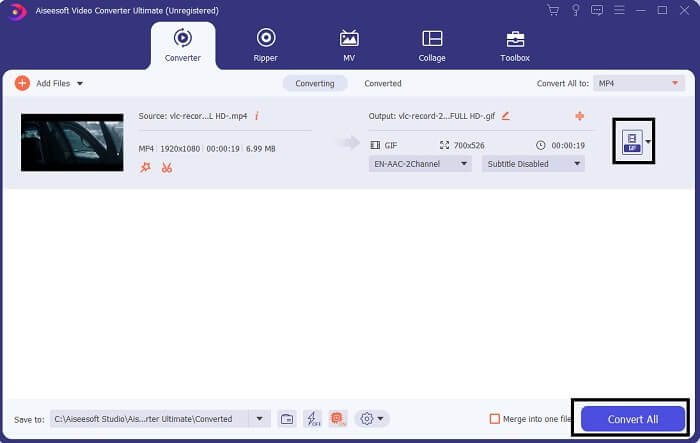
گام 4. روی دکمه کشویی در سمت بالای راست رابط کلیک کنید، به پایین اسکرول کنید و فرمت GIF را انتخاب کنید. رزولوشن دلخواهتان را انتخاب کنید؛ میتواند بزرگ، متوسط یا کوچک باشد. اگر همهچیز آماده است، روی Convert All کلیک کنید تا تبدیل شروع شود.
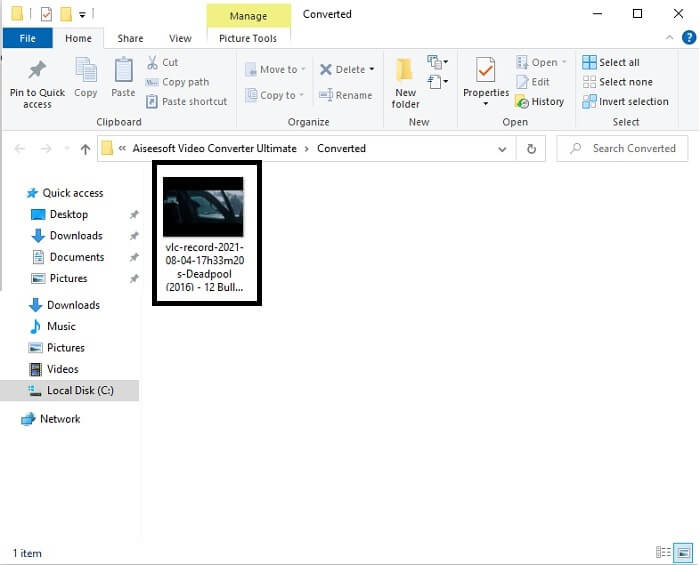
گام 5. پس از پایان تبدیل، پنجره مدیریت فایل برایتان باز میشود و خروجی نهایی را نشان میدهد و حالا میتوانید از فایل GIF خود لذت ببرید. اما همچنین میتوانید در همین مراحل، یک فایل .gif را به .mpg تبدیل کنید؛ فقط لازم است فرمت خروجی را عوض کنید.
2. مبدل ویدیوی آنلاین رایگان FVC
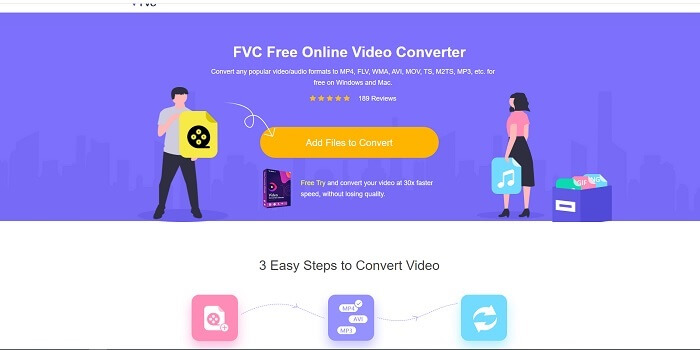
شاید به این فکر می کنید که اگر پول نداشته باشید، می توانم همچنان همان تبدیل اول را تجربه کنم؟ پاسخ یک بله بزرگ است. FVC همیشه بهترین تجربه را برای مشتریانی که پول ندارند و همچنین کسانی که می خواهند ابزار خود را امتحان کنند، ارائه می دهد. اگرچه، این ابزار فقط تبدیل ساده را انجام می دهد، بنابراین انتظار زیادی نداشته باشید که نسخه پریمیوم می تواند ارائه دهد. و نمی تواند چندین فرمت ویدیویی و صوتی را به روشی سریعتر تبدیل کند.
اما فرایند تبدیلی که این ابزار ارائه میدهد بسیار بهتر از بسیاری از مبدّلهای پولی و رایگان دیگر است. FVC Free Online Video Converter اینجاست تا روزتان را نجات بدهد. همانطور که از نامش پیداست، یک ابزار آنلاین رایگان است که به شما اجازه میدهد با حداکثر توان، تبدیل انجام دهید. برخلاف بسیاری از مبدّلهای دیگر، این ابزار هیچ تبلیغ، بدافزار، نیاز به ثبتنام، ورود یا ارائه اطلاعات شخصی پیش از استفاده ندارد. اگر بهدنبال یک مبدّل ساده هستید، این ابزار برای شما مناسب است. برای اینکه بدانید این ابزار بهعنوان یک مبدّل چطور کار میکند، این مراحل را دنبال کنید.
گام 1. با کلیک روی این لینک به وبسایت رسمی بروید.
گام 2. صفحه وب باید شبیه این باشد. سپس روی Add Files to Convert کلیک کنید تا این ابزار آنلاین اجرا شود.
برای تبدیل دستهای فایلها، نسخهٔ دسکتاپ را دانلود کنید.
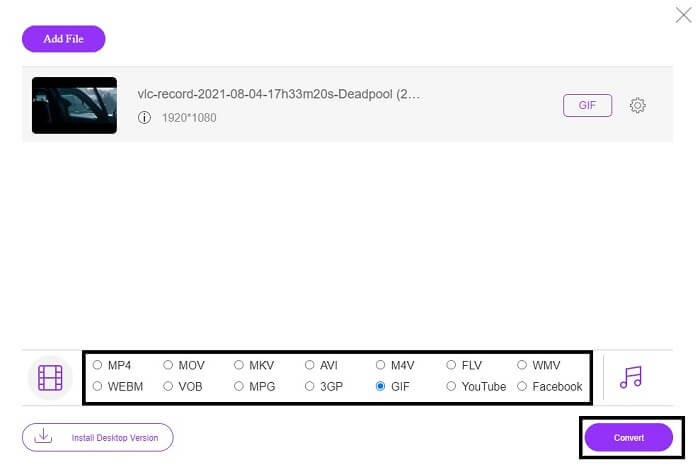
گام 3. ویدیویی را که میخواهید تبدیل کنید، انتخاب کنید. بعد از انتخاب ویدیو، فرمت فایل GIF را برگزینید. برای اطلاعات بیشتر، میتوانید فرمتهای ویدیویی و صوتی دیگر را هم انتخاب کنید؛ اگر خواستید بعداً آنها را بررسی کنید.
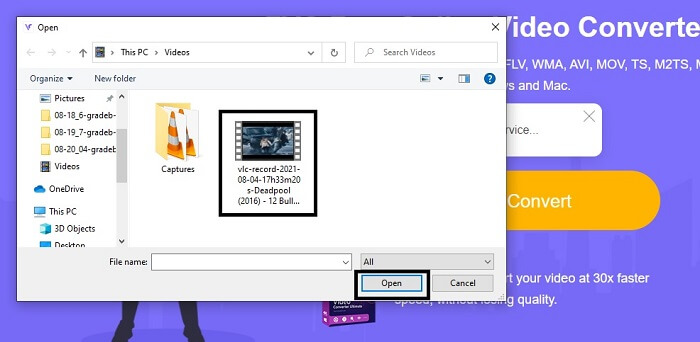
گام 4. انتخاب کنید میخواهید خروجی نهایی کجا ذخیره شود. سپس اگر همهچیز آماده است، روی Convert کلیک کنید تا تبدیل آغاز شود. تکمیل فرایند فقط چند ثانیه طول میکشد.
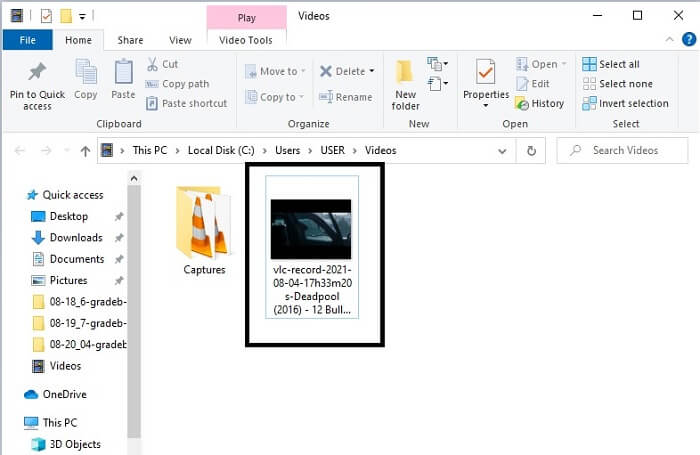
گام 5. برای بررسی موفقیتآمیز بودن تبدیل، میتوانید فایل GIF تبدیلشده را در فایل منیجر یا اکسپلورر خود پیدا کنید. روی آن کلیک کنید و لذت ببرید.
3. VLC Media Player
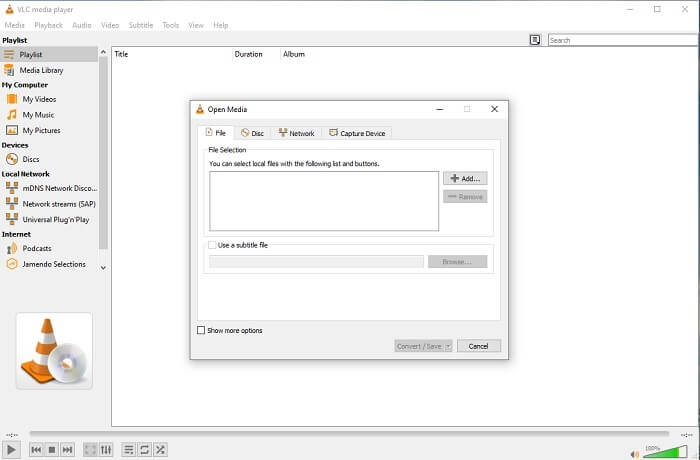
این ابزار بهعنوان یکی از قدرتمندترین پخشکنندههای رسانهای شناخته میشود. اما آیا میدانستید که پلیر VLC هم میتواند MPG را به GIF تبدیل کند؟ البته فرمتهایی که ارائه میدهد بسیار محدود و فقط شامل فرمتهای شناختهشده است. با وجود اینکه VLC بهعنوان یکی از بهترین پخشکنندههای ویدیو شناخته میشود، قابلیت تبدیل آن بهترین گزینه برای شما نیست. پس اگر یک مبدّل بهتر میخواهید، باید بهجای این ابزار، ابزار آنلاین بالا را انتخاب کنید. اما اگر میخواهید ویدیو تماشا کنید، VLC Media Player باید انتخاب شما باشد، چون آن ابزار دیگر، پخشکننده ویدیو در اختیار شما نمیگذارد؛ چون هدف اصلیاش فقط تبدیل است.
4. زمزار
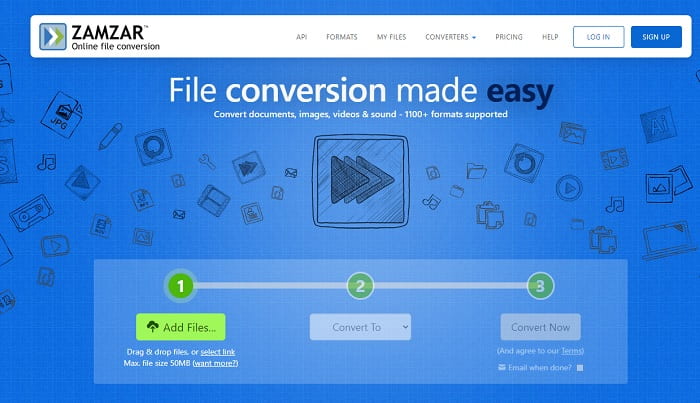
یکی دیگر از ابزارهای آنلاین که تبدیل عالی را فراهم می کند، زمزار است. مانند هر مبدل آنلاین دیگری، آنها رابط یکسانی را به اشتراک میگذارند و همچنین دستورالعملهایی را در مورد نحوه تبدیل آن ارائه میدهد. اما روند تبدیل و دانلود متفاوت است. اگرچه نسخه رایگان است، شما فقط می توانید حداکثر 50 مگابایت حجم فایل را تبدیل کنید. چون بعد از تبدیل ویدیو باید به مرحله دانلود آن بروید. برای کسانی که تبدیل خود را ترک می کنند و فقط منتظر پخش شدن محصول هستند، دردسر زیادی دارد.
بخش 2. نمودار مقایسه
| ویژگی/ابزارها | FVC Video Converter Ultimate | مبدل آنلاین رایگان FVC | پخش کننده رسانه VLC | زامزار |
| مبدل |  | | | |
| ابزار ویرایش | |  | | |
| مبدل قدرتمند | | | | |
| ثبت نام مورد نیاز است | | | | |
| بستر، زمینه | برنامه مبتنی بر دسکتاپ | برنامه مبتنی بر وب | برنامه مبتنی بر دسکتاپ | برنامه مبتنی بر وب |
| حدود قیمت | $25.00 1 ماه / 1 کامپیوتر $55.20 خرید یک بار برای 1 کامپیوتر $119.00 Lifetime 5 PC | این یک ابزار آنلاین رایگان است | این یک ابزار آنلاین رایگان است | ابزار آنلاین رایگان اما حق بیمه ماهانه را نیز فراهم می کند. برای پایه: $9 برای حرفه ای: $16 برای تجارت: $25 |
MPG در مقابل GIF
MPG که توسط گروه متخصصان تصویر متحرک (MPEG) ساخته شده است، یک فرمت ویدیوی دیجیتال رایج برای ذخیره اطلاعات ویدئو، صدا و ابرداده است. هنگام ایجاد فیلم برای اشتراک گذاری در اینترنت بسیار مفید است. آن فایلهای MPG معمولاً حاوی فشردهسازی ویدیویی/صوتی MPEG-1 یا MPEG-2 هستند.
GIF یک فرمت تصویر رایج برای گرافیک های وب است. علاوه بر ذخیره تصاویر کوچک و تصاویر حاوی متن، GIF همچنین میتواند انیمیشنهای اصلی را در وبسایتها نمایش دهد. این یک فرمت بدون تلفات است و فشرده سازی GIF وضوح تصویر را کاهش نمی دهد.
بخش 3. سوالات متداول درباره MPG به GIF
آیا راهی برای استفاده از فتوشاپ و تبدیل ویدیو به GIF وجود دارد؟
بله، میتوانید در فوتوشاپ MPG را به GIF تبدیل کنید. و نه فقط فایل MPG؛ میتوانید فرمتهای دیگر را هم انتخاب کنید و آنها را به GIF تبدیل کنید. ویژگی خاص دیگر آن این است که میتوانید GIF را نیز بهتر و حرفهایتر کنید. برای آموختن نحوه تبدیل MP4 به GIF اینجا کلیک کنید.
بهترین ابزار ضبط صفحه برای ضبط GIF چیست؟
بهترین ابزار ضبط صفحهنمایشی که میتوانید برای این کار استفاده کنید، FVC Screen Recorder است. این ابزار فقط برای ضبط ویدیو عالی نیست؛ بلکه یک ضبطکننده صدای داخلی و ضبطکننده گیمپلی هم دارد تا تجربه بازی باکیفیتتری داشته باشید. بااینحال، استفاده از این ابزار به پرداخت هزینه نیاز دارد. نگران نباشید، چون یک ابزار آنلاین هم دارد که میتواند عملیات ضبط را انجام دهد.
چرا GIF ایجاد شد؟
فرمت GIF برای نمایش تصویر در عین صرفهجویی در فضای ذخیرهسازی ایجاد شد. خالق GIF استیو ویلهیت، دانشمند علوم کامپیوتر آمریکایی است که با کمک غول فناوری CompuServe در اواخر سال 1987 آن را توسعه داد. برای کسب اطلاعات بیشتر درباره گیفها اینجا کلیک کنید.
نتیجه
در نهایت، اکنون که می دانید چگونه یک GIF برای خودتان بسازید، بهتر است آن را امتحان کنید و لذت ببرید. فقط با استفاده از این ابزار آسان، می توانید تفاوت ایجاد کنید. به جای جستجو در وب، اکنون یک سازنده GIF تایید شده هستید. همچنین، اکنون می توانید احساسات خود را به روش شخصی و با تخصص شخصی خود که فقط با خواندن این مقاله ایجاد شده است، بیان کنید. امیدواریم که بتوانید از زندگی GIF بهتری که ایجاد می کنید لذت ببرید و بهترین GIF خود را در جهان به اشتراک بگذارید.
-
 [راهنما] نحوه تبدیل ویدیوهای M4V به GIF متحرک در Windows/Mac
 اگر می خواهید از ویدیوهای M4V مورد علاقه خود فایل های GIF متحرک بسازید ، می توانید با 2 روش آسان و کارآمد برای تبدیل فیلم M4V به GIF با تنظیمات سفارشی آشنا شوید.
-
 WebM به GIF - 3 مبدل WebM به GIF رایگان برای ایجاد GIF های شخصی خود
 آیا WebM یک GIF است؟ چگونه یک ویدیو را به GIF تبدیل کنیم؟ آیا مبدل WebM به GIF رایگان وجود دارد؟ این پست 3 راه رایگان را برای کمک به شما در تبدیل WebM به GIF به اشتراک می گذارد.
-
 نحوه تبدیل فیلم های MKV به GIF های متحرک بدون Photoshop/FFmpeg
 پس از بارگیری و تماشای فیلم های MKV در رایانه خود ، ممکن است بخواهید لحظات فوق العاده ای را با دوستان یا در اینترنت به عنوان GIF به اشتراک بگذارید. در این مقاله می توانید با 2 روش ساده تبدیل MKV به GIF آشنا شوید.

