


 Video Converter Ultimate
 ضبط صفحه
 تعمیر ویدیو
نحوه تبدیل M2TS به WMV در ویندوز / مک / آنلاین (استفاده کاملاً رایگان)
بعضی از دوربین های کانن و سونی از M2TS به عنوان قالب خروجی پیش فرض استفاده می کنند. فیلم های M2TS در اندازه فایل ها بزرگ هستند. سازگاری قالب M2TS نیز خوب نیست. اگر می خواهید فایل های M2TS را برای ویرایش بیشتر به Windows Movie Maker وارد کنید ، ابتدا باید M2TS را به فیلم WMV تبدیل کنید.
این مقاله به شما روشهای آنلاین و آفلاین را برای تبدیل ویدیو از فرمت M2TS به فرمت WMV مرحلهبهمرحله نشان میدهد. بنابراین میتوانید بهراحتی فرمت ویدیوی M2TS را روی گوشی یا کامپیوتر خود به WMV تغییر دهید.

قسمت 1: نحوه تبدیل M2TS به WMV در ویندوز و مک
اگر فقط می خواهید فرمت ویدئو را تغییر دهید ، یک مبدل ویدیویی M2TS به WMV رایگان کافی است. شما نیازی به پرداخت هزینه های اضافی مورد نیاز خود ندارید. در اینجا 2 نرم افزار مبدل M2TS به WMV وجود دارد که می توانید انتخاب کنید.
تبدیل M2TS به WMV در ویندوز به صورت رایگان
برای تبدیل فایلهای M2TS به WMV روی کامپیوتر ویندوزی، میتوانید از FVC Free M2TS Converter استفاده کنید. این یک مبدل دستهای M2TS است که میتواند فایلهای M2TS را بهصورت گروهی به WMV، MOV، MP4 و سایر فرمتهای ویدیویی و صوتی تبدیل کند. ابزارهای ویرایش ویدئوی داخلی آن نیز بهصورت رایگان قابل استفاده هستند. میتوانید پیش از تبدیل، فایلهای ویدیوی M2TS را ویرایش و سفارشیسازی کنید. در ادامه، ویژگیهای اصلی نرمافزار رایگان مبدل M2TS به WMV آورده شده است.

مبدل M2TS رایگان
112،356+ بارگیری- M2TS را به صورت WMV در ویندوز 10/8/7 / Vista / XP تبدیل کنید.
- از تبدیل دسته ای M2TS به WMV پشتیبانی کنید.
- 50 برابر سرعت تبدیل سریع تر.
- سایر جلوه های ویدئویی را روی پرونده های M2TS فشرده ، ادغام و اعمال کنید.
- مضامین خاص را به پرونده های M2TS خود مانند خانواده ، تولد ، تعطیلات و غیره اضافه کنید.
دانلود رایگانبرای Windows 7 یا جدیدتردانلود امن
دانلود رایگانبرای MacOS 10.7 یا جدیدتردانلود امن
مرحله 1: FVC Free M2TS Converter را بهصورت رایگان دانلود، نصب و اجرا کنید. روی Add File(s) کلیک کنید تا بیش از یک فایل ویدیوی M2TS را وارد کنید.

مرحله 2: در فهرست output format مرور کرده و WMV را بهعنوان فرمت خروجی ویدیو تنظیم کنید.

مرحله 3: اگر میخواهید یک ویدیوی M2TS را ویرایش کنید، کافی است در بالا روی Edit کلیک کنید. سپس میتوانید عنوان، نویسنده و زمان را در بخش آغاز و پایان در FVC Free M2TS Converter ویرایش کنید.

مرحله 4: روی Convert کلیک کنید تا بهصورت رایگان در ویندوز، M2TS را به WMV تبدیل کنید.
تبدیل M2TS به WMV در مک به صورت رایگان
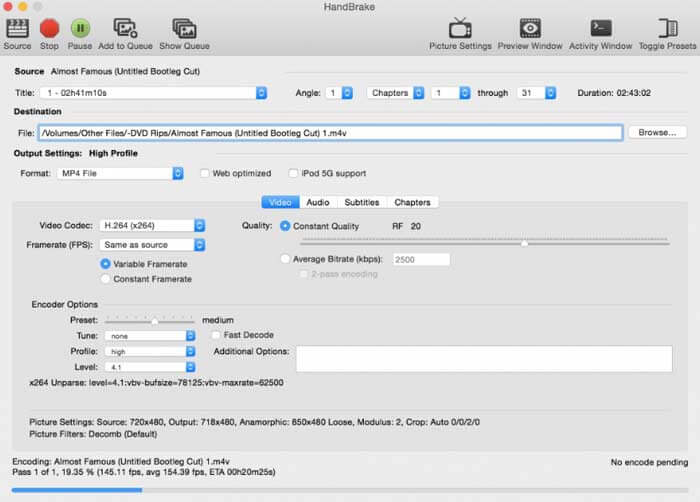
برای کاربران Mac می توانید از HandBrake به عنوان مبدل رایگان M2TS به WMV استفاده کنید. در اینجا مراحل دقیق تبدیل M2TS به WMV به صورت رایگان در Mac با استفاده از ترمز دستی ارائه شده است.
مرحله 1: HandBrake را اجرا کنید. در پنجره پاپآپ Source، فایل M2TS خود را انتخاب کرده و سپس روی Open کلیک کنید.
مرحله 2: فهرست Format را باز کنید. فرمت ویدیو را WMV انتخاب کنید.
مرحله 3: برای تغییر پوشه مقصد روی Browse کلیک کنید.
مرحله 4: روی Start کلیک کنید تا تبدیل ویدیوی M2TS به WMV روی مک تکمیل شود.
قسمت 2: نحوه تبدیل M2TS به WMV آنلاین
اگر نمیخواهید چیزی روی کامپیوتر خود نصب کنید، میتوانید از یک مبدل ویدیوی آنلاین هم استفاده کنید. در این بخش، FVC Free Online Video Converter را بهعنوان مثال در نظر میگیریم.
مرحله 1: در مرورگر خود به آدرس FVC Free Online Video Converter بروید.

مرحله 2: اگر هنوز FVC launcher را دانلود نکردهاید، ابتدا روی Add Files to Convert کلیک کنید تا آن را دانلود کنید. سپس لانچر را نصب کرده و بهروزرسانی کنید.

مرحله 3: فایل M2TS را باز کرده و اضافه کنید. سپس پیش از شروع Convert، فرمت WMV را انتخاب کنید.

مرحله 4: پس از تأیید پوشه ذخیرهسازی، صبورانه منتظر بمانید تا فایل WMV شما آماده شود.
قسمت 3: س FAالات متداول در تبدیل M2TS به WMV
آیا اندروید می تواند فایل های M2TS را پخش کند؟
نه. می توانید از VLC Media Player به عنوان برنامه پخش کننده M2TS خود استفاده کنید. یا می توانید M2TS را به فرمت WMV برای پخش آسان در Android و iPhone تبدیل کنید.
آیا تفاوتی بین MTS و M2TS وجود دارد؟
در واقع پاسخ منفی است. هیچ تفاوت عملکردی میان MTS و M2TS وجود ندارد. هر دو فایلهای ویدیویی با وضوحبالا هستند که با AVCHD در ارتباطاند.
آیا M2TS از WMV بهتر است؟
M2TS مخصوص دوربین فیلمبرداری طراحی شده است. بنابراین پرونده های M2TS در وضوح بالا و اندازه پرونده بزرگ هستند. با تبدیل M2TS به WMV می توانید فیلم را کوچکتر کنید. در مقایسه با M2TS ، WMV یک قالب ویدیویی رایج است و به طور گسترده پشتیبانی می شود. اگر می خواهید M2TS را فشرده کنید و به یک قالب ویدیویی معروف تغییر دهید ، روش خوبی برای تبدیل M2TS به قالب WMV است.
همه چیز درباره تبدیل ویدیوها از M2TS به WMV همین بود. میتوانید بهصورت رایگان فرمت ویدیو را تغییر دهید و افکتهای ویدیویی پایه را در ویندوز، مک و بهصورت آنلاین اعمال کنید. استفاده از آن کاملاً رایگان و امن است؛ بدون هیچگونه ریسک پنهان یا خرید درونبرنامهای. بنابراین میتوانید با خیال راحت فایلهای M2TS را به فرمت WMV تبدیل کنید.
-
 نحوه تبدیل M2TS به MOV در ویندوز / مک
 آیا برای پخش فایل های ویدئویی در تعدادی از پخش کننده ها و سیستم عامل ها ، باید M2TS را به MOV تبدیل کنید؟ این مقاله به شما کمک می کند تا بهترین روش آنلاین / آفلاین را برای تبدیل M2TS به MOV در ویندوز / مک پیدا کنید.
-
 نحوه تبدیل فایل های M2TS به MP3 به صورت رایگان
 آیا یک فایل M2TS می تواند به MP3 تبدیل شود؟ در این پست ، ما 6 روش برتر آنلاین و رایگان را برای کمک به شما در تبدیل M2TS به فرمت های صوتی MP3 ، AAC ، AIFF و بیشتر فهرست کرده ایم.
-
 5 روش آسان برای تبدیل TS به AVI / MKV / MOV / WMV در ویندوز / مک
 آیا می خواهید پرونده های TS را به سرعت به AVI / MKV / MOV / WMV تبدیل کنید؟ این مقاله مبدل های ویدیویی آنلاین و آفلاین را با راهنمای کامل نشان می دهد. شاید بتوانید بهترین مبدل TS رایگان را از اینجا دریافت کنید.
