


 Video Converter Ultimate
 ضبط صفحه
 تعمیر ویدیو
ترکیب فایل M4A: مراحل سریع و آسان برای ادغام صدا
استفاده از یک فایل M4A بهخودیِخود به اندازه کافی دشوار است، زیرا همه دستگاهها و نرمافزارهای صوتی از این فرمت صوتی پشتیبانی نمیکنند. ویرایش آن هم چالش دیگری برای کاربران ایجاد کرده است. البته، راههای زیادی برای چسباندن فایلهای M4A و تبدیل آنها به یک فایل صوتی واحد وجود دارد و استفاده از ابزارهای شخصثالث مانند نرمافزارها و ابزارهای آنلاین این کار را ممکن میکند. این راهنما به کاربرانی که در این زمینه مشکل دارند کمک میکند تا یک ابزار قابل اعتماد برای ترکیب فایلهای M4A خود پیدا کنند و در عین حال، یک آموزش مرحلهبهمرحله برای شروع کار با نرمافزارها و ابزارهای آنلاین در اختیارشان میگذارد.

قسمت 1. سریعترین روش ترکیب فایلهای M4A در Windows/Mac [برای کیفیت بالا]
اولین مورد در فهرست، نرمافزار Video Converter Ultimate منتخب FVC است. این ابزار نرمافزاری میتواند بهطور مؤثر برشها و تریمهای دقیق، فایلهای فشردهشده و در این مورد، ادغامکنندههای فایل M4A ایجاد کند. ادغام فایلهای M4A به کاربران اجازه میدهد چندین فایل M4A را همزمان بارگذاری کنند، بدون آنکه لازم باشد ابتدا آنها را تبدیل کنند. این کار بسیار سریع و آسان است، زیرا خودِ نرمافزار بسیار منظم و کار با آن ساده است و همین باعث میشود بهسرعت به گزینهای محبوب برای کاربران تازهکار تبدیل شود.
مرحله ۱. Video Converter Ultimate منتخب FVC را دانلود کرده و روی دسکتاپ خود اجرا کنید.
دانلود رایگانبرای ویندوز 7 یا بالاتردانلود امن
دانلود رایگانبرای MacOS 10.7 یا بالاتردانلود امن
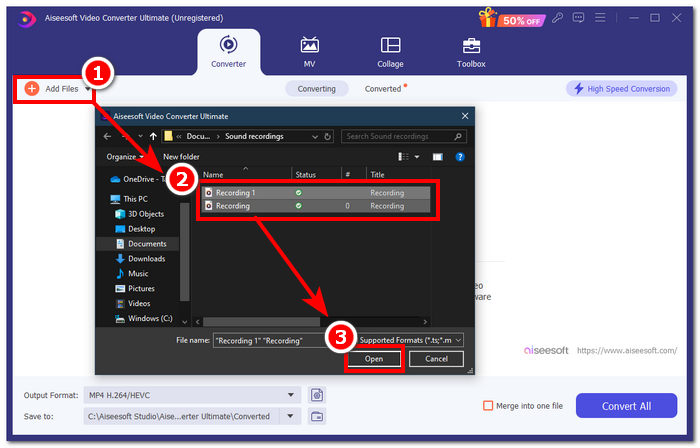
مرحله ۲. پس از نصب نرمافزار، روی دکمه Add Files کلیک کنید و فایلهای M4A را که میخواهید ادغام کنید، انتخاب کنید.
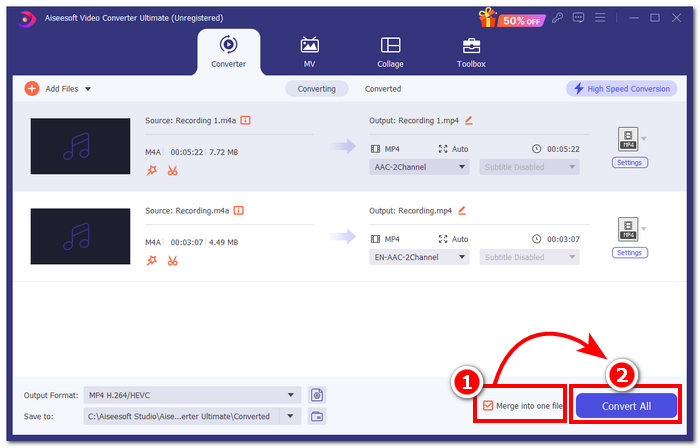
مرحله ۳. وقتی فایلهای M4A شما در رابط ابزار بارگذاری شدند، روی چکباکسی که در قسمت پایین-راست ابزار قرار دارد کلیک کنید تا ادغام فایل M4A شما فعال شود. سپس روی دکمه Convert All که درست کنار آن قرار دارد کلیک کنید تا فرایند ادغام آغاز شود.
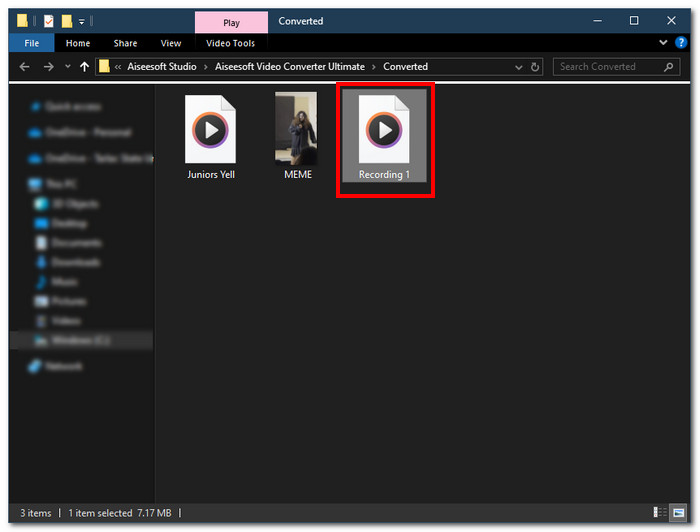
مرحله ۴. پس از تکمیل فرایند ادغام، پنجره جدیدی روی صفحه شما باز میشود. فایلهای M4A ادغامشده شما در آن پنجره قرار دارند. تبریک، شما سرانجام فایلهای M4A خود را ادغام کردید.
FVC-picked Video Converter Ultimate سریعترین نرمافزار در میان نرمافزارهای فهرستشده است زیرا با فناوری پردازش پرسرعت ادغام شده است تا از نتیجهای با کیفیت بدون افت اطمینان حاصل کند و در عین حال یک رابط بسیار بصری ارائه میدهد که باعث میشود فایلهای M4A شما یکپارچه ادغام شوند. برخلاف سایر نرم افزارها که تنها از تعداد محدودی از فرمت های فایل صوتی پشتیبانی می کنند، این نرم افزار طیف گسترده ای از فرمت های فایل های صوتی و تصویری از جمله M4A، MP3، MP4، WAV، AAC و غیره را پشتیبانی می کند.
قسمت 2. ترکیب فایل های M4A در مک با GarageBand [برای سازندگان موسیقی]
برای علاقه مندان حرفه ای موسیقی یا سازندگان در اکوسیستم اپل، GarageBand ابزار ادغام فایل های M4A است. ادغام فایلهای M4A با استفاده از دستگاههای Mac شما آسان است، زیرا GarageBand اپل یک ویرایشگر صوتی است که از قبل در دستگاههای شما نصب شده است. برای ادغام دو فایل M4A در یک فایل صوتی، کافیست مراحل زیر را دنبال کنید GarageBand یکی از آن ابزارهای نرم افزاری است که به راحتی و به راحتی کار می کند.
مرحله ۱. GarageBand را در دستگاههای مک خود دانلود و اجرا کنید.
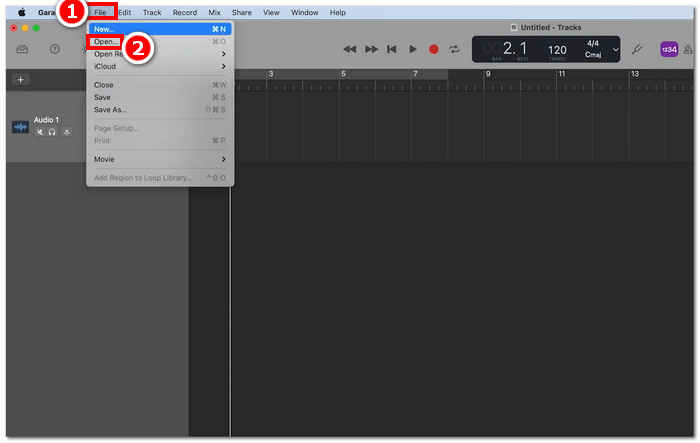
مرحله ۲. در رابط اصلی، با کلیک روی File > Open در گوشه بالا-چپ ابزار، فایلهای M4A خود را بارگذاری کنید.
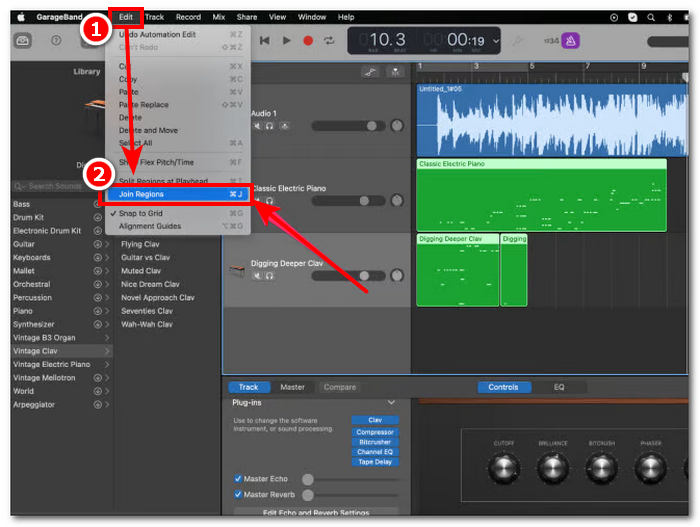
مرحله ۳. وقتی فایلهای M4A شما در رابط ابزار بارگذاری شدند، برای شروع ادغام فایلهای M4A بارگذاریشده، روی Edit > Join Regions کلیک کنید.
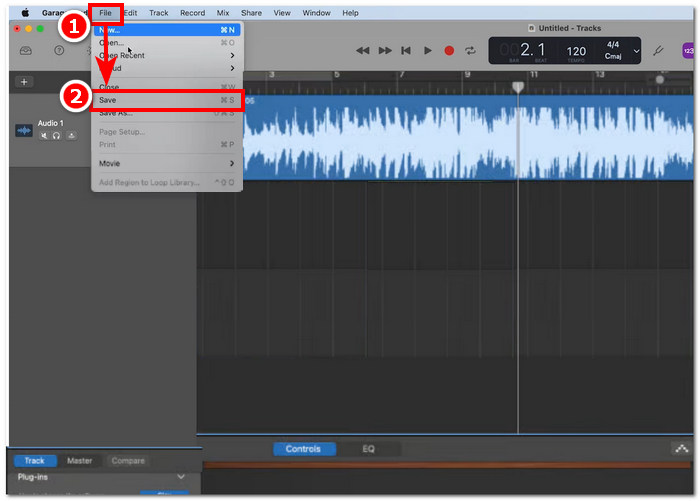
مرحله ۴. وقتی فایلهای M4A شما در یک ترک صوتی واحد ادغام شدند، اکنون میتوانید با کلیک روی File > Save که در گوشه بالا-چپ ابزار قرار دارد، آن را ذخیره یا دانلود کنید.
GarageBand واقعاً یکی از سادهترین و در عین حال حرفهایترین نرمافزارها برای ادغام و ویرایش فایلهای M4A است. دنبال کردن مراحل بالا، راه بسیار خوبی برای ساماندهی دو یا چند فایل M4A در یک فایل صوتی واحد است که اشتراکگذاری یک میکس را آسانتر میکند.
قسمت 3. ترکیب فایل های M4A در ویندوز با VLC [برای کاربران پایه]
با کمال تعجب، VLC Media Player می تواند فایل های M4A را در یک فایل ترکیب کند. با بهره گیری از تنظیمات آن در نمایشگر مشخصات رسانه و فایل، یک فرآیند ادغام یکپارچه و ساده را امکان پذیر می کند. این پخش کننده صوتی و تصویری محبوب رایگان و مفید، صرف نظر از اینکه کدام فرمت فایل را می خواهید VLC ترکیب کنید، می تواند آنها را به طور موثر تبدیل و ادغام کند.
مرحله ۱. VLC Media Player را در دسکتاپ خود دانلود و اجرا کنید.
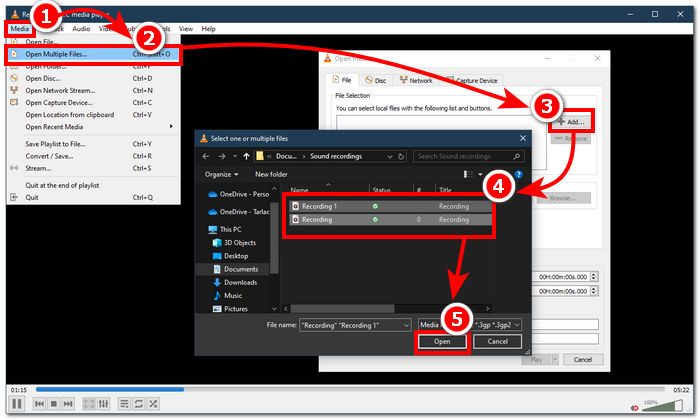
مرحله ۲. در رابط اصلی، ابتدا در گوشه بالا-چپ پلیر روی Media > Open Multiple Files کلیک کنید. پس از کلیک روی این گزینه، پنجره جدیدی ظاهر میشود. برای ادامه، روی دکمه + Add کلیک کنید و فایلهای M4A را که میخواهید ادغام کنید، انتخاب کنید.
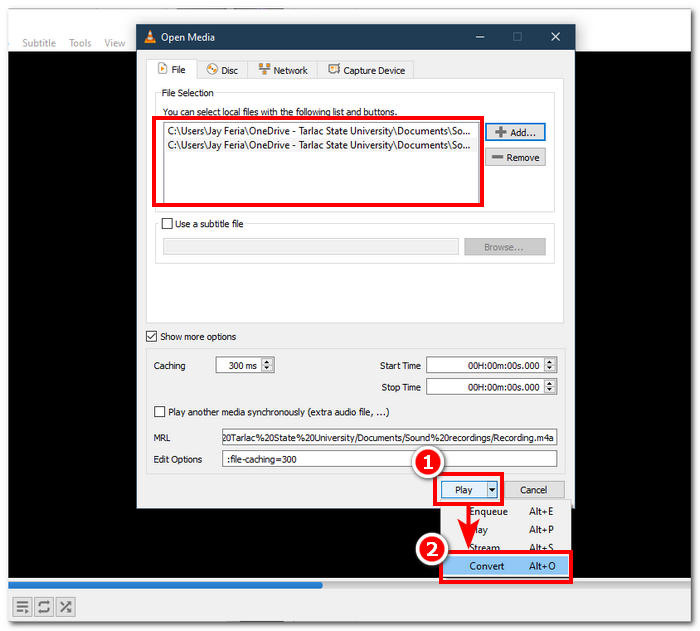
مرحله ۳. وقتی فایلهای M4A شما در فیلد فایل قرار گرفتند، روی دکمه پیکان رو به پایین کنار دکمه Play در قسمت پایین رابط ابزار کلیک کنید و Convert را انتخاب کنید.
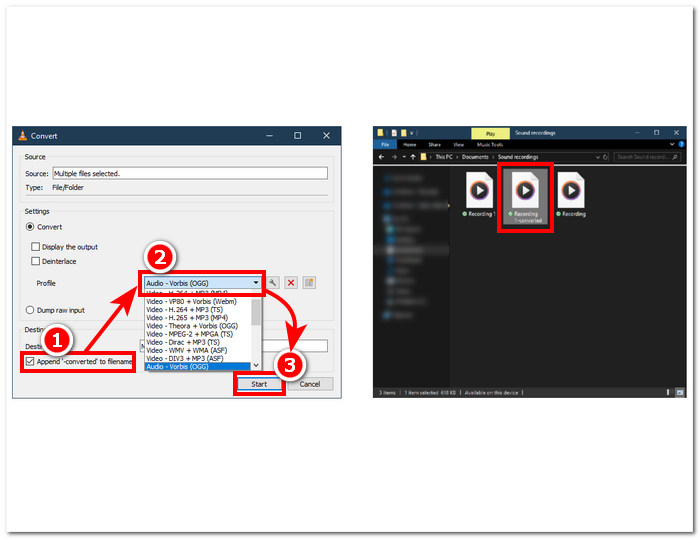
مرحله ۴. سپس پنجره جدیدی ظاهر میشود. چکباکس مربوط به Append ‘-converted’ to filename را فعال کنید. سپس به تنظیمات پروفایل بروید و Audio را انتخاب کنید. وقتی همهچیز تنظیم شد، روی دکمه Start کلیک کنید و فایل M4A ادغامشده شما در پوشهای که فایلهای M4A در آن قرار دارند، در دسترس خواهد بود.
فراموش نکنید هنگام ترکیب فایلها، طول صدا را برای همگامسازی با فایل ویدئویی تنظیم کنید. اگر صدا در VLC دچار تأخیر است، این مقاله میتواند مفید باشد: چگونه تأخیر صدای VLC را برطرف کنیم.
دنبال کردن مراحل ارائه شده تضمین می کند که فایل های M4A خود را با هم ادغام کنید. VLC Media Player فقط یک پخش کننده معمولی برای انواع رسانه ها نیست، بلکه می تواند به عنوان یک ویرایشگر ابرداده نیز استفاده شود و می تواند نه تنها M4A بلکه ویدیوها را نیز ترکیب کند.
قسمت 4. ترکیب فایل های M4A آنلاین [برای فایل های کوچک M4A]
اگر به دنبال ابزار ادغام M4A کارآمدتر و صرفه جویی در زمان هستید، ممکن است بخواهید به یک ابزار آنلاین متوسل شوید. برای ادغام فایل های M4A به صورت آنلاین، باید از یک ابزار قابل اعتماد استفاده کرد، زیرا هزاران ابزار ادغام M4A گمراه کننده به صورت آنلاین وجود دارد. خوشبختانه Audio Joiner پشتیبان شماست زیرا ابزاری مبتنی بر وب برای ادغام فایل های M4A است. اساساً با آپلود فایلهای M4A شما در وبسایت کار میکند و با یک کلیک، فوراً فایلهای صوتی شما را در یکی ادغام میکند.
مرحله ۱. برای دسترسی به این سرویس، به وبسایت رسمی Audio Joiner بروید.
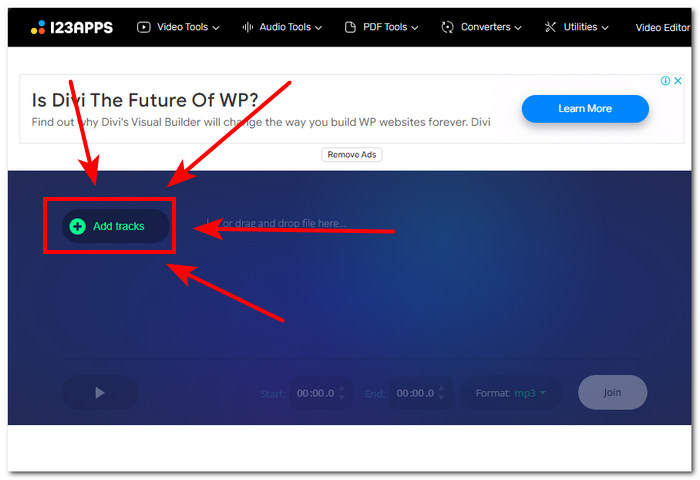
مرحله ۲. وقتی وارد رابط وبسایت شدید، روی دکمه سبزرنگ + Add Tracks کلیک کنید و فایلهای M4A را که میخواهید ترکیب کنید، انتخاب کنید.
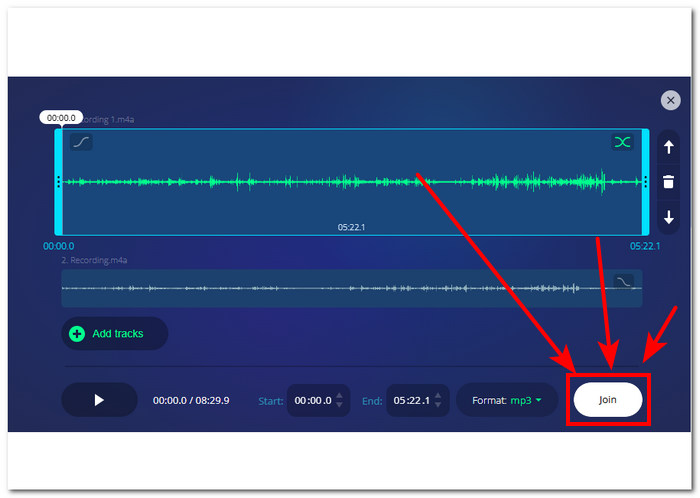
مرحله ۳. وقتی فایلهای M4A شما در ابزار بارگذاری شد، روی دکمه Join که در قسمت پایین-راست وبسایت قرار دارد کلیک کنید و فقط منتظر بمانید تا فرایند ادغام به پایان برسد.
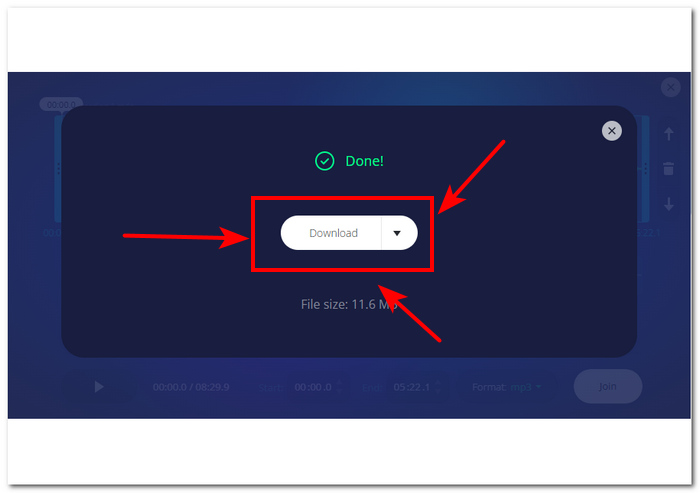
مرحله ۴. پس از اتمام ادغام، میتوانید با فشردن دکمه Download روی صفحه، فایل M4A ادغامشده خود را دانلود کرده و در دسکتاپ ذخیره کنید.
این ابزار ادغام فایل های M4A مبتنی بر وب، علیرغم اینکه برای کاربرانی که نمی خواهند وقت خود را صرف نصب یک ابزار نرم افزاری کنند، راحت است، با تبلیغات پاپ آپ اجرا می شود و متأسفانه، فایل های صوتی شما را کندتر بارگذاری می کند.
بخش 5. سوالات متداول در مورد نحوه ترکیب فایل های M4A
ساده ترین راه برای ترکیب فایل های صوتی چیست؟
ساده ترین راه برای ترکیب فایل های M4A تکیه بر ابزارهای آنلاین است که ادغام فوری فایل های صوتی را با یک کلیک ارائه می دهند. با این حال، مراقب استفاده از چنین ابزارهایی باشید، زیرا خطراتی در آن وجود دارد.
دستور ادغام آهنگ ها در GarageBand چیست؟
کلید میانبر فرمان صفحه کلید برای ادغام یک آهنگ در GarageBand این است که Command + J را به طور همزمان فشار دهید.
آیا می توانید از پخش کننده رسانه ویندوز برای میکس آهنگ ها استفاده کنید؟
متأسفانه Windows Media Player هنوز چنین ویژگیها یا عملکرد داخلی را ندارد که به شما در ترکیب یا ادغام آهنگها کمک کند.
آیا راهی برای ترکیب فایل های M4A بدون از دست دادن کیفیت وجود دارد؟
بله، راه های زیادی برای ترکیب M4A بدون از دست دادن کیفیت وجود دارد. برخی از ابزارها تنظیماتی را برای آن تنظیم میکنند، و برخی از آنها فقط یک صادرات با کیفیت بالا را هر بار ارائه میدهند، مانند Video Converter Ultimate که FVC انتخاب شده است.
آیا می توانم فایل های M4A را در تلفن هوشمند خود ترکیب کنم؟
بله، ادغام فایل های M4A در رایانه های رومیزی و مرورگرهای وب و همچنین دستگاه های تلفن همراه در دسترس است. GarageBand نسخه موبایل نسخه دسکتاپ خود را ارائه می دهد، اما این نسخه فقط در دستگاه های iOS در دسترس است، در حالی که WavePad موبایل در iOS و Android در دسترس است.
نتیجه
دانستن نحوه ادغام ترکهای M4A مهارتی فوقالعاده برای زمانی است که در حال یادگیری ویرایش صدا هستید. این کار به شما کمک میکند تا پروژههای خود را برش بزنید و ساماندهی کنید تا در هیچ مقطعی تعداد نابجایی از ترکهای فعال نداشته باشید. برای ادغام مؤثر فایلهای M4A، کاربران ممکن است به نرمافزارها یا ابزارهای آنلاین قابل اعتماد نیاز داشته باشند تا چنین کاری را انجام دهند. بنابراین، برای شروع، دنبال کردن مراحل ما میتواند به شما کمک کند این مهارت کاربردی را پیش از گذار به پلتفرمهای ضبط پیشرفتهتر، بهخوبی فرا بگیرید.
-
 نحوه تبدیل M4A به MP3 با 4 مبدل صوتی رایگان
 نمی توانید M4A را پخش کنید و باید آن را به MP3 تبدیل کنید؟ آیا راهی رایگان برای تبدیل M4A به MP3 بصورت آنلاین وجود دارد؟ این پست 4 روش رایگان برای کمک به شما در تبدیل M4A به MP3 با iTunes ، مبدل های صوتی آنلاین و حرفه ای به اشتراک می گذارد.
-
 MP3 پلیر بارگیری - 10 بهترین پخش کننده موسیقی MP3 رایگان 2021
 بهترین پخش کننده موسیقی MP3 چیست؟ چگونه می توانم موسیقی را روی دستگاه پخش MP3 قرار دهم؟ چگونه می توان MP3 Player Player را بارگیری کرد؟ این پست به شما یک مرور دقیق از 10 بهترین پخش کننده MP3 رایگان برای Windows PC و Mac می دهد.
-
 بهترین پخش کننده MP4 خود را برای پخش فایل های MP4 با کیفیت بصری بالا دریافت کنید
 از بهترین توصیه های 10 نرم افزار پخش کننده ویدیوی MP4 ، بهترین پخش کننده MP4 خود را بخوانید و از آن استفاده کنید. شما می توانید فایل های ویدئویی MP4 را بدون تأخیر در ویندوز و مک به راحتی پخش کنید.
