


 Video Converter Ultimate
 ضبط صفحه
 تعمیر ویدیو
MP3 را با بهترین ابزارها در ویندوز، مک، آنلاین و تلفن همراه ویرایش کنید
MP3 مخفف «MPEG-1 Audio Layer III» است و نوعی فایل به شمار میآید که موسیقی را بهصورت فشرده ذخیره میکند. این نوع فایل نسبت به فایلهای صوتی فشردهنشده حجم بسیار کمتری دارد، که ذخیرهسازی و انتقال آن را آسانتر میسازد. با تولید موسیقی بیشتر، مردم بهدنبال روشهای ساده برای ویرایش MP3ها هستند تا صدای آنها را بهتر کنند. دلیلش این است که گاهی میتوان MP3 را حتی بهتر از نسخهٔ اصلیِ فشردهنشده تنظیم کرد. مشکل اینجاست که نرمافزارهای ویرایشی میتوانند گران باشند و به رایانهای قدرتمند نیاز داشته باشند. خوشبختانه، این راهنما به شما نشان میدهد چگونه از توصیهشدهترین ویرایشگرهای MP3 استفاده کنید تا بتوانید موسیقی خود را روی همهٔ پلتفرمهایی که استفاده میکنید ویرایش کنید. بنابراین، هر نیازی که داشته باشید، بهترین کار این است که از اینجا شروع کنید!

بخش 1. بهترین انتخاب برای ویرایش MP3 با ویرایشگر MP3 All-in-One
اولین نرمافزاری که یک فایل MP3 را ویرایش میکند، ویرایشگر برگزیدهٔ ما Video Converter Ultimate است. بله، این یک مبدّل رسانهای است که نهتنها برای ویدئوها، بلکه برای فایلهای صوتی نیز طراحی شده است. این برنامه به شما اجازه میدهد صدا را بهسادگی تا دوبرابر بلندتر یا تا حد یک نجوا کمحجمتر کنید. همچنین میتوانید سرعت پخش را بیشتر یا کمتر کنید، بدون اینکه درگیر تنظیمات فنی پیچیده شوید.
علاوه بر این، میتواند نویز پسزمینه را حذف کند، قسمتهای ناخواسته را برش دهد، فایلها را به بخشهایی تقسیم کند و حتی صداهای ضبط شده را ویرایش کند. علاوه بر این، یک رابط کاربری آسان ارائه می دهد که، حتی اگر در زمینه ویرایش صدا مبتدی باشید، این برنامه انجام همه این کارها را تنها در چند مرحله ساده می کند. شما همچنین عاشق فناوری پیشرفته ای که ارائه می دهد، مانند شتاب سخت افزاری، NVIDIA، Intel، AMD و ابزارهای ویرایشی مبتنی بر هوش مصنوعی که می توانید استفاده کنید، خواهید بود.
ویژگیهای کلیدی:
• تبدیل صوتی که تا 120 برابر سریعتر تبدیل می شود.
• پشتیبانی از بیش از 1000 فرمت مختلف.
• فایل های صوتی را یکپارچه تقسیم، برش و ادغام کنید.
• طول MP3 را بدون هیچ محدودیتی ویرایش کنید.
• فایل های صوتی را به اندازه دلخواه خود فشرده کنید.
• رمزگذار فایل MP3، نرخ نمونه، کانال و میزان بیت را تغییر دهید.
دانلود رایگانبرای ویندوز 7 یا بالاتردانلود امن
دانلود رایگانبرای MacOS 10.7 یا بالاتردانلود امن
چگونه با FVC فایلهای صوتی را ویرایش کنیم
گام 1. پس از اجرای نرمافزار، میتوانید با زدن دکمهٔ Add Files فایلهای MP3 را اضافه کنید. بهطور جایگزین، میتوانید فایلها را از محل ذخیرهشان بکشید و در نرمافزار ویرایش رها کنید.
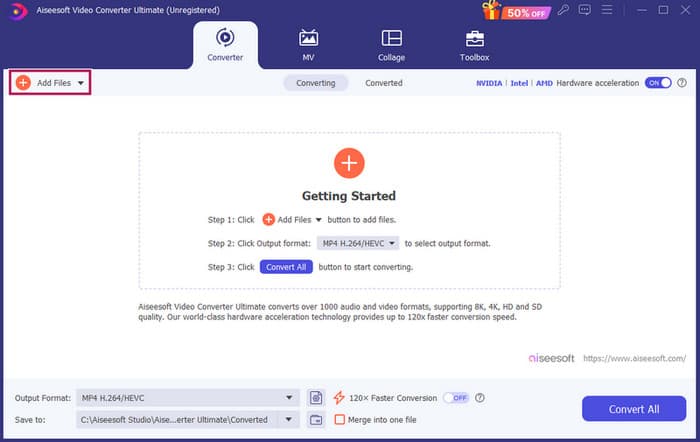
گام 2. پس از بارگذاری فایلها، با کلیک روی دکمهٔ ستاره روی تصویر بندانگشتی، به تنظیمات حجم و تأخیر دسترسی پیدا میکنید. دکمهٔ قیچی برای دسترسی به ابزار ادغام، جداسازی و برش است. و البته دکمهٔ تنظیمات برای دسترسی به ویرایشگر پروفایل استفاده میشود.
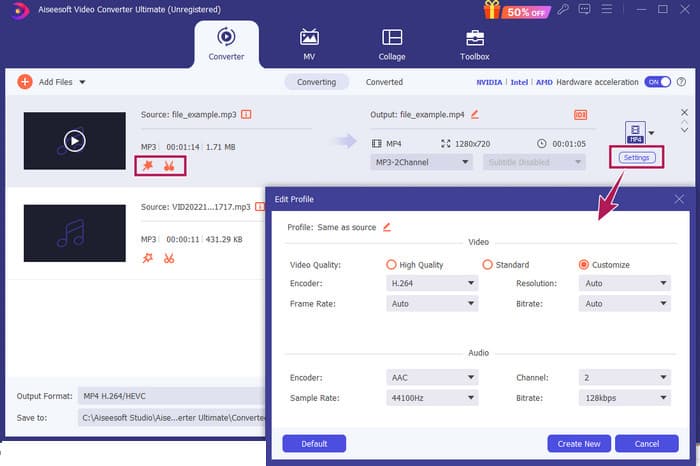
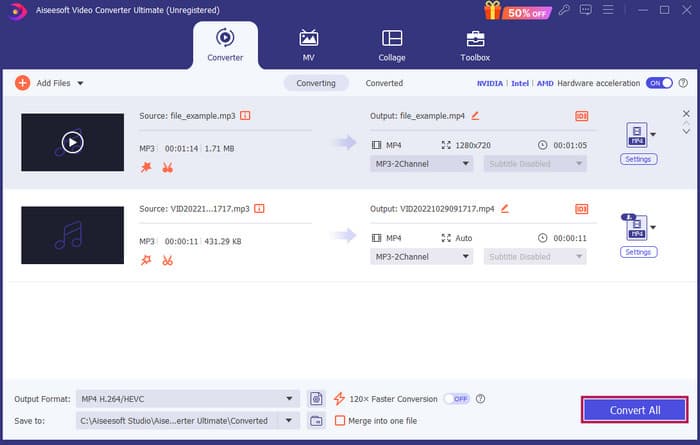
گام 3. بعد از ویرایش فایلها، لازم است روی دکمهٔ Convert All کلیک کنید. و اینگونه است که در ویندوز 10 با FVC فایل MP3 را ویرایش میکنید.
جمعبندی: FVC Video Converter Ultimate میتواند راهحل همیشگی شما نهفقط برای بهبود یا تغییر MP3، بلکه بهعنوان ابزاری عالی برای تبدیل فایلها باشد. ما سادگی و سرعت ویرایش صوتی در آن را دوست داریم. هرچند بیشتر ابزارهای جعبهابزار آن برای فایلهای ویدئویی است، اما همچنان ویرایشگرهای صوتی قدرتمندی در آن وجود دارد. از اینرو، این برنامه انتخاب دستچینشدهٔ ما برای ویرایش مؤثر و آسان فایلهاست که برای مبتدیان بسیار مناسب است.
قسمت 2. ویرایش MP3 با Adobe Audition در ویندوز
Adobe Audition یکی از گزینههای مشهور برای ویرایش حرفهای صداست که توسط موسیقیدانها، پادکستسازها و مهندسان صدا استفاده میشود. این برنامه بهخاطر قدرتمند بودن و درعینحال کاربری آسان شناخته میشود. علاوه بر این، دارای قابلیتهایی مانند ضبط و ویرایش همزمان چند ترک صوتی، افزودن افکتهای ویژه با پیشنمایش فوری هنگام ساخت آنها، و حتی کتابخانهای از صداها برای استفاده در پروژهها است. همچنین میتوانید آن را نسخهٔ ارتقایافته و خوشطراحی از برنامهٔ قدیمیتر Cool Edit Pro در نظر بگیرید. افزون بر این، میتوانید MP3ها را ویرایش کرده و چیدمان محیط کار را طبق سلیقهٔ خود سفارشی کنید، و این برنامه اجازه میدهد تا با حداکثر 40 ترک صوتی مجزا بهطور همزمان کار کنید. همچنین یک میز میکس برای ویرایش، و حتی ابزاری برای افزودن سازهای موسیقی به پروژه در اختیار شما قرار میدهد.
ویژگیهای کلیدی:
• یک دسته کامل از فایل های صوتی را تنها با یک کلیک ویرایش کنید.
• فیلترها و جلوه های جالبی را اضافه کنید تا صدای صوتی خود را شگفت انگیز کنید.
• ترک های صوتی مختلف را برای ایجاد صدای جلا ترکیب کنید.
• صداهای خود را با ابزارهای قدرتمند تعمیر و تقویت کنید.
چگونه با Adobe Audition فایلهای صوتی را ویرایش کنیم
گام 1. برنامه را باز کنید و با رفتن به File-Open فایلهای MP3 را وارد کنید.
گام 2. برای ویرایش، میتوانید از Waveform Editor برای ویرایش دقیق یک ترک استفاده کنید. برای چند ترک صوتی، از Multitrack Editor بهره ببرید.
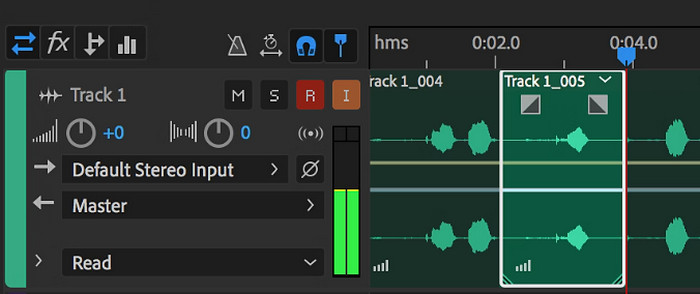
گام 3. پس از پایان ویرایش، میتوانید سایر ابزارهای برنامه مانند افکتها را بررسی کنید. در نتیجه، وقتی کار لازم را انجام دادید، میتوانید پروژهٔ صوتی را ذخیره کنید. اینگونه است که در ویندوز با Adobe Audition فایل MP3 را ویرایش میکنید.
جمعبندی: بیتردید، Adobe Audition یک ویرایشگر صوتی برجسته و درعینحال کلاسیک است. تعجبی ندارد که بسیاری از ویراستاران هنوز به آن پایبند هستند. با این حال، برای مبتدیانی که نمیخواهند با رابط پیچیده سروکار داشته باشند، Adobe Audition شاید بهترین گزینه نباشد.
قسمت 3. ویرایش MP3 با iTunes در مک
iTunes مانند مدیر موسیقی شماست که تمام آهنگهای مورد علاقهتان را در رایانهتان مرتب نگه میدارد. آن را به عنوان یک جعبه دیجیتال تصور کنید که در آن به راحتی می توانید مجموعه موسیقی خود را بر اساس هنرمند، آلبوم یا حتی ژانر مرتب کنید. همچنین به شما امکان میدهد هر گونه اطلاعات گمشده، مانند عنوان آهنگ یا نام هنرمندان را برطرف کنید، بنابراین همیشه میتوانید آنچه را که به دنبال آن هستید پیدا کنید. با این ویرایشگر اسلش پخش کننده رسانه، می توانید موسیقی متن یا لیست پخش سفارشی را برای حالت ها یا فعالیت های مختلف، مانند ترکیب تمرین یا لیست پخش برای استراحت ایجاد کنید.
بهترین قسمت؟ iTunes فوق العاده کاربر پسند است. حتی اگر اهل فن آوری نیستید، می توانید به راحتی و به سرعت آهنگ ها را به کتابخانه خود اضافه کنید، آنها را منظم سازماندهی کنید و بدون دردسر آنها را پخش کنید. در حالی که نمی تواند مانند سایر برنامه ها ویرایش فانتزی را انجام دهد، اما برای کارهای اساسی مانند کوتاه کردن سکوت ناخواسته از ابتدا یا انتهای فایل های MP3 شما یک انتخاب عالی است. ما نحوه ویرایش MP3 را در مک و ویندوز در چند مرحله ساده بررسی خواهیم کرد!
ویژگیهای کلیدی:
• مدیریت و ایجاد یک کتابخانه دیجیتالی از فایل های صوتی.
• علاوه بر MP3، از فرمت های صوتی مختلف از جمله WAV، AIFF، Apple Lossless و AAC نیز پشتیبانی می کند.
• امکان ویرایش اطلاعات فایل MP3 مانند هنرمند، آلبوم، سبک و سال انتشار را فراهم می کند.
چگونه با iTunes فایلهای صوتی را ویرایش کنیم
گام 1. برنامه را اجرا کرده و فایل MP3 را بارگذاری کنید. به بخش File بروید و گزینهٔ Add File to Library یا گزینهای مشابه آن را انتخاب کنید. سپس فایل MP3 موردنظری را که میخواهید برش دهید، از دستگاه خود برگزینید.
گام 2. اکنون دوباره به File بروید و Library را انتخاب کنید. مطمئن شوید آن MP3 در آنجا فهرست شده است. سپس روی آن راستکلیک کرده و گزینهٔ Get Info را برگزینید.
گام 3. حالا میتوانید نقاط برش را تنظیم کنید. برای این کار، به پنجرهٔ Get Info بروید، بهدنبال Options بگردید و سپس Start و Stop time را پیدا کنید. اکنون نقطهٔ شروع و پایان بخشی را که میخواهید نگه دارید تعیین کنید. پس از انجام تنظیمات، میتوانید با کلیک روی دکمهٔ OK تغییرات را ذخیره کنید.
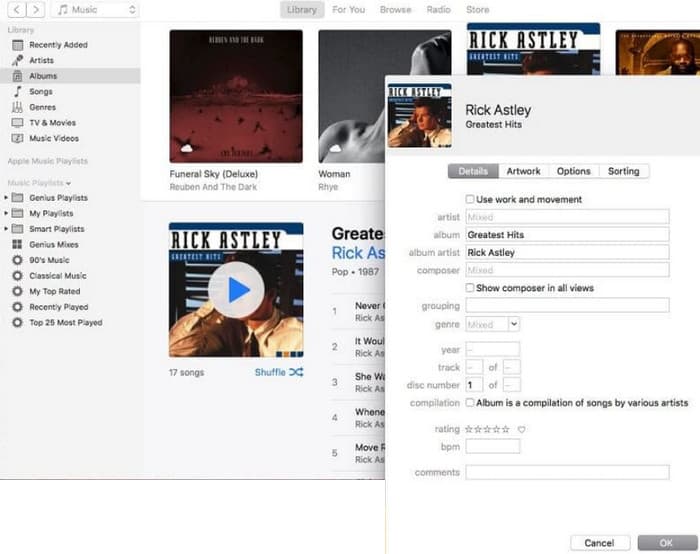
جمعبندی: iTunes میتواند در حد نیاز، ویرایش و بهبود ابتدایی MP3 را فراهم کند. البته، از آنجا که یک ویرایشگر اختصاصی صدا برای ویرایش کامل MP3 نیست، ممکن است از کمبود قابلیتهای آن ناامید شوید.
قسمت 4. MP3 را با یک ویرایشگر آنلاین MP3 ویرایش کنید
Clideo یک برشدهنده و ویرایشگر MP3 آنلاین امیدوارکننده است برای کسانی که میخواهند از یک ویرایشگر صوتی تحتوب برای برش فایلهای MP3 خود استفاده کنند. این یک ابزار وب است که روی هر دستگاهی کار میکند، بنابراین نیازی به دانلود نرمافزار ندارید. Clideo به شما اجازه میدهد با تعیین دقیق زمان شروع و پایان، یا بهسادگی با کشیدن نشانگرها روی صفحه، بخشهای مشخصی از صدای خود را برش دهید.
علاوه بر این، از انواع فایل های مختلف پشتیبانی می کند، بنابراین می توانید تقریباً هر فایل موسیقی را که دارید ویرایش کنید. علاوه بر این، Clideo به شما امکان می دهد تا جلوه هایی مانند fade-in و fade-out را برای انتقال صدای روانتر در ابتدا و انتهای کلیپ خود اضافه کنید. به طور کلی، Clideo یک ابزار کاربر پسند و همه کاره است که ویرایش فایل های صوتی شما را آسان می کند.
ویژگیهای کلیدی:
• قسمت های ناخواسته فایل های صوتی خود را به راحتی برش دهید.
• افکت های محو و محو شدن را اضافه کنید.
• از فرمت های صوتی مختلف پشتیبانی می کند.
چگونه با Clideo فایلهای صوتی را ویرایش کنیم
گام 1. پس از ورود به صفحهٔ رسمی Clideo، به بخش برشدهندهٔ صوتی آن بروید.
گام 2. برای بارگذاری فایلهای MP3، روی دکمهٔ Choose File کلیک کنید. وقتی وارد کردن فایل با موفقیت انجام شد، میتوانید ویرایش آن را آغاز کنید.
گام 3. کشنده (نشانگر) را روی اندازهٔ دلخواه خود تنظیم کرده، سپس برای ذخیرهٔ تغییرات روی Export کلیک کنید.
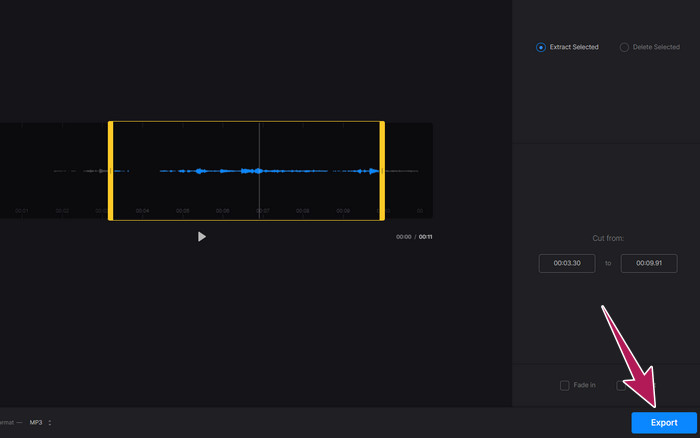
جمعبندی: Clideo یک ابزار آنلاین است که چندین ابزار برای ویرایش MP3 و دیگر انواع فایل، از جمله ویدئو، در اختیار شما میگذارد. با این حال، باید در نظر داشته باشید که ابزارهای آنلاین مانند Clideo ممکن است از نظر امنیتی نامطمئنتر باشند، زیرا نسبت به ابزارهای آفلاین آسیبپذیرترند.
قسمت 5. MP3 را با یک برنامه موبایل در iPhone/Android ویرایش کنید
آخرین ویرایشگر MP3 که توصیه میکنم، اپلیکیشنی است که میتوانید روی اندروید و iOS نصب کنید. نام آن WavePad است و امکانات زیادی دارد، به همین دلیل ممکن است در نگاه اول کمی پیچیده به نظر برسد. با این برنامه میتوانید کلیپها را برش و کوتاه کنید، ارتفاع (زیر و بمی) صدای خود را تغییر دهید و حتی نویز پسزمینه را حذف کنید. افزون بر این، این برنامه ویرایش MP3 روی آیفون و اندروید را با مجموعهای از افکتهای صوتی و موسیقیِ رایگان برای افزودن به ضبطهای شما انجام میدهد. این اپلیکیشن دارای یک اکولایزر داخلی است که به شما کمک میکند صدای خود را بهخوبی تنظیم کنید. علاوه بر MP3، WavePad با رایجترین انواع فایلهای صوتی دیگر نیز کار میکند.
ویژگیهای کلیدی:
• برش، کپی، چسباندن، و افزودن افکت به صداها.
• پشتیبانی از فرمت های صوتی مختلف مانند MP3، WAV، و AIFF.
• دارای تنظیمات مختلف کیفیت صدا.
چگونه با WavePad فایلهای صوتی را ویرایش کنیم
گام 1. برنامه را اجرا کنید، روی سه خط ضربه بزنید و از زبانههای File-Import from the Audio را انتخاب کنید. این کار به شما امکان میدهد فایل MP3 موردنیاز برای ویرایش را بارگذاری کنید.
گام 2. با کشیدن انگشت به سمت راست روی گزینههای ابزار در بالای صفحه، به ابزارهای ویرایش دسترسی پیدا کنید.
گام 3. پس از انجام این کار، میتوانید برای ضبط بخشی که میخواهید از فایل نگه دارید، روی دکمهٔ REC ضربه بزنید. سپس آن را ذخیره کرده و به دستگاه خود صادر کنید.
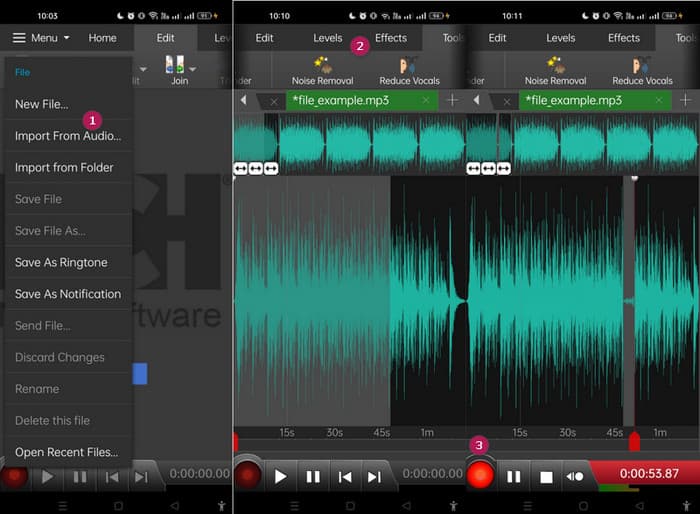
جمعبندی: نسخهٔ رایگان WavePad بیشتر امکانات را در بر دارد، اما برای دسترسی کامل – شامل همهٔ افکتهای صوتی و امکان ذخیرهٔ فایلها در قالبهای مختلف و حذف آگهیها – یک نسخهٔ پولی با هزینهٔ ماهانهٔ $3 هم وجود دارد. این نسخه به شما امکان میدهد MP3ها را بهصورت پیشرفتهتر روی اندروید یا آیفون ویرایش کنید.
بخش 6. سوالات متداول در مورد ویرایش MP3
آیا می توانم یک آهنگ را در Apple Music کوتاه کنم؟
نه. متأسفانه، نمیتوانید مستقیماً آهنگها را در خود Apple Music کوتاه کنید.
آیا مایکروسافت ویرایشگر صوتی دارد؟
ویرایشگرهای صوتی زیادی مانند Audacity برای ویرایش MP3 وجود دارد که می توانید آنها را از فروشگاه مایکروسافت دانلود کنید.
چگونه می توانم یک فایل MP3 را در Windows Media Player برش دهم؟
متأسفانه خودِ Windows Media Player قابلیتهای ویرایشیِ داخلی برای برش فایلهای MP3 را ندارد.
نتیجه
دستکم اکنون بهترین روشها برای ویرایش MP3ها را مثل همیشه در اختیار دارید. با بهترین ویرایشگرهای صوتی که در بالا پیشنهاد کردیم، قطعاً به صدای دلخواه خود خواهید رسید! این ابزارها راهحلهای جامع برای پلتفرمهای گوناگون فراهم میکنند و صرفنظر از دستگاه یا سیستمعامل شما، انعطافپذیری و راحتی را تضمین مینمایند. چه یک برنامهٔ دسکتاپ را ترجیح دهید، چه ابزار آنلاین یا اپلیکیشن موبایل، میتوانید بهراحتی به ویرایشهایی در سطح حرفهای دست یابید. از برش و ادغام ساده گرفته تا افکتها و بهبودهای پیشرفته، ویرایشگر مناسب میتواند فایلهای MP3 شما را بهصورت کارآمد متحول کند. گزینهها را بررسی کنید و از همین امروز شروع به پالایش و تکمیل ترکهای صوتی خود کنید.
-
 10 پخش کننده برتر FLV برای ویندوز، مک، iOS و اندروید در سال 2024
 پخش کننده FLV به شما کمک می کند تا به راحتی به پرونده های FLV خود در دستگاه ویندوز ، Mac ، Android ، iOS دسترسی پیدا کنید. بهترین پخش کننده های فایل FLV را که هم اکنون می توانید بارگیری کنید ، بررسی کنید.
-
 8 بهترین بازیکن MOV برای پخش فایلهای QuickTime MOV با کیفیت اصلی
 فقط در مورد 8 بهترین پخش کننده MOV که هم برای ویندوز و هم برای مک در دسترس است بیشتر بدانید. می توانید یکی از موارد دلخواه و مناسب را برای پخش فایلهای MOV با کیفیت اصلی انتخاب کنید.
-
 بهترین پخش کننده MP4 خود را برای پخش فایل های MP4 با کیفیت بصری بالا دریافت کنید
 از بهترین توصیه های 10 نرم افزار پخش کننده ویدیوی MP4 ، بهترین پخش کننده MP4 خود را بخوانید و از آن استفاده کنید. شما می توانید فایل های ویدئویی MP4 را بدون تأخیر در ویندوز و مک به راحتی پخش کنید.
