


 Video Converter Ultimate
 ضبط صفحه
 تعمیر ویدیو
نحوه تبدیل M2TS به قالب های سازگار با iPad در ویندوز / مک / آنلاین
آیا میتوانید مستقیماً فایل M2TS را روی آیپد پخش کنید؟ متأسفانه پاسخ منفی است. فرمت M2TS با آیپد سازگار نیست. اگر میخواهید فایلهای M2TS را روی آیپد پخش کنید، باید یک اپلیکیشن پخشکننده M2TS روی آیپد نصب کنید، یا میتوانید M2TS را به فرمت سازگار با آیپد تبدیل کنید. بدیهی است که این مقاله راهحل دوم را انتخاب میکند. فقط ادامه مطلب را بخوانید تا یاد بگیرید چگونه فرمت ویدیو را از M2TS به فرمت قابل پخش در آیپد تغییر دهید.

قسمت 1: نحوه تبدیل M2TS به iPad در ویندوز و مک
iPad از چه قالب هایی پشتیبانی می کند؟ در واقع ، iPad فرمت های رایج H.264 ، MP4 ، M4V ، MOV ، MPEG-4 و M-JPEG را می پذیرد. برای قرار دادن M2TS در iPad ، ابتدا باید M2TS را به قالب ویدیوی iPad تبدیل کنید.
نحوه تبدیل M2TS به iPad در ویندوز به صورت رایگان
FVC Free M2TS Converter یک مبدل دستهای M2TS به آیپد است که کاملاً رایگان میباشد. شما میتوانید فایلهای M2TS را بهصورت دستهای با سرعتی تا ۵۰ برابر سریعتر از مبدلهای معمولی M2TS به فرمت آیپد تبدیل کنید. بنابراین، مهم نیست اگر نیاز دارید تعداد زیادی فایل ویدیویی بزرگ M2TS را بهصورت گروهی برای آیپد تبدیل کنید. این مبدل رایگان M2TS به آیپد بهخوبی از عهده آن برمیآید.
علاوه بر این، میتوانید قبل از تبدیل M2TS به آیپد، فایلهای M2TS را ادغام کرده و تم یا افکت اضافه کنید. پنجره پیشنمایش لحظهای میتواند فوراً افکتهای ویدیو را به شما نشان دهد. به بیان دیگر، میتوانید در ویندوز بهصورت یکجا و رایگان ویدیوهای AVCHD با فرمت M2TS را ویرایش و به آیپد تبدیل کنید.

مبدل M2TS رایگان
113،456+ بارگیری- M2TS را به iPad H.264، MP4 تبدیل کنید MOV، MPEG-4 و سایر قالب های سازگار.
- 50 برابر سرعت بیشتر با پشتیبانی از تبدیل دسته ای.
- ضمن تبدیل شدن به iPad از همه دوربین های فیلمبرداری HD ، کیفیت بالایی را حفظ کنید.
- مبدل M2TS به iPad با رایانه Windows 10/8/7 کار می کند.
دانلود رایگانبرای Windows 7 یا جدیدتردانلود امن
دانلود رایگانبرای MacOS 10.7 یا جدیدتردانلود امن
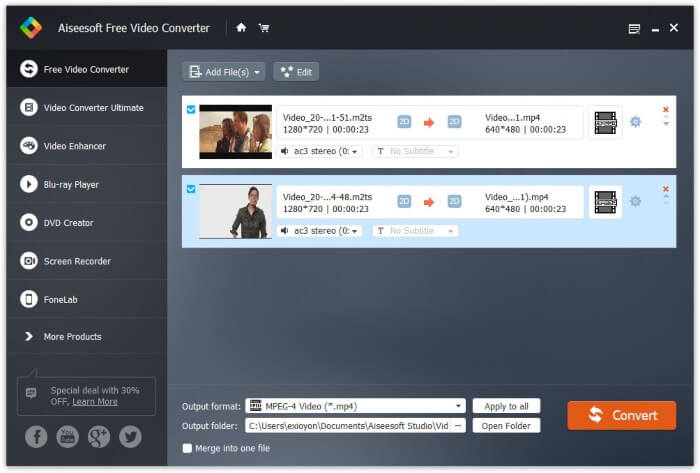
مرحله 1: FVC Free M2TS Converter را بهصورت رایگان دانلود، نصب و اجرا کنید. فایلهای M2TS را بکشید و در رابط اصلی رها کنید.

مرحله 2: فهرست Output format را در نزدیکی پایین پنجره باز کنید. برای تبدیل M2TS به آیپد در ویندوز، میتوانید مستقیماً فرمت خروجی را از دستهبندی Apple iPad انتخاب کنید.

مرحله 3: روی آیکون چرخدنده Settings کلیک کنید تا انکودر ویدیو، نرخ فریم و موارد دیگر را تنظیم کنید. در نهایت روی Convert کلیک کنید تا ویدیو را از M2TS به فرمت آیپد تبدیل کنید.
نحوه تبدیل M2TS به iPad در Mac به صورت رایگان
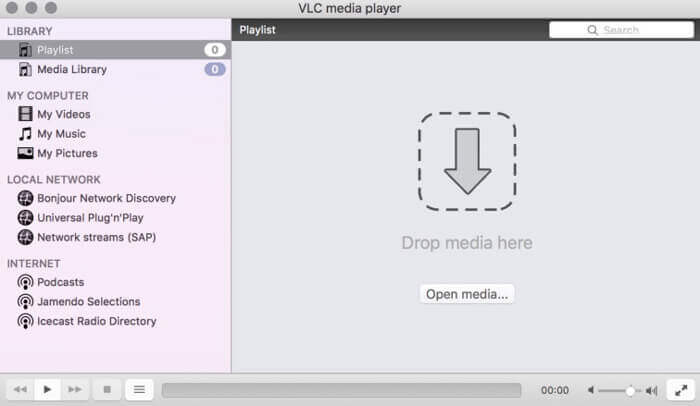
اگر می خواهید ویدیوی M2TS را به صورت رایگان در Mac بر روی iPad تبدیل کنید ، VLC Media Player می تواند انتخاب خوب شما باشد. این یک پخش کننده و مبدل M2TS منبع آزاد و آزاد برای چند پلتفرم است.
مرحله 1: برنامه VLC Media Player را در مک باز کنید. از فهرست کشویی Media گزینه Convert/Save را انتخاب کنید.
مرحله 2: روی Add کلیک کنید تا یک فایل M2TS را وارد کنید. سپس فایل را انتخاب کرده و برای ادامه فرایند روی Open در پایین کلیک کنید.
مرحله 3: در پایین روی Convert/Save کلیک کنید تا به پنجره بعدی بروید.
مرحله 4: فرمت آیپد را از فهرست کشویی Profile انتخاب کنید. میتوانید برای تنظیم تنظیمات ویدیو روی آیکون Tools کنار آن کلیک کنید.
مرحله 5: برای شروع تبدیل فایل M2TS به آیپد در مک با استفاده از VLC، روی Start کلیک کنید.
قسمت 2: نحوه تبدیل M2TS به iPad Online
برای کاربران تلفن همراه ، استفاده از مبدل آنلاین M2TS به iPad نیز انتخاب خوبی است. بدون نیاز به بارگیری ، نصب یا ثبت نام ، می توانید یک فایل M2TS را به صورت رایگان به iPad تبدیل کنید.
مرحله 1: یک مبدل آنلاین M2TS به آیپد را باز کنید، مانند FVC Free Online Video Converter.

مرحله 2: از طریق کلیک روی Add Files to Convert، لانچر FVC را دانلود و نصب کنید.

مرحله 3: فایل M2TS موردنظر برای تبدیل را در رایانه خود پیدا کنید. و فراموش نکنید که فرمت خروجی را انتخاب کنید.

مرحله 4: روی Start Converting کلیک کنید تا M2TS را بهصورت رایگان به آیپد بهصورت آنلاین تبدیل کنید.
قسمت 3: س FAالات متداول در تبدیل M2TS به iPad
چه اتفاقی می افتد که ناگهان هیچ صوتی در پرونده های M2TS در iMovie وجود ندارد؟
M2TS بطور محلی توسط دستگاههای اپل پشتیبانی نمی شود. برای حل مشکل باید M2TS را به فرمت Mac تبدیل کنید.
چگونه می توانم پرونده های M2TS را در iPhone و iPad باز کنم؟
AVCHD M2TS با دستگاه های iOS سازگار نیست. اگر اصرار به پخش فیلم های M2TS در iPad دارید ، می توانید از برنامه VLC Media Player برای دریافت پخش فیلم استفاده کنید.
آیا برنامه پخش کننده ویدیوی خوبی برای iPad وجود دارد؟
در iPad می توانید صفحه نمایش بزرگتری نسبت به iPhone داشته باشید. بنابراین تجربه تماشای فیلم نیز بهتر خواهد بود. پخش کننده های ویدیویی توصیه شده شامل PlayerXtreme Media Player ، KMPlayer ، VLC ، AirPlayer و موارد دیگر هستند. برای دریافت انعطاف پذیر کنترل های ویدئو می توانید هرکدام را انتخاب کنید.
همه روشهای تبدیل M2TS به آیپد با ابزارهای آنلاین و آفلاین همین بود. این مبدلهای ویدیوی M2TS رایگان و ایمن برای استفاده هستند. فرقی نمیکند چند فایل M2TS میخواهید به فرمتهای سازگار با آیپد تبدیل کنید، میتوانید اینجا بالاترین سرعت را به دست آورید.
-
 نحوه تبدیل M2TS به MP4 بدون کاهش کیفیت
 آیا می خواهید فیلم را از دوربین فیلمبرداری HD به MP4 رایج تبدیل کنید؟ در اینجا 4 روش ساده و رایگان برای تغییر پرونده M2TS به MP4 در ویندوز و مک آورده شده است.
-
 نحوه تبدیل M2TS به MKV بدون افت کیفیت
 آیا می خواهید M2TS را با حفظ کیفیت اصلی به MKV تبدیل کنید؟ این پست روش های رایگان و آنلاین تغییر M2TS به MKV بدون ضرر را به شما نشان می دهد.
-
 چه تفاوتی بین MTS و M2TS وجود دارد
 پرونده MTS یا M2TS چیست؟ تفاوت M2TS با MTS چیست؟ چگونه می توانم فایل فیلمبرداری ضبط شده MTS یا M2TS را تماشا کنم؟ تمام پاسخ ها را در این پست پیدا کنید.
