


 Video Converter Ultimate
 ضبط صفحه
 تعمیر ویدیو
فایل MTS چیست و نحوه تبدیل / پخش پرونده MTS چیست
اگر از یک دوربین فیلمبرداری سونی یا پاناسونیک استفاده میکنید، ویدئوی ضبطشده را با فرمت MTS دریافت خواهید کرد. در واقع تا زمانی که نتوانید فایل MTS را با پخشکننده رسانه یا دستگاه خود اجرا کنید، متوجه این موضوع نمیشوید. اینجاست که سؤال پیش میآید: فایل MTS چیست؟

اکنون در بسیاری از زمینه ها و محصولات الکترونیکی ، نیاز به کیفیت تصویر بالاتر برای پردازش ویدیویی وجود دارد. MTS یک قالب ویدیویی جریان انتقال با کیفیت بالا است که می تواند تجربه بصری با کیفیت بالا را ارائه دهد.
با این حال، MTS یک فرمت فایل محبوب نیست. بسیاری از پخشکنندههای رسانه رایج و دستگاههای قابلحمل iOS و اندروید نمیتوانند فایل MTS را بهطور مستقیم پخش کنند. با در نظر گرفتن این موضوع، در این مطلب قصد داریم یک معرفی مفصل از فرمت MTS ارائه دهیم. علاوه بر این، ۳ روش ساده برای تبدیل و پخش فایلهای MTS به شما نشان خواهیم داد.
قسمت 1. فایل MTS چیست - MTS در مقابل MP4
MTS پسوند فایل AVCHD (Advanced Video Coding High Definition) است که عمدتاً توسط دوربینهای فیلمبرداری HD سونی و پاناسونیک استفاده میشود. این فرمت بهطور مشترک توسط سونی و پاناسونیک توسعه یافته و بهطور ویژه برای ویدئوهای دیجیتال با کیفیت بالا طراحی شده است. MTS یک فرمت ویدئویی ترنسپورت استریم MPEG و H.264 با وضوح بالا است و از HD با کیفیت 720p و 1080i بهخوبی پشتیبانی میکند. بنابراین در مقایسه با سایر فرمتها، فایل MTS میتواند کیفیت ویدئویی بالاتری ارائه دهد.
MTS پسوند پرونده فیلم AVCHD در دوربین فیلمبرداری دیجیتال است. وقتی یک فایل MTS را به رایانه وارد می کنید ، پسوند پرونده به طور خودکار به M2TS تبدیل می شود. MTS همچنین به طور گسترده ای برای Blu-ray Disc Audio-Video (BDAV) استفاده می شود. این قابلیت را دارد که جریان های مختلف ویدئویی ، صوتی و غیره را حمل کند.
فایل MTS میتواند ویدئویی با کیفیت بالا و در عین حال با حجم نسبتاً کم ارائه کند. اما همانطور که در بالا اشاره شد، MTS توسط بسیاری از پخشکنندههای رسانه، نرمافزارهای ویرایش ویدئو، رایانهها و دستگاههای موبایل پشتیبانی نمیشود. بهراحتی ممکن است به دلیل ناسازگاری، با خطای پخش فایل MTS مواجه شوید. به همین دلیل، افراد زیادی در اینترنت درباره پخشکننده MTS، چگونه یک فایل MTS را پخش کنیم و چگونه MTS را به MP4 تبدیل کنیم و موارد مشابه جستوجو میکنند.
MTS در مقابل MP4
در مقایسه با MTS ، MP4 به راحتی توسط تقریباً همه دستگاه های پخش کننده رسانه ، ابزارها و دستگاه های ویرایش ویدئو قابل پخش است. MP4 محبوب ترین قالب ظرف چندرسانه ای دیجیتال برای ذخیره فیلم است. MP4 همچنین قادر به انتقال صدا و متن است.
MP4 با ویندوز 10/8/7 / XP / Vista PC ، Mac ، نرم افزار ویرایش ، دستگاه پخش رسانه ، دستگاه های iOS / Android مانند iPhone ، iPad ، iPod touch ، تلفن Android ، تلفن Windows و غیره سازگار است. MP4 می تواند ضمن حفظ اندازه پرونده مناسب ، کیفیت فیلم بالایی را ارائه دهد. بنابراین هنگامی که فرمت پشتیبانی نشده ای مانند MTS دریافت می کنید ، می توانید برای پخش بهتر آن را به MP4 تبدیل کنید.
قسمت 2. نحوه تبدیل رایگان MTS به MP4 آنلاین
هنگامی که می خواهید فیلم ضبط شده MTS را با یوتیوب ، فیس بوک یا سایر سیستم عامل ها به اشتراک بگذارید ، یا می خواهید آن را در دستگاه خود ویرایش و مشاهده کنید ، ممکن است لازم باشد MTS را به MP4 تبدیل کنید. خوشبختانه مبدل های ویدئویی MTS زیادی وجود دارد که برخی از آنها بصورت آنلاین رایگان می توانند به شما در تبدیل فایل MTS کمک کنند. در اینجا در این بخش ، ما به شما یک مبدل ویدیوی آنلاین رایگان محبوب ، FVC Free Video Converter Online برای تبدیل پرونده MTS شما معرفی می کنیم.
مرحله ۱. ابتدا مرورگر خود را باز کرده و به وبسایت رسمی FVC Free Online Video Converter بروید. در اینجا میتوانید مستقیماً به آدرس https://www.free-videoconverter.net/free-online-video-converter/ مراجعه کنید. سپس روی دکمه Add Files to Convert کلیک کنید تا لانچر دانلود و نصب شود.
مرحله ۲. وقتی لانچر فعال شد، فایل MTS که میخواهید به MP4 تبدیل کنید را بارگذاری کنید. سپس روی دکمه Convert کلیک کنید تا فرایند تبدیل ویدئو از MTS به MP4 آغاز شود.

قسمت 3. روش رایگان تبدیل MTS به MP4 بدون افت کیفیت (توصیه می شود)
با استفاده از مبدل ویدیوی آنلاین رایگان بالا، میتوانید بهراحتی تبدیل ویدئو از MTS به MP4 را انجام دهید. اگر به کیفیت خروجی فایل MP4 اهمیت بیشتری میدهید، باید Free MTS Converter را امتحان کنید. این برنامه به شما امکان میدهد MTS را بدون هیچگونه افت کیفیت تصویر یا صدا به MP4 تبدیل کنید.
دانلود رایگانبرای Windows 7 یا بالاتردانلود ایمن
دانلود رایگانبرای macOS 10.7 یا بالاتردانلود ایمن
مرحله ۱. روی دکمه دانلود بالا دوبار کلیک کرده و سپس مطابق دستورالعملهای روی صفحه، این مبدل رایگان MTS به MP4 را سریعاً روی رایانه خود نصب و اجرا کنید.
مرحله ۲. وقتی وارد پنجره اول این مبدل ویدیوی MTS شدید، روی Add File(s) کلیک کنید تا فایل MTS مورد نظر برای تبدیل را بارگذاری کنید. در این مرحله، بر اساس نیاز خود میتوانید یک یا چند فایل اضافه کنید.
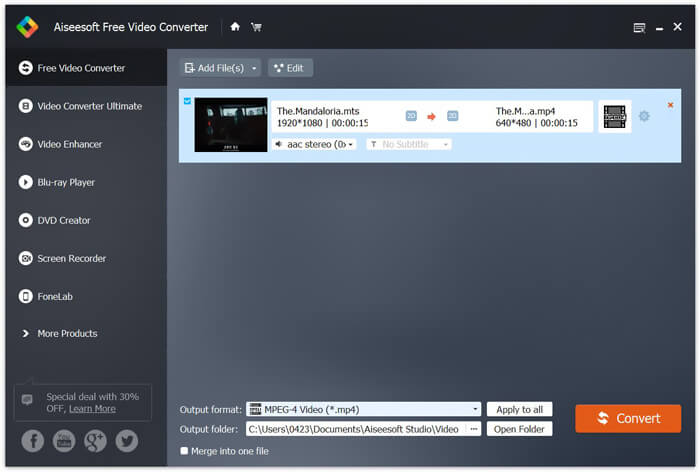
مرحله ۳. روی Output format کلیک کرده و سپس MP4 را بهعنوان فرمت هدف انتخاب کنید. در اینجا میتوانید با کلیک روی گزینه Output folder پوشه مقصد مناسبی برای ویدیوی تبدیلشده انتخاب کنید. پس از آن، روی دکمه Convert کلیک کنید تا فرایند تبدیل رایگان ویدئو از MTS به MP4 آغاز شود.

مبدل ویدئویی رایگان با جدیدترین فناوری شتابدهی طراحی شده است که سرعت تبدیل MTS / M2TS به MP4 را برای شما بسیار سریع تضمین می کند. علاوه بر این ، همچنین برخی از ویژگی های ویرایش اساسی را برای فیلم های سفارشی قبل از تبدیل نهایی به شما ارائه می دهد. باید آن را رایگان بارگیری کنید و امتحان کنید.
قسمت 4. نحوه تبدیل و پخش رایگان فایل MTS با VLC Player بصورت رایگان
اگر VLC Media Player را روی رایانه خود نصب کرده اید ، می توانید برای بارگذاری یا پخش بهتر ، به آن اعتماد کنید تا یک پرونده MTS را به MP4 ، MOV ، FLV و موارد دیگر تبدیل کند. در حقیقت ، VLC Player به عنوان یک پخش کننده رسانه منبع باز ، شما را قادر می سازد تا با تجربه بصری فوق العاده ، مستقیماً از پرونده MTS لذت ببرید. در اینجا ، در این بخش ، ما می خواهیم نحوه پخش و تبدیل یک فایل MTS در VLC player را به شما نشان دهیم.
یک فایل MTS را با VLC Player پخش کنید
مرحله 1. ابتدا باید اطمینان حاصل کنید که یک VLC Player در رایانه خود دارید. سپس این media player را برای پخش فایل MTS باز کنید.
مرحله ۲. روی Media > Open File کلیک کنید تا فایل MTS که میخواهید پخش کنید بارگذاری شود. پس از بارگذاری، پخشکننده VLC بهطور خودکار فایل MTS را برای شما پخش خواهد کرد.
در اینجا باید بدانید که همه پرونده های MTS را نمی توان با اثرات خوب بر روی VLC Player مشاهده کرد.
در برخی موارد ، به احتمال زیاد با خطای بازی MTS مواجه می شوید. برای اینکه VLC Player از پرونده MTS شما پشتیبانی کند ، باید برخی از پسوندها را اضافه کنید. به عنوان مثال ، برای پخش فایل MTS به کتابخانه ای برای رمزگشایی AACS نیاز دارید.
یک فایل MTS را با VLC Player تبدیل کنید
در واقع ، هنگام دریافت خطای پخش فایل MTS ، می توانید MTS خود را به یک قالب ویدیویی معروف مانند MP4 ، MOV ، FLV و AVI و غیره تبدیل کنید. پس از آن ، به راحتی می توانید فایل MTS را در هر دستگاهی با سهولت تماشا کنید.
مرحله ۱. پخشکننده VLC را روی رایانه خود باز کنید. روی Media > Convert/Save کلیک کنید تا پنجره پاپآپ Open Media باز شود. در اینجا میتوانید روی Add کلیک کنید تا فایل MTS مورد نظر برای تبدیل را وارد کنید.
مرحله ۲. پس از وارد کردن فایل، روی Convert Save کلیک کنید تا پنجره Convert باز شود. روی Profile کلیک کرده و سپس MP4 را بهعنوان فرمت مقصد انتخاب کنید. در این مرحله میتوانید با کلیک روی گزینه Browse پوشه مقصد مناسبی برای ویدیوی خروجی انتخاب کنید.
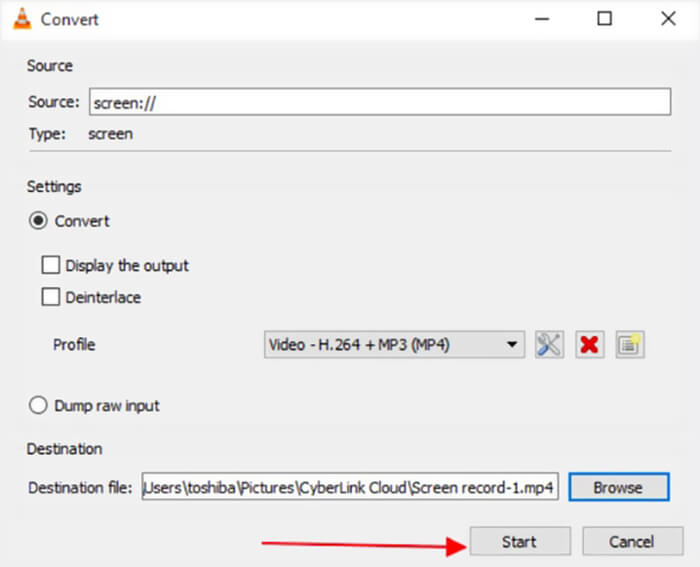
مرحله ۳. پخشکننده VLC برخی قابلیتهای ویرایش ابتدایی را در اختیار شما قرار میدهد. پیش از تبدیل نهایی فایل MTS، میتوانید جلوههای ویدئویی را مطابق نیاز خود تنظیم کنید. سپس میتوانید روی Start کلیک کنید تا فرایند تبدیل رایگان فایل MTS آغاز شود.
پس از خواندن این صفحه، میتوانید درک روشنی از فایل MTS به دست آورید. علاوه بر این، میتوانید یاد بگیرید چگونه یک فایل MTS را تبدیل و پخش کنید. اگر هنوز سؤالی درباره فرمت MTS دارید، برای ما پیغام بگذارید.
-
 2 روش ساده برای تبدیل رایگان MTS به MP3
 آیا نیاز به استخراج MP3 صوتی از پرونده MTS دارید اما نمی دانید چگونه؟ بهترین مبدل MTS به MP3 چیست؟ این پست دارای 2 روش آسان برای کمک به شما در تبدیل MTS / M2TS به MP3 با کیفیت صدای بالا است.
-
 4 روش برتر رایگان برای تبدیل MTS به MOV
 آیا نمی توانید فایل MTS را در رایانه یا تلفن iPhone / Android خود پخش کنید؟ پرونده MTS چیست و چگونه می توان آن را پخش کرد؟ بهترین MTS Video Converter چیست؟ این پست 4 روش ساده و رایگان را برای کمک به شما در تبدیل MTS به MOV برای پخش بهتر به اشتراک می گذارد.
-
 چه تفاوتی بین MTS و M2TS وجود دارد
 پرونده MTS یا M2TS چیست؟ تفاوت M2TS با MTS چیست؟ چگونه می توانم فایل فیلمبرداری ضبط شده MTS یا M2TS را تماشا کنم؟ تمام پاسخ ها را در این پست پیدا کنید.
