


 Video Converter Ultimate
 ضبط صفحه
 تعمیر ویدیو
چگونه فایلهای TS خود را به فرمت FLV بدون افت کیفیت تبدیل کنیم
This guide focuses on how to convert TS to FLV. Generally speaking, there are two kinds of video formats, commonly used and others. FLV is one of the commonly used video formats developed for internet, while TS belongs the latter kind. TS, standing for Video Transport Stream, is used to store MPEG-2 video data. They are often seen on DVDs. Anyway, let's start the journey now.

قسمت 1: 3 روش برتر برای تبدیل TS به FLV در دسک تاپ
راه 1: تبدیل TS به FLV با مبدل FLV رایگان
As its name indicated, FVC Free FLV Converter is just the FLV converter you need to turn TS to FLV, so that you can watch your files or share them on social media. It is total free to use with no watermark or other limit. It even provides some features you can only find in paid software.
ویژگی های اصلی بهترین مبدل FLV
- 1. به راحتی بین FLV و سایر فرمت های ویدیویی تبدیل کنید.
- 2. هنگام تبدیل از کیفیت فیلم و صدا محافظت کنید.
- 3. دسته ای همزمان چندین پرونده ویدیویی TS را مدیریت کنید.
دانلود رایگانبرای ویندوز 7 یا بالاتردانلود امن
دانلود رایگانبرای مکاواس 10.7 یا بالاتردانلود امن
نحوه تبدیل فایل های TS به FLV به صورت رایگان
Step 1: Import TS files
بعد از نصب مبدل FLV در رایانه ، بهترین آن را راه اندازی کنید. سپس بر روی دکمه Add File (s) کلیک کنید تا تمام پرونده های TS از DVD یا رایانه شما وارد شود. سپس فیلم ها در منطقه کتابخانه ظاهر می شوند.

Step 2: Set output format
If you need to edit the videos, click the Edit button to open the video editor window. If not, go to the bottom, click and expand the Output format option. Then search for FLV in the General Video tab and select it.

Step 3: Convert TS to FLV
Next, set a specific folder to save the FLV output files by hitting the Browse button. Finally, click on the Convert button at bottom right corner to begin converting TS to FLV.

راه 2: نحوه تبدیل TS به FLV توسط VLC
VLC روش دیگری برای تبدیل TS به FLV به صورت رایگان است زیرا این یک پروژه منبع باز است. این برنامه برای رایانه های شخصی ، مک و لینوکس موجود است. هزینه ها بدیهی است. کیفیت خروجی خیلی خوب نیست و روش کار پیچیده ای است. اگر مشکلی ندارید ، مراحل زیر را انجام دهید.
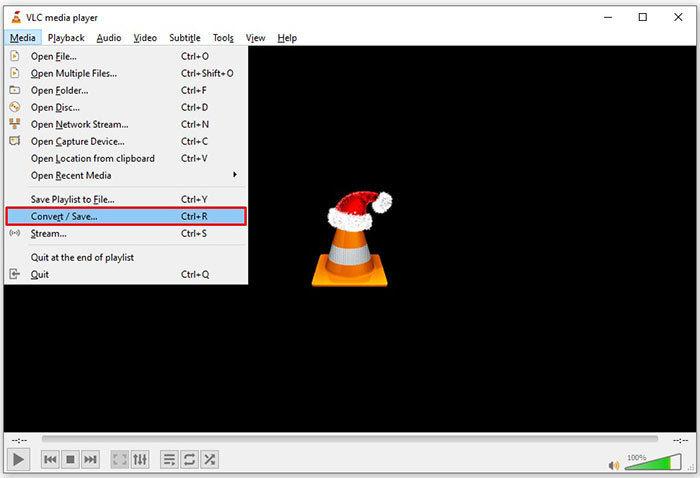
Step 1: Open VLC, click Media menu and choose Convert/Save. The open-media dialog will pop up.
Step 2: Click the Add button and add a TS file into VLC. Hit Convert/Save button to move on.
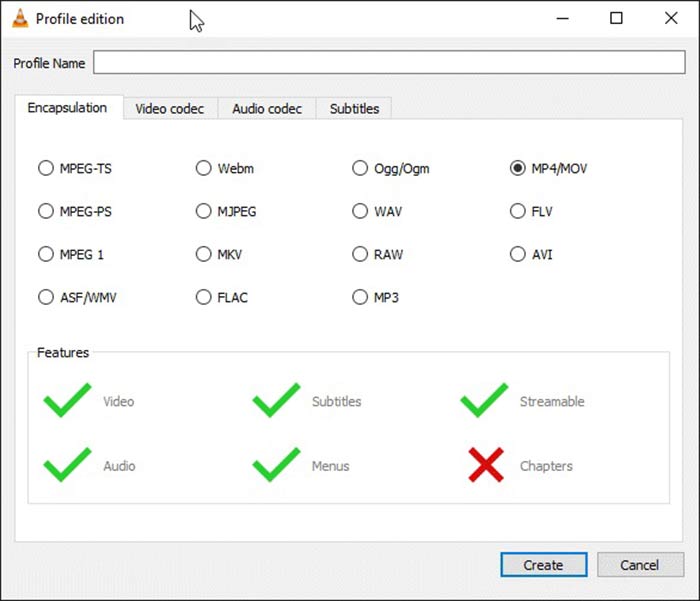
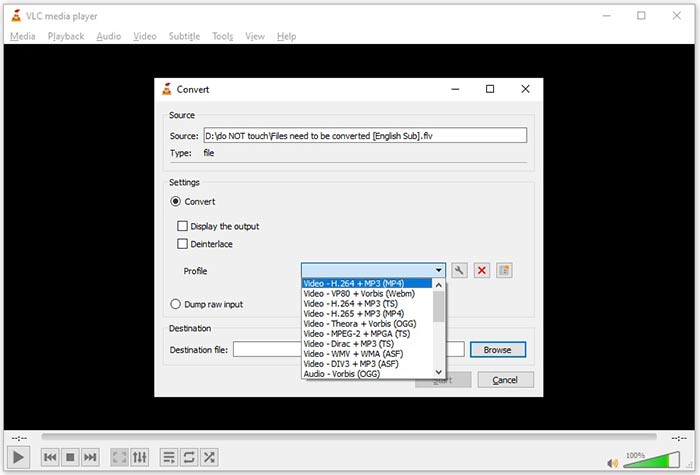
Step 3: Open the Profile option and choose the output format. If you cannot find FLV in Profile, click the Profile Edit button, enter FLV in Profile Name box, select FLV and click Create. Then select FLV from Profile.
Step 4: Hit the Browse button to set the destination folder and click the Start button.
روش 3: نحوه تبدیل TS به FLV از طریق FormatFactory
FormatFactory یک برنامه رایگان تبدیل فایل برای رایانه های شخصی است. این امکان را برای شما فراهم می کند تا فایل های TS را بدون پرداخت یک پنی به FLV تبدیل کنید. با این حال ، فقط از تبدیل با ضرر پشتیبانی می کند. این بدان معناست که کیفیت فیلم شما کاهش می یابد. بعلاوه ، در Mac یا Linux در دسترس نیست.
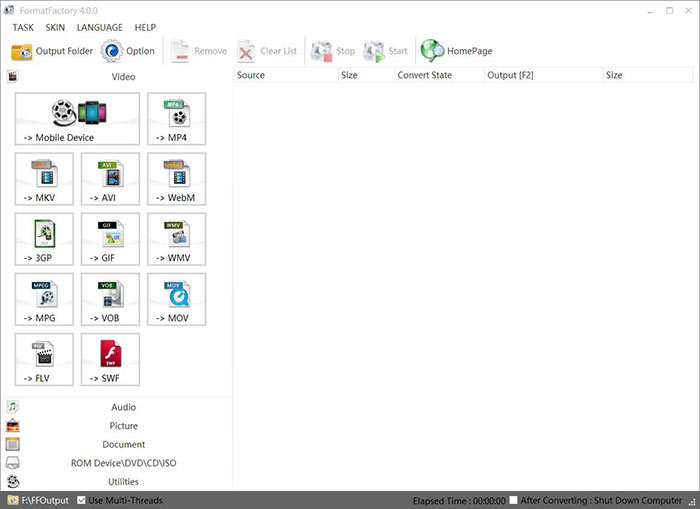
Step 1: Run the free TS to FLV converter, go to the Video section and select FLV.
Step 2: Click the Add File button and import the TS video files from your computer. Hit OK to confirm it.
Step 3: Next, click on the Start button to initiate converting TS to FLV on PC. It takes a while since the freeware is very slow. When it is done, you can go to the directory under Output section to find the FLV files.
قسمت 2: نحوه تبدیل TS به FLV آنلاین
VLC and other video converting software all need you to install on your hard disk. It takes space of your internal memory. You may wonder whether you can convert TS to FLV without installing software. The answer is FVC Free Online Video Converter. It works online and is free of charge. Although does not provide bonus features, it is enough to meet you basic need on video converting.
Step 1: Open https://www.free-videoconverter.net/free-online-video-converter/ in a web browser and click the Add Files to Convert button to download the launcher.

Step 2: Once downloading is done, the launcher will pop up. Click the Add File button to upload the TS files. This web app supports batch conversion. Go to the bottom and select FLV at the bottom.

Step 3: If you are ready, click on the Convert button to trigger the TS to FLV conversion. The app works fast, but the real time is determined by your internet connection. Wait for the converting to finish and download the FLV output.
Don't Miss:
- • راهنمای جامع نحوه تبدیل TS به MP4
- • نحوه تبدیل فایل TS به فرمت های صوتی MP3 ، AIFF ، ALAC ، FLAC و بیشتر در ویندوز / مک
قسمت 3: س FAالات متداول در مورد تبدیل TS به FLV
چرا نمی توانم TS را به فرمت های دیگر تبدیل کنم؟
TS فرمت فایل ویدیویی برای DVD است. اکثر دی وی دی های تجاری رمزگذاری شده و توسط کپی رایت محافظت می شوند. همچنین اگر نرم افزار مناسب تبدیل فیلم را ندارید ، از تبدیل فایل های TS جلوگیری می کنید.
آیا می توانم TS را در Windows Media Player باز کنم؟
Windows Media Player نمی تواند پرونده های DVD یا TS را باز کند ، بنابراین نمی توانید TS را در WMP پخش کنید. متناوباً ، می توانید از پخش کننده ویدیوی شخص ثالث مانند VLC استفاده کنید. یا باید بسته کدک اضافی را برای WMP نصب کنید.
چگونه می توان پرونده های TS را مشاهده کرد؟
فقط چند مدیا پلیر از پرونده های TS مانند VLC پشتیبانی می کنند. پخش کننده های داخلی داخلی در رایانه های شخصی و Mac ، Windows Media Player و QuickTime Player با TS سازگار نیستند. روش دیگر برای تماشای فایل های TS ، رایت آنها روی دی وی دی است.
نتیجه
اکنون ، شما باید حداقل چهار روش برای تبدیل فایل های TS به فیلم های FLV برای اشتراک گذاری آنلاین یا بازی در دستگاه های دیجیتال را بیاموزید. به عنوان قالب ویدئویی برای فیلم های DVD ، TS به طور گسترده ای در رایانه یا دستگاه های تلفن همراه استفاده نمی شود. منطقی است که اکثر پخش کننده های رسانه نمی توانند آن را باز کنند. مبدل FVC رایگان FLV؛ با این حال ، به شما کمک می کند TS را به راحتی به FLV تغییر دهید. س questionsالات بیشتری دارید؟ لطفاً آنها را در زیر این پست بنویسید و ما در مورد آن پاسخ خواهیم داد.
-
 3 مرحله آسان برای رایت ویدئو _TTS Files / Folder to DVD on Mac / Windows
 چگونه می توانم فایل های TS را به دیسک DVD تبدیل و رایت کنم؟ این راهنمای گام به گام به شما نشان می دهد که چگونه فایلها و پوشه های TS را در ویندوز / مک در DVD کپی کنید تا بتوانید فایلهای TS را روی DVD player یا تلویزیون تماشا کنید.
-
 6 روش آسان برای تبدیل TS به AVI / MKV / MOV / WMV در ویندوز / مک
 آیا می خواهید پرونده های TS را به سرعت به AVI / MKV / MOV / WMV تبدیل کنید؟ این مقاله مبدل های ویدیویی آنلاین و آفلاین را با راهنمای کامل نشان می دهد. شاید بتوانید بهترین مبدل TS رایگان را از اینجا دریافت کنید.
-
 فشرده سازی فایل های ویدئویی TS - نحوه فشرده سازی فایل های TS به اندازه های کوچکتر
 وقتی می خواهید فایل های ویدئویی TS با کیفیت بالا را در دستگاه های خود ذخیره کنید ، باید در مورد چگونگی فشرده سازی فایل های ویدئویی TS در اندازه های کوچکتر از این مقاله بیشتر بدانید.
