


 Video Converter Ultimate
 ضبط صفحه
 تعمیر ویدیو
نحوه تبدیل فایلهای ویدئویی FLV به فرمت 3G2 در دسک تاپ و آنلاین
میگویند فناوری زندگی را تغییر میدهد و انجام کارهای روزمره و شغلی ما را آسانتر میکند. با این حال، هر سکهای دو رو دارد و فناوری هم همینطور است. برای مثال، ویدئوی دیجیتال این فرصت را به ما میدهد که در هر زمان و هر مکان به سرگرمی و اطلاعات دسترسی داشته باشیم. مشکل، فرمت ویدئو است. طبق یک نظرسنجی اخیر، بیش از صد نوع فرمت ویدئویی وجود دارد. این راهنما بر این موضوع تمرکز دارد که چگونه به شما کمک کند روی کامپیوتر و به صورت آنلاین و رایگان فرمت FLV را به 3G2 یا 3GP تبدیل کنید.

قسمت 1: نحوه تبدیل FLV به 3G2 در PC / Mac
روش 1: تبدیل FLV به 3G2 با مبدل FLV رایگان
تنها تعداد محدودی مبدل ویدئو از فرمت 3G2 پشتیبانی میکنند. FVC Free FLV Converter یکی از آنهاست. علاوه بر این، بدون پرداخت حتی یک ریال میتواند نیاز شما را برطرف کند. اگر تعداد زیادی فایل FLV دارید، میتواند همه آنها را همزمان و با سرعت بالا پردازش کند.
ویژگیهای اصلی بهترین مبدل FLV به 3G2
- 1. FLV را بدون افت کیفیت به 3G2 تبدیل کنید.
- 2. دسته ای با استفاده از فناوری چند نخ چند پرونده FLV را اداره کنید.
- 3. طیف گسترده ای از ابزارهای پاداش مانند ویرایش ویدئو را ارائه دهید.
دانلود رایگانبرای ویندوز 7 یا بالاتردانلود امن
دانلود رایگانبرای مکاواس 10.7 یا بالاتردانلود امن
چگونه FLV را به صورت دستهای و رایگان به 3G2 تبدیل کنیم
مرحله 1: اضافه کردن پرونده های FLV
هر زمان لازم داشتید FLV را به 3G2 تبدیل کنید، بهترین مبدل ویدئوی رایگان را روی کامپیوتر خود نصب و اجرا کنید. روی دکمه Add File(s) کلیک کنید، همه فایلهای FLV که میخواهید تبدیل کنید را پیدا کرده و آنها را باز کنید.

مرحله 2: قالب خروجی را انتخاب کنید
بعد از بارگذاری ویدئو، به بخش پایینی پنجره بروید. روی گزینه Output format کلیک کنید و آن را باز کنید، با نوار جستجو به دنبال 3G2 بگردید و آن را در سمت راست انتخاب کنید. روی دکمه Open Folder کلیک کرده و پوشه مشخصی را برای ذخیره خروجی انتخاب کنید.

مرحله 3: FLV را به 3G2 تبدیل کنید
در نهایت روی دکمه Convert کلیک کنید تا فرآیند تبدیل FLV به 3G2 بلافاصله آغاز شود. چند دقیقه بعد، فایلهای 3G2 را در پوشهای که انتخاب کرده بودید پیدا خواهید کرد.

روش 2: نحوه تبدیل FLV به 3G2 با VLC
VLC نه تنها یک پخش کننده رسانه منبع باز است ، بلکه یک مبدل FLV به 3G2 رایگان است. به شما امکان می دهد مبدل ویدیو را به صورت رایگان در ویندوز و مک انجام دهید. مراحل زیر است:
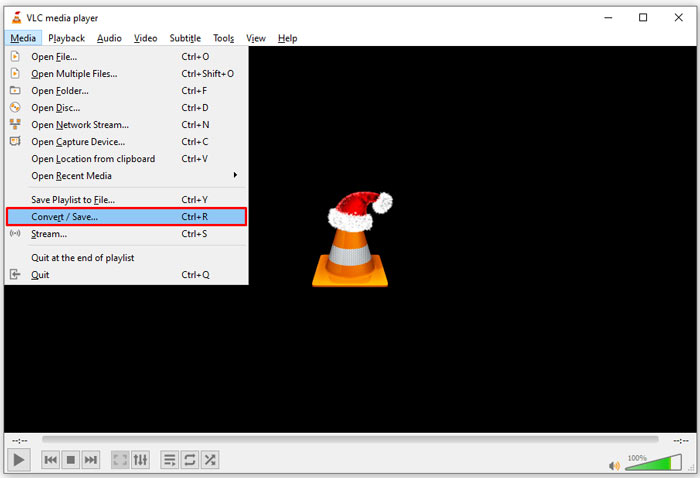
مرحله 1: ویالسی (VLC) را باز کنید، به منوی Media در نوار بالایی بروید و گزینه Convert/Save را انتخاب کنید.
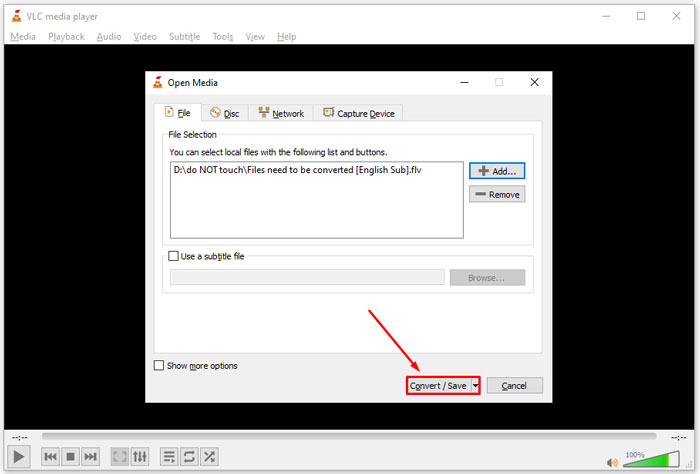
مرحله 2: روی دکمه Add کلیک کرده و فایل FLV که میخواهید به فرمت دیگری تبدیل کنید را باز کنید. روی دکمه Convert/Save بزنید تا ادامه دهید.
مرحله 3: گزینه Profile را باز کرده و فرمت 3G2 یا فرمت مرتبط را انتخاب کنید. سپس با کلیک روی دکمه Browse پوشه خروجی را تنظیم کنید.
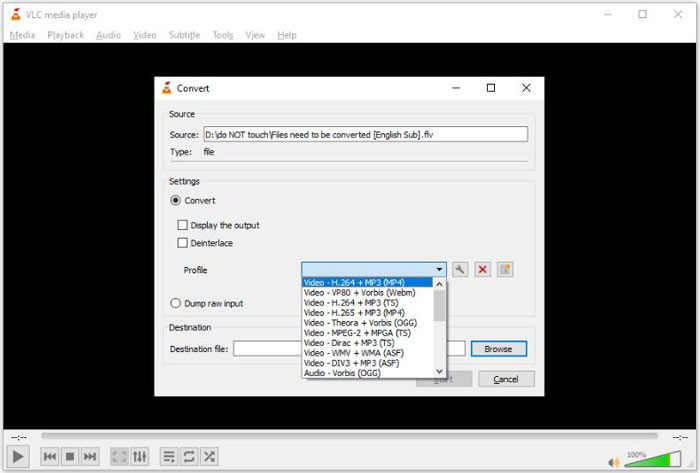
مرحله 4: به محض اینکه روی دکمه Start کلیک کنید، VLC تبدیل FLV به 3G2 را آغاز خواهد کرد. این کار کمی زمان میبرد و باید صبور باشید.
قسمت 2: نحوه تبدیل FLV به 3G2 آنلاین
گاهی فقط هر از چند گاهی نیاز دارید FLV را به 3G2 تبدیل کنید. در چنین مواردی، یک برنامه تحت وب انتخابی مناسب است، مانند FVC Free Online Video Converter. این سرویس رایگان است و نیازی به ثبتنام ندارد و محدودیتی برای اندازه فایل قائل نیست.
مرحله 1: در هر مرورگری به آدرس https://www.free-videoconverter.net/free-online-video-converter/ مراجعه کنید. روی دکمه Add Files to Convert کلیک کرده و لانچر را دریافت کنید.

مرحله 2: وقتی دانلود انجام شد، لانچر بهطور خودکار باز میشود. روی دکمه Add File کلیک کرده و فایلهای FLV را بارگذاری کنید. این مبدل ویدئوی تحت وب از تبدیل دستهای پشتیبانی میکند.
اگر میخواهید پارامترهایی مانند وضوح تصویر (resolution)، نرخ فریم (framerate) و موارد دیگر را تنظیم کنید، روی آیکون Gear کلیک کرده و پنجره Settings را باز کنید.

مرحله 3: به پایین صفحه بروید و در ناحیه فرمت، یک فرمت خروجی مناسب انتخاب کنید. به محض آماده شدن، روی دکمه Convert کلیک کنید. سپس نتیجه را روی هارد دیسک خود دانلود کنید.
شاید این مطالب را هم بپسندید:
قسمت 3: س FAالات متداول در مورد FLV تا 3G2
پرونده های 3G2 چیست؟
3G2 ، مخفف 3 Generation Partnership Project Group 2 است ، پسوندی برای پرونده های چندرسانه ای مبتنی بر MPEG-4. توسط گروهی متشکل از هفت سازمان توسعه استاندارد برای تلفن های همراه در شبکه های CDMA ایجاد شده است. بسیار شبیه 3GP است.
آیا Windows Media Player می تواند 3G2 را باز کند؟
نه ، WMP نمی تواند پرونده های ویدیویی 3G2 را باز یا پخش کند زیرا فاقد رمزگذار مربوطه است. شما سه گزینه برای باز کردن پرونده های 3G2 دارید: تبدیل آن به قالب ویدیوی استاندارد ، بارگیری یک پخش کننده فیلم 3G2 یا نصب بسته کدک اضافی برای WMP.
آیا FLV بهتر از 3G2 است؟
پاسخ به هدف شما بستگی دارد. اگر فیلم را از طریق تلفن همراه با شبکه CDMA مشاهده می کنید ، 3G2 انتخاب بهتری است. برای به اشتراک گذاری ویدیو ، FLV بهتر از 3G2 است.
نتیجه
اکنون ، شما باید درک کنید که 3G2 مخفف چیست و چگونه FLV را بدون افت کیفیت تبدیل کنید. VLC یک مبدل ویدیویی رایگان است که توانایی تغییر فرمت های ویدیویی را دارد. با این حال ، FVC Free FLV Converter عملکرد بهتری دارد. استفاده از آن از VLC آسانتر است و کاملاً رایگان است. اگر مشکلات بیشتری دارید ، لطفاً زیر این پست پیام بگذارید و ما سریع به آن پاسخ خواهیم داد.
-
 FLV به WAV - تبدیل FLV به WAV آنلاین بصورت رایگان و در Mac / PC
 چگونه یک فایل FLV را تبدیل کنم؟ آیا VLC می تواند FLV را به WAV تبدیل کند؟ این پست 3 روش رایگان برای تبدیل FLV به WAV بدون افت کیفیت را بیان می کند.
-
 FLV به MPG - نحوه تبدیل FLV به MPG در Mac ، PC و آنلاین رایگان
 چگونه FLV را به MPEG تبدیل کنیم؟ آیا می توانم FLV را به MPG به صورت رایگان تبدیل کنم؟ این پست دارای 3 مبدل ویدیوی رایگان است که به شما کمک می کند FLV را بدون افت کیفیت به MPG تبدیل کنید.
-
 FLV به Xbox - نحوه تبدیل و پخش FLV در Xbox
 نمی توانید فایل های FLV را در Xbox One یا Xbox 360 پخش کنید؟ آیا نیاز به تبدیل FLV به قالب Xbox پشتیبانی شده مانند MP4 ، AVI ، MOV یا WMV دارید؟ در این پست لیست 3 مبدل FLV به Xbox رایگان برای بازی FLV در Xbox وجود دارد.
