


 Video Converter Ultimate
 ضبط صفحه
 تعمیر ویدیو
نحوه تبدیل فایلهای ویدیویی FLV به فرمت 3GP به صورت رایگان
این مقاله بهترین روشها برای تبدیل FLV به 3GP را به شما نشان میدهد. طبق بررسیها، فرمتهای ویدیویی بسیار زیادی در بازار وجود دارد. توسعهدهندگان آنها را برای اهداف متفاوتی عرضه کردهاند. برای مثال، FLV که مخفف Flash Video است، برای ذخیره محتوای تصویری جهت پخش در Adobe Flash Player از طریق اینترنت استفاده میشود.
از طرف دیگر ، 3GP قالب چندرسانه ای ایجاد شده توسط پروژه نسل سوم مشارکت برای ذخیره پهنای باند و استفاده از داده در دستگاه های تلفن همراه است. به عبارت دیگر ، بهتر است FLV را به 3GP تبدیل کرده و فیلم ها را روی گوشی تماشا کنید.

قسمت 1: بهترین راه برای تبدیل FLV به 3GP در دسک تاپ
FVC Free FLV Converter یک مبدل ویدیویی قدرتمند است. همانطور که از نامش پیداست، این برنامه به شما امکان میدهد بدون پرداخت هیچ هزینهای، FLV را به 3GP تبدیل کنید. علاوه بر این، قابلیتهای کاربردی زیادی مانند ویرایش ویدیو و صدا ارائه میدهد. مهمتر از همه، رابط کاربری دوستانه آن باعث میشود خیلی سریع به آنچه میخواهید دست پیدا کنید.
ویژگی های اصلی بهترین مبدل FLV رایگان
- 1. فیلم های FLV را به هر قالب چندرسانه ای مانند 3GP تبدیل کنید.
- 2. دسته ای همزمان چندین پرونده ویدئویی را اداره کنید.
- 3. رمزگذاری فایل های FLV برای پخش در دستگاه های تلفن همراه.
دانلود رایگانبرای ویندوز 7 یا بالاتردانلود امن
دانلود رایگانبرای مکاواس 10.7 یا بالاتردانلود امن
نحوه تبدیل FLV به 3GP به صورت رایگان
پس از نصب برنامه روی دستگاه خود، بهترین مبدل رایگان FLV را اجرا کنید. این برنامه با Windows 10/8/7 و Mac OS X سازگار است. روی دکمه Add File(s) کلیک کنید تا پنجره انتخاب فایل باز شود. فایلهای FLV مورد نظر برای تبدیل را انتخاب کرده و روی Open کلیک کنید. سپس ویدیوها در ناحیه کتابخانه ظاهر میشوند.

مرحله 2: تنظیم فرمت خروجی
روی منوی کشویی Profile format در پایین کلیک کنید تا کادر پروفایل نمایش داده شود. در کادر Search Profile عبارت 3GP را وارد کرده و کلید Enter را روی صفحهکلید خود فشار دهید. سپس فرمت خروجی را انتخاب کنید. اگر میخواهید ویدیوها را روی دستگاه همراه خود پخش کنید، سازنده دستگاه و مدل مناسب را مستقیماً انتخاب کنید.

مرحله 3: تبدیل FLV به 3GP
برای تعیین پوشه ذخیرهسازی خروجی، روی دکمه Open Folder در پایین کلیک کنید. در نهایت، روی دکمه Convert کلیک کنید تا فرایند تبدیل FLV به 3GP آغاز شود. چند دقیقه بعد، فایلهای 3GP را روی هارد دیسک خود پیدا خواهید کرد.

قسمت 2: نحوه تبدیل FLV به 3GP آنلاین
اپلیکیشنهای مبدل ویدیوی تحت وب، یک روش محبوب دیگر برای تبدیل FLV به 3GP بهصورت رایگان هستند. با این حال، بیشتر آنها معایب مختلفی مانند محدودیت حجم فایل، واترمارک، مشکلات امنیتی و موارد دیگر دارند. خوشبختانه، FVC Free Online Video Converter میتواند این مشکلات را برای شما حل کند. این سرویس کاملاً رایگان و بدون هیچ محدودیتی است. کیفیت خروجی هم بسیار خوب است.
مرحله 1: در یک مرورگر وب به آدرس https://www.free-videoconverter.net/free-online-video-converter/ بروید و روی دکمه Add Files to Convert کلیک کنید تا لانچر را دریافت کنید. این لانچر فضای محلی سیستم شما را اشغال نخواهد کرد.
برای تبدیل دستهای فایلها، نسخهٔ دسکتاپ را دانلود کنید.
مرحله 2: روی منوی Add File کلیک کرده و فایلهای FLV که میخواهید تبدیل کنید را بارگذاری کنید. این اپلیکیشن تحت وب به شما اجازه میدهد چند ویدیو را بهصورت دستهای و همزمان تبدیل کنید.
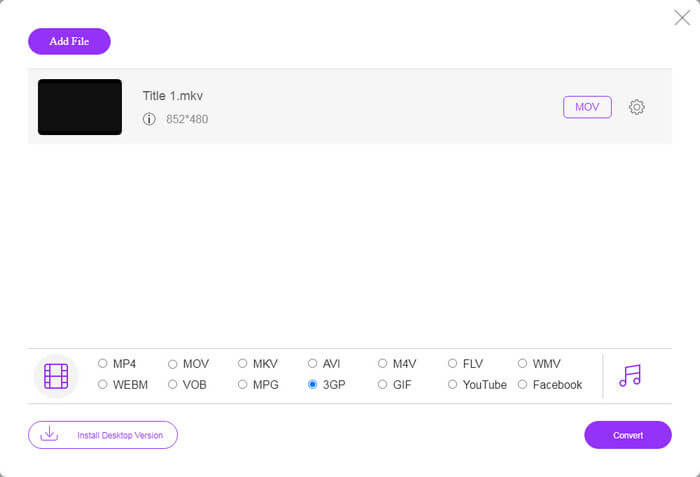
مرحله 3: به پایین صفحه بروید و در بخش پروفایل، فرمت 3GP را انتخاب کنید. روی دکمه Convert کلیک کنید تا تبدیل آنلاین FLV به 3GP آغاز شود. اگر شبکه شما سرعت خوبی داشته باشد، این فرایند در چند ثانیه تمام میشود. سپس فایلهای 3GP را روی هارد دیسک خود دانلود کنید.
از دست ندهید:
قسمت 3: نحوه تبدیل FLV به 3GP با VLC
گاهی اوقات ، نرم افزار رایگان به اندازه نرم افزارهای حرفه ای قدرتمند است. به عنوان مثال VLC ، یک دستگاه پخش رسانه ای منبع باز محبوب است. این برنامه قادر است FLV را به صورت رایگان در ویندوز ، مک و لینوکس به 3GP تبدیل کند. البته ، هزینه واضح است ، مانند استفاده سخت. بنابراین ، مراحل زیر را به اشتراک می گذاریم:
مرحله 1: مبدل رایگان FLV به 3GP را روی کامپیوتر خود اجرا کنید. ابتدا باید آن را نصب کنید. وبسایت رسمی، نصاب ایمن را در اختیار شما قرار میدهد.
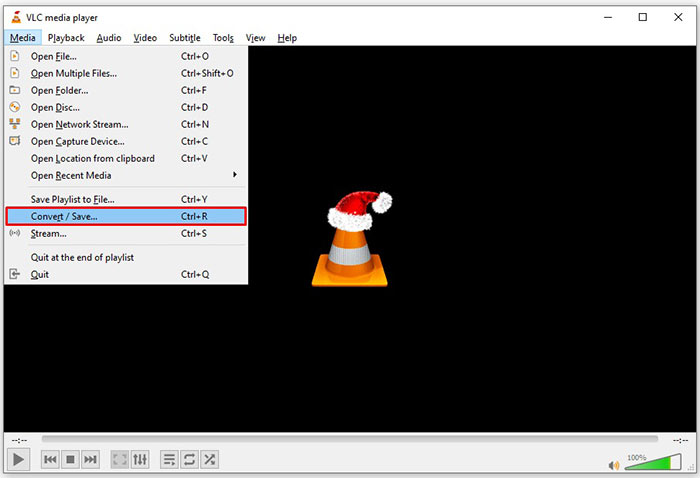
مرحله 2: به منوی Media در نوار بالایی بروید و گزینه Convert/Save را انتخاب کنید. سپس پنجره گفتوگوی Open Media ظاهر میشود.
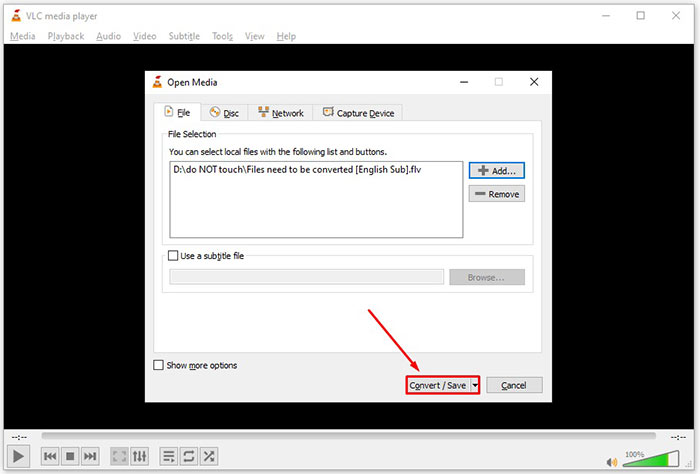
مرحله 3: روی دکمه Add کلیک کنید، فایل FLV مورد نیاز برای تبدیل را پیدا کرده و انتخاب کنید، و روی Open کلیک کنید. روی دکمه Convert/Save بزنید تا به پنجره بعدی بروید.
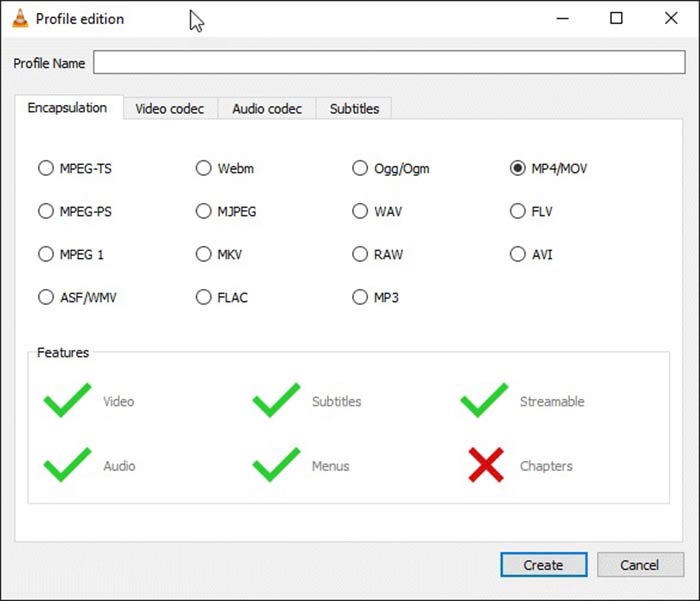
مرحله 4: لیست کشویی کنار Profile را باز کرده و 3GP یا فرمت ویدیویی مرتبط را انتخاب کنید. اگر میخواهید کدک ویدیو یا دیگر پارامترها را تغییر دهید، روی دکمه Profile Edit در کنار لیست کشویی کلیک کرده و 3GP را اضافه کنید.
مرحله 5: روی دکمه Browse کلیک کنید و در بخش Destination یک پوشه مشخص را برای ذخیره فایل خروجی 3GP انتخاب کنید.
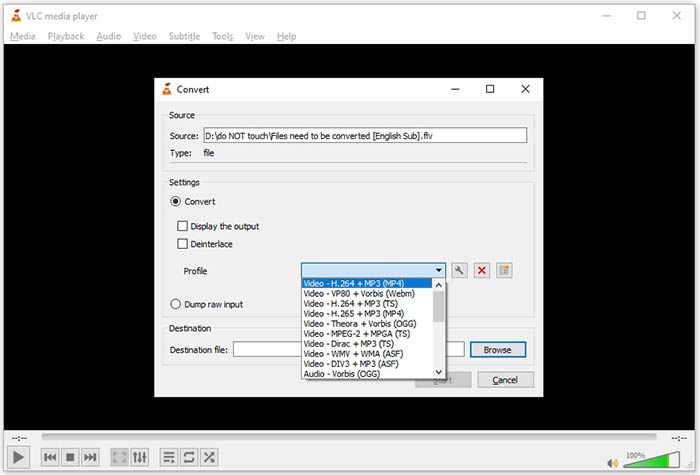
مرحله 6: به محض اینکه روی دکمه Start کلیک کنید، VLC تبدیل FLV به 3GP را آغاز خواهد کرد.
از آنجا که VLC با ضبط ویدیوی اصلی کار را انجام می دهد ، یک لحظه طول می کشد. این بدان معنی است که این فرایند به اندازه طول فیلم FLV شما صرف می شود.
FLV در مقابل 3GP
Adobe Flash Player از FLV برای ارائه محتوای ویدیویی مانند فیلم ها و برنامه های تلویزیونی استفاده می کرد. امروزه Adobe دیگر پخش کننده را توسعه نمی دهد و به کاربران توصیه می کند به دلایل امنیتی آن را حذف نصب کنند. با این حال، همچنان می توانید از فرمت FLV در بسیاری از برنامه های غیر Adobe/Macromedia استفاده کنید.
پروژه مشارکت نسل سوم (3GPP) فرمت 3GP/3GPP را به عنوان یک قالب کانتینری چند رسانه ای تولید کرد. این در واقع بر اساس فرمت فایل رسانه ای ISO است. ما اغلب از آن برای ذخیره جریان های ویدیویی/صوتی که بین تلفن های همراه 3G و آنلاین منتقل می شوند استفاده می کنیم.
قسمت 4: س FAالات متداول درباره تبدیل FLV به 3GP
آیا تبدیل FLV به 3GP به کیفیت فیلم آسیب می رساند؟
به طور کلی ، تبدیل فیلم کیفیت خود را از دست می دهد. با این حال ، یک برنامه مبدل ویدیوی قدرتمند قادر است این مشکل را برطرف کرده و کیفیت فیلم را با استفاده از فناوری پیشرفته بهینه کند.
چه مدت طول می کشد تا فیلم FLV تبدیل شود؟
این توسط چندین عامل تعیین می شود ، مانند طول فیلم ، نرم افزار تبدیل فیلم که استفاده می کنید ، عملکرد سخت افزار شما و موارد دیگر. اگر از مبدل ویدیوی وب استفاده می کنید ، اتصال اینترنت شما یک عنصر اساسی است.
چرا FLV در iPhone من بازی نمی کند؟
آیفون از MOV ، بخشی از MP4 ، ASF و AVI پشتیبانی می کند. بنابراین ، نمی توانید FLV را مستقیماً در آیفون باز کنید. با این حال ، روش هایی برای تماشای FLV در دستگاه های تلفن همراه وجود دارد. اگر فایل FLV شما توسط سرویس های اینترنتی مانند Google Drive میزبانی شود ، دستگاه پخش رسانه داخلی در دسترس است. به علاوه ، شما می توانید از رسانه پخش دیگری مانند VLC استفاده کنید.
نتیجه
این راهنما به شما سه روش رایگان برای تبدیل فایلهای ویدئویی FLV به فرمت 3GP در رایانه یا آنلاین گفته است. اگر آماده تماشای فیلم های FLV در دستگاه های تلفن همراه هستید ، بهتر است آن را با FVC Free FLV Converter به 3GP یا سایر فرمت های ویدیویی موبایل پسند تبدیل کنید. استفاده از آن نه تنها آسان است ، بلکه می تواند از کیفیت فیلم شما نیز محافظت کند. س questionsالات بیشتری دارید؟ لطفا در زیر یک پیام بگذارید
-
 نحوه تبدیل فایلهای ویدئویی FLV به MP4 بدون پرداخت یک پنی
 این راهنما چهار روش رایگان برای تبدیل فایلهای ویدئویی FLV شما به فرمت MP4 در ویندوز 10/8/7 / XP و Mac OS X را به اشتراک می گذارد ، بنابراین می توانید از فیلم ها در هر دستگاهی لذت ببرید.
-
 چگونه فیلم های FLV خود را به فایل های صوتی MP3 در دسک تاپ و آنلاین تبدیل کنیم
 چگونه می توان FLV را به فایل MP3 تبدیل کرد؟ تنها کاری که باید انجام دهید این است که این مقاله را با دقت بخوانید ، روش مورد علاقه خود را پیدا کرده و راهنمای گام به گام ما را دنبال کنید تا به خواسته خود برسید.
-
 3 روش برتر برای تبدیل FLV به MOV
 چگونه FLV را به MOV تبدیل کنیم؟ چگونه می توانم FLV را به MOV در مک تبدیل کنم؟ آیا راهی رایگان برای تبدیل FLV به MOV به صورت آنلاین وجود دارد؟ در این پست 3 مبدل FLV به MOV برای تغییر فایل های FLV به MOV به اشتراک گذاشته شده است.

