


 Video Converter Ultimate
 ضبط صفحه
 تعمیر ویدیو
3 روش کارآمد برای تبدیل FLV به VOB به صورت رایگان
اگر ویدیویی را از یوتیوب دانلود کردهاید و میخواهید آن را روی DVD ذخیره کنید، ممکن است متوجه شوید که ویدیوی اینترنتی در قالب FLV است. برای رایت آن روی DVD، لازم است فایلهای FLV را به VOB تبدیل کنید. بنابراین، این مقاله ۳ روش رایگان برای تبدیل FLV به VOB را معرفی میکند که بهراحتی میتوانید روی دستگاههای دسکتاپ انجام دهید.

قسمت 1. نحوه صادرات VOB از FLV به صورت رایگان
FVC Free FLV Converter ابزاری ایدهآل برای تبدیل FLV به VOB است. بهعنوان یک مبدل ویدیویی همهکاره، به شما اجازه میدهد فایلهای FLV را با کیفیت و سرعت بالا تبدیل، ادغام و سفارشیسازی کنید. همچنین میتوانید برای تزیین ویدیوهایتان تم اضافه کرده و آنها را روی دستگاههای مختلف از جمله آیفون و آیپد به اشتراک بگذارید.

- با یک کلیک FLV را به VOB و سایر قالب ها بصورت رایگان تبدیل کنید.
- به شما امکان می دهد آهنگ های صوتی را به طور انتخابی غیرفعال یا ویرایش کنید.
- قبل از تبدیل ، یک تم برای فیلم FLV خود اضافه کنید.
- یک روش رایگان ، سریع و ساده برای تبدیل دسته ای فایل های FLV ارائه دهید.
دانلود رایگانبرای ویندوز 7 یا بالاتردانلود امن
دانلود رایگانبرای مکاواس 10.7 یا بالاتردانلود امن
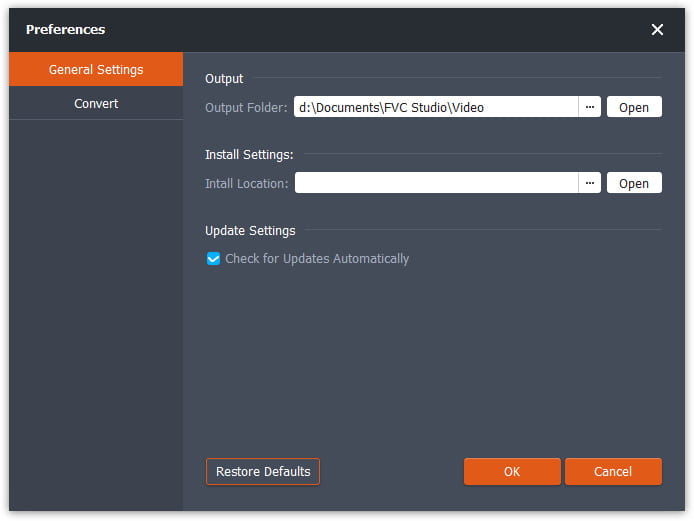
مرحله ۱. پس از دانلود و اجرای Free FLV Converter، میتوانید پوشهای را برای ذخیره فایل VOB انتخاب کنید. روی گزینه Menu در بالای رابط کلیک کرده و به قسمت Preference بروید. در بخش General Settings میتوانید پوشه خروجی را انتخاب کنید.
مرحله ۲. برای افزودن فایلهای FLV باید روی دکمه Add Files در رابط کلیک کنید. سپس میتوانید فایلها را در پنجره مرور انتخاب کنید. بعد باید روی فیلد Output Format کلیک کرده و قالب VOB را انتخاب کنید.

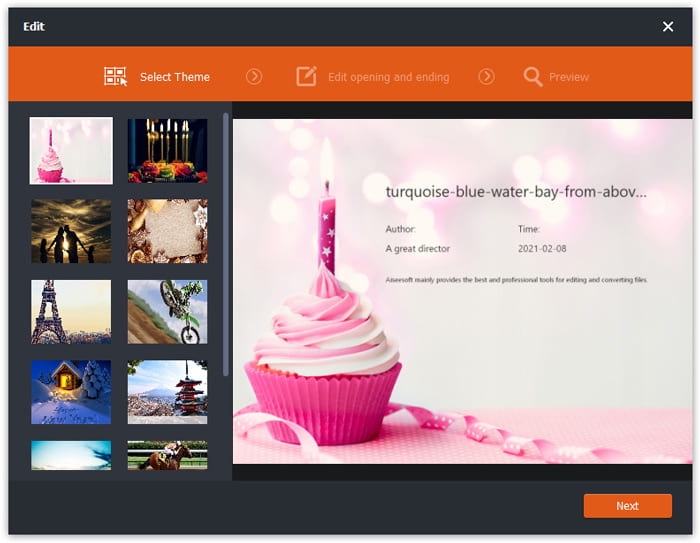
مرحله ۳. میتوانید قبل از تبدیل، برای فایل ویدیویی خود تم اضافه کنید. روی دکمه Edit در رابط کلیک کرده و به بخش Select Theme بروید. میتوانید تمهایی مانند تولد، خانواده و منظره را برای ویدیوی FLV خود انتخاب کنید. سپس میتوانید افکتهای ویدیو را پیشنمایش کرده و آن را ذخیره کنید.
مرحله ۴. برای شروع تبدیل، باید روی دکمه Convert در رابط اصلی کلیک کنید. پوشه بهطور خودکار باز میشود و میتوانید فایل VOB را در آن پیدا کنید.
Free FLV Converter یک نرم افزار همه کاره برای تبدیل فیلم های FLV است و می توانید فیلم های خود را با ویژگی های پیشرفته ویرایش ارتقا دهید.
قسمت 2. نحوه تغییر FLV به VOB آنلاین
FVC Free Online Video Converter یک ابزار آنلاین و رایگان برای تبدیل FLV به VOB است. این ابزار رابطی منظم و شفاف دارد که برای همه کاربران کاربرپسند است. چون یک ابزار آنلاین است، نیازی به دانلود و نصب هیچ برنامهای ندارید.
- 1. با یک کلیک و بدون افت کیفیت ، FLV را در چند ثانیه به VOB تبدیل کنید.
- 2. قبل از تبدیل ، فایل FLV را سفارشی کنید.
- 3. ایمن و پایدار برای استفاده.
مرحله ۱. به وبسایت Free Online Video Converter بروید. لازم است روی دکمه Add Files to Convert کلیک کنید. پنجره مرور باز میشود تا بتوانید فایلهای FLV را اضافه کنید.
برای تبدیل دستهای فایلها، نسخهٔ دسکتاپ را دانلود کنید.
مرحله ۲. پس از افزودن فایلها، باید قالب خروجی را برای فایلها انتخاب کنید. چندین قالب در پایین پنجره فهرست شدهاند. فرمت VOB را پیدا کرده و روی دایره کنار آن کلیک کنید.
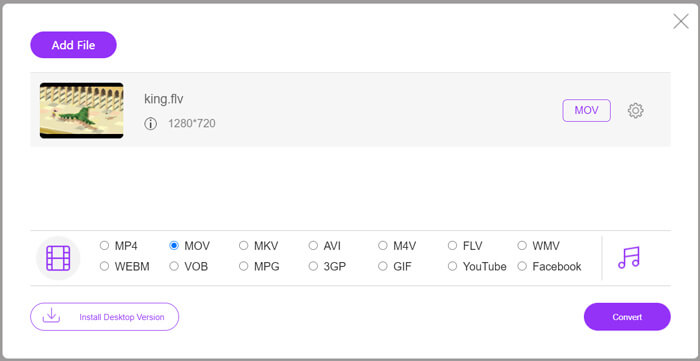
مرحله ۳. قبل از تبدیل، میتوانید روی آیکون Gear کلیک کنید تا پارامترهایی مانند وضوح ویدیو، انکدر، حجم صدا و کانال صوتی فایل FLV را تنظیم کنید.
مرحله ۴. روی دکمه Convert کلیک کنید تا تبدیل آغاز شود. پس از پایان فرایند تبدیل، میتوانید فایل VOB را در پوشهای که قبلاً تنظیم کردهاید پیدا کنید.
در مجموع، Free Online Video Converter ابزاری راحت و کارآمد برای تبدیل آنلاین FLV به VOB بهصورت رایگان است. همچنین میتوانید در همینجا فایلهای FLV را فشرده کنید.
قسمت 3. نحوه استفاده از ترمز دستی برای کدگذاری FLV به VOB
ترمز دستی یک رمز گذار رایگان و منبع باز است که می توانید برای تبدیل FLV به VOB از آن استفاده کنید. از سیستم های ویندوز و مک پشتیبانی می کند. در اینجا مراحل تبدیل FLV به VOB با ترمز دستی وجود دارد.
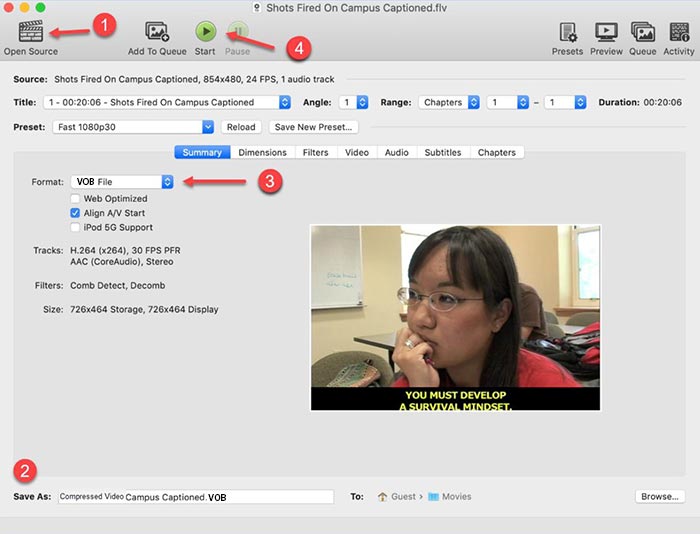
مرحله ۱. Handbrake را دانلود و اجرا کنید. برای افزودن فایلهای FLV باید روی دکمه Open Source کلیک کنید. میتوانید فایل FLV را در پنجره مرور پیدا کنید.
مرحله ۲. سپس با کلیک روی فیلد Save As در پایین رابط، پوشه ذخیره فایل خروجی VOB را مشخص کنید.
مرحله ۳. سپس در فیلد Format، قالب VOB را انتخاب کنید.
مرحله ۴. روی دکمه Start کلیک کنید تا تبدیل آغاز شود.
FLV در مقابل VOB
Adobe Flash Player از FLV برای ارائه محتوای ویدیویی مانند فیلم ها و برنامه های تلویزیونی استفاده می کرد. امروزه Adobe دیگر پخش کننده را توسعه نمی دهد و به کاربران توصیه می کند به دلایل امنیتی آن را حذف نصب کنند. با این حال، همچنان می توانید از فرمت FLV در بسیاری از برنامه های غیر Adobe/Macromedia استفاده کنید.
فرمت VOB اغلب برای ذخیره داده های فیلم یک دیسک DVD استفاده می شود که شامل ویدئو، صدا، زیرنویس، منوهای DVD و برخی محتویات دیگر است. معمولاً به صورت جریان های سیستم MPEG-2 فرمت می شود. می توانید فایل های VOB را بر روی ابزارهای مختلف پخش ویدیو باز کنید.
قسمت 4. سQالات متداول در مورد تبدیل FLV به VOB
1. فرمت FLV چیست؟
فرمت FLV (Flash Video) فایلی است که از Adobe Flash Player برای انتقال ویدیو یا صدا در اینترنت استفاده میکند. این قالب استاندارد ویدیو در پلتفرمها و وبسایتهایی مانند YouTube و Hulu است. (برای پخشکننده FLV اینجا را ببینید)
2. چرا باید FLV را به VOB تبدیل کنم؟
در صورت نیاز به ذخیره فیلم از اینترنت به DVD ، باید FLV را به VOB تبدیل کنید. VOB فرمی است که شامل پخش ویدئو با فرمت MPEG-2 و پخش صوتی با چندین قالب در DVD است.
3. چگونه می توانم پرونده FLV را قبل از تبدیل برش دهم؟
برای برش فایلهای FLV مانند Video Converter Ultimate می توانید از نرم افزار ویرایش ویدیوی حرفه ای استفاده کنید. به شما امکان می دهد تا برای شروع کلیپ ویدئو ، نقطه شروع و پایان را روی جدول زمانی تنظیم کنید.
نتیجه
این مقاله ۳ روش تأییدشده برای تبدیل FLV به VOB ارائه میدهد. میتوانید از FVC Free FLV Converter و Free Online Video Converter برای تبدیل آسان و رایگان استفاده کنید. همچنین چند نرمافزار رایگان مانند Handbrake یا VLC Media Player وجود دارد که میتوانید برای تبدیل به کار بگیرید. میتوانید آنها را دانلود کرده و امتحان کنید تا ببینید مشکل شما را حل میکنند یا نه. اگر درباره تبدیل FLV به VOB سؤالی دارید یا میخواهید بیشتر درباره آن بدانید، لطفاً دیدگاه خود را در پایین بنویسید.
دانلود رایگانبرای ویندوز 7 یا بالاتردانلود امن
دانلود رایگانبرای مکاواس 10.7 یا بالاتردانلود امن
-
 VLC در حال پخش DVD نیست ، چگونه آن را برطرف کنیم
 آیا VLC می تواند DVD را پخش کند؟ چرا VLC DVD من را پخش نمی کند؟ چگونه می توان VLC را برای پخش DVD در ویندوز 10 دریافت کرد؟ این پست دارای 3 نکته برای رفع مشکل عدم پخش DVD با VLC است.
-
 3 روش برتر برای تبدیل سریع MP4 به VOB
 چگونه MP4 را به ویندوز PC و Mac تبدیل به VOB کنیم؟ برای حل این مشکل ، این پست 3 بهترین روش برای کمک به شما در تبدیل MP4 به VOB به صورت رایگان را به اشتراک می گذارد.
-
 بهترین راه برای تبدیل VOB به FLV
 آیا می خواهید یک فایل VOB را به یک فایل FLV تبدیل کنید؟ به راحتی می توانید کار را با مبدل های دسک تاپ یا آنلاین انجام دهید. این راهنما را بخوانید و یاد بگیرید که چگونه VOB را به راحتی و به سرعت به FLV تبدیل کنید.

