


 Video Converter Ultimate
 ضبط صفحه
 تعمیر ویدیو
5 روش سریع و بدون دردسر برای تبدیل MKV به FLV به صورت رایگان [آنلاین و آفلاین]
نمیتوانید فایلهای MKV خود را به دلیل حجم زیاد از طریق اینترنت به اشتراک بگذارید؟ چرا بهجای فشردهسازی و افت کیفیت، آنها را تبدیل نمیکنید؟ اگر پیش از ارسال، توضیحات زیر را بخوانید، این مشکل برطرف میشود. لازم نیست یک ساعت برای خواندن این مطلب وقت بگذارید، پس بدون مقدمه بیشتر، بیایید شش مبدلی را بشناسیم که میتوانید با آنها فایلهای MKV را به FLV تبدیل کنید.

قسمت 1. بهترین مبدل MKV به FLV برای دانلود
FVC Video Converter Ultimate میتواند بدون هیچ دردسری به شما کمک کند MKV را به FLV سریع و مؤثر تبدیل کنید. این مبدل فوقالعاده، کاملاً با دیگر مبدلهای این فهرست یا ابزارهایی که تاکنون استفاده کردهاید تفاوت دارد. این یکی از برترین کُدرها و دِکُدرهایی است که میتوانید روی رایانه ویندوز یا مک خود دانلود کنید و حتی بدون داشتن سیستمِ قدرتمند، بهصورت آفلاین و بینقص کار میکند.

FVC Video Converter Ultimate
4,987,355+ دانلود- MKV را به FLV، AVI، MP4، MOV یا به بیش از 200 فرمت موجود در ویندوز و مک تبدیل کنید.
- فرمت MKV خود را با تمام دسکتاپ ها و دستگاه ها سازگار کنید.
- این می تواند تبدیل دسته ای را برای فرمت های MKV یا فرمت های دیگر انجام دهد.
- مبدل ضد احمق برای استفاده هر کسی.
- پشتیبانی از خروجی با کیفیت بالا و حتی تا کیفیت ویدیوی 4k.
دانلود رایگانبرای ویندوز 7 یا بالاتردانلود امن
دانلود رایگانبرای MacOS 10.7 یا بالاتردانلود امن
مراحل تبدیل MKV به FLV با FVC Video Converter Ultimate
مرحله 1. برنامه را در سیستم خود دانلود کنید و سپس مراحل نصب را دنبال کنید.
دانلود رایگانبرای ویندوز 7 یا بالاتردانلود امن
دانلود رایگانبرای MacOS 10.7 یا بالاتردانلود امن
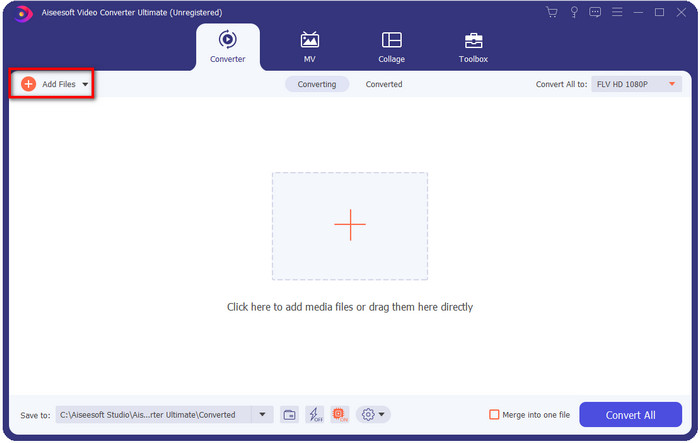
مرحله 2. بعد از نصب، برنامه را باز کنید و فایلهای MKV را اضافه کنید؛ میتوانید فایل را روی رابط بکشید و رها کنید یا روی دکمه Add Files کلیک کنید.
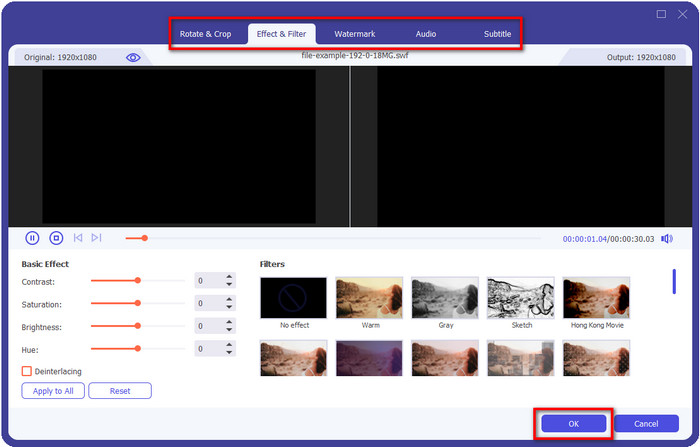
اگر میخواهید پیش از تبدیل، فایلهای MKV خود را ویرایش کنید، میتوانید روی دکمه wand کلیک کنید تا افکتها، برش (Crop)، زیرنویس و موارد دیگر را به ویدئو اضافه کنید. برای ذخیره تغییراتی که به ویدئو دادهاید روی OK کلیک کنید.
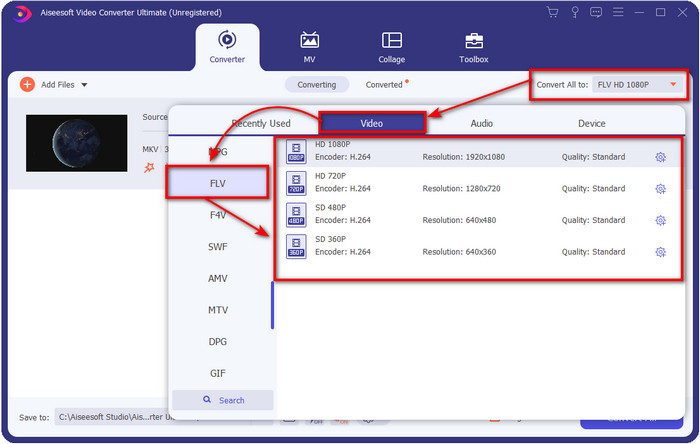
مرحله 3. روی دکمه drop-down کلیک کرده و در فهرست، فرمت FLV را انتخاب کنید.
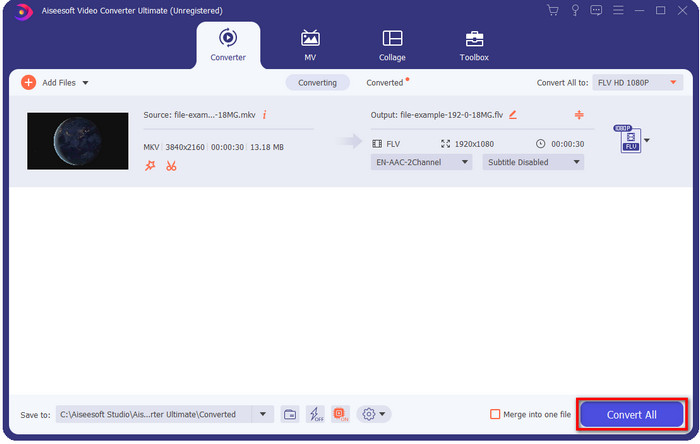
مرحله 4. روی دکمه Convert All کلیک کنید تا فرایند تغییر MKV به FLV بهصورت رایگان آغاز شود. پس از پایان، پوشهای با فایل FLV جدید بهطور خودکار باز خواهد شد.
قسمت 2. 4 بهترین مبدل MKV به FLV مبتنی بر وب
1. FVC رایگان تبدیل ویدئو آنلاین
FVC Free Video Converter Online یک مبدل رایگان MKV به FLV آنلاین ساده اما چشمگیر است که در همه مرورگرها در دسترس است. این ابزار از طیفی متوسط از فرمتها پشتیبانی میکند که میتوانید آنها را انتخاب و در آنها آپلود کنید. هرچند این ابزار وابسته به اینترنت است، اما تبدیل و آپلود فایل در آن بسیار سادهتر و سریعتر است. میخواهید بدانید چگونه از آن استفاده کنید؟ پس مراحل زیر را دنبال کنید.
طرفداران
- برای هر کسی که اینترنت دارد قابل استفاده است.
- رابط کاربر پسند و آسان برای درک.
- بدون محدودیت برای اندازه فایل
- تنظیمات پیشرفته برای ویدیو و صدا.
منفی ها
- فرمت در مقیاس متوسط
مرحله 1. برای باز کردن مبدل آنلاین، روی این لینک کلیک کنید.
مرحله 2. دکمه Add Files to Convert را فشار دهید تا فایل را از پوشه رایانه خود اضافه کنید، سپس روی Open کلیک کنید.
برای تبدیل دستهای فایلها، نسخهٔ دسکتاپ را دانلود کنید.
هرچند اینجا نمیتوانید ویدئو را ویرایش کنید، اما میتوانید تنظیمات ویدئو و صدا را با کلیک روی دکمه gear تغییر دهید.
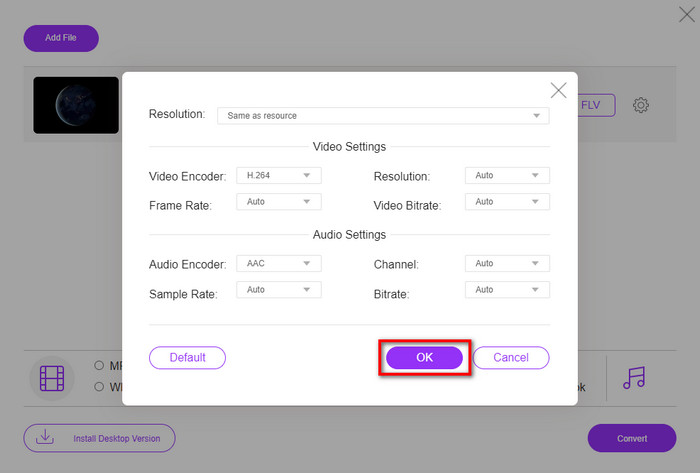
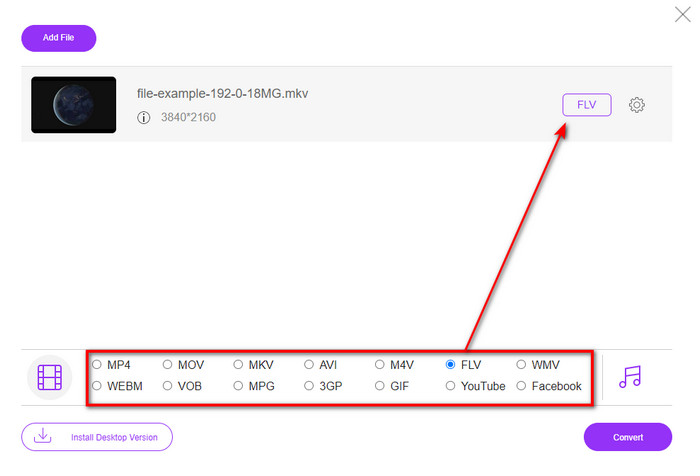
مرحله 3. فرمت FLV را در فهرست انتخاب کنید.
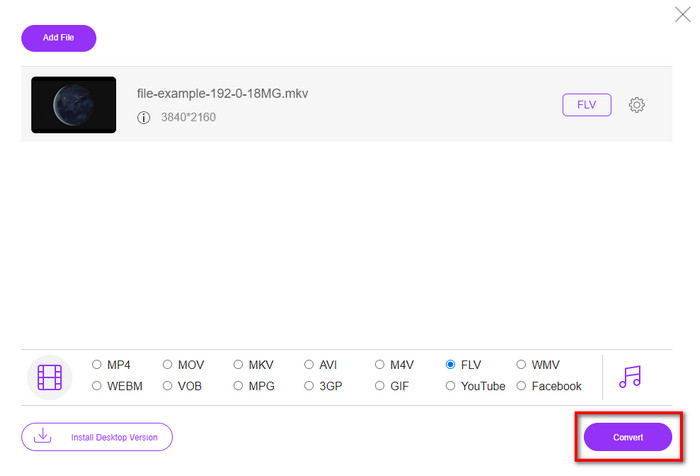
مرحله 4. روی Convert کلیک کنید تا فرایند تبدیل آغاز شود.
2. مک کانورتر
یکی از امنترین مبدلهای آنلاین MKV به FLV که میتوانید استفاده کنید، Mconverter است. علاوه بر تبدیل فرمتهای ویدئویی و صوتی، میتوانید تصاویر، آرشیوها، اسناد و بسیاری از فرمتهای رسانهای دیگر را نیز در اینجا تبدیل کنید. با اینکه استفاده از این مبدل رایگان است، اما برای هر فایلی که وارد میکنید محدودیت حجمی وجود دارد.
طرفداران
- ویدیوها، صداها، اسناد و موارد دیگر را به صورت آنلاین تبدیل کنید.
- از چندین تبدیل پشتیبانی می کند.
- آسان برای استفاده.
منفی ها
- حجم فایل نباید بیشتر از 200 مگابایت باشد.
- برخی از تبلیغات در هنگام تبدیل فایل.
مرحله 1. در مرورگر خود Mconverter را باز کنید، فایل .mkv را بکشید و درون باکس رها کنید.
مرحله 2. روی فرمت FLV کلیک کنید تا فرایند بهطور خودکار آغاز شود.
مرحله 3. پس از پایان، فایل بهطور خودکار در حافظه شما دانلود میشود.
3. Freeconvert.com
وبسایت Freeconvert.com به شما کمک میکند MKV را به صورت آنلاین و رایگان به FLV تبدیل کنید. این مبدل وب رابطی ساده و قابلفهم دارد که هرکسی میتواند با آن کار کند. با این حال، این مبدل آنلاین تنها از تعداد نسبتاً محدودی از فرمتها پشتیبانی میکند و تبلیغات زیادی در رابط وب آن وجود دارد.
مرحله 1. در موتور جستجوی خود عبارت Freeconvert.com را جستجو کنید.
مرحله 2. روی Choose File کلیک کنید تا فایل .mkv را از پوشه رایانه خود آپلود کنید، سپس دکمه drop-down را فشار دهید و فرمت FLV را انتخاب کنید.
مرحله 3. روی Convert FLV کلیک کنید تا تبدیل آغاز شود و برای دانلود فایل، روی Download FLV کلیک کنید.
طرفداران
- یک مبدل آنلاین رایگان که می توانید از آن استفاده کنید.
- مبدل وب امن و ساده.
- از یک فایل 1 گیگابایتی برای تبدیل پشتیبانی می کند.
منفی ها
- این فرمت در مقیاس کوچک را پشتیبانی می کند.
- فرآیند تبدیل و دانلود زمان زیادی از شما خواهد گرفت.
4. Movavi Online Video Converter
Movavi Online Video Converter یکی از مبدلهای پیشنهادی برای تبدیل MKV به FLV بهصورت آنلاین است. این نسخه وب رایگانِ Movavi Video Converter است که بهخاطر کارایی بالا و ظاهر حرفهای، توسط کاربران زیادی در سراسر وب استفاده میشود.
مرحله 1. مرورگر مورد علاقه خود را باز کرده و وبسایت Movavi را جستجو کنید.
مرحله 2. روی +Add Your Media کلیک کنید تا فایلی را که میخواهید تبدیل کنید، اضافه کنید. سپس روی دکمه drop-down کلیک کرده و Video را انتخاب کنید؛ فرمت FLV را پیدا کرده و روی آن کلیک کنید.
مرحله 3. روی Convert فشار دهید تا فرایند تبدیل آغاز شود.
طرفداران
- بدون رابط وب تبلیغاتی
- مبدل ساده هر کسی می تواند استفاده کند.
- این فرمت در مقیاس متوسط را پشتیبانی می کند.
منفی ها
- فرآیند تبدیل فرمت زمان بیشتری می برد.
- مانند سایر مبدل های وب به اینترنت وابسته است.
قسمت 3. نمودار مقایسه
| امکانات | FVC Video Converter Ultimate | مبدل ویدیوی رایگان FVC آنلاین | مک کانورتر | Freeconvert.com | مبدل ویدیوی آنلاین Movavi |
| قابلیت تبدیل فرمت |  | | | | |
| وابسته به اینترنت |  | | | | |
| تبدیل دسته ای | | | | | |
| ویژگی های ویرایش پیشرفته | | | | | |
| پلتفرم های موجود | ابزار مبتنی بر دسکتاپ | ابزار مبتنی بر وب | ابزار مبتنی بر وب | ابزار مبتنی بر وب | ابزار مبتنی بر وب |
MKV در مقابل FLV
فرمت کانتینر چند رسانه ای Matroska که در سال 2002 منتشر شد، یک فرمت متن باز است که می تواند شامل تعدادی آهنگ ویدئو، صدا، تصویر و زیرنویس باشد. بنابراین، می توانید از آن برای ذخیره کلیپ های ویدئویی کوتاه، نمایش های تلویزیونی و فیلم ها به راحتی استفاده کنید. برای طرفداران انیمه بسیار محبوب است.
Adobe Flash Player از FLV برای ارائه محتوای ویدیویی مانند فیلم ها و برنامه های تلویزیونی استفاده می کرد. امروزه Adobe دیگر پخش کننده را توسعه نمی دهد و به کاربران توصیه می کند به دلایل امنیتی آن را حذف نصب کنند. با این حال، همچنان می توانید از فرمت FLV در بسیاری از برنامه های غیر Adobe/Macromedia استفاده کنید.
بخش 4. سوالات متداول در مورد تبدیل MKV به FLV
چرا فایل های MKV خیلی بزرگ هستند؟
دو دلیل اصلی وجود دارد که چرا فایلهای MKV اینقدر بزرگ هستند. دلیل اول این است که این فرمت میتواند مقدار نامحدودی محتوای ویدئو، صدا و فراداده را در یک فایل واحد نگه دارد. دلیل دوم این است که اگر ویدئوی شما طولانی باشد، طبیعی است که اندازه فایل هم بسیار بزرگ شود. با این حال، میتوانید با کمک این فشردهساز MKV حجم فایل را کاهش دهید. اما اگر به دنبال راهی سادهتر هستید، باید تبدیل فایلهای MKV به MP4، AVI، MOV، FLV و غیره را در نظر بگیرید.
آیا MKV بهتر از AVI است؟
فرمتهای MKV و AVI تقریباً شبیه یکدیگرند، زیرا هر دو میتوانند ویدئوی باکیفیت بالا و حجم زیاد را در خود جای دهند. با این حال، این کانتینرها ساختار و کاربردهای متفاوتی دارند که آنها را متمایز میکند. بهطور مثال، فرمت AVI فرمتی فشردهنشده است که میتواند محتوای ویدئویی خام را نگه دارد و برای پخش بهترین گزینه است. این فرمت همچنین پایهای برای توسعه فایل MKV بوده است. هرچند فایل MKV از فشردهسازی پشتیبانی میکند، اما محتوای آن از نظر تعداد عناصر و دادهها بسیار بیشتر از چیزی است که AVI میتواند نگه دارد. بنابراین، اگر میخواهید کیفیت بالای ویدئوهای خود را حفظ کنید، MKV گزینه مناسبتری است. اما اگر سازگاری با دستگاهها و پلیرهای مختلف برای شما مهمتر است، AVI انتخاب بهتری خواهد بود. اگر میخواهید بدانید چگونه MKV را به AVI تبدیل کنید، روی این لینک کلیک کنید.
آیا ترمز دستی تبدیل MKV به FLV را انجام می دهد؟
Handbrake میتواند این کار را انجام دهد، اما این مبدل از برنامههای macOS و Windows که 10 بالا نیستند، پشتیبانی نمیکند.
نتیجه
در پایان، اکنون میدانید چگونه MKV را به FLV بهصورت آنلاین و آفلاین تبدیل کنید. این ابزارها بهطور تصادفی انتخاب نشدهاند، بلکه بر اساس ترجیحات کاربران گزینش شدهاند. در جستجو و بررسیهایی که انجام دادیم، متوجه شدیم این شش ابزار در انجام وظیفه خود بهعنوان مبدل، عملکرد بسیار خوبی دارند. اما FVC Video Converter Ultimate فراتر از انتظاری که از یک مبدل داشتیم ظاهر شد. میخواهید با دیگر توانمندیهای این مبدل فوقالعاده آشنا شوید؟ پس منتظر چه هستید؟ همین حالا آن را دانلود کنید.
-
 MKV به MOV - نحوه تبدیل MKV به MOV
 چگونه می توانم MKV را به MOV در Mac تبدیل کنم؟ آیا iMovie می تواند MKV را بخواند؟ فرمت MOV به چه معناست؟ در این پست 2 روش ساده برای کمک به شما در تبدیل MKV به MOV با مبدل های ویدیویی رایگان آنلاین و حرفه ای آورده شده است.
-
 نحوه تبدیل فیلم های MKV به GIF های متحرک بدون Photoshop/FFmpeg
 پس از بارگیری و تماشای فیلم های MKV در رایانه خود ، ممکن است بخواهید لحظات فوق العاده ای را با دوستان یا در اینترنت به عنوان GIF به اشتراک بگذارید. در این مقاله می توانید با 2 روش ساده تبدیل MKV به GIF آشنا شوید.
-
 نکات و ترفندهایی در مورد نحوه تبدیل فایل های MKV به MP3 [2025]
 آیا در انتخاب مبدل مناسب برای MKV به MP3 مشکل دارید؟ سپس به خواندن این پست ادامه دهید زیرا راه حل های مختلفی برای یک مشکل ارائه کردیم.

