


 Video Converter Ultimate
 ضبط صفحه
 تعمیر ویدیو
راه های بی دردسر برای تغییر JPG به PNG که نمی توانید از دست بدهید
فایلهایی که پسوند .png و .jpg دارند، فایلهای تصویری هستند. این فرمتهای فایل شامل عکسها، نقاشیها، اسکرینشاتها و اطلاعات بصریاند. همچنین انواع دیگر رسانه را هم در بر میگیرند. از آنجا که این دو، فرمتهای متفاوتی هستند، هرکدام قابلیتهای خاص خود را دارند. اگر میخواهید اطلاعات دقیقی درباره این دو نوع فایل یاد بگیرید، خوششانس هستید. این راهنما اطلاعات کافی درباره فرمتهای JPG و PNG در اختیار شما قرار میدهد. علاوه بر این، بهترین روشهای تبدیل تصویر JPG به فرمت PNG را نیز کشف خواهید کرد. ما ابزارهای آنلاین و آفلاین مفیدی را که میتوانید استفاده کنید معرفی میکنیم. همچنین با مزایا و معایب هرکدام آشنا میشوید. به این ترتیب، ایدهای به دست میآورید که کدام مبدل تصویر برای شما مؤثرتر است. این راهنما را بخوانید و تمام اطلاعات لازم درباره نحوه تبدیل JPG به PNG را به دست آورید.

بخش 1. جزئیات کامل در مورد فرمت های فایل JPG و PNG
فرمت JPG چیست؟
Joint Photographic Experts Group، JPG، فرمت محبوبی است که از یک الگوریتم استفاده می کند. گرافیک و عکس را فشرده می کند. این فرمت فایل فشرده سازی قابل توجهی را ارائه می دهد و به طور گسترده ای مفید است. JPG حجم کمی دارد که بسیار عالی است. برای اشتراک گذاری از طریق اینترنت و استفاده از وب سایت ها عالی است. یک فایل JPG از فشرده سازی با اتلاف و رنگ 24 بیتی پشتیبانی می کند. علاوه بر این، می تواند 16.8 میلیون رنگ را با حفظ اندازه کوچک نمایش دهد. همچنین برای نمایش عکاسی عالی است. عکاسان از فرمت فایل JPG استفاده می کنند. این برای عکسبرداری با فرمت خام برای اطمینان از ثبت دقیق یک تصویر است. از آنجایی که کوچک است، کاربران می توانند تصویر را در اکثر مرورگرها سریعتر باز کنند. جدا از نمایشگر عکاسی، این فرمت برای انتشار در وب نیز مناسب است. فایل JPG برای وبلاگ نویسان و ناشران مفید است. زمان بارگذاری سریعتر صفحه را فراهم میکند تا بینندگان بتوانند فوراً به محتوا دسترسی داشته باشند.
طرفداران
- اندازه کوچک فایل امکان انتقال فوری را فراهم می کند.
- اشباع و تعادل رنگ سفید در JPG تنظیم شده است.
- این فرمت فایل در همه مرورگرها قابل تشخیص است.
- می تواند وضوح تصویر درجه یک را ارائه دهد.
منفی ها
- فشرده سازی کیفیت تصویر را بدتر می کند.
- این فرمت فایل برای تصاویر با متن یا لبه های تیز نامناسب است.
- JPG از تصاویر لایه ای پشتیبانی نمی کند.
فرمت PNG چیست؟
یک شبکه گرافیکی قابل حمل، PNG، یک نوع فایل تصویری شطرنجی است. این فرمت تکامل فرمت GIF است. در سال 1995، الیور فروم فرمت PNG را برای انجام کارهایی که GIF قادر به انجام آن نیست، ایجاد کرد. فرمت PNG بدون ثبت اختراع است و برخلاف GIF دارای پالت رنگی گسترده تری است. PNG یکی از محبوب ترین فایل های تصویری در این دوره است. بدون شک مورد علاقه طراحان وب است. می تواند پس زمینه های نیمه شفاف و شفاف را مدیریت کند. شما می توانید تصویرسازی کنید، یک وب سایت طراحی کنید، عکاسی کنید و موارد دیگر. به عنوان مثال، اگر می خواهید یک عکس روی لوگو قرار دهید، تنها کاری که می توانید انجام دهید این است که لوگو را برش دهید. از آنجایی که فایل ثبت اختراع نشده است، می توانید PNG را بدون مجوز در هر نرم افزار ویرایش تصویر نیز باز کنید. همچنین این فرمت از فشرده سازی بدون اتلاف استفاده می کند. این بدان معنی است که فشرده سازی بر کیفیت تصویر تأثیر نمی گذارد.
طرفداران
- فرمت فایل PNG می تواند تصاویر دقیق تری را مدیریت کند.
- هیچ حق ثبت اختراعی وجود ندارد، بنابراین می توانید تصاویر PNG را در همه برنامه ها باز کنید.
- پس از فشرده سازی، تصویر PNG هیچ داده ای را از دست نمی دهد.
منفی ها
- PNG اندازه بزرگتری نسبت به JPG و GIF دارد.
- این فایل از حالت های رنگی CMYK پشتیبانی نمی کند.
- پاسخگویی و زمان بارگذاری صفحه کندتر است.
بخش 2. روش های موثر برای تبدیل JPG به PNG
راه 1. نحوه تبدیل JPG به PNG با استفاده از مبدل تصویر رایگان FVC
تبدیل JPG به PNG با استفاده از FVC Free Image Converter آسان است. این مبدل تحتوب فرایند تبدیل سادهای ارائه میدهد. میتوانید فایل JPG خود را تنها در چند مرحله به فرمت PNG تبدیل کنید. کاربران، بهویژه مبتدیان، با رابط کاربری شهودی این ابزار بهراحتی میتوانند از آن استفاده کنند. همچنین دارای سرعت بالای تبدیل است که آن را برای همه کاربران مناسب و راحت میسازد. افزون بر این، میتوانید تبدیل دستهای انجام دهید؛ یعنی میتوانید چندین فایل تصویری را همزمان تبدیل کنید. این نرمافزار آنلاین در تمام مرورگرها در دسترس است؛ از جمله گوگل، اکسپلورر، سافاری، اج و غیره. نرمافزار رایگان و ایمن است. پس از تبدیل و ذخیره تصاویر، دادههای شما بهطور خودکار حذف میشود.
طرفداران
- مناسب برای مبتدیان.
- این یک رابط کاربری آسان برای درک را ارائه می دهد.
- قابل دسترسی در تمامی مرورگرها
- 100% رایگان.
- این یک فرآیند تبدیل دسته ای را فراهم می کند.
منفی ها
- برای استفاده از مبدل تصویر نیاز به اتصال به اینترنت دارد.
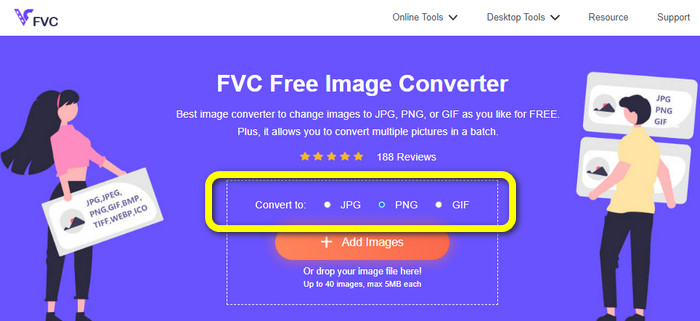
گام 1: به وبسایت FVC Free Image Converter بروید. به بخش گزینههای فرمت بروید و فرمت PNG را انتخاب کنید.
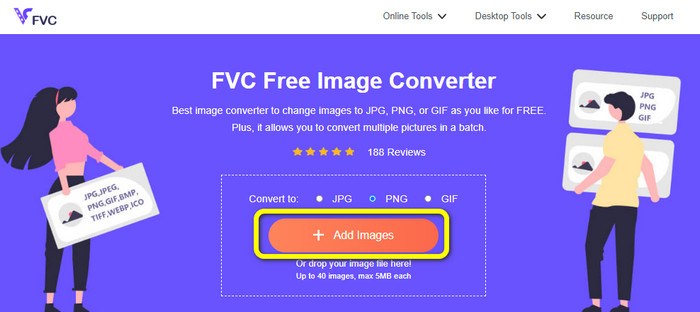
گام 2: روی دکمه Add Images کلیک کنید تا تصویر JPG مورد نظر برای تبدیل را اضافه کنید.
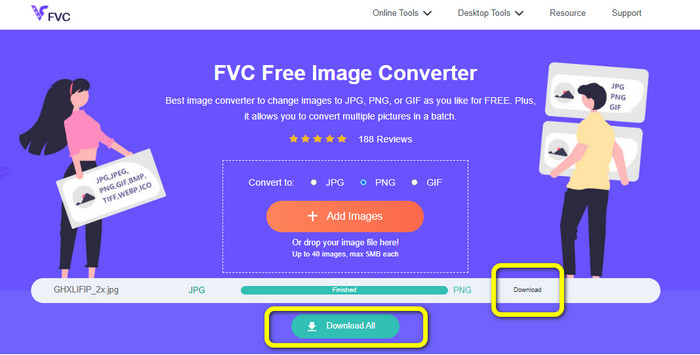
گام 3: بعد از بارگذاری تصویر JPG، فرایند تبدیل آغاز میشود. چند لحظه صبر کنید و سپس روی دکمه Download کلیک کنید تا تصویر را ذخیره کنید.
راه 2. نحوه تبدیل JPG به PNG با استفاده از FreeConvert
FreeConvert مبدل تصویر دیگری است که میتوانید بهصورت آنلاین استفاده کنید. این ابزار میتواند به شما کمک کند JPG را آنلاین به PNG تبدیل کنید. همچنین با دستورالعملهای ساده، فرایند تبدیل بسیار آسان میشود. این ابزار برای همه کاربران، بهویژه مبتدیان، مناسب است. علاوه بر این، تبدیل دستهای در این نرمافزار فراهم است. به این ترتیب میتوانید چندین فایل را همزمان تبدیل کرده و زمان بیشتری ذخیره کنید. بهجز فرمت PNG، از BMP، TIFF، GIF و موارد دیگر نیز پشتیبانی میکند. با این حال، نسخه رایگان محدودیتهایی دارد. حداکثر حجم فایل 1 گیگابایت است. برای دسترسی به حجم بالاتر باید اشتراک تهیه کنید. همچنین تبلیغات آزاردهنده دائماً روی صفحه نمایش داده میشود.
طرفداران
- فرآیند تبدیل دسته ای در دسترس است.
- کارکرد آسان.
منفی ها
- برای استفاده از نرم افزار نیاز به اتصال به اینترنت دارد.
- تبلیغات مزاحم همیشه روی صفحه نمایش داده می شود.
- نسخه پولی را دریافت کنید تا از ویژگی های عالی بیشتری بهره مند شوید.
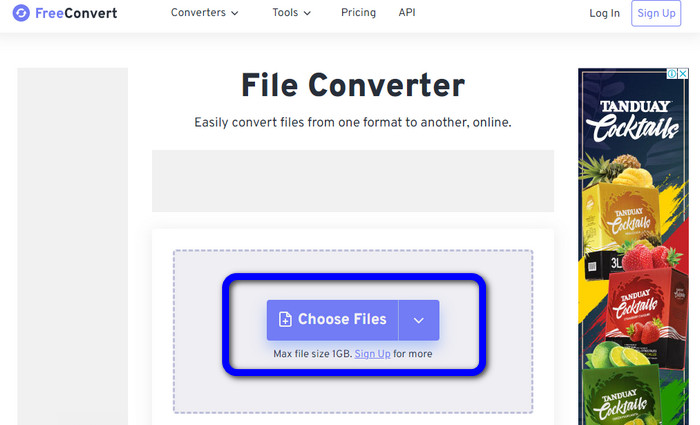
گام 1: به وبسایت FreeConvert بروید. روی دکمه Choose Files کلیک کنید تا تصویر JPG را بارگذاری کنید.
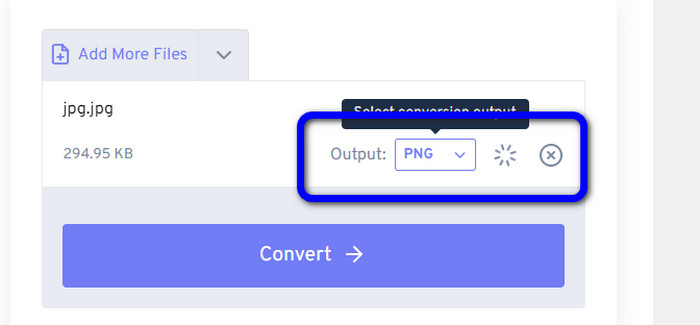
گام 2: به گزینه Output بروید و فرمت فایل PNG را انتخاب کنید.
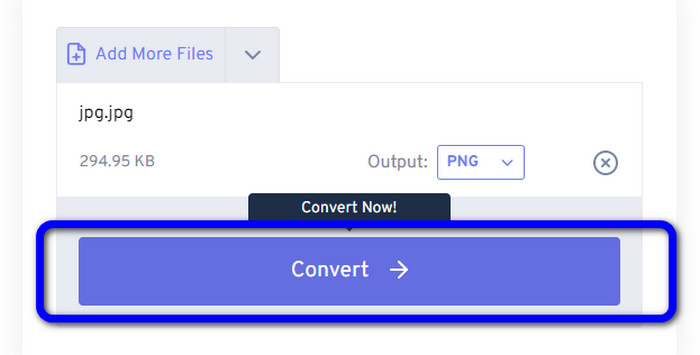
گام 3: روی دکمه Convert کلیک کنید تا وارد فرایند تبدیل شوید. پس از پایان فرایند، تصویر را دانلود کنید تا در رایانه خود ذخیره کنید.
راه 3. نحوه تبدیل JPG به PNG با استفاده از JPG به PNG
ابزار آنلاین دیگری که میتوانید برای تبدیل JPG به PNG استفاده کنید، JPG to PNG است. این ابزار اجازه میدهد تصاویری با حجم حداکثر 50 مگابایت بارگذاری کنید. علاوه بر این، میتوانید حداکثر 20 تصویر JPG را بهطور همزمان تبدیل کنید. این نرمافزار تحتوب همچنین کاربری آسانی دارد؛ بنابراین کاربران حرفهای و غیرحرفهای هر دو میتوانند تصاویر را تبدیل کنند. این ابزار از فرمتهای مختلف فایل تصویری از جمله HEIC، WebP، JPG و غیره پشتیبانی میکند. با این حال، گاهی اوقات این مبدل عملکرد خوبی ندارد. در حین تبدیل تصاویر، برخی تبلیغات مزاحم نیز نمایش داده میشود. همچنین برای تبدیل فایلهای تصویری به اتصال اینترنت نیاز دارید.
طرفداران
- ایده آل برای کاربران غیر حرفه ای.
- این می تواند 20 تصویر را به طور همزمان تبدیل کند.
منفی ها
- تبلیغات آزار دهنده هستند.
- گاهی اوقات، مبدل به دلایلی عملکرد خوبی ندارد.
- برای استفاده از ابزار به اتصال اینترنت نیاز دارید.
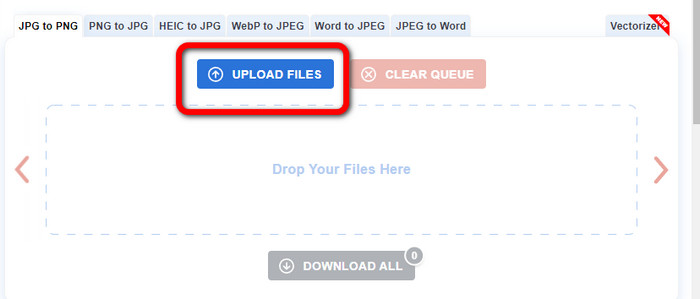
گام 1: به وبسایت رسمی JPG to PNG بروید. روی دکمه Upload Files کلیک کنید تا تصویر JPG را وارد کنید.
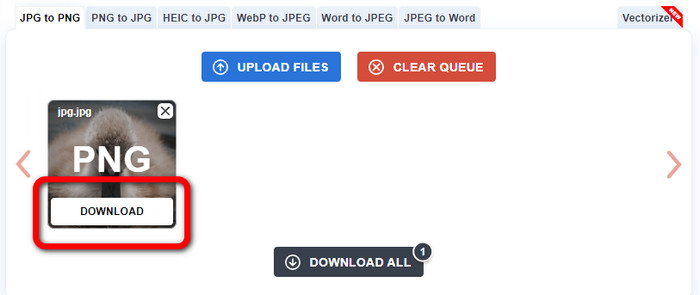
گام 2: پس از بارگذاری تصویر JPG، بهطور خودکار به PNG تبدیل میشود. بعد از پایان فرایند تبدیل، روی دکمه Download کلیک کنید.
راه 4. نحوه تبدیل JPG به PNG با استفاده از Convertio
Convertio نیز مبدل تصویری است که میتوانید بهصورت آنلاین استفاده کنید. این مبدل امکان تبدیل JPG به PNG را با روشی بدون دردسر فراهم میکند. میتوانید تنها با چند کلیک فایلهای تصویری را تبدیل کنید. همچنین به لطف رابط کاربری شهودی آن، بهراحتی میتوانید دستورالعملها را دنبال کنید. علاوه بر PNG، از فرمتهای تصویری دیگر نیز پشتیبانی میکند؛ از جمله JPG، SVG، GIF، TIFF، BMP و غیره. اما در نسخه رایگان، فقط میتوانید تصویری با حداکثر حجم 100 مگابایت بارگذاری کنید. بنابراین اگر میخواهید فایلهای تصویری بیشتری تبدیل کنید، لازم است اشتراک خریداری کنید.
طرفداران
- فرآیند تبدیل آسان است، که برای مبتدیان مناسب است.
- از فرمت های مختلف تصویر مانند PNG، JPG، TIFF، BMP، SVG و غیره پشتیبانی می کند.
منفی ها
- حداکثر اندازه فایل برای آپلود در نسخه رایگان فقط 100 مگابایت است.
- اتصال به اینترنت مورد نیاز است.
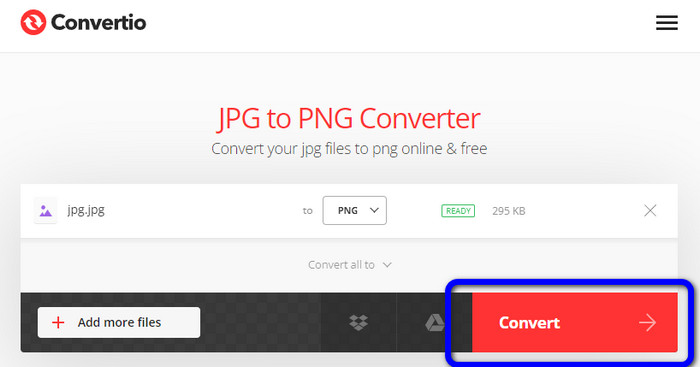
گام 1: به وبسایت Convertio بروید. روی دکمه Choose Files کلیک کنید تا عکس را بارگذاری کنید.
گام 2: فرمت PNG را از میان گزینههای فرمت انتخاب کنید.
گام 3: روی دکمه Convert کلیک کنید تا تصویر JPG را به PNG تبدیل کنید.
راه 5. نحوه تبدیل JPG به PNG با استفاده از Canva
Canva مبدل آنلاین دیگری است که میتوانید برای تبدیل JPG به PNG استفاده کنید. میتوانید فایلهای خود را بدون افت کیفیت در اینجا تبدیل کنید. این مبدل در همه مرورگرها قابل دسترسی است که آن را برای همه کاربران راحت میسازد. اما اگر اشتراک نداشته باشید، امکاناتی که میتوانید استفاده کنید محدود است. بنابراین خرید این ابزار بهترین راه برای بهرهبردن از تمام قابلیتهای آن است.
طرفداران
- قابل دسترسی برای همه مرورگرها
- تبدیل فایل ها بدون افت کیفیت
منفی ها
- برای تبدیل فایل های تصویری به اتصال اینترنت نیاز دارد.
- ابزار را خریداری کنید تا از ویژگی های عالی بیشتری بهره مند شوید.
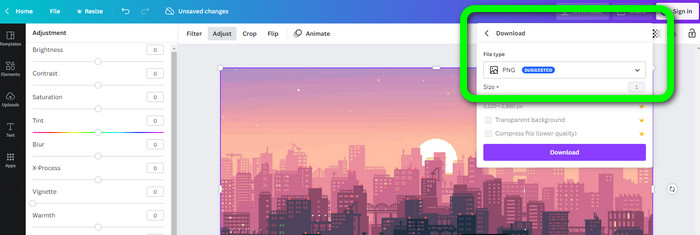
گام 1: مرورگر خود را باز کنید و به وبسایت Canva بروید. روی دکمه Upload your image در بخش میانی صفحه کلیک کنید.
گام 2: پس از بارگذاری تصویر، به دکمه Download بروید. سپس در گزینه File type، فرمت PNG را انتخاب کنید.
راه 6. نحوه تبدیل JPG به PNG با استفاده از تبدیل JPG به PNG
برنامهای به نام JPG to PNG Converter نیز ابزاری مبتنی بر وب است. این برنامه برای تبدیل کارآمد تصاویر مناسب است. به دلیل سرعت بالای فرایند، میتوانید فایلها را تنها در چند ثانیه تبدیل کنید. این مبدل تصویر در تمام مرورگرها در دسترس است. متأسفانه گاهی اوقات مبدل دچار اختلال شده و کار نمیکند. همچنین ممکن است کیفیت تصویر بعد از فرایند تبدیل تغییر کند.
طرفداران
- استفاده از ابزار آسان است.
- این یک فرآیند تبدیل سریع را ارائه می دهد.
منفی ها
- گاهی اوقات، نرم افزار به خوبی کار نمی کند.
- پس از فرآیند تبدیل، کیفیت تصویر تغییر می کند.
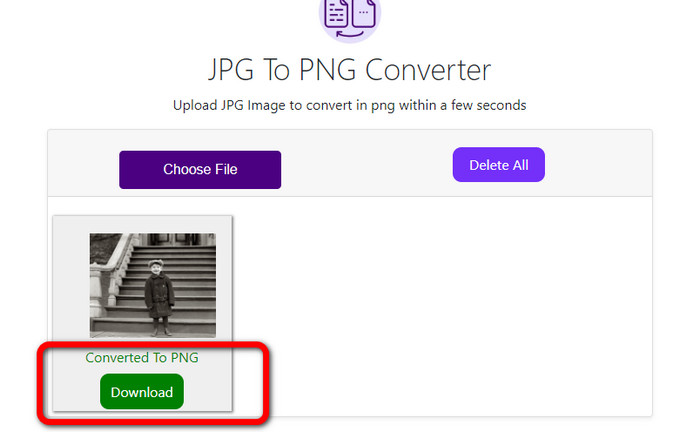
گام 1: روی دکمه Choose Files کلیک کنید تا عکس JPG را اضافه کنید.
گام 2: روی دکمه Download کلیک کنید تا عکس خود را در دستگاه ذخیره کنید.
راه 7. نحوه تبدیل JPG به PNG با استفاده از Video Converter Ultimate
اگر بهدنبال یک مبدل JPEG به PNG هستید، از Video Converter Ultimate استفاده کنید. این نرمافزار بهصورت رایگان قابل دانلود است. این مبدل تصویر رابطی شهودی با روشهای پایه برای تبدیل JPG به PNG ارائه میدهد. به این ترتیب، کاربران حرفهای و ماهر بهخوبی میتوانند از آن بهره ببرند. علاوه بر این، دارای فرایند تبدیل سریعی است و میتوانید فایلهای تصویری را در چند ثانیه تبدیل کنید. بهترین نکته در مورد این برنامه آن است که میتوانید چندین تصویر را بهطور همزمان تبدیل کنید؛ بنابراین وقت بیشتری ذخیره کرده و تعداد بیشتری تصویر تبدیل میکنید. همچنین از فرمتهای متعددی مانند TIFF، WebP، BMP، JPG و غیره پشتیبانی میکند.
طرفداران
- این یک رابط بصری با مراحل ساده ارائه می دهد که آن را برای همه کاربران مناسب می کند.
- رایگان برای دانلود.
- فرآیند تبدیل دسته ای در دسترس است.
- قابل دسترسی در هر دو کامپیوتر ویندوز و مک.
منفی ها
- نسخه پولی را دریافت کنید تا ویژگی های شگفت انگیز بیشتری را تجربه کنید.
گام 1: نرمافزار Video Converter Ultimate را در مک یا ویندوز خود دانلود و سپس اجرا کنید.
دانلود رایگانبرای ویندوز 7 یا بالاتردانلود امن
دانلود رایگانبرای MacOS 10.7 یا بالاتردانلود امن
گام 2: به پنل Toolbox بروید و گزینه Image Converter را انتخاب کنید.
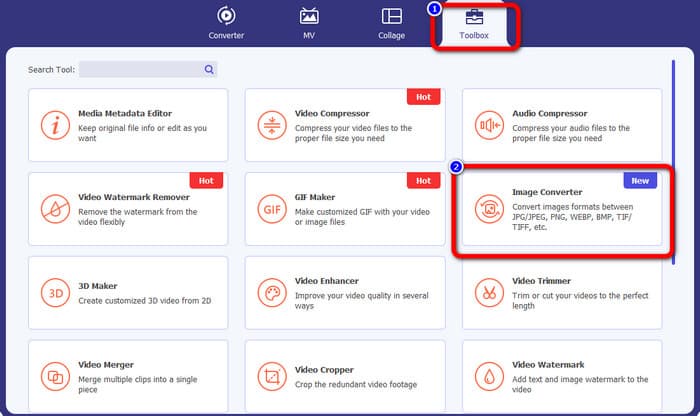
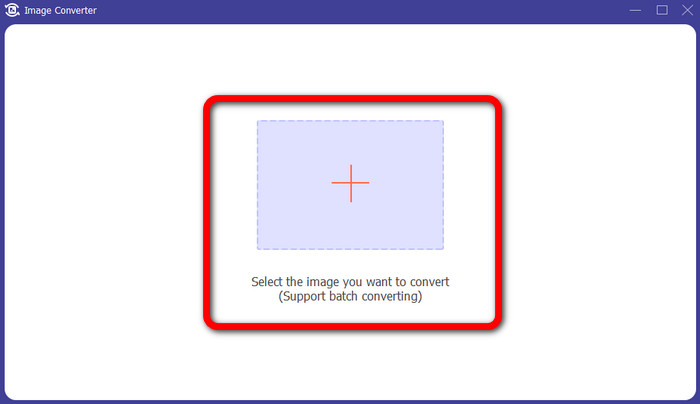
گام 3: روی آیکون Plus کلیک کنید تا تصویر JPG را پیوست کنید.
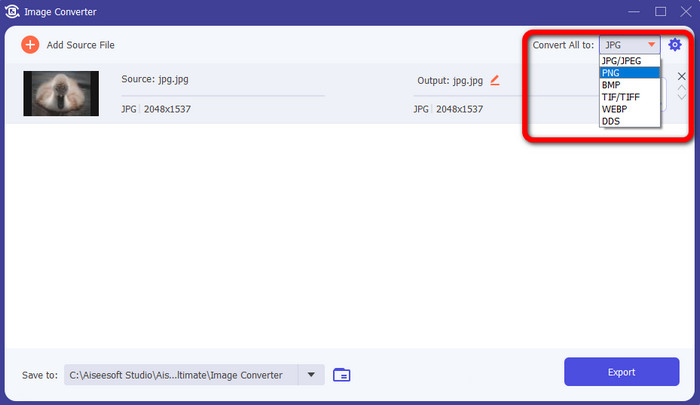
گام 4: در گوشه بالا-راست رابط، فرمت PNG را از بین گزینههای فرمت انتخاب کنید.
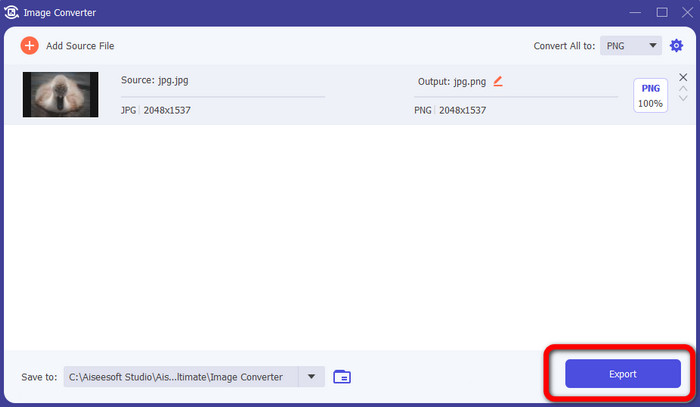
گام 5: سپس روی دکمه Export کلیک کنید. منتظر بمانید تا فرایند تبدیل تکمیل شود؛ سپس میتوانید فایل خود را از پوشهتان باز کنید.
راه 8. نحوه تبدیل JPG به PNG با استفاده از BitRecover JPG Converter Wizard
ابزار آفلاین دیگری برای تبدیل JPG به PNG، نرمافزار BitRecover JPG Converter Wizard است. این نرمافزار برای ویندوز مناسب و بهصورت رایگان قابل دانلود است. با کمک این نرمافزار میتوانید تصویر JPG خود را با دقت به PNG تبدیل کنید. با این حال، کار با این نرمافزار دشوار است. فرایند آن گیجکننده است و استفاده از آن را برای مبتدیان پیچیده میکند. همچنین فرایند نصب بسیار کند است که زمانبر خواهد بود.
طرفداران
- رایگان برای دانلود.
- این برنامه برای ویندوز مناسب است.
منفی ها
- برای کاربران غیر حرفه ای مناسب نیست.
- فرآیند نصب پیچیده است.
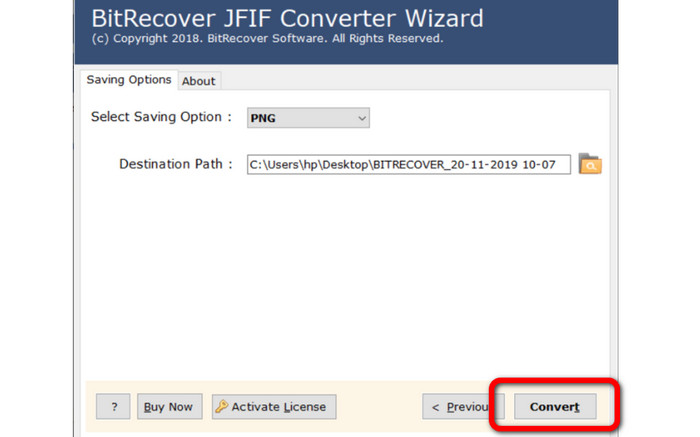
گام 1: ابزار را روی رایانه خود نصب کنید. روی Select Files یا Select Folders کلیک کنید تا تصویر JPG را پیوست کنید.
گام 2: سپس روی دکمه Next کلیک کنید. بعد از آن، به گزینههای فرمت بروید و فرمت فایل PNG را انتخاب کنید.
گام 3: روی دکمه Convert کلیک کنید تا فرایند تبدیل آغاز شود.
بخش 3. سوالات متداول در مورد نحوه تبدیل JPG به PNG
1. چرا باید JPG را به PNG تبدیل کنید؟
اگر می خواهید پشتیبانی شفافیت ایجاد کنید، تبدیل JPG به PNG بهترین انتخاب است. همچنین اگر می خواهید تصاویر را ویرایش کنید یا لایه ها اضافه کنید، یک تصویر PNG مناسب است.
2. ساده ترین راه برای تبدیل JPG به PNG چیست؟
از FVC Free Image Converter استفاده کنید. این ابزار روشی ساده برای تبدیل JPG به فرمت PNG ارائه میدهد؛ بنابراین حتی کاربران غیرحرفهای نیز میتوانند بهصورت آنلاین از این مبدل تصویر استفاده کنند.
3. آیا PNG بهتر از JPG است؟
اگر قصد دارید تصاویر خود را با استفاده از نرم افزار ویرایش عکس ویرایش کنید، فرمت PNG بهتر است. اما اگر یک فایل تصویری کوچک می خواهید، می توانید از فرمت JPG استفاده کنید.
نتیجه
تمام شد! اینها مؤثرترین روشها برای تبدیل JPG به PNG هستند. این مقاله همچنین مزایا و معایب هرکدام را بیان کرد. به این ترتیب، اطلاعات مهم دیگری درباره هر مبدل تصویر به دست میآورید. اما اگر نرمافزاری با روش ساده، دسترسی آسان و امنیت بالا میخواهید، از FVC Free Image Converter استفاده کنید. اگر ترجیح میدهید با رایانه خود فایلهای تصویری را تبدیل کنید، از Video Converter Ultimate کمک بگیرید. این نرمافزار رابط کاربری شهودی دارد که آن را برای همه مناسب میسازد.
-
 روش های تبدیل تصاویر به JPG آنلاین و آفلاین
 آیا به دلایلی می خواهید فایل را به فرمت JPG تبدیل کنید؟ پس این مقاله برای تو است. بهترین روش تبدیل تصویر به JPG را به شما آموزش می دهیم
-
 روش های مفید برای تبدیل آسان تصاویر به فرمت PNG
 آیا به دنبال بهترین راه برای ذخیره تصویر خود به صورت PNG هستید؟ این راهنما راه حل های عالی برای تبدیل تصاویر به PNG به صورت آنلاین و آفلاین ارائه می دهد
-
 جزئیات کامل در مورد تفاوت های JPEG در مقابل JPG در مقابل PNG
 این پست اطلاعات کافی در مورد تفاوت های JPEG در مقابل JPG در مقابل PNG به شما می دهد. علاوه بر این، نحوه تبدیل تصاویر به این فایل ها را یاد خواهید گرفت.
