


 Video Converter Ultimate
 ضبط صفحه
 تعمیر ویدیو
مراحل نهایی نحوه تبدیل NEF به JPG را دریافت کنید
هنگام عکسبرداری، همیشه میخواهیم لحظههای فراموشنشدنی زندگیمان را با بالاترین کیفیت ممکن ثبت کنیم. به همین دلیل است که مردم دوربینهای عالی با کیفیت تصویر بالا میخرند. با این حال، میتوانید با ذخیره کردن تصویر خام (Raw) به بهترین کیفیت دست پیدا کنید، اما این کار میتواند مشکلات زیادی ایجاد کند. NEF مخفف Nikon Electronic Format است. شرکت نیکون، یکی از محبوبترین تولیدکنندگان دوربین، از فرمتهای تصویر خام استفاده میکند. گاهی پیش میآید که نتوانید این فایلها را در رایانه مشاهده کنید. برای باز کردن آنها به یک برنامه حرفهای نیاز دارید که معمولاً گران و کار با آن دشوار است. در این شرایط، بهترین راهحل تبدیل فایلهای NEF به یک فرمت تصویری عمومی مانند JPG است. انعطافپذیری این فرمت به شما این امکان را میدهد که تقریباً روی هر دستگاهی عکسها را ببینید و در عین حال در فضای ذخیرهسازی نیز صرفهجویی شود. اگر میخواهید فایلهای خود را به JPG تبدیل کنید، این راهنما را بخوانید و با بهترین مبدلهای «NEF به JPG» که میتوانید استفاده کنید آشنا شوید.

قسمت 1. NEF در مقابل JPG
| فرمت فایل | NEF | JPG / JPEG |
| پسوند نام فایل | .نف | jpg / .jpeg |
| نام و نام خانوادگی | فرمت الکترونیکی نیکون | گروه مشترک کارشناسان عکاسی |
| توسعه یافته توسط | نیکون | گروه مشترک کارشناسان عکاسی |
| شرح | فایل های تصویر خام نیکون به عنوان شناخته می شوند NEF فایل ها. مانند سایر فایلهای تصویر RAW، فایلهای NEF تمام اطلاعاتی را که دوربین قبل از پردازش ضبط کرده است ذخیره میکند. این شامل ابرداده مانند مدل های دوربین و لنز است. عکس های NEF کیفیت تصویر فوق العاده بالایی را ارائه می دهند. | گروه مشترک متخصصان عکاسی این را ایجاد کرد JPG فرمت در اواخر سال 1980. همچنین شامل ذخیره تصاویر بر روی دوربین های دیجیتال و سایر ابزارهای تولید مثل است. روش فشردهسازی با اتلاف فایلهای JPEG برای رنگهای حداکثر 24 بیتی و ذخیرهسازی بیشتر تصویر استفاده میشود. |
| فشرده سازی | باخت | باخت |
| برنامه ها / مرورگرهای مرتبط | نمایشگر گرافیکی Adobe Lightroom IrfanView Adobe Photoshop ViewNX 2 Pics.io | برنامه IrfanView Graphic Viewer Photos Paint Adobe Photoshop Google Chrome Internet Explorer Microsoft Edge Mozilla Firefox |
قسمت 2. نحوه تبدیل NEF به JPG در وب
نحوه تبدیل NEF به JPG در Safeimageconverter
از Safeimageconverter برای تبدیل آنلاین سریع تصویر از JPF به NEF استفاده کنید. با این ابزار آنلاین ساده میتوانید بهراحتی فرمت فایل را تغییر دهید. این مبدل تصویر رایگان، تحت وب و بدون نیاز به نصب است، بنابراین میتوانید هرچقدر که میخواهید از آن استفاده کنید بدون اینکه هزینهای بپردازید. فقط کافی است فایل اصلی را در این ابزار بارگذاری کنید تا یک فایل تصویری تبدیلشده با فرمت NEF دریافت کنید. همچنین این ابزار بسیار مفید است و به ما کمک میکند در زمان صرفهجویی کنیم. میتوانیم خیلی سریع و آسان از JPG به فرمت NEF تبدیل کنیم. میتوانید فایلها را مستقیماً در مرورگر تبدیل کنید. با این حال، هنگام تبدیل فایلهای تصویری، تبلیغات مزاحم زیادی روی صفحه ظاهر میشود. همچنین گاهی پیش میآید که این ابزار آنلاین پس از پایان فرایند تبدیل، خطا نمایش میدهد. علاوه بر این، برای استفاده از این ابزار آنلاین، اتصال اینترنت نیز لازم است.
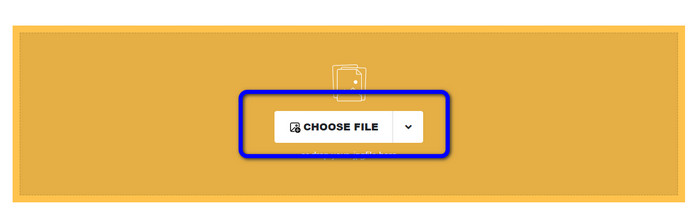
گام ۱. به وبسایت Safeimageconverter بروید. سپس روی دکمه Choose File کلیک کنید تا فایل NEF مورد نظر برای تبدیل را بارگذاری کنید.
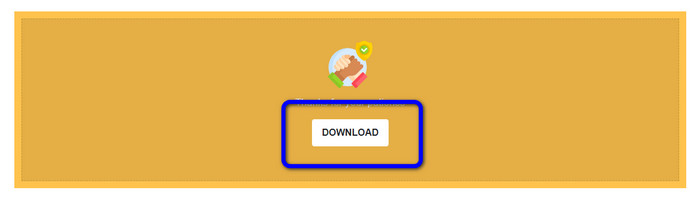
گام ۲. بعد از بارگذاری، مبدل تصویر بهطور خودکار فایل تصویری را تبدیل میکند. پس از پایان فرایند تبدیل، روی دکمه Download کلیک کنید. به این ترتیب میتوانید تصویر تبدیلشده را در رایانه خود ذخیره کنید.
قسمت 3. روش عملی برای تبدیل NEF به JPG در مک و ویندوز
اگر ترجیح میدهید در ویندوز یا مک، NEF را به JPG تبدیل کنید، از Photoshop استفاده کنید. Adobe Photoshop فقط برای ویرایش عکسها خوب نیست، بلکه در تبدیل فرمتهای گوناگون، از جمله NEF نیز قابل اعتماد است. علاوه بر این، میتوانید در فتوشاپ چندین فایل NEF را بهصورت دستهای به JPG تبدیل کنید. سرعت تبدیل آن نیز بالاست و برای همه کاربران مناسب است. همچنین این برنامه آفلاین میتواند کیفیت تصاویر شما را حفظ کند؛ به این ترتیب پس از تبدیل فایلها، همچنان از کیفیت رضایتبخش عکسها مطمئن خواهید بود. با این حال، Adobe Photoshop رایگان نیست و برای استفاده از برنامه باید یک طرح اشتراک خریداری کنید. این نرمافزار فقط یک نسخه آزمایشی هفتروزه ارائه میدهد. علاوه بر آن، فرایند نصب نیز نسبتاً پیچیده است.
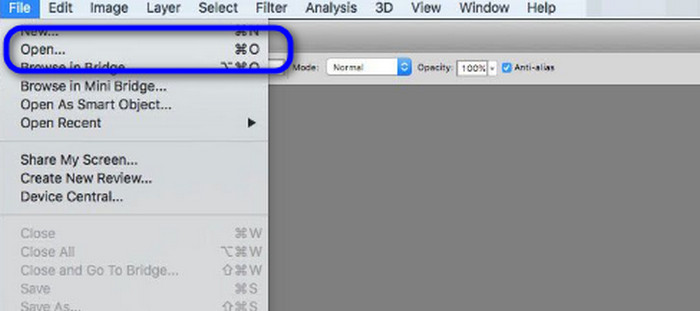
گام ۱. Adobe Photoshop را روی رایانه خود دانلود کنید. سپس پس از نصب برنامه، آن را اجرا کنید تا رابط کاربری را ببینید. بعد از آن، به منوی File بروید و گزینه Open را انتخاب کنید تا فایل تصویر NEF را وارد کنید.
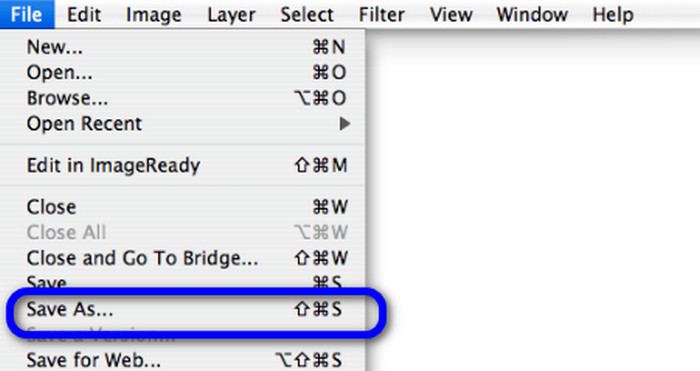
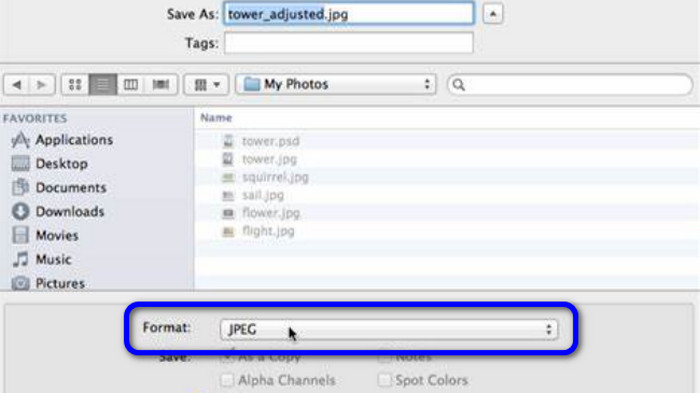
گام ۲. پس از وارد کردن تصویر NEF در رابط برنامه، دوباره به منوی File بروید و گزینه Save As را انتخاب کنید.
گام ۳. سپس از بخش انتخاب فرمت، JPG را برگزینید و روی Save کلیک کنید.
قسمت 4. تبدیل تصویر توصیه شده
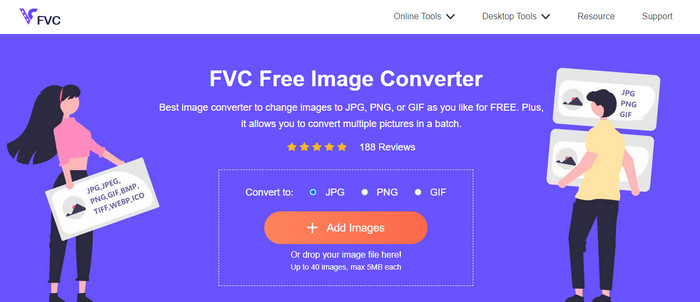
در این بخش، اگر بهدنبال مبدل تصویر دیگری برای تبدیل آنلاین سایر فرمتهای تصویری هستید، استفاده از FVC Free Image Converter بهترین راهحل برای شما است. این مبدل تصویر آنلاین میتواند بهراحتی فرمتهای مختلف را تبدیل کند. FVC Free Image Converter از فرمتهایی مانند JPG، PNG، GIF، BMP، TIFF و موارد دیگر پشتیبانی میکند. همچنین میتوانید از طریق مرورگرهای مختلفی مانند گوگل کروم، اکسپلورر، اج، فایرفاکس و غیره به این مبدل دسترسی داشته باشید. علاوه بر این، میتوانید فرایند تبدیل را فقط در چند ثانیه به پایان برسانید که برای همه کاربران بسیار راحت است. همچنین میتوانید چندین تصویر را بهطور همزمان در این ابزار آنلاین بارگذاری کنید. با قابلیت تبدیل دستهای، میتوانید تا ۴۰ تصویر را بهصورت همزمان آپلود کنید. افزون بر این، هنگام دانلود تصاویر تبدیلشده، میتوانید همه آنها را تنها با یک کلیک دانلود کنید.
بخش 5. سوالات متداول در مورد تبدیل NEF به JPG
1. آیا امکان تبدیل JPG به NEF وجود دارد؟
متأسفانه، شما نمی توانید یک فایل JPG را به NEF تبدیل کنید. این به این دلیل است که NEF یک عکس واقعی است که با دوربین نیکون گرفته شده است. زمانی که عکاس از دوربین نیکون استفاده می کند و فایل های دیجیتالی را آپلود می کند، از فرمت NEF استفاده می شود.
2. چگونه یک فایل NEF را باز کنیم؟
اگر کدک مناسبی در ویندوز خود داشته باشید، می توانید به راحتی فایل NEF را باز کنید. با این حال، اگر نمی توانید فایل NEF را باز کنید، به کمک برنامه های قابل دانلود نیاز دارید. می توانید از Microsoft Camera Codec Pack، Adobe Photoshop، Irfan View، GIMP و غیره استفاده کنید.
3. چرا باید از NEF به JPG تبدیل کنید؟
تبدیل NEF به JPG ضروری است زیرا برخی از برنامه ها و ویرایشگرهای تصویر از فایل های NEF پشتیبانی نمی کنند. همچنین، NEF دارای اندازه فایل بزرگی است که فضای ذخیره سازی زیادی را در دستگاه مصرف می کند. بنابراین، بهترین انتخاب این است که فایل NEF را به JPG تبدیل کنید.
نتیجه
فایلهای NEF میتوانند تصاویر باکیفیت بالایی در اختیار شما بگذارند، اما برخی مرورگرها و برنامهها از این نوع فایل پشتیبانی نمیکنند که آزاردهنده است. خوشبختانه این مطلب راهحلی عالی برای تبدیل NEF به JPG در اختیار شما قرار داد. همچنین در این مطلب با یک مبدل تصویری آنلاین دیگر برای تبدیل سایر فرمتهای تصویری آشنا شدید که همان FVC Free Image Converter است. میتوانید از این مبدل آنلاین برای تبدیل فرمتهای مختلف تصویر استفاده کنید.
-
 4 روش قابل اعتماد برای تبدیل JFIF به JPG با سهولت
 این راهنمای همه چیز را در مورد تبدیل JFIF به JPG به صورت آنلاین و آفلاین به شما می گوید. اگر می خواهید موثرترین روش ها را یاد بگیرید، فورا این پست را بخوانید!
-
 چگونه GIF را به JPG بدون از دست دادن کیفیت تبدیل کنیم
 موثرترین روش ها را برای تبدیل حرفه ای GIF به JPG بخوانید و دریافت کنید. تبدیل فایل های تصویری را با راهنمای مبدل های تصویر کامل یاد خواهید گرفت
-
 روش های آسان برای تبدیل تصاویر به وکتور
 در اینجا برخی از روش های قابل توجه در مورد نحوه برداری از یک تصویر آورده شده است. علاوه بر این، دانش کافی در مورد مبدل تصویری که می توانید استفاده کنید، خواهید داشت.
