


 Video Converter Ultimate
 ضبط صفحه
 تعمیر ویدیو
یک برنامه برجسته برای تغییر اندازه تصویر - FastStone Photo Resizer
جستوجوی یک ابزار تغییر اندازه عکس در اینترنت کار سادهای است. بهویژه امروزه که نرمافزارهای ویرایش عکس بسیاری بهصورت آنلاین در دسترس هستند. وقتی صحبت از تغییر اندازه و تبدیل تصاویر میشود، میتوانید ابزارهای آنلاین و آفلاین بسیار خوبی پیدا کنید. اما اگر در انتخاب یکی از آنها مشکل دارید، ما کار را برای شما ساده میکنیم. FastStone یک پلتفرم ویرایش تصویر است که میتوانید از آن برای تغییر اندازه عکسهایتان استفاده کنید. و در این مطلب، جزئیات کامل FastStone و روش استفاده از FastStone Photo Resizer را به شما توضیح میدهیم.

قسمت 1. بررسی FastStone Photo Resizer
FastStone Photo Resizer یک برنامه ویرایش تصویر است که باید از آن استفاده کنید. می توانید از آن بر روی دسکتاپ ویندوز خود استفاده کنید و به راحتی آن را دانلود کنید. علاوه بر این، دارای یک رابط کاربری تمیز و آسان است که آن را به یک ابزار کاربر پسند تبدیل می کند. FastStone Photo Resizer از فرمت های مختلف تصویر مانند JPEG، BMP، PNG، TIFF و GIF پشتیبانی می کند. همچنین شامل بسیاری از ویژگیهای ویرایشی است که میتوانید برای تبدیل، تغییر نام، برش، اضافه کردن متن، تغییر رنگ، افزودن واترمارک و موارد دیگر استفاده کنید.
علاوه بر این، پردازش دسته ای را ارائه می دهد که در آن می توانید دو یا چند تصویر را همزمان پردازش کنید. و اگر میخواهید تبدیلی را که انجام میدهید پیشنمایش کنید، FastStone شما را قادر میسازد این کار را انجام دهید. میتوانید تغییر اندازهدهنده تصویر FastStone را به صورت رایگان در رایانه ویندوز خود دانلود کنید، اما برای استفاده از ویژگیهای صریح آن باید برنامه را خریداری کنید. اگر می خواهید بدانید که چگونه با استفاده از FastStone اندازه تصاویر را تغییر دهید، آموزش زیر را دنبال کنید.
طرفداران
- این ویژگی ها و ابزارهای ویرایشی متنوعی را ارائه می دهد.
- قیمت پایینی دارد.
- این یک رابط کاربری ساده دارد.
- این یک فرآیند به اشتراک گذاری فایل آسان است.
منفی ها
- این فقط یک مرکز پشتیبانی و کمک محدود دارد.
- استفاده از آن رایگان نیست.
- فقط در نرم افزار ویندوز موجود است
نحوه استفاده از FastStone Photo Resizer برای تغییر اندازه تصاویر:
مرحله 1. ابتدا، FastStone Photo Resizer را روی کامپیوتر ویندوزی خود دانلود و نصب کنید. پس از نصب برنامه، آن را روی دسکتاپ اجرا کنید. سپس در رابط اصلی برنامه، روی دکمه Batch Convert در Menu کلیک کنید تا تصویر مورد نظر برای تغییر اندازه را بارگذاری کنید.
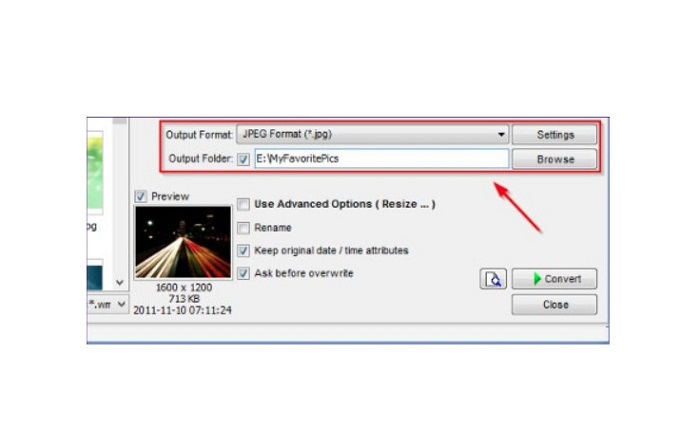
مرحله 2. پس از وارد کردن تصویر/تصاویرتان، آنها در رابط ظاهر میشوند. سپس روی فلش کشویی Output Format کلیک کنید تا فرمت خروجی فایل موردنظرتان را انتخاب کنید. و برای انتخاب محل ذخیره خروجی، روی دکمه Browse کنار Output Folder کلیک کنید.
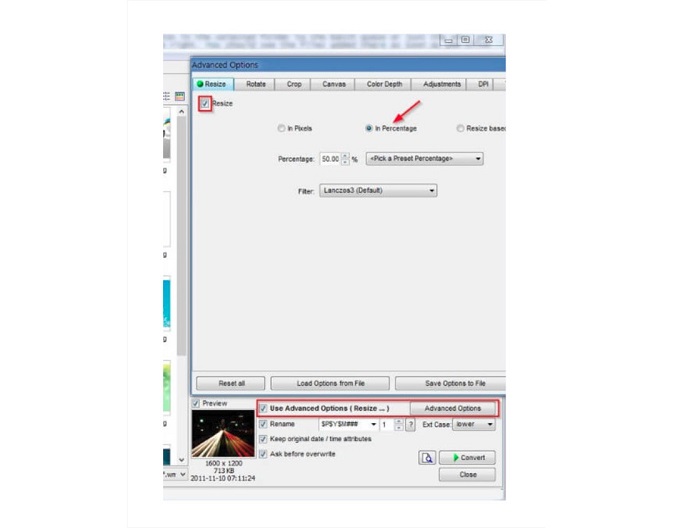
مرحله 3. در ادامه، روی Advanced Options کلیک کنید تا برگه جدیدی باز شود. سپس در تب Resize، گزینه In Percentage را تیک بزنید تا اندازه تصویر را بر اساس درصد تغییر دهید. میتوانید با کلیک روی فلش کشویی کنار Filter، فیلتر مورد نظر خود را انتخاب کنید.
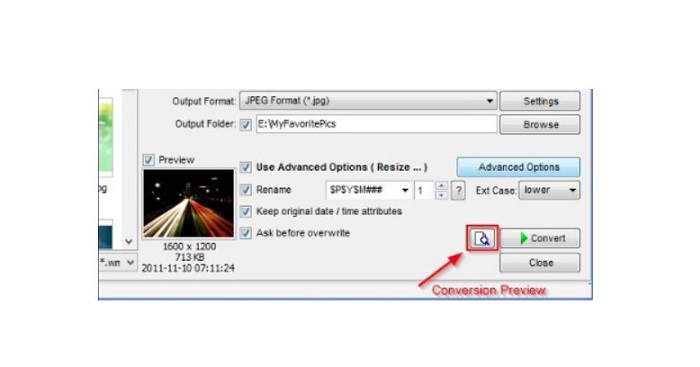
مرحله 4. سپس میتوانید با کلیک روی آیکون Preview در کنار دکمه Convert پیشنمایش تصویر خود را ببینید و آن را با فایل اصلی مقایسه کنید.
مرحله 5. در نهایت، دکمه Convert را تیک بزنید تا فرایند تغییر اندازه آغاز شود. این کار همچنین فرمت فایل تصویر شما را به فرمتی که در مرحله قبل انتخاب کردهاید تبدیل میکند. پس از اینکه FastStone تصویر شما را تغییر اندازه داد، پنجره جدیدی ظاهر میشود که در آن تصویر خروجی و اندازههای آن را میبینید.
و این پایان آموزش FastStone Photo Resizer است. با دنبال کردن مراحل بالا، می توانید به راحتی با استفاده از FastStone اندازه تصویر خود را تغییر دهید.
بخش 2. جایگزین های FastStone Photo Resizer
FastStone Photo Resizer فقط در رایانه های رومیزی ویندوز قابل دسترسی است. و یکی دیگر از اشکالات این است که قبل از دسترسی به سایر ویژگی های ویرایش آن، باید برنامه را خریداری کنید. بنابراین، اگر ترجیح می دهید از یک برنامه اصلاح کننده ویدیویی موجود در دستگاه های ویندوز، مک یا لینوکس و در دسترس آنلاین استفاده کنید، این بخش را به طور کامل بخوانید.
ارتقا دهنده تصویر رایگان FVC
FVC Free Image Upscaler یکی از پرکاربردترین برنامههای تغییر اندازه تصویر است که بهصورت آنلاین و در همه مرورگرها، از جمله Google، Firefox و Safari، قابل دسترسی است. این ابزار آنلاین همچنین میتواند در برطرف کردن تاری تصاویر به شما کمک کند. اگر تصویری تار یا با کیفیت پایین دارید، میتوانید از این ابزار آنلاین برای رفع تاری و بهبود کیفیت آن استفاده کنید. علاوه بر این، میتوانید تصویر خود را با بزرگنمایی 2x، 4x، 6x و 8x ارتقا دهید. نکته چشمگیر در مورد FVC Free Image Upscaler این است که از فرایند مبتنی بر فناوری هوش مصنوعی استفاده میکند که بهطور خودکار بخشهای تار تصویر شما را تشخیص داده و آنها را بهبود میبخشد.
علاوه بر این، از تمام فرمت های تصویر مانند PNG، JPG، JPEG و BMP پشتیبانی می کند. همچنین برای استفاده از این ابزار نیازی به ثبت نام یا ورود به حساب کاربری ندارید. و اگر می خواهید پیش نمایش خروجی خود را قبل از ذخیره آن بررسی کنید، می توانید در حین استفاده از این برنامه این کار را انجام دهید. علاوه بر این، استفاده از آن بی خطر و راحت است. و با وجود اینکه یک برنامه وابسته به اینترنت است، دارای یک رابط پردازش سریع است که در آن بارگذاری تصاویر برای تغییر اندازه کار سختی نخواهید داشت.
مرحله 1. مرورگر خود را باز کنید و در کادر جستوجو، FVC Free Image Upscaler را تایپ کنید. روی لینک ارائهشده کلیک کنید تا مستقیماً به صفحه اصلی بروید.
مرحله 2. با کلیک روی دکمه Upload Photo، برنامه را روی دسکتاپ خود اجرا کنید. پس از اجرای برنامه، دوباره روی دکمه Upload Photo کلیک کنید تا تصویر مورد نظر برای تغییر اندازه/رفع تاری را بارگذاری کنید.
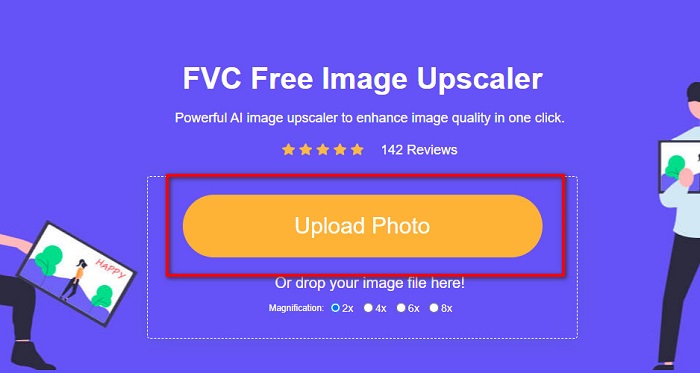
مرحله 3. سپس، پیشتنظیمهای بزرگنمایی را که میتوانید از بین آنها انتخاب کنید خواهید دید. میتوانید یکی از گزینههای 2x، 4x، 6x یا 8x را انتخاب کنید.
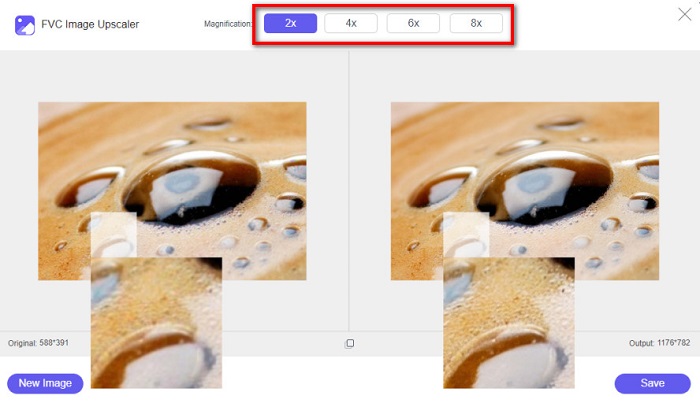
مرحله 4. نشانگر ماوس خود را حرکت دهید تا پیشنمایش تصویر را ببینید. و اگر از نتیجه راضی هستید، روی دکمه Save در گوشه پایین سمت راست رابط کلیک کنید.
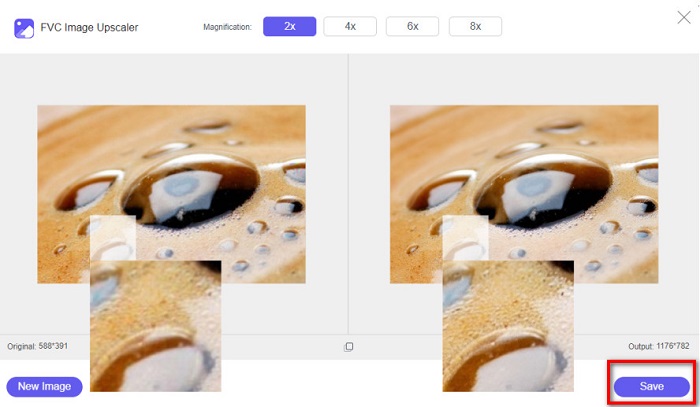
Image Resizer.com
یکی دیگر از ابزارهای آنلاین عالی برای تغییر اندازه تصویر که میتوانید از آن استفاده کنید Image Resizer.com است. Image Resizer.com به شما امکان میدهد با تنظیم ابعاد، اندازه تصویر خود را تغییر دهید. علاوه بر این، قابلیتی برای برش یا چرخاندن عکس شما دارد. این ابزار همچنین برای مبتدیان مناسب است زیرا رابط کاربری ساده و راحتی دارد. با این حال، شامل تبلیغات مزاحم زیادی است که ممکن است حواس شما را پرت کند.
مرحله 1. در مرورگر خود، Image Resizer.com را جستوجو کنید. و در رابط کاربری اصلی، روی دکمه Select Image کلیک کنید تا عکسی را که میخواهید اندازهاش را تغییر دهید بارگذاری کنید.
مرحله 2. در رابط بعدی، میتوانید ابعاد تصویر خود را بر اساس اندازه ثابت یا درصد تغییر دهید. سپس، Width و Height (عرض و ارتفاع) دلخواه خود را برای عکس وارد کنید.
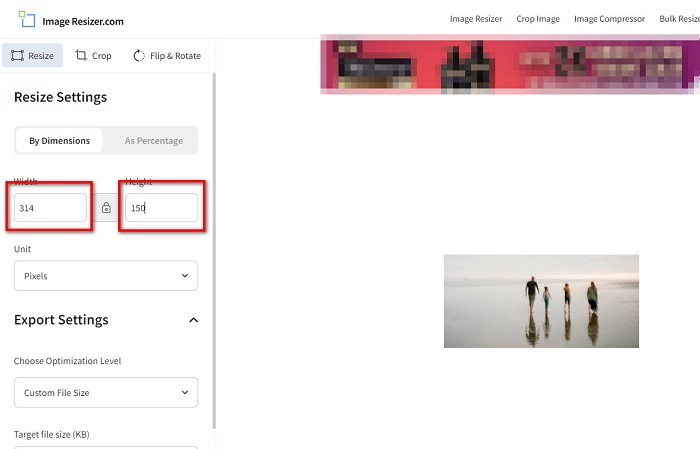
مرحله 3. پس از اتمام تغییر اندازه تصویر، روی دکمه Resize Image کلیک کنید تا فرایند به پایان برسد.
بخش 3. سوالات متداول در مورد FastStone Photo Resizer
FastStone Photo Resizer چقدر هزینه دارد؟
می توانید نسخه کامل FastStone Photo Resizer را برای $19.95 (مجوز مادام العمر) خریداری کنید.
آیا نمایشگر FastStone رایگان است؟
FastStone Image Viewer یک نمایشگر تصویر است که برای مایکروسافت ویندوز استفاده می شود. می توانید از FastStone Image Viewer به صورت رایگان و بدون شارژ استفاده کنید.
آیا FastStone Photo Resizer کیفیت عکس را خراب می کند؟
خیر. وقتی با استفاده از FastStone Photo Resizer تصویر خود را بهینهسازی میکنید، کیفیت تصویرتان از بین نخواهد رفت.
نتیجه
FastStone Photo Resizer یک برنامه عالی است اگر میخواهید تصویر خود را روی دسکتاپ ویندوز تغییر اندازه دهید. علاوه بر این، امکانات ویرایشی زیادی دارد و یک ابزار کاربرپسند نیز هست. اما اگر میپرسید آیا نسخهای از FastStone Photo Resizer برای مک وجود دارد، پاسخ منفی است. بنابراین، اگر میخواهید از یک تغییردهنده اندازه عکس که روی همه پلتفرمها در دسترس باشد استفاده کنید، همین حالا از FVC Free Image Upscaler استفاده کنید.
-
 راهنمای کامل Imglarger – راه حلی برای طراحان عکس
 Imglarger یکی از برجسته ترین ابزارهای حل تصویر است. برای آشنایی با توضیحات کامل، مزایا و معایب، قیمت و جایگزین های Imglarger روی این صفحه کلیک کنید.
-
 بهترین برنامه تغییر اندازه عکس آنلاین، آفلاین، اندروید و آیفون
 بهترین برنامه های تغییر اندازه عکس کدامند؟ روی صفحه کلیک کنید تا با پنج برنامه قدرتمند تغییر اندازه عکس که می توانید برای بهبود یا تغییر اندازه فایل خود استفاده کنید، آشنا شوید.
-
 6 روش برای تغییر شکل تصویر در وب و آفلاین [100% کار می کند]
 با آموزشی که در اینجا اضافه می کنیم، اکنون می توانید به راحتی اندازه یک تصویر را بر اساس اندازه دلخواه خود تغییر دهید. نحوه انجام آن را در اینجا بیاموزید!
