


 Video Converter Ultimate
 ضبط صفحه
 تعمیر ویدیو
3 راه برای فشرده سازی آسان عکس ها برای ایمیل [راهنما]
ایمیل یک پلت فرم عالی برای ارسال پیام با پیوست های عکس و سایر فایل های مورد نیاز است. با این حال، برخی از کاربران در ارسال عکسهای فایل بزرگ با مشکل مواجه میشوند، زیرا منجر به کندی زمان آپلود، تحویل ناموفق، یا فراتر رفتن از محدودیت اندازه پیوست اعمالشده توسط ارائهدهندگان ایمیل میشوند. برای جلوگیری از این مشکلات، تغییر اندازه عکسها قبل از ارسال ضروری است.
با این توضیح، در این مقاله قرار است ۳ روش را برای شما توضیح دهیم که به کمک آنها بتوانید عکسها را برای ایمیل فشرده کنید تا مطمئن شوید پیوستهای تصویری شما بدون افت کیفیت، بهراحتی ارسال و دریافت میشوند.

بخش 1. مزایای فشرده سازی عکس ها برای ایمیل
فشرده سازی عکس ها، به طور کلی، مزایای زیادی دارد، از جمله برای استفاده از ایمیل. موارد زیر مواردی هستند که می توانید هنگام تغییر اندازه عکس ها برای ایمیل از آنها لذت ببرید:
• از آنجا که فشردهسازی تصویر به معنی تغییر اندازه عکس به ابعاد کوچکتر است، در مقایسه با عکسهای فشردهنشده، میتوانید بهراحتی چندین عکس را بهصورت پیوست در یک ایمیل ارسال کنید.
• اغلب، سرویسهای ایمیل محدودیتهایی برای حجم پیوستهایی که میتوانید ارسال کنید، اعمال میکنند. با فشردهسازی عکسها برای ایمیل، میتوانید در این محدودهها بمانید و مطمئن شوید ایمیل شما بدون مشکل ارسال میشود. این موضوع بهخصوص زمانی مفید است که برای چند گیرنده ایمیل میفرستید یا قصد دارید در کنار عکسها، انواع دیگری از فایلها را نیز ضمیمه کنید.
• وقتی عکسها فشرده میشوند، فقط به این معناست که فضای کمتری اشغال میکنند و این به شما اجازه میدهد از سقف فضای ذخیرهسازی ایمیلتان بهتر استفاده کنید.
• پیوستهای حجیم گاهی توسط سرورهای ایمیل علامتگذاری میشوند و این موضوع میتواند منجر به عدم تحویل ایمیل یا رفتن آن به پوشه اسپم شود. فشردهسازی عکسها برای ایمیل به جلوگیری از این مشکلات کمک میکند و اطمینان میدهد که پیوستهای شما بدون دردسر به دست گیرندگان موردنظر میرسند.
• در برخی موقعیتها که کاربران با موبایل ایمیل خود را چک میکنند، عکسهای فشردهشده نسبت به عکسهای فشردهنشده بسیار راحتتر روی دستگاههای موبایل دانلود و مشاهده میشوند.
قسمت 2. فشرده سازی عکس ها برای ایمیل با تبدیل فرمت تصویر
اگر میخواهید عکسها را برای ایمیل فشرده کنید، اولین روشی که میتوانید امتحان کنید استفاده از ابزار مبدل تصویر است. با این کار، تصویر شما را به فرمتی که میخواهید تبدیل میکند که در آن فرآیند تبدیل عکس شما را به اندازه مطلوب و قابل کنترلتر بهینه میکند.
مبدل تصویر رایگان FVC یک ابزار رایگان تبدیل است که به کاربران امکان میدهد عکسهای خود را به فرمتهای مختلف فایل تصویری مانند JPG، PNG و GIF تبدیل کنند. بنابراین، اگر در حال ارسال فایلی تصویری در ایمیل هستید که در قالبی با دادهی بیشتر و در نتیجه حجم بالاتر ذخیره شده، میتوانید بهخوبی از این ابزار استفاده کنید. علاوه بر این، این ابزار برای زمانی ایدهآل است که میخواهید چندین فایل حجیم را بفرستید، زیرا میتواند حداکثر ۴۰ تصویر را بهصورت همزمان (Batch) تبدیل کند. در ادامه میبینید چگونه میتوانید از این ابزار برای فشردهسازی عکسها برای ایمیل استفاده کنید:
گام ۱. ابتدا در مرورگر خود عبارت FVC Free Image Converter را جستوجو کنید تا به این ابزار آنلاین دسترسی پیدا کنید.
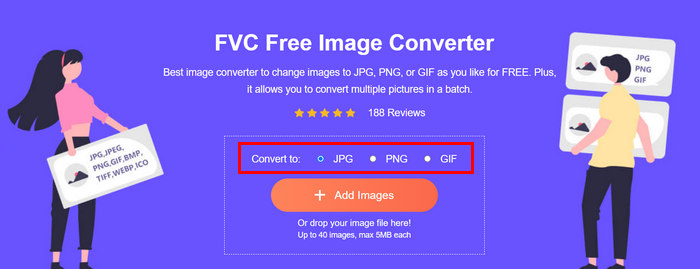
گام ۲. سپس، در گزینه Convert to فرمت خروجی دلخواه خود را انتخاب کنید. بعد از آن روی دکمه Add Images کلیک کنید تا تصاویری را که میخواهید تبدیل کنید، وارد (Import) نمایید.
گام ۳. پس از اتمام کار، روی دکمه Download All کلیک کنید.
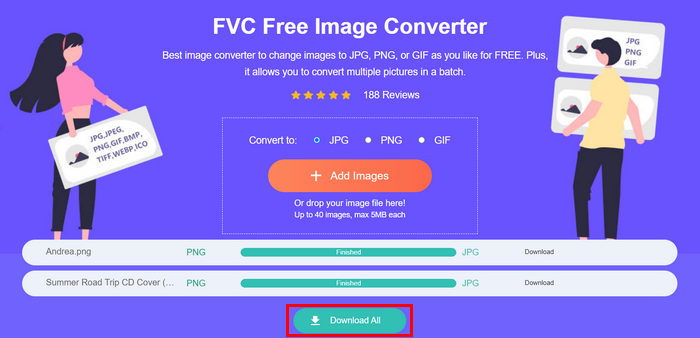 با ابزار FVC Free Image Converter، تضمین می شود که عکس های تبدیل شده شما اکنون فشرده شده و اندازه آنها کاهش یافته است، که برای استفاده از ایمیل عالی است.
 قسمت 3. کوچک کردن عکس ها برای ایمیل با ابزار فشرده سازی آنلاین
فشردهساز تصویر رایگان FVC یک ابزار فشردهسازی آنلاین رایگان است که فرآیند فشردهسازی عکسها برای ایمیل را بسیار ساده میکند. کاربران فقط کافی است فایلهای تصویری خود را آپلود یا وارد کنند و اجازه دهند ابزار بهطور خودکار آنها را فشرده کند. اگر نگران افت کیفیت هستید، این ابزار از بهترین روشهای بهینهسازی و الگوریتمهای پیشرفته فشردهسازی استفاده میکند. این موضوع باعث میشود که هنگام فشردهسازی برای ایمیل، کیفیت تصویر شما تا حد امکان حفظ شود.
همچنین، اگر مجبور به فشرده سازی دسته ای یک تصویر هستید، این ابزار به شما اجازه می دهد تا 40 تصویر را به طور همزمان فشرده کنید. در نهایت، از فرمت های مختلف تصویری محبوب مانند JPEG، PNG، SVG و GIF های متحرک پشتیبانی می کند.
مرحله ۱. در مرورگر خود، به وبسایت رسمی آنها مراجعه کنید.
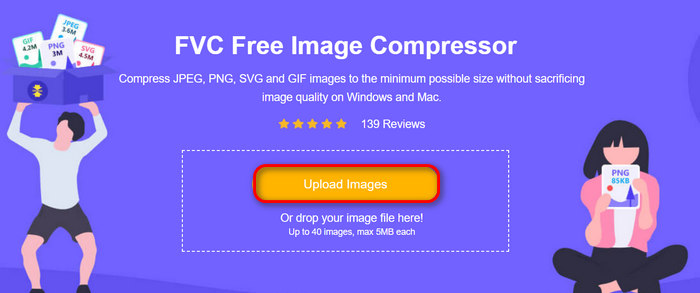
گام ۲. پس از آن، روی Upload Images کلیک کنید تا تصاویری را که میخواهید برای وب خود فشرده کنید، وارد نمایید. توجه داشته باشید که این ابزار بلافاصله پس از انتخاب تصاویر و کلیک روی «Open»، عکسهای شما را بهطور خودکار فشرده میکند.
گام ۳. بعد از فشردهسازی تصاویر، میتوانید با بررسی حجم جدید آنها پس از فشردهسازی، پیشنمایششان را ببینید. در نهایت، برای ذخیره تصویر خود روی Download All کلیک کنید.
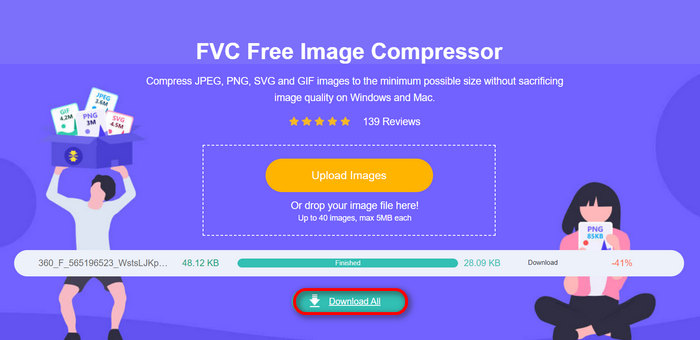
این روش واقعاً میتواند به شما کمک کند عکسها را برای ایمیل بدون تحمل مراحل پیچیده و هزینههای اشتراک فشرده کنید. علاوه بر این، رابط کاربر پسند و بصری آن، آن را به ابزاری ایده آل برای هر سطحی از کاربر تبدیل می کند. بنابراین، اگر می خواهید عکس های خود را برای استفاده از ایمیل بهینه کنید، اکنون این روش را امتحان کنید.
قسمت 4. تغییر اندازه عکس ها برای ایمیل به اندازه مشخص
اگر میخواهید اندازه عکسها را برای ایمیل به اندازه مشخصی تغییر دهید، میتوانید ابزار IMGonline را امتحان کنید. این ابزار کمپرسور تصویر به شما امکان می دهد اندازه تصویر خود را به اندازه دلخواه خود تغییر دهید. در اینجا نحوه انجام آن آمده است:
گام ۱. در وبسایت آنها روی دکمه Choose File کلیک کنید تا عکسی را که میخواهید فشرده کنید، اضافه کنید.

گام ۲. سپس تنظیمات فشردهسازی فایل JPEG را مشخص کنید. بسته به انتخابتان، حجم دلخواه را بر حسب KB یا MB وارد کنید.

گام ۳. در منوی Size Reducing in Megapixel میزان فشردهسازی عکس یا محدودیت فشردهسازی مدنظر خود را انتخاب کنید.
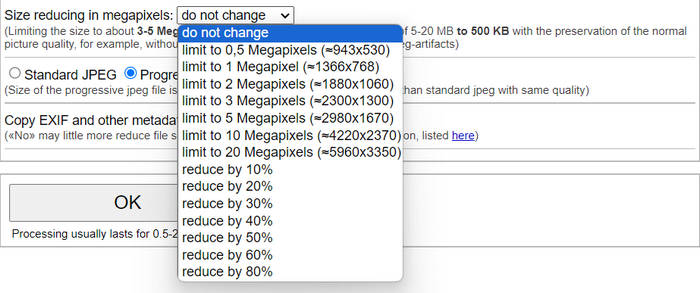
گام ۴. بعد از آن، بین گزینههای Standard JPG و Progressive JPG یکی را انتخاب کنید.

گام ۵. پس از پایان تنظیمات، فقط روی دکمه OK کلیک کنید.
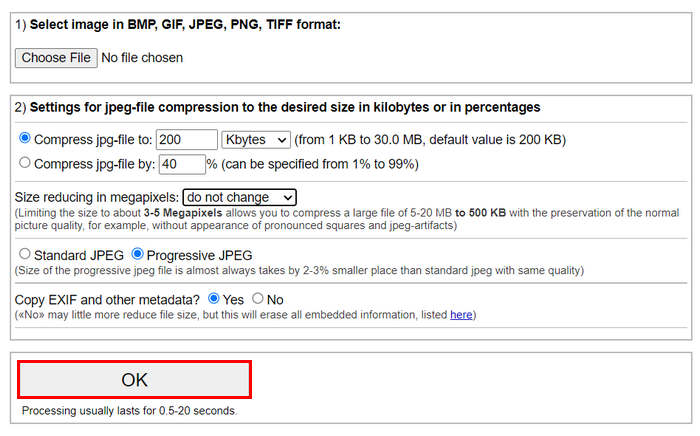
در رابطه با انتخاب بین JPG استاندارد و JPG پیشرو، به خاطر داشته باشید که اندازه فایل jpeg مترقی همیشه 2-3% جای کوچکتر از jpeg استاندارد با همان کیفیت گرفته می شود.
بخش 5. سوالات متداول در مورد فشرده سازی عکس ها برای ایمیل
اندازه عکس هایم را برای ایمیل چه اندازه باید تغییر دهم؟
وقتی صحبت از اندازه ایدهآل برای ارسال عکس در ایمیل به میان میآید، در حالی که هیچ محدودیتی وجود ندارد، به طور کلی توصیه میشود اندازه عکسهای خود را حداکثر تا 1024x768 پیکسل تغییر دهید. همچنین، نگه داشتن اندازه تصویر زیر 1 مگابایت به جلوگیری از مشکلات مربوط به محدودیتهای پیوست کمک میکند و دانلود و مشاهده تصاویر را برای گیرندگان آسانتر میکند.
چگونه تصاویر را برای جیمیل فشرده کنیم؟
فشردهسازی تصاویر برای جیمیل را میتوان با روشهای مختلفی انجام داد. یکی از سادهترین راهها استفاده از ابزارهای آنلاین فشردهسازی مانند ابزار رایگان فشردهساز تصویر FVC است. برای استفاده از آن، فقط کافی است فایلهای تصویری خود را آپلود کنید و این ابزار بهطور خودکار آنها را فشرده میکند.
چه نوع تصویری برای ایمیل بهتر است؟
بهترین فرمتهای تصویری برای ایمیل JPEG و PNG هستند. فرمت JPEG بهدلیل نرخ فشردهسازی مناسب و ایجاد تعادل بین حجم فایل و کیفیت، بهطور گسترده استفاده میشود و برای عکسها و تصاویری با رنگهای زیاد ایدهآل است. PNG برای تصاویری که به شفافیت (Transparency) نیاز دارند یا شامل متن، لوگو و گرافیک با لبههای تیز هستند ترجیح داده میشود، زیرا کیفیت این عناصر را بهتر حفظ میکند، هرچند حجم فایل آن نسبت به JPEG میتواند بیشتر باشد.
نتیجه
اینکه بدانید چگونه عکسها را برای ایمیل فشرده کنید بسیار مهم است تا از زمانهای طولانی آپلود، عدم تحویل ایمیل و محدودیت حجم پیوستها جلوگیری کنید. با دنبالکردن روشهایی که در این مقاله بهطور جامع توضیح داده شد، میتوانید مطمئن شوید پیوستهای تصویری شما حجم مناسبی دارند و بهسرعت ارسال و دریافت میشوند.
منتظر چی هستی؟ با این 3 روش آسان، همین امروز بهینه سازی پیوست های ایمیل خود را آغاز کنید.
-
 عکس بیش از حد فشرده: در اینجا نحوه رفع آسان آنها آورده شده است
 آیا نمی دانید وقتی تصویر شما بیش از حد فشرده شده است چه کاری انجام دهید؟ این مقاله را بخوانید و یاد بگیرید که چرا این مشکل تصویر رخ می دهد و 2 روش برای رفع آنها یاد بگیرید.
-
 تغییر اندازه تصویر به 100 کیلوبایت: 3 بهترین راه برای فشرده سازی کارآمد
 به دنبال ابزاری برای کمک به تغییر اندازه تصویر به 100 کیلوبایت هستید؟ این مقاله را بخوانید و با 3 روش یاد بگیرید که چگونه می توانید تصاویر خود را به اندازه فایل دلخواه خود کوچک کنید.
-
 نحوه فشرده سازی تصاویر در ورد [ویندوز و مک]
 آیا نمی دانید چگونه می توانید از Word خود برای فشرده سازی تصویر استفاده کنید؟ این راهنما روش هایی را به شما آموزش می دهد که چگونه تصاویر را در Word برای فشرده سازی بدون درز فشرده کنید.
