


 Video Converter Ultimate
 ضبط صفحه
 تعمیر ویدیو
خلاقیت خود را آزاد کنید: بررسی جامع Luminar Neo
آیا بهدنبال یک راهحل همهکاره برای بهبود کیفیت تصاویر و حذف پسزمینه هستید؟ دیگر لازم نیست بگردید، چون Luminar Neo میتواند ابزار ایدهآل شما باشد. با رابط کاربری ساده و قابلفهم و قابلیتهای قدرتمند مبتنی بر هوش مصنوعی، این ابزار بهعنوان یک ویرایشگر عکس چندمنظوره برای هر نوع کاربر برجسته میشود. چه بخواهید شادابی رنگها را افزایش دهید، پسزمینهها را بهطور یکپارچه جایگزین کنید، یا فقط جزئیات عکسهایتان را ظریفتر کنید، این ابزار مجموعه گستردهای از امکانات و ویژگیهای کارآمد در اختیار شما قرار میدهد تا نیازهای خلاقانهتان را برآورده کند. در این بررسی Luminar Neo، نگاهی خواهیم انداخت به اینکه چگونه این ابزار قدرتمند میتواند بدون دردسر سطح عکاسی شما را ارتقا دهد و اطلاعات لازم برای آزاد کردن تمام ظرفیت تصاویرتان را در اختیارتان بگذارد. همراه ما باشید تا امکانات و قابلیتهایی را بررسی کنیم که Luminar Neo را به یک انتخاب شاخص در دنیای بهبود تصاویر تبدیل کرده است.

قسمت 1. بررسی لومینار نئو
Luminar Neo، نرمافزار نوآورانه ویرایش عکس که توسط Skylum ساخته شده، برای عکاسان و هنرمندان بصری که بهدنبال مجموعهای جامع از ابزارها برای ارتقای تصاویر خود هستند، یک تغییردهنده بازی است. در هسته خود، این ابزار از فناوری پیشرفته هوش مصنوعی برای سادهسازی فرایندهای پیچیده ویرایشی استفاده میکند و آن را برای کاربران با هر سطح مهارتی در دسترس قرار میدهد. در حالیکه مجموعه گستردهای از ابزارهای خلاقانه و پریستهای ویرایشی را ارائه میدهد، آنچه Luminar Neo را متمایز میکند، قابلیتهای استثنایی بزرگنمایی تصویر و حذف پسزمینه آن است. ابزار بزرگنمایی تصویر تضمین میکند که عکسهای شما حتی هنگام بزرگ شدن نیز وضوح و جزئیات خود را حفظ کنند، در حالیکه ابزار حذف پسزمینه، راهحلی یکپارچه برای تغییر و اصلاح آسان پسزمینهها ارائه میدهد.
ویژگی های اصلی
◆ از هوش مصنوعی پیشرفته برای پیشرفت های دقیق، از جمله ابزارهای تخصصی برای آسمان و پوست استفاده کنید.
◆ ابزارها و از پیش تنظیم های متنوع برای افزودن لمس منحصر به فرد به عکس های شما.
◆ ادغام با نرم افزارهای ویرایش محبوب مانند فتوشاپ برای گردش کار روان.
◆ پردازش سریع برای مدیریت فایل های بزرگ و ویرایش های پیچیده بدون دردسر.
◆ هنگام آزمایش با ویرایش، تصویر اصلی خود را حفظ کنید.
◆ رابط کاربر پسند.
◆ حذف پس زمینه.
طرفداران
- گردش کار قابل تطبیق
- قابلیت های هوش مصنوعی قوی
- قیمت مقرون به صرفه.
- برای مبتدیان آسان است.
- تخفیف برای کاربران Skylum.
- پشتیبانی 24/7 مشتری.
منفی ها
- برخی از عملکردها نیاز به بهبود دارند.
- بدون برنامه موبایل برای ویرایش عکس.
قسمت 2. Luminar Neo در مقابل Luminar AI
در اینجا جدول مقایسه بین Luminar Neo و Luminar AI آورده شده است.
| ویژگی | لومینار نئو | هوش مصنوعی نوری |
| ویرایش مبتنی بر هوش مصنوعی | آره | آره |
| رابط | پیشرفته و قابل تنظیم | کاربر پسند و ساده شده |
| ابزارهای ویرایش | طیف گسترده ای از ابزارها و تنظیمات از پیش تعیین شده | قالب ها و ابزارهای هوشمند مبتنی بر هوش مصنوعی |
| ادغام | ادغام یکپارچه با سایر نرم افزارهای ویرایش | عملکرد کارآمد، بهینه شده برای پردازش هوش مصنوعی |
| مخاطب هدف | عکاسان حرفه ای و کاربران پیشرفته | عکاسان مبتدی و معمولی |
مهم است که به یاد داشته باشید که انتخاب بین Luminar Neo در مقابل Luminar AI به ترجیحات فردی شما و نیازهای ویرایش خلاصه می شود. چه به ویژگیهای پیشرفته و قابل تنظیم Luminar Neo تمایل داشته باشید یا سادگی کاربر پسند Luminar AI را ترجیح دهید، هر دو ابزار به عنوان راهحلهای قدرتمند در حوزه ویرایش عکس هستند.
قسمت 3. چگونه از Luminar Neo استفاده کنیم؟
در اینجا نحوه استفاده از Luminar Neo برای ارتقاء تصاویر آورده شده است:
مرحله 1. Luminar Neo را بهعنوان یک برنامه مستقل باز کنید.
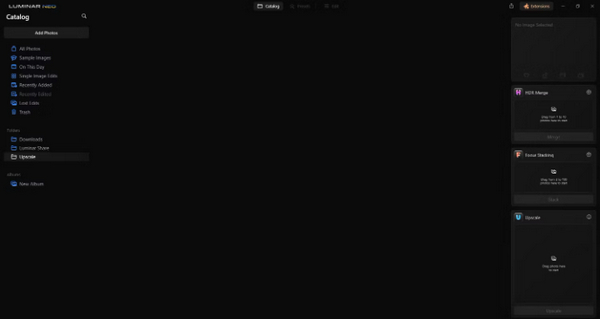
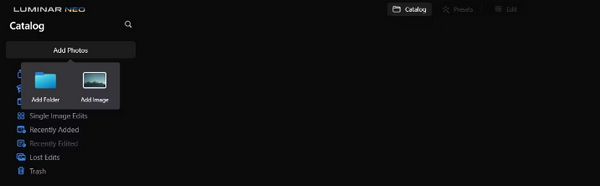
مرحله 2. روی Add Photos کلیک کرده و سپس Add Image را انتخاب کنید.
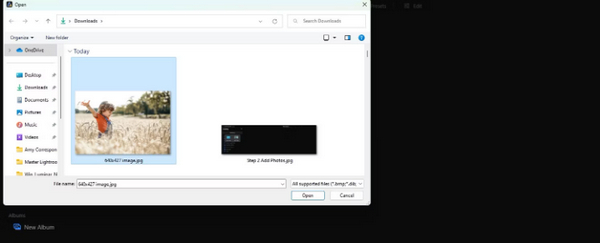
مرحله 3. فایل موردنظر خود را انتخاب کرده و روی Open کلیک کنید.
مرحله 4. اکنون در بالای منو روی Catalog کلیک کنید.
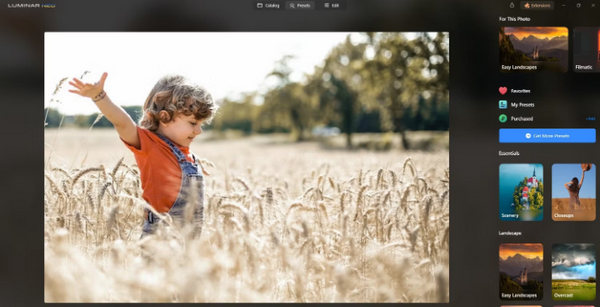
مرحله 5. تصویر را به سمت پایین، به جعبه Upscale AI که در پایین با عبارت Drag photo here to start برچسبگذاری شده است، بکشید.
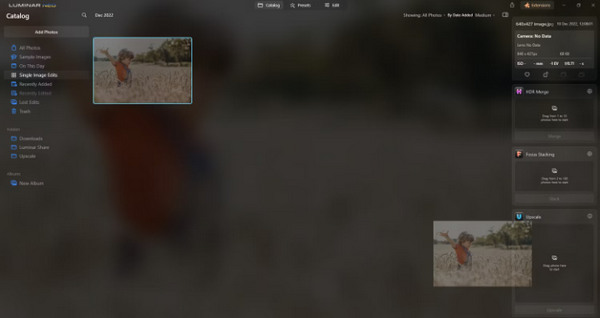
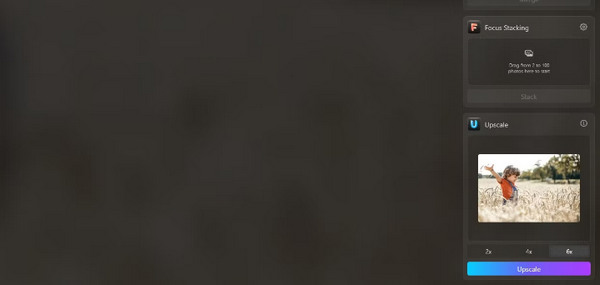
مرحله 6. فرایند را با انتخاب میزان بزرگنمایی دلخواهتان کامل کنید؛ برای مثال، در این آموزش ما یک افزایش 6 برابری را انتخاب کردیم.
مرحله 7. در نهایت روی Upscale کلیک کنید تا سطح بزرگنمایی انتخابشده روی تصویر شما اعمال شود.
با استفاده از Luminar Share، تصویر تازه ارتقا یافته خود را بدون دردسر از رایانه به تلفن خود منتقل کنید.
در اینجا نحوه استفاده از Luminar Neo برای حذف پسزمینه تصویر آمده است:
مرحله 1. ابتدا عکسی را که میخواهید ویرایش کنید وارد کنید. دکمه Add Photos را در گوشه بالا-چپ صفحه پیدا کرده و روی آن کلیک کنید. پس از انتخاب عکس، روی Open کلیک کنید.
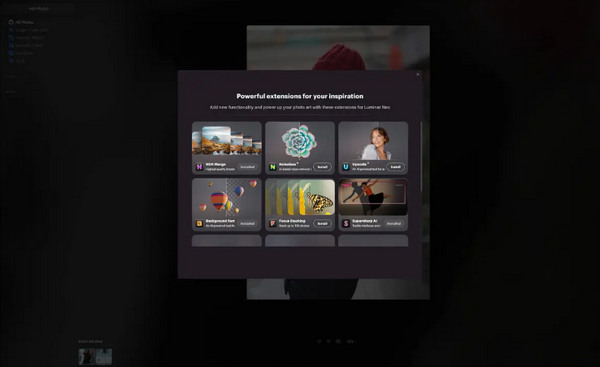
مرحله 2. این مرحله برای کاربران تازهکار بسیار مهم است. باید افزونه Background Removal AI را از تب Extensions در گوشه بالا-راست صفحه خود دانلود کنید. پس از دانلود، روی عکس خود دوبار کلیک کنید، Edit را بزنید و ویرایش را شروع کنید.
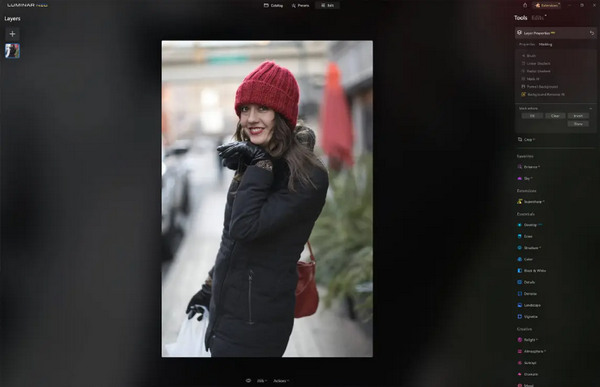
مرحله 3. در نوار ویرایش در سمت راست صفحه، به Layer Properties بروید، سپس Masking و گزینه Background Removal AI را انتخاب کنید. این کار امکان انتخاب سوژه را برای شما فراهم میکند. وقتی سوژه با رنگ قرمز مشخص شد، دکمه Remove را فشار دهید تا پسزمینه بهصورت جادویی حذف شود. برای اصلاح بخشهایی که هوش مصنوعی ممکن است از قلم انداخته باشد، از قلمموی refinements استفاده کنید.
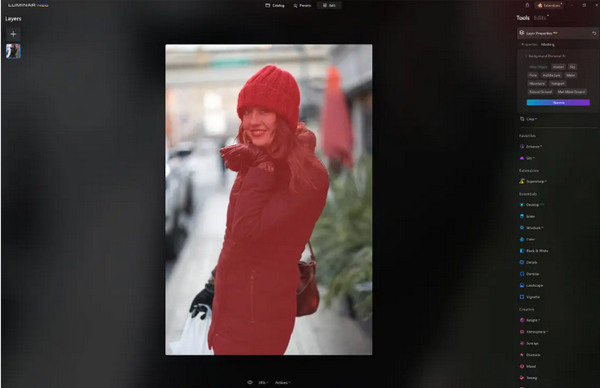
تنها چیزی که در مورد Luminar Neo وجود دارد این است که نسخه رایگان آن این ویژگی را ندارد. با این وجود، اگر بودجه زیادی ندارید و می خواهید عکس خود را به سطح بالاتری ارتقا دهید، این ابزار برای شما مناسب است.
قسمت 4. 2 بهترین جایگزین رایگان برای Luminar Neo
Luminar Neo ممکن است برای برخی گران باشد و آنقدر پیچیده باشد که به راحتی بتوان آن را پیمایش کرد، بنابراین، اگر به دنبال ابزارهای جایگزین برای Luminar Neo هستید، در اینجا بهترین ابزارهایی است که می توانید بررسی کنید.
ارتقا دهنده تصویر آنلاین FVC
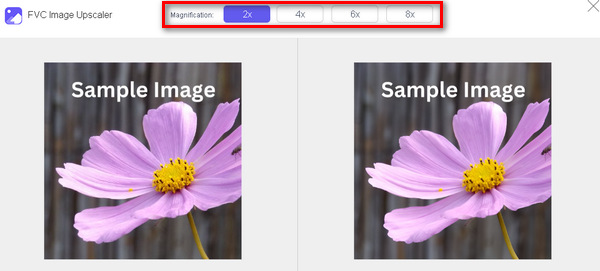
FVC Online Image Upscaler یک ابزار آنلاین رایگان برای بزرگنمایی تصویر است. بله، درست خواندید؛ رایگان است، اما هنوز توانایی آن را دستکم نگیرید. این ابزار با فناوری هوش مصنوعی یکپارچه شده تا فرایند بهبود را بهصورت خودکار و روان انجام دهد. همچنین میتوانید تصویر را تا 8 برابر بزرگتر کنید بدون اینکه کیفیت آن افت کند.
در اینجا نحوه استفاده از این ابزار آورده شده است
مرحله 1. به وبسایت رسمی آنها بروید.
مرحله 2. روی Upload Photo کلیک کرده و تصویری را که میخواهید بزرگنمایی کنید انتخاب کنید.

مرحله 3. پس از آن، این ابزار پیشنمایشی از تصویر شما نشان میدهد. میتوانید از گزینه Magnifier برای بررسی کیفیت تصویر استفاده کنید.
مرحله 4. برای دانلود تصویر خود روی Save کلیک کنید.
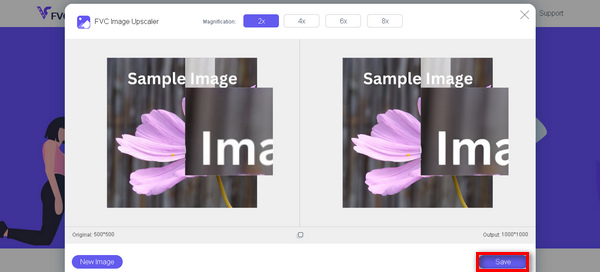
FVC Image Upscaler بهترین جایگزین برای Luminar Neo برای ارتقاء مقیاس تصاویر است. علاوه بر این، با استفاده از این ابزار، کاربران به راحتی می توانند تصاویر خود را ارتقا دهند. بدون رابط پیچیده، شما فقط به چند کلیک نیاز دارید تا تصاویر خود را به طور کامل ارتقا دهید.
حذف کننده پس زمینه آنلاین FVC
در همین حین، میتوانید از FVC Online Background Remover بهعنوان یک گزینه جایگزین برای حذف پسزمینه تصاویر استفاده کنید. این ابزار چندمنظوره است و برای خودکارسازی فرایند حذف پسزمینه طراحی شده است. این سرویس از چندین فرمت محبوب تصویری مانند PNG، JPG و JPEG پشتیبانی میکند. علاوه بر این، میتوانید نتیجه نهایی تصویر را شخصیسازی کنید؛ میتوانید پسزمینه را به رنگهای یکدست تغییر دهید، سوژه را برگردانید (flip کنید)، جابهجا کنید و آن را برش (crop) دهید.
در اینجا مراحلی وجود دارد که چگونه می توانید به راحتی از این ابزار استفاده کنید:
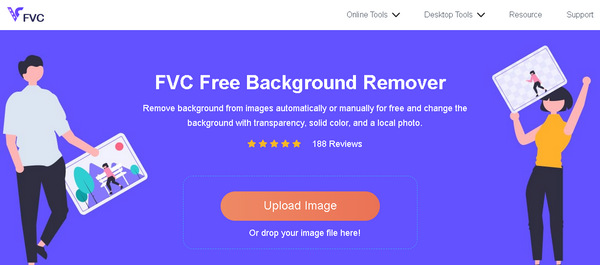
مرحله 1. ابتدا به وبسایت رسمی آنها رفته و روی Upload Image کلیک کنید.
مرحله 2. پس از نمایش نتیجه، میتوانید با اصلاح لبهها و جابهجا کردن سوژه، تصویر را ویرایش کنید.
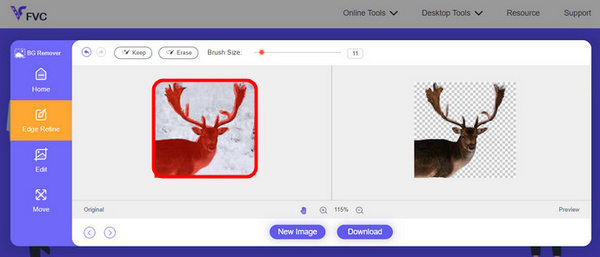
مرحله 3. برای ذخیره نتیجه، روی دکمه Download کلیک کنید.
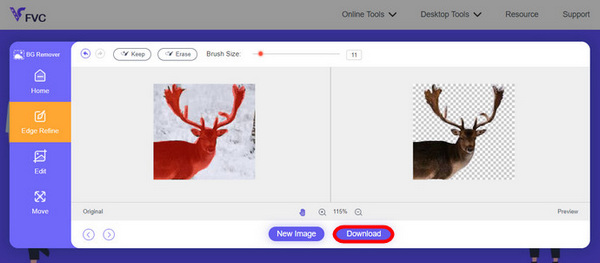
FVC Image Background Remover واقعا ابزاری مناسب برای برش تصویر و بهترین جایگزین برای Luminar Neo است. و جدای از رایگان بودن آن، پیمایش ابزار آسان است. بدون دردسر، فقط نتایج با کیفیت.
بخش 5. سوالات متداول در مورد بررسی Luminar Neo
آیا Luminar Neo بهتر از Lightroom است؟
مقایسه بین Luminar Neo و Lightroom اغلب به ترجیحات فردی و نیازهای خاص بستگی دارد. لایت روم به دلیل ادغام یکپارچه خود با Creative Cloud Adobe مشهور است و آن را در بین عکاسان حرفه ای محبوب می کند. از سوی دیگر، Luminar Neo ویژگیهای پیشرفته هوش مصنوعی و گردش کار انعطافپذیر را ارائه میدهد. انتخاب بین این دو در نهایت به سبک ویرایش کاربر و الزامات گردش کار بستگی دارد.
آیا Luminar Neo به خوبی فتوشاپ است؟
Luminar Neo و Photoshop اهداف مختلفی را در حوزه ویرایش عکس انجام می دهند. فتوشاپ یک استاندارد صنعتی است که مجموعه ای جامع از ابزارهای پیشرفته را برای ویرایش پیچیده و طراحی گرافیکی ارائه می دهد. Luminar Neo اگرچه قدرتمند است، اما با ویژگیهای مبتنی بر هوش مصنوعی بیشتر به عکاسان پاسخ میدهد. مناسب بودن یکی بر دیگری به نیازهای خاص کاربر بستگی دارد.
آیا Luminar Neo برای مبتدیان خوب است؟
بله، Luminar Neo به گونه ای طراحی شده است که کاربر پسند باشد و آن را به یک انتخاب عالی برای مبتدیان تبدیل می کند. رابط بصری آن، همراه با قابلیتهای هوش مصنوعی پیشرفته، به کاربران اجازه میدهد تا بدون منحنی یادگیری شیبدار به نتایج چشمگیر دست یابند. گستره وسیعی از پیشتنظیمها و ابزارهای خلاقانه این نرمافزار همچنین به مبتدیان این امکان را میدهد تا عکسهای خود را به راحتی کاوش و بهبود بخشند.
آیا Luminar Neo یک خرید یکباره است یا یک مدل اشتراک؟
Luminar Neo از مدل خرید یکباره پیروی می کند. کاربران می توانند بدون نیاز به اشتراک مکرر نرم افزار را خریداری کرده و به ویژگی های آن دسترسی داشته باشند. این ساختار قیمتگذاری یک رویکرد ساده و مقرونبهصرفه برای کاربرانی که ترجیح میدهند برای نیازهای ویرایش عکس خود یکبار پرداخت کنند، ارائه میکند.
نتیجه
بهطور خلاصه، این بررسی Luminar Neo دیدگاههای ارزشمندی درباره این ابزار قدرتمند و در عین حال کاربرپسند ویرایش عکس در اختیار شما گذاشته است. با قابلیتهای پیشرفتهای مانند بزرگنمایی مبتنی بر هوش مصنوعی و حذف پسزمینه، هم برای حرفهایها و هم برای مبتدیان مناسب است. هرچند هنوز جا برای بهبود وجود دارد، اما چندمنظوره بودن، هوش مصنوعی قوی و قیمت مقرونبهصرفه آن را به گزینهای جذاب برای ارتقای مهارتهای عکاسی شما تبدیل میکند. چه بهدنبال سفارشیسازی باشید، چه سادگی، Luminar Neo یک راهحل جامع برای دگرگون کردن تصاویرتان ارائه میدهد.
-
 اضافه کردن پس زمینه به عکس در آیفون، اندروید، کامپیوتر، آنلاین
 آیا می توانم یک پس زمینه سفید به عکس اضافه کنم؟ چگونه این کار را انجام دهیم؟ 3 روش برای افزودن پسزمینه به عکسها به صورت آنلاین، در رایانه، آیفون یا اندروید را بیاموزید.
-
 تقویت کننده تصویر Canva: تقویت کننده جدید کیفیت تصویر؟ [مرور]
 کشف کنید که چگونه Canve Image Enhancer می تواند عکس های شما را به سطح بعدی برساند. بررسی دقیق ما را بررسی کنید که تمام ویژگیها، مزایا و معایب این ابزار را پوشش میدهد.
-
 تقویت کننده تصویر Vance AI: یک بررسی عمیق [2024]
 به دنبال یک ابزار تقویت کننده تصویر قدرتمند و کارآمد هستید؟ بررسی عمیق ما از Vance AI Image Enhancer را بخوانید و ببینید که چگونه می تواند عکس های شما را متحول کند.
