


 Video Converter Ultimate
 ضبط صفحه
 تعمیر ویدیو
چگونه به سرعت یک تصویر را با 3 بهترین راه حل برای استفاده از پیکسل خارج کنیم
«رفع پیکسلی شدن تصویر» راهکاری است که برای بازسازی و نوسازی عکسهای پیکسلیشده، یا تصاویری که حالت شطرنجی و مربعی ریز (بیتمپ) دارند، به آن نیاز دارید. بسیاری از کاربران فکر میکنند ویرایش، تنظیم، تغییر و بهبود تصویر کار دردسرسازی است؛ راستش هم همینطور بود، اما مربوط به گذشته است. با فناوری پیشرفتهای که امروز در دسترس داریم، اگر از ابزار مناسب استفاده کنید، این کار بهسادگی قابل انجام است.
آیا ابزار مناسبی برای حذف پیکسل روی عکس خود ندارید؟ خوشبختانه، این مقاله سه نرمافزار برتر را که میتواند به شما در ویرایش پیکسلهای عکس کمک کند و یک آموزش در مورد هر کدام برای حل مشکل، برای شما آورده است.

قسمت 1. چگونه یک تصویر را بصورت آنلاین با بهترین ویرایشگر عکس انتخاب کنیم [توصیه می شود]
FVC Free Image Upscaler یک ابزار آنلاین کاملاً خودکار است که میتوانید از آن برای رفع پیکسلی شدن تصاویر بهصورت آنلاین و رایگان استفاده کنید. میتوانید آن را در هر مرورگر وبی که در اختیار دارید باز کنید؛ نیازی به دانلود هیچ لانچر یا برنامهی راهانداز دیگری نیست، بنابراین بهمحض ورود به سایت میتوانید فوراً از این ابزار استفاده کنید. هرچند این نرمافزار تحت وب ارائه شده است، اما قدرت و عملکرد آن در ازبینبردن پیکسل و شطرنجی بودن تصویر با حرفهایترین ویرایشگرهای تصویر، چه آنلاین و چه آفلاین، برابری میکند. شاید فکر کنید کار با این ابزار برایتان دشوار است، اما اینطور نیست. هنوز قانع نشدهاید؟ اگر چنین است، میتوانید آموزش مرحلهبهمرحلهای را که در ادامه آمده بخوانید یا دنبال کنید تا نحوه استفاده آسان از این ابزار را بهصورت راهنما مشاهده کنید.
مرحله 1. میتوانید با جستجوی نام این ابزار در هر مرورگر وبی که روی دستگاه خود دارید، یا با کلیک روی این لینک برای باز کردن وبسایت اصلی آن، به این ابزار تحت وب دسترسی پیدا کنید.
مرحله 2. وقتی وارد ابزار وب شدید، روی «Add Image» کلیک کنید تا تصویر پیکسلی را آپلود کنید. یک پنجره پوشه روی صفحه شما ظاهر میشود؛ میتوانید تصویری را که در حافظه محلی خود ذخیره کردهاید پیدا کرده و سپس روی «Open» بزنید تا آن را بارگذاری کنید.
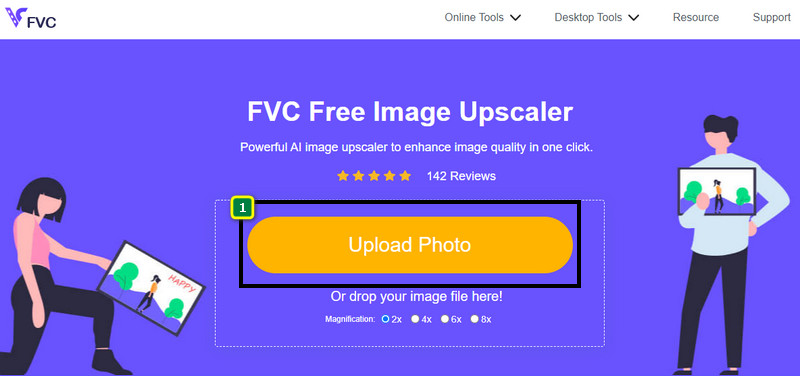
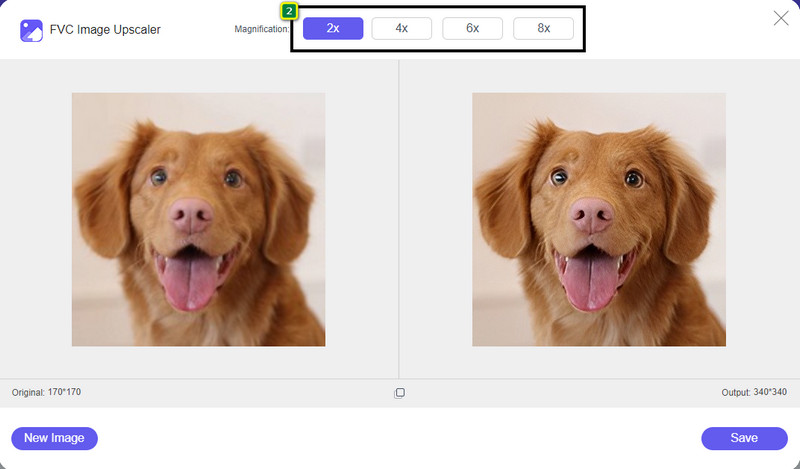
مرحله 3. سپس گزینه بزرگنمایی موردنظر خود را انتخاب کنید تا روی تصویر اعمال شود و ظاهر آن را صاف و روان کند، بهطوریکه دیگر حالت شطرنجی با مربعهای ریز نداشته باشد.
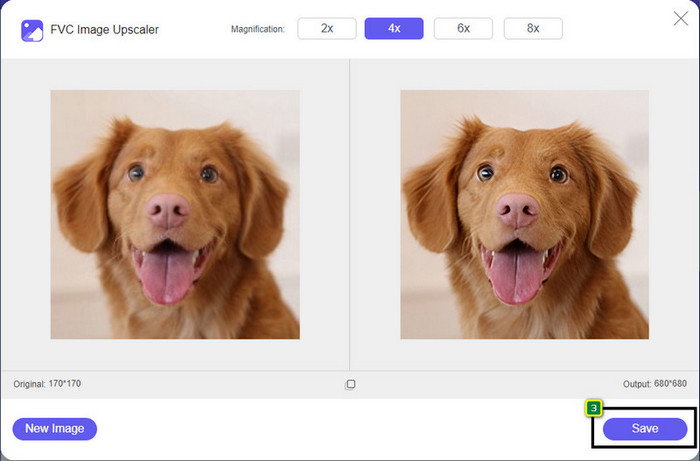
مرحله 4. به همین سادگی، روی «Save» کلیک کنید تا نسخه بدون پیکسل و شطرنجی را در حافظه محلی خود دانلود کنید.
قسمت 2. چگونه یک تصویر را به صورت آفلاین با استفاده از 2 روش در ویندوز و مک از پیکسل خارج کنیم [آسان]
Pixbim - عکسها را در ویندوز از پیکسل خارج کنید
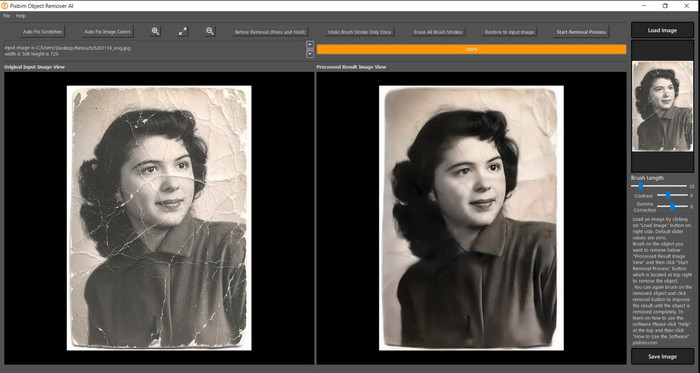
Pixbim یکی از قدرتمندترین و ابزارهای رفع پیکسلی شدن تصویر مبتنی بر هوش مصنوعی است که میتوانید برای حل این مشکل روی ویندوز خود دانلود کنید. این ویرایشگر شایسته ذکر در این مطلب است، زیرا تصاویر پیکسلی را بهسرعت و با کارایی بالا اصلاح میکند. در این برنامه، هوش مصنوعی تنظیمات لازم را بهطور خودکار برای شما انجام میدهد تا در استفاده از نرمافزار دچار پیچیدگی نشوید. بهدلیل قابلیتها و امکانات آن، پس از پایان دوره آزمایشی رایگان باید برای ادامه استفاده، یک کلید لایسنس خریداری کنید؛ که ممکن است برای بسیاری از افرادی که میخواهند آن را روی رایانه خود داشته باشند، کمی گران بهنظر برسد.
مرحله 1. پس از دانلود نرمافزار، باید آن را اجرا کنید تا بتوانیم به مرحله بعد برویم.
مرحله 2. روی «Load Image» بزنید تا تصویر پیکسلیای را که میخواهید در اینجا بهبود دهید، اضافه کنید.
مرحله 3. بعد از آن، با کشیدن «اسلایدرها» متناسب با مقداری که میخواهید به آن برسید، تنظیمات را انجام دهید.
مرحله 4. پس از پایان تنظیم و اصلاح تصویر، نتیجه را ذخیره کنید تا خروجی بگیرید.
ویرایشگر عکس Movavi [ویندوز و مک]
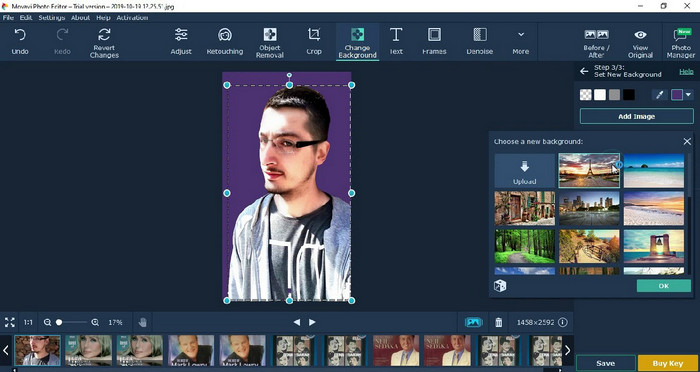
بسیاری از کاربران پیشتر بهدلیل چندمنظوره بودن Movavi Photo Editor در ویرایش تصاویر، از آن استفاده کردهاند. این برنامه، مانند Pixbim، با پشتیبانی از شبکههای عصبی هوش مصنوعی خود، میتواند پیکسلهای از دسترفته تصویر را بازیابی کند. با در اختیار داشتن این ویرایشگر، میتوانید ویرایشهای ابتدایی و پیشرفته روی ظاهر عکس انجام دهید؛ مانند برش، چرخش، افزودن فیلتر، ترمیم پیکسلها و موارد دیگر. با این حال، تا زمانی که نسخه پریمیوم آن را روی رایانه خود خریداری نکنید، به همه این امکانات دسترسی کامل نخواهید داشت.
قیمت تقریباً مشابه Pixbim دارد که برای بسیاری بسیار گران است. اما اگر بودجه ای برای خرید ویرایشگر دارید، این ممکن است همان چیزی باشد که به آن نیاز دارید. با دنبال کردن مراحل، نحوه حذف پیکسل تصاویر را با این برنامه بیاموزید.
مرحله 1. برنامه را روی ویندوز یا مکاواس خود دانلود کنید.
مرحله 2. نرمافزار را اجرا کنید، سپس عکسی را که میخواهید پیکسلی بودن آن را برطرف کنید، در اینجا بارگذاری کنید.
مرحله 3. حالا که تصویر را آپلود کردهاید، روی «Magic Enhance» کلیک کنید تا هوش مصنوعی بهطور خودکار تصویر را اصلاح و بهینه کند.
مرحله 4. تصویر را خروجی بگیرید و از نتیجه آن لذت ببرید.
بخش 3. سؤالات متداول در مورد نحوه ارتقاء پیکسل یک تصویر
چرا یک واترمارک روی تصویر بدون پیکسل صادر شده وجود دارد؟
هنگامی که از نسخه آزمایشی رایگان برنامه استفاده می کنید، این احتمال وجود دارد که در هنگام صادرات علامت واترمارک باقی بماند. بنابراین، اگر میخواهید تصویری را بدون واترمارک صادر کنید، میتوانید مجوز برنامه را خریداری کنید یا از FVC Free Image Upscaler استفاده کنید، زیرا هیچ واترمارکی روی تصویر صادر شده باقی نمیگذارد.
تفاوت بین تار و پیکسلی چیست؟
بسیاری از مقالات ثابت کرده اند که تار و پیکسل به دلیل برخی عوامل یکسان نیستند. تصاویر تار دلیلی است که شما یک حرکت با سرعت بالا می گیرید یا با دوربین لرزان عکس می گیرید. در حالت پیکسلی، وقتی یک عکس فوری را بزرگ میکنید، یک پیکسلسازی شروع میشود و یک بیت مپ با یک مربع کوچک خواهید دید.
چه عاملی باعث پیکسل شدن تصویر می شود؟
برخی از دلایل تبدیل تصاویر به پیکسل. یک دلیل رایج زمانی است که یک تصویر شطرنجی را بزرگ می کنید. فرمت های شطرنجی مانند PNG، JPG، GIF و غیره از مربع های کوچکی تشکیل شده اند که ظاهر شی ذخیره شده در این ظروف را می سازند. معمولاً وقتی تصویر را بزرگ میکنید، میبینید که مربعهایی وجود دارد که به پیکسل معروف هستند و حاوی دادههای رنگی هستند که به صورت بصری ارائه میشوند. این می تواند برای بسیاری از ویرایشگران مشکل ایجاد کند، به خصوص زمانی که پیکسل شدن اتفاق می افتد.
چگونه می توانم نویز تصویر را برطرف کنم؟
این نیز یکی دیگر از مشکلات رایجی است که ممکن است در عکسهایی که گرفتهاید با آن روبهرو شوید و راهحلی که نیاز دارید در همین مقاله قرار دارد. روی این لینک کلیک کنید تا بهراحتی بخوانید، یاد بگیرید و مشکل را حل کنید و ببینید چگونه 'نویز تصویر را کاهش دهید'.
نتیجه
به همین سادگی، اکنون میتوانید با کمک بهترین ویرایشگرهای تصویری که میتوانید روی رایانه دانلود کنید یا در وب بهصورت آنلاین به کار ببرید، خیلی راحت یک تصویر را از حالت پیکسلی خارج کنید. این مورد دیگر حل شده است! بنابراین اگر روزی دوباره با مشکل پیکسلی شدن روبهرو شدید، میتوانید روی این مقاله برای کمک حساب کنید. بهترین ابزاری که ممکن است به آن نیاز داشته باشید، مانند FVC Free Image Upscaler، اینجاست و آماده کمک به شماست. بهترین کار این است که با اصلاح پیکسلی شدن ظاهر تصویر، کاری کنید که این مشکل دیگر به چشم هیچکس نیاید. با استفاده از این ویرایشگر تصویرِ آنلاین، با پیکسلی شدن خداحافظی کنید.
-
 7 ارتقا دهنده تصویر که می توانید برای بهبود و بهبود هر تصویر استفاده کنید [2022]
 آیا به ارتقا دهنده تصویر نیاز دارید؟ خوشبختانه، این مقاله بهترین نرم افزاری را که می توانید به آن دسترسی داشته باشید و روی دسکتاپ خود دانلود کنید، پوشش می دهد.
-
 5 تقویت کننده وضوح تصویر که باید از این 2022 استفاده کنید [آخرین انتخاب]
 نمی دانید از چه تقویت کننده وضوح تصویر باید استفاده کنید؟ این مقاله را بخوانید و پنج ابزار برای استفاده و افزایش وضوح تصاویر را مرور می کنیم.
-
 4 برنامه برای افزایش وضوح تصویر در دستگاه های تلفن همراه شما [بهترین انتخاب]
 اگر میخواهید به رزولوشن 1080p، 4k یا مواردی از این دست برسید، به برنامههایی برای افزایش وضوح عکس خود نیاز دارید. با لیست زیر می توانید به راحتی این کار را انجام دهید!
