


 Video Converter Ultimate
 ضبط صفحه
 تعمیر ویدیو
تصویر با کیفیت به 4k با استفاده از داغترین ارتقاء دهنده موجود در بازار
بزرگنمایی تصویر تا وضوح 4K در بسیاری از نرمافزارها، چه حرفهای و چه غیرحرفهای، به قابلیتی پرتقاضا تبدیل شده است. کاربران بر این باورند که وضوح بالاتر مانند 4K تصویر آنها را جزئینگرتر، شارپتر، شفافتر و بهتر میکند. با این حال، واقعاً زمانی از تصاویر 4K لذت میبرید که آنها را برای تبلیغات محیطی، چاپ بنر و مشهای باکیفیت، نمایش روی نمایشگرهای دیجیتال بزرگ، اغلب پروژههای سینماتوگرافی دیجیتال و موارد دیگر استفاده کنید. هدف PPI یا وضوح تصویر این است که بر اساس عرض و ارتفاع تصویر، تعداد مشخصی پیکسل را نمایش دهد. آیا میخواهید بدانید چطور عکس خود را به 3840 در 2160 تبدیل کنید؟ یا ترجیح میدهید از استاندارد سینمایی DCI 4K با وضوح 4069 در 2160 استفاده کنید؟ این مقاله اطلاعات لازم را برای دستیابی به وضوح UHD که با نام 4K شناخته میشود، در اختیار شما قرار میدهد.

بخش 1. چگونه با بهترین راه حل، تصویر را به 4k رایگان ارتقا دهیم [سرویس وب]
FVC Free Image Upscaler سادهترین ابزار بزرگنمایی تصویر به 4K است که میتوانید برای رسیدن به این وضوح از آن استفاده کنید. این ابزار فقط تصویر شما را بزرگ نمیکند، بلکه PPI عکس شما را نیز اصلاح میکند تا با وضوح دلخواهتان مطابقت داشته باشد. این یک ابزار بزرگنمایی (Upscaler) است؛ یعنی تصویری که در اینجا آپلود میکنید نه کش میآید و نه کیفیتش را از دست میدهد، و این به لطف بهترین فناوری هوش مصنوعی است که FVC در آن بهکار برده است. آیا نیاز به یک آموزش مرحلهبهمرحله برای استفاده از آن دارید؟ اگر چنین است، مراحل کامل زیر را دنبال کنید و شروع به بزرگنمایی تصویری کنید که میخواهید.
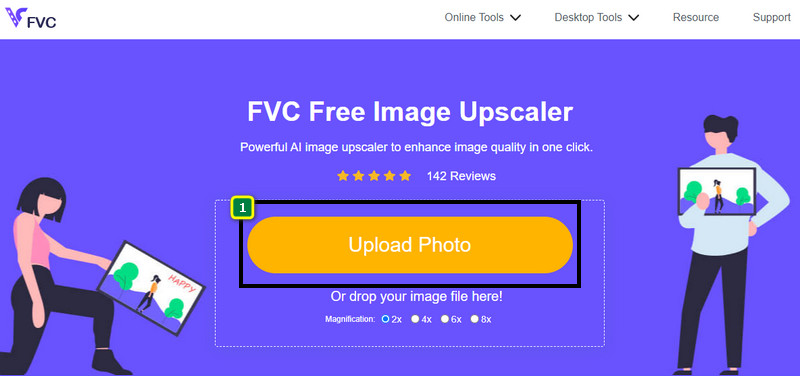
مرحله 1. روی این لینک کلیک کنید تا ابزار در یک تب جدید باز شود. این لینک شما را به نسخه رسمی ابزاری هدایت میکند که با آن تصویر موردنظر خود را برای بزرگنمایی تغییر میدهید.
مرحله 2. روی Upload Photo کلیک کنید تا فایل JPG، JPEG، PNG، GIF، BMP یا SVGای را که میخواهید به وضوح 4K بزرگنمایی کنید، اضافه نمایید.
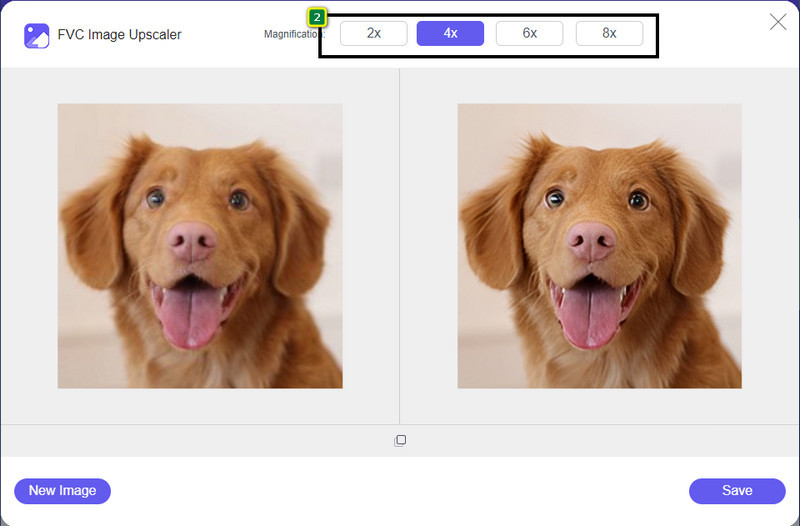
مرحله 3. بعد از آن، تصویری که آپلود کردهاید در ابزار بارگذاری میشود. سپس از میان گزینههای 2x، 4x، 6x و 8x در بالا انتخاب کنید تا به وضوح 4K برسید.
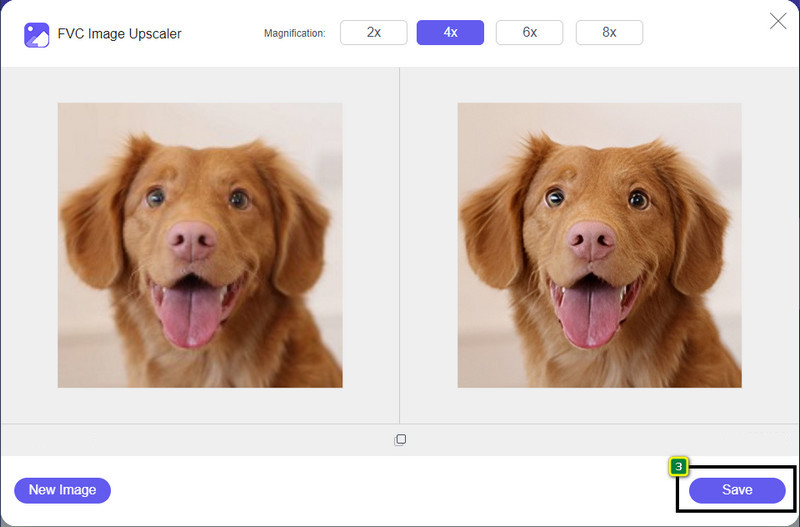
مرحله 4. برای خروجی گرفتن از تصویر 4K که در اینجا بهبود دادهاید، روی دکمه Save کلیک کنید؛ تصویر بهصورت خودکار در پوشه فایلهای شما ذخیره میشود.
بخش 2. نحوه ارتقاء تصویر به 4k آفلاین در ویرایشگر گرافیکی پیش فرض ویندوز [رایگان]
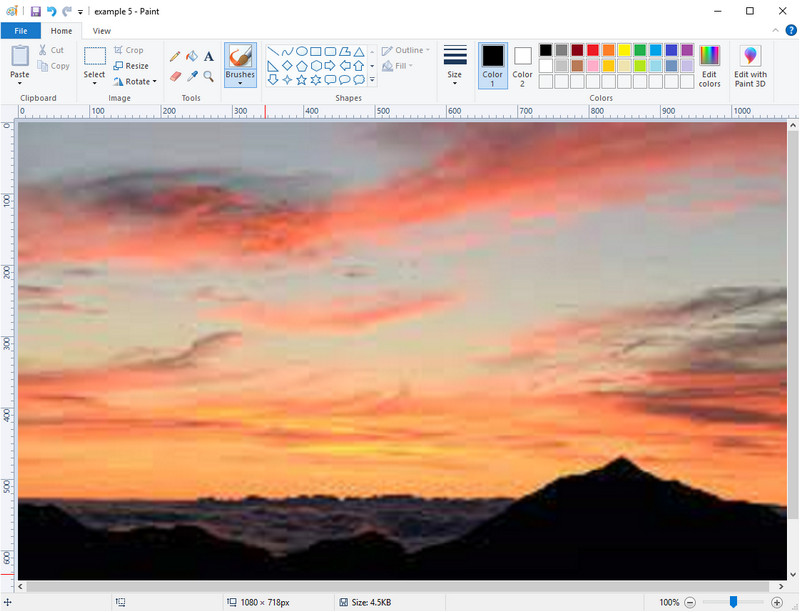
Paint یک ویرایشگر گرافیکی پیشفرض در ویندوز است که میتوانید با تغییر ابعاد تصویر، از آن برای بزرگنمایی تصویر تا 4K استفاده کنید. این نرمافزار بهدلیل امکاناتی که ارائه میکند، در میان بسیاری از کاربران ویندوز محبوب شده است. میتوانید یک بوم خالی باز کنید و مانند نقاشی روی بوم معمولی، اما اینبار بهصورت دیجیتال، روی آن نقاشی بکشید. این برنامه قابلیت قفل نسبت ابعاد دارد؛ یعنی وقتی ارتفاع تصویر را تنظیم میکنید، عرض آن نیز متناسب با آن تغییر میکند و برعکس. همچنین میتوانید با استفاده از درصد، ابعاد تصویر خود را تنظیم کنید.
اگرچه می توانید از این ابزار به عنوان ویرایشگر خود استفاده کنید، اما در سایر زمینه های ویرایش هنوز کافی نیست. به عنوان مثال، از حالت خاکستری پشتیبانی نمی کند. بنابراین، اگر می خواهید از این ابزار استفاده کنید، مراحلی که اضافه می کنیم را دنبال کنید.
مرحله 1. روی آیکون ویندوز در صفحه کلیک کرده و نام ابزار، یعنی Paint، را تایپ کنید.
مرحله 2. بعد از باز کردن برنامه، روی File سپس Open کلیک کنید و تصویر موردنظری را که میخواهید در اینجا بزرگنمایی کنید، اضافه کنید. در صورت تمایل میتوانید تصویر را بکشید و درون این برنامه رها (Drag & Drop) کنید.
مرحله 3. به گزینه Resize بروید و روی Pixel کلیک کنید. سپس اندازه ارتفاع یا عرض را به استاندارد 4K تغییر دهید.
بهتر است یک اندازه گیری را تغییر دهید. فرقی نمیکند ارتفاع یا عرض آن باشد و همیشه نسبت ابعاد اصلی را علامت بزنید تا مناسب باشد. اگر اندازه برخی از تصاویر را به 4k تغییر دهید، کشیده می شوند.
مرحله 4. در پایان، برای دانلود تصویری که در اینجا به 4K بزرگنمایی کردهاید، روی دکمه Save کلیک کنید.
قسمت 3. نحوه ارتقاء تصویر به 4k با استفاده از نرم افزار حرفه ای در ویندوز و مک [Paid]
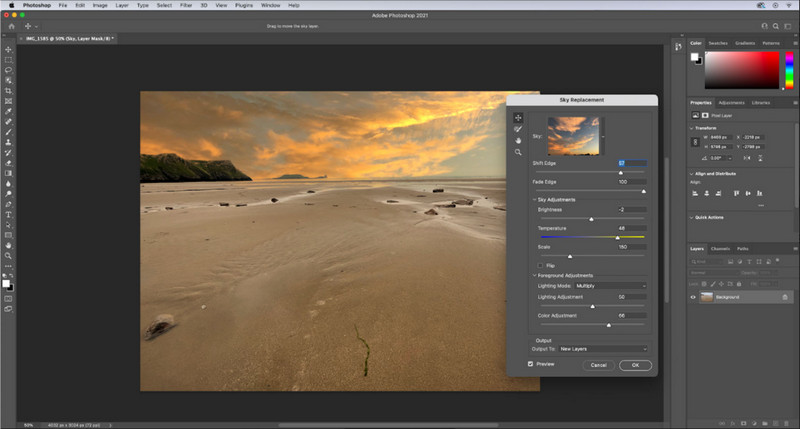
Adobe Photoshop این امکان را به کاربران میدهد که سطح جدیدی از ویرایش و بزرگنمایی تصویر را تجربه کنند، اما در اینجا بیشتر روی قابلیت بزرگنمایی آن تمرکز میکنیم. تردیدی نیست که این نرمافزار بهدلیل امکانات عمیق و حرفهای در ویرایش تصویر، انتخابی تخصصی محسوب میشود. این ابزار هنگام بزرگنمایی تصویر، با کمک الگوریتمهایی که روی فایل شما اعمال میکند، داده PPI جدیدی برای آن ایجاد میکند. میتوانید وضوح را به 4K تغییر دهید، بدون اینکه تصویر کشیده یا پیکسلی شود.
با این حال، اگر قبلاً نسخه آزمایشی رایگان ارائه شده توسط این برنامه را مصرف کرده اید، باید این طرح را خریداری کنید. اگرچه نیاز به پرداخت دارید، اما کلیات این نرم افزار برای استفاده توسط ویرایشگران حرفه ای و سطح متوسط عالی است. برای مبتدیان، می توانید با آموزش زیر نحوه ارتقاء تصویر را به 4k بیاموزید.
مرحله 1. نسخه رسمی این نرمافزار را از سایت Adobe دانلود کنید، اما اگر برنامه را از قبل نصب دارید، میتوانید آن را مستقیماً باز کرده و استفاده را آغاز کنید.
مرحله 2. برای آپلود تصویری که میخواهید بزرگنمایی کنید، روی File سپس Open کلیک کنید؛ یک پنجره پوشه روی صفحه ظاهر میشود. نام فایل تصویری را انتخاب کرده و برای آپلود آن روی Open بزنید.
مرحله 3. در نوار بالایی، روی گزینه Image کلیک کنید و Image Size را انتخاب نمایید.
مرحله 4. یک پنجره محاورهای باز میشود که در آن میتوانید اندازه ارتفاع، عرض و وضوح (Resolution) تصویر خود را تنظیم کنید.
برای دستیابی به نتیجهای نرمتر و باکیفیتتر، باید گزینه Resample را تیک بزنید و روی دکمه کشویی (drop-down) کلیک کنید. بهجای انتخاب حالت خودکار (Automatic)، گزینه Bicubic Enlargement را انتخاب کنید؛ این روش به بهبود نتیجه بزرگنمایی تصویر کمک میکند. برای ذخیره تنظیماتی که انجام دادهاید، روی OK کلیک کنید.
مرحله 5. برای دانلود تصویری که آن را به وضوح 4K بزرگنمایی کردهاید، روی File کلیک کرده و به Save بروید.
مرتبط:
راهنمای ساده برای افزودن سریع واترمارک به ویدئو در فتوشاپ
افزایش کیفیت تصویر با استفاده از این روشهای سریع و ساده
بخش 4. سوالات متداول در مورد نحوه ارتقاء تصویر به 4k
آیا محدودیتی برای افزایش مقیاس تصاویر به 4k وجود دارد؟
محدودیت هایی وجود دارد که باید رعایت کنید. به عنوان مثال، اگر مانیتور شما فقط می تواند 1080p را پردازش کند، بهتر است از اندازه استاندارد 1080p به جای 4k استفاده کنید زیرا ارتقاء مقیاسی که اضافه می کنید موثر نخواهد بود.
آیا تصویر من پس از ارتقاء به 4k بهتر می شود؟
انتظار نداشته باشید معجزه ای اتفاق بیفتد، اما خواهید دید که اگر تصویر را در صفحه نمایش درست باز کنید، مانند تلویزیون های 4k، نتیجه ای حاصل خواهد شد.
چرا تصاویر من پس از مشاهده آنها در تلویزیون 4k تار می شوند؟
زمانی که ابعاد و PPI با استاندارد تلویزیون دیجیتالی که استفاده میکنید، بهویژه 4k مطابقت نداشته باشد، تصاویر معمولاً کشیده میشوند. اگر با برنامه ای که در اینجا اضافه می کنیم، تصویر را به وضوح 4k ارتقا دهید، از این امر جلوگیری می کنید.
نتیجه
به طور کلی، برای تنظیم تصویر با وضوح 4k به یک ارتقاء دهنده تصویر 4k نیاز دارید. با ابزارهایی که در اینجا اضافه می کنیم و آموزش به راحتی می توانید این کار را انجام دهید. می توانید برای ارتقای تصویر مورد نظر خود از سرویس آنلاین استفاده کنید و از نتیجه شگفت زده خواهید شد.
-
 ترمیم عکس قدیمی به صورت آنلاین و آفلاین [مراحل آسان]
 آیا می خواهید یک عکس قدیمی را بازیابی کنید؟ با استفاده از این ابزار، فرآیند بازسازی عکس قدیمی را خواهید دانست. این پست را بخوانید تا ساده ترین روش ها را بیاموزید.
-
 7 تقویت کننده پیکسل برتر برای همه مرورگرهای وب که باید استفاده کنید
 اگر می خواهید بهترین تقویت کننده های پیکسل را بشناسید، بهتر است این پست را بررسی کنید. این مقاله هفت بهترین تقویت کننده پیکسل عکس را برای همه مرورگرهای وب فهرست می کند.
-
 بهترین برنامه تغییر اندازه عکس آنلاین، آفلاین، اندروید و آیفون
 بهترین برنامه های تغییر اندازه عکس کدامند؟ روی صفحه کلیک کنید تا با پنج برنامه قدرتمند تغییر اندازه عکس که می توانید برای بهبود یا تغییر اندازه فایل خود استفاده کنید، آشنا شوید.
