


 Video Converter Ultimate
 ضبط صفحه
 تعمیر ویدیو
2 مبدل برای تبدیل DV به MOV بدون افت کیفیت استفاده می شود
فایلهای DV رایجترین نوع فایل روی اغلب دوربینهای فیلمبرداری هستند، چون بهترین کیفیت ویدیو را برای ویرایش و تماشا ذخیره میکنند. شاید از خود بپرسید آیا میتوانید از این فرمت در iMovie برای ویرایش یا در QuickTime برای تماشا استفاده کنید یا نه. اما نمیتوانید از این فایل خام استفاده کنید، چون نسخهای قدیمی و پشتیبانینشده است. با این حال، جای نگرانی نیست، چون میتوانید فایلهای DV خود را روی مک به یک فرمت پشتیبانیشده مثل MOV تبدیل کنید. در ادامه این مقاله، درک عمیقتری بهدست خواهیم آورد که چرا لازم است روی مک خود DV را به MOV تبدیل کنید.

قسمت 1. تبدیل فایل های DV به MOV در مک با مبدل قدرتمند آفلاین
FVC Video Converter Ultimate ابزار فوقالعادهای است که هم روی مک و هم روی ویندوز برای تبدیل DV به MOV از آن استفاده خواهید کرد. بدون هیچ تردیدی، این مبدل میتواند فایلهای شما را بدون دردسر به یک فرمت جدید تبدیل کند. علاوه بر این، برخی کاربران به روشی سریع برای تبدیل فایل به فرمت جدید نیاز دارند؛ خوشبختانه این ابزار به شما کمک میکند خیلی سریع این کار را انجام دهید. افزون بر قابلیت تبدیل، میتوانید در همینجا ویرایشی مثل برش، ادغام، کراپ و بسیاری کارهای دیگر انجام دهید. پس اگر میخواهید توانایی تبدیل این ابزار نهایی را تجربه کنید، این راهنمای گامبهگام را برای انجام کار دنبال کنید.
چگونه فایلهای DV را با FVC Video Converter Ultimate به MOV تبدیل کنیم:
مرحله 1. مبدل DV را روی مک یا کامپیوتر ویندوزی خود دانلود کنید، مراحل نصب را دنبال کرده و برای باز کردن برنامه روی Start Now کلیک کنید.
دانلود رایگانبرای ویندوز 7 یا بالاتردانلود امن
دانلود رایگانبرای MacOS 10.7 یا بالاتردانلود امن
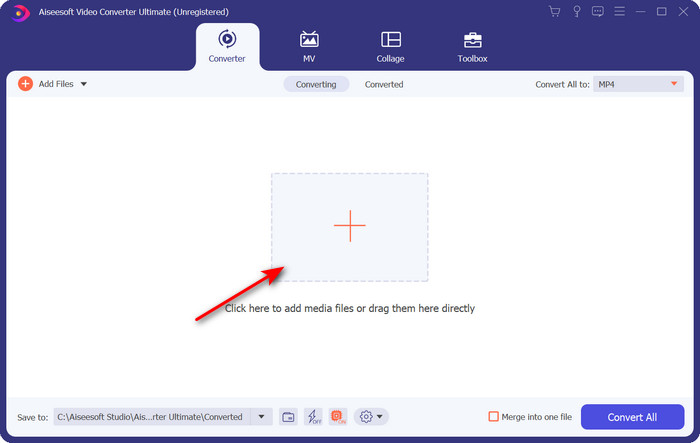
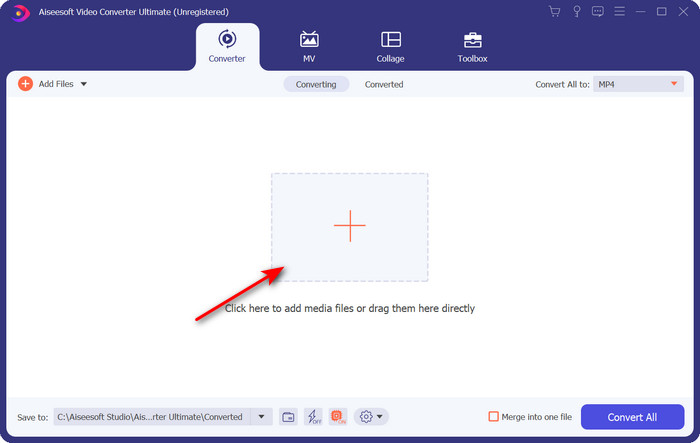
مرحله 2. بعد از اجرا، با کلیک روی دکمه + فایلی را که میخواهید تبدیل کنید بارگذاری کنید؛ پوشه باز میشود، فایل را پیدا کنید و سپس روی Open کلیک کنید.
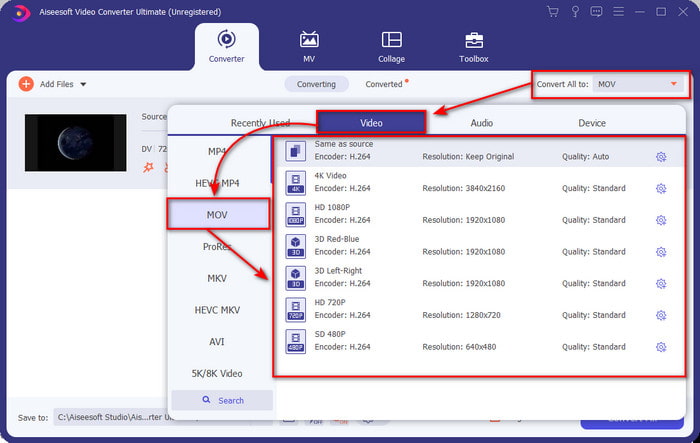
مرحله 3. برای انتخاب فرمت، روی دکمه drop-down کلیک کنید، فرمت MOV و وضوح تصویری را که میخواهید برگزینید. میتوانید کیفیت خروجی را بالا تنظیم کنید، اما در این صورت اندازه فایل نسبت به نسخه اصلی بزرگتر خواهد شد.
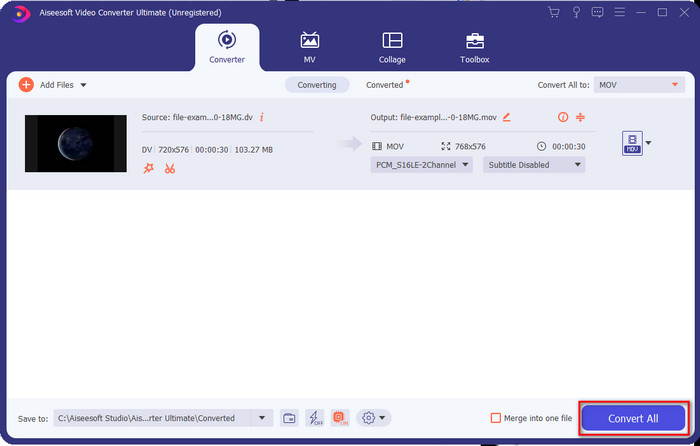
مرحله 4. برای آغاز فرایند تبدیل DV به MOV روی Convert All کلیک کنید و بلافاصله آن را دانلود کنید.
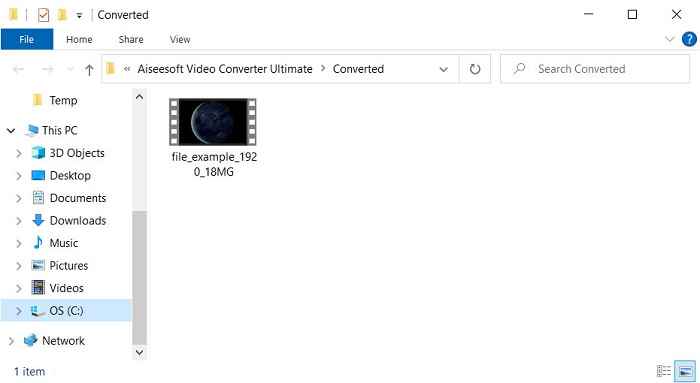
مرحله 5. محل ذخیره فایل تبدیلشده نمایش داده میشود؛ حالا میتوانید بدون نگرانی از باز نشدن فایل، آن را روی مک خود تماشا یا ویرایش کنید.
قسمت 2. تبدیل DV به MOV به صورت رایگان با تبدیل آنلاین
میخواهید در مرورگر خود ویدیو را تبدیل کنید؟ پس باید از FVC Free Video Converter Online استفاده کنید تا DV را به MOV بهصورت رایگان تبدیل کنید. افزون بر قابلیت تبدیل، مانند FVC Video Converter Ultimate میتوانید وضوح، بیتریت و نرخ فریم را هم تغییر دهید. هرچند میتوانید بهصورت رایگان و آنلاین از آن استفاده کنید، اما توانایی این ابزار آنلاین با مبدل آفلاینی که در بالا معرفی شد تفاوت زیادی دارد. با این حال، اگر میخواهید یک تبدیل ساده را بهصورت رایگان انجام دهید، این باید مبدل آنلاین همیشگی شما باشد. برای کوتاه کردن کلام، حالا به سراغ مراحل استفاده از آن میرویم.
نحوه تبدیل فایلهای DV به MOV با مبدل ویدیوی رایگان FVC آنلاین.” /]مرحله 1. برای باز کردن ابزار آنلاین، روی این لینک کلیک کنید تا یک مرورگر جدید باز شود.
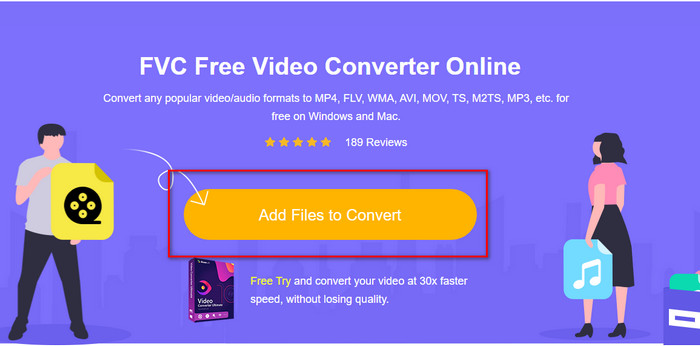
مرحله 2. روی Add Files to Convert کلیک کنید تا مبدل آنلاین اجرا شود، سپس از پوشه، فایل .dv مورد نظر برای تبدیل را انتخاب کنید.
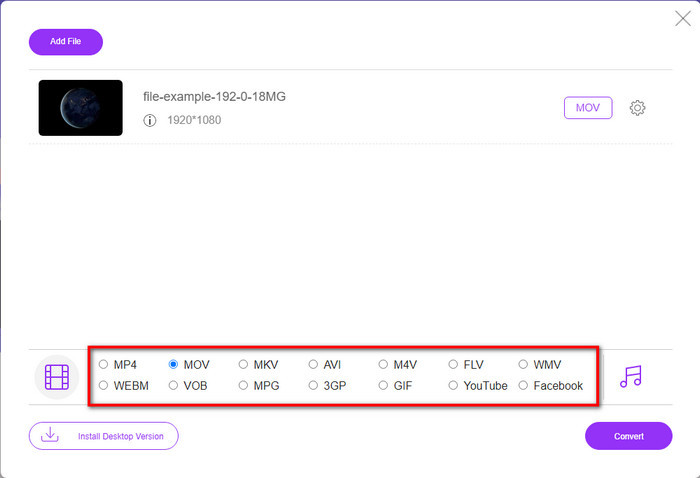
مرحله 3. فرمت MOV یا هر فرمت دیگری را که میخواهید از فهرست زیر انتخاب کنید.
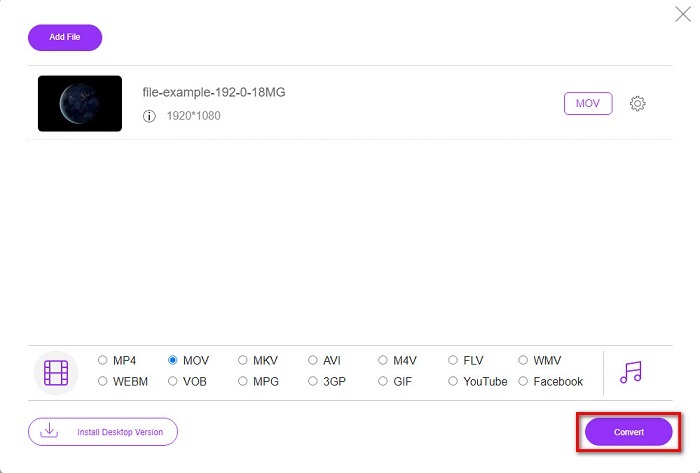
مرحله 4. برای شروع تبدیل، روی Convert کلیک کنید و منتظر بمانید تا فرایند کامل شود.
مرحله 5. پس از اتمام، پوشه جدیدی روی صفحه شما نمایش داده میشود که فایل تبدیلشده در آن قرار دارد.
قسمت 3. DV در مقابل MOV
فرمت DV برای ذخیره ویدیو و صدا ایده آل است زیرا از الگوریتم مشابه MPEG استفاده می کند. اما این بسیار متفاوت از MPEG است زیرا به فشرده سازی نرخ فریم قبلی متکی نیست. بنابراین به جای تکیه بر فشرده سازی درون نرخی، از فشرده سازی مستقل برای ویرایش سریعتر پخش استفاده می کند. در نتیجه، فایل های DV در اواخر سال 1995 به عنوان یک فرمت ویدئویی استاندارد در تمام دوربین های فیلمبرداری معرفی شدند. اما امروزه دوربین های فیلمبرداری نواری کمتری را شاهد خواهیم بود زیرا اکنون از هارد دیسک، SSD و کارت های حافظه برای ذخیره فیلم های ضبط شده استفاده می کنیم.
از طرف دیگر، فرمت MOV توسط اپل برای ذخیره یک فایل رسانه ای با کیفیت بالا که می تواند در همه ویرایشگرها استفاده شود یا با پخش کننده رسانه پخش می شود، توسعه داده شده است. این قالب احترام زیادی به دست می آورد زیرا می تواند حاوی عناصر رسانه ای جمعی باشد و هر یک می تواند داده ها را برای ویدیو، صدا و متن جمع آوری کند. مانند DV، فشرده سازی این فرمت بر اساس الگوریتم است.
برای تکمیل همه چیز، نمیتوانید فایلهای DV را مستقیماً در برنامه Mac آپلود کنید زیرا این قالب قدیمی است. اکنون فرمت های بهتری از .dv وجود دارد. اما اگر ویدیوهای شما در این فرمت هستند، می توانید از مبدل DV به MOV استفاده کنید و فایل را برای پخش در Quicktime یا ویرایش آن در iMovie تبدیل کنید.
بخش 4. سوالات متداول در مورد تبدیل DV به MOV
چرا نمی توانم فایل های DV را در مک پخش کنم؟
دلایل زیادی در این مورد می تواند متفاوت باشد، به خصوص فایل های DV که تقریباً با همه سیستم عامل ها سازگاری کمتری دارند. اما ما دو دلیل احتمالی را برای شما فهرست می کنیم و اولین دلیل این است که پخش کننده رسانه ای که استفاده می کنید از این فرمت پشتیبانی نمی کند. این رایج ترین مشکل در اکثر فرمت ها به دلیل سازگاری و راه حل آن برای تبدیل است. مورد دیگر این است که فایل های .dv شما ممکن است خراب یا خراب شده باشد. از آنجایی که آسیب دیده یا خراب است، فایل پخش نمی شود.
آیا فایل DV هنوز یک فرمت ایده آل است؟
قبلا برای ضبط و ویرایش فایل های رسانه ای ایده آل بود، اما امروزه فرمت آن بهترین نیست. دلیل اصلی این است که فرمت های بهتر از .dv وجود دارد و دلیل دیگر سازگاری است.
چگونه فایل های DV را فشرده کنیم؟
اگرچه فایلهای DV همچنان فشرده هستند، اما اگر طول ویدیو زیاد باشد حجم آنها (بر حسب مگابایت) بزرگ خواهد بود. بنابراین، برای انتقال آسانتر و ذخیره فضای بیشتر، فشردهسازی فایل ضروری است. برای اینکه بدانید چگونه فایلهای DV یا دیگر فایلهای رسانهای خود را فشرده کنید، این مقاله را بخوانید تا یاد بگیرید چگونه بدون افت کیفیت، ویدیوها را فشرده کنیم.
نتیجه
بهطور خلاصه، فایلهای DV زمانی برای ضبط صدا و تصویر بهترین بودند، اما امروزه فرمتهای دیگری جای آنها را گرفتهاند. همچنین این فرمت نسبت به MOV از سازگاری کمتری برخوردار است، مخصوصاً اگر بخواهید ویدیوها را روی مک ویرایش یا تماشا کنید. از آنجا که این فرمت منسوخ شده است، باید با کمک ابزارهایی که در بالا معرفی شد، تبدیل آن را بهصورت آنلاین یا آفلاین در نظر بگیرید. در مجموع، FVC Free Video Converter Online بهترین ابزاری است که ما در وب پیدا کردهایم. علاوه بر رایگان بودن، عملکرد این ابزار آنلاین با سایر ابزارهای وب موجود تفاوت چشمگیری دارد. اما باید جایگاه ویژهای هم برای مبدل فوقالعاده، یعنی FVC Video Converter Ultimate قائل شویم. این ابزار نیازی به معرفی ندارد و بدون تردید در هر مشکل مرتبط با تبدیل فایل به شما کمک خواهد کرد. حال انتخاب اینکه کدام برای شما بهتر است، در دستان خود شماست.
-
 نحوه تبدیل AVI به MOV با مراحل آسان و ابزارها
 آیا می خواهید بدانید چگونه AVI را به یک MOV قابل پخش تبدیل کنید؟ شما باید این مقاله را دنبال کنید تا بدانید چگونه این کار را انجام دهید و نکاتی برای داشتن یک تبدیل موفق داشته باشید.
-
 4 روش برای تبدیل DivX به MOV به صورت رایگان [آنلاین و آفلاین]
 آیا با محدودیت های یک DivX دست و پنجه نرم می کنید یا پخش کننده های رسانه ای برای دسترسی به ویدیوها در این فرمت را ندارید؟ اگر می خواهید آن را به فرمت MOV تبدیل کنید، به خواندن این مقاله ادامه دهید تا شکاف ها را پر کنید.
-
 مبدل رایگان M4V به MOV – نحوه تبدیل M4V به MOV
 اگر پخش کننده رسانه شما از M4V پشتیبانی نمی کند، آیا تا به حال برای تماشای فیلم در آیفون خود دچار مشکل شده اید؟ موضوع اصلی این مقاله تبدیل آن به یک فایل ویدئویی MOV است.
