


 Video Converter Ultimate
 ضبط صفحه
 تعمیر ویدیو
تبدیل بدون درز Caf به MP3 برای حفظ کیفیت و دسترسی به صدا
تبدیل Caf به MP3 برای بهبود سازگاری و دسترسی ضروری است. تبدیل فایلهای Caf به MP3، پخش یکپارچه را در پلتفرمهای مختلف تضمین میکند و مشکلات سازگاری را از بین میبرد. علاوه بر این، فایلهای MP3 از نظر اندازه کوچکتر هستند و ذخیره، انتقال و اشتراکگذاری آنها را آسانتر میکنند. چه بخواهید از مجموعه صوتی خود در تلفن های هوشمند، رایانه یا سیستم های داخل خودرو لذت ببرید، تبدیل Caf به MP3 به شما انعطاف پذیری و راحتی بیشتری در دسترسی به موسیقی، پادکست، یا ضبط های مورد علاقه خود می دهد.
با استفاده از یک مبدل Caf به MP3، میتوانید بهراحتی فایلهای Caf خود را به فرمت محبوب MP3 تبدیل کنید؛ فرمتی که دسترسی گستردهتر، حجم فایل کمتر و اشتراکگذاری آسانتر مجموعه صوتی شما را تضمین میکند. با این توضیح، ابزارهایی را بیابید که میتوانید برای تبدیل فایلهایتان از Caf به MP3 از آنها استفاده کنید.

قسمت 1. CAF چیست و چرا CAF را به MP3 تبدیل می کنیم
Caf یا Core Audio Format یک فرمت فایل صوتی است که توسط Apple Inc معرفی شده است. معمولاً در سیستم عاملهای macOS و iOS استفاده میشود. فایلهای Caf اغلب ایجاد میشوند و در برنامههای صوتی حرفهای مانند ویرایش، میکس و ضبط صدا استفاده میشوند. تبدیل Caf به MP3 چندین دلیل و مزیت قانع کننده دارد. در اینجا چند دلیل کلیدی وجود دارد که چرا میتوانید فایلهای Caf خود را به فرمت MP3 تبدیل کنید:
سازگاری بهتر: MP3 یکی از رایجترین فرمتهای صوتی پشتیبانیشده در انواع دستگاهها، پخشکنندههای رسانه و سیستمعاملها است. با تبدیل فایلهای Caf خود به MP3، سازگاری را تضمین کرده و هرگونه مشکل یا محدودیت احتمالی در پخش فایلهای Caf را از بین میبرید.
دسترسیپذیری: تبدیل Caf به MP3 دسترسیپذیری محتوای صوتی شما را بسیار بیشتر میکند. فایلهای MP3 را میتوان روی دستگاههای مختلف از جمله گوشیهای هوشمند، تبلتها، لپتاپها، رایانههای رومیزی، پخشکنندههای موسیقی پرتابل و حتی سیستمهای صوتی خودرو پخش کرد. این انعطافپذیری به شما اجازه میدهد موسیقی، پادکستها یا ضبطهای مورد علاقهتان را هر زمان و هر کجا که هستید، گوش دهید.
حجم فایل کمتر: فایلهای MP3 معمولاً فشرده میشوند و در نتیجه در مقایسه با فایلهای Caf حجم بسیار کمتری دارند. این فشردهسازی به صرفهجویی در فضای ذخیرهسازی دستگاههای شما کمک میکند، بدون آنکه کیفیت صدا بهطور محسوسی کاهش یابد. همچنین انتقال یا اشتراکگذاری فایلهای صوتی با دیگران از طریق ایمیل، برنامههای پیامرسان یا پلتفرمهای آنلاین را آسانتر میکند.
قسمت 2. تبدیل CAF به MP3 آفلاین
نرمافزار Video Converter Ultimate ابزاری بسیار کارآمد است که امکان تبدیل فرمتهای مختلف فایل را به فرمتهای متنوع صوتی مانند Caf و MP3 فراهم میکند. این نرمافزار قابلیت تبدیل دستهای دارد و به کاربر اجازه میدهد چندین فایل صوتی را بهطور همزمان تبدیل کند.
علاوه بر این، کاربران توانایی بهینه سازی کیفیت هر آهنگ مورد نظر را از طریق ویژگی برنامه دارند که امکان سفارشی سازی نکات فنی خروجی از جمله نرخ نمونه و بیت ریت را فراهم می کند. برای افرادی که به دنبال تبدیل دسته ای فایل های صوتی از Caf به MP3 یا بالعکس هستند، راهنمای مختصری را در زیر برای مطالعه شما ارائه کرده ایم. برای یادگیری نحوه تغییر Caf به MP3 می توانید به دستورالعمل های زیر مراجعه کنید.
مرحله 1. آیکون دانلود رایگان مناسب را در زیر انتخاب کنید تا برنامه را روی دستگاه خود اجرا کنید. حتماً دستورالعملهای روی صفحه را برای فعالسازی برنامه در مرحله بعد دنبال کنید. پس از نصب، کار با رابط آن بهسرعت قابل یادگیری است. این ابزار بهعنوان یک مبدل Caf به MP3 برای مک و ویندوز عمل میکند.
دانلود رایگانبرای ویندوز 7 یا بالاتردانلود ایمن
دانلود رایگانبرای macOS 10.7 یا بالاتردانلود ایمن
مرحله 2. روی دکمه Add در رابط اصلی کلیک کنید تا فایل صوتیای را که میخواهید ویرایش کنید، وارد کنید. سپس نمای بندانگشتی از فایل واردشده را مشاهده خواهید کرد. میتوانید برای تبدیل همزمان چندین فایل، یک پوشه کامل ارسال کنید. مکان پوشهای را در فهرست دستگاه خود انتخاب کنید که تمام فایلهای صوتی موردنیاز در آن قرار دارد.
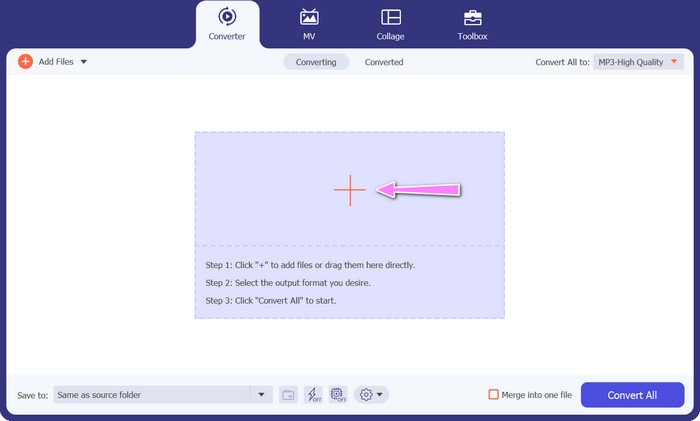
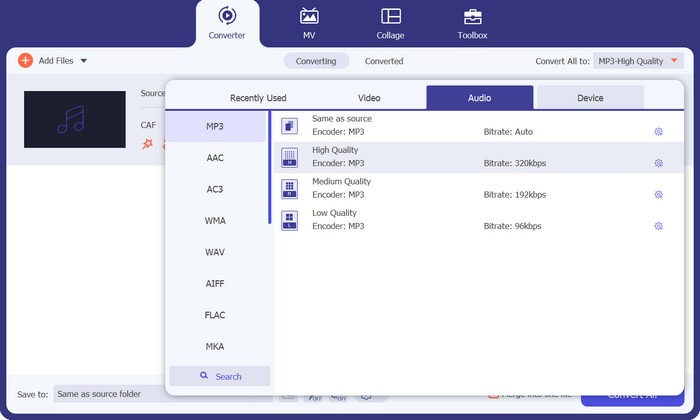
مرحله 3. اکنون میتوانید با کلیک روی دکمه Converter All to که در بالای پنجره برنامه قرار دارد، فرمت خروجی را تغییر دهید. از پنل با برچسب Audio، گزینه MP3 را انتخاب کنید. در همین حین میتوانید نرخ نمونهبرداری (Sample Rate) و بیتریت فایل خروجی را برای رسیدن به کیفیت دلخواه تنظیم کنید.
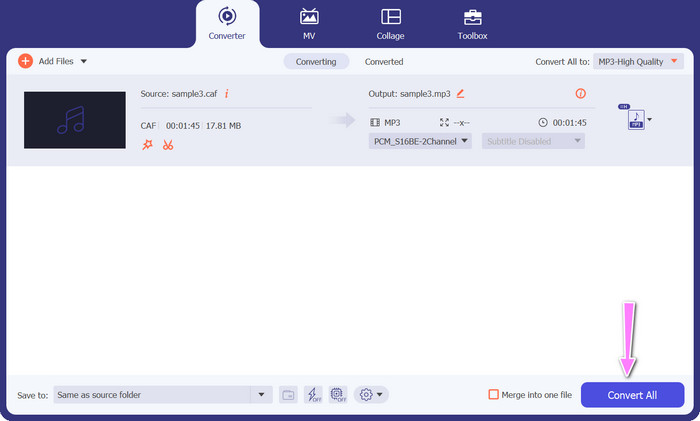
مرحله 4. بهعنوان آخرین مرحله، روی دکمه Convert All در پایین کلیک کنید تا فرآیند تبدیل آغاز شود. سپس برنامه، پوشه خروجی را بهصورت خودکار باز میکند تا بتوانید فرمت جدید فایل را بررسی کنید.
طرفداران
- این می تواند به صورت دسته ای Caf را به فرمت فایل صوتی MP3 تبدیل کند.
- این برنامه با هر دو سیستم عامل ویندوز و مک به خوبی کار می کند.
منفی ها
- این نیاز به هزینه اشتراک پرداختی پس از آزمایش رایگان دارد.
قسمت 3. تبدیل CAF به MP3 آنلاین
همچنین میتوانید از Free MP3 Audio Converter Online استفاده کنید که گزینه دیگری است. این یک برنامه تحت وب است که همانطور که از نامش پیداست، همراه با اینترنت کار میکند. در نتیجه، لازم نیست برنامهای جداگانه برای تبدیل Caf به MP3 روی دستگاه خود نصب داشته باشید. همه چیز در دسترس است و تنها به یک مرورگر نیاز دارید تا کارها را انجام دهید. از نظر امکانات، این مبدل رایگان Caf به MP3 کمبودی ندارد. علاوه بر این، میتوانید تعداد زیادی فایل بارگذاری کنید، آنها را به صورت دستهای تبدیل کنید یا پروفایل یک کلیپ ویدیویی یا صوتی را تنظیم کنید. با دنبال کردن روشهای تشریحشده در اینجا، با بهترین مبدل آنلاین Caf به MP3 آشنا خواهید شد.
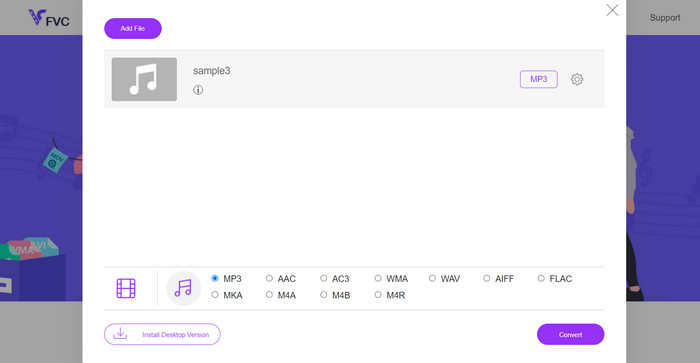
مرحله 1. کافی است با کلیک روی لینکی که در بالا قرار داده شده، مستقیماً به وبسایت اصلی Free MP3 Audio Converter Online بروید. سپس میتوانید با رفتن به صفحه اصلی و انتخاب گزینه Add Files to Convert، فایل صوتی خود را ارسال کنید.
مرحله 2. پیشنمایشی از فایل اصلی انتخابشده روی صفحه ظاهر خواهد شد. میتوانید با رفتن به بخش پایین همان پنل، فرمت خروجی دلخواه خود را انتخاب کنید.
مرحله 3. برای تغییر فرمت فایل از Caf به MP3، روی دکمه Convert کلیک کنید. اگر قصد تبدیل فایل دیگری را دارید، باید همین روند را از ابتدا تکرار کنید.
طرفداران
- کاربران ممکن است از تبدیل نامحدود در روز لذت ببرند.
- این تبدیل آنلاین Caf به MP3 تقریباً روی همه مرورگرهای وب کار می کند.
منفی ها
- سرعت تبدیل متناسب با پهنای باند اینترنت موجود است.
مطالعه بیشتر:
تبدیل MP3 به AAC: چگونه کیفیت صدای خود را ارتقا دهید
دانلود پخشکننده MP3 – ۱۰ پخشکننده برتر و رایگان موسیقی MP3 در سال ۲۰۲۳
بخش 4. سوالات متداول در مورد تبدیل CAF به MP3
آیا می توانم ابرداده فایل های Caf خود را پس از تبدیل آنها به MP3 حفظ کنم؟
حفظ ابرداده در طول تبدیل Caf به MP3 به مبدل یا نرم افزار خاصی که استفاده می کنید بستگی دارد. برخی از ابزارهای تبدیل این قابلیت را دارند که ابرداده هایی مانند نام هنرمند، عنوان آلبوم، شماره آهنگ و غیره را حفظ کنند. با این حال، توجه به این نکته مهم است که همه مبدلها از حفظ ابرداده پشتیبانی نمیکنند.
آیا فرمت های صوتی دیگری وجود دارد که بتوانم فایل های Caf را به آن تبدیل کنم؟
بله، علاوه بر MP3، چندین فرمت صوتی دیگر نیز وجود دارد که می توانید بسته به نیازهای خاص خود، فایل های Caf را به آنها تبدیل کنید. فرمت های جایگزین رایج عبارتند از WAV، FLAC (Free Lossless Audio Codec)، AAC و OGG (Ogg Vorbis).
آیا باید برای تبدیل Caf به MP3 هزینه کنم؟
گزینه های تبدیل Caf به MP3 هم رایگان و هم پولی وجود دارد. بسیاری از مبدل های آنلاین خدمات رایگان ارائه می دهند که به شما امکان می دهد بدون هیچ هزینه ای فایل های Caf را به MP3 تبدیل کنید. با این حال، برخی از نرمافزارهای پیشرفته یا خدمات آنلاین ممتاز ممکن است به خرید یا اشتراک برای ویژگیهای اضافی یا سرعت تبدیل بالاتر نیاز داشته باشند.
نتیجه
با تبدیل Caf به MP3 میتوانید از تمام ظرفیت مجموعه صوتی خود بهرهمند شوید و از پخش بیوقفه آن در هر زمان و هر مکان لذت ببرید. این کار به شما امکان میدهد موسیقی، پادکستها یا ضبطهای مورد علاقهتان را روی طیف گستردهای از دستگاهها و پلتفرمها گوش کنید.
-
 بهترین 4 روش تبدیل AIFF به MP3 در مک و رایانه
 آیا به دلیل بزرگ بودن فایل های AIFF برای ذخیره شدن، مشکل دارید؟ بنابراین، شما باید به خواندن ادامه دهید زیرا ما نحوه رفع آن را با تبدیل AIFF به فرمت MP3 توضیح می دهیم.
-
 نحوه تبدیل AMR به MP3 را بیاموزید [آنلاین و آفلاین]
 به خاطر اینکه فایلهای amr را نمیتوان روی دسکتاپ پخش کرد، کار سختی سپری میشود؟ سپس این مقاله را بخوانید تا با نحوه تبدیل AMR به فرمت MP3 آشنا شوید.
-
 راهنمای نحوه افزودن آلبوم هنری به MP3 Effortlessy در Breze
 آیا می خواهید بدانید چگونه می توان آلبوم هنری را به MP3 اضافه کرد؟ اگر چنین است، جزئیات کامل و آموزش ویرایش آلبوم هنری را در فایل خود بخوانید.
