


 Video Converter Ultimate
 ضبط صفحه
 تعمیر ویدیو
3 راه برای پخش DVD در رایانه Windows 10/8/7
چرا DVD من روی Windows Media Player پخش نمیشود؟
اگر از ویندوز 7 یا ویندوز 8 استفاده میکنید، میتوانید بهراحتی با پخشکننده پیشفرض، یعنی Windows Media Player فیلمهای DVD را تماشا کنید. اما مایکروسافت در ویندوز 10، قابلیتهای WMP را محدود کرده است. بنابراین دیگر نمیتوانید مستقیماً دیسک DVD را در Windows Media Player باز کنید.

این مطلب به شما نشان میدهد چگونه DVD را در Windows Media Player پخش کنید. فرقی نمیکند از کامپیوتری با ویندوز 10، ویندوز 8، ویندوز 7 یا نسخههای قدیمیتر استفاده کنید، شما میتوانید 3 پخشکننده DVD برای تماشای آسان DVDها در اختیار داشته باشید.
قسمت 1. نحوه پخش DVD در Windows Media Player
Windows Media Player بهصورت پیشفرض روی کامپیوترهای مبتنی بر ویندوز نصب و قابل استفاده است. این برنامه عمدتاً برای پخش ویدئو، صدا و نمایش تصاویر در سیستم ویندوز به کار میرود. همچنین از پخش CDهای صوتی، CDهای داده، VCDها و DVDها در ویندوز 7 و ویندوز 8 پشتیبانی میکند. در این بخش نحوه پخش DVD در Windows Media Player توضیح داده میشود.
مرحله 1. ابتدا باید Windows Media Player را در کامپیوتر خود باز کنید. میتوانید کلید ویندوز را فشار دهید تا جعبه جستوجو ظاهر شود، سپس WMP یا Windows Media Player را تایپ کنید تا این ابزار را پیدا کنید. Windows Media Player بهعنوان اولین گزینه ظاهر میشود. در اینجا میتوانید کلید Enter را فشار دهید، یا روی گزینه دوبار کلیک کنید تا باز شود.
مرحله 2. دیسک DVD را در درایو نوری کامپیوتر خود قرار دهید. با توجه به این که اغلب لپتاپهای امروزی درایو DVD ندارند، ممکن است لازم باشد یک درایو خارجی متصل کنید.
مرحله 3. ویدئوی DVD بهطور خودکار شروع به پخش میکند. اگر اینطور نشد، میتوانید به Windows Media Player بروید و دیسک DVD را زیر بخش Player Library انتخاب کنید. در اینجا میتوانید یک عنوان DVD یا نام فصل را برگزینید. سپس پخشکننده بهطور خودکار به حالت Now Playing سوئیچ میکند.
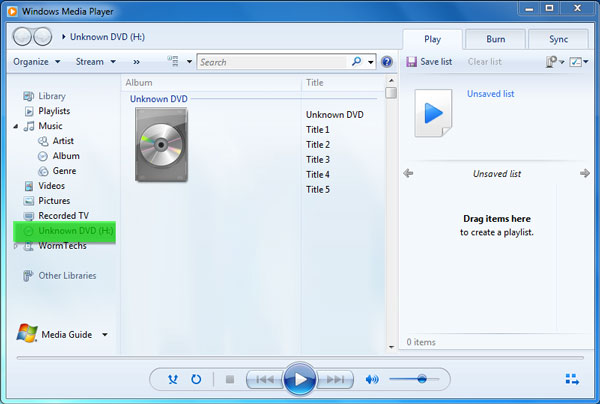
برای پخش DVD در Windows Media Player به یک درایو DVD و یک دیکودر DVD سازگار نیاز دارید. اگر یک پیام خطا مشاهده کردید، میتوانید برای آگاهی از نحوه تهیه دیکودر، به Web Help مراجعه کنید. توجه داشته باشید که Windows Media Player فقط روی کامپیوترهای دارای ویندوز 7 و ویندوز 8 میتواند DVD پخش کند.
قسمت 2. روش بهتر برای پخش DVD در رایانه Windows 10/8/7
همانطور که در بالا گفته شد، دیگر نمیتوانید در ویندوز 10 با Windows Media Player دیسکهای DVD را پخش کنید. در عوض باید یک اپلیکیشن Windows DVD Player خریداری کنید که برای پخش DVD حدود $15 هزینه دارد. بدیهی است که ترجیح میدهید راهی رایگان برای پخش DVD روی کامپیوتر خود داشته باشید.
FVC Free DVD Player یک ابزار کاملاً رایگان پخش DVD است که به شما اجازه میدهد هر نوع دیسک DVD، پوشههای DVD و فایلهای ایمیج ISO را روی کامپیوترهای ویندوز 10/8/7 و مک پخش کنید. این در واقع یک پخشکننده DVD آنلاین است. میتوانید آن را مستقیماً در هر مرورگری مانند IE، کروم، فایرفاکس و سافاری استفاده کنید. با پشتیبانی از فناوری پیشرفته رمزگذاری ویدئو، میتواند فیلمهای DVD را با کیفیت بالا و بهطور روان پخش کند. علاوه بر این، از DTS-HD و Dolby TrueHD پشتیبانی میکند تا صدایی بدون افت کیفیت به شما ارائه دهد.

مرحله 1. مرورگر خود را باز کرده و به سایت این پخشکننده رایگان DVD بروید. روی دکمه Play Now کلیک کنید تا بهسرعت یک فایل لانچر کمحجم برای پخش DVD نصب شود. بعد از آن، پنجره اصلی پخش DVD روی صفحه ظاهر میشود.
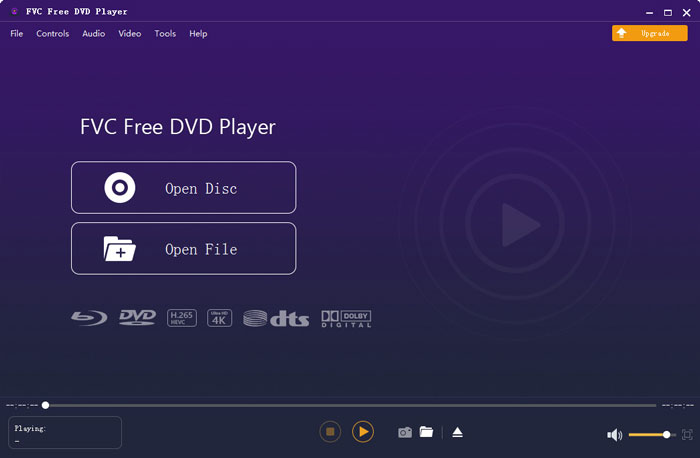
مرحله 2. دیسک DVD خود را در درایو نوری کامپیوتر قرار دهید. سپس روی دکمه Open Disc کلیک کنید تا DVD را پیدا کرده و فیلم DVD خود را پخش کنید. شما کنترل کامل پخش را در اختیار دارید. برای مثال میتوانید پخش را شروع، متوقف، به عقب یا جلو ببرید، و صدا و اندازه پنجره پخش را هر طور میخواهید تنظیم کنید.
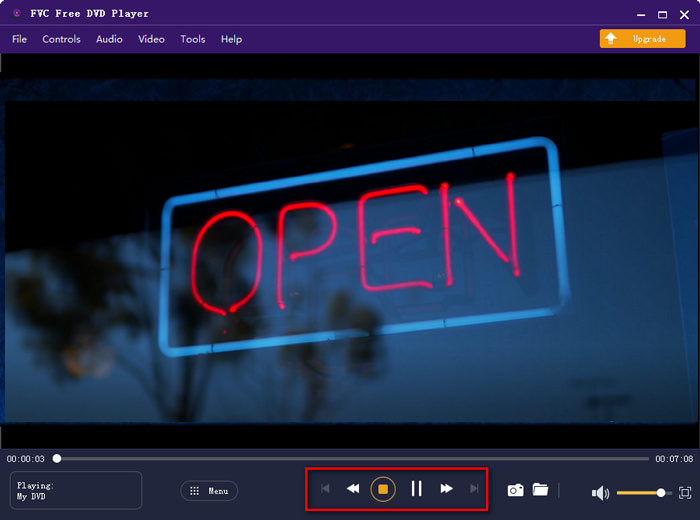
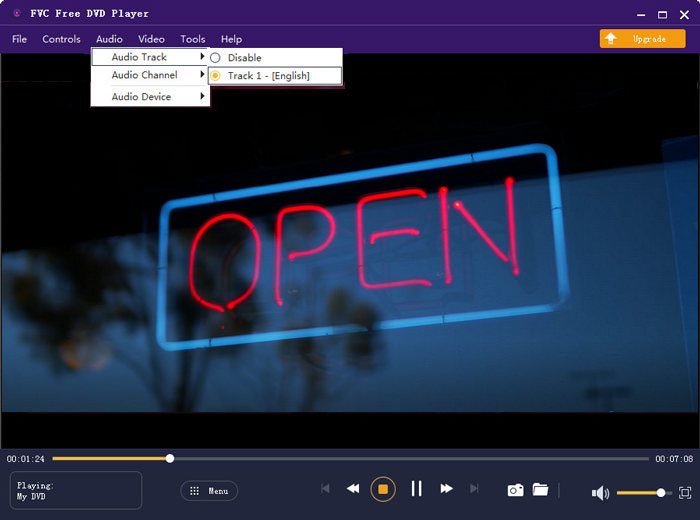
مرحله 3. علاوه بر قابلیت پخش پایه، این پخشکننده رایگان DVD به شما امکان میدهد زیرنویس و ترک صوتی را اضافه یا تغییر دهید. همچنین میتوانید در هر لحظه از پخش DVD از تصویر، اسکرینشات بگیرید.
قسمت 3. نحوه تماشای دی وی دی در ویندوز 10/8/7 PC با VLC Media Player
VLC media player یکی از محبوبترین پخشکنندههای ویدئو است که از پخش DVD نیز پشتیبانی میکند. بهعنوان یک پخشکننده چندسکویی، VLC به شما اجازه میدهد DVD را روی کامپیوترهای ویندوز 10/8/7، macOS و لینوکس پخش کنید. این برنامه توانایی پخش DVDها، VCDها و CDهای صوتی را دارد. برای پخش ویدئوی DVD، VLC بهراحتی به منوی DVD، فصلها و سایر محتواهای مرتبط دسترسی پیدا میکند. علاوه بر DVD، VLC از دیسکهای بلوری (Blu-ray) نیز پشتیبانی میکند.
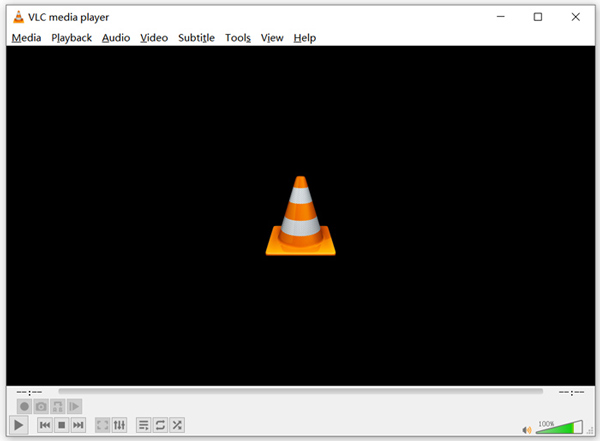
مرحله 1. ابتدا باید نسخه مناسب VLC را بهصورت رایگان روی کامپیوتر خود دانلود کنید. دیسک DVD را در درایو نوری لپتاپ خود قرار دهید.
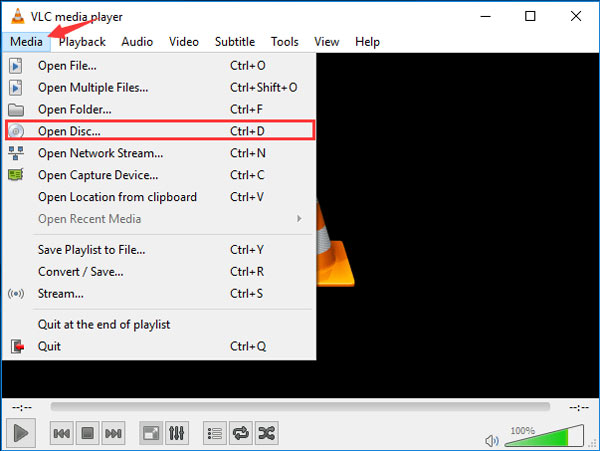
مرحله 2. VLC media player را باز کرده و سپس روی Media در نوار منوی بالا کلیک کنید. از فهرست کشویی، گزینه Open Disc را انتخاب کنید.
مرحله 3. در پنجره جدید Open Media، روی تب Disc کلیک کنید، گزینه DVD را علامت بزنید و سپس روی دکمه Browse کلیک کنید تا فیلم DVD موردنظر خود را انتخاب و بارگذاری کنید.
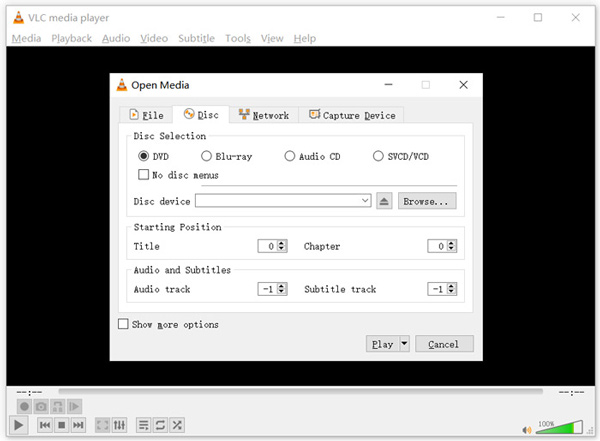
پس از این عملیات ، می توانید فیلم DVD را به راحتی در Windows 10/8/7 PC یا Mac با VLC media player مشاهده کنید.
قسمت 4. سQالات متداول نحوه پخش DVD در Windows Media Player
سوال 1. چگونه CD را در Windows Media Player پاره می کنید؟
برای پاره کردن CD در Windows Media Player ، باید CD را در درایو دیسک کامپیوتر قرار دهید. Windows Media Player را باز کنید و CD را در لیست پوشه ها انتخاب کنید. اکنون می توانید سی دی را با تنظیمات پیش فرض پاره کنید. در اینجا همچنین می توانید تنظیمات Rip را بر اساس نیاز خود سفارشی کنید.
سوال 2. چرا نمی توانم DVD را در ویندوز 10 پخش کنم؟
مایکروسافت پشتیبانی از پخش DVD داخلی را در ویندوز 10 حذف کرده است. بنابراین ، شما نمی توانید مستقیماً فیلم های DVD را روی رایانه Windows 10 باز کنید.
سوال 3. چگونه DVD را به MP4 تبدیل کنیم؟
برای ریپ کردن DVD به ویدئوی دیجیتال مانند MP4، MOV یا AVI، میتوانید DVD converter دانلود کنید تا DVD را بدون افت کیفیت تبدیل کنید.
نتیجه
چرا DVD در Windows Media Player پخش نمیشود؟ اگر از کامپیوتری با ویندوز 10 استفاده میکنید، میتوانید برای تماشای فیلمهای DVD روی پخشکننده Free DVD Player پیشنهادشده یا VLC حساب کنید. برای کاربران ویندوز 8 یا ویندوز 7، میتوان مستقیماً DVD را در Windows Media Player پخش کرد. اگر هنوز درباره پخش DVD در ویندوز 10/8/7 سؤالی دارید، میتوانید برای ما پیغام بگذارید.
-
 10 بهترین پخش کننده رایگان MP3 موسیقی 2025
 بهترین پخش کننده موسیقی MP3 چیست؟ چگونه می توانم موسیقی را روی دستگاه پخش MP3 قرار دهم؟ چگونه می توان MP3 Player Player را بارگیری کرد؟ این پست به شما یک مرور دقیق از 10 بهترین پخش کننده MP3 رایگان برای Windows PC و Mac می دهد.
-
 7 بهترین بازیکن Xvid برای ویندوز و مک
 FVC Free Video Player را دریافت کنید - بهترین پخش کننده Xvid برای همه سیستم عامل ها. در اینجا ما به 6 پخش کننده دیگر Xvid برای ویندوز و مک نیز اشاره کردیم.
-
 5 بهترین پخش کننده VOB برای رایانه شخصی ویندوز 10/8/7 و مک 2025
 چگونه می توان فایل های VOB را در ویندوز 10 بازی کرد؟ بهترین پخش کننده VOB چیست؟ در این پست 5 بهترین پخش کننده VOB برای ویندوز 10 رایانه و Mac بررسی می شود.
