


 Video Converter Ultimate
 ضبط صفحه
 تعمیر ویدیو
FLAC در مقابل MP3: معرفی و مقایسه فرمت های صوتی
بحث میان فرمتهای فایل FLAC در برابر MP3 سالهاست که ادامه دارد. در حالی که MP3 یکی از قدیمیترین و پرکاربردترین فرمتهاست، FLAC بهدلیل فشردهسازی بدونافت کیفیت صدا، در میان علاقهمندان جدی موسیقی محبوبیت پیدا کرده است. اما کدامیک بهتر است؟ در این راهنما، نگاهی دقیقتر به تفاوتهای بین FLAC و MP3، از جمله کیفیت صدا، اندازه فایل، سازگاری و موارد دیگر میاندازیم تا به شما کمک کنیم برای آرشیو موسیقی خود فرمت مناسب را انتخاب کنید.

قسمت 1. FLAC در مقابل MP3: معرفی فرمت های صوتی
داستانک MP3
MP3 فرمت محبوبی برای فایل های صوتی دیجیتال است که از زمان معرفی آن در دهه 1990 به طور گسترده مورد استفاده قرار گرفته است. از نوعی فشرده سازی با اتلاف برای کاهش اندازه فایل های صوتی و در عین حال حفظ کیفیت صدای خوب استفاده می کند. فایل های MP3 را می توان به راحتی بر روی دستگاه های مختلف به اشتراک گذاشت، دانلود و پخش کرد، که آن را به انتخابی مناسب برای علاقه مندان به موسیقی دیجیتال تبدیل می کند. سوال اینجاست که آیا FLAC بهتر از MP3 است؟ بیایید با خواندن توضیحات FLAC متوجه شویم.
داستانک FLAC
FLAC (Free Lossless Audio Codec) یک فرمت فایل صوتی با کیفیت بالا است که از فشرده سازی بدون تلفات برای حفظ داده های صوتی اصلی بدون کاهش کیفیت استفاده می کند. این بدان معناست که فایلهای FLAC بسیار بزرگتر از فایلهای MP3 هستند، اما همان سطح وفاداری صوتی را به عنوان منبع اصلی حفظ میکنند.
بخش 2. دستگاه های پشتیبانی شده / پلت فرم های FLAC و MP3
اکنون، اجازه دهید مقایسه MP3 و FLAC را ببینیم تا ببینیم که آنها در مورد پلتفرم ها یا دستگاه هایی که پشتیبانی می کنند چگونه عمل می کنند.
MP3 یک فرمت فایل صوتی است که به طور گسترده ای پشتیبانی می شود که می تواند بر روی سیستم عامل های مختلف پخش شود، از جمله:
◆ رایانههایی که سیستمعاملهای Windows، macOS و Linux را دارند.
◆ پخشکنندههای قابلحمل، مانند آیپادها و سایر پخشکنندههای MP3.
◆ گوشیهای هوشمند و تبلتهایی که iOS، Android و سایر سیستمعاملهای تلفن همراه دارند.
◆ استریو ماشین با ورودی USB یا کمکی.
◆ سیستم های سینمای خانگی و گیرنده های استریو با اتصال USB یا شبکه.
◆ سرویس های پخش موسیقی، مانند Spotify و Apple Music، اغلب از MP3 به عنوان فرمت پیش فرض خود برای پخش و دانلود موسیقی استفاده می کنند.
FLAC به اندازه MP3 به طور گسترده پشتیبانی نمی شود، اما همچنان بر روی پلتفرم های مختلف قابل پخش است، از جمله:
◆ رایانههایی که سیستمعاملهای Windows، macOS و Linux را دارند.
◆ برخی از پخش کننده های رسانه ای قابل حمل، مانند Astell&Kern AK Jr و PonoPlayer.
◆ برخی از گوشی های هوشمند و تبلت های دارای سیستم عامل اندروید و سایر سیستم عامل های تلفن همراه.
◆ برخی از استریوهای خودرو و سیستم های سینمای خانگی با اتصال USB یا شبکه.
◆ برخی از سرویسهای پخش موسیقی، مانند Tidal، که گزینههای پخش و دانلود FLAC با کیفیت بالا را ارائه میدهند.
قسمت 3. آیا FLAC بهتر از MP3 است؟
این بار با مقایسه جامع این فرمت های صوتی به ما اجازه دهید تفاوت بین FLAC و MP3 را فهرست کنیم.
در اینجا مقایسه ای جامع از FLAC و MP3 بر اساس عوامل مختلف آورده شده است:
کیفیت صدا: FLAC کیفیت صدای بهتری نسبت به MP3 ارائه میدهد، زیرا فرمتی بدونافت است که تمام دادههای صوتی موجود در منبع اصلی را حفظ میکند. در مقابل، MP3 یک فرمت باافت است که هنگام فشردهسازی بخشی از دادههای صوتی را حذف میکند و این میتواند به کاهش کیفیت صدا منجر شود.
اندازه فایل: فایلهای MP3 بسیار کوچکتر از فایلهای FLAC هستند، زیرا MP3 برای کاهش اندازه فایل از فشردهسازی باافت استفاده میکند. این موضوع MP3 را به انتخابی عملیتر برای افرادی با فضای ذخیرهسازی محدود یا کسانی که نیاز دارند فایلهای موسیقی را بهسرعت از طریق اینترنت بهاشتراک بگذارند یا دانلود کنند، تبدیل میکند.
سازگاری: MP3 با انواع دستگاهها و نرمافزارها، از جمله رایانههای رومیزی و لپتاپ، پخشکنندههای قابلحمل، گوشیهای هوشمند، سیستمهای صوتی خودرو و سرویسهای استریم موسیقی بهطور گسترده سازگار است. از سوی دیگر، FLAC ممکن است بهدلیل اندازه بزرگتر فایل و فشردهسازی بدونافت با برخی دستگاهها و نرمافزارها سازگار نباشد.
نرخ بیت (Bitrate): فایلهای MP3 را میتوان با نرخ بیت پایینتر رمزگذاری کرد تا اندازه فایل باز هم کمتر شود، اما این کار به کاهش بیشتر کیفیت صدا منجر میشود. در مقابل، فایلهای FLAC همواره همان نرخ بیت و جزئیات منبع اصلی را حفظ میکنند.
ویرایش: FLAC برای ویرایش صدا گزینه بهتری است، زیرا سطح بالاتری از وفاداری صوتی ارائه میدهد و هیچ آرتیفکت فشردهسازیِ اضافی ایجاد نمیکند. در مقابل، فایلهای MP3 بهدلیل فشردهسازی باافت، هنگام ویرایش ممکن است آرتیفکتهای فشردهسازی بیشتری ایجاد کنند.
قیمت: هر دو فرمت FLAC و MP3 رایگان و متنباز هستند، بنابراین استفاده از هیچیک هزینهای برای شما ندارد.
قسمت 4. تبدیل FLAC به MP3 یا MP3 به FLAC
اکنون که فرآیند مقایسه FLAC به MP3 را به پایان رساندیم، اجازه دهید به روند تبدیل MP3 به FLAC یا بالعکس برویم.
نرمافزار Video Converter Ultimate ابزاری قدرتمند است که به شما اجازه میدهد فایلهای صوتی و ویدیویی را بهآسانی از یک فرمت به فرمت دیگر تبدیل کنید. یکی از فرمتهای بسیاری که توسط FVC Video Converter Ultimate پشتیبانی میشود FLAC است؛ یک فرمت صوتی باکیفیت و بدونافت که اغلب توسط دوستداران حرفهای موسیقی استفاده میشود. شما میتوانید فایلهای FLAC خود را بهسرعت و بهآسانی به MP3 تبدیل کنید تا هم در فضای دستگاه صرفهجویی کرده و هم اشتراکگذاری موسیقی را سادهتر کنید. Video Converter Ultimate رابط کاربری ساده و طیفی از گزینههای سفارشیسازی ارائه میدهد و آن را به ابزاری کاربردی و مفید برای هر کسی که نیاز به تبدیل فایلهای صوتی و ویدیویی دارد تبدیل میکند.
برای تبدیل فایل های صوتی بین فرمت های FLAC و MP3 با استفاده از این ابزار، باید چند مرحله ساده را دنبال کنید.
گام 1. ابتدا با کلیک روی یکی از دکمههای دانلود رایگان، برنامه را روی رایانه خود دانلود و نصب کنید و مراحل نصب را دنبال کنید. سپس برنامه را اجرا کنید تا به رابط کاربری ساده آن دسترسی داشته باشید.
دانلود رایگانبرای ویندوز 7 یا بالاتردانلود ایمن
دانلود رایگانبرای macOS 10.7 یا بالاتردانلود ایمن
گام 2. سپس با کلیک روی دکمه علامت بهعلاوه در رابط اصلی، فایل صوتیای را که میخواهید تبدیل کنید اضافه کنید. پس از افزودن، تصویر بندانگشتی هر فایل را در رابط مشاهده خواهید کرد.
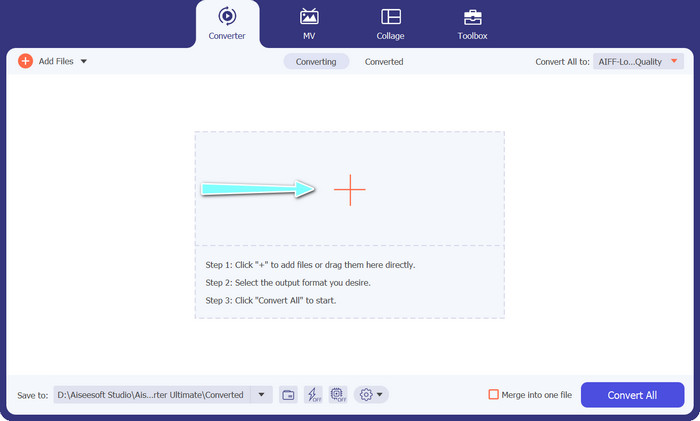
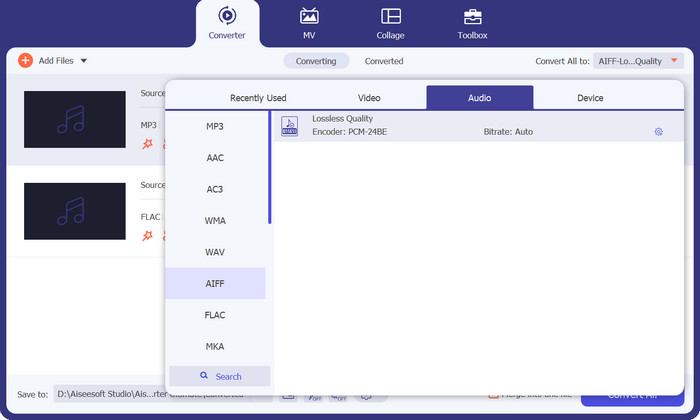
گام 3. با انتخاب زبانه Audio از منوی Profile در بخش بالای سمت راست ابزار، فرمت خروجی را مشخص کنید. بسته به جهت تبدیل، MP3 یا FLAC را انتخاب کنید.
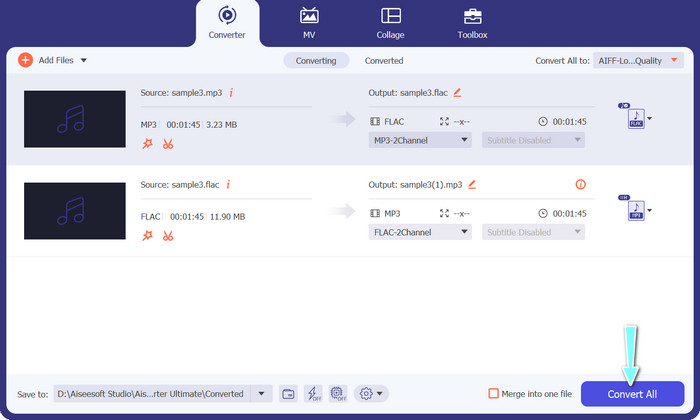
گام 4. پوشه خروجیای را که میخواهید فایلهای تبدیلشده در آن ذخیره شوند، با انتخاب محل مناسب در پایین رابط مشخص کنید. در نهایت روی دکمه Convert All کلیک کنید تا فرایند تبدیل آغاز شود.
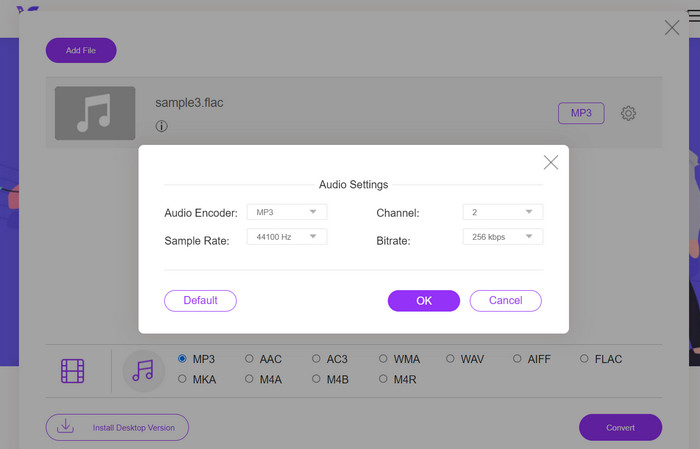
اگر به یک ابزار آنلاین رایگان برای تبدیل FLAC به MP3 نیاز دارید، به Free Video Converter Online سر بزنید. این برنامه کاربردی به کاربران اجازه میدهد فایلهای ویدئویی و صوتی را بدون هیچ هزینهای تبدیل کنند و همچنین امکان سفارشیسازی تنظیمات خروجی را مطابق سلیقه شما فراهم میکند. سرعت تبدیل نیز، تا زمانی که اتصال اینترنت پایدار داشته باشید، قابلاعتماد است. برای شروع، مراحل زیر را دنبال کنید:
گام 1. مرورگر وب دلخواه خود را باز کرده و به وبسایت Free Video Converter Online بروید.
گام 2. روی دکمه Add Files to Convert کلیک کنید تا فایل FLAC موردنظر برای تبدیل به MP3 را بارگذاری کنید.
گام 3. از فهرست فرمتهای موجود در منوی فرمت Audio، MP3 را بهعنوان فرمت خروجی انتخاب کنید. همچنین میتوانید نرخ بیت یا کیفیت خروجی دلخواه خود را برای فایل MP3 برگزینید.
گام 4. روی دکمه Convert کلیک کنید تا فرایند تبدیل آغاز شود.
بخش 5. سوالات متداول در مورد FLAC در مقابل MP3
بین FLAC 16 بیتی در مقابل MP3 320 کیلوبیت بر ثانیه کدام بهتر است؟
انتخاب بین FLAC 16 بیتی و MP3 320 کیلوبیت بر ثانیه به ترجیح شخصی و استفاده مورد نظر از فایل صوتی بستگی دارد. اگر کیفیت صدا را در اولویت قرار می دهید و فضای ذخیره سازی کافی دارید، FLAC 16 بیتی ممکن است گزینه بهتری باشد. اگر به اندازه فایل کمتری نیاز دارید بدون اینکه کیفیت صدا را به خطر بیندازید، MP3 320 کیلوبیت در ثانیه ممکن است انتخاب خوبی باشد.
آیا فایل های FLAC بزرگتر از فایل های MP3 هستند؟
بله، فایلهای FLAC به دلیل ماهیت بدون اتلاف، معمولاً بزرگتر از فایلهای MP3 هستند.
آیا همه پخش کننده های رسانه از FLAC پشتیبانی می کنند؟
نه، همه پخش کننده های رسانه از FLAC پشتیبانی نمی کنند. با این حال، بسیاری از پخشکنندههای رسانه و نرمافزارهای مدرن از پخش FLAC پشتیبانی میکنند، از جمله VLC، Foobar2000، و Winamp.
نتیجه
انتخاب بین MP3 و FLAC به ترجیحات شخصی و نیازهای خاص شما بستگی دارد. از اینرو، مقایسه FLAC در برابر MP3 برای تصمیمگیری شما ضروری است. در نهایت، اینکه از کدام فرمت استفاده کنید به اولویتهای شما در زمینه کیفیت صدا، اندازه فایل و میزان سازگاری با دستگاهها برمیگردد.
-
 4 بهترین روش برای تبدیل MOV به MP3 در ویندوز و مک به راحتی
 هنگامی که می خواهید فایل های صوتی MP3 را از فایل های MOV استخراج کنید ، می توانید با 4 کارآمدترین مبدل MOV به MP3 اطلاعات بیشتری کسب کنید تا فایل های مورد نظر را از مقاله دریافت کنید.
-
 بهترین مبدل های MP3 برای تبدیل آسان فایل های صوتی به MP3
 با مبدل های MP3 آنلاین و آفلاین کاربر پسند ما، به راحتی هر فرمت صوتی را به MP3 تبدیل کنید. تنها با چند کلیک نتایجی با کیفیت بالا دریافت کنید.
-
 3 ویرایشگر برتر فراداده FLAC در مک و ویندوز [به روز رسانی 2023]
 آیا می خواهید ابرداده FLAC را تغییر دهید؟ در این مورد، شما باید این مقاله را بخوانید زیرا ما دانش کافی در مورد آخرین ویرایشگر ابرداده FLAC برای استفاده ارائه می دهیم.
