


 Video Converter Ultimate
 ضبط صفحه
 تعمیر ویدیو
بررسی عمیق و مقایسه دو فرمت صوتی M4A در مقابل MP3
به دلیل گسترش موسیقی دیجیتال، انتخاب یک فرمت صوتی مناسب اکنون بیش از همیشه ضروری است. در حالی که M4A و MP3 به طور گسترده مورد استفاده قرار می گیرند، تفاوت های مهمی بین این دو وجود دارد. در حالی که MP3 استاندارد واقعی برای فایل های موسیقی است، M4A اغلب برای کیفیت صوتی برتر استفاده می شود.
در مقایسه M4A vs. MP3، ما جزئیات دقیق بین فرمتهای فایل M4A و MP3 را بررسی خواهیم کرد تا بتوانید تصمیمی آگاهانه بگیرید. همچنین تحلیلی جامع از تفاوتها و شباهتهای این دو نوع فایل از نظر کیفیت صدا، سازگاری، اندازه فایل و موارد دیگر ارائه خواهیم داد. اگر عاشق موسیقی هستید یا به صورت حرفهای موسیقی کار میکنید، بهتر است ادامه مطلب را بخوانید تا بدانید کدام فرمت برای شما ایدهآل است.

قسمت 1. M4A در مقابل MP3
در اینجا یک جدول ساده برای مقایسه این فرمت ها در جنبه های مختلف مهم برای تصمیم گیری آگاهانه وجود دارد. جدول زیر را بررسی کنید.
| M4A | MP3 | |
| کیفیت صدا | بالا | خوب |
| حجم فایل | بزرگ | کم اهمیت |
| سازگاری | محدود | به طور گسترده سازگار است |
| فراداده | پشتیبانی | محدود |
| حفاظت از DRM | آره | نه |
| کاربردهای محبوب | موسیقی، کتاب صوتی، پادکست | موسیقی، پادکست، آهنگ های زنگ |
قسمت 2. M4A و MP3 مقدمه
نبرد MP3 در مقابل M4A بس است. اجازه دهید کمی مکث کنیم و با معرفی مختصری از هر یک از این قالب ها بیشتر بدانیم.
معرفی M4A
فرمت صوتی دیجیتال اختصاصی اپل MPEG-4 Audio (یا به اختصار M4A) است. این یک فرمت صوتی عالی برای موسیقی، کتابهای صوتی و پادکست است زیرا میتواند نرخ بیت و نرخ نمونههای زیادی را در خود جای دهد. فایلهای M4A ممکن است در iTunes، QuickTime و سایر پخشکنندههای رسانه باز شوند، که آنها را برای دستگاههای اپل ایدهآل میکند.
معرفی MP3
MP3 که مخفف "MPEG-1 Audio Layer 3" است، یک فرمت صوتی دیجیتال است که به دلیل پذیرش گسترده و فشردهسازی با نرخ بیت کم، استانداردی برای صدای فشرده شده است. فایل های MP3 به دلیل اندازه فشرده در مقایسه با سایر فرمت های صوتی برای موسیقی، پادکست و آهنگ های زنگ عالی هستند. آنها را می توان در بسیاری از دستگاه های مختلف پخش کرد و به سرعت و به راحتی از اینترنت دانلود کرد. از سوی دیگر، فایلهای MP3 اغلب کیفیت صوتی ضعیفتری نسبت به فرمتهای جایگزین مانند M4A دارند.
قسمت 3. آیا M4A بهتر از MP3 است؟
M4A و MP3 نقاط قوت و ضعف متفاوتی دارند. M4A به دلیل کیفیت صدای عالی خود شناخته شده است و علاقه مندان و حرفه ای های موسیقی آن را ترجیح می دهند. MP3، از طرف دیگر، اندازه فایل کوچکتری دارد و به طور گسترده ای با دستگاه های مختلف و پخش کننده های رسانه سازگار است.
انتخاب بین M4A و MP3 به آنچه برای شما مهمتر است بستگی دارد: کیفیت صدای بالا یا اندازه فایل کوچکتر و سازگاری.
قسمت 4. تفاوت بین MP3 و M4A
فرمت های محبوب موسیقی دیجیتال MP3 و M4A دارای ویژگی های متمایزی هستند. در زیر توضیح مفصلی از تمایز بین MP3 و M4A ارائه شده است:
کیفیت صدا: M4A به دلیل کیفیت صدای برتر نسبت به MP3 شناخته میشود. M4A از الگوریتم فشردهسازی بهتری استفاده میکند و از بازه گستردهتری از بیتریتها و نرخهای نمونهبرداری پشتیبانی میکند. همچنین M4A از فشردهسازی بدون افت کیفیت (Lossless) پشتیبانی میکند که کیفیت اصلی صدا را حفظ میکند، در حالی که MP3 از فشردهسازی با افت کیفیت (Lossy) استفاده میکند که اندازه فایل را کاهش میدهد اما کیفیت صدا را نیز پایین میآورد.
اندازه فایل: فایلهای MP3 در مقایسه با فایلهای M4A کوچکتر هستند. دلیل آن این است که MP3 از الگوریتم فشردهسازی کارآمدتری استفاده میکند که اندازه فایل را بدون تأثیر قابلتوجه بر کیفیت صدا کاهش میدهد. از سوی دیگر، M4A از الگوریتم فشردهسازی کمکارآمدتری استفاده میکند که منجر به اندازه فایلهای بزرگتر اما با کیفیت صدای بهتر میشود.
سازگاری: MP3 بهطور گسترده بهعنوان استاندارد صنعتی برای صدای دیجیتال شناخته میشود و با دامنه گستردهای از دستگاهها و پخشکنندههای رسانه، از جمله گوشیهای هوشمند، تبلتها و رایانهها سازگار است. در مقابل، M4A سازگاری کمتری دارد و عمدتاً در دستگاهها و نرمافزارهای اپل، مانند iTunes و QuickTime، استفاده میشود.
فراداده (Metadata): M4A از طیف گستردهتری از فراداده نسبت به MP3 پشتیبانی میکند. این بدان معناست که فایلهای M4A میتوانند اطلاعات بیشتری درباره صوت ذخیره کنند، مانند تصویر کاور آلبوم، متن ترانه و اطلاعات قطعه.
محافظت DRM: M4A از حفاظت مدیریت حقوق دیجیتال (DRM) پشتیبانی میکند که به دارندگان حق نشر اجازه میدهد استفاده و توزیع فایلهای صوتی خود را کنترل کنند. در مقابل، MP3 از حفاظت DRM پشتیبانی نمیکند.
قسمت 5. نحوه تبدیل M4A به MP3 یا MP3 به M4A
بیش از مقایسه و بررسی این دو فرمت صوتی، یادگیری نحوه تبدیل از M4A به MP3 یا بالعکس نیز مهم است. در اینجا برخی از برنامه هایی که می توانید استفاده کنید آورده شده است:
چه آنلاین باشید و چه آفلاین، Video Converter Ultimate ابزار بسیار خوبی است که میتوانید برای تبدیل بین M4A و MP3 از آن استفاده کنید. این برنامه با امکانات زیادی ارائه میشود که میتوانید از آنها بهره ببرید. این ابزار امکان تبدیل گروهی چندین فایل را فراهم میکند، به این معنا که میتوانید مجموعهای از فایلهای موسیقی را یکجا تبدیل کنید. نکته جالب این است که به شما اجازه میدهد به تنظیمات خروجی فایلهای صوتی خود دسترسی داشته باشید. با نگاه کردن به مراحل زیر، نحوه کار این ابزار را بیاموزید.
مرحله 1. با کلیک روی یکی از دکمههای دانلود رایگان دانلود را آغاز کرده و سپس دستورالعملهای روی صفحه را دنبال کنید. مرحله بعدی اجرای برنامه و آشنا شدن با رابط کاربری ساده آن است.
دانلود رایگانبرای ویندوز 7 یا بالاتردانلود ایمن
دانلود رایگانبرای macOS 10.7 یا بالاتردانلود ایمن
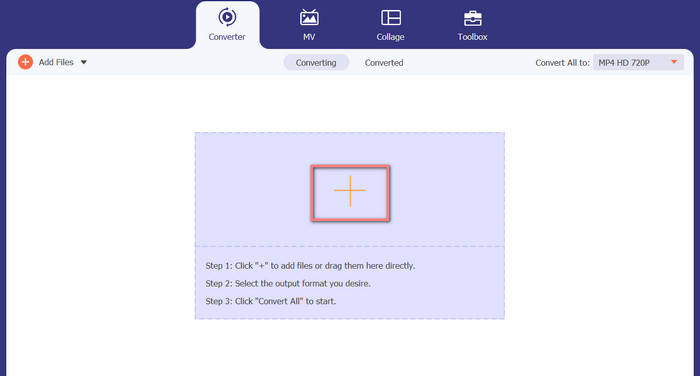
مرحله 2. روی دکمه افزودن در صفحه اصلی کلیک کنید، سپس فایل صوتیای را که میخواهید تبدیل کنید پیدا کنید. پیشنمایشی از فایل آپلودشده، کمی بعد از بارگذاری، در رابط کاربری نمایش داده خواهد شد. میتوانید با آپلود یک پوشه، چندین فایل M4A را بهطور همزمان به MP3 تبدیل کنید.
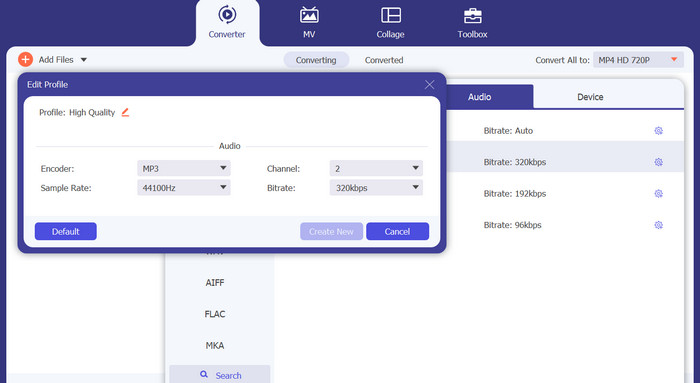
مرحله 3. برای تغییر فرمت خروجی ابزار، به برگه Audio در منوی Profile (واقع در بالای سمت راست ابزار) بروید. میتوانید یک فایل M4A را به MP3 و برعکس تبدیل کنید.
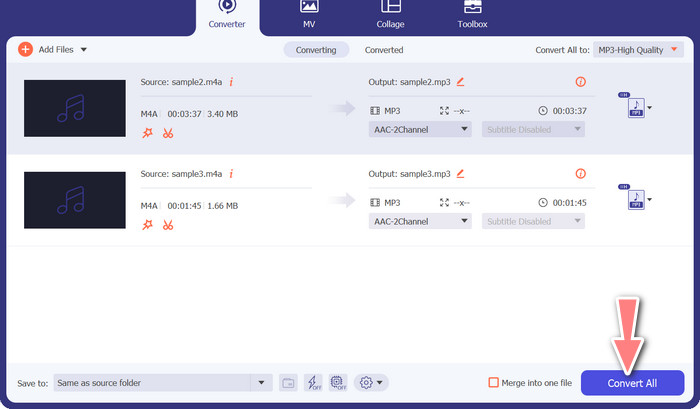
مرحله 4. محل ذخیرهسازی دلخواه را در پایین صفحه انتخاب کنید. برای شروع فرایند تبدیل، گزینه Convert All را انتخاب کنید.
تبدیل رایگان ویدیو آنلاین (آنلاین)
جایی برای نصب یک برنامه دیگر ندارید؟ خبر خوب این است که استفاده از یک مبدل مبتنی بر وب میتواند شما را کاملاً از دانلود نرمافزار بینیاز کند. ابزار تحت وب Free Video Converter Online امکان تبدیل در داخل مرورگر را فراهم میکند. این ابزار همچنین از طیف وسیعی از انواع فایلهای موسیقی و ویدیو پشتیبانی میکند. علاوه بر این، این ابزار وب از تبدیل گروهی نیز پشتیبانی میکند. همچنین کاربر میتواند تنظیمات فایل صوتی نهایی را تغییر دهد. نحوه تبدیل MP3 به M4A بهصورت آنلاین را بیاموزید.
مرحله 1. ابتدا مرورگر وب دلخواه خود را باز کرده و به وبسایت Free Video Converter Online بروید.
مرحله 2. روی گزینه Add Files to Convert کلیک کنید، سپس به سراغ فایل M4A که میخواهید تبدیل کنید بروید و آن را انتخاب کنید.
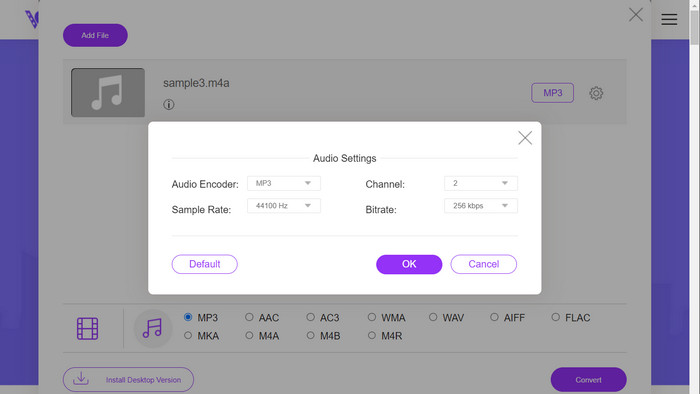
مرحله 3. از منوی فرمت Audio، MP3 را بهعنوان نوع فایل خروجی انتخاب کنید. همچنین میتوانید بیتریت یا کیفیت خروجی فایل MP3 را تنظیم کنید.
مرحله 4. برای شروع فرایند تبدیل، روی دکمه Convert کلیک کنید. این مراحل تبدیل M4A به MP3 روی وب است.
مطالعه بیشتر:
راهنمای تبدیل M4A به WAV [ویندوز و مک]
بهترین ابزارها برای تبدیل گروهی MP3 به فایلهای M4R
بخش 6. سوالات متداول در مورد M4A و MP3
MP3 در مقابل M4A از نظر متادیتا چیست؟
M4A از طیف وسیع تری از متادیتا نسبت به MP3 پشتیبانی می کند، به این معنی که فایل های M4A می توانند اطلاعات بیشتری در مورد صدا ذخیره کنند.
آیا می توانم فایل های MP3 یا M4A را ویرایش کنم؟
شما می توانید فایل های MP3 و M4A را با استفاده از نرم افزارهای مختلف ویرایش صدا ویرایش کنید.
کدام یک برای پادکست بهتر است، MP3 یا M4A؟
MP3 به دلیل اندازه فایل کوچکتر و سازگاری گسترده تر برای پادکست ها بهتر است.
نتیجه
درک مقایسه MP3 vs. M4A میتواند به شما کمک کند بهترین فرمت صدای دیجیتال را انتخاب کنید. چه در حال استریم موسیقی باشید و چه در حال تولید آن، انتخاب فرمت مناسب برای تضمین بهترین کیفیت صدا و سازگاری، بسیار مهم است.
-
 MP3 VS MP4: چه تفاوتی بین MP3 و MP4 وجود ندارد
 MP3 یا MP4 ، کدوم بهتره؟ تفاوت MP3 و MP4 در چیست؟ در این مقاله MP3 از هر جنبه ای که می توانید تصویر کنید با MP4 مقایسه می شود.
-
 M4A Player - 5 بازیکن برتر M4A برای آندروید و کامپیوتر
 چگونه می توان فایل های M4A را روی تلفن Android بازی کرد؟ کدام بازیکن می تواند M4A بازی کند؟ این پست 5 بهترین بازیکن رایگان M4A را برای Android ، Mac و PC به اشتراک می گذارد.
-
 4 بهترین روش برای اصلاح و ویرایش متادیتا MP3 در ویندوز و مک
 آیا می خواهید اسرار ویرایش ابرداده MP3 را به راحتی بدانید؟ این وبلاگ با ابزارهای مختلفی که به راحتی به آن دسترسی دارید، تکنیک های مختلفی را به شما آموزش می دهد.
