


 Video Converter Ultimate
 ضبط صفحه
 تعمیر ویدیو
هر چیزی که می توانید در مورد چیستی فایل PNG بیاموزید
این روزها، فرمت فایل PNG یکی از فرمتهای استاندارد تصویر است. میتوانید آن را در اینترنت، روی رایانهها، تلفنهای همراه و غیره ببینید. با این حال، بعضی کاربران شناختی از این فرمت ندارند. خوشبختانه این مطلب اطلاعات کافی مورد نیاز شما را در اختیارتان میگذارد. در اینجا متوجه خواهید شد که فرمت فایل PNG چیست. علاوه بر این، این مطلب روشهای عالی برای تبدیل تصاویر به فرمت فایل PNG به شما ارائه میدهد.

بخش 1. اطلاعات دقیق در مورد فایل PNG
پسوند گرافیک شبکه قابل حمل (PNG) خانواده شطرنجی فشردهسازی تصویر بدون تلفات را انجام میدهد. این پتنت نیست و به عنوان جایگزینی برای GIF، فرمت تبادل گرافیکی ایجاد شده است. علاوه بر تصاویر استاندارد خاکستری که شفافیت را ارائه می دهند، می توانند بر اساس یک پالت باشند. PNG از انواع رنگ های اضافی مانند CMYK پشتیبانی نمی کند. زیرا یکی از اهداف اصلی آن ارسال تصاویر از طریق اینترنت است. همچنین هیچ کار چاپ حرفه ای را در نظر نگرفته است. تصویر موجود در فایل به تکه های اطلاعاتی تقسیم شده است. این شامل پیکسل ها یا نظرات متنی رمزگذاری شده است، و تأیید یکپارچگی تحت RFC 2083 انجام می شود. بسیاری از کاربران با فرمت PNG مواجه می شوند. به این دلیل که امروزه یکی از فرمت های محبوب است. ممکن است یک پیوست ایمیل یا تصویری باشد که از یک وب سایت به دست آورده اید. گاهی اوقات، اسکرین شات ها نیز این وضوح را دارند. برای حرفه ای هایی که می توانند از آن استفاده کنند مفیدتر است.
از لحاظ تاریخی، فرمت تصویر PNG در سال 1995 شروع شد. الیور فروم، متخصص فناوری اطلاعات، فرمت PING را ارائه کرد. اما بعداً تبدیل به PNG شد. این فرمت فایل تکامل بعدی فرمت GIF است. فرمت GIF هشت سال قدیمی تر از PNG است. GIF معایب زیادی دارد. به مجوز ثبت اختراع و محدوده محدود 256 رنگ نیاز دارد. این محدودیت ممکن است هنگام باز کردن تصویر روی صفحه کامپیوتر، روی آن تأثیر بگذارد. در نتیجه ساخت فایل PNG بهترین انتخاب است. بدون ثبت اختراع است و دارای پالت رنگ بزرگتری است.
قسمت 2. نحوه باز کردن یک فایل PNG
از آنجایی که از قبل می دانید فایل .png چیست، این قسمت به شما می گوید که چگونه این فرمت را در دستگاه ها و مرورگرهای مختلف خود باز کنید. می توانید عکس های PNG خود را در هر مرورگر وب محبوبی باز کنید. این شامل فایرفاکس، کروم، اکسپلورر و غیره است. روش بدون مشکل است.
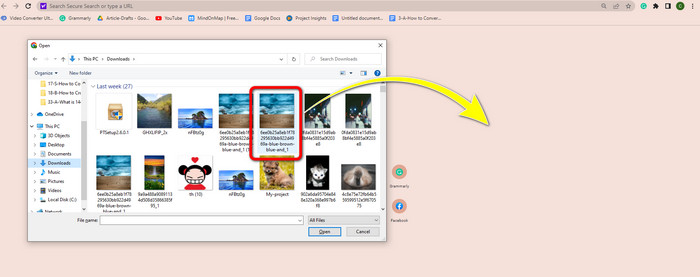
اگر از مرورگر خود استفاده میکنید، میتوانید با فشردن کلیدهای Ctrl + O روی صفحهکلید، تصویر PNG را باز کنید. تصویر PNG موردنظر خود را برای باز کردن انتخاب کنید. سپس روی دکمه Open در پوشه فایل خود کلیک کنید.
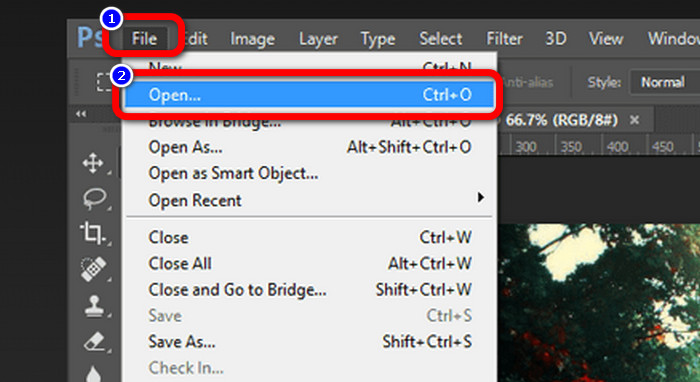
روشهایی برای باز کردن تصاویر PNG در فتوشاپ، درایو یا سایر برنامهها نیز وجود دارد. میتوانید به مسیر File > Open > بروید و عکس را انتخاب کنید. پس از آن، کلید Enter را فشار دهید. به این صورت میتوانید تصویر PNG خود را در آن برنامه مشاهده کنید.
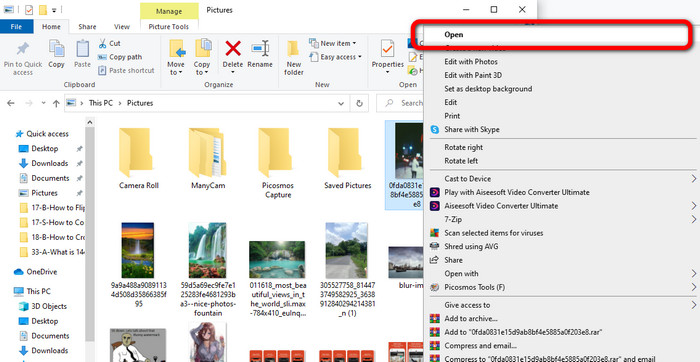
در رایانه ویندوز، باز کردن یک فایل PNG آسان است. روی File folder از نوار وظیفه (Taskbar) کلیک کنید تا باز شود. به زبانه Quick access بروید تا تصویر PNG را ببینید. وقتی تصویر را دیدید، روی آن کلیک راست کرده و گزینه Open را انتخاب کنید. به این ترتیب میتوانید تصویر را در حالت تمامصفحه مشاهده کنید.
بخش 3. روشی موثر برای تبدیل تصاویر به فرمت PNG
با استفاده از مبدل تصویر رایگان FVC، تصاویر را به PNG تبدیل کنید
میتوانید از مبدلهای آنلاین مختلف برای تبدیل تصاویر به فرمت PNG استفاده کنید. با این حال، برخی از آنها امن نیستند و بعضی دیگر هم هزینهبر هستند. اگر بهدنبال یک مبدل تصویر امن و رایگان هستید، از ابزار FVC Free Image Converter استفاده کنید. این ابزار یکی از برترین برنامهها برای تبدیل آنلاین تصاویر است. میتوانید بهصورت رایگان از آن استفاده کنید، که آن را برای همه کاربران در دسترس قرار میدهد. همچنین میتوانید تصاویر با فرمتهای مختلف مانند TIFF، JPG، PNG، GIF و غیره را بارگذاری کنید. علاوه بر این، تبدیل تصاویر ساده است و فقط در سه مرحله، تصاویر شما را به فرمت PNG تبدیل میکند. همچنین میتوانید بهصورت همزمان چندین تصویر را تبدیل کنید. این مبدل از فرایند تبدیل دستهای پشتیبانی میکند و به این ترتیب، در زمان شما صرفهجویی میشود. افزون بر این، با حذف دادههای شما پس از پایان فرآیند تبدیل، حریم خصوصی را تضمین میکند. همچنین نیازی به ثبتنام یا ساخت حساب کاربری در این برنامه ندارید. تنها با باز کردن وبسایت میتوانید از آن استفاده کنید.
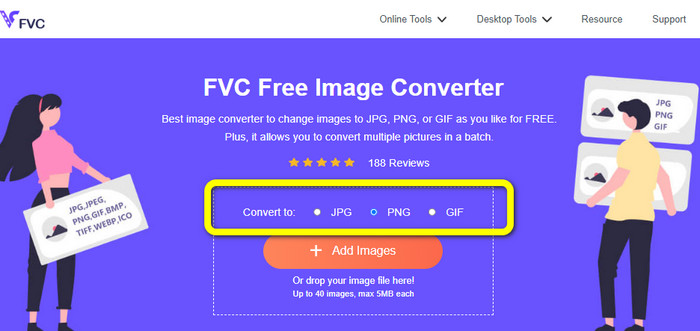
مرحله ۱: ابتدا به وبسایت FVC Free Image Converter بروید. وقتی در صفحه اصلی هستید، به گزینه فرمت بروید و فایل PNG را بهعنوان فرمت خروجی موردنظر انتخاب کنید.
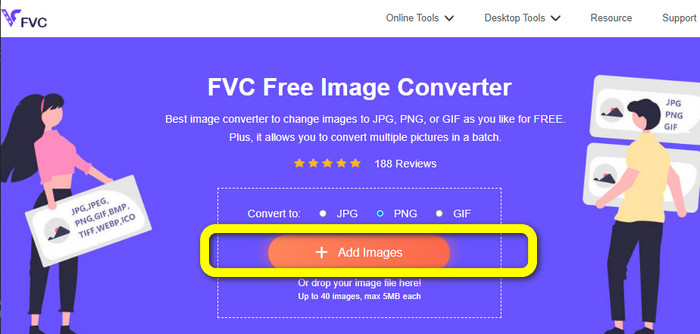
مرحله ۲: روی دکمه Add Images در مرکز رابط کاربری کلیک کنید تا عکس را بارگذاری کنید. تصویری را که میخواهید تبدیل کنید از پوشه فایل خود باز کنید.
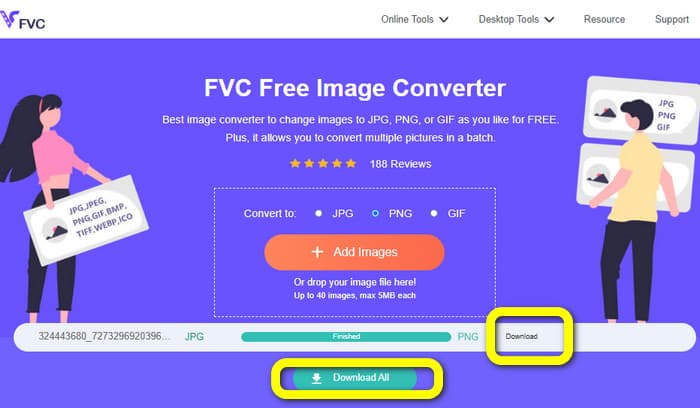
مرحله ۳: پس از پایان فرایند تبدیل، روی دکمه Download کلیک کنید تا تصویر نهایی خود را ذخیره کنید. بعد از آن میتوانید تصویر PNG خود را در رایانه باز کنید.
با استفاده از Coolutils تصاویر را به PNG تبدیل کنید
میتوانید از مبدل فایل تصویری Coolutils بهصورت آنلاین و بدون دانلود هیچ برنامهای استفاده کنید. نیازی به منتظر ماندن برای دریافت لینک ایمیل نیست، زیرا این مبدل آنلاین بلافاصله فرایند تبدیل را برای شما انجام میدهد. این ابزار آنلاین به شما امکان میدهد بهسرعت تصاویر را به PNG تبدیل کنید. یکی از ویژگیهای خوب این سرویس، امکان چرخاندن و تغییر اندازه تصویر قبل از تبدیل است. با این حال، پیشنمایشی از اینکه تصویر چرخاندهشده بعد از تبدیل چگونه خواهد بود نشان نمیدهد. چون این ابزار از طریق مرورگر وب کار میکند، میتوانید از این روش روی هر سیستمعاملی، از جمله ویندوز، لینوکس و مک استفاده کنید. این برنامه از بسیاری از فرمتهای ورودی مانند JPEG، PNG، GIF، BMP و TIFF پشتیبانی میکند.
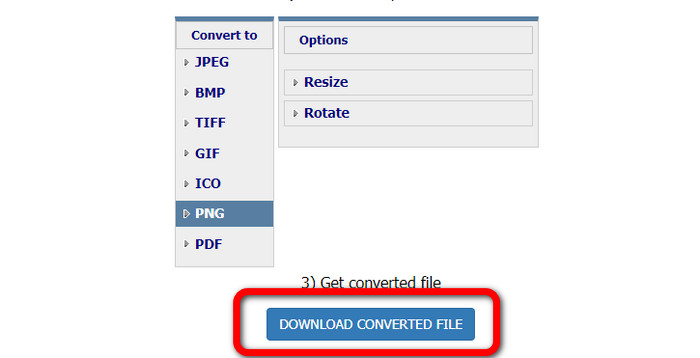
مرحله ۱: مرورگر خود را باز کرده و Coolutils را جستوجو کنید. سپس روی دکمه Upload File to Convert کلیک کنید تا تصویری را که میخواهید تبدیل کنید اضافه نمایید.
گام 2: فرمت PNG را از میان گزینههای فرمت انتخاب کنید.
مرحله ۳: روی دکمه Download converted file کلیک کنید تا تصویر خود را در دسکتاپ ذخیره کنید. همچنین میتوانید از این ابزار برای تبدیل تصاویر به JPG هم استفاده کنید.
بخش 4. سوالات متداول در مورد فایل PNG
1. تفاوت PNG و JPG چیست؟
تفاوت اصلی بین فرمت های PNG و JPG در الگوریتم فشرده سازی آنهاست. فرمت فایل PNG از یک الگوریتم بدون اتلاف استفاده می کند. به این معنی است که می تواند تمام اطلاعات را از تصویر حفظ کند. فرمت JPG از یک الگوریتم فشرده سازی با اتلاف استفاده می کند. برخی از اطلاعات تصویر را برای کاهش اندازه فایل حذف می کند.
2. فرمت PNG چقدر متن نوشته شده را نمایش می دهد؟
موثر است. فشرده سازی بدون اتلاف این فایل می تواند عکس های متنی را نمایش دهد. این شامل طرح بندی صفحه و اسکرین شات است. اسکن متن چاپ شده مانند اسناد دست نویس و صفحات روزنامه گنجانده شده است.
3. چه چیزی بهتر است، JPG یا PNG؟
این بستگی به هدف شما دارد. فایل JPG کیفیت تصویر را پایین می آورد. همچنین برای کاهش اندازه فایل یک تصویر بهتر عمل می کند. PNG با حفظ کیفیت تصویر، فایل را فشرده کرد. برای ذخیره اقلامی مانند متن، گرافیک نمادین و نقاشی های خطی عالی است.
نتیجه
تمام اطلاعات بالا درباره فرمت فایل PNG است. حتی دادههای کافی درباره اینکه فایل PNG برای چه موردی استفاده میشود را نیز در اختیارتان قرار میدهد. علاوه بر این، این مقاله دستورالعملهای کاربردی برای تبدیل تصاویر به فرمت PNG با استفاده از FVC Free Image Converter به شما نشان میدهد. بنابراین، اگر میخواهید فایلهای تصویری را تبدیل کنید، از این مبدل آنلاین قابلاعتماد استفاده کنید.
-
 8 مبدل تصویر شگفت انگیز [اطلاعات کامل]
 این بررسی در مورد بهترین مبدل های فایل تصویری که می توانید برای تبدیل فایل های تصویری استفاده کنید، به شما می گوید. این پست را بخوانید تا بهترین مبدل تصویر را برای خود بشناسید
-
 جزئیات کامل در مورد تفاوت های JPEG در مقابل JPG در مقابل PNG
 این پست اطلاعات کافی در مورد تفاوت های JPEG در مقابل JPG در مقابل PNG به شما می دهد. علاوه بر این، نحوه تبدیل تصاویر به این فایل ها را یاد خواهید گرفت
-
 JPEG/JPG چیست: بدون زحمت تصاویر خود را به JPG تبدیل کنید
 آیا در مورد معنای JPEG کنجکاو هستید؟ ما برای شما پاسخی داریم. همچنین، شما یاد خواهید گرفت که چگونه فرمت های مختلف تصویر را به فایل های JPG تبدیل کنید. اکنون پست را بخوانید.
