


 Video Converter Ultimate
 ضبط صفحه
 تعمیر ویدیو
بهترین مبدل هایی که می توانید برای تبدیل 3GP به AVI آنلاین و آفلاین استفاده کنید
فرمت 3GP یک فرمت انعطافپذیر است که برای انتقال جریانهای صدا و ویدیو به گوشیهای تلفن همراه نسل سوم (3G) مبتنی بر GSM استفاده میشود. این فرمت با اتصال 3G سازگار است تا انتقال فایل را سریعتر کند. این فرمت بیشتر در نسخههای قدیمی تلفنها استفاده میشد، چون چندمنظوره است و بهسرعت منتقل میشود. با این حال، امروزه دیگر نمیتوان فایلهای 3GP را روی بسیاری از پخشکنندههای رسانه محلی اجرا کرد، زیرا این فرمت اجازه نمیدهد پخشکنندههای جدید ساختار آن را تشخیص دهند. بنابراین بهترین راه برای تماشای تمام فایلهای 3GP روی تلفن یا رایانه رومیزی شما، تبدیل آنها است. به جای اینکه در اینترنت بهدنبال بهترین مبدل بگردید، ما چهار مبدل را جمعآوری کردهایم که میتوانید از میان آنها انتخاب کنید. ابزارهای ذکرشده در زیر عالی هستند و میتوانند بدون افت کیفیت، فایلهای 3GP را به فرمت AVI تبدیل کنند.

قسمت 1. تبدیل 3GP به AVI آفلاین با مبدل نهایی
FVC Video Converter Ultimate
اگر نمیخواهید برای تبدیل فایلهای 3GP خود زحمتی بکشید، قویاً پیشنهاد میکنیم از FVC Video Converter Ultimate استفاده کنید. این نرمافزار یکی از بهترین انتخابها برای تبدیل فایل است و تبدیل را در چند ثانیه و با سرعت بسیار بالا انجام میدهد. علاوه بر این، بسیاری از کاربرانی که از آن استفاده کردهاند تجربه مشابهی را بیان کردهاند. در جمعبندی، آنها صراحتاً گفتهاند که این ابزار در یک چشمبرهمزدن مشکل تبدیل فایلهایشان را حل کرده است.
توضیح بیشتر، این ابزار نه تنها در تبدیل فایل بهترین است. همچنین دارای پیشرفته ترین ویژگی هایی است که می خواهید امتحان کنید. به عنوان مثال می توان به ویرایشگر، سازنده GIF، تقویت کننده صدا، همگام سازی صدا و تصویر، معکوس کردن و غیره اشاره کرد. اگر این ابزار را بخرید، همه ابزارهای ذکر شده را زودتر دریافت خواهید کرد و چیزهای بیشتری برای ارائه وجود دارد. بنابراین اکنون، بیایید سعی کنیم و گام به گام مراحل تبدیل 3GP را به AVI در مک و رایانه شخصی بدون از دست دادن کیفیت آن دنبال کنیم.
مرحله 1. روی دکمه دانلود کلیک کنید و انتخاب کنید که کاربر PC هستید یا Mac، سپس آن را نصب کنید.
دانلود رایگانبرای ویندوز 7 یا بالاتردانلود امن
دانلود رایگانبرای MacOS 10.7 یا بالاتردانلود امن
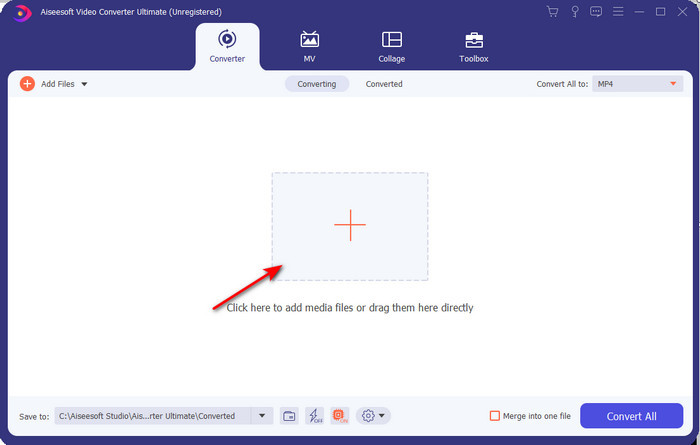
مرحله 2. ابزار را اجرا کنید، روی علامت + در وسط رابط کلیک کنید، فایل .3gp را از پوشه خود انتخاب کرده و روی Open کلیک کنید. همچنین، اگر بخواهید میتوانید در اینجا تبدیل دستهای انجام دهید؛ برای افزودن بیشتر، روی Add Files کلیک کنید.
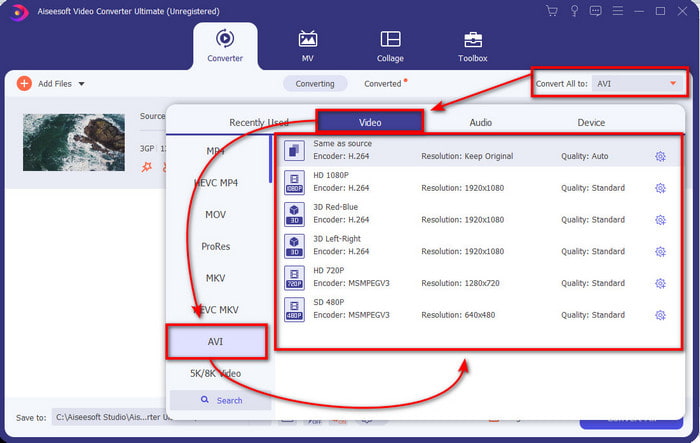
مرحله 3. برای تغییر 3GP، روی گزینه Convert All to کلیک کرده و فرمت AVI را زیر دسته Video انتخاب کنید.
مرحله 4. برای شروع فرایند تبدیل، روی Convert All کلیک کنید، و فرایند تبدیل فایلهای 3GP شما اکنون آغاز میشود.

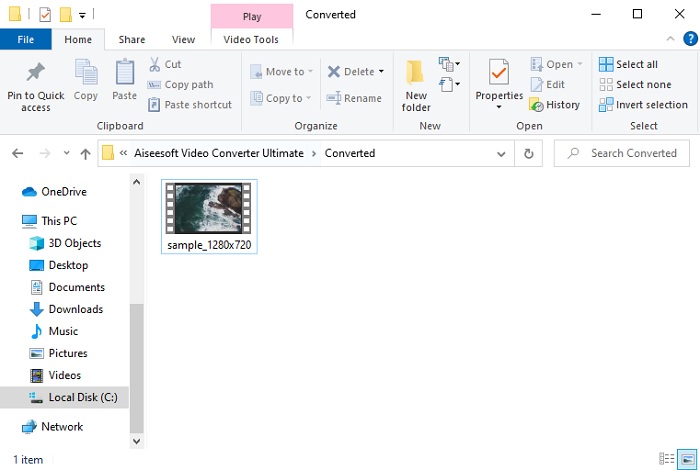
مرحله 5. بعد از تبدیل، یک پوشه فایل روی صفحه شما ظاهر میشود که حاوی فایل 3GP تبدیلشده است. روی فایل AVI تازه تبدیلشدهای که ساختهاید کلیک کنید تا آن را تماشا کنید و در صورت تمایل بعداً ویرایشش کنید.
قسمت 2. 3 مبدل های آنلاین موجود برای تبدیل 3GP به AVI
1. FVC رایگان تبدیل ویدئو آنلاین

ما اطمینان میدهیم که بهترین مبدل آنلاین 3GP به AVI در این فهرست، FVC Free Video Converter Online است. تمام قابلیتهایی که دوست دارید در یک مبدل آنلاین ببینید در این ابزار وجود دارد. از همه جنبهها میتوان گفت این بهترین مبدل آنلاین است. برای مثال، اگر بهدنبال یک مبدل آنلاین کارآمد، فرایند تبدیل امن و بدون هیچگونه تبلیغ هستید، این ابزار تحت وب برای شما مناسب است. هرچند این ابزار تحت وب ظاهر خوبی دارد و کاملاً درست کار میکند، اما فقط از طیف متوسطی از فرمتها پشتیبانی میکند. امکانات پیشرفتهای که ممکن است هنگام استفاده از FVC Video Converter Ultimate با آنها مواجه شوید، در اینجا در دسترس نیست. اما مزیت آن نسبت به نسخه نرمافزاری این است که کاملاً رایگان است. بدون هیچ معطلی، به مراحل تبدیل فایل شما به نسخهای جدید میپردازیم.
مرحله 1. روی این لینک کلیک کنید تا به وبسایت بروید.
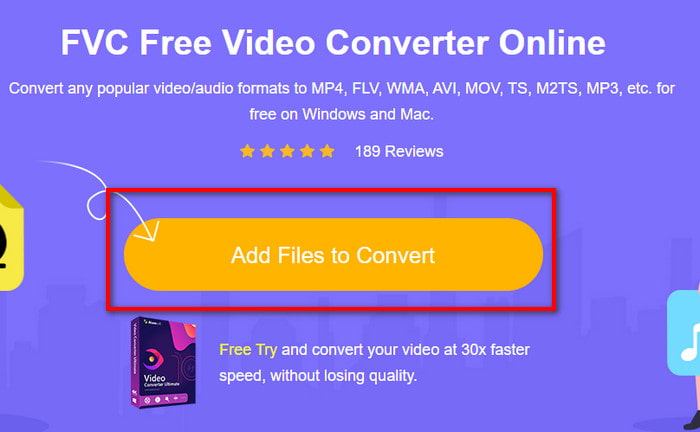
مرحله 2. روی Add Files to Convert کلیک کنید تا ابزار آنلاین اجرا شود؛ سپس یک پوشه باز میشود، فایل .3gp را پیدا کنید. اگر اولین بار است که از این ابزار استفاده میکنید، باید لانچر را با کلیک روی Add Files to Convert دانلود کرده و سپس دوباره روی آن کلیک کنید تا اجرا شود.
مرحله 3. بعد از اینکه انتخاب فایل تمام شد، فرمت AVI را در بخش پایین انتخاب کنید.
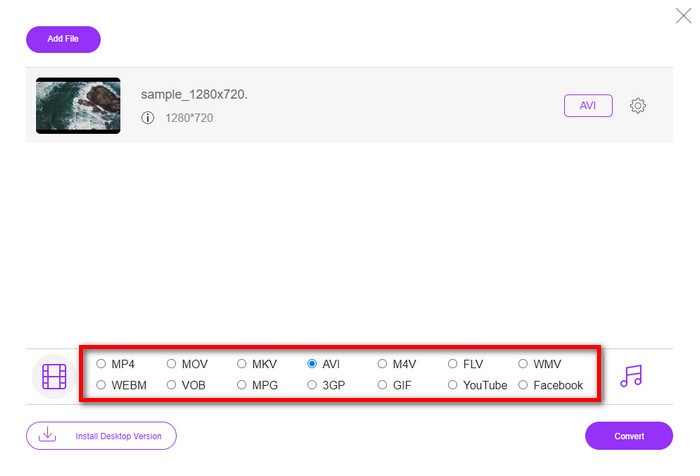
مرحله 4. اگر اکنون آماده تبدیل فایل هستید، روی Convert کلیک کنید.
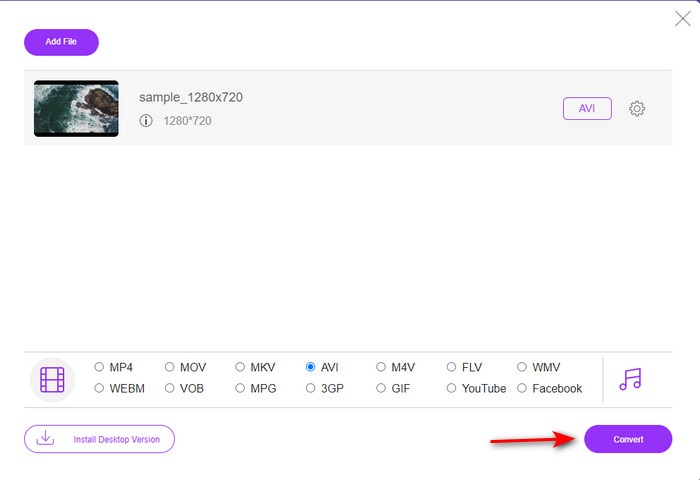
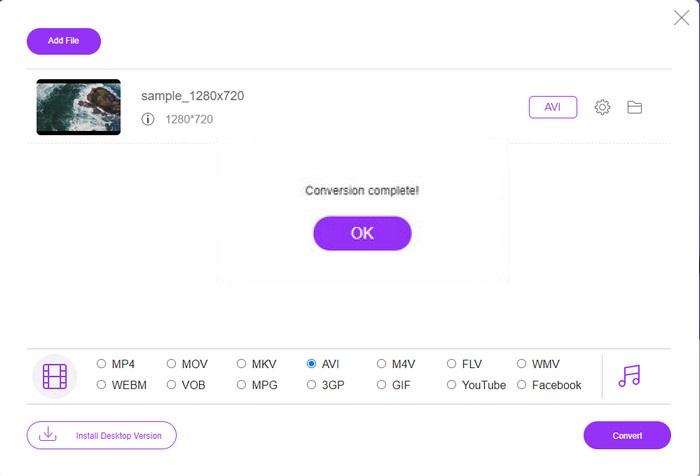
مرحله 5. پس از تبدیل، دوباره پوشهای ظاهر میشود، اما اینبار حاوی فایلی است که قبلاً تبدیل کردهاید.
2. Fconvert.com
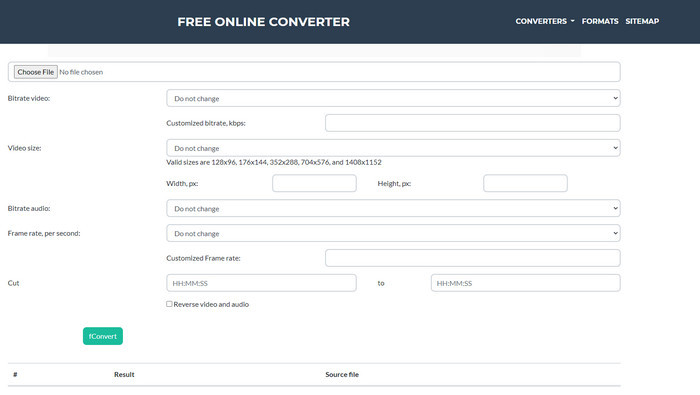
در زمینه تبدیل فایلها، Fconvert.com حتماً باید در این فهرست باشد، زیرا این ابزار تحت وب یکی از مبدلهای فوقالعادهای است که میتوانید بهصورت رایگان استفاده کنید. این مبدل تقریباً میتواند تمام فرمتهایی را که میشناسید و شاید فرمت فایل شما هم باشد، تبدیل کند. با این حال، یک مشکل در این ابزار وجود دارد و آن تبلیغات است؛ چون هر بار که روی چیزی در وبسایت کلیک میکنید، ابتدا یک تبلیغ نمایش داده میشود و بعد به موردی که کلیک کردهاید میروید. گرچه تبلیغات آزاردهنده هستند، این برنامه همچنان ظاهر مرتب و عملکرد بسیار خوبی در تبدیل فرمت دارد. پس اگر میخواهید تجربه کنید این ابزار چقدر خوب است، مراحل زیر را دنبال کنید و بیاموزید چگونه بهصورت رایگان 3GP را به AVI تبدیل کنید.
مرحله 1. وبسایت اصلی این ابزار را در مرورگر خود جستوجو کنید.
مرحله 2. زیر بخش video روی AVI کلیک کنید، روی Choose File کلیک کرده، فایل .3gp را پیدا کنید، سپس به پایین صفحه اسکرول کرده و روی fConvert کلیک کنید.
مرحله 3. دوباره به پایین صفحه اسکرول کنید، سپس بخش Result را خواهید دید؛ روی فایل کلیک کنید تا آن را دانلود کنید.
3. Anyconv
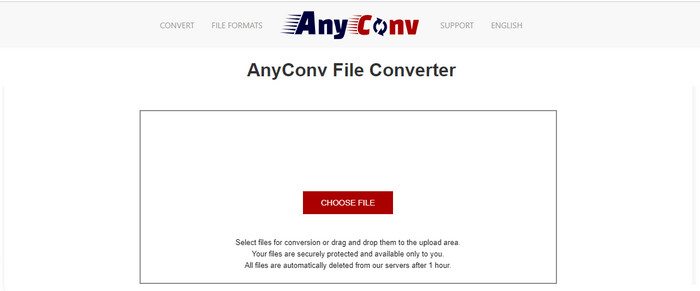
ابزار دیگری که در تبدیل فرمتها تخصص دارد Anyconv است. این ابزار تحت وب با Fconvert.com تفاوت زیادی دارد، زیرا بسیار بهتر و سریعتر است. همچنین، این ابزار نسبت به ابزار قبلی تبلیغات کمتری دارد. هرچند تبلیغاتش کمتر است، اما از نظر اندازه بزرگتر از تبلیغات Fconvert.com هستند؛ اما از نظر عملکرد، این ابزار در تبدیل کاملاً خوب عمل میکند. بدون اتلاف وقت، این ابزار را میآزماییم تا ببینیم آیا برای تبدیل رایگان 3GP به AVI بهخوبی کار میکند یا نه.
مرحله 1. موتور جستوجوی خود را باز کرده و وبسایت Anyconv را پیدا کنید.
مرحله 2. روی Choose File کلیک کنید؛ یک پوشه باز میشود، فایل .3gp را در ابزار وب قرار دهید و ادامه دهید. برای تغییر فرمت باید روی دکمه drop-down کلیک کرده و AVI را پیدا کنید. برای شروع فرایند تبدیل روی Convert کلیک کنید.
مرحله 3. صبر کنید تا فرایند تمام شود، سپس روی Download AVI کلیک کنید تا فایل تبدیلشده را دانلود کنید.
بخش 3. کدام فرمت بهترین است. 3GP یا AVI
اگر از یک تلفن نسل سوم استفاده میکنید و میخواهید ویدیوی با کیفیت بالا ذخیره کنید، آن را در نسل سوم تلفن سریعتر انتقال دهید، سپس 3GP فرمت این کار است. با این حال، اگر بخواهید فرمت AVI را به تلفن های نسل سوم ارسال کنید، فایل باز نمی شود زیرا این فرمت پشتیبانی نمی شود. اما در مورد امروز، AVI بسیار بهتر است. قبلاً در مقایسه با 3GP از همه پخش کننده ها و ویرایشگرهای رسانه پشتیبانی زیادی به دست آورده است. اگرچه فرمت AVI امروزه بهترین انتخاب است، اما حجم فایل در مقایسه با 3GP بسیار زیاد است و اگر بخواهید آن را در گوشی خود ذخیره کنید، فضای زیادی را اشغال می کند. علاوه بر این، هر دو فرمت عالی هستند، اما اهداف و کاربردهای متفاوتی دارند.
بخش 4. سوالات متداول در مورد 3GP و AVI
آیا می توانم از FFmpeg برای تبدیل 3GP به AVI استفاده کنم؟
میتوانید از FFmpeg برای تبدیل فایل 3GP خود استفاده کنید؛ با این که انجام آن کمی دشوار است، اما اگر وقت بگذارید قابل مدیریت است. قدم اول این است که فایل فشرده (zip) FFmpeg را روی رایانه خود دانلود کرده و آن را از حالت فشرده خارج کنید. قدم دوم این است که CMD را باز کنید تا با این ابزار کار کنید. سپس با استفاده از خط فرمان، فایل خود را پیدا کنید؛ کد ffmpeg -i input.3gp -vn -ar 44100 -ac 2 -b:a 192k output.avi را کپی کرده و در CMD جایگذاری کنید و برای شروع فرایند تبدیل، کلید Enter را بزنید.
آیا 3GP روی گوشی های نسل 4 قابل بازی است؟
این فرمت در گوشیهای نسل سوم استفاده میشود، و هنوز هم میتوانید در برخی گوشیهای نسل چهارم ویدیوهای با فرمت 3GP را پخش کنید، اما نه در همه آنها. زیرا همانطور که قبلاً گفته شد، 3GP برای نسل سوم است و نه برای بعضی از گوشیهای نسل چهارم. یا میتوانید به سراغ پخشکنندههای حرفهای 3GP بروید تا از تماشای ویدیوهای خود لذت ببرید.
کدام فرمت بهتر است: 3GP یا MP4؟
از نظر کیفیت و میزان پشتیبانی، MP4 در این زمینه بسیار بهتر است. با این حال، 3GP بسیار کمحجمتر است و در شبکههای 3G برای انتقال سریعتر این نوع فایل بهتر عمل میکند. اگر میخواهید MP4 را به 3GP یا برعکس تبدیل کنید، اینجا کلیک کنید تا جزئیات بیشتری بیاموزید.
نتیجه
هر سفری باید به پایان برسد و اکنون می توانید به راحتی با کمک ابزارهای ذکر شده در بالا، 3GP را به AVI تبدیل کنید. علاوه بر این، تمام ابزارهای ارائه شده در بالا، بیایید FFmpeg را نیز شامل کنیم، عالی کار می کنند. با این حال، بهترین انتخاب همیشه به FVC Video Converter Ultimate است. این ابزار از تمام مبدل های آنلاینی که می توانند در تبدیل و بسیاری از جنبه های دیگر انجام دهند، پیشی می گیرد. بنابراین اکنون، اگر می خواهید نرم افزار را دریافت کنید، روی دکمه دانلود کلیک کنید و تبدیل را سریع انجام دهید.
-
 [آنلاین و رایگان] 3 روش برای تبدیل MP4 به 3GP بدون دردسر
 آیا می خواهید MP4 را به روشی آسان و سریع به 3GP تبدیل کنید؟ در اینجا ما 3 مبدل MP4 به 3GP را برای تغییر MP4 به 3GP برای بازی در تلفن های همراه مختلف به اشتراک خواهیم گذاشت.
-
 3 روش برتر برای تبدیل FLV به 3GP در ویندوز / مک
 آیا نمی توانید فایل های FLV را در تلفن هوشمند یا رایانه لوحی باز کنید؟ نگران نباش! در اینجا ما سه روش برای تبدیل FLV به 3GP بدون از دست دادن کیفیت برای بازی در تلفن همراه را به اشتراک می گذاریم.
-
 انتخاب عالی برای تبدیل MKV به فرمت AVI
 در نحوه تبدیل ویدیوهای MKV با مراحل آسان که به طور انحصاری برای شما ارائه شده است، آشنا شوید. آیا می خواهید بدانید چگونه؟ سپس برای کسب اطلاعات بیشتر روی این لینک کلیک کنید.
