


 Video Converter Ultimate
 ضبط صفحه
 تعمیر ویدیو
تبدیل DIVX به 3GP با موثرترین روشها
نمیتوانید ویدیوی DIVX خود را روی دستگاهتان پخش کنید چون پشتیبانی نمیشود؟ بسیاری از افراد همین مشکل را دارند. اما خوششانس هستید، چون ما مؤثرترین و سادهترین روش برای تبدیل DIVX به 3GP را بررسی خواهیم کرد. این فرصت را از دست ندهید و درباره تبدیل انواع فایلها با استفاده از برنامههای معتبر و آزمایششدهای که معرفی میکنیم، بیشتر بیاموزید.

بخش 1: بهترین نرم افزار برای تبدیل DIVX به 3GP
میخواهید روی دستگاههایی مثل کامپیوترهای ویندوز و مک، DIVX را به 3GP تبدیل کنید؟ پس مشکل شما همین حالا حل شده است. برای تبدیل فایل DIVX میتوانید از Video Converter Ultimate استفاده کنید. همانطور که از نام ابزار پیداست، یک برنامه همهکاره است که با آن میتوانید بیش از 1000 فرمت ویدیویی از جمله DIVX، 3GP، MP4، MOV، MTS، WEBM و موارد دیگر را تبدیل کنید. همچنین میتوانید دو یا چند فایل را همزمان تبدیل کنید، زیرا این ابزار تبدیل دستهای (Batch) ارائه میدهد. علاوه بر این، Video Converter Ultimate فرایند تبدیل سریعی دارد که اگر قصد تبدیل تعداد زیادی فرمت فایل را داشته باشید، بسیار عالی است.
علاوه بر این، اگر علاقه مند به ویرایش فایل DIVX خود قبل از تبدیل آن هستید، همچنان می توانید از این برنامه آفلاین استفاده کنید. با فرض اینکه می خواهید رنگ ویدیوی خود را اصلاح کنید، می توانید به پنل جعبه ابزار رفته و ابزار تصحیح رنگ را برای تنظیم روشنایی، کنتراست و اشباع ویدیو انتخاب کنید. علاوه بر این، فرض کنید می خواهید صدا را در فایل ویدئویی DIVX خود قبل از تبدیل آن همگام کنید. در این صورت، می توانید این کار را انجام دهید زیرا عملکرد همگام سازی صوتی را ارائه می دهد، بنابراین همگام سازی صدا با ویدیو برای شما آسان است.
قابلیتها:
◆ تبدیل فرمت های فایل های ویدئویی، از جمله MP4، M4V، FLV، AVI، و غیره.
◆ می تواند موزیک ویدیو با تم های مختلف ایجاد کند.
◆ جعبه ابزار شامل تقویت کننده ویدیو، حذف کننده علامت، کمپرسور و موارد دیگر است.
◆ قابلیت ساخت کلاژ.
طرفداران
- این برنامه از فرمت های مختلف فایل مانند MP4، AVI، FLV، MOV، MTS، DIVX، 3GP و غیره پشتیبانی می کند.
- دارای یک رابط کاربری دوستانه که برای مبتدیان مناسب است.
- دارای فرآیند تبدیل 30 برابر سریعتر است
- قابل دسترسی در هر دو ویندوز و مک.
- این می تواند چندین ویدیو را در یک حرکت تبدیل کند.
منفی ها
- Video Converter Ultimate را بخرید تا از ویژگی های منحصر به فرد بیشتری بهره مند شوید.
برای تبدیل آسان DIVX به 3GP، باید این راهنماهای ساده زیر را دنبال کنید.
مرحله 1: ابتدا فقط کافی است Video Converter Ultimate را روی دستگاههای خود، مانند کامپیوترهای ویندوز یا مک، دانلود کنید. سپس مراحل نصب را انجام دهید و برنامه را باز کنید.
دانلود رایگانبرای ویندوز 7 یا بالاتردانلود امن
دانلود رایگانبرای MacOS 10.7 یا بالاتردانلود امن
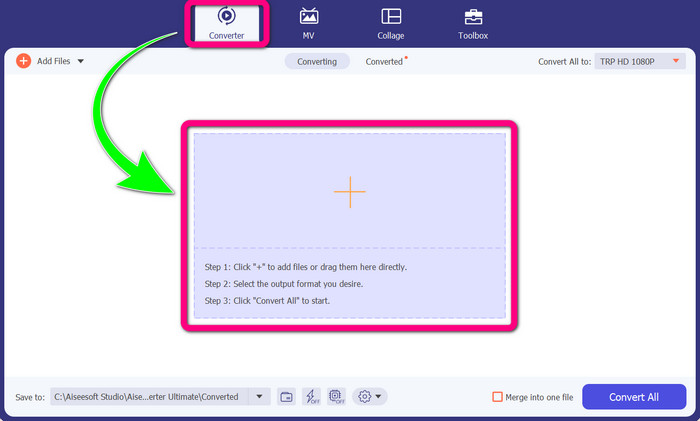
مرحله 2: وقتی برنامه Video Converter Ultimate را روی دستگاه خود باز کردید، پنل Converter را انتخاب کنید. سپس روی آیکون + کلیک کنید تا فایل ویدیوی DIVX خود را اضافه کنید.
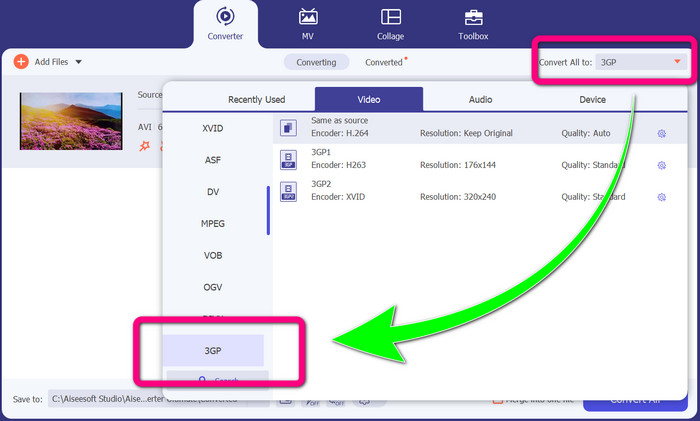
مرحله 3: پس از افزودن فایل ویدیویی، روی گزینه Convert all to کلیک کنید، فرمت 3GP را پیدا کرده و آن را انتخاب کنید.
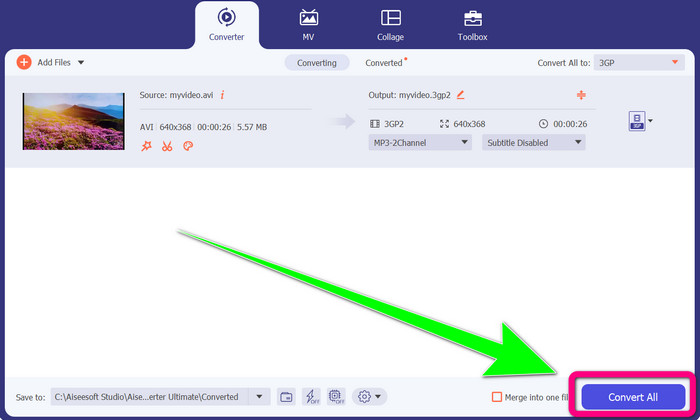
مرحله 4: وقتی انتخاب فرمت 3GP را انجام دادید، روی دکمه Convert All کلیک کنید. منتظر بمانید تا فرایند تبدیل کامل شود و سپس ویدیوی نهایی را در دستگاه خود ذخیره کنید.
قسمت 2: مبدل های آنلاین عالی برای تبدیل DIVX به 3GP
استفاده از مبدل ویدیوی رایگان FVC به صورت آنلاین
یکی از بهترین ابزارهای آنلاین برای تبدیل DIVX به 3GP، FVC Free Video Converter Online است. این ابزار میتواند تنها با چند کلیک، فرمتهای مختلف فایل را تبدیل کند. تقریباً تمام ویدیوها و صداهای رایج را به MP4، MOV، MKV، FLV، VOB، MP3، AAC و فرمتهای دیگر پشتیبانی میکند. FVC Free Video Converter Online ساده و کاربرپسند است و حتی مبتدیان هم میتوانند از آن استفاده کنند. همچنین، فرقی نمیکند کاربر ویندوز باشید یا مک؛ میتوانید روی این ابزار حساب کنید چون هم در ویندوز و هم در مک در دسترس است. برای تبدیل DIVX به 3GP مراحل ساده زیر را دنبال کنید.
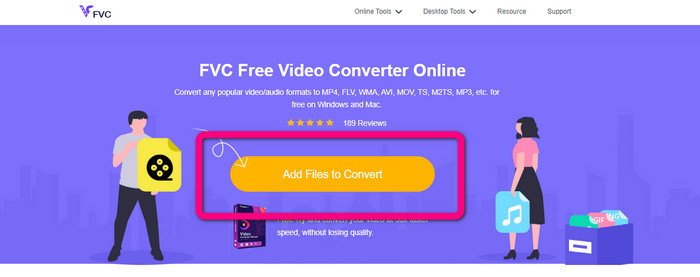
مرحله 1: به وبسایت FVC Free Video Converter Online بروید. سپس دکمه Add Files to Convert را انتخاب کنید تا فایل DIVX موردنظر برای تبدیل را وارد کنید.
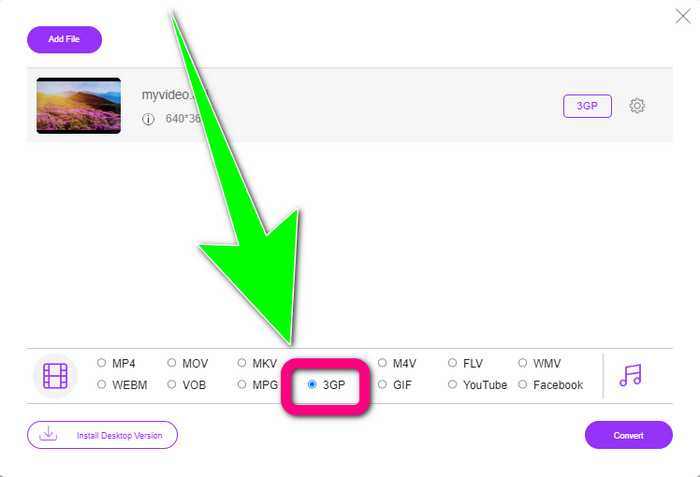
مرحله 2: پس از افزودن فایل DIVX، از میان گزینههای فرمت در پایین، فرمت 3GP را کلیک کنید.
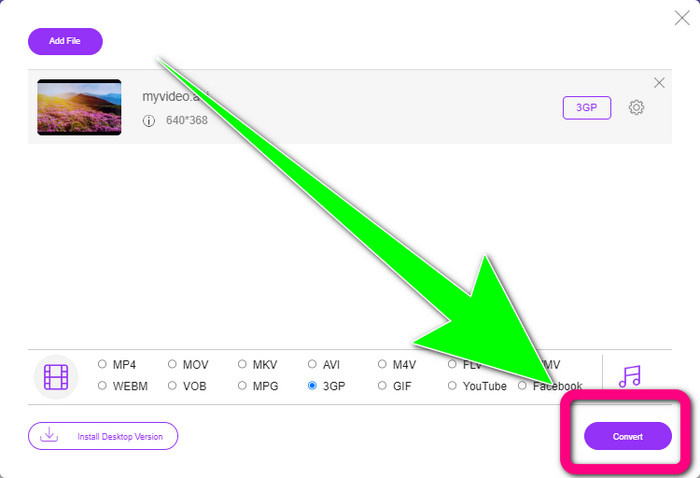
مرحله 3: با کلیک روی دکمه Convert ادامه دهید. منتظر بمانید تا فرایند تبدیل تمام شود و ویدیوی تبدیلشده را ذخیره کنید.
با استفاده از Convertio
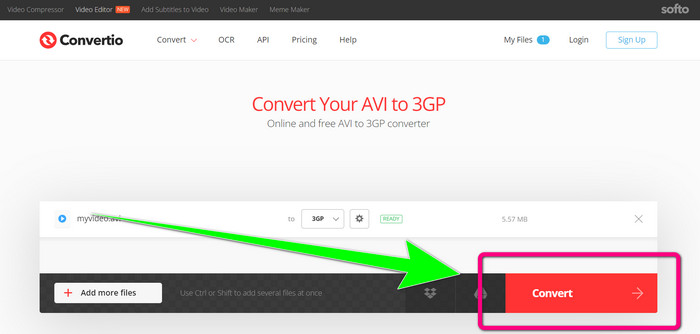
اگر میخواهید بهصورت آنلاین DIVX را به 3GP تبدیل کنید، Convertio یکی از ابزارهایی است که میتوانید از آن استفاده کنید. این ابزار از فرمتهای زیادی مانند 3GP، DIVX، XVID، AVID، MP4، M4V، ASF، HEVC و موارد دیگر پشتیبانی میکند. علاوه بر تبدیل فایلهای ویدیویی، میتوانید تصاویر، صداها، اسناد، آرشیوها و سایر فایلها را نیز تبدیل کنید. Convertio نیز ابزاری ساده است، چون تنها در چند مرحله میتوانید تبدیل را انجام دهید و نیازی نیست هنگام تبدیل فایل DIVX به فایل 3GP خودتان را درگیر مراحل پیچیده کنید. با این حال، مانند سایر ابزارهای آنلاین، اگر به اینترنت دسترسی نداشته باشید، نمیتوانید از این نرمافزار استفاده کنید. همچنین گاهی این ابزار آنلاین عملکرد چندان خوبی ندارد. نسخه رایگان Convertio محدودیت دارد؛ فقط میتوانید فایلهایی با حداکثر اندازه 100 مگابایت را تبدیل کنید. برای افزایش حداکثر حجم فایل و بهرهمندی از عملکرد بهتر، باید نرمافزار را خریداری کنید. برای تبدیل فایل DIVX به فرمت 3GP، مراحل زیر را دنبال کنید.
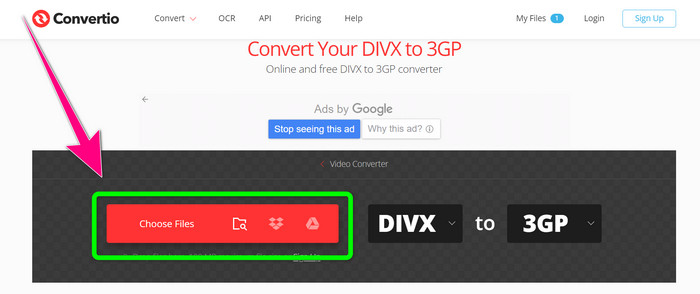
مرحله 1: به وبسایت Convertio بروید. روی دکمه Choose Files کلیک کنید و ویدیوی دارای فرمت DIVX خود را اضافه کنید.
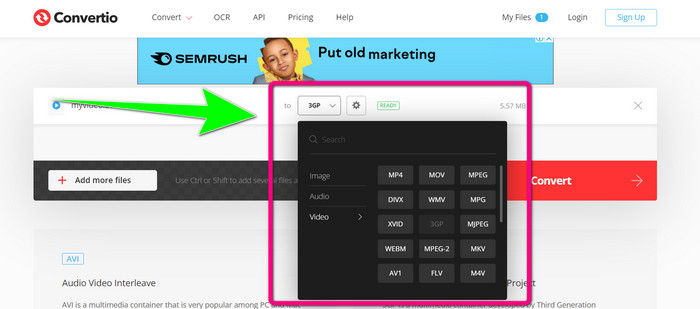
مرحله 2: پس از افزودن ویدیو، به گزینههای فرمت بروید و فرمت 3GP را انتخاب کنید.
مرحله 3: وقتی فرمت 3GP را انتخاب کردید، روی دکمه Convert کلیک کنید، منتظر بمانید تا فرایند تبدیل کامل شود و سپس فایل ویدیویی 3GP خود را ذخیره کنید.
قسمت 3: مروری بر فرمت های فایل DIVX و 3GP
DIVX
DIVX یک نرمافزار فشردهسازی ویدیو است که قادر است فایلهای ویدیویی را تا یکدوازدهم حجم اصلی با کمترین افت کیفیت فشرده کند. این فرمت ویدیویی در شرکتهای بزرگ فیلمسازی مانند Disney، Dreamworks SKG، Universal و Paramount رایج است.
3GP
3GP یک کانتینر چندرسانهای است. این فرمت در سال 1998 توسط سازمان Third Generation Partnership Project برای تلفنهای مبتنی بر GSM (سامانه جهانی ارتباطات سیار) توسعه داده شد. کانتینر 3GP به فضای ذخیرهسازی کم، مصرف داده پایین و پهنای باند اندک نیاز دارد که برای تلفنهای همراه بسیار مناسب است.
مطالعه بیشتر
بهراحتی MTV را با این مبدلهای نهایی به MKV تبدیل کنید
چگونه TRP را بدون افت کیفیت به MKV تبدیل کنیم
بخش 4: سوالات متداول در مورد تبدیل DIVX به 3GP
مبدل DIVX چیست؟
این یک ابزار عالی است که میتواند انواع مختلف فایلها را به فرمتهای گوناگون تبدیل کند. این فرمتها شامل AVI، MP4، MPEG، MOV، FLV و موارد دیگر است. پس از اتمام تبدیل، میتوانید ویدیوی خود را روی هر پخشکنندهای که از آن فرمت پشتیبانی میکند، پخش کنید. FVC Free Video Converter Online یکی از بهترین مبدلهایی است که میتوانید از آن استفاده کنید.
آیا فرمت فایل DIVX با AVI یکی است؟
فرمت فایل DIVX بر اساس کانتینر AVI است، اما می تواند دارای ویژگی های عالی مانند فصل ها و زیرنویس ها باشد. علاوه بر این، هر دو فرمت فایل AVI و DIVX را می توان در دستگاه های دارای گواهی DIVX پخش کرد.
آیا می توانم فایل DIVX را بدون افت کیفیت به 3GP تبدیل کنم؟
بله، قطعاً میتوانید. با استفاده از Video Converter Ultimate میتوانید فایل DIVX را بدون نگرانی از تغییر کیفیت، به 3GP تبدیل کنید. این مبدل عالی میتواند انواع فایلها را بدون افت کیفیت ویدیوی شما تبدیل کند.
نتیجه
همانطور که میبینید، روشهای مؤثر مختلفی برای تبدیل DIVX به 3GP با استفاده از ابزارهای آفلاین و آنلاین وجود دارد. اما گاهی برخی ابزارهای آنلاین، بهویژه زمانی که سرعت اینترنت شما پایین است، چندان راحت و مناسب نیستند؛ در این صورت میتوانید از یک برنامه قابل دانلود استفاده کنید. اگر بهدنبال یک ابزار آفلاین عالی هستید، میتوانید Video Converter Ultimate را امتحان کنید.
-
 4 مورد از بهترین مبدل های MKV به 3GP برای ویندوز و مک
 اگر به دنبال مبدل های MKV به 3GP هستید که استفاده از آنها آسان باشد، خوش شانس هستید! ما بهترین و رایگان مبدل های MKV به 3GP را پیدا کردیم که باید امتحان کنید.
-
 5 بهترین تبدیل نهایی MOV به 3GP که نباید از دست بدهید
 اگر به دنبال بهترین مبدل های آنلاین و آفلاین MOV به 3GP هستید، در مسیر درستی قرار گرفته اید. برای تبدیل MOV خود به یک فایل 3GP، این مقاله را بخوانید.
-
 3 راه برای تبدیل MPG به 3GP در ویندوز و مک [رایگان]
 اگر به دنبال راه هایی برای تبدیل MPG به 3GP هستید، این مقاله را بخوانید تا بهترین روش های تبدیل MPG به 3GP در ویندوز و مک را بدانید.
