


 Video Converter Ultimate
 ضبط صفحه
 تعمیر ویدیو
در مورد مبدل هایی که به راحتی برای تبدیل DivX به AVI استفاده می شوند آشنا شوید
فرمتهای DivX و AVI رقیب یکدیگر نیستند، هرچند هر دو با فایلهای ویدیویی مرتبطاند، اما تفاوتهای زیادی دارند. برای مثال، DivX برای فشردهسازی محتوای ویدیوهای طولانی به کار میرود تا اندازه آنها را تا حد ممکن کوچک کند بدون آنکه از کیفیت اصلی ویدیو کاسته شود. در مقابل، AVI یکی از نمونههای ظرفهای ویدیویی است که میتوانید برای ذخیره ویدیوهای باکیفیت و با وضوح بالا استفاده کنید، اما در ازای آن حجم فایل بزرگتر خواهد بود. حالا که یک شناخت کلی از این دو پیدا کردیم، بیایید عمیقتر شویم تا بیشتر آنها را درک کنیم و یاد بگیریم چطور DivX را به صورت رایگان به AVI تبدیل کنیم؛ کافی است به خواندن این مطلب ادامه دهید.
قسمت 1. DivX در مقابل AVI
همانطور که قبلاً گفته شد DivX و AVI واقعاً رقیبی برای خودشان نیستند زیرا می توانند هر دو در یک فایل یا فایل دیگر استفاده شوند. علاوه بر این، DivX یک کمپرسور فایل است که توسط خود DivX، Inc. توسعه یافته است. این کمپرسور انحصاری است و گفته می شود نسل بعدی اجاره ویدئو دی وی دی است. اما اکنون DivX به دلیل تلاش ناموفق برای جایگزینی دی وی دی ها خاموش شده است. اما اکنون، همچنان میتوانید به این ابزار دسترسی داشته باشید و آن را در برخی از پخشکنندههای رسانه قدیمی که از نوع فشردهسازی ارائه شده توسط DivX پشتیبانی میکنند، تماشا کنید.
AVI یک فرمت فایل رسانهای است که برای نگهداری هر نوع ویدیو و صدا با کُدکهای مختلف استفاده میشود. این فرمت توسط مایکروسافت توسعه داده شد تا برای پخش هر نوع جریان ویدیو و صدا به کار رود. در اواخر سال 1992، AVI ایجاد شد تا ویدیو و صدایی پیشرفته و آیندهنگر ارائه دهد که فقط روی سیستمعامل ویندوز استفاده میشد. اما امروزه میتوانید AVI را روی مک، لینوکس و حتی گوشیهای همراه نیز استفاده کنید. با این حال، هنوز یک نکته در فرمت AVI بهخوبی بهبود نیافته و آن هم میزان فشردهسازی و در نتیجه اندازه فایل آن است.
DivX
◆ کمپرسورهایی که برای کوچکتر کردن اندازه فایل یک ظرف بدون دست زدن به کیفیت آن استفاده می شوند.
◆ این کمپرسور اختصاصی DivX Inc است.
◆ گفته می شد که این نسخه بهتر از دی وی دی ها است اما در تلاش شکست خورد.
◆ اکثر پخش کننده های رسانه ای جدید امروزه از DivX پشتیبانی نمی کنند.
AVI
◆ به عنوان یکی از کانتینرهای ویدیویی و صوتی متحول شده در این عصر مدرن شناخته شده است.
◆ این فرمت در اکثر پلتفرم ها و نرم افزارها پشتیبانی می شود.
◆ هیچ فشرده سازی دقیقی پشتیبانی نمی شود زیرا بدون تلفات است.
و اکنون که تفاوت بین این دو را می دانیم، اکنون زمان مناسبی است که مبدل DivX به AVI را به صورت آنلاین و آفلاین بشناسید و می توانید از آن برای تماشای فایل DivX استفاده کنید.
قسمت 2. 4 از بهترین مبدل ها و آموزش تبدیل DivX به AVI
بالا 1. FVC Video Converter Ultimate
اگر تبدیل فایل DivX برایتان مشکل است، پس FVC Video Converter Ultimate میتواند پاسخ شما باشد. برخلاف بسیاری از مبدلها، این نرمافزار در طول سالها ارتقا یافته و به یکی از مبدلهای شاخص تبدیل شده است. علاوه بر اینکه یکی از بهترینهاست، سریعترین فرایند تبدیل را هم در اختیارتان میگذارد، چون از شتابدهی سختافزاری و تبدیل پرسرعت پشتیبانی میکند. بهخاطر امکانات داخلی متنوع، این نرمافزار بهراحتی در صدر قرار گرفته است. هرچند نسخه کامل آن پولی است، اما برای استفاده از آن لازم نیست هزینه زیادی بپردازید. اکنون اگر میخواهید یاد بگیرید چطور DivX را در مک یا رایانه شخصی به AVI تبدیل کنید، مراحل زیر را که خودمان امتحان میکنیم، دنبال کنید.
مرحله 1. پیش از هر چیز، قبل از آنکه بتوانید از این ابزار استفاده کنید، باید آن را روی سیستم خود دانلود کنید. سپس آن را نصب کرده، تنظیمات اولیه را انجام دهید و روی Start Now کلیک کنید تا ادامه دهید.
دانلود رایگانبرای ویندوز 7 یا بالاتردانلود امن
دانلود رایگانبرای MacOS 10.7 یا بالاتردانلود امن
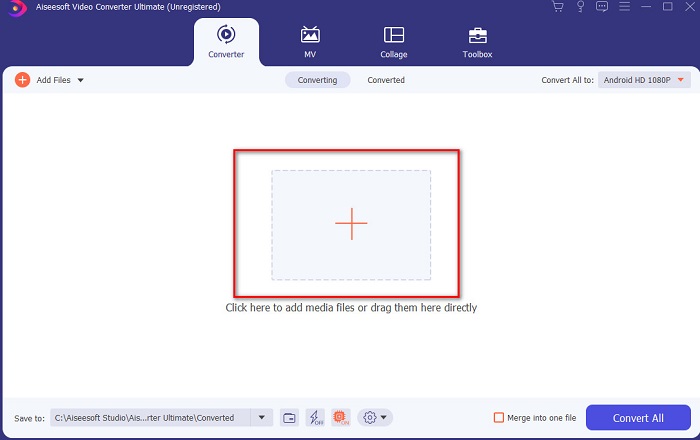
مرحله 2. ابزار را اجرا کنید تا ادامه دهید، سپس رابطی شبیه تصویر نمایش داده میشود. در قسمت میانی روی دکمه + کلیک کنید، فایل DivX موردنظر را پیدا کرده و انتخاب کنید، سپس روی Open کلیک کنید.
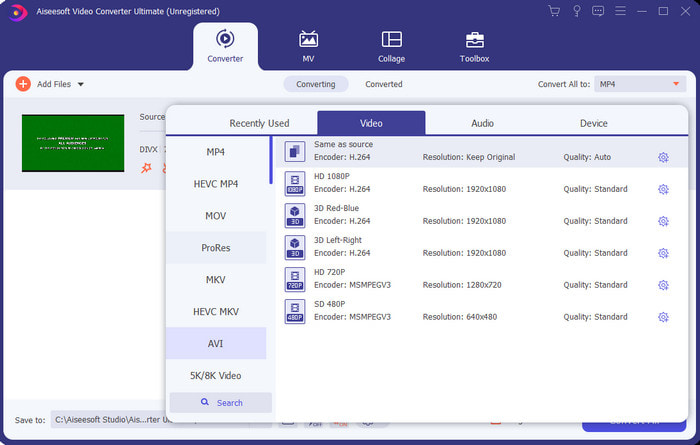
مرحله 3. برای تغییر DivX به AVI روی Convert All to کلیک کنید، فرمت AVI را پیدا کرده و روی آن کلیک کنید.
مرحله 4. برای شروع فرایند تبدیل، روی Convert All کلیک کنید و منتظر بمانید تا فرایند کامل شود.
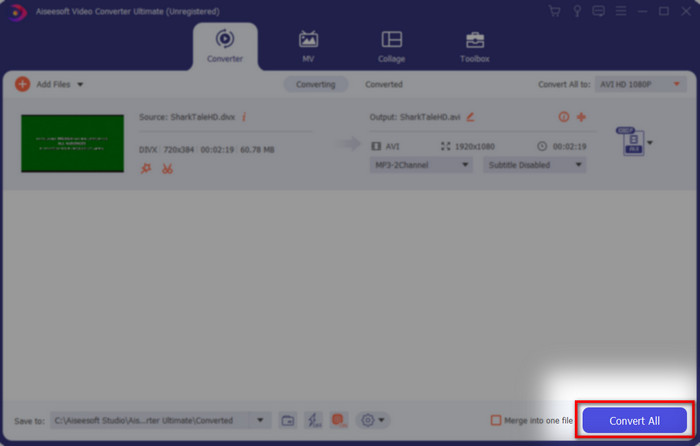
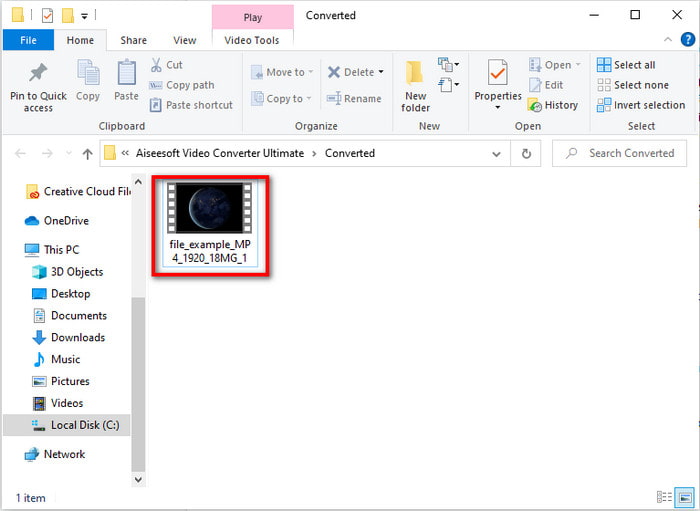
مرحله 5. منتظر بمانید تا فرایند تبدیل تکمیل شود. وقتی کار به پایان رسید، پوشهای کنار صفحهنمایش شما ظاهر میشود که فایل تبدیلشده در آن قرار دارد؛ روی آن کلیک کنید، ویدیو را پخش کرده و از تماشای آن لذت ببرید.
Top 2. Freemake Video Converter
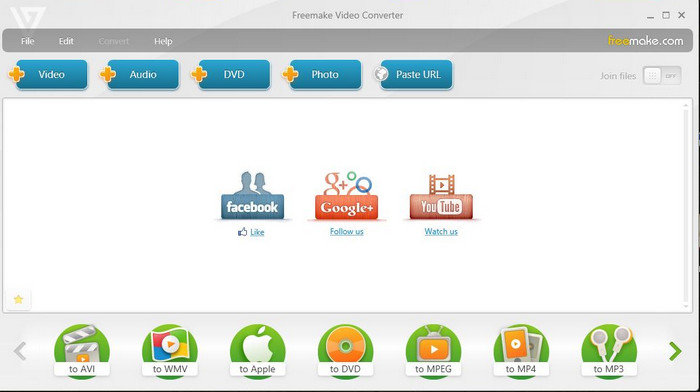
یک نرمافزار قابل دانلود دیگر که میتوانید برای تبدیل فرمتها استفاده کنید، Freemake Video Converter است. این ابزار تاکنون به کاربران زیادی کمک کرده تا هر نوع فایل رسانهای را به فرمتی جدید تبدیل کنند. همچنین بهطور گسترده بهعنوان یکی از بهترین نرمافزارهایی که میتوانید دانلود کرده و روی آن حساب کنید شناخته میشود. با اینکه ابزار قدرتمندی است، اما هنوز از برخی فرمتها پشتیبانی نمیکند و فرایند تبدیل آن بسیار کند است؛ زیرا مانند FVC Video Converter Ultimate از شتابدهی سختافزاری بهره نمیبرد. پس اگر میخواهید DivX را به صورت رایگان به AVI تبدیل کنید، این نرمافزار میتواند گزینه مناسب شما باشد.
طرفداران
- دانلود رایگان هر نرم افزار.
- ظاهر عاقلانه ساده است.
منفی ها
- شتاب سخت افزاری نداره
- برخی از قالبها در اینجا پشتیبانی نمیشوند.
بالا 3. مبدل ویدیوی رایگان FVC
اگر میخواهید فایل رسانهای را به فرمتی جدید تبدیل کنید، اما تمایلی به دانلود نرمافزار ندارید، آنگاه FVC Free Video Converter برای کمک به شما آماده است. برخلاف دو ابزار قبلی که در بالا ذکر شد، این ابزار را میتوانید بدون نیاز به دانلود، مستقیماً به صورت آنلاین استفاده کنید. هرچند استفاده از این نرمافزار رایگان است، اما همچنان برخی فرمتها در آن پشتیبانی نمیشوند و گزینههای شما برای انتخاب فرمت خروجی محدود است. با این حال، اگر بخواهیم آن را با Freemake Video Converter مقایسه کنیم، فرایند تبدیل در این ابزار بسیار سریعتر است. حال اگر میخواهید بدانید چگونه DivX را بهصورت آنلاین به AVI تبدیل کنید، مراحل زیر را دنبال کنید.
مرحله 1. با کلیک روی این لینک به وبسایت اصلی FVC Free Video Converter بروید.
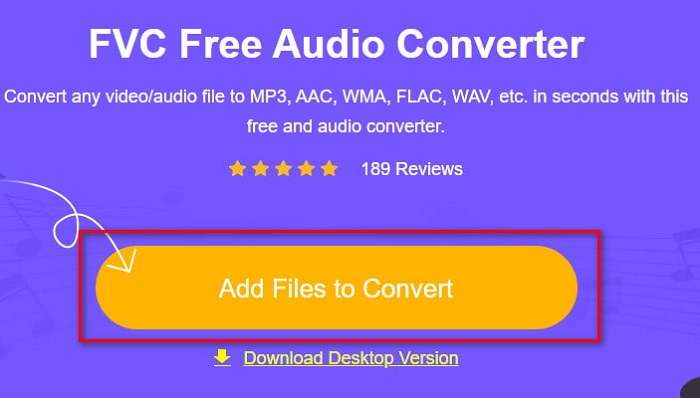
مرحله 2. روی Add Files to Convert کلیک کنید تا اگر اولین بار است، لانچر را دانلود کنید. و اگر لانچر از قبل نصب شده است، دوباره روی Add Files to Convert کلیک کنید، فایل موردنظر را در پوشه پیدا کرده، آن را انتخاب و روی Open کلیک کنید.
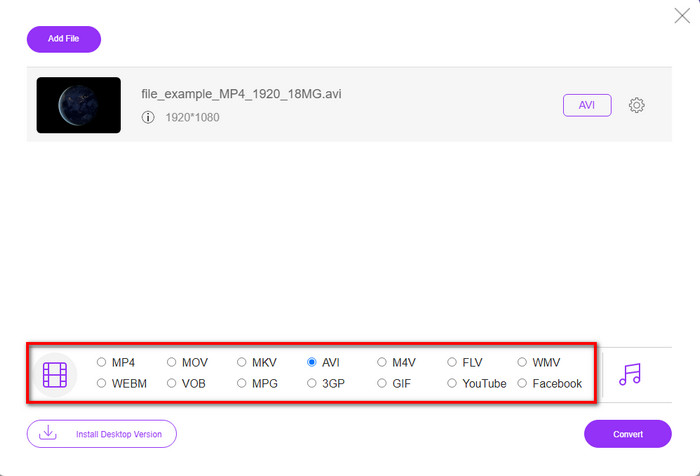
مرحله 3. فرمت AVI را از میان گزینههای فهرستشده در پایین انتخاب کنید، یا هر فرمت دیگری که میخواهید فایل به آن تبدیل شود.
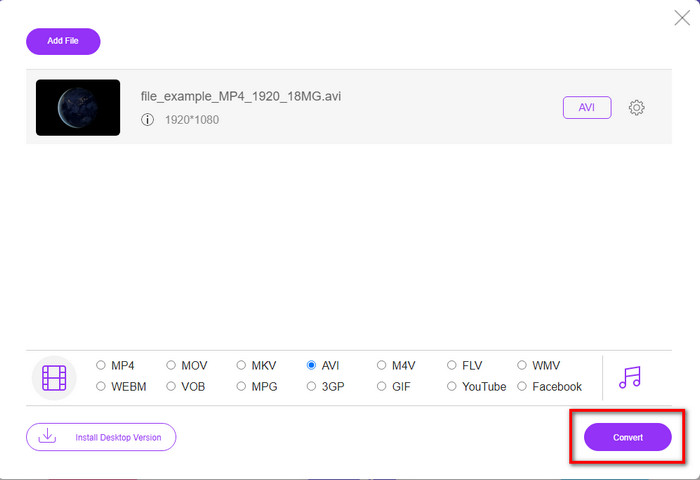
مرحله 4. پس از پایان انتخاب فرمت، حالا وقت آن است که با کلیک روی Convert آن را روی سیستم خود ذخیره کنید.
مرحله 5. وقتی فرایند انجام شد، منتظر بمانید تا پوشه حاوی فایل روی صفحه شما ظاهر شود. با کلیک روی آن، فایل را باز کرده و رسانه تبدیلشده را تماشا کنید.
بالا 4. Online-Convert.com
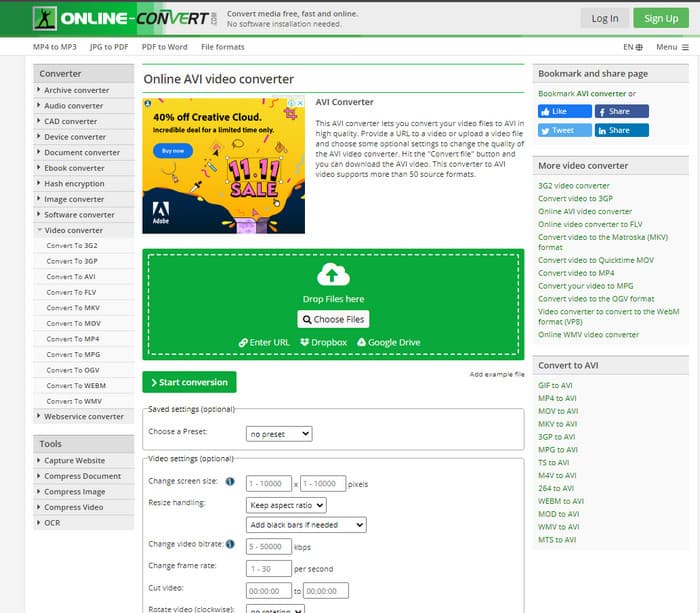
ابزار آنلاین دیگری که میتوانید برای تبدیل هر نوع فایل رسانهای استفاده کنید، Online-Convert.com است. مانند برخی ابزارهای آنلاین دیگر، این مبدل فقط از تعداد محدودی فرمت پشتیبانی میکند. با این حال، یک بخش تنظیمات ویدیویی داخلی دارد که میتوانید از آن استفاده کنید، اما مدیریت آن دشوار است، بهخصوص اگر در این زمینه آشنایی نداشته باشید. علاوه بر این، فرایند آپلود و دانلود فایل در این سایت بسیار کندتر از FVC Free Video Converter است.
طرفداران
- رایگان برای دسترسی در وب.
- رابط این ابزار عالی است و تبلیغات کمی دارد.
- فرآیند تبدیل به اتصال به اینترنت بستگی دارد.
منفی ها
- بدون اینترنت قابل دسترسی نیست
- فرآیند واردات و صادرات در مقایسه با سایر ابزارها زمان زیادی می برد.
قسمت 3. کدام یک برای تبدیل DivX به AVI بهترین است؟
| امکانات | FVC Video Converter Ultimate | مبدل ویدیویی Freemake | مبدل ویدیوی رایگان FVC | Online-Convert.com |
| تبدیل تصویر و صدا |  | | | |
| تبدیل دسته ای | |  | | |
| شتاب سخت افزاری | | | | |
| ابزار مبتنی بر برنامه | ابزار مبتنی بر دسکتاپ | ابزار مبتنی بر دسکتاپ | ابزار مبتنی بر وب | ابزار مبتنی بر وب |
| اتصال به شبکه | مورد نیاز نیست | مورد نیاز نیست | ضروری | ضروری |
بخش 4. سوالات متداول در مورد مبدل های DivX به AVI
که بهتر است؟ DivX و XviD؟
DivX یک کدک اختصاصی شناخته شده برای فایل کانتینر ویدیویی و صوتی است و همچنین در ریپ کردن فایل بر روی دیسک در حین فشرده سازی آن بدون افت کیفیت تخصص دارد. در حالی که XviD نسخه نهایی DivX است و تا حدودی بسیار بهتر از DivX است. همچنین، غیر انحصاری است، به این معنی که هر کسی می تواند هر زمان یا هر چیزی که بخواهد از آن استفاده کند.
کدک ها چیست؟
یک کدک برای فشرده سازی یک فایل و توزیع هر یک از فایل های صوتی و تصویری بسیار سریعتر در اندازه فایل کوچکتر استفاده می شود. همچنین از آن برای از حالت فشرده خارج کردن فایلی استفاده میشود که با کدک مذکور پیوند داده شده است تا فایل فشردهای که ساختهاید باز شود بدون اینکه اعتبار آن از بین برود.
برای داشتن اندازه فایل کوچکتر، فشرده سازی یا تبدیل ایده آل است؟
اگر میخواهید کیفیت ویدیو را حفظ کنید و در عین حال اندازه آن را کوچکتر سازید، بهترین کار این است که آن را با کمک این لینک فشرده کنید. اما اگر روش سادهتری میخواهید، بهتر است با مطالعه این مطلب درباره تبدیل ویدیوها به MP4، با نحوه انجام این کار آشنا شوید.
نتیجه
در پایان این مقاله، حالا برای ما سادهتر است که بدانیم DivX چیست و AVI چه کاربردی دارد. همچنین چهار ابزار مفید را به شما معرفی کردیم که با کمک آنها میتوانید برای پخش فایلهای DivX، آنها را به فرمت AVI تبدیل کنید. پس اگر میخواهید یک موفقیت تمامعیار داشته باشید، از FVC Video Converter Ultimate استفاده کنید تا موفقیت شما تضمین شود.
دانلود رایگانبرای ویندوز 7 یا بالاتردانلود امن
دانلود رایگانبرای MacOS 10.7 یا بالاتردانلود امن
-
 [رایگان و آنلاین] 7 روش برای تبدیل MTS به AVI در رایانه Mac/Windows
 چگونه می توان MTS را به راحتی به AVI تبدیل کرد؟ در این راهنما ، 7 روش آسان و رایگان برای تبدیل فایلهای MTS به AVI در ویندوز یا مک بدون افت کیفیت پیدا خواهید کرد.
-
 آموزش تبدیل MP4 به فایلهای AVI با 7 مبدل ویدیوی رایگان
 آیا می خواهید تمام راه های رایگان تبدیل AVI به ویدیوی MP4 را دریافت کنید؟ این مقاله را نباید از دست بدهید. در اینجا 7 روش برای تبدیل فایل های AVI به MP4 به صورت رایگان در ویندوز، مک، آیفون، اندروید و آنلاین آورده شده است.
-
 3 روش آسان برای تبدیل FLV به AVI در دسک تاپ و آنلاین
 در اینجا سه روش برای کمک به شما در تبدیل کارآمد فایل های ویدئویی FLV به فرمت AVI در Windows و Mac آورده شده است تا بتوانید آنها را با کیفیت بالا مشاهده کنید.
