


 Video Converter Ultimate
 ضبط صفحه
 تعمیر ویدیو
4 ساده ترین راه برای تبدیل فایل F4V به فرمت فایل رسانه ای AVI
Macromedia F4V را معرفی کرد و بعدها، Adobe آن را برای رقابت با ذخیرهسازی ویدئویی مدرن و با کیفیت بالا توسعه داد. همچنین، به عنوان یک فرمت جایگزین برای FLV ایجاد شده است زیرا FLV دارای محدودیت است. توضیح بیشتر این است که فایل F4V از فرمت فایل رسانه پایه ISO با کدک H.264 برای کاهش حجم فایل استفاده می کند. اگرچه فرمت دارای خروجی با کیفیت بالا است، اما F4V نسبت به فرمت های دیگر سازگاری کمتری دارد. و نه تنها این، بلکه این قالب نیز به تدریج حذف شده است زیرا Adobe Flash Player قبلاً بازنشسته شده است.
پس اگر شما هم مثل دیگران با این مشکل روبهرو هستید که فایلهای .f4v آنها روی پخشکنندهٔ رسانهشان اجرا نمیشود، به خواندن ادامه دهید. ما مجموعهای از ابزارهای مختلف را گردآوری کردهایم که با تبدیل فرمت .f4v به AVI به شما کمک میکنند فایلهای غیرقابلپخش را اجرا کنید. اکنون بیایید ادامه دهیم و ببینیم چگونه با استفاده از ابزارهای آنلاین و آفلاین موجود، فرمت F4V را به AVI تبدیل کنیم.

قسمت 1. آموزش تبدیل F4V به AVI با مبدل فوق العاده F4V به AVI
اگر بهدنبال بهترین مبدلی هستید که مشکلتان را برطرف کند، پس FVC Video Converter Ultimate همان ابزاری است که به آن نیاز دارید. ما خودمان این ابزار را آزمایش کردهایم و تعدادی از نظرها را خواندهایم؛ «آلتیمیت» فقط یک اسم نیست، عملکرد و قابلیتهای نرمافزار هم واقعاً در حد نهایی است. همچنین یکی از چشمگیرترین قابلیتهای این ابزار، تبدیل بسیار سریع و شتابدهی سختافزاری است تا کاربرانی که از این نرمافزار استفاده میکنند مجبور نباشند منتظر بمانند.
همچنین اگر میخواهید GIF بسازید، ویدئوها را تندتر یا کندتر کنید، آنها را معکوس کنید، صدای ویدئو را تقویت کنید و غیره، این ابزار امکانات پیشرفتهای را در اختیار شما قرار میدهد. البته برای استفاده از آن باید هزینهای پرداخت کنید، اما نگران نباشید، مبلغ پرداختی شما کمتر از صد دلار خواهد بود. حال اگر هنوز در مرحلهٔ تصمیمگیری برای خرید این ابزار هستید، مراحل زیر را بخوانید و با دنبال کردن این دستورالعملها، فایل F4V را به AVI تبدیل کنید.
مرحله 1. قبل از استفاده از این ابزار قدرتمند، ابتدا آن را روی رایانهٔ خود دانلود کنید. سپس آن را نصب کرده و تنظیمات اولیه را خیلی سریع انجام دهید؛ روی Start Now کلیک کنید تا برنامه باز شود.
دانلود رایگانبرای ویندوز 7 یا بالاتردانلود امن
دانلود رایگانبرای MacOS 10.7 یا بالاتردانلود امن
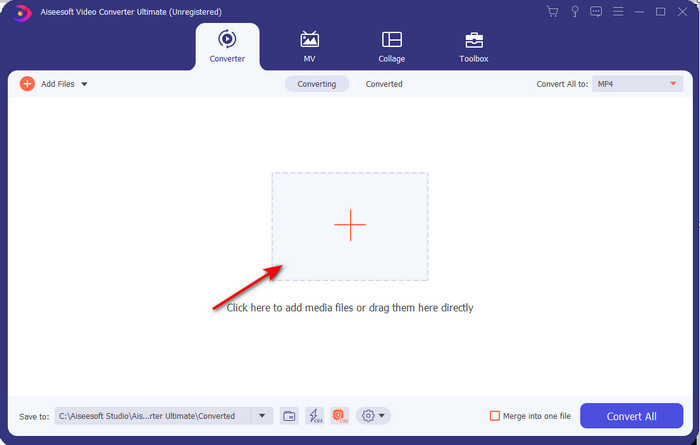
مرحله 2. وقتی ابزار باز شد، به بخش Add Files بروید یا روی دکمهٔ + کلیک کنید، سپس یک پوشه باز میشود؛ در آن، فایل با پسوند .f4v را پیدا کرده و روی Open کلیک کنید.
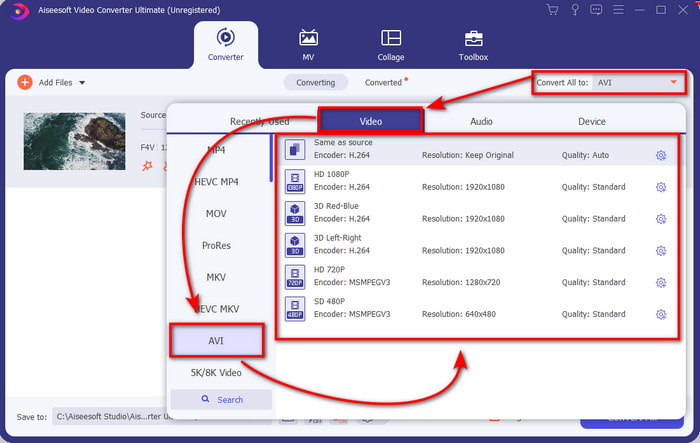
مرحله 3. بعد از وارد کردن فایل، در قسمت بالا-راست رابط کاربری روی Convert All to کلیک کرده و فرمت AVI را انتخاب کنید.
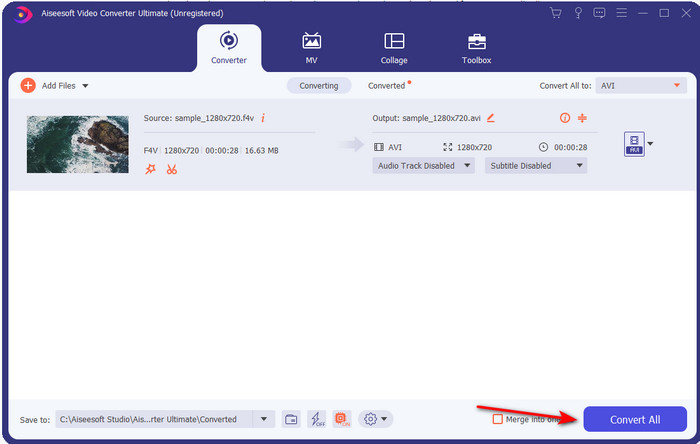
مرحله 4. حالا برای شروع فرایند تبدیل، روی Convert All کلیک کنید. چند دقیقه صبر کنید تا فرمت F4V به AVI تبدیل شود.
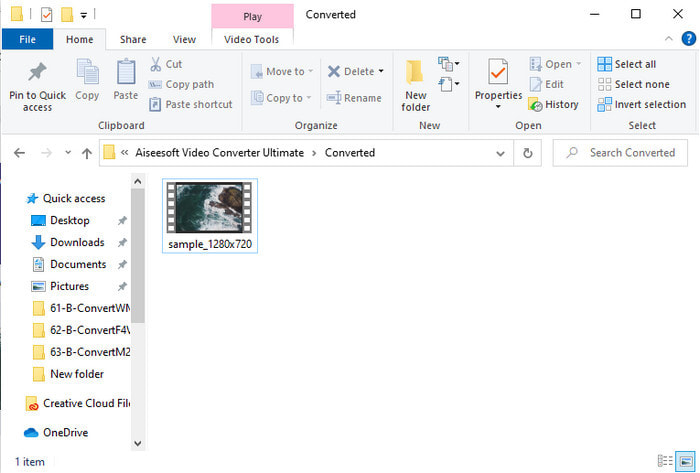
مرحله 5. پس از پایان کار، یک پوشهٔ فایل بهطور خودکار روی دسکتاپ شما باز میشود که حاوی فایل .f4v تبدیلشده است. روی فایل ویدئویی کلیک کنید تا ویدئویی را که قبلاً روی رایانهتان قابل پخش نبود تماشا کنید، یا در صورت تمایل آن را به گوشی خود منتقل کنید.
قسمت 2. آموزش تبدیل F4V به AVI آنلاین با 3 مبدل وب موجود
1. FVC رایگان تبدیل ویدئو آنلاین
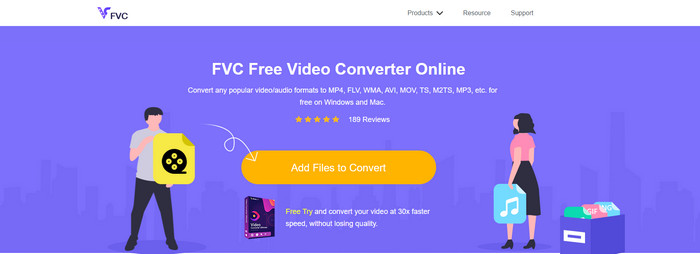
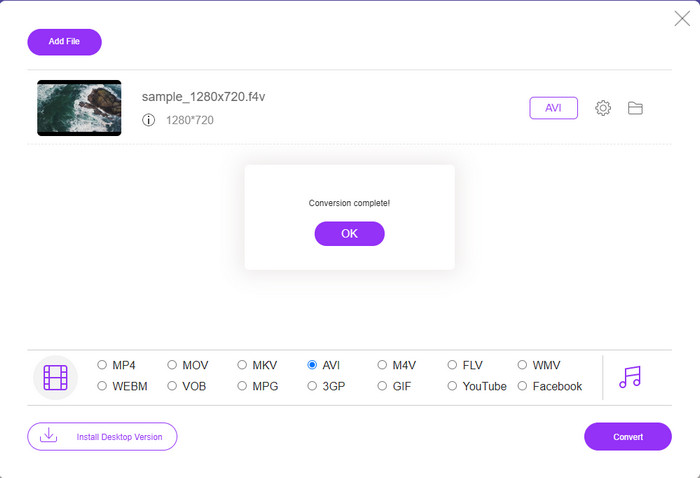
اگر میخواهید بدانید کدام مبدل تحت وب بهتر است، احتمالاً FVC Free Video Converter Online همان گزینهٔ مناسب باشد. تمام قابلیتهایی که دوست دارید استفاده کنید اینجا در دسترس است؛ میتوانید نرخ بیت و fps ویدئو را تغییر دهید تا قبل از تبدیل، کیفیت آن را افزایش دهید. میلیونها کاربر اینترنتی عملکرد کلی این ابزار تحت وب را تحسین کردهاند. همچنین این ابزار از طیفی متوسط از فرمتها پشتیبانی میکند که میتوانید آنها را انتخاب و بارگذاری کنید. با این حال، مثل نسخهٔ آلتیمیت، امکان اعمال افکتهای پیشرفته برای فوقالعاده کردن ظاهر ویدئو وجود ندارد. با اینحال، اگر میخواهید آن را امتحان کنید و فرمت F4V را به AVI تبدیل کنید، مراحل زیر را دنبال کنید.
مرحله 1. روی این لینک کلیک کنید تا به FVC Free Video Converter Online بروید.
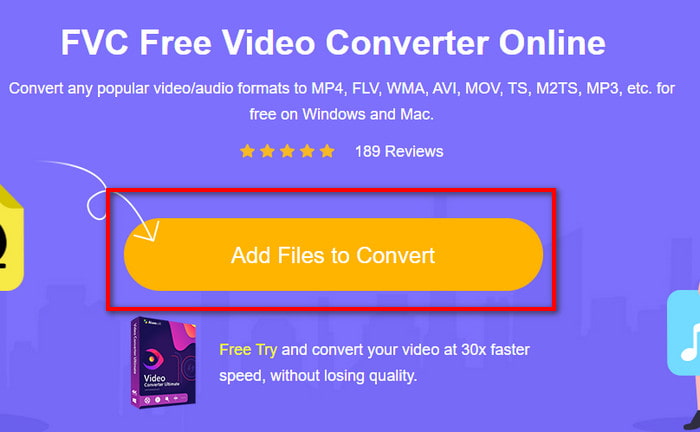
مرحله 2. سپس روی Add Files to Convert کلیک کنید تا ابزار اجرا شود و در پوشه، فایلی را که میخواهید به فرمت جدید تبدیل کنید انتخاب کرده و روی Open کلیک کنید.
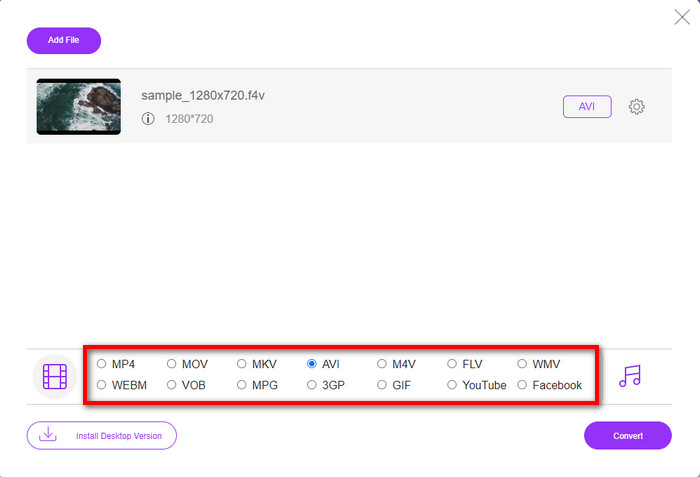
مرحله 3. وقتی فایل وارد شد، در بخش پایین، فرمت AVI را از میان فرمتهایی که میخواهید فایل به آن تبدیل شود انتخاب کنید.
مرحله 4. پس از انتخاب فرمت AVI، اکنون زمان تبدیل فرا رسیده است؛ روی دکمهٔ Convert کلیک کنید.
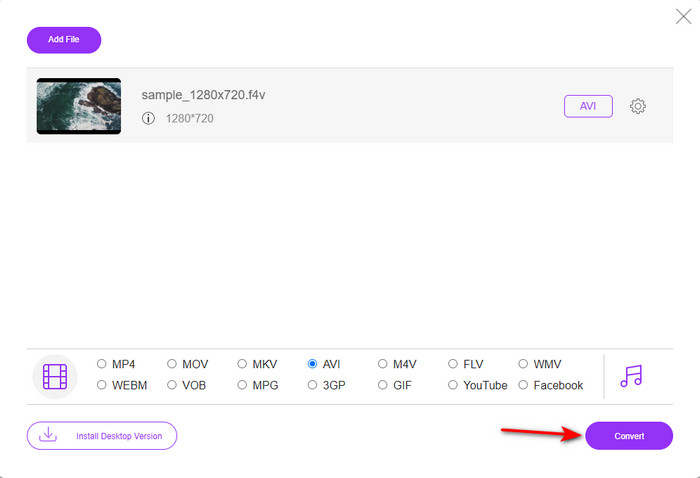
مرحله 5. چند دقیقه صبر کنید تا فایل دانلود شود، سپس پوشهای حاوی فایل تبدیلشده ظاهر میشود.
2. زامزار
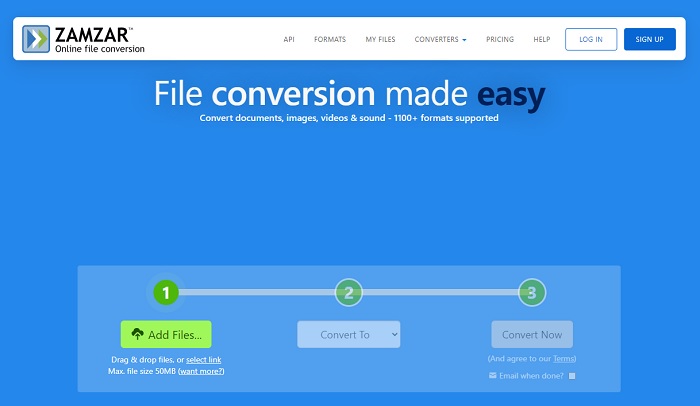
یک جایگزین دیگر برای تبدیل آنلاین که میتوانید استفاده کنید، Zamzar است. مانند هر مبدل دیگری، این ابزار برای استفاده و دسترسی به اتصال اینترنت نیاز دارد. همهٔ ابزارهای تحت وبی که اینجا معرفی شدهاند، برای انجام تبدیل، به اینترنت وابستهاند. با توجه به استفادهٔ گستردهٔ کاربران، Zamzar محبوب شده است، زیرا از فرمتهای متعددی پشتیبانی میکند که میتوانید آنها را انتخاب و استفاده کنید. همچنین استفاده از آن رایگان است، اما محدودیتی در اندازهٔ فایلی که میتواند تبدیل کند وجود دارد. بنابراین، اگر فایل .f4v شما بیش از 50 مگابایت باشد، نمیتوانید آن را اینجا تبدیل کنید، همانطور که در توضیحات سایت ذکر شده است. اما اگر اندازهٔ فایل کمتر از این مقدار است، میتوانید با دنبال کردن مراحل زیر، از این ابزار برای تبدیل آنلاین F4V به AVI استفاده کنید.
مرحله 1. مرورگر وب خود را باز کرده و عبارت Zamzar را جستوجو کنید.
مرحله 2. روی Add Files کلیک کنید و فایلی را که میخواهید تبدیل کنید پیدا کنید. سپس فرمت AVI را انتخاب کرده و روی Convert to بزنید؛ بعد از آن روی Convert کلیک کنید.
مرحله 3. منتظر بمانید تا فرایند تمام شود؛ سپس یک صفحهٔ جدید نمایش داده میشود، روی Download کلیک کنید تا فایل ذخیره شود.
3. ConvertFiles
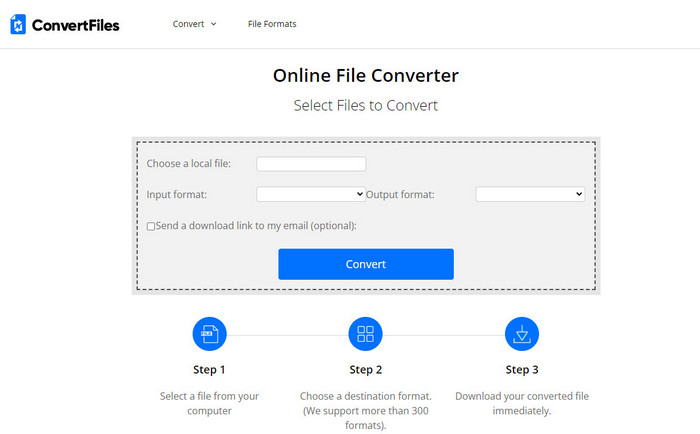
اگر میخواهید فرایند تبدیل سادهتری داشته باشید که فقط چند دقیقه طول بکشد، میتوانید از ConvertFiles استفاده کنید. این ابزار هم هنگام تبدیل و هم بعد از آن عملکرد خوبی دارد. اما وجود تبلیغات متعدد در رابط وب، تجربهٔ کار با این ابزار را تا حدی آزاردهنده میکند. همچنین، فرایند تبدیل در مقایسه با دیگر مبدلهای آنلاین و آفلاین، زمان بیشتری میبرد. با این حال، حداکثر حجم فایلی که میتوانید در اینجا وارد کنید از Zamzar بیشتر است. بنابراین، اگر میخواهید با این ابزار فایل F4V را به AVI تبدیل کنید، مراحل زیر را دنبال کنید.
مرحله 1. به مرورگر وب خود بروید، عبارت Convert Files را جستوجو کرده و سایت آن را باز کنید.
مرحله 2. روی Choose a Local File کلیک کنید تا پوشهٔ فایلها باز شود و فایل موردنظر را انتخاب کنید؛ سپس در بخش Output Format، گزینهٔ AVI را انتخاب کنید. بعد روی Convert کلیک کنید تا فرایند تبدیل آغاز شود.
مرحله 3. پس از پایان تبدیل، روی آدرس اینترنتی آبیرنگی که ظاهر میشود کلیک کنید تا به صفحهٔ جدید منتقل شوید. در آن صفحه روی لینک کلیک کنید تا فرمت تبدیلشده را دانلود کنید.
بخش 3. کدام فرمت بهتر است. F4V در مقابل AVI
خوب، F4V و AVI در بهترین حالت کار خود را به عنوان یک کانتینر انجام می دهند. با این حال، تعداد زیادی از این قالب ها مشترک هستند و هدف آنها یکسان نیست. به عنوان مثال، اگر می خواهید یک ویدیوی با کیفیت بالا را در اندازه فایل کوچک ذخیره کنید و داده های ویدئویی DRM MPEG-4 را نگه دارید و از آن محافظت کنید، F4V بهترین انتخاب است. اما فرض کنید می خواهید یک ویدیو با کیفیت بالا ذخیره کنید که از پخش همزمان رسانه پشتیبانی می کند. در این صورت، شما باید فرمت AVI را انتخاب کنید زیرا دارای یک ظرف متفاوت برای صدا و تصویر است. با وجود این، اندازه فایل AVI برای بسیاری از دستگاه ها و حتی دسکتاپ ها بسیار زیاد است، زیرا فشرده نشده است.
بخش 4. سوالات متداول در مورد تبدیل F4V به AVI
آیا تبدیل F4V بعد از تبدیل وضوح را کاهش می دهد؟
وضوح ویدیو حتی پس از تبدیل آن به فرمت جدید باید کیفیت اصلی خود را حفظ کند. در برخی موارد، بسیاری از کاربران تجربه می کنند که کیفیت F4V آنها پایین آمده است. یکی از دلایل باید این باشد که میزان کیفیتی که تنظیم میکنید پایین است یا ابزاری که استفاده میکنید ویدیوهای 1080 یا 4k را پشتیبانی نمیکند.
چرا F4V را نمی توان در پخش کننده رسانه من پخش کرد؟
این فرمت را میتوان در چندین پخشکنندهٔ رسانه اجرا کرد، اما همهٔ پخشکنندهها از آن پشتیبانی نمیکنند. بنابراین اگر میخواهید ویدئو را در این فرمت تماشا کنید، بهترین کار این است که آن را به فرمتی دیگر تبدیل کنید یا یک پخشکنندهٔ رسانهی جدیدِ شخصثالث پیدا کنید تا ویدئوهای F4V خود را تماشا کنید.
آیا باید F4V را فشرده کنم تا اندازه آن کمتر شود؟
حجم فایل F4V در مقایسه با فرمت AVI آنقدرها بزرگ نیست. در عین حال، اگر تلاش کنید این نوع فایل را بیشتر فشرده کنید، این احتمال وجود دارد که کیفیت ویدئو کاهش یابد. در اینجا میتوانید یاد بگیرید چگونه ویدئوهای F4V خود را فشرده کنید.
نتیجه
با پایان دادن به این مقاله، اکنون بینشی در مورد چیستی F4V و دلیل نیاز به تبدیل آن داریم. همه نرم افزارهای آنلاین و آفلاین ذکر شده در این مقاله به خوبی کار می کنند. اگرچه همه ابزارها عالی هستند، FVC Video Converter Ultimate هنوز در بین بقیه برجسته است. از آنجایی که این نرم افزار حتی به خوبی کار می کند، شما به اینترنت متصل نیستید، و این ابزار می تواند فرآیند تبدیل را در یک چشم به هم زدن به پایان برساند. بنابراین اکنون، اگر میخواهید تبدیل فوقالعادهای را که ما در مورد آن صحبت میکنیم، تجربه کنید، اکنون آن را دانلود کنید.
-
 نحوه تبدیل TS به AVI / MKV / MOV / WMV آنلاین و رایگان در Win / Mac
 آیا می خواهید پرونده های TS را به سرعت به AVI / MKV / MOV / WMV تبدیل کنید؟ این مقاله مبدل های ویدیویی آنلاین و آفلاین را با راهنمای کامل نشان می دهد. شاید بتوانید بهترین مبدل TS رایگان را از اینجا دریافت کنید.
-
 [رایگان و آنلاین] 7 روش برای تبدیل MTS به AVI در رایانه Mac/Windows
 چگونه می توان MTS را به راحتی به AVI تبدیل کرد؟ در این راهنما ، 7 روش آسان و رایگان برای تبدیل فایلهای MTS به AVI در ویندوز یا مک بدون افت کیفیت پیدا خواهید کرد.
-
 آموزش تبدیل MP4 به فایلهای AVI با 7 مبدل ویدیوی رایگان
 آیا می خواهید تمام راه های رایگان تبدیل AVI به ویدیوی MP4 را دریافت کنید؟ این مقاله را نباید از دست بدهید. در اینجا 7 روش برای تبدیل فایل های AVI به MP4 به صورت رایگان در ویندوز، مک، آیفون، اندروید و آنلاین آورده شده است.
