


 Video Converter Ultimate
 ضبط صفحه
 تعمیر ویدیو
 MOD را به هر فرمتی مانند MP4، MOV، AVI، MP3 و غیره تبدیل کنید.
7 مبدل MOD رایگان در پلتفرم شما برای تبدیل فرمت MOD به راحتی
نیاز دارید فایل MOD خود را تغییر دهید؟ اگر چنین است، دیگر لازم نیست نگران باشید و با سختی بهدنبال مبدّلهای مختلف بگردید. استرس به خودتان راه ندهید، چون امروز برایتان راهحل آماده کردهایم. در ادامه، بهترین روشها را برای تبدیل MOD به MP4، MOV، MPEG2، DVD یا هر فرمت ویدئویی دیگری که میخواهید همراه با مراحل لازم برای دنبالکردن، در اختیارتان میگذاریم.

قسمت 1. 7 مبدل رایگان MOD برای تبدیل فایل های MOD به صورت آنلاین و آفلاین
1. FVC Video Converter Ultimate – بهترین مبدل MOD در ویندوز و مک
اولین گزینه در فهرست ما محبوبترین مبدّل MOD است که روی پلتفرمهای مختلف در دسترس است؛ یعنی FVC Video Converter Ultimate. این مبدّل فرایند تبدیل فوقالعاده پرسرعتی را به کاربرانش ارائه میدهد و همانطور که همیشه بوده، هرگز ناامیدشان نمیکند. با اینکه تبدیل با این ابزار سریع انجام میشود، کیفیت ویدئو تغییری نمیکند، چون هنگام تغییر فرمت از آن محافظت میشود.
چه چیزی بیشتر از فرآیند سرعت رعد و برق آن است؟ همچنین از فرمتهای عظیمی که میتوانید وارد یا صادر کنید، مانند MOD، MP4، MOV، MKV، FLV، WMV و بسیاری دیگر پشتیبانی میکند. به دلیل فرمت پشتیبانی شده، مشتریان به این ابزار علاقه مند شدند و بسیاری از آنها این را به سایر کاربرانی که نیاز به تبدیل فرمت خود دارند توصیه می کنند. بنابراین اگر برای تبدیل MOD به MP4 یا هر فرمت ویدیویی که میخواهید به کمک نیاز دارید، این ابزار با دنبال کردن مراحل ذکر شده در زیر کمک بسیار خوبی است.
مرحله 1. برای دانلود مبدّل روی رایانه رومیزی، دکمه دانلود زیر را کلیک کنید و پلتفرمی را که در حال حاضر استفاده میکنید انتخاب نمایید. سپس سریعاً مراحل نصب را دنبال کنید و نرمافزار را اجرا کنید. اگر در تبدیل فایل تازهکار هستید، نگران نباشید، چون مراحلی که اینجا ارائه شدهاند، تضمین میکنند که فایل MOD را بهدرستی تبدیل کنید.
دانلود رایگانبرای ویندوز 7 یا بالاتردانلود امن
دانلود رایگانبرای MacOS 10.7 یا بالاتردانلود امن
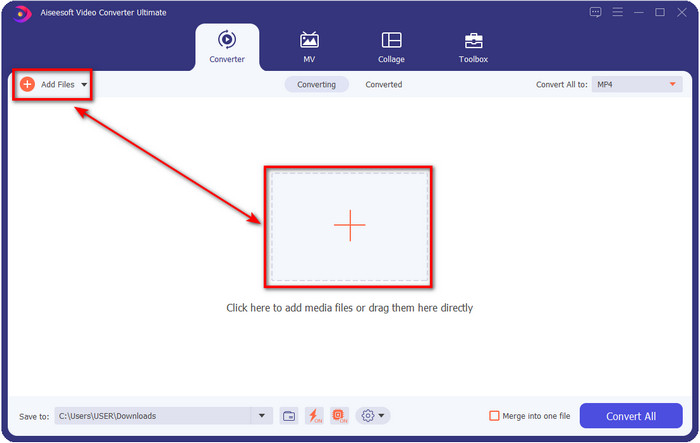
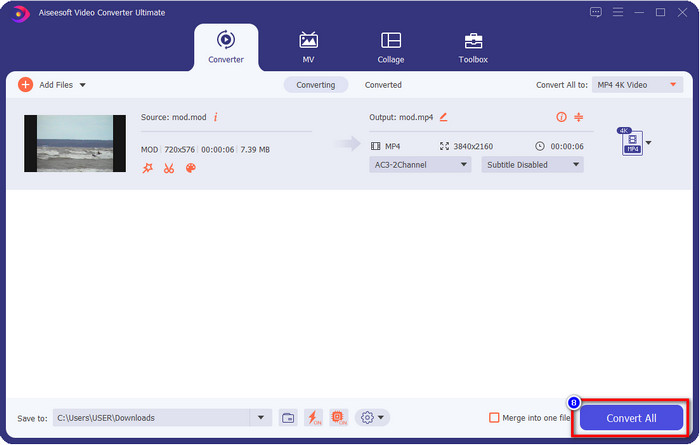
مرحله 2. با کلیک روی Add Files، فایل MOD را بارگذاری کنید، یا میتوانید روی دکمه بزرگ + در وسط رابط کاربری کلیک کنید. پس از آن پوشههای رایانه روی صفحهتان نشان داده میشود؛ حالا در این مرحله، جستوجو کرده و فایل MOD را انتخاب کنید و برای رفتن به مرحله بعد روی Open بزنید.
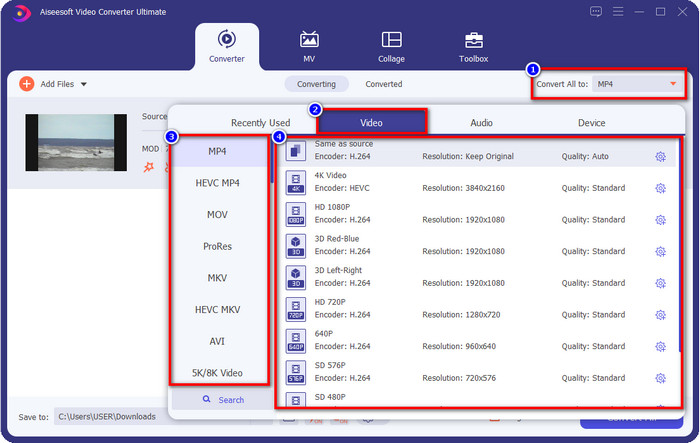
مرحله 3. برای تغییر فرمت به MP4، MOV، MKV یا هر فرمت دیگری که نیاز دارید، روی Convert All to کلیک کرده و فرمت مورد نظر را انتخاب کنید.
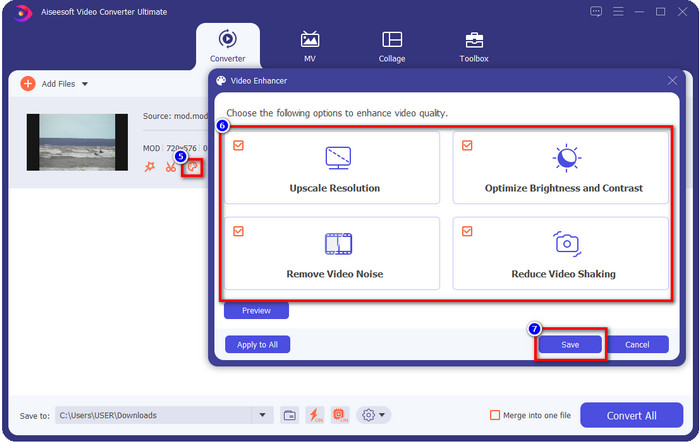
اختیاری. یکی از قابلیتهای فوقالعادهای که این ابزار ارائه میدهد، بخش تقویتکننده (enhancer) است. اگر روی سطل رنگ کلیک کنید، یک رابط کوچک جدید باز میشود؛ حالا میتوانید با تیکزدن جعبهها، تنظیمات مهمی روی ویدئوی خود اعمال کنید. روی Save کلیک کنید تا تغییراتی را که روی ویدئوی MOD خود اعمال کردهاید ذخیره شود.
مرحله 4. بعد از انجام تمام مراحل، حالا زمان آن است که با کلیک روی Convert All، فایل MOD را تبدیل کنید. به همین سادگی، مثل ۱-۲-۳، یاد میگیرید که فرمت MOD را به فرمتی جدید تبدیل کنید.
طرفداران
- MOD را به MP4، MOV، MKV، FLV، AVI، یا به فرمت های بیش از 200 به طور موثر تبدیل کنید.
- ویژگیهای ویرایش پیشرفته شامل برش، برش، برش و موارد دیگر است.
- دانلود ایمن و بدون بدافزار است.
- قابل دانلود بر روی تمامی پلتفرم های دسکتاپ مانند ویندوز و مک.
منفی ها
- برای بهره مندی از تمام ویژگی های پیشرفته، باید ابزار را خریداری کنید.
2. مبدل TOD رایگان iMovieSoft
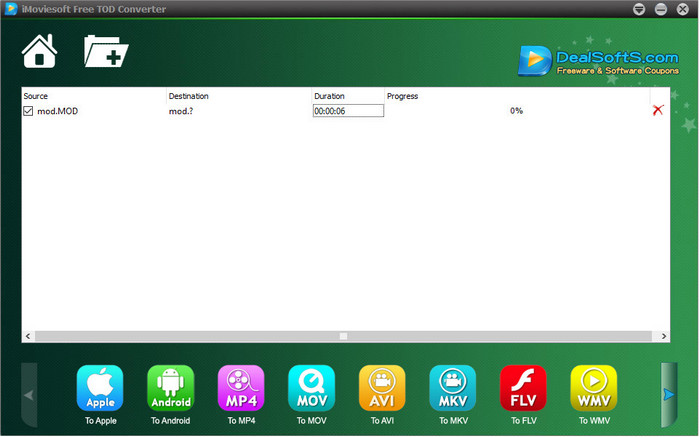
یکی دیگر از مبدّلهایی که میتوانید روی رایانه رومیزی خود دانلود کنید، iMoiveSoft Free TOD Converter است. با این ابزار میتوانید فرمت MOD خود را به فرمتهای در دسترس در آن تبدیل کنید. هرچند تعداد فرمتهای قابل پشتیبانی این ابزار خیلی زیاد نیست، اما فرمتهای شناختهشده در آن موجود است. علاوه بر این، وبسایت اصلی این ابزار از اتصال امن برخوردار نیست؛ با اینکه هشدار امنیتی وجود دارد، ما آن را روی سیستم خود دانلود کردیم تا بتوانیم مراحل تبدیل فایلهای MOD به MOV، MP4، AVI و غیره را در اختیارتان بگذاریم.
مرحله 1. مبدّل را روی رایانه خود دانلود و آن را باز کنید.
مرحله 2. روی Folder کلیک کرده و بهدنبال فایلهای MOD برای واردکردن بگردید.
مرحله 3. فرمت پایین صفحه را انتخاب کرده و روی Convert کلیک کنید.
طرفداران
- دانلود رایگان در ویندوز و مک است.
- آسان برای استفاده.
- ویژگی های اصلی ویرایش در دسترس هستند.
منفی ها
- وب سایت اصلی اتصال امن نیست.
- این یک گزینه فرمت دارد که می توانید انتخاب کنید.
- UI نیاز به بهبود دارد.
3. مبدل iOrgSoft
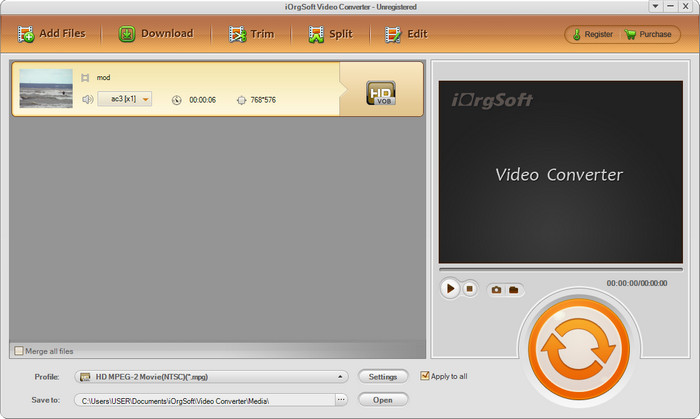
iOrgSoft Converter انتخاب خوبی است اگر میخواهید بهراحتی MOD را به MPEG2 تبدیل کنید. وبسایت اصلی این مبدّل نیز مانند iMovieSoft اتصال محافظتشدهای ندارد. میتوانید از یک لینک خارجی برای دانلود ویدئو با این ابزار استفاده کنید. با اینکه ابزار چند گزینه ارائه میدهد، رابط کاربری آن در اولویت نبوده است؛ یعنی نباید انتظار یک رابط کاربری خیلی زیبا داشته باشید. همچنین هنگام تبدیل، احتمال کرشکردن و بروز اشکال وجود دارد.
مرحله 1. صفحه اصلی وب این مبدّل را جستوجو کرده و آن را از آنجا دانلود کنید.
مرحله 2. مبدّل را باز کنید، روی Add Files کلیک کنید تا فایلهای MOD را وارد کنید، سپس روی سینی فرمت (format tray) کلیک کرده و فرمت دلخواه خود را انتخاب کنید.
مرحله 3. برای شروع تبدیل، روی دکمه convert کلیک کنید.
طرفداران
- از فرمت های بیشتری نسبت به iMovieSoft پشتیبانی می کند.
- ساده برای استفاده و آسان برای درک.
- آن را در ویندوز و مک دانلود کنید.
منفی ها
- اتصال ناامن به وب سایت اصلی آن.
- رابط کاربری وحشتناک است.
4. FFmpeg
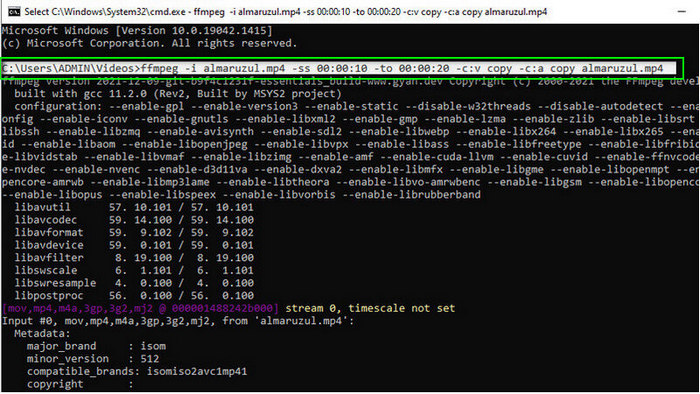
اگر به یک مبدّل رایگان MOD به MOV نیاز دارید، FFmpeg میتواند کمکتان کند. برخلاف دیگر مبدّلهای این فهرست، این ابزار از رابط مبتنی بر خط فرمان (CLI) استفاده میکند و شما از طریق متن با آن ارتباط برقرار میکنید. با اینکه این نوع رابط برای بسیاری از ما چندان آشنا نیست، بعضی کاربران هنوز هم از آن به عنوان مبدّل خود استفاده میکنند. حالا اگر این مبدّل توجه شما را جلب کرده است، مراحل زیر را دنبال کنید.
مرحله 1. FFmpeg را دانلود کنید و فایل exe را اجرا کنید.
مرحله 2. CMD را باز کنید؛ حالا میتوانید از طریق آن با ابزار کار کنید.
مرحله 3. با استفاده از خط فرمان، محل فایل را پیدا کنید. سپس این متن را کپی و پیست کنید: ffmpeg -i input.mod -vn -ar 44100 -ac 2 -b:a 192k output.mp4 برای تبدیل به MP4. همچنین میتوانید فرمت را به MOV، MKV، AVI و فرمتهای دیگر تغییر دهید. برای شروع فرایند، روی صفحهکلید خود دکمه Enter را بزنید.
طرفداران
- مبدل ویدئویی منحصر به فرد در اکثر سیستم عامل ها موجود است.
- ایمن برای استفاده
- در تبدیل فرمت شما قابل اعتماد است.
منفی ها
- استفاده از آن خیلی آسان نیست.
- این بهترین انتخاب برای مبتدیان یا مبتدیان برای تبدیل فرمت نیست.
5. CloudConvert
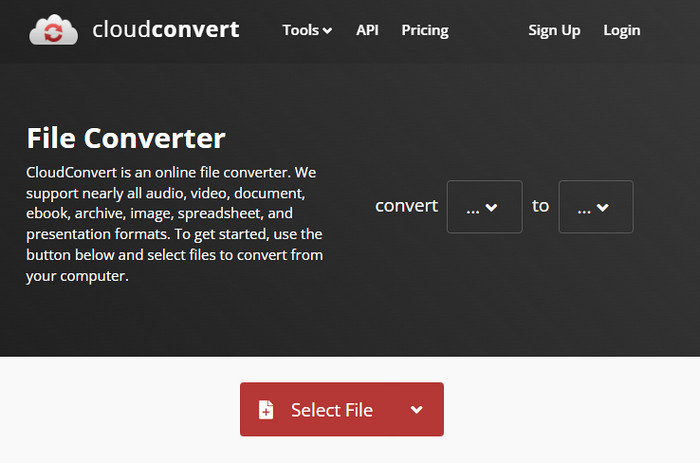
نمیخواهید مبدّلی روی رایانه خود دانلود کنید؟ اگر چنین است، هنوز هم میتوانید با استفاده از CloudConvert بهصورت آنلاین فرمت MOD را تبدیل کنید. این ابزار آنلاین فرایند تبدیلی ساده اما مؤثر را در اختیار کاربرانش قرار میدهد. همچنین از تبدیل دیگر انواع فایل مانند PDF، آرشیو، کتابهای الکترونیکی و غیره به فرمتهای جدید پشتیبانی میکند.
مرحله 1. در مرورگر دلخواه خود عبارت CloudConvert را جستوجو کنید.
مرحله 2. روی Select File کلیک کرده و فایل MOD را بارگذاری کنید. دکمه drop-down را بزنید و فرمت دلخواه خود را انتخاب کنید. سپس روی Convert کلیک کنید.
مرحله 3. پس از اتمام بارگذاری و تبدیل، روی Download کلیک کنید تا فرمت جدید فایل را روی درایو خود ذخیره کنید.
طرفداران
- دانلود ابزار مورد نیاز نیست.
- ابزار وب آنلاین رایگان.
- کاربر پسند.
منفی ها
- وابسته به شبکه
- روند این فرآیند به سرعت اینترنت شما بستگی دارد.
6. تبدیل 365
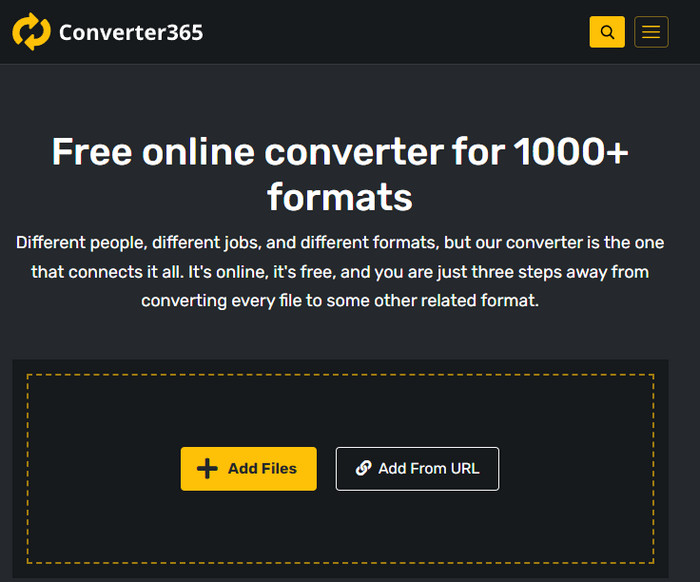
یکی دیگر از مبدّلهای آنلاین و رایگان MOD به MP4 که میتوانید استفاده کنید، Converter365 است. این یکی از ابزارهای آنلاین است که میتوان گفت ظاهری شیک و جذاب دارد. به همین دلیل، استفاده از آن حرفهای به نظر میرسد؛ بااینحال، ما هنگام تبدیل فایلهای ویدئویی با آن به مشکل برخوردیم، چون گاهی کرش میکند. با وجود این، اگر نیاز دارید فایل MOD خود را بهسادگی تبدیل کنید، ممکن است این ابزار به کارتان بیاید.
مرحله 1. مرورگر خود را باز کنید و عبارت Converter365 را جستوجو کنید.
مرحله 2. روی Add Files کلیک کنید، سپس فایل .mod را پیدا کنید. وقتی فایل را پیدا کردید، با کلیک روی دکمه drop-down، فرمت مورد نظر را انتخاب کنید.
مرحله 3. روی Start Conversion کلیک کنید تا فرایند تبدیل آغاز شود.
طرفداران
- مبدل از طریق وب قابل دسترسی است.
- این یک تبدیل ساده و در عین حال موثر را فراهم می کند.
- رابط کاربری حرفه ای به نظر می رسد.
منفی ها
- برای استفاده نیاز به اتصال اینترنت دارد.
- گاهی اوقات هنگام تبدیل فرمت خطاهایی رخ می دهد.
7. زمزار
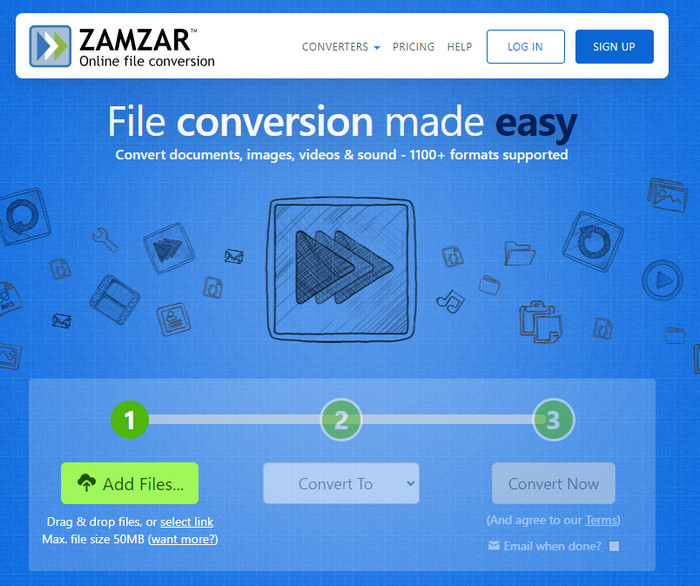
اگر به یک مبدّل آنلاین MOD ساده و کاربردی نیاز دارید، Zamzar میتواند کمکتان کند. این ابزار فرایند دقیقی برای تبدیل فایلهای .mod شما ارائه میدهد. علاوه بر این، بدون شک یکی از امنترین مبدّلهای موجود در وب است. بنابراین، اگر میخواهید این ابزار را امتحان کنید، میتوانید مراحل زیر را دنبال کنید.
مرحله 1. با جستوجو در مرورگر دلخواه خود به Zamzar دسترسی پیدا کنید.
مرحله 2. روی Add File کلیک کنید تا فایل MOD مورد نیاز برای تبدیل را وارد کنید. سپس روی Convert To کلیک کرده و فرمت مورد نیاز خود را انتخاب کنید.
مرحله 3. روی Convert Now کلیک کنید و منتظر بمانید تا فرایند تمام شود. سپس روی Download کلیک کنید تا فایل را روی درایو رایانه خود ذخیره کنید.
طرفداران
- یکی از بهترین گزینه ها در صورت نیاز به تبدیل فرمت.
- این یک فرآیند ساده برای تبدیل را فراهم می کند.
- در تمام مرورگرهای وب موجود است.
منفی ها
- وابسته به اینترنت، بدون اینترنت شما نمی توانید از آن استفاده کنید.
- از گزینه های قالب کمتری پشتیبانی می کند.
مرتبط:
بخش 2. سوالات متداول در مورد مبدل های MOD
MOD چیست؟
MOD یک فرمت دو طرفه است که می تواند به عنوان صدا برای برنامه های استاندارد ردیابی موسیقی دیجیتال استفاده شود. این شامل الگوهای یادداشت، اعداد ابزار و کنترلکنندههای پیام با آهنگهای مختلف برای صداهای نمونه است. همانطور که اشاره شد دو طرفه است; شما همچنین می توانید از این فرمت به عنوان یک فرمت ویدئویی برای دوربین های فیلمبرداری دیجیتال ساخته شده توسط Panasonic و JVC استفاده کنید. اگرچه این قالب از مارک های شناخته شده پشتیبانی می کند، اما اگر بخواهیم آن را با سایر کانتینرهای ویدیویی مقایسه کنیم، کمی قدیمی است.
آیا پخش کننده های رسانه از پسوند .mod پشتیبانی می کنند؟
همه پخش کننده های رسانه از این فرمت پشتیبانی نمی کنند، به خصوص اگر پخش کننده شما کدک ویدیویی MPEG-2 در داخل نداشته باشد. این یک مشکل برای همه است. اگر برای پخش به آن نیاز دارید، می توانید پسوند ویدئویی MPEG-2 را دانلود کنید. اما شما همچنین می توانید فایل را به یک فرمت پشتیبانی شده به سیستم عامل های خود تبدیل کنید، این تا کنون ساده ترین و ایمن ترین راه است. بنابراین اکنون، اگر نیاز به تبدیل فایل MOD خود دارید، ممکن است بخواهید به جای آن از FVC Video Converter Ultimate استفاده کنید. هیچ ایده ای در مورد ابزار ندارید؟ در این صورت، جزئیات بالا را بخوانید.
آیا MOD با پخش کننده DVD سازگار است؟
با پخش کننده DVD سازگار نیست. با این حال، می توانید آن را در DVD رایت کنید تا با پخش کننده DVD سازگار باشد.
نتیجه
این هفت ابزار، به خاطر عملکرد و کاراییشان، بهترین انتخابها هستند اگر به یک مبدّل MOD نیاز دارید. ما با دقت همه این نرمافزارها را امتحان کردیم و متوجه شدیم که FVC Video Converter Ultimate خروجی و قابلیتهایی شگفتانگیز ارائه میدهد که هیچیک از ابزارهای دیگر به پای آن نمیرسند. بنابراین، اگر میخواهید عظمت این ابزار را تجربه کنید، میتوانید ابتدا آن را روی رایانه خود دانلود کرده و هر طور میخواهید از آن استفاده کنید.

FVC Video Converter Ultimate
2,999,368+ دانلود- MOD را به هر فرمت محبوب تبدیل کنید.
- کیفیت ویدیو را به طور طبیعی افزایش دهید
- با خروجی با کیفیت بالا، کولاژ ویدیویی را به آرامی بسازید
- ویدیوها را مانند یک حرفه ای ویرایش کنید، از جمله برش، چرخش، افزودن فیلتر و غیره.
دانلود رایگانبرای ویندوز 7 یا بالاتردانلود امن
دانلود رایگانبرای MacOS 10.7 یا بالاتردانلود امن
-
 2 مبدل MPG نهایی برای تبدیل MPG به WMV به صورت رایگان
 آیا می خواهید MPG را به WMV رایگان تبدیل کنید؟ در این صورت، شما خوش شانس هستید زیرا متوجه شدیم که دو ابزار وجود دارد که می توانید برای تبدیل فایل های MPG خود از آنها استفاده کنید.
-
 نحوه تغییر iTunes M4V به MKV در Mac و Windows Quickiest Way
 اگر نیاز به تبدیل M4V به MKV در مک دارید، باید این مقاله را بخوانید. همانطور که ما حقایقی در مورد مبدل هایی ارائه می دهیم که به شما در فرآیند تبدیل کمک می کند.
-
 5 مبدل رایگان MPEG به MKV که در همه پلتفرم ها موجود است
 مبدل های MPEG به MKV در دسترس کدامند؟ آیا باید درباره مبدل های MPEG موجود در پلتفرم خود اطلاعات بیشتری کسب کنید؟ پس این مقاله برای تو است.
