


 Video Converter Ultimate
 ضبط صفحه
 تعمیر ویدیو
ترفندهای سریع برای تبدیل آسان M4V به 3GP
آیا میخواهید فایل M4V را به 3GP تبدیل کنید؟ M4V یک فرمت ویدیویی ظرف (Container) است که بهطور اختصاصی برای محصولات اپل ارائه شده است. بنابراین، اگر یک فایل ویدیویی M4V دارید و میخواهید آن را روی دستگاههای مجهز به شبکه 3G پخش کنید، بهترین راهحل این است که آن را تبدیل کنید. این مطلب فرایند ساده تبدیل فایل M4V به فرمت 3GP را بهصورت سریع و بدون دردسر، با استفاده از دستگاههای خودتان، به شما توضیح میدهد. پس این مقاله را تا انتها بخوانید و تمام نکات را فرابگیرید.

قسمت 1: نرم افزار عالی برای تبدیل M4V به 3GP
بهترین مبدل آفلاین برای شما Video Converter Ultimate است. این برنامه کاربردی به شما اجازه میدهد بهسادگی و درجا M4V را به 3GP تبدیل کنید. این نرمافزار از بیش از 1000 فرمت پشتیبانی میکند، مانند MP4، FLV، MTS، DIVX، XVID، VOB، MOV، MKV و غیره. با کمک این نرمافزار آفلاین، میتوانید فایلها را تا 30 برابر سریعتر از بسیاری از مبدلهای دیگر تبدیل کنید. علاوه بر این، رابط کاربری ساده و روشهای آسانی برای تبدیل M4V به 3GP دارد که برای همه کاربران مناسب و راحت است.
علاوه بر این، Video Converter Ultimate تقریباً در تمام پلتفرمهای رسانهای مانند ویندوز و مک در دسترس است. علاوه بر این، ویژگی دیگری دارد که می توانید از آن لذت ببرید. اگر میخواهید ویدیوی M4V خود را قبل یا بعد از تبدیل ارتقا دهید، میتوانید ویژگیهای جعبه ابزار را انتخاب کنید. این می تواند ویدیوی شما را از طرق مختلف بهبود بخشد. اگر میخواهید سرعت ویدیوی خود را تغییر دهید، میتوانید روی عملکرد کنترلکننده سرعت ویدیو کلیک کنید. اگر علاقه مند به تصحیح رنگ ویدیوی خود هستید، می توانید از تابع Color Correction استفاده کنید.
قابلیتها
◆ فرمت های مختلف فایل های ویدئویی مانند M4V، MP4، FLV، AVI، TS، SWF و غیره را تبدیل کنید.
◆ در ایجاد یک موزیک ویدیو عالی است و تم های متعددی را ارائه می دهد.
◆ جعبه ابزاری را برای بهبود ویدیو ارائه می دهد.
◆ ساخت کلاژ در دسترس است.
◆ فرمت های تصویر مانند JPG، PNG، WEBP، BMP، TIF و غیره را تبدیل کنید.
◆ کلیپ های ویدیویی متعدد را در یک قطعه ترکیب کنید.
◆ قابلیت تنظیم سرعت ویدیوی یک ویدیو.
طرفداران
- در دسترس همه کاربران.
- قابل اعتماد در شخصی سازی ویدیوهای سه بعدی از دو بعدی.
- تقریباً در تمام پلتفرمهای رسانهای مانند مک و ویندوز قابل دسترسی است.
- سرعت تبدیل 30 برابر سریعتر است.
- ویدیو را از چند طریق تقویت کنید.
- از بیش از 1000 فرمت فایل پشتیبانی می کند.
منفی ها
- برای لذت بردن از ویژگی های عالی بیشتر، اشتراک را خریداری کنید.
این مراحل ساده زیر را برای تبدیل فوری M4V به 3GP دنبال کنید.
مرحله 1: Video Converter Ultimate را روی ویندوز یا مک خود دانلود کنید. سپس مراحل نصب را انجام داده و برنامه را اجرا کنید.
دانلود رایگانبرای ویندوز 7 یا بالاتردانلود امن
دانلود رایگانبرای MacOS 10.7 یا بالاتردانلود امن
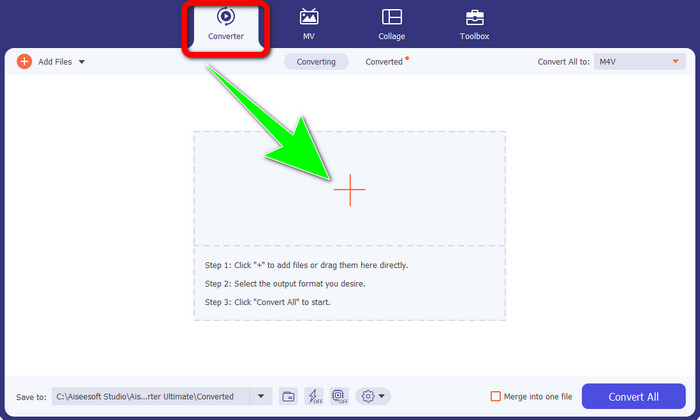
مرحله 2: پس از اجرای نرمافزار روی ویندوز یا مک، به پنل Converter بروید و روی آیکون + کلیک کنید تا فایل M4V مورد نظر برای تبدیل را وارد کنید.
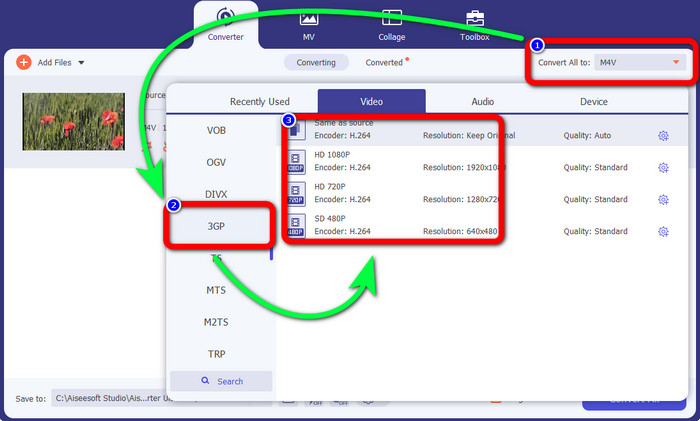
مرحله 3: وقتی فایل M4V خود را اضافه کردید، روی دکمه Convert all to کلیک کنید. گزینههای فرمت ظاهر میشوند؛ فرمت 3GP را انتخاب کنید. همچنین میتوانید وضوح (رزولوشن) دلخواه خود را برگزینید.
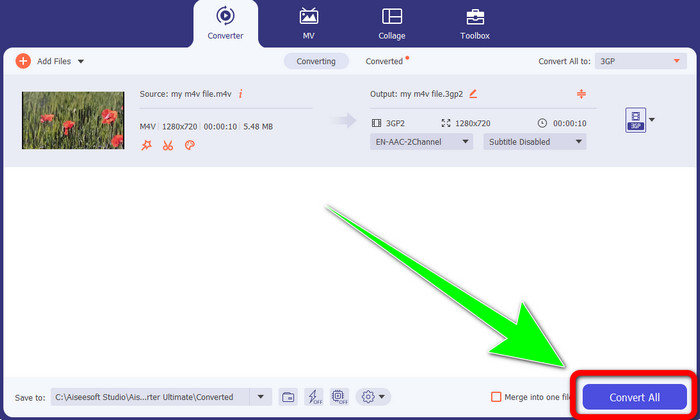
مرحله 4: در نهایت، پس از انتخاب فرمت 3GP، روی دکمه Convert All کلیک کنید و خروجی نهایی را ذخیره کنید. این برنامه امکان تبدیل دستهای دارد، بنابراین میتوانید فایلهای بیشتری اضافه کرده و همه را همزمان تبدیل کنید.
بخش 2: ابزار آنلاین برای تبدیل M4V به 3GP
بعد از آشنایی با بهترین مبدل آفلاین، میتوانیم سراغ بهترین مبدل آنلاین برای شما برویم. این برنامه آنلاین FVC Free Video Converter Online است. این ابزار آنلاین به شما اجازه میدهد تنها با چند کلیک، M4V را به 3GP بدون دردسر تبدیل کنید. همچنین از فرمتهای مختلف ویدیو/صوت مانند MP4، WMA، MOV، FLV، TS، MP3 و غیره پشتیبانی میکند. علاوه بر این، این ابزار آنلاین رایگان است و میتوانید هم در ویندوز و هم در مک از آن استفاده کنید. اگر میخواهید فایل M4V خود را به فرمت 3GP تبدیل کنید، مراحل دقیق زیر را دنبال کنید.
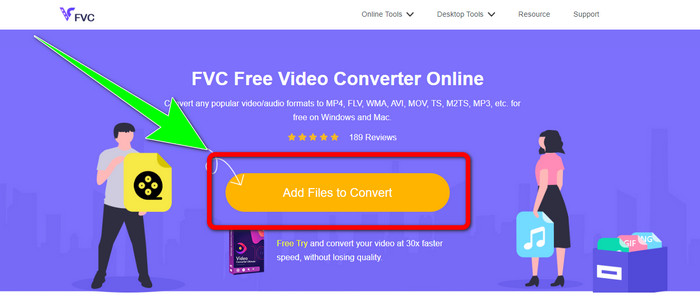
مرحله 1: به وبسایت FVC Free Video Converter Online بروید. روی دکمه Add Files to Convert کلیک کرده و فایل M4V خود را وارد کنید.
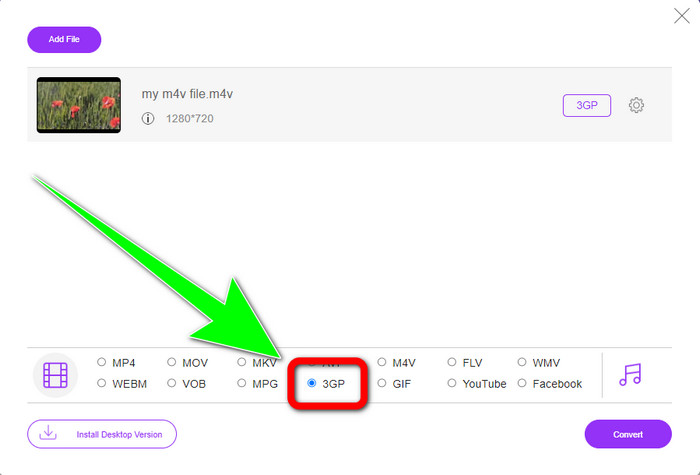
مرحله 2: از میان گزینههای فرمت، فرمت فایل 3GP را انتخاب کنید.
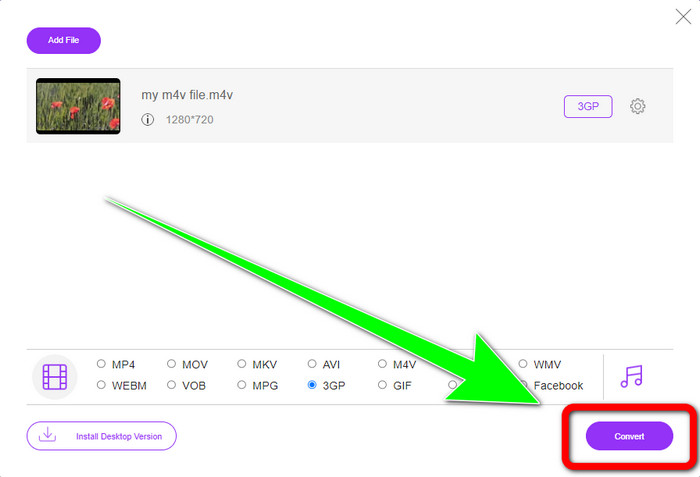
مرحله 3: پس از انتخاب فرمت 3GP، میتوانید روی دکمه Convert کلیک کنید تا فایل M4V شما به فرمت 3GP تبدیل شود. سپس منتظر بمانید تا فرایند تبدیل به پایان برسد و بعد ویدیوی خود را ذخیره کنید.
قسمت 3: چه مبدل M4V به 3GP را انتخاب کنید
میخواهید بدانید کدام برنامه بین این دو بهتر است؟ راستش هر دو عالی هستند. اگر قصد دارید یک مبدل ویدیویی قدرتمند دانلود کنید، پیشنهادیترین برنامه برای شما Video Converter Ultimate است. این نرمافزار از تبدیل دستهای پشتیبانی میکند و اجازه میدهد چندین فایل را در یک فرایند واحد تبدیل کنید. همچنین رابط کاربری بسیار روان و قابلفهمی دارد که برای کاربران غیرحرفهای هم مناسب است. علاوه بر تبدیل، قابلیتهای بیشتری مانند ویرایش ویدیو، ساخت کلاژ، ساخت موزیکویدیو و امکانات دیگر را نیز ارائه میدهد. از سوی دیگر، اگر ترجیح میدهید از یک مبدل آنلاین استفاده کنید، از FVC Free Video Converter Online کمک بگیرید. این ابزار نیز امکان تبدیل دستهای را فراهم میکند و برای مبتدیان کاملاً مناسب است. نیازی به پرداخت هزینه ندارید، زیرا این مبدل کاملاً رایگان است. با توجه به این توضیحات، میتوان گفت هر دو مبدل، ابزارهایی عالی و قابل اعتماد هستند.
بخش 4: جدول مقایسه بین M4V و 3GP
| M4V | 3GP | |
| نوع فایل | MPEG4-Video | فرمت چند رسانه ای 3GP |
| شرح | M4V نوعی محفظه ویدیویی است که برای ذخیره اطلاعات صوتی و تصویری فایل های iTunes استفاده می شود. Apple FairPlay DRM ممکن است برای محافظت از این نوع فایلها در برابر مشاهده و کپی غیرمجاز استفاده شود. در این صورت، فایل های صوتی یا تصویری را باید از فروشگاه iTunes خریداری کنید. از آنجایی که قالب بر اساس ساختار MPEG-4 است، پخش کننده های فعلی تقریبا همیشه می توانند فایل های محافظت نشده را مشاهده کنند. | یک ظرف چندرسانهای معروف به 3GP در سال 1998 برای تلفنهای مبتنی بر GSM (سیستم جهانی ارتباطات سیار) ایجاد شد. برای تلفن های همراه بهترین است زیرا کانتینر از داده، پهنای باند و فضای ذخیره سازی کمی استفاده می کند. برای فایل هایی که از طریق MMS ارسال می شوند، به عنوان یک ظرف استاندارد عمل می کند. |
| توسعه یافته توسط | شرکت اپل. | پروژه مشارکت نسل سوم |
| طرفداران | به محافظ اپل متصل شده است. | سازگار با تقریباً دستگاه ها، |
| منفی ها | فقط با دستگاه ها و برنامه های تقریباً اپل سازگار است | ویدئو را با وضوح پایین ذخیره می کند. |
بخش 5: سوالات متداول در مورد تبدیل M4V به 3GP
چگونه می توانم M4V را بدون از دست دادن کیفیت به 3GP تبدیل کنم؟
اگر میخواهید فایل M4V خود را بدون افت کیفیت به فرمت 3GP تبدیل کنید، باید از Video Converter Ultimate استفاده کنید. این برنامه تضمین میکند که کیفیت ویدیوهای شما تغییری نکند. همچنین میتوانید از این ابزار برای تبدیل M4V به DIVX هم استفاده کنید.
آیا فایلهای M4V با دستگاهها/سیستمهای دیگر سازگار هستند؟
قطعاً بله. میتوانید از انواع مختلف پخشکنندههای M4V برای پخش این نوع ویدیو در دستگاههای گوناگون استفاده کنید. پخشکنندههای M4V مزایای زیادی دارند؛ از جمله سازگاری با سیستمعاملهای مختلف مانند اندروید، لینوکس، iOS، ویندوز و مک.
آیا M4V کوچکتر از MP4 است؟
اندازه بستگی به آنچه در داخل است دارد. مانند کدک صوتی و تصویری، نرخ فریم، وضوح و موارد دیگر.
نتیجه
اینها روشهای تبدیل M4V به 3GP با استفاده از ابزارهای آفلاین و آنلاین هستند. اگر میخواهید فرمتهای مختلف فایل را در ویندوز یا مک تبدیل کنید، میتوانید از Video Converter Ultimate استفاده کنید. همچنین اگر بهدنبال یک ابزار آنلاین عالی هستید، FVC Free Video Converter Online بهترین گزینه است.
-
 نحوه تبدیل DIVX به 3GP در ویندوز، مک و آنلاین
 چگونه DIVX را به 3GP تبدیل کنیم؟ اگر به دنبال پاسخ هستید، این مقاله را بخوانید. ما روش های عالی را با کمک مبدل های مختلف به شما نشان خواهیم داد.
-
 4 بهترین راه برای تبدیل SWF به 3GP در ویندوز، مک و آنلاین
 در اینجا مفیدترین روش ها برای تبدیل فوری SWF به 3GP آورده شده است. همچنین، این پست برخی از ابزارهای موثر ویندوز و آنلاین را که می توانید استفاده کنید را به شما نشان می دهد.
-
 بهترین و ساده ترین روش ها را برای تبدیل TS به 3GP بیابید
 این مقاله دانلود رایگان مبدل TS به 3GP را ارائه می دهد که می توانید آن را روی دستگاه خود امتحان کنید. این مقاله را بخوانید تا جزئیات ضروری بیشتری را که نیاز دارید را کشف کنید.
