


 Video Converter Ultimate
 ضبط صفحه
 تعمیر ویدیو
3 روش موثر برای تبدیل M4V به MKV در Mac/Windows/Linux بدون افت کیفیت
من باید ویدیوهای M4V را که در iTunes دانلود کردهام بچرخانم. آیا ایده ای برای تبدیل M4V به MKV در مک دارید و بعداً از آن در تلویزیون خود استفاده می کنم؟
این مشکل بسیار شایع است، بهویژه در مورد ویدیوهای M4V که از iTunes دانلود شدهاند، زیرا این فرمت تحت سیاست Fair Play اپل است و محافظتشده میباشد. بنابراین، تا زمانی که آنها را تبدیل نکنید، نمیتوانید ویدیوهای .m4v را بلافاصله روی دستگاههای دیگر پخش کنید. این مقاله اطلاعاتی درباره مبدلهایی که میتوانید از آنها استفاده کنید و با موفقیت فرمت M4V را تبدیل کنید، ارائه میدهد. بدون هیچ معطلی دیگری، بیایید یاد بگیریم که روش مؤثر تبدیل M4V به MKV روی مک یا ویندوز چیست.

قسمت 1. تبدیل iTunes M4V به MKV در مک و ویندوز [بیشترین انتخاب]
مبدلهای رایگان M4V به MKV زیادی در بازار وجود دارد که میتوانید دانلود کنید و یکی از آنها FVC Video Converter Ultimate است. اما این ابزار همهکاره تبدیل بسیار مؤثرتری نسبت به سایر مبدلها ارائه میدهد، زیرا از سرعت تبدیل بسیار بالا، امکان آپلود نامحدود برای تبدیل و رابط کاربری شهودی برخوردار است. از این مبدل نهایی شگفتزده شدهاید؟ یا میخواهید بیشتر درباره آن بدانید؟ در این صورت، در ادامه مهمترین قابلیتهایی را میبینید که با تهیه این مبدل در اختیار خواهید داشت.

FVC Video Converter Ultimate
2,999,368+ دانلود- این می تواند چندین آیتونز M4V را به MKV یا به بیش از 200 فرمت رسانه ای مانند MOV، AVI، MP4 و غیره تبدیل کند.
- با تبدیل فوقالعاده سریع، فرآیند تبدیل M4V شما در یک لحظه
- ویژگیهای ویرایش پیشرفته برای بهتر کردن ویدیوی شما در دسترس است.
- ویژگی های شگفت انگیز را برای فشرده سازی، تغییر اندازه، سازنده GIF و غیره در جعبه ابزار تنظیم کنید.
دانلود رایگانبرای ویندوز 7 یا بالاتردانلود امن
دانلود رایگانبرای MacOS 10.7 یا بالاتردانلود امن
آیا شگفت انگیز نیست که چگونه همه این ویژگی ها می توانند در یک ابزار باشند؟ بیایید دیگر زمان را تلف نکنیم و با دنبال کردن مراحل زیر مشخص کنیم که چگونه این ابزار به طور موثر iTunes M4V شما را به MKV تبدیل می کند.
گام 1. ابتدا مبدل نهایی را با کلیک روی دکمه دانلود زیر روی سیستم خود دانلود کنید. پلتفرمی را که در حال حاضر از آن استفاده میکنید انتخاب کنید، مراحل نصب را دنبال کنید و برای ادامه روی Start Now کلیک کنید. بهخاطر داشته باشید که برای جلوگیری از دشواریها، لازم است با رابط کاربری ابزار بیشتر آشنا شوید.
دانلود رایگانبرای ویندوز 7 یا بالاتردانلود امن
دانلود رایگانبرای MacOS 10.7 یا بالاتردانلود امن
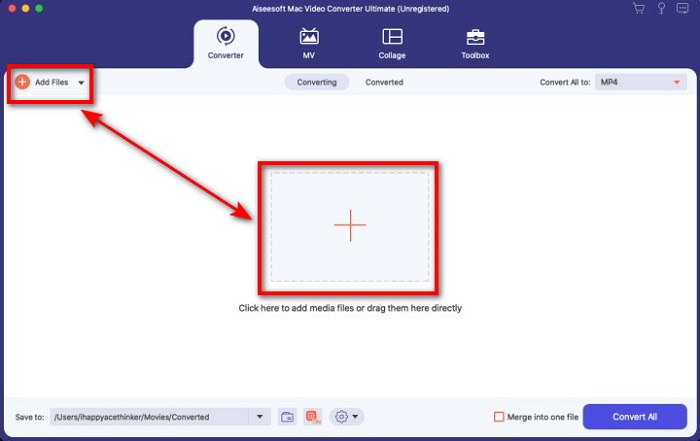
گام 2. فایل M4V را با کلیک روی گزینه Add Files یا دکمه + در رابط برنامه بارگذاری کنید. پس از آن، یک پوشه رایانه روی صفحه شما باز میشود، فایل .m4v را جستوجو کرده و روی Open کلیک کنید.
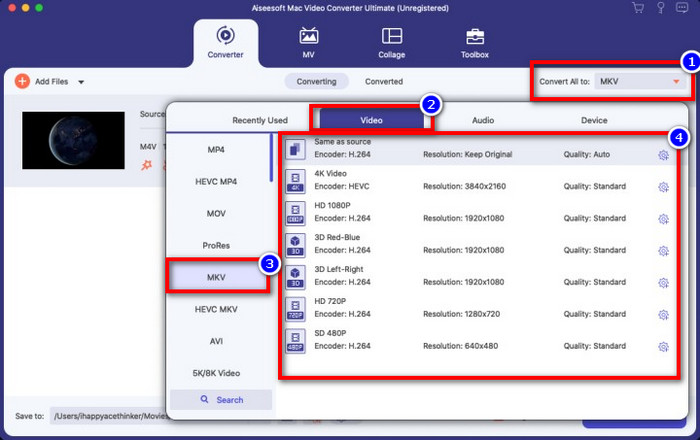
گام 3. فرمت MKV را در بخش Convert All to انتخاب کرده و روی آن کلیک کنید.
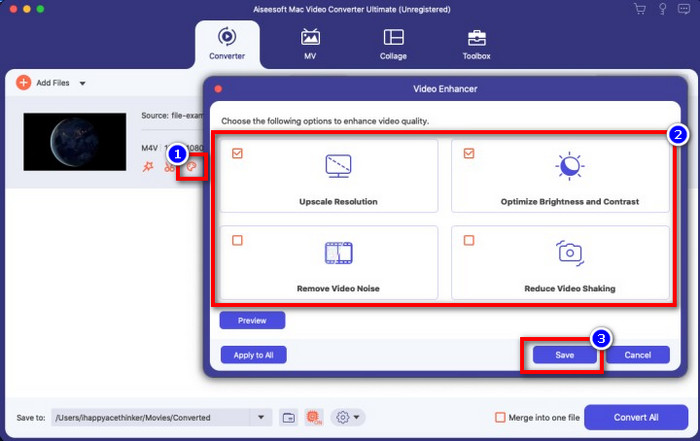
اختیاری. تا اینجا کارایی این روش بدون شک بسیار خوب بوده است. اما آیا میدانستید که این ابزار تقویتکننده ویدیو نیز ارائه میدهد؟ اگر روی گزینه enhance video کلیک کنید، یک پنجره محاورهای نمایش داده میشود؛ گزینههایی را که میخواهید در ویدیوی خود بهبود دهید علامت بزنید و برای اعمال آنها روی Save کلیک کنید.
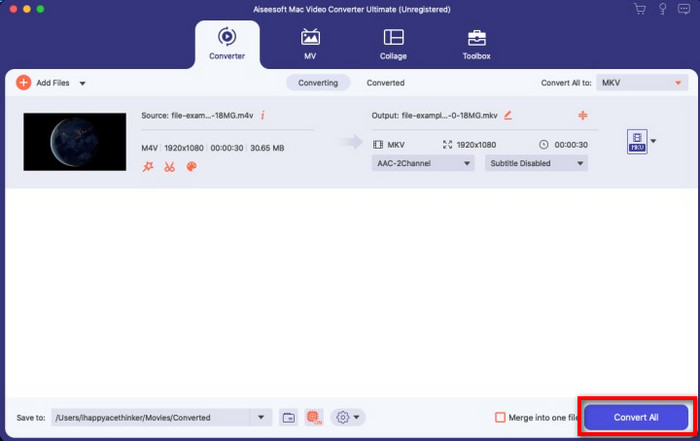
گام 4. با کلیک روی دکمه Convert All، فرایند تبدیل در مدتزمان کوتاهی آغاز میشود. کار تمام است؛ با این کار، پسوند فایل ویدیوی شما اکنون .mkv شده است.
قسمت 2. تبدیل M4V به MKV آنلاین
نمیخواهید برای تبدیل فایلهای M4V پول پرداخت کنید و ترجیح میدهید M4V را بهصورت آنلاین به MKV تبدیل کنید؟ اگر چنین است، FVC Free Video Converter Online یک مبدل آنلاین است که کارایی فرایند تبدیل شما را حتی روی وب تضمین میکند. این مبدل میتواند بدون خرید خود برنامه یا حتی دانلود آن، کار را به پایان برساند. همچنین هیچ تبلیغ و حتی نیازی به ثبتنام برای استفاده از آن وجود ندارد. هرچند این مبدل رایگان است، قابلیتهای ارائهشده در آن فقط بر تبدیل تمرکز دارند. برخلاف ابزار نهایی که امکانات گسترده و شگفتانگیزی ارائه میدهد. علاوه بر این، اگر لازم است فایلهای M4V خود را بهصورت آنلاین تبدیل کنید، از این مبدل استفاده کرده و مراحل زیر را دنبال کنید.
گام 1. لطفاً روی این لینک کلیک کنید تا FVC Free Video Converter Online باز شود.
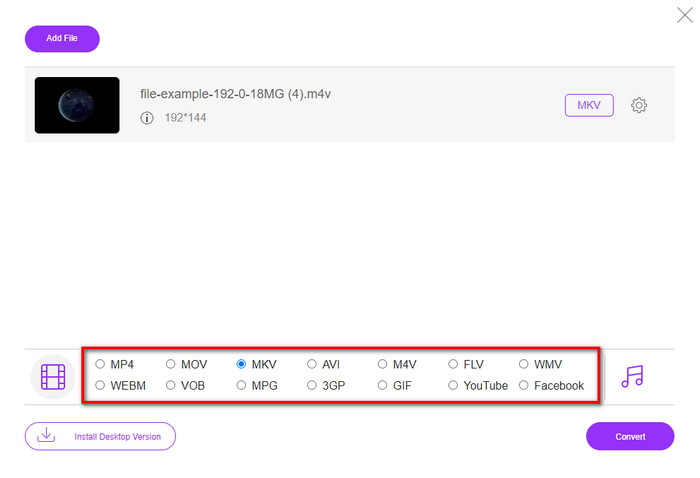
گام 2. روی گزینه Add Files to Convert کلیک کنید تا راهاندازی شده و فایل M4V موردنیاز برای تبدیل را بارگذاری کنید.
برای تبدیل دستهای فایلها، نسخهٔ دسکتاپ را دانلود کنید.
گام 3. فرمت MKV یا هر فرمت دیگری را که میخواهید، در پایین انتخاب کنید.
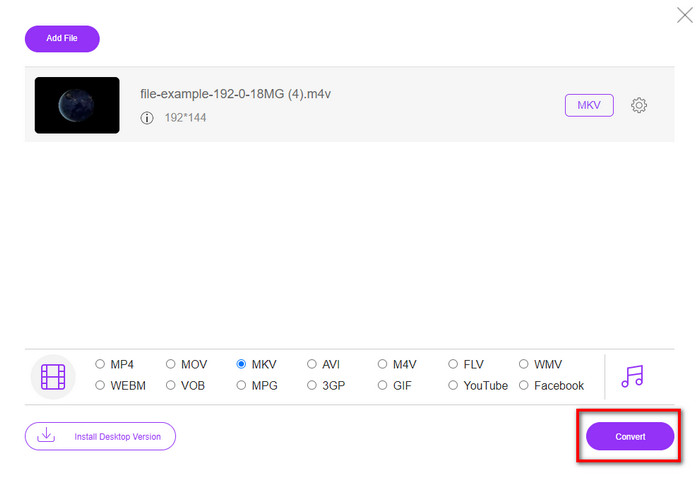
گام 4. روی Convert کلیک کنید تا فرایند آغاز شود.
قسمت 3. تبدیل M4V به MKV به صورت رایگان
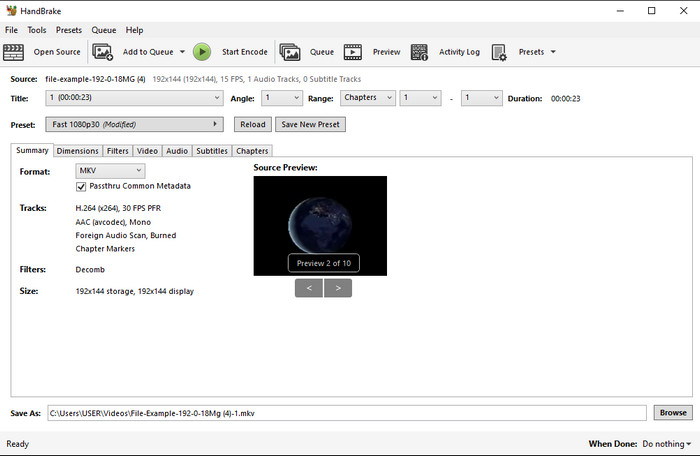
Handbrake درست مانند سایر مبدلهایی که در اینجا معرفی شد، فرایند تبدیل سریع و کارآمدی ارائه میدهد. بااینحال، فرمتهایی که این ابزار پشتیبانی میکند محدود است، به این معنی که در انتخاب فرمت خروجی آزادی عمل زیادی ندارید. اما اگر میخواهید از Handbrake استفاده کنید و M4V را به MKV تبدیل کنید، مراحل زیر را انجام دهید.
گام 1. برنامه Handbrake را روی رایانه رومیزی خود دانلود کنید. فایل .m4v را با کشیدن و رها کردن روی رابط برنامه بارگذاری کنید. همچنین میتوانید روی File کلیک کرده، فایل را در پوشههای رایانه پیدا کرده و روی Open بزنید.
گام 2. روی Format کلیک کرده و MKV را انتخاب کنید.
گام 3. روی Start Encode کلیک کنید تا فرایند تبدیل آغاز شود.
بخش 4. شباهت ها و تفاوت های بین M4V و MKV چیست؟
قبل از مقایسه M4V و MKV، بیایید شباهت های بین این دو فرمت را دریابیم. M4V و MKV هر دو محفظه هایی برای محتوای رسانه و عناصر هستند. همچنین، این دو فرمت برای ذخیره یکی از بهترین کیفیت های ویدئویی مانند فیلم های HD یا 4k شناخته شده اند. و همچنین برای حاوی عناصری مانند ابرداده بزرگ هستند. علاوه بر این، جزئیات بعدی زیر تفاوت بین این دو فرمت است.
M4V بسیار شبیه فرمت MP4 است. با این حال، این فرمت تحت حفاظت کپی DRM است که به این معنی است که شما نمی توانید آزادانه از آن استفاده کنید. اما همه فایلهای M4V از محافظت اپل برخوردار نیستند، زیرا برخی از M4Vهای قابل دانلود دارای مجوز غیرمجاز هستند، بنابراین مطمئن شوید که فایل .m4v را در iTunes دانلود کنید تا از ویروس مخربی که سیستم شما را آلوده میکند جلوگیری کنید. اگرچه فرمت دارای محدودیت است، اما همچنان می توانید از این فرمت در چندین پخش کننده رسانه برای تماشای ویدیویی که در iTunes دانلود می کنید استفاده کنید. علاوه بر این، اگر به طراحی محافظت شده در مک نیاز دارید، این فرمت بهترین انتخاب است.
در مقابل، MKV خاص است که حاوی چندین محتوای رسانه ای و عناصر در یک فایل باشد. این قابلیت فقط در MKV موجود است، زیرا استفاده از این فرمت رایگان است و نسبت به M4V انعطاف پذیرتر است. علاوه بر این، دلایل زیادی برای تغییر M4V به MKV در مک یا ویندوز وجود دارد که یکی از آنها نامحدود کردن فایل ویدیویی است.
M4V در مقابل MKV
M4V توسط اپل توسعه داده شده است که از MPEG 4 نیز استفاده می کند. فایل های M4V اغلب برای ذخیره ویدیوهای دانلود شده از فروشگاه Apple iTunes استفاده می شود، مانند موزیک ویدیوها، قسمت های تلویزیونی، و غیره. ممکن است برخی از فایل های M4V را در برابر کپی محافظت شده پیدا کنید زیرا از آن استفاده می کند. حفاظت از حق نشر DRM FairPlay اپل.
فرمت کانتینر چند رسانه ای Matroska که در سال 2002 منتشر شد، یک فرمت متن باز است که می تواند شامل تعدادی آهنگ ویدئو، صدا، تصویر و زیرنویس باشد. بنابراین، می توانید از آن برای ذخیره کلیپ های ویدئویی کوتاه، نمایش های تلویزیونی و فیلم ها به راحتی استفاده کنید. برای طرفداران انیمه بسیار محبوب است.
بخش 5. سوالات متداول در مورد تبدیل M4V به MKV
کدام یک برای ویرایش بهتر است، M4V یا MOV؟
این دو فرمت از فرمتهای اپل هستند، بنابراین متوجه میشوید که تفاوت چشمگیری بین M4V و MOV وجود ندارد. بااینحال، MOV برای ویرایش بسیار مناسبتر است، زیرا این فرمت اغلب شامل توالیهای پخش ویدیو است که بهترین انتخاب برای ویرایش حرفهای به شمار میآید. شاید فکر کنید باید برای اهداف ویرایشی فایل M4V خود را به MOV تبدیل کنید. اگر چنین است، روی این لینک کلیک کنید تا با درک جامعتری درباره تبدیل M4V به MOV آشنا شوید.
آیا M4V و MP4 یکسان هستند؟
M4V و MP4 از نظر ساختار و کیفیت فیلم بسیار یکسان هستند. اما به دلیل محافظت از Apple Plays، M4V از پشتیبانی های کمی برخوردار است و نمی توانید فقط یک ویدیو پخش کنید یا در پسوند .m4v ویرایش کنید.
پخش کننده های رسانه ای که از M4V پشتیبانی می کنند کدامند؟
بسیاری از پخشکنندههای رسانهای از این نوع فرمت به دلیل حفاظت DRM پشتیبانی نمیکنند. بنابراین اگر بهدنبال یک پخشکننده MKV باشید، باید زمان زیادی صرف جستوجو و امتحان کردن کنید که بسیار وقتگیر است. اما اگر این مقاله را بخوانید، میتوانید از ۵ پخشکننده برتر رسانهای MKV که روی همه پلتفرمها در دسترساند استفاده یا آنها را دانلود کنید.
نتیجه
سه ابزاری که در این مقاله معرفی شدند، با دنبال کردن مراحل، قطعاً تبدیل مؤثری را که میخواهید در اختیارتان قرار میدهند. هرچند این مبدلها نقاط مشترک زیادی دارند، اما تفاوتهای فراوانی نیز بین آنها وجود دارد. اگر جزئیاتی را که در بالا ارائه کردیم بخوانید، اطلاعات زیادی درباره این سه ابزار به دست خواهید آورد. فرض کنید میخواهید تنها با یک بار انجام فرایند، تبدیل عالی و درعینحال کارآمدی به دست آورید؛ در این صورت، ما FVC Video Converter Ultimate را توصیه میکنیم. غیرقابلباور بهنظر میرسد؟ واقعاً همینطور است، پس آن را روی رایانه خود دانلود کنید تا خودتان امتحان کنید.
-
 مبدل M4V به MP3 - 4 بهترین روش برای استخراج MP3 از پرونده های M4V
 وقتی می خواهید به راحتی صوتی MP3 را از فیلم های M4V استخراج کنید ، می توانید در مورد 4 بهترین مبدل M4V به MP3 اطلاعات بیشتری کسب کنید تا فایل های صوتی مورد نظر را از مقاله دریافت کنید.
-
 [راهنما] نحوه تبدیل ویدیوهای M4V به GIF متحرک در Windows/Mac
 اگر می خواهید از ویدیوهای M4V مورد علاقه خود فایل های GIF متحرک بسازید ، می توانید با 2 روش آسان و کارآمد برای تبدیل فیلم M4V به GIF با تنظیمات سفارشی آشنا شوید.
-
 3 برنامه تبدیل ویدیو برای تبدیل iTunes M4V به AVI در مک استفاده می شود
 آیا هیچ ایده ای برای تبدیل MKV به فرمت AVI ندارید؟ همانطور که به خواندن این مقاله ادامه می دهیم، با 3 ابزاری آشنا می شویم که می توانند به شما در تبدیل فرمت فایل کمک کنند.

