


 Video Converter Ultimate
 ضبط صفحه
 تعمیر ویدیو
موثرترین روش های آنلاین و آفلاین برای تبدیل MTV به MKV
برخی مواقع فرمت فایل MTV شما با دستگاه یا برنامهتان سازگار نیست. بهترین راهحل این است که فرمت فایل ویدیویی خود را تغییر دهید. خوشبختانه، ما عالیترین روشها را در اختیار شما گذاشتهایم. این مطلب چند برنامه را به شما معرفی میکند که میتوانید از آنها برای تبدیل MTV به MKV در لحظه استفاده کنید. این مقاله را از دست ندهید تا بهترین مبدل MTV به MKV را پیدا کنید.

قسمت 1: اطلاعات دقیق در مورد MTV و MKV
MTV چیست؟
MTV مخفف Music Television است. در 1 اوت 1981، MTV بهعنوان یک شبکه کابلی آمریکایی راهاندازی شد. این نوع فایل ایجاد شد تا امکان پخش ویدیو روی پخشکنندههای قابلحمل MP4 ارزانقیمت ساخت چین را فراهم کند، بدون اینکه لازم باشد با گرفتن مجوز، ارزش آن دستگاهها را بالا ببرند. پخشکننده MTV در چین تولید میشد و میتوانست ویدیو، فایلهای متنی و تصاویر را نمایش دهد. در نهایت، سازوکار آن به این صورت است که در حین پخش صدای MP3، مجموعهای از فریمهای تصویری خام و فشردهنشده با فرمت rgb565/555 را پشتسر هم نمایش میدهد.
MKV چیست؟
MKV مخفف Matroska Video است. این فرمت یک ظرف چندرسانهای (کانتینر) است، مشابه فرمتهای MOV و AVI. اما در یک فایل، از ترکهای زیرنویس و صداهای بیشتری پشتیبانی میکند. این کانتینر چندرسانهای Matroska برای ویدیو بهکار میرود و بر پایه Extensible Binary Meta Language ساخته شده است. تفاوت فرمت MKV با سایر فرمتهای ویدیو در این است که بسیاری از فرمتهای دیگر در واقع کُدک هستند، اما MKV یک کانتینر است.
قسمت 2: نحوه تبدیل MTV به MKV بدون ضرر
تبدیل بدون افت کیفیت MTV به MKV با استفاده از Video Converter Ultimate کار بسیار سادهای است. این برنامه میتواند فایلهای زیادی مانند MOV، MTS، XVID، FLV، AVI، MP4 و غیره را تبدیل کند. از نظر روند کار، این نرمافزار سرعت تبدیل 30 برابر بالاتر دارد که با دیگر مبدلها قابل مقایسه نیست. همچنین میتوانید چندین فایل را بهطور همزمان تبدیل کنید، چون از تبدیل دستهای پشتیبانی میکند. علاوه بر این، اگر میخواهید ویدیوی خود را تقویت و جذابتر کنید، میتوانید از این ابزار استفاده کنید. این برنامه ابزارهای زیادی برای ویرایش و بهبود ویدیو دارد، مانند تقویتکننده ویدیو که با آن میتوانید وضوح ویدیو را بالاتر ببرید، نویز را حذف کنید، روشنایی و کنتراست را بهینه کنید و لرزش ویدیو را کاهش دهید. با استفاده از این قابلیتها میتوانید مطمئن باشید که ویدیوی شما رضایتبخشتر خواهد شد. همچنین اگر میخواهید روی ویدیو واترمارک اضافه کنید، میتوانید از این ابزار کمک بگیرید، چون امکان افزودن واترمارک به ویدیو را نیز دارد. اینها فقط برخی از قابلیتهای این ابزار است؛ اگر میخواهید با امکانات بیشتر و عالی آن آشنا شوید، باید خودتان Video Converter Ultimate را امتحان کنید.
قابلیتها:
◆ قادر به ایجاد یک کلاژ.
◆ ابزارهای ویرایش ویدیو، مانند تقویت کننده، حذف کننده علامت، کمپرسور و غیره را ارائه دهید.
◆ به شما امکان می دهد ویدیوهای موسیقی ایجاد کنید.
◆ تبدیل فرمت های فایل های ویدئویی متعدد.
طرفداران
- دارای فرآیند تبدیل 30 برابر سریعتر است.
- ایده آل برای کاربران غیر حرفه ای.
- می تواند چندین فرمت فایل مانند MP4، MOV، MTV، MKV و غیره را تبدیل کند.
- هیچ واترمارکی اعمال نشد.
- قابل دسترسی برای ویندوز و مک.
منفی ها
- شما باید اپلیکیشن را خریداری کنید تا ویژگی های عالی بیشتری را تجربه کنید.
برای تبدیل فوری MTV به MKV، این راهنمای دقیق را دنبال کنید.
مرحله 1: با کلیک روی دکمه Download زیر، برنامه Video Converter Ultimate را روی رایانه ویندوز یا مک خود دانلود کنید. سپس نرمافزار را روی دستگاهتان نصب کرده و برنامه را اجرا کنید.
دانلود رایگانبرای ویندوز 7 یا بالاتردانلود امن
دانلود رایگانبرای MacOS 10.7 یا بالاتردانلود امن
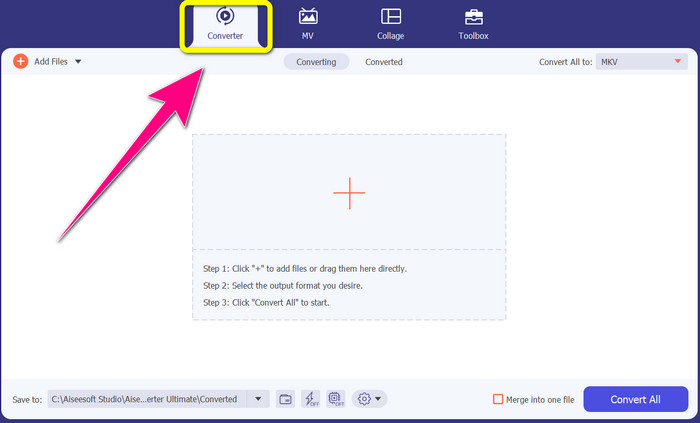
مرحله 2: در بخش بالایی رابط، چهار بخش Converter، MV، Collage و Toolbox را میبینید. پنل Converter را انتخاب کنید.
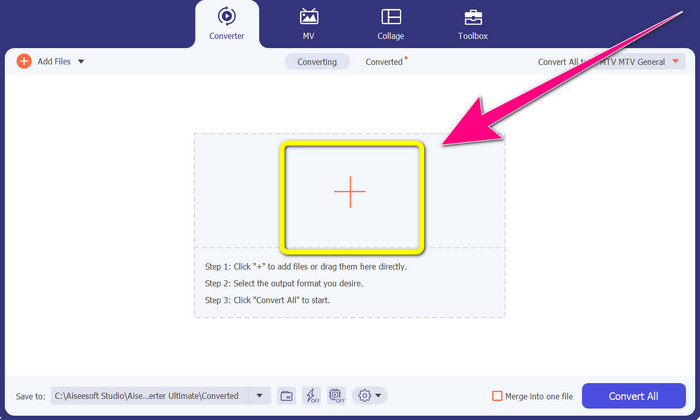
مرحله 3: سپس روی آیکون + کلیک کنید تا فایل ویدیویی MTV موردنظر برای تبدیل را اضافه کنید.
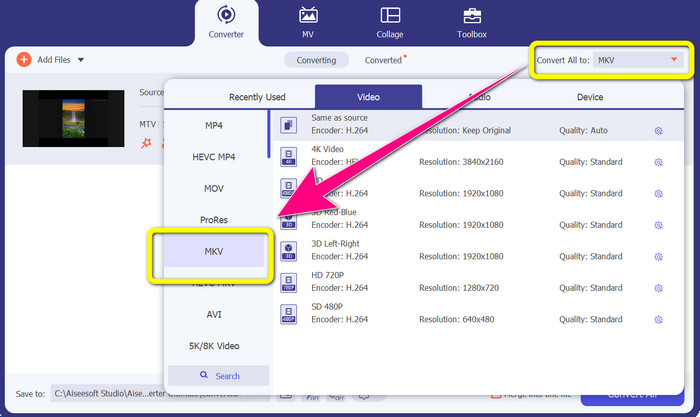
مرحله 4: پس از افزودن ویدیو، روی گزینه Convert all to کلیک کنید. سپس در میان گزینههای فرمت، فرمت MKV را پیدا کرده و روی آن کلیک کنید.
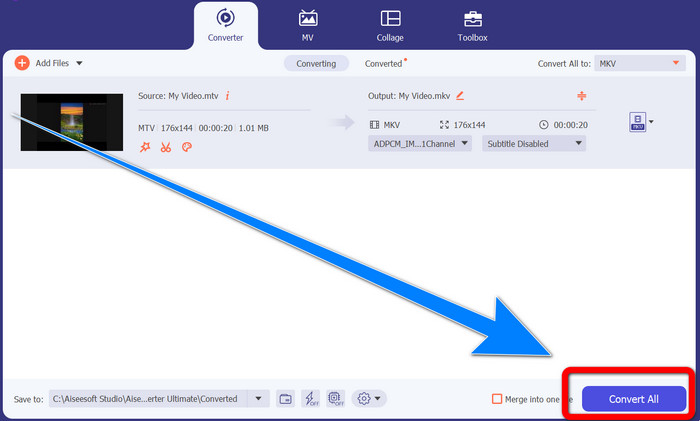
مرحله 5: بعد از انتخاب فرمت فایل MKV، میتوانید روی دکمه Convert All کلیک کنید تا ویدیوی نهایی تبدیل و ذخیره شود.
قسمت 3: نرم افزار آنلاین برای تبدیل MTV به MKV
با استفاده از Converthelper
شما یاد گرفتید که چگونه روی ویندوز و مک، MTV را به MKV تبدیل کنید. اکنون روش تبدیل فایلها بهصورت آنلاین را خواهید آموخت. یکی از مبدلهای مفیدی که میتوانید استفاده کنید Converthelper است. این ابزار آنلاین، ابزاری رایگان است که میتوانید برای تبدیل فرمتهای مختلف فایل مانند MTV، MKV، DDAT، AVE، PS GFP، WMF و غیره از آن استفاده کنید. علاوه بر این، مراحل کمی برای تبدیل دارد که آن را برای مبتدیان مناسب میکند. همچنین با استفاده از Converthelper میتوانید تعداد زیادی فایل را بدون محدودیت تبدیل کنید. با این حال، این مبدل آنلاین رایگان در روند تبدیل کند است و کامل شدن تبدیل فایلها کمی زمان میبرد. همچنین عملکرد این ابزار به اتصال اینترنت شما بستگی دارد. بنابراین، برای تبدیل فایلها با Converthelper باید اتصال اینترنت خوبی داشته باشید. برای تبدیل MTV به MKV بهصورت آنلاین، مراحل زیر را دنبال کنید.
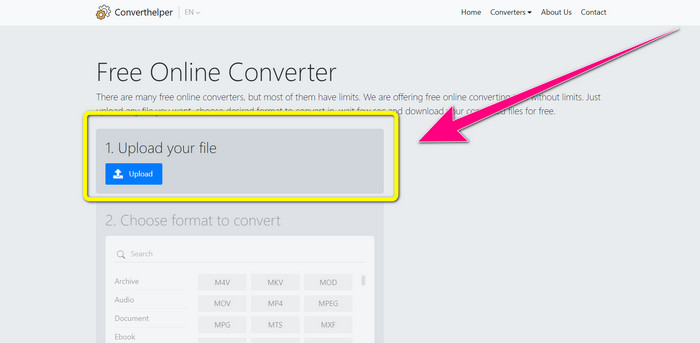
مرحله 1: وبسایت Converthelper را در مرورگر خود باز کنید. سپس روی دکمه Upload کلیک کرده و ویدیوی دارای فایل MTV را اضافه کنید.
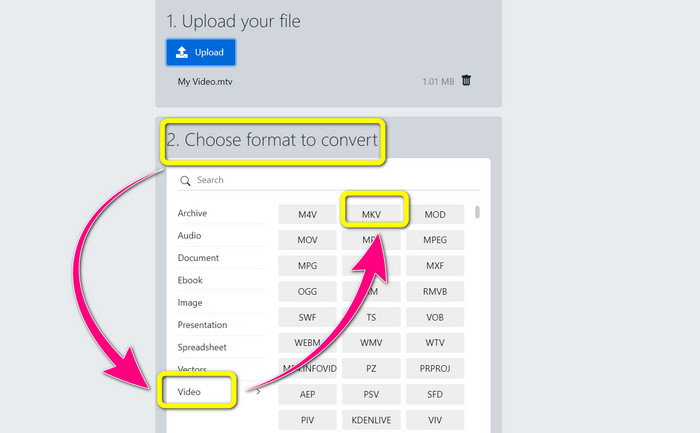
مرحله 2: پس از آپلود فایل، به مرحله 2 بروید. گزینههای فرمت را انتخاب کنید. روی دکمه Video کلیک کنید، بهدنبال فایل MKV بگردید و روی آن کلیک کنید.
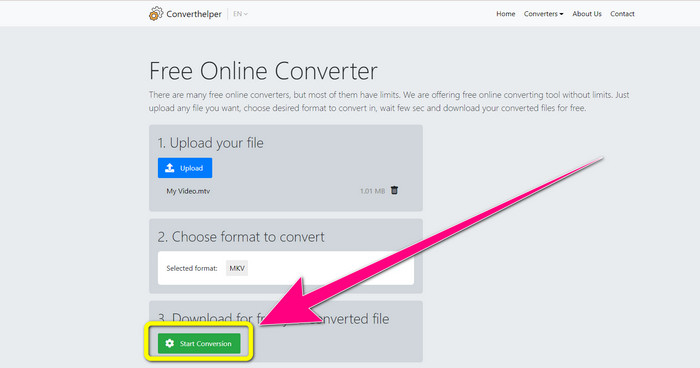
مرحله 3: در مرحله پایانی، روی دکمه Start Conversion کلیک کنید تا فایل MTV شما به فرمت MKV تبدیل شود. منتظر بمانید تا روند نهایی تبدیل کامل شود و سپس ویدیوی نهایی خود را با فرمت MKV دانلود کنید.
با استفاده از تبدیل آنلاین
یکی دیگر از ابزارهای آنلاینی که می توانید برای تبدیل MTV به MKV از آن استفاده کنید، تبدیل آنلاین است. جدا از فرمت های MTV و MKV، فرمت های بیشتری مانند MP4، AVI، GIF، FLAC، FLV، VOB، DIVX، MOV، WMV و غیره را پشتیبانی می کند. این نه تنها در تبدیل فایل های ویدئویی قابل اعتماد است. همچنین می توانید تصاویر، اسناد، صدا و فرمت های دیگر را تبدیل کنید. این ابزار آنلاین برای کاربران جدید نیز خوب است زیرا استفاده از آن آسان است و تنها چند مرحله برای تبدیل فایل های مختلف دارد. با این حال، این ابزار آنلاین دارای محدودیت اندازه فایل است که حداکثر 3 مگابایت است. همچنین، مانند سایر ابزارهای مبتنی بر وب، اگر به اینترنت متصل نباشید، نمیتوانید از آن استفاده کنید. مواقعی وجود دارد که این نرم افزار عملکرد خوبی ندارد. برای تبدیل فایل MTV خود به فرمت فایل MKV، از مراحل زیر استفاده کنید.
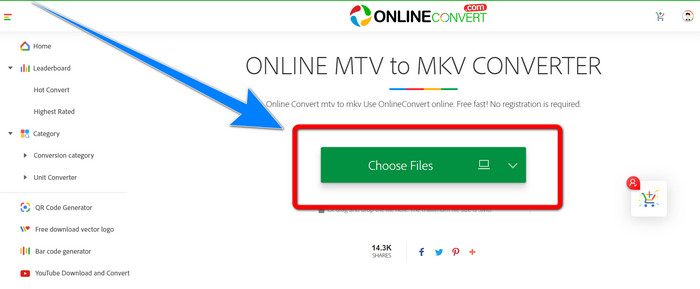
مرحله 1: به وبسایت Online Convert بروید. روی دکمه Choose Files کلیک کنید تا ویدیوی خود را با فرمت فایل MTV وارد کنید.
مرحله 2: وقتی ویدیوی خود را با فرمت فایل MTV آپلود کردید، به سراغ گزینههای فرمت بروید و فرمت MKV را انتخاب کنید.
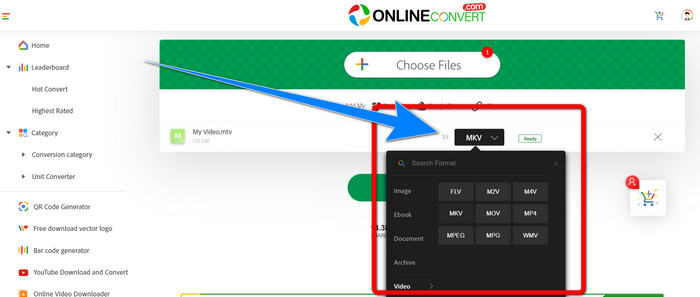
مرحله 3: در آخرین مرحله، روی دکمه Convert کلیک کنید تا فرمت MTV شما به فرمت فایل MKV تبدیل شود. سپس منتظر روند تبدیل بمانید و ویدیوی تبدیلشده خود را ذخیره کنید.
مطالعه بیشتر:
بهترین روشها برای تبدیل AMV به MKV بهصورت رایگان
[آنلاین و رایگان] چگونه میتوانم روی ویندوز/مک، MKV را به MP4 تبدیل کنم؟
قسمت 4: سوالات متداول در مورد تبدیل MTV به MKV
آیا فرمت MKV با MP4 یکی است؟
نه، این کار را نمی کنند. MKF ویژگیهای اضافی بیشتری مانند زیرنویسهای متعدد و آهنگهای صوتی دارد، بنابراین MKV اندازه فایل بزرگتری نسبت به فرمت MP4 دارد. همچنین MKV دارای وضوح بالاتری نسبت به MP4 است زیرا دارای کدک پیشرفته با نسبت تراکم بالاتر است.
آیا می توانم MKV را به فرمت دیگری نیز تبدیل کنم؟
قطعاً بله! شما میتوانید با استفاده از نرمافزاری که از فرمتهای MKV پشتیبانی میکند، مانند Video Converter Ultimate، فرمت MKV را به فرمتهای دیگر تبدیل کنید. برنامه را روی ویندوز یا مک خود دانلود کنید و از تبدیل فایلهایتان لذت ببرید.
آیا فرمت MKV عالی است؟
بله همینطور است. نیازی به مجوز ندارد. از ویژگی های عالی مانند چندین آهنگ و زیرنویس و غیره پشتیبانی می کند.
نتیجه
اینها بهترین روشها برای تبدیل MTV به MKV با استفاده از مبدلهای عالی هستند. اگر میخواهید چندین فایل را بهصورت آسان و بدون افت کیفیت تبدیل کنید، از Video Converter Ultimate استفاده کنید.
-
 مبدل رایگان MP4 به MKV - نحوه تبدیل MP4 به MKV با سهولت
 وقتی می خواهید MP4 را به صورت رایگان به MKV تبدیل کنید ، می توانید در مورد 4 روش کارآمد برای تبدیل فایل های MP4 به فیلم MKV برای سناریوهای مختلف ، اطلاعات بیشتری کسب کنید.
-
 نحوه تبدیل MKV به DivX به صورت آنلاین و آفلاین به صورت رایگان
 آیا به دنبال بهترین راه برای تبدیل MKV به فرمت DivX به صورت رایگان هستید؟ برای شناخت بهترین مبدل های آنلاین و آفلاین MKV به DivX به خواندن ادامه دهید
-
 4 مورد از بهترین مبدل های MKV به 3GP برای ویندوز و مک
 اگر به دنبال مبدل های MKV به 3GP هستید که استفاده از آنها آسان باشد، خوش شانس هستید! ما بهترین و رایگان مبدل های MKV به 3GP را پیدا کردیم که باید امتحان کنید
