


 Video Converter Ultimate
 ضبط صفحه
 تعمیر ویدیو
راهنمای ساده شده برای تبدیل فایل های MTV خود به فرمت WMV با مراحل دقیق
بسیاری از کاربران میپرسند چگونه میتوانند فایلهای MTV خود را به یک فرمت قابل پخش در ویندوز، مانند فرمت WMV، تبدیل کنند. امروز روز خوششانسی شماست، چون در اینجا دو تا از بهترین مبدلهایی را که توانستیم پیدا کنیم معرفی میکنیم. علاوه بر این، تمام اطلاعات دقیقی که در اینجا آورده شده، واقعیتهایی هستند که میتوانید از آنها استفاده کنید. بدون هیچگونه معطلی، بیایید ادامه دهیم و جزئیات زیر را بخوانیم تا ایدههای بیشتری در مورد چگونگی تبدیل MTV به WMV به دست آورید.

قسمت 1. تبدیل MTV به WMV با Video Converter Ultimate
FVC Video Converter Ultimate هنگامی که میخواهید MTV را به WMV یا فرمتهای دیگر تبدیل کنید، یک فرایند تبدیل کارآمد و خروجی حرفهای ارائه میدهد. این مبدل رویکردی بیرقیب در تبدیل دارد که هیچ مبدل دیگری توان رقابت با آن را ندارد. علاوه بر این، قابلیتهای ویرایشی هم دارد که از آنها خوشتان خواهد آمد و در بسیاری از مواقع به شما کمک میکند. میخواهید درباره برخی از بخشهای آن بیشتر بدانید؟ اگر چنین است، جزئیات زیر را بخوانید.

FVC Video Converter Ultimate
3,222,440+ دانلود- MTV را به WMV، AVI، MKV، MOV، FLV، یا به بیش از 200 فرمت پشتیبانی شده تبدیل کنید.
- از شتاب سخت افزاری و تبدیل فوق العاده سریع برای فرآیند تبدیل سریع و کارآمد پشتیبانی می کند.
- بهترین انتخاب مبتدیان در تبدیل، خروجی حرفه ای را بدون هیچ زحمتی فراهم می کند.
- ویژگیهای ویرایش پیشرفته مانند برش، برش، ادغام و غیره برای شما در دسترس است.
- قابل دانلود در تمامی سیستم عامل ها مانند ویندوز و macOS.
دانلود رایگانبرای ویندوز 7 یا بالاتردانلود امن
دانلود رایگانبرای MacOS 10.7 یا بالاتردانلود امن
اکنون که ویژگی های منحصر به فرد آن را دریابیم، زمان آن رسیده است که فایل های MTV خود را با کمک این ابزار نهایی با دنبال کردن مراحل زیر تبدیل کنید.
مرحله 1. قبل از هر چیز، ابتدا باید نرمافزار را با کلیک روی دکمه دانلودی که در زیر موجود است، روی درایو دسکتاپ خود دانلود کنید. پس از اتمام دانلود، بلافاصله مراحل نصب را دنبال کنید و نرمافزار را اجرا کنید.
دانلود رایگانبرای ویندوز 7 یا بالاتردانلود امن
دانلود رایگانبرای MacOS 10.7 یا بالاتردانلود امن
مرحله 2. فایل MTV را با کشیدن و رها کردن روی رابط کاربری بارگذاری کنید. یا میتوانید روی Add Files کلیک کنید، سپس فایل را در پوشهای که روی صفحهنمایشتان باز میشود پیدا کرده و روی Open فشار دهید.
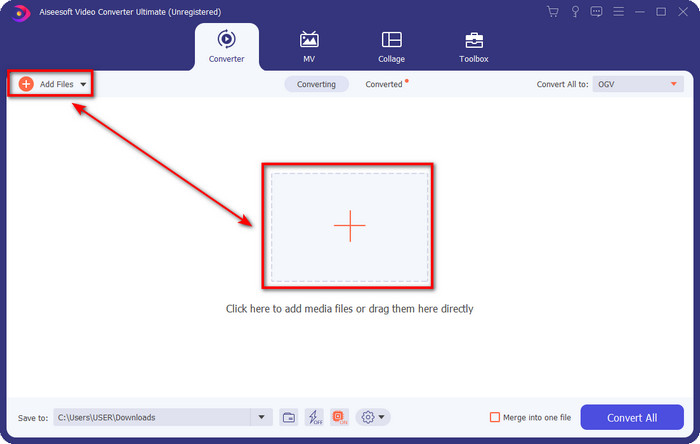
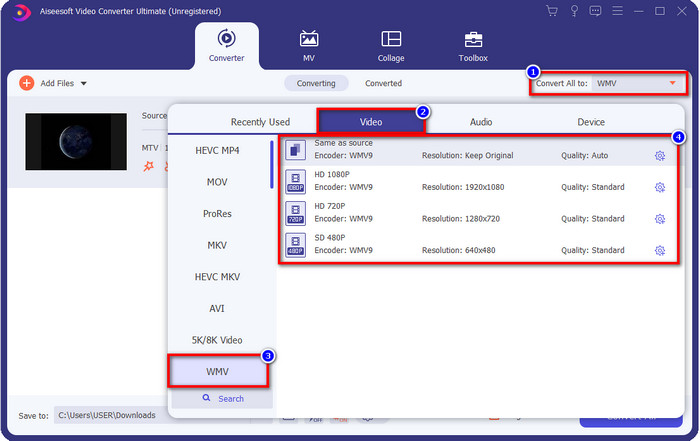
مرحله 3. به محض اینکه فایل MTV را اضافه کردید، باید روی دکمه Convert All to کلیک کرده و فرمت WMV یا هر فرمت دیگری را که از فهرست در دسترس است انتخاب کنید.
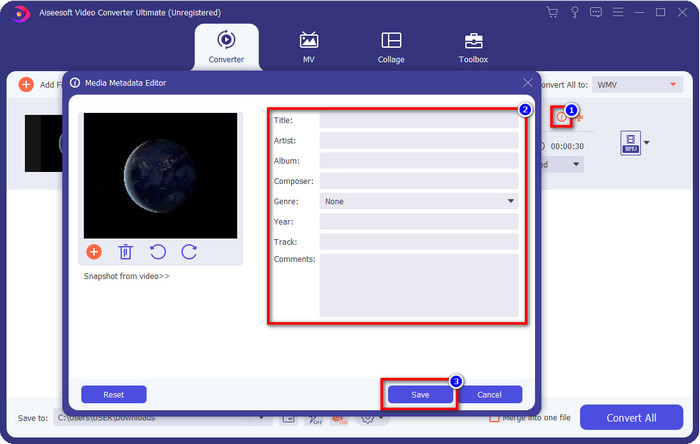
اختیاری. لازم است متادیتا را ویرایش کنید؟ اگر چنین است، روی دکمه metadata کلیک کنید و دادههایی را که میخواهید وارد کنید، اضافه کنید. برای مثال، عنوان (Title)، هنرمند (Artist)، آهنگساز (Composer)، آلبوم (Album)، ژانر (Genre) و موارد دیگر را پر کنید و برای ذخیره متادیتا روی Save کلیک کنید.
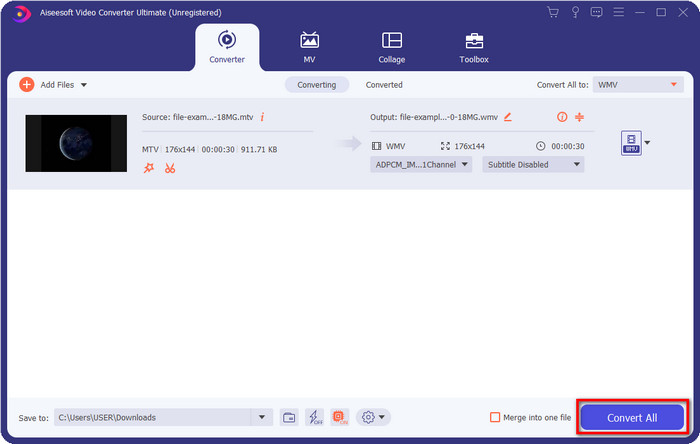
مرحله 4. با کلیک روی دکمه Convert All، فرایند آغاز میشود. پس از اتمام، یک پوشه جدید روی رایانهتان باز میشود که شامل فایل WMV است.
قسمت 2. تبدیل MTV به WMV آنلاین
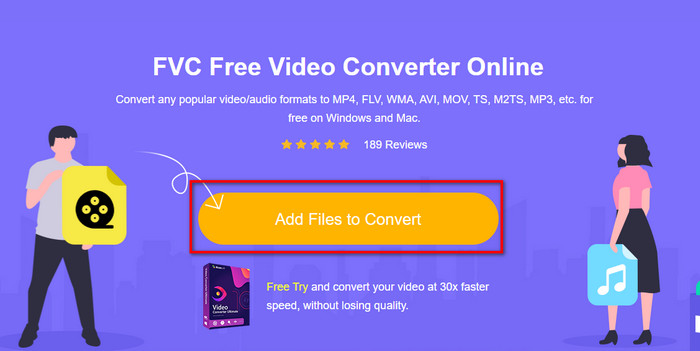
FVC Free Video Converter Online به عنوان یک مبدل، عملکردهای مناسبی ارائه میدهد که هرکسی با داشتن اتصال اینترنت میتواند به آن دسترسی داشته باشد. این مبدل تحتوب در همه مرورگرها در دسترس و استفاده از آن آسان است. برخلاف مبدلی که ابتدا ذکر شد، این ابزار نیازی به دانلود کامل برنامه ندارد، اما باید پیش از استفاده، نصبکننده (installer) آن را دانلود کنید. هرچند این ابزار میتواند مقداری از فضای درایوتان را ذخیره کند، اما مثل نسخه Ultimate قدرتمند نیست. حالا بیایید به سراغ مراحل برویم و یاد بگیریم چگونه با کمک این مبدل تحتوب، MTV را به صورت آنلاین به WMV تبدیل کنیم.
مرحله 1. روی این لینک کلیک کنید تا مبدل اصلی تحتوب در یک تب جدید باز شود.
مرحله 2. روی دکمه Add Files to Convert کلیک کنید تا نصبکننده دانلود شود. دوباره روی آن کلیک کنید؛ این بار پوشهای از رایانه شما باز میشود و باید فایل MTV را پیدا کنید، روی آن کلیک کرده و سپس Open را بزنید.
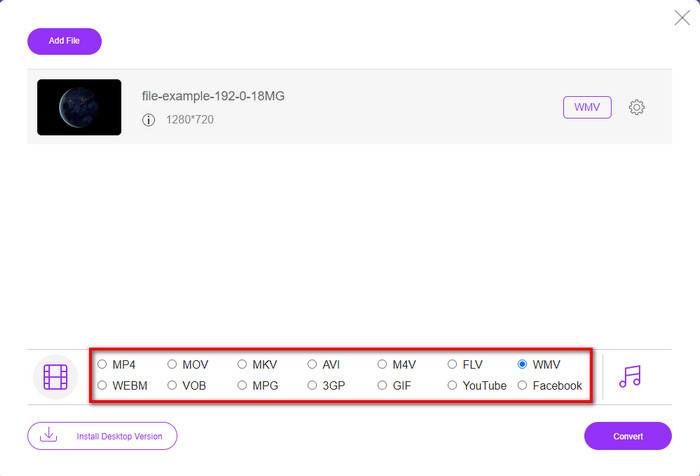
مرحله 3. پس از آپلود فایل MTV، روی فرمت WMV در پایین یا هر فرمتی که میخواهید به آن تبدیل کنید، کلیک کنید.
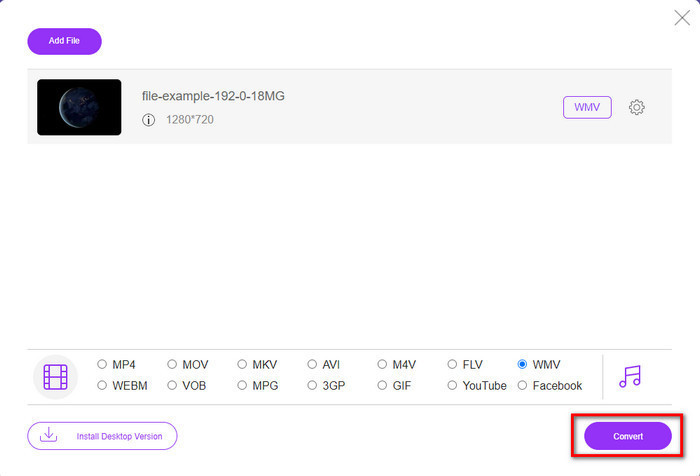
مرحله 4. اگر آماده تبدیل هستید، روی دکمه Convert کلیک کنید تا فرایند شروع شود.
قسمت 3. تفاوت بین MTV و WMV چیست
MTV و WMV هر دو کانتینری برای محتوای ویدیویی و صوتی هستند. با این حال، آنها قابلیت های منحصر به فردی دارند که دیگری نمی تواند آن را کپی کند. آیا می خواهید در مورد MTV و WMV بیشتر بدانید؟ سپس بیایید شروع به خواندن اطلاعات دقیق بعدی در زیر کنیم.
برعکس، WMV وضوح بسیار بالاتری را در مقایسه با MTV ارائه می دهد. اگرچه وضوح بالاتری دارد، اما از یک کمپرسور برای کوچکتر کردن حجم فایل استفاده می کند اما بدون افت کیفیت. همچنین این فرمت برای پخش در تمام ویندوزها از MTV سازگارتر است. بنابراین، اگر می خواهید فایل MTV خود را پخش کنید، باید بدانید که چگونه آن را به WMV تبدیل کنید و آن را در سیستم عامل ویندوز پخش کنید.
در نهایت، به دلیل کیفیتی که WMV ارائه می دهد و دلایل سازگاری، باید MTV را به WMV تبدیل کنید. بنابراین، اگر مایل به تبدیل فایل MTV هستید، باید از محصول FVC برای دستیابی به خروجی فوق العاده بدون انجام فرآیندهای زیاد استفاده کنید.
بخش 4. سوالات متداول در مورد تبدیل MTV به WMV
چرا وضوح ویدیوی MTV پایین است؟
اگر فایل رسانه ای در این فرمت است، انتظار رزولوشن پایین را داشته باشید. زیرا پس از فشردهسازی فایل، کیفیت ویدیو قربانی کوچکتر کردن حجم آن است. همچنین این فرمت فقط می تواند یک سری تصاویر را به صورت ربط 465/555 پخش کند و صدا به صورت MP3 است.
برای پخش فایل های mtv. از چه پخش کننده ویدیویی می توانم استفاده کنم؟
میتوانید از پخشکننده رسانه VLC برای پخش این فرمت رسانهای استفاده کنید، زیرا از انکودرهای مختلف و فرمتی که میخواهید در آن پخش کنید پشتیبانی میکند. بنابراین، اگر میخواهید فایلهای MTV خود را تماشا کنید، باید VLC را روی دستگاه خود دانلود کنید تا پخش آن ممکن شود. اما اگر میخواهید یک پخشکننده رسانهای بسیار بهتر از VLC داشته باشید، باید بهجای آن از پخشکننده Blu-ray استفاده کنید؛ چون هنگام تماشای فایلهای MTV، حسی تقریباً سینمایی به شما میدهد.
آیا Quicktime از فرمت MTV پشتیبانی می کند؟
متأسفانه فرمت MTV به دلیل انکودر آن در QuickTime قابل پخش نیست. اما فهمیدیم که میتوانید این فایل را بهجای آن به فرمت MOV تبدیل کنید. میخواهید بیشتر بدانید که چگونه MTV را به MOV تبدیل کنید؟ اگر چنین است، باید ۵ دقیقه وقت بگذارید و این مقاله را بخوانید تا آگاه شوید.
نتیجه
در نهایت، ما دو روش برتر برای تبدیل MTV به WMV پیدا کردیم تا آن را با ویندوز سازگارتر کنیم و حتی کارهای بیشتری انجام دهیم که در خود فرمت MTV ممکن نیست. حالا که متوجه شدیم از چه مبدلهایی میتوانید استفاده کنید، وقت آن است که یکی را انتخاب کنید. هر کدام از این دو را که انتخاب کنید، مطمئناً در تبدیل خود به موفقیت میرسید. اما اگر میخواهید خروجی حرفهای و شگفتانگیز داشته باشید، باید از FVC Video Converter Ultimate استفاده کنید. میخواهید بیشتر درباره این مبدل نهایی بدانید؟ پس همین حالا آن را دانلود کنید و خودتان امتحانش کنید.
-
 [آنلاین و رایگان] 3 روش برای تبدیل MTV به AVI بدون دردسر
 آیا تا به حال در مورد فرمت ویدئویی مانند MTV شنیده اید؟ از آنجایی که همه چیز را در مورد این فرمت نمی دانید و می خواهید یک ویدیوی MTV را به AVI تبدیل کنید، این مقاله را با دقت بخوانید تا در مورد این موضوع بیشتر بدانید.
-
 3 روش برتر برای تبدیل FLV به WMV در ویندوز و مک
 آیا به دنبال بهترین روش تبدیل FLV به WMV بدون از دست دادن کیفیت در رایانه یا مک هستید؟ شما خوش شانس هستید زیرا ما در اینجا سه روش را برای انجام آسان کار انجام می دهیم.
-
 راهنمای ساده نحوه تبدیل GIF به WMV در Windows/Mac
 آیا می خواهید بدانید چگونه GIF را به فرمت WMV تبدیل کنید؟ سپس این مقاله را دنبال کنید زیرا راه حل های مختلفی را که می توانید انتخاب کنید را نشان می دهد.
