


 Video Converter Ultimate
 ضبط صفحه
 تعمیر ویدیو
4 روش مختلف در مورد نحوه تبدیل فایل MXF به AVI را بیاموزید
فرمت MXF ویدیوها و صداهای باکیفیت بالا را ذخیره میکند که بیشتر فیلمبرداران حرفهای استفاده از آن را دوست دارند. همچنین این فرمت میتواند فراداده (متادیتا)ای را در خود داشته باشد که توضیح میدهد داخل فایل چه محتوایی قرار دارد. علاوه بر این، سازمان SMPTE فرمت MXF را ایجاد کرد تا ویدیو را سریع به دستگاه دیگر منتقل کرده و آن را ویرایش کنند. اما بعضی از ویرایشگرها و پخشکنندههای رسانهای از کیفیت HD که این فرمت ارائه میدهد پشتیبانی نمیکنند. در این شرایط، بهتر است فایل MXF خود را به یک فرمت جدید تبدیل کنید که نسبت به MXF پشتیبانی بیشتری دارد، مثل AVI یا دیگر فرمتهای ویدیویی. حالا بیایید تمام مبدّلها را دستهبندی کنیم تا یاد بگیریم چگونه MXF را به AVI تبدیل کنیم.
قسمت 1. نحوه تبدیل MXF به AVI به صورت رایگان در ویندوز و مک
FVC Video Converter Ultimate
این ابزار به عنوان یکی از پیشرفتهترین ابزارهای آفلاینی شناخته میشود که میتوانید بدون پشیمانی آن را روی دسکتاپ خود دانلود کنید. نرمافزار FVC Video Converter Ultimate چندین سال است که در بازار حضور دارد. به همین دلیل، بسیاری از کاربرانش تاکنون از این نرمافزار کمک گرفتهاند. همچنین عملکرد کلی این ابزار، چه قبل، چه حین و چه بعد از تبدیل، همیشه عالی بوده است. نکته خوب دیگر این است که تمام قابلیتهای پیشرفتهای که این ابزار ارائه میدهد سادهسازی شدهاند، بنابراین حتی اگر حرفهای هم نباشید، خروجی فوقالعادهای دریافت خواهید کرد. با توجه به اینکه این برنامه بسیار چشمگیر به نظر میرسد، حالا بیایید امتحان کنیم ببینیم آیا این مبدّل از پس کار برمیآید یا نه، اگر با دنبال کردن مراحل زیر MXF را به AVI تبدیل کنید.
مراحل تبدیل MXF به AVI با استفاده از FVC Video Converter Ultimate
مرحله 1. ابتدا روی دکمه دانلود زیر کلیک کنید و پلتفرمی را که در حال حاضر استفاده میکنید انتخاب کنید. بعد از دانلود، آن را نصب کرده و راهاندازی سریع را انجام دهید تا به مرحله بعد بروید.
دانلود رایگانبرای ویندوز 7 یا بالاتردانلود امن
دانلود رایگانبرای MacOS 10.7 یا بالاتردانلود امن
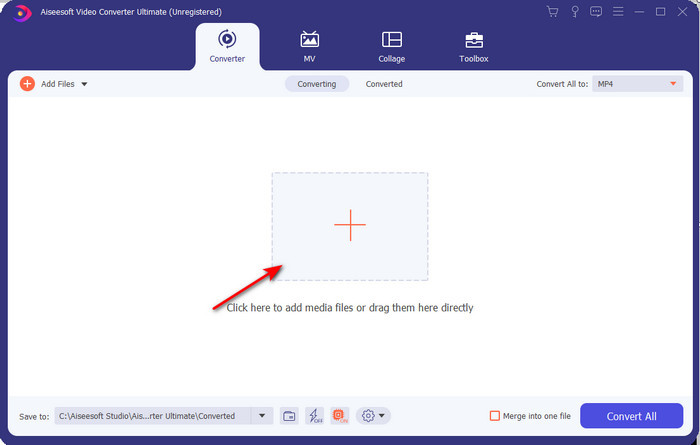
مرحله 2. مبدّل را باز کنید تا به آن دسترسی پیدا کنید، روی آیکون Add Files کلیک کنید تا فایل MXF را در پوشه جستوجو کرده و سپس روی Open کلیک کنید تا آن را وارد کنید.
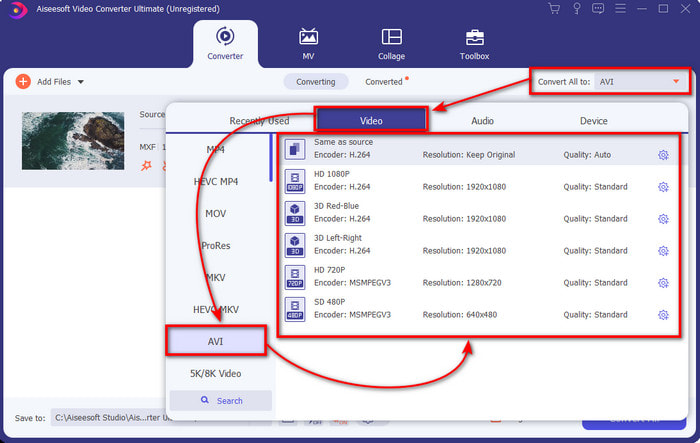
مرحله 3. برای انتخاب فرمت خروجی، روی دکمه drop-down کلیک کنید؛ در لیست زیر آن، فرمت AVI و دیگر فرمتهایی را که میتوانید انتخاب کنید خواهید دید.
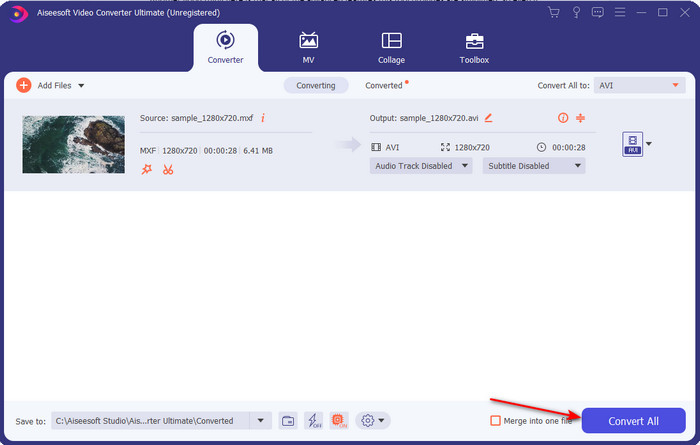
مرحله 4. برای شروع فرایند تبدیل، روی Convert All کلیک کنید و چند ثانیه منتظر بمانید.
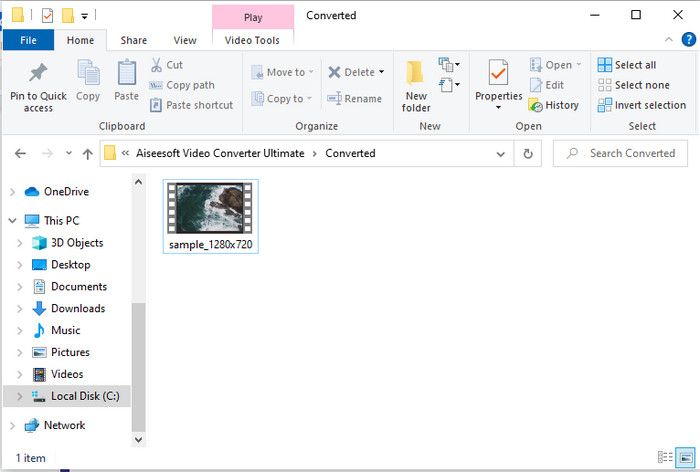
مرحله 5. بعد از اتمام تبدیل، پوشهای روی صفحهنمایش شما باز میشود که فایل تبدیلشده در آن قرار دارد. روی آن کلیک کرده و ویدیو را تماشا کنید.
قسمت 2. 3 مبدل آنلاین مورد استفاده برای تبدیل MXF به AVI به صورت رایگان
1. FVC رایگان تبدیل ویدئو آنلاین

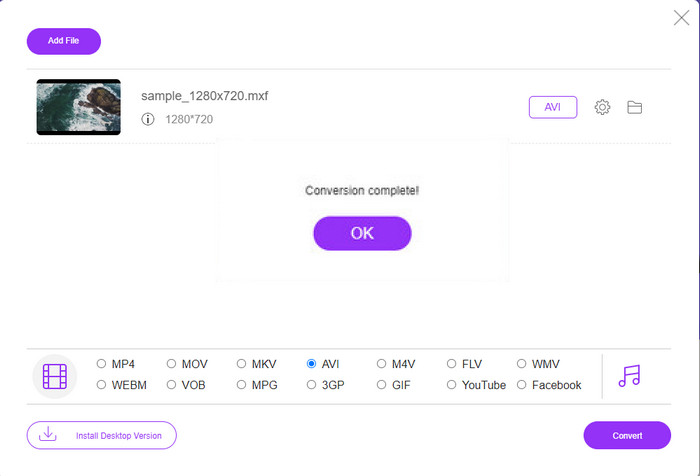
اگر به دنبال بهترین روشها برای تبدیل MXF به AVI بهصورت آنلاین هستید، FVC Free Video Converter Online بهترین گزینه در فهرست مبدّلهای آنلاین است. این ابزار از فرمتهای مختلفی که میتوانید از بین آنها انتخاب کنید پشتیبانی میکند و از این نظر از دو ابزار آنلاین دیگری که در ادامه میآیند نیز گستردهتر است. همچنین میتوانید بدون پرداخت هزینه و بدون محدودیت تعداد تبدیل، از این ابزار روی مرورگر رایانه ویندوز یا مک خود استفاده کنید. با این حال، امکان تبدیل دستهای فایلها در اینجا وجود ندارد، زیرا پشتیبانی نمیشود. برخی از قابلیتهای ویرایشی که شاید دوست داشته باشید استفاده کنید نیز در این نسخه در دسترس نیستند. علاوه بر این، اگر میخواهید روشی سادهتر برای تبدیل داشته باشید و تمایلی به دانلود برنامه ندارید، این ابزار همان چیزی است که نیاز دارید. حالا بیایید به سراغ مراحل لازم برویم تا فایل .mxf شما را به فرمتی جدید تبدیل کنیم.
مرحله 1. روی این لینک کلیک کنید تا وبسایت این مبدّل را باز کنید.
مرحله 2. وقتی وبسایت را باز کردید، روی Add Files to Convert فشار دهید؛ سپس پوشهای روی صفحه ظاهر میشود، فایل .mxf را در پوشه پیدا کرده و روی Open کلیک کنید.
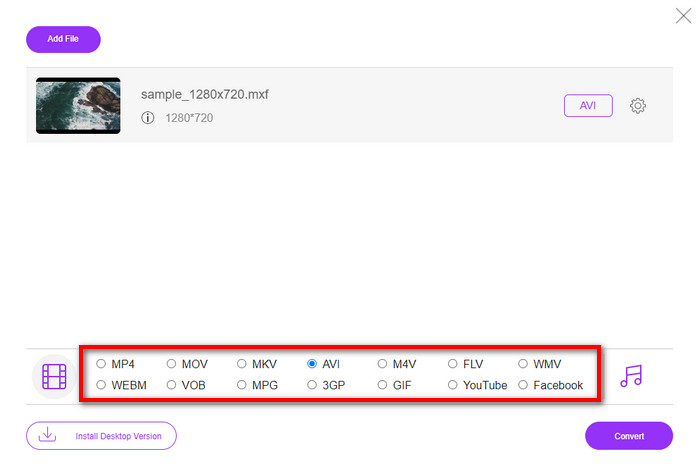
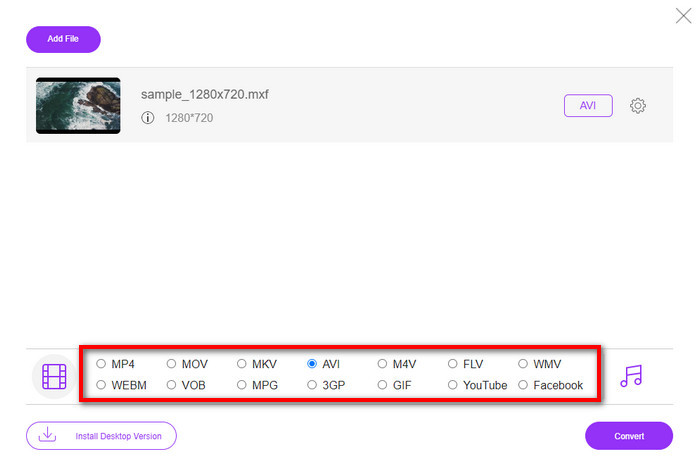
مرحله 3. بعد از انتخاب فایل، فرمت AVI را از بین فرمتهای موجود در پایین انتخاب کنید.
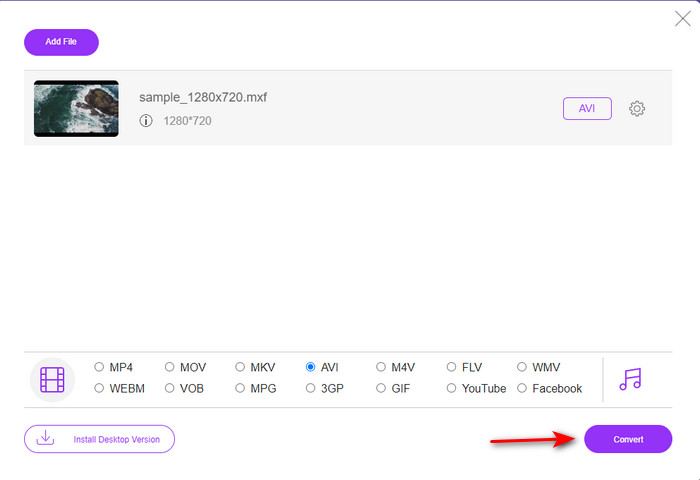
مرحله 4. اگر برای شروع فرایند تبدیل آماده هستید، روی Convert کلیک کنید تا کار آغاز شود.
مرحله 5. بعد از پایان تبدیل، یک پوشه ظاهر میشود؛ سپس نسخه جدید فایل MXF خود را باز کرده و آن را تماشا کنید.
2. Freefileconvert.com
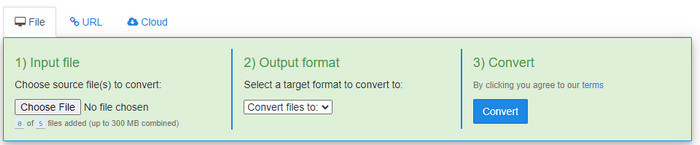
یکی دیگر از مبدّلهای MXF به AVI که بهصورت آنلاین میتوانید از آن استفاده کنید، وبسایت Freefileconvert.com است. یکی از کارهایی که این ابزار میتواند انجام دهد، تبدیل دستهای تا ۵ فایل بهصورت همزمان است. با این حال، نمیتوانید این پنج فایل را به فرمتهای خروجی متفاوت تبدیل کنید و تنها یک فرمت خروجی مشترک برای همه آنها قابل انتخاب است. همچنین وبسایت شامل برخی تبلیغات آزاردهنده است؛ نکته نگرانکننده دیگر هشدار آنتیویروس بود که هنگام تلاش برای تبدیل فرمت در این سایت دریافت کردیم. حالا اگر میخواهید فرمت MXF خود را اینجا تبدیل کنید، مراحل زیر را دنبال کنید.
مرحله 1. مرورگر مورد علاقه خود را باز کنید و Freefileconvert.com را جستوجو کنید.
مرحله 2. برای وارد کردن فایل، روی Choose File کلیک کنید. برای تغییر فرمت، روی Convert Files to کلیک کرده و AVI را پیدا کنید.
مرحله 3. روی Convert فشار دهید تا فرایند تبدیل آغاز شود.
3. Filezigzag
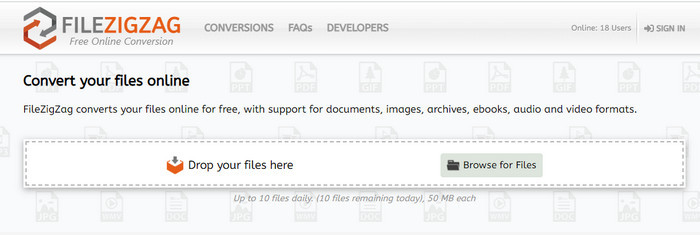
اگر میخواهید MXF را به AVI بهصورت رایگان تبدیل کنید، میتوانید از Filezigzag استفاده کنید. این ابزار تحت وب فرایند تبدیل سادهای ارائه میدهد و کاربرپسند است. همه ابزارهای وبی که اینجا معرفی شدند کاربرپسند هستند، اما این ابزار تا حدی با دو ابزار دیگر متفاوت است. رابط کاربری این ابزار عالی است و مانند FVC Free Video Converter Online عاری از ویروس است. با وجود اینکه ابزار بسیار چشمگیر به نظر میرسد، همچنان محدودیتهایی از نظر تعداد تبدیل و اندازه فایل دارد. به طور مشخص، شما فقط میتوانید روزانه ده فایل را تبدیل کنید و همه این فایلها باید زیر 50 مگابایت باشند. علاوه بر این، حالا بیایید به سراغ مراحل استفاده از این ابزار برویم.
مرحله 1. مرورگر وب خود را اجرا کنید و Filezigzag را جستوجو کنید؛ باید مطمئن شوید که وارد وبسایت رسمی شدهاید.
مرحله 2. روی Browse for File کلیک کنید تا فایل را روی رابط وب پیدا کنید، سپس Target Format را روی AVI تنظیم کنید.
مرحله 3. روی Start Converting کلیک کنید تا فرایند شروع شود.
قسمت 3. نمودار مقایسه
| امکانات | FVC Video Converter Ultimate | مبدل ویدیوی رایگان FVC | Freefileconvert.com | Filezigzag |
| تبدیل کردن |  | | | |
| تبدیل دسته ای | |  | | |
| بدافزار رایگان | | | | |
| دسترسی به اینترنت | | | | |
| ویژگی های ویرایش | | | | |
| تبدیل سریع و شتاب سخت افزاری | | | | |
بخش 4. سوالات متداول در مورد MXF و AVI
آیا می توانم فایل MXF را در مک خود ذخیره کنم؟
بله، میتوانید آن را در درایو مک خود ذخیره کنید، اما به یاد داشته باشید که نمیتوانید آن را در QuickTime Player تماشا کنید. همچنین شما نمی توانید این قالب را در iMovie خود نیز ویرایش کنید زیرا پشتیبانی نمی شود. بنابراین، اگر می خواهید MXF خود را روی مک خود کار کنید، ایده آل است که آن را به فرمت جدیدی تبدیل کنید که در مک پشتیبانی می شود. درست مانند MOV، AVI، MP4، MKV و بسیاری دیگر.
چرا فایل های .mxf اینقدر بزرگ هستند؟
دلیل بزرگ بودن فایل های MXF تنها به این دلیل است که فشرده نشده است. این همان ساختار FOURCC است که با Generic Container پیاده سازی شده است تا ضبط، ویرایش و پخش بهتر در دوربین های فیلمبرداری انجام شود. خوشبختانه، میتوانید از چند کمپرسور ویدیویی برای کوچکتر کردن فایلهای MXF خود استفاده کنید.
آیا می توانم از فایل MXF در یوتیوب استفاده کنم؟
یوتیوب از تعدادی فرمت پشتیبانی می کند و بیش از 15 فرمت در یوتیوب دارد. و در آن لیست فایل های mxf. گنجانده نشده است. بنابراین برای شفافتر بودن فایلهای MXF شما در یوتیوب پشتیبانی نمیشوند و ارسال ویدیوی خود تحت پسوند فایل mxf، تبدیل فایل MXF به MP4 یا AVI است.
نتیجه
همانطور که تمام جزئیات را به پایان میرسانیم، متوجه شدیم که فایلهای MXF حاوی ویدیوهای با کیفیت بالا در هر دوربین فیلمبرداری هستند. همچنین برخی از اطلاعات مانند ابرداده نیز در این کانتینر ذخیره می شود. با این حال، این فرمت در مقایسه با فرمت های دیگر از پشتیبانی کمی برخوردار شد. بنابراین اکنون بهترین راه برای پخش یا ویرایش ویدیو در mxf. تبدیل آن به فرمت avi است. همه ابزارهای آنلاین و آفلاین در تبدیل فایل به خوبی عمل می کنند. اما FVC Video Converter Ultimate تا کنون چشمگیرترین است. برای تجربه ویژگی های نهایی این ابزار باید فورا آن را دانلود کنید.
-
 4 روش رایگان برای تبدیل دوربین فیلمبرداری MXF به MP4 برای پخش جهانی
 این پست راهنمای دقیق تبدیل MXF به MP4 در رایانه است. در مراحل ساده می توانید 4 مبدل MXF به MP4 رایگان برای تبدیل دوربین فیلمبرداری MXF به MP4 رایگان دریافت کنید.
-
 3 روش آسان برای تبدیل FLV به AVI در دسک تاپ و آنلاین
 در اینجا سه روش برای کمک به شما در تبدیل کارآمد فایل های ویدئویی FLV به فرمت AVI در Windows و Mac آورده شده است تا بتوانید آنها را با کیفیت بالا مشاهده کنید.
-
 4 روش کارآمد برای تبدیل MOV به AVI در رایانه شخصی و مک [2021]
 آیا می خواهید بدانید بهترین مبدل MOV به AVI در وب چیست؟ و چرا FVC Ultimate Video Converter ممکن است برای شما مناسب باشد.
