


 Video Converter Ultimate
 ضبط صفحه
 تعمیر ویدیو
سریعترین روش برای تبدیل MXF به M4V روی دسکتاپ و آنلاین
فایل MXF یک فرمت استاندارد صنعتی برای صدا و ویدیو است. با این حال، این فرمت فایل توسط Apple QuickTime Player پشتیبانی نمیشود، بنابراین پخش کردن فایل MXF شما با استفاده از این برنامه امکانپذیر نیست. اگر نمیتوانید فایل MXF خود را در Apple QuickTime Player پخش کنید، باید آن را به فرمت دیگری مانند M4V تبدیل کنید. خوشبختانه، ما بهترین راهحل را برای شما داریم. این مقاله مؤثرترین و کاربردیترین روشها را برای تبدیل MXF به M4V با استفاده از مبدلهای قابل اعتماد آفلاین و آنلاین در اختیار شما قرار میدهد. علاوه بر این، به شما ایده میدهیم که چگونه تنها با ویرایش ساده، ویدیوهای خود را جذابتر کنید. این مقاله را فوراً بخوانید و اطلاعات مورد نیاز خود را به دست آورید.

قسمت 1: روش عالی برای تبدیل MXF به M4V آنلاین
یکی از بهترین مبدلهای آنلاین که میتوانید برای تبدیل MXF به M4V از آن استفاده کنید، FVC Free Video Converter Online است. این نرمافزار آنلاین قادر است انواع مختلف فایلهای ویدیویی مانند MOV، MKV، AVI، FLV، MP4، WEBM، VOB و موارد دیگر را تبدیل کند. همچنین میتوانید در یک مرحله چندین فایل را تبدیل کنید، زیرا این مبدل از تبدیل دستهای پشتیبانی میکند. علاوه بر این، قبل از تبدیل ویدیوها میتوانید بر اساس سلیقه خود، وضوح، نرخ بیت و نرخ فریم آنها را تنظیم کنید. این ابزار همچنین رابط کاربری ساده و روش تبدیل آسانی دارد. به این ترتیب، همه افراد، چه کاربران حرفهای و چه مبتدی، میتوانند با این مبدل آنلاین کار کنند. افزون بر این، این مبدل آنلاین در همه مرورگرها مانند Google Chrome، Mozilla Firefox، Microsoft Edge و غیره در دسترس است، که آن را برای کاربران بسیار قابل دسترس میکند.
علاوه بر این، جدا از تبدیل ویدئو، میتوانید فرمتهای صوتی متعددی از جمله AAC، MP3، M4A، M4B، FLAC و غیره را تبدیل کنید. همچنین دارای تنظیمات صوتی است که به شما امکان می دهد نمونه و نرخ بیت آنها را تنظیم کنید. با این ویژگی ها می توانید بگویید که FVC Free Video Converter Online قابل اعتماد است.
قابلیتها
◆ فرمت های ویدیویی مختلف مانند MP4، AVI، M4V، MXF، MOV، WMV، MKV، FLV و غیره را تبدیل کنید.
◆ قابلیت ویرایش رزولوشن، نرخ بیت و نرخ فریم ویدیو را دارد.
◆ فرآیند تبدیل دسته ای را ارائه می دهد.
◆ فایل های صوتی مانند MP3، AAC، AC3، M4B، FLAC و غیره را تبدیل کنید.
◆ می توانید نرخ نمونه صدا و میزان بیت را ویرایش کنید.
برای آشنایی با تبدیل فایل MXF به فرمت M4V با استفاده از FVC Free Video Converter Ultimate، مراحل زیر را ببینید.
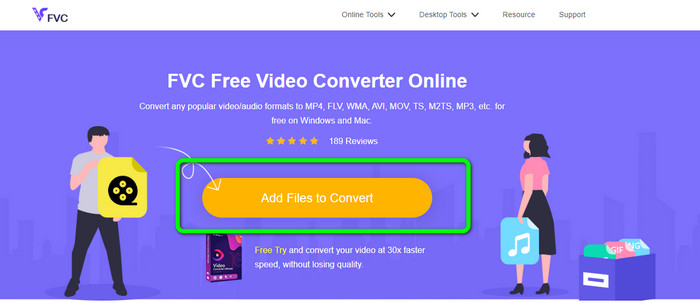
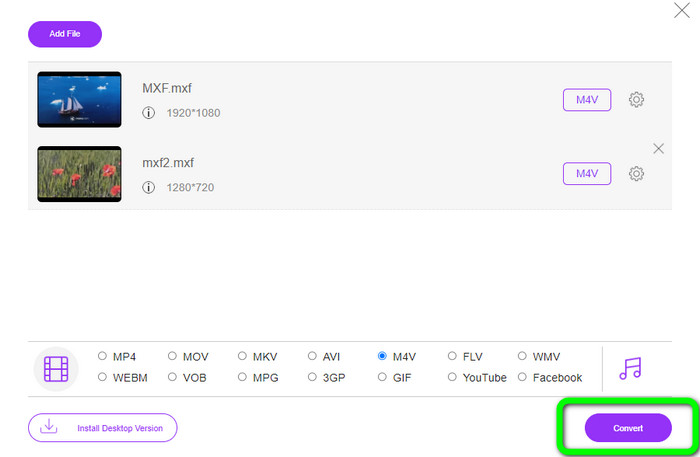
مرحله 1: به مرورگر خود بروید و به وبسایت FVC Free Video Converter Online سر بزنید. پس از ورود به صفحه اصلی، روی Add Files to Convert کلیک کنید تا فایل ویدیویی MXF مورد نظر خود را برای تبدیل، بارگذاری کنید.
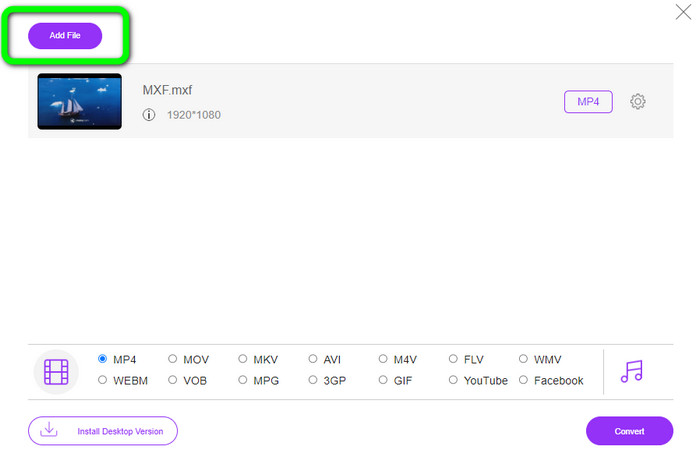
مرحله 2: این مبدل یک فرآیند تبدیل دستهای ارائه میدهد. بنابراین اگر میخواهید فایلهای MXF بیشتری بارگذاری کنید، دکمه Add File را کلیک کنید.
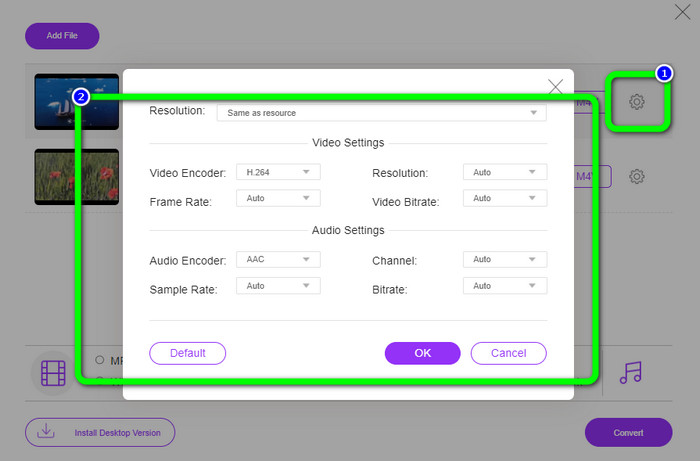
مرحله 3: در این بخش میتوانید با کلیک روی آیکون Setting ویدیوی خود را ویرایش کنید. پس از کلیک روی این آیکون، میتوانید نرخ فریم، وضوح و نرخ بیت ویدیو را تنظیم کنید. همچنین میتوانید نرخ نمونهبرداری و بیتریت صدا را تغییر دهید. سپس دکمه OK را بزنید.
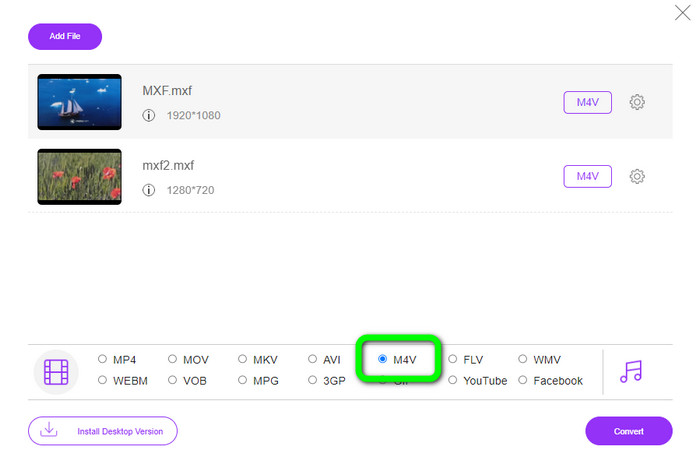
مرحله 4: پس از ویرایش ویدیوها، میتوانید با انتخاب فرمت M4V از گزینههای فرمت در بخش پایینی رابط، خروجی را تغییر دهید.
مرحله 4: در آخرین مرحله، دکمه Convert را فشار دهید. منتظر بمانید تا فرآیند تبدیل انجام شود و سپس ویدیوی خود را در محل دلخواه ذخیره کنید.
قسمت 2: سریعترین راه برای تبدیل MXF به M4V بدون ضرر
اگر یک ابزار قابل نصب برای تبدیل بدون افت کیفیت MXF به M4V میخواهید، Video Converter Ultimate بهترین انتخاب است. این مبدل قدرتمند میتواند انواع فایلها را با سرعت بالا تبدیل کند، نه 10 برابر، نه 20 برابر، بلکه 30 برابر سریعتر از سرعت متوسط تبدیل. علاوه بر این، یک قابلیت عالی دیگر نیز دارد؛ میتوانید چندین فایل را به طور همزمان تبدیل کنید، چون از تبدیل دستهای پشتیبانی میکند. همچنین، علاوه بر MXF و M4V، این ابزار از فرمتهای مختلف ویدیویی از جمله MP4، FLV، AVI، MKV، MOV، WMV، VOB و بسیاری دیگر پشتیبانی میکند. افزون بر این، Video Converter Ultimate هم در ویندوز و هم در مک قابل دسترس است، که آن را برای کاربران هر دو سیستمعامل مناسب میسازد.
علاوه بر این، این اپلیکیشن قابل دانلود علاوه بر تبدیل ویدئو، دارای ویژگی های عالی تری نیز می باشد. اگر می خواهید یک موزیک ویدیو برای شریک زندگی، خانواده، دوستان و غیره خود ایجاد کنید، می توانید از این ابزار استفاده کنید. Video Converter Ultimate یک سازنده موزیک ویدیو ارائه می دهد که در آن می توانید فیلم های فوق العاده ای با موسیقی بسازید. همچنین تم های رایگان مانند شاد، شیک، ساده، شب های برفی، عاشقانه و غیره را ارائه می دهد. همچنین اگر ویدیویی با حجم فایل بزرگ دارید، می توانید آن را با استفاده از کمپرسور ویدیو فشرده کنید. با کمک این ابزار می توانید به راحتی اندازه ویدیوی خود را تغییر دهید.
قابلیتها
◆ بیش از 100 فرمت فایل ویدئویی، از جمله M4V، MXF، FLV، AVI، MP4، XVID، VOB، MOV، SWF، MKV و غیره را تبدیل کنید.
◆ تبدیل چندین فایل به طور همزمان.
◆ سازنده موزیک ویدیو را ارائه می دهد.
◆ یک کلاژ فوق العاده ایجاد کنید.
◆ ابزارهای ویرایش ویدیو، مانند اصلاح کننده ویدئو، کمپرسور، تقویت کننده، تصحیح رنگ و غیره را ارائه دهید.
◆ فرمت های فایل تصویری مانند BMP، PNG، JPG و غیره را تبدیل کنید.
برای تبدیل MXF به M4V بدون ضرر با استفاده از FVC Video Converter Ultimate مراحل دقیق زیر را دنبال کنید.
مرحله 1: با کلیک روی دکمه Download، برنامه Video Converter Ultimate را روی دستگاه خود دانلود کنید. دو دکمه دانلود در پایین وجود دارد. اگر کاربر ویندوز هستید، نسخه ویندوز را کلیک کنید و اگر کاربر مک هستید، نسخه مک را انتخاب کنید. سپس برنامه را اجرا کنید.
دانلود رایگانبرای ویندوز 7 یا بالاتردانلود امن
دانلود رایگانبرای MacOS 10.7 یا بالاتردانلود امن
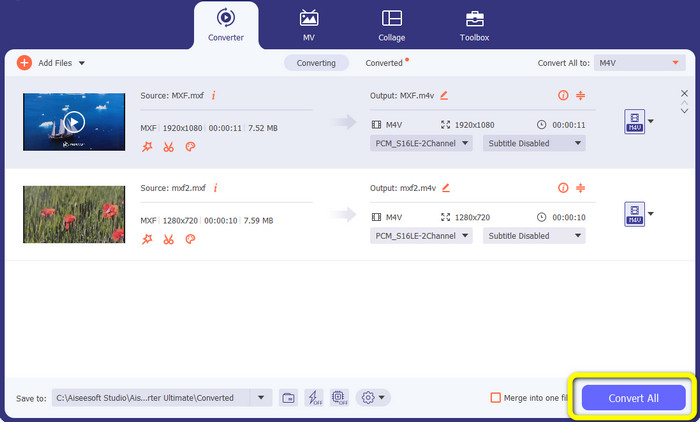
مرحله 2: پس از آن، پنل Converter را انتخاب کنید. برای وارد کردن فایل ویدیویی MXF، روی آیکون + یا دکمه Add File کلیک کنید.
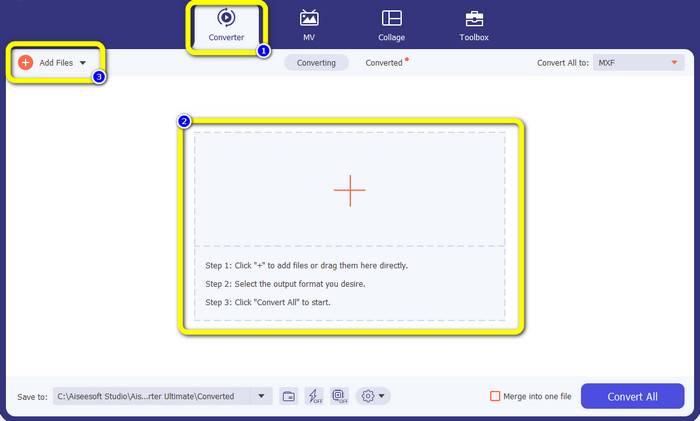
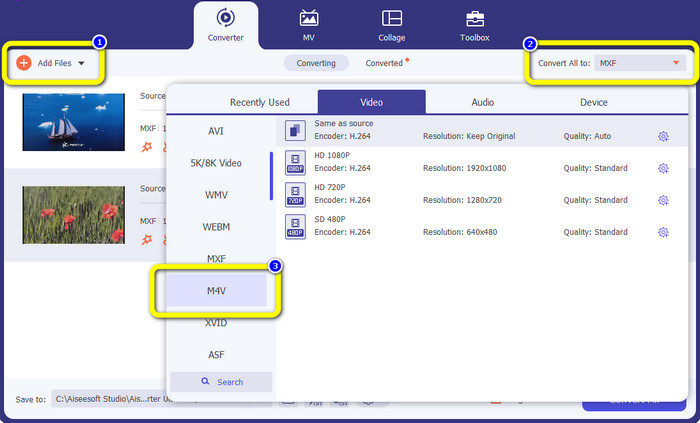
مرحله 3: اگر میخواهید چندین فایل را به طور همزمان تبدیل کنید، دکمه Add File را کلیک کنید. سپس روی دکمه Convert All to کلیک کرده و فرمت فایل M4V را برگزینید. همچنین میتوانید وضوح دلخواه خود را برای ویدیو انتخاب کنید.
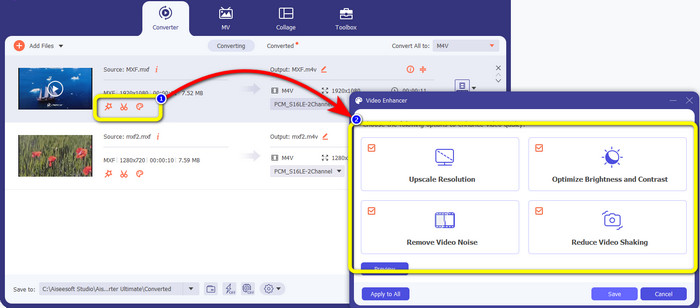
مرحله 4: اگر میخواهید قبل از تبدیل، ویدیوهای خود را ویرایش کنید، میتوانید این کار را انجام دهید. روی ابزارهای ویرایش در اولین جعبه کلیک کنید. سپس آیکون video enhance را انتخاب کنید. بعد، همه گزینهها را برای بهبود وضوح، بهینهسازی روشنایی و کنتراست، و کاهش نویز و لرزش ویدیو علامت بزنید.
مرحله 5: وقتی ویرایش و تغییر فرمت خروجی ویدیوها به پایان رسید، دکمه Convert All را کلیک کرده و ویدیوی خود را در دستگاه ذخیره کنید.
قسمت 3: MXF چیست؟
انجمن SMPTE ظرف رسانه MXF را برای استفاده تجاری ایجاد کرد. MXF بخشی از طرح داده های Advanced Authoring Format (AAF) را پیاده سازی می کند و اخیراً به عنوان استاندارد صنعتی برای ویرایش حرفه ای غیرخطی ویدیو ظاهر شده است. فایلهای MXF را میتوان به راحتی به هر فرمت ویدیویی رایج تبدیل کرد و تقریباً با استفاده از هر کدک فشردهسازی کرد. ذکر این نکته ضروری است که پیاده سازی این فرمت توسط سونی، پاناسونیک و کانن دارای ناسازگاری های متعددی بود که یکی از ضعف های اصلی این کانتینر است. بازنگری استاندارد در سال 2009 به این مشکلات می پردازد.
قسمت 4: M4V چیست؟
M4V نوعی محفظه ویدیویی است که توسط فایل های iTunes برای ذخیره داده های صوتی و تصویری استفاده می شود. اگر فایلهای صوتی یا تصویری Apple FairPlay DRM هستند که در برابر مشاهده و کپی غیرمجاز محافظت میشوند، بهتر است از فروشگاه iTunes خریداری کنید. از آنجایی که قالب بر اساس ساختار MPEG-4 است، عملاً هر پخش کننده معاصری می تواند فایل های محافظت نشده را نمایش دهد.
مطالعه بیشتر:
بهترین مبدلهای MXF به WMV برای تبدیل رایگان MXF به WMV
4 راهحل برتر برای تبدیل MXF به MKV [حلشده]
بخش 5: سوالات متداول در مورد تبدیل MXF به M4V
حجم فایل MXF چقدر است؟
MXF از اندازه فایل تا 2 گیگابایت پشتیبانی می کند. علاوه بر این، MXF از فایل های طولانی تر پشتیبانی می کند. حداکثر زمان ضبط فایل رسانه ای برای فرمت OMF سه ساعت است. MXF می تواند 12 ساعت صدا را در دو کانال با فرکانس 48 کیلوهرتز کنترل کند.
چه کسی از فایل های MXF استفاده می کند؟
چندین تبلیغات تولیدی، از جمله ضبطکنندههای ویدئویی IMX سری 2000 SONY MSW، از آن استفاده کردند. همچنین، تجهیزات ویرایش Avid از نوع خاصی از MXF پشتیبانی می کند.
چگونه MXF را به MOV تبدیل کنم؟
میتوانید از FVC Free Video Converter Online استفاده کنید. فایل MXF خود را بارگذاری کنید، فرمت MOV را از گزینههای فرمت انتخاب کرده و روی دکمه Convert کلیک کنید. به این ترتیب میتوانید فوراً MXF را به MOV تبدیل کنید.
نتیجه
راههای زیادی برای تبدیل MXF به M4V وجود دارد. اما اگر میخواهید از بهترین و ارزشمندترین مبدلها استفاده کنید، میتوانید از برنامههای ذکر شده در بالا، یعنی Video Converter Ultimate و FVC Free Video Converter Online بهره ببرید. این دو مبدل میتوانند فایلها را سریعتر از بسیاری از مبدلهای دیگر تبدیل کنند و استفاده از آنها رایگان است.
-
 روش های مختلف در مورد نحوه تغییر فرمت فایل MOV به M4V
 آیا می خواهید روش موثری برای تبدیل فایل MOV به فرمت M4V داشته باشید؟ سپس، این مقاله خواسته شما را برآورده خواهد کرد. در اینجا بهترین مبدل هایی است که می توانید استفاده کنید.
-
 تکنیک های عالی برای تبدیل فوری GIF به M4V
 این راهنما موثرترین استراتژی ها را برای تبدیل GIF به M4V در اختیار شما قرار می دهد. به علاوه، ما بهترین دو مبدل را که می توانید امتحان کنید به شما معرفی می کنیم.
-
 2 روش استثنایی برتر در مورد نحوه تبدیل M2TS به M4V
 به نظر شما تبدیل فایل M2TS به فرمت دیگری امکان پذیر است؟ اگر بهترین راه حل را می خواهید، نحوه تبدیل فرمت فایل M2TS به M4V را به شما نشان خواهیم داد.
