


 Video Converter Ultimate
 ضبط صفحه
 تعمیر ویدیو
روش های آزمایش شده و اثبات شده برای تبدیل MXF به MKV
Are you having trouble playing your MXF file on VLC Media Player and other programs? It only means that VLC hardly recognized your file. Then, you must convert your MXF file to other file formats. You can convert it to an MKV file because you can play this on VLC Media Player and other programs. In that case, we will show you the best and greatest ways to convert MXF to MKV quickly. Read this article to find more important details you need.

قسمت 1: برجسته ترین روش برای تبدیل MXF به MKV
If you want to look for one of the top-notching video converters, you can try the Video Converter Ultimate. It helps you convert MXF to MKV file format. Also, it supports numerous file formats, including M4V, SWF, MTS, MP4, WMV, FLV, AVI, 3GP, and 100+ more. The best experience you can have when using this tool is that you can convert your MXF file 30x faster than other converters. And also, you can convert multiple video files in one go because it has a batch conversion function. But wait, there’s more. If your MXF video has a watermark, you can remove it using the Toolbox features before converting it. Under the Toolbox panel, you will find the Video Watermark Remover function. Also, if there are some instances that you want to play your video backward, then Video Converter Ultimate got your back! This tool also offers a Video Reverser function, so you can reverse your video and play them backward effortlessly.
قابلیتها
◆ تبدیل فرمت های مختلف فایل های ویدئویی.
◆ برای ایجاد موزیک ویدیو خوب است.
◆ ایده آل برای ساخت یک ویدیو یا عکس کلاژ.
◆ قابلیت تبدیل فرمت های تصویر مانند JPG، PNG، GIF و غیره.
◆ گزینه جعبه ابزار را برای بهبود ویدیو ارائه می دهد.
◆ قابلیت فشرده سازی فیلم و صدا.
◆ می تواند یک ویدیو را تا 0.125 برابر کندتر کند و آن را تا 8 برابر سریعتر از سرعت عادی کند.
طرفداران
- دارای یک فرآیند تبدیل فوق العاده سریع است که 30 برابر سریعتر از سایر برنامه ها است.
- می تواند چندین فایل را با یک کلیک تبدیل کند.
- کاربران را قادر می سازد تا GIF ها را از تصاویر یا ویدیوها سفارشی کنند.
- مناسب برای مبتدیان و دارای رابط کاربری ساده است.
- می تواند بیش از 1000 فرمت فایل مانند MP4، AVI، FLV، WMV، WEBM، MOV و غیره را تبدیل کند.
منفی ها
- ویژگی های عالی بیشتری را می توان در نسخه پولی تجربه کرد.
برای تبدیل فایل MXF به فرمت MKV مراحل ساده زیر را دنبال کنید.
Step 1: Click the Download button below to download the Video Converter Ultimate on your Windows or Mac. Go to the installation process and run the application.
دانلود رایگانبرای ویندوز 7 یا بالاتردانلود امن
دانلود رایگانبرای MacOS 10.7 یا بالاتردانلود امن
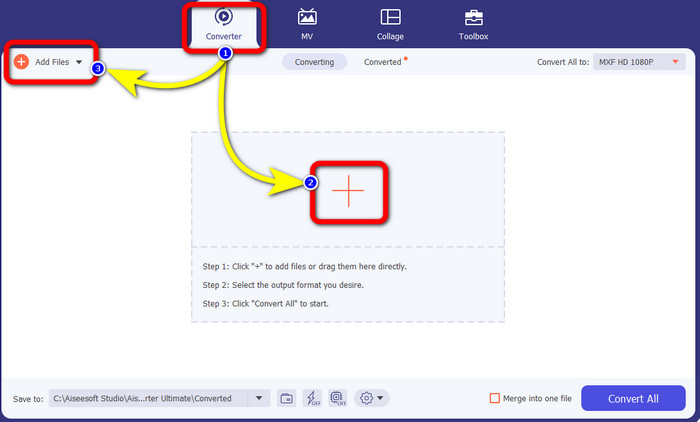
Step 2: Select the Converter panel when the interface shows up. Press the Plus icon to attach your video with an MXF file you want to convert. Also, you can select the Add Files button to add your video.
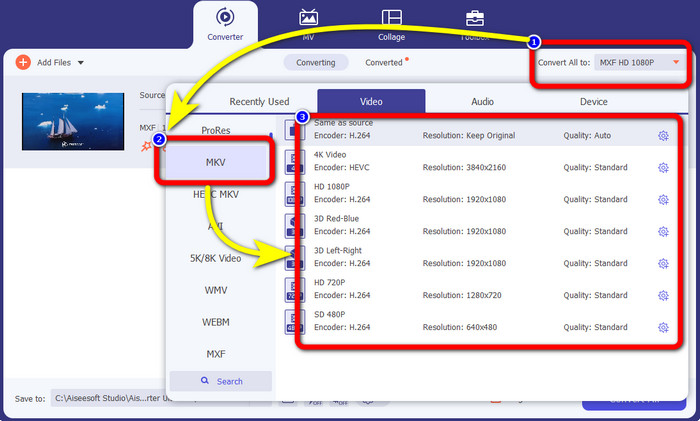
Step 3: After adding your file, click the Convert All to option. The format options will appear, then select the MKV file format.
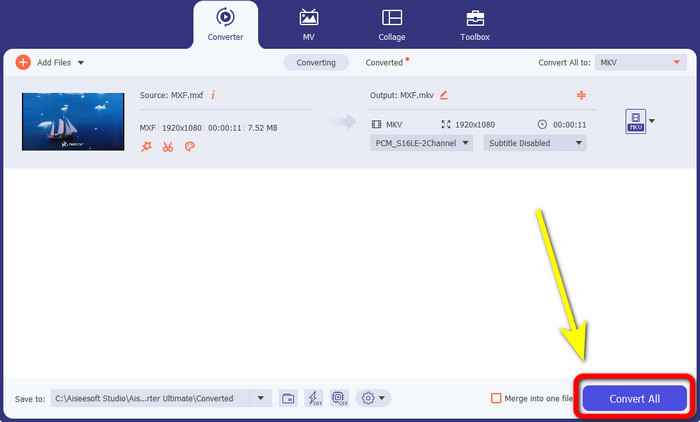
Step 4:Finally, you can already click the Convert All button to convert your MXF file to MKV format.
بخش 2: روش های آنلاین برای تبدیل MXF به MKV
استفاده از مبدل ویدیوی رایگان FVC به صورت آنلاین
When it comes to converting MXF to MKV format online, FVC Free Video Converter Online is for you. This online tool can convert more files, including MP4, MOV, FLV, GIF, MPG, 3GP, MKV, VOB, WEBM, etc. You don’t need to worry about how to use it because it only has three simple steps to convert files, which is perfect for any user, especially for beginners. In addition, this online tool video quality up to 1080p. It is also accessible on many browsers, such as Google Chrome, Mozilla Firefox, Microsoft Edge, and more. Moreover, aside from converting video formats, you can also convert audio formats, like MP3, M4A, AAC, AC3, WMA, FLAC, etc.
بیایید فایل MXF خود را با استفاده از FVC Free Video Converter Online به MKV تبدیل کنیم.
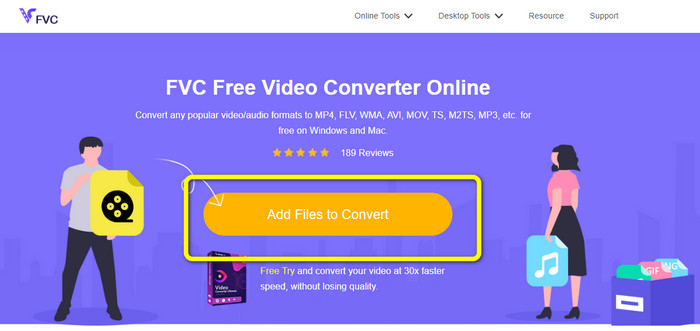
Step 1: Visit the FVC Free Video Converter Online website. Click the Add File to Convert button in the middle to upload your video with an MXF file.
Step 2: A small box on your screen will appear after uploading your MXF file. Then, you will see the format options on the lower part. Select your desired format, which is the MKV file format.
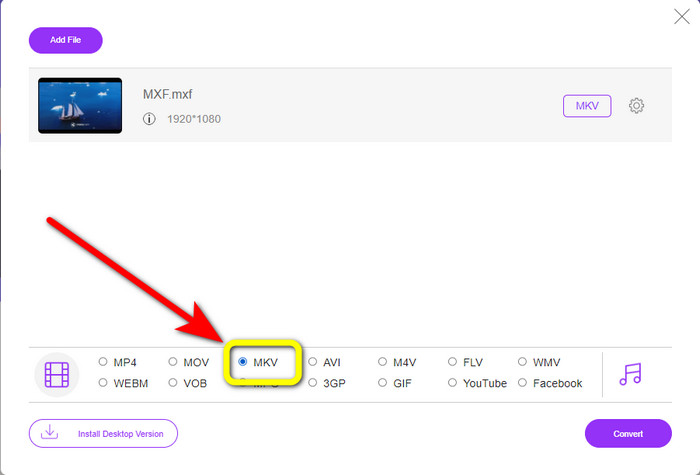
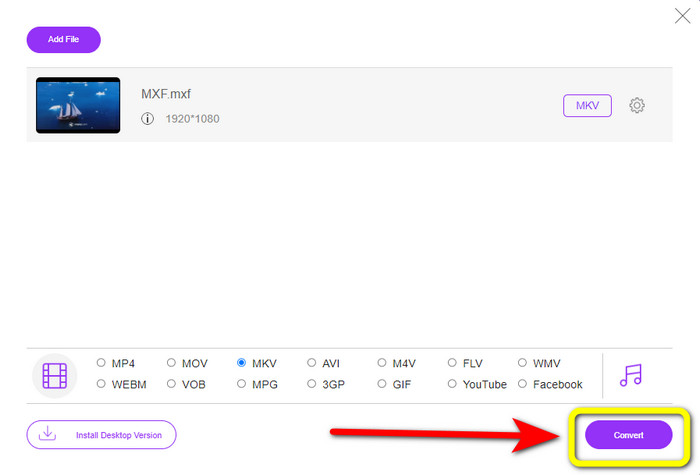
Step 3: For your last step, press the Convert button to convert the MXF file to MKV. Wait for the conversion process and save your video. You can also use this tool to convert MXF to WMV.
با استفاده از Convertio
Convertio is another online tool you can use to convert MXF to MKV file format. This online software can convert your video file to 37 formats, including MP4, MOV, WEBM, AVI, MTS, MPEG, XVID, DIVX, and more. You can also convert image and audio formats, like GIF, MP3, AAC, FLAC, M4R, etc. Aside from converting, Convertio allows you to compress video, add subtitles to a video, create a meme, and edit videos. However, even though it has many good tools and features, this online software has limitations when using the free version. Sadly, you can only convert files with a maximum of 100Mb file sizes. It only means you must purchase the subscription to converter unlimited files and experience more features from this tool. Follow the simple guides below to convert the MXF file to MKV format.
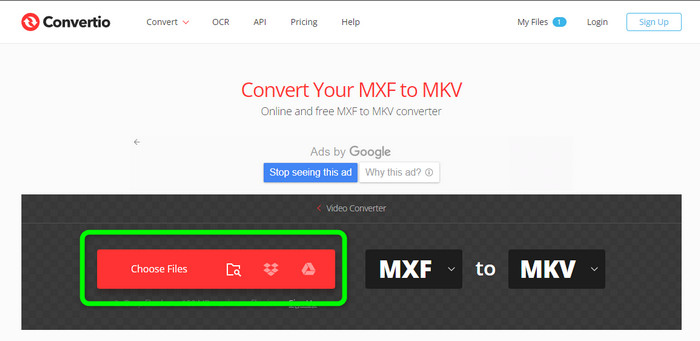
Step 1: Go to the Convertio website. Click the Choose Files button to attach your MXF file.
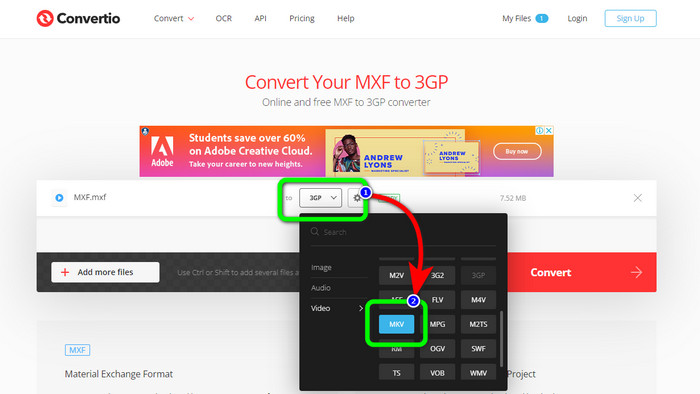
Step 2: When the file is already uploaded, click the format options and select the MKV file format.
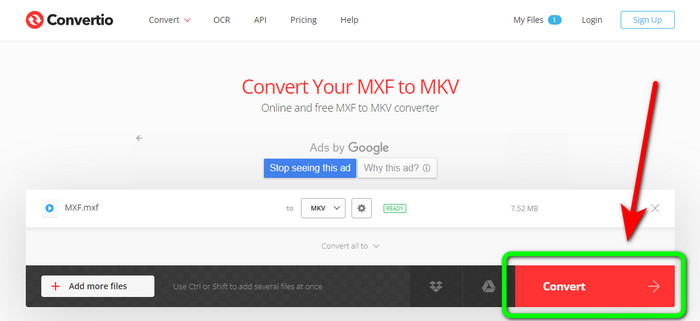
Step 3: After choosing your desired file format, the MKV file, you can click the Convert button. Wait for the process of converting the file and save it on your device.
با استفاده از Cloudconvert
If you are still looking for another online converter to convert MXF to MKV, you must visit Cloudconvert. This online tool is good for converting various files, such as MKV, FLV, AVI, WEBM, WMV, etc. In addition, you can convert many files without losing the quality of your videos. However, you can only convert 25 files per day using the free version of this software. In this case, if you want to convert more files, you must buy a subscription. Also, there are times when the conversion process is slow, depending on your internet connection speed. But, Cloudconvert only has eight supported output file formats, which is not great for users. If you are ready to convert your video from an MXF file to MKV format, use the steps below..
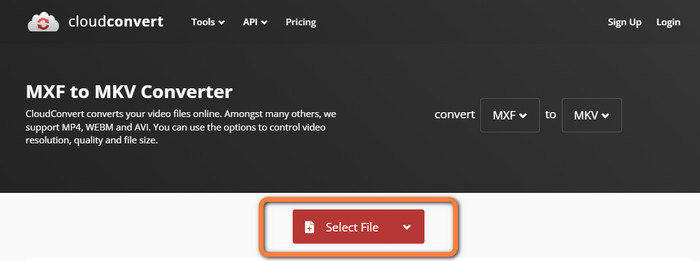
Step 1: Visit the website of Cloudconvert. Click the Select File button to insert the MXF file you want to convert to MKV.
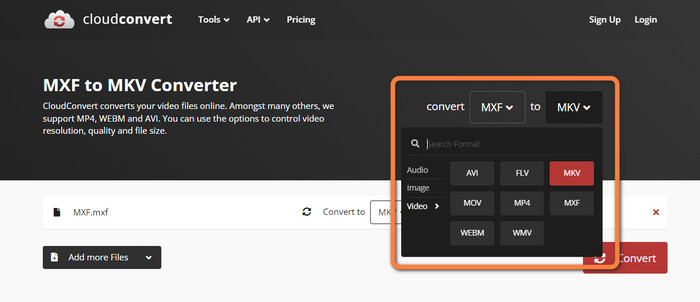
Step 2: After you insert your MXF file, proceed to the format options and select the MKV file format.
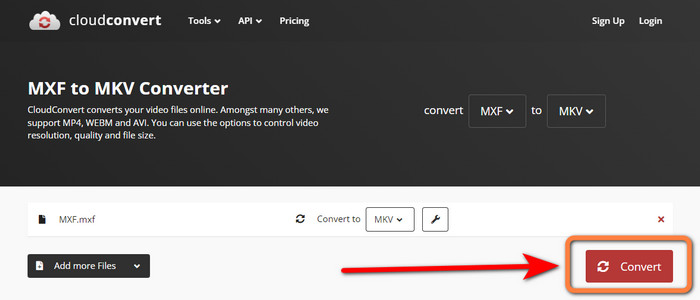
Step 3: The last step is to press the Convert button. Then, wait for the conversion process and save your final video. This tool also helps you convert TRP to MKV.
قسمت 3: مقایسه MXF در مقابل MKV
| MXF | MKV | |
| فرمت فایل | mxf | mkv |
| شرح | یک فرمت ظرف چندرسانه ای به نام MXF، ویدئو، صدا و ابرداده را برای سرعت بخشیدن به تبادل ویدیوها بین رایانه های مختلف نگه می دارد. فایل های MXF اغلب برای فیلم ها و تبلیغات تلویزیونی که در سینماها نمایش داده می شوند استفاده می شود. | فرمت ظرف چندرسانه ای Matroska یا MKV، انواع دیگر آهنگ های ویدئویی، صوتی و زیرنویس (مانند USF یا SRT) را در یک فایل واحد ترکیب می کند. توزیع آنلاین فیلم های کوتاه و نمونه های صوتی اغلب از فایل های MKV استفاده می کند. |
| توسعه دهنده | انجمن مهندسان تصویر متحرک و تلویزیون | CoreCodec، INC. |
| نوع MIME | برنامه/mxf | ویدئو/x-matroska |
| کدک های ویدیویی | MPEG-4 AVC/H.264، MPEG-1، MPEG-2، MPEG-4 Visual و غیره. | MPEG-1، Theora، Real Video، Microsoft MPEG4 V2، VP8، MVC و غیره. |
| برنامه های مرتبط | File Viewer Plus Adobe Premiere Pro Windows Media Player | VLC Media Player DIVX Player MX Player GOM Player KMPlayer PotPlayer |
بخش 4: سوالات متداول در مورد تبدیل MXF به MKV
1. MKV کانتینر است یا کدک؟
فرمت کانتینر چند رسانه ای برای ویدئو که توسط Matroska استفاده می شود به عنوان یک فایل MKV شناخته می شود. Extensible Binary Meta Language پایه و اساس MKV است که از چندین فرمت فشرده سازی ویدیویی و صوتی پشتیبانی می کند. MKV یک کانتینر است، نه یک کدک، که تمایز اصلی بین آن و سایر فرمت های ویدیویی است.
2. MKV بهتر از MP4 هست؟
آنها هر دو با شکوه هستند. برای پخش ویدیو در مرورگر، MP4 به طور گستردهتری پشتیبانی میشود و سربار فایل کمتری دارد. ظرف MKV به طور گسترده ای برای تبدیل دیسک های Blu-Ray و DVD به فایل های ویدئویی استفاده می شود.
3. آیا MXF یک فایل ویدئویی است؟
قطعا، بله. MXF فرمت فایل صوتی و تصویری است. فایلهای MXF شامل اطلاعاتی درباره رسانههای داخل آن است. این اطلاعات همچنین به عنوان ابرداده شناخته می شود، از جمله اندازه فریم، نرخ فریم، تاریخ ایجاد و غیره.
نتیجه
This article offers the most excellent, tested, and proven methods to convert MXF to MKV using desktop tools and online applications. If you want to convert unlimited files easily and instantly, you can visit the FVC Free Video Converter Online.
-
 نحوه تبدیل MKV به DivX به صورت آنلاین و آفلاین به صورت رایگان
 آیا به دنبال بهترین راه برای تبدیل MKV به فرمت DivX به صورت رایگان هستید؟ برای شناخت بهترین مبدل های آنلاین و آفلاین MKV به DivX به خواندن ادامه دهید
-
 بهترین روش ها در مورد نحوه تبدیل AMV به MKV به صورت رایگان
 آیا می خواهید AMV را به راحتی و رایگان به MKV تبدیل کنید؟ ما به شما اطلاعات کافی و بهترین برنامه را با مبدلی که می توانید استفاده کنید ارائه می دهیم. بیایید ادامه دهیم!
-
 با استفاده از این مبدل های نهایی MTV را به راحتی به MKV تبدیل کنید
 آیا می خواهید روش عالی تبدیل MTV به MKV را بدانید؟ این پست سه راه ساده برای تبدیل فایلها به صورت آنلاین و در ویندوز/مک ارائه میدهد
