


 Video Converter Ultimate
 ضبط صفحه
 تعمیر ویدیو
2 مبدل MXF به WMV توصیه شده آنلاین و آفلاین در دسترس است
بسیاری از کاربران میپرسند چگونه فایلهای MXF را به WMV تبدیل کنند چون میخواهند ویدیو را به صورت آنلاین پخش کنند. برخلاف فایلهای MXF، فرمت WMV بیشتر برای توزیع محتوای ویدیویی و ذخیرهسازی روی دیسکهای HD DVD یا بلوری استفاده میشود. بهجای خواندن هزاران مطلب مختلف درباره مبدّل MXF، چرا همین مطلب را تا انتها نمیخوانید؟ برای اینکه بدانید چگونه میتوانید فایلهای MXF خود را بدون افت کیفیت و با کمک دو روشی که در ادامه آمده تبدیل کنید، ادامه را دنبال کنید.

قسمت 1. معرفی مختصر MXF و WMV
قبل از اینکه به تبدیل MXF به WMV بپردازیم، اجازه دهید نگاهی گذرا به این دو فرمت داشته باشیم و دلیل تبدیل فرمت را بدانیم.
فرمت تبادل مواد، معروف به MXF، یک فرمت رسانه ای حاوی یک نوار ویدئویی جایگزین است. اما در عوض، روی یک نوار، اکنون دیجیتالی شده است. این قالب با گنجاندن ابرداده و کد زمانی در مورد جزئیات ویدیویی و صوتی بهترین کار را دارد. بیشتر برای انتقال تبلیغات در ایستگاه های تلویزیونی یا آرشیو برنامه های پخش تلویزیونی استفاده می شود.
در حالی که فایل WMV یا Windows Media Video با فرمت ASF یکسان است زیرا جریان بیت فایل رسانه را میپیچد. این فرمت بدون شک کوچکتر از MXF است زیرا از فشرده سازی بدون تلفات برای فشرده سازی اندازه فایل استفاده می کند. با این حال، کیفیت آن تحت تاثیر قرار نخواهد گرفت. علاوه بر این، WMV در ابتدا برای پخش آنلاین ساخته شد، اما با نسخه جدید، WMV9، برای دیویدیهای HD و دیسکهای Blu-ray سازگار شده است.
شما باید فایل MXF خود را تبدیل کنید زیرا پخش فیلم ها در فرمت WMV، به خصوص در ویندوز، بسیار راحت تر از MXF است. برای توزیع آنلاین، WMV بهتر از فایل MXF است. اما اگر می خواهید یک رکورد زمان و ابرداده داشته باشید، MXF آن گزینه را برای شما فراهم می کند.
قسمت 2. تبدیل MXF به WMV با مبدل فوق العاده نهایی در ویندوز و مک
FVC Video Converter Ultimate بهترین فرایند تبدیل MXF به WMV را با حفظ کامل کیفیت ارائه میکند. علاوه بر آن، میتوانید MXF را بدون افت کیفیت فایل خام، به AVI، MOV، MKV، MP4 و فرمتهای دیگر نیز تبدیل کنید. این ابزار فقط یک مبدّل نیست، چون کارهای شگفتانگیز دیگری مانند ویرایش و غیره را هم میتوانید در آن انجام دهید. همچنین، با تمام برنامههای دسکتاپ از جمله ویندوز و مک با همان قابلیتها سازگار است. حالا، میخواهید بدانید چطور از این مبدّل فوقالعاده استفاده کنید؟ اگر بله، مراحل زیر را دنبال کنید و یاد بگیرید چگونه تبدیل انجام دهید.
مراحل تبدیل MXF به WMV با استفاده از FVC Video Converter Ultimate:
مرحله 1. پیش از هر چیز، باید نرمافزار را با کلیک روی دکمه دانلود روی رایانه خود دریافت کنید. مراحل نصب را بهسرعت دنبال کرده و برنامه را اجرا کنید.
دانلود رایگانبرای ویندوز 7 یا بالاتردانلود امن
دانلود رایگانبرای MacOS 10.7 یا بالاتردانلود امن
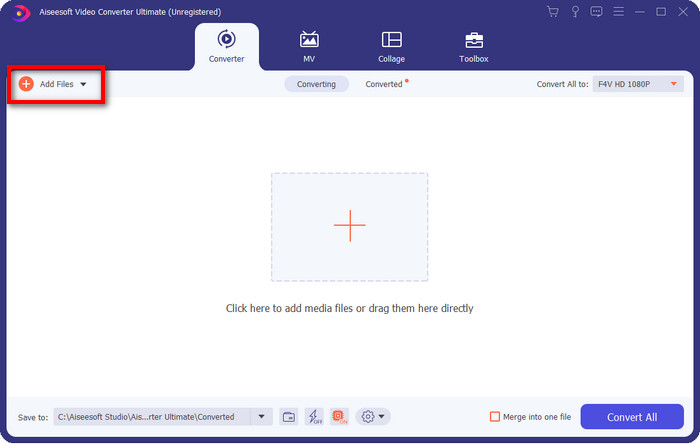
مرحله 2. با کلیک روی Add Files فایل را بارگذاری کنید؛ در پنجره پوشه، فایل MXF موردنظر برای تبدیل را انتخاب کرده و روی Open بزنید.
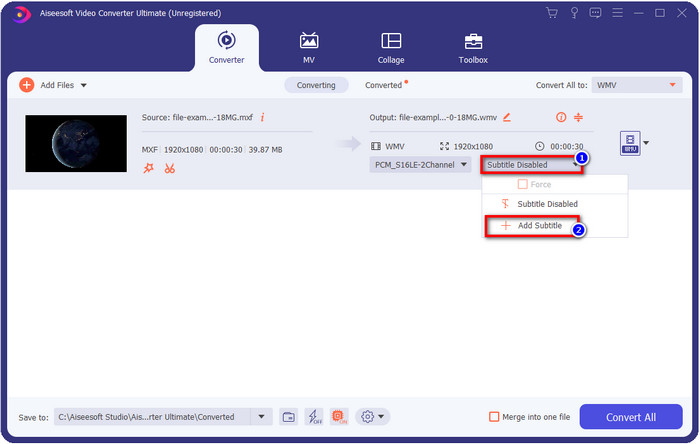
آیا میخواهید به ویدیوی خود زیرنویس اضافه کنید؟ اگر چنین است، روی دکمه drop-down کلیک کرده و Add Subtitle را بزنید. فایل زیرنویس را در پوشههای روی رایانه خود پیدا کرده و روی Open کلیک کنید.
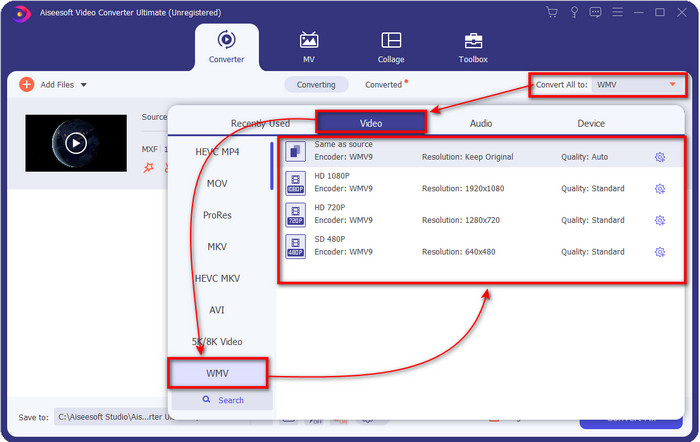
مرحله 3. برای تغییر فرمت به WMV روی Convert All to کلیک کنید.
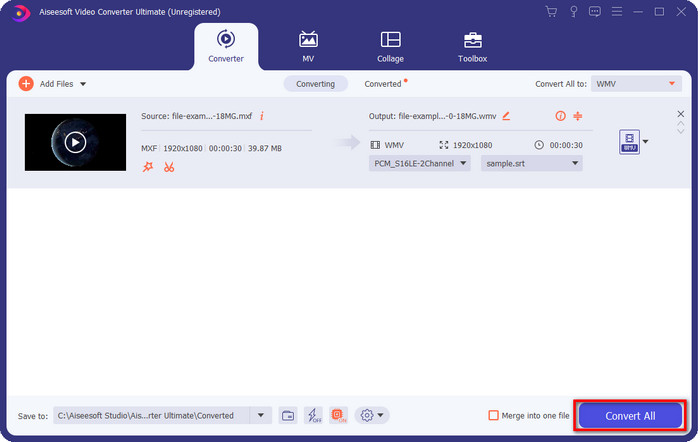
مرحله 4. بعد از انجام همه مراحل، اکنون زمان آن است که با کلیک روی Convert All فایل را به WMV تبدیل کنید.
طرفداران
- از فرمت بزرگ برای تبدیل MXF به WMV، FLV، MKV، AVI، MOV و غیره پشتیبانی می کند.
- در تمامی سیستم عامل ها برای دانلود در ویندوز و مک موجود است.
- از ویژگیهای ویرایش منحصربهفرد پشتیبانی میکند تا ویدیوی شما را منحصر به فرد و جذابتر از دیگران کند.
- سریع ترین و خارق العاده ترین فرآیند تبدیل را با FVC Video Converter Ultimate تجربه کنید.
منفی ها
- خرید نرم افزار مورد نیاز است.
- قبل از اینکه بتوانید از آن استفاده کنید، نرم افزار را روی دسکتاپ خود دانلود کنید.
قسمت 3. سریعترین و ساده ترین تبدیل MXF به WMV با سرویس آنلاین
FVC Free Online Video Converter یک مبدّل ویدیویی درجهیک است که بهراحتی میتوانید در وب به آن دسترسی داشته باشید. میتوانید تعداد قابل قبولی از فرمتها مانند MP4، MOV، MKV، FLV، AVI و دیگر فرمتهای ویدیویی را در اینجا بارگذاری کنید. برخلاف بسیاری از مبدّلهای آنلاین، در اینجا محدودیتی برای تعداد یا حجم فایلهایی که میخواهید تبدیل کنید وجود ندارد. با این حال، امکان تبدیل دستهای (Batch) در این ابزار وجود ندارد چون از آن پشتیبانی نمیکند. برای تبدیل MXF به WMV مراحل زیر را انجام دهیم.
مراحل تبدیل MXF به WMV با استفاده از FVC Free Video Converter Online:
مرحله 1. روی این لینک کلیک کنید تا به صفحه اصلی وبسایت بروید.
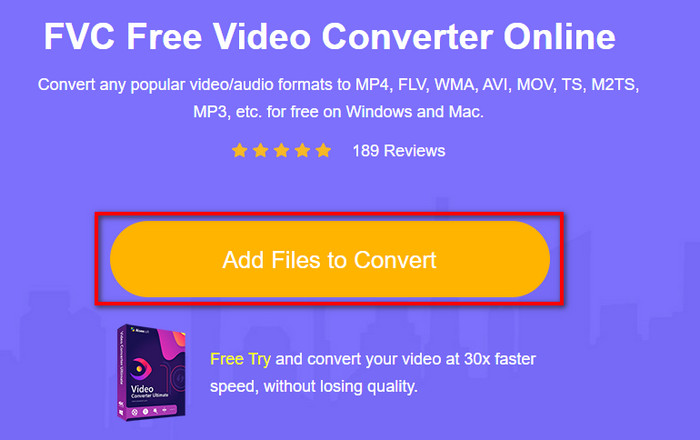
مرحله 2. روی Add Files to Convert کلیک کنید تا پوشهای که فایل MXF خود را در آن قرار دادهاید باز شود. فایل را انتخاب کرده و روی Open بزنید.
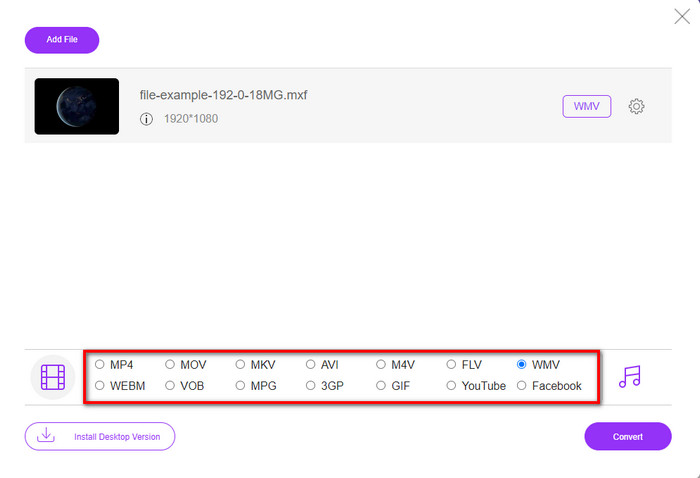
مرحله 3. در رابط کاربری جدید وب، زیر فهرست فرمتها، فرمت دلخواه برای تبدیل را انتخاب کنید یا روی WMV کلیک کنید.
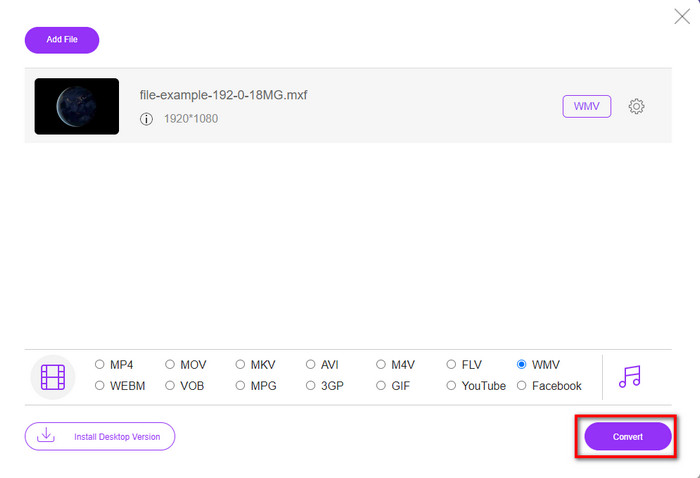
مرحله 4. با کلیک روی Convert تبدیل فرمت را آغاز کنید؛ فرایند شروع خواهد شد.
طرفداران
- این یکی از امن ترین راه ها برای تبدیل MXF به فرمت های WMV، AVI، MOV، MP4 و دیگر فرمت های معروف است.
- در هر زمان و هر مکان در مرورگر مورد علاقه خود به آن دسترسی داشته باشید.
- رایگان و سبک وزن است.
منفی ها
- برای استفاده به اتصال اینترنت نیاز دارید.
- از تبدیل دسته ای و سریع پشتیبانی نمی کند
بخش 4. سوالات متداول در مورد تبدیل MXF به WMV
چرا فایل های MXF خیلی بزرگ هستند؟
یکی از دلایلی که باعث میشود فایلهای MXF حجیم باشند، فراداده (Metadata) فراوانی است که درون خود دارند و به حجم فایل اضافه میکند. اما میتوانید با فشردهسازی، حجم فایل را کمتر کنید. برای این کار این مطلب را بخوانید و یاد بگیرید چگونه فایلهای MXF را فشرده کنید.
آیا تبدیل فایل های MXF زمان زیادی می برد؟
این موضوع بستگی به مبدّلی دارد که استفاده میکنید. برای مثال، اگر در حال حاضر از ابزار تحت وب استفاده میکنید، سرعت تبدیل به سرعت اینترنت شما بستگی خواهد داشت. استفاده از مبدّل آنلاین MXF معمولاً زمان بیشتری نسبت به مبدّلهای دسکتاپ که روی ویندوز یا مک نصب میشوند میبرد. بنابراین، اگر میخواهید تبدیل با سرعت بسیار بالا را تجربه کنید، باید از FVC Video Converter Ultimate استفاده کنید.
آیا فرمت های MOV و MXF یکسان هستند؟
اگر بخواهیم درباره محتوای آنها صحبت کنیم، MXF و MOV تقریباً عناصر مشابهی دارند؛ برای مثال، ویدیو، صدا و فراداده. اما MXF مخصوصاً در زمینه متادیتا و تایمکد، اطلاعات بسیار جزئیتر و دقیقتری نسبت به MOV ارائه میدهد. با این حال، استفاده از MOV بهمراتب سادهتر از MXF است. در بسیاری از موارد، کاربران میپرسند آیا میتوانند MXF را به MOV تبدیل کنند. اگر شما هم یکی از آنها هستید، باید روی این لینک کلیک کرده و جزئیات کامل مربوط به مبدّلهای MXF به MOV را بخوانید.
نتیجه
برای جمعبندی بحث، اکنون شناختن مبدّلها، چه تحت وب و چه دسکتاپ، برای تبدیل MXF به WMV سادهتر شده است. از آنجا که هر دو مبدّل، خروجی شگفتانگیزی در اختیار شما قرار میدهند، اگر به نتیجهای حرفهایتر نیاز دارید، باید از FVC Video Converter Ultimate استفاده کنید. تردیدی نیست که این ابزار میتواند در تمام مشکلات مربوط به تبدیل به شما کمک کند. و اگر زمانی نیاز داشتید ویدیو را معکوس کنید، ادغام کنید، بهبود دهید و کارهای دیگر انجام دهید، این برنامه تنها راهحل همه این نیازها خواهد بود.
-
 4 روش رایگان برای تبدیل دوربین فیلمبرداری MXF به MP4 برای پخش جهانی
 این پست راهنمای دقیق تبدیل MXF به MP4 در رایانه است. در مراحل ساده می توانید 4 مبدل MXF به MP4 رایگان برای تبدیل دوربین فیلمبرداری MXF به MP4 رایگان دریافت کنید.
-
 4 مبدل MXF برتر برای تبدیل MXF به AVI [رایگان و پولی]
 فایل MXF چیست؟ چگونه MXF را به AVI تبدیل کنیم؟ این چند سوالی است که ما به آنها پاسخ می دهیم. بنابراین، اگر شما هم همین سوال را دارید، این مقاله را بخوانید.
-
 نحوه تبدیل MXF به FLV با استفاده از روش های مختلف [ثابت شده]
 آیا سعی کرده اید MXF را به FLV روی مبدل عجیب و غریب موجود آنلاین تبدیل کنید. با این وجود، نمیتوانید کیفیتی را که میخواهید در ویدیوی خود دریافت کنید؟ توصیه می کنیم این مقاله را بخوانید تا در مورد تبدیل MXF به FLV بیشتر بدانید.
