


 Video Converter Ultimate
 ضبط صفحه
 تعمیر ویدیو
در بررسی دقیق درباره 5 مبدل برتر برای تبدیل OGV به WMV
هیچ ایدهای ندارید چطور باید فایل OGV را به WMV تبدیل کنید و آن را در Windows Media Player خود پخش کنید؟ خوششانس هستید، چون امروز میخواهیم ابزارهای مختلفی را که میتوانید برای تبدیل فایل OGV خود به کار ببرید، معرفی کنیم. میخواهید بدانید این پنج ابزار کداماند؟ در بخش بعدی، همچنین یاد میگیرید چطور فایل OGV خود را به WMV تبدیل کنید. پس بهتر است کمربندها را ببندید، چون نمیخواهیم بیشتر از این منتظر بمانید، و همین حالا سفرمان را شروع میکنیم.

قسمت 1. 5 تبدیل OGV به WMV آنلاین و آفلاین
بالا 1. FVC Video Converter Ultimate
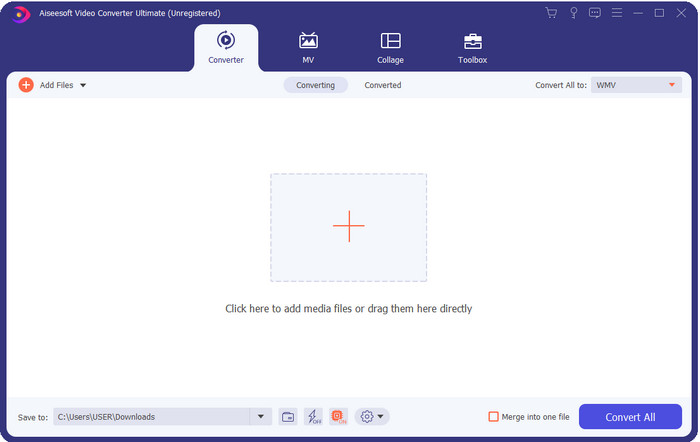
FVC Video Converter Ultimate یکی از بهترین مبدلهای OGV به WMV است که میتوانید روی دسکتاپ خود دانلود کنید. این ابزار سرعتی باورنکردنی در تبدیل ارائه میدهد که بسیاری از کاربرانش را تحت تأثیر قرار داده است. علاوه بر این، تبدیل تنها بخش مهم این ابزار نیست. میتوانید از امکانات پیشرفته ویرایش در اینجا استفاده کنید تا ویدئوی خود را برجسته کنید، حجم آن را کمتر کنید یا ویدئوها را با هم ادغام کنید. در مجموع، اگر تازهکار هستید و بهتازگی میخواهید فرمتها را تبدیل کنید، این بهترین انتخاب است؛ چون میتوانید تبدیل را بدون هیچ زحمتی و به سادگی یک، دو، سه انجام دهید و در پایان، خروجیای حرفهای داشته باشید.
دانلود رایگانبرای ویندوز 7 یا بالاتردانلود امن
دانلود رایگانبرای MacOS 10.7 یا بالاتردانلود امن
طرفداران
- OGV خود را به فرمت های WMV، AVI، MOV، MP4 و 200+ تبدیل کنید که در کمتر از یک دقیقه در دسترس هستند.
- لباس قوی آن تبدیل و ویژگی های ویرایش پیشرفته ای است که شما نیاز دارید.
- یک مبدل باورنکردنی که هر کسی میتواند حتی بدون تجربه از آن استفاده کند، اشتباه و سبک وزن است.
- در تمامی سیستم عامل ها برای دانلود در ویندوز و مک موجود است.
منفی ها
- برای تهیه این نرم افزار ابتدا باید آن را خریداری کنید.
- آن را در درایو کامپیوتر خود دانلود کنید.
بالا 2. VLC Media Player
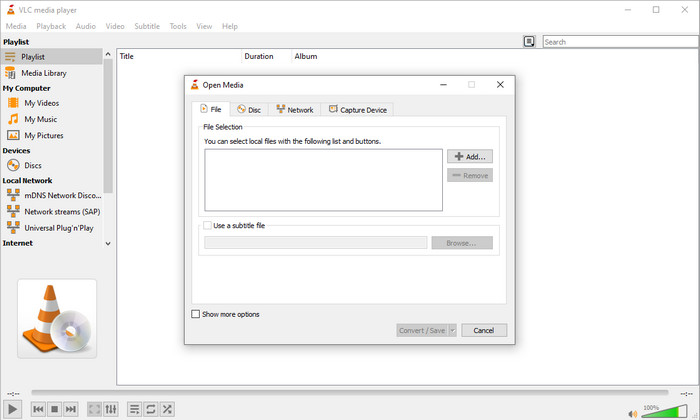
VLC Media Player یکی از در دسترسترین و پردانلودترین پخشکنندهها روی همه دستگاهها است. این پخشکننده ویدئو همچنین میتواند OGV شما را به WMV یا نسخه جدید دیگری که میخواهید تبدیل کند. با اینکه این پخشکننده قابلیت تبدیل دارد، اما همچنان از نظر فرمتهای پشتیبانیشده محدود است، بهویژه زمانی که میخواهید فایل خود را به یک فرمت خاص تبدیل کنید. با این حال، اگر از قبل VLC را روی دسکتاپ خود دارید، چرا این پخشکننده-مبدل ویدئو را روی دسکتاپ امتحان نکنید تا فرمت فایل خود را تغییر دهید.
طرفداران
- دانلود رایگان است و از فرمت های مختلف برای پخش و تبدیل پشتیبانی می کند.
- در همه دستگاه های قابل استفاده موجود است.
- فرآیند سریع تبدیل
منفی ها
- از فرمت محدودی پشتیبانی می کند که می توانید از بین آنها انتخاب کنید.
- مبدل معمولی شما نیست.
- قبل از اینکه بتوانید تبدیل کنید، مراحل زیادی لازم است.
بالا 3. Aconvert
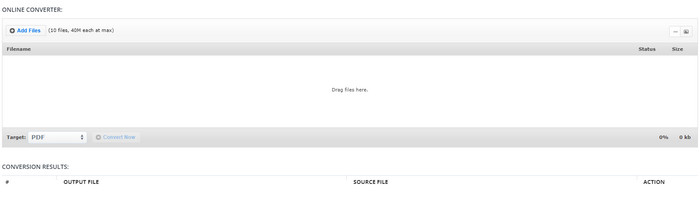
Aconvert در انجام وظیفه تبدیل فایلهای OGV به شما کمک خواهد کرد. این مبدل آنلاین OGV به WMV فرایند تبدیل کارآمدی ارائه میدهد تا با کمترین مزاحمت روبرو شوید. با این حال، این مبدل تبلیغات زیادی روی رابط وب دارد که از جهات مختلف میتواند بسیار آزاردهنده باشد. همچنین این ابزار تجربه تبدیل شما را به ده بار تبدیل و حداکثر اندازه ۴۰ مگابایت برای هر فایل محدود میکند. اما نیازی به نگرانی نیست، چون این ابزار برای همه کاربران اینترنت که میخواهند فایلها را بهصورت آنلاین تبدیل کنند، رایگان است.
طرفداران
- در وب برای استفاده در دسترس است.
- از فرمت شناخته شده ای پشتیبانی می کند که می توانید وارد کنید.
- کاربر پسند.
منفی ها
- فرمت گزینه ها برای خروجی نهایی کاستی های زیادی داشت.
- تبلیغات آزاردهنده زیادی در وب سایت وجود دارد.
بالا 4. Video2Edit.com
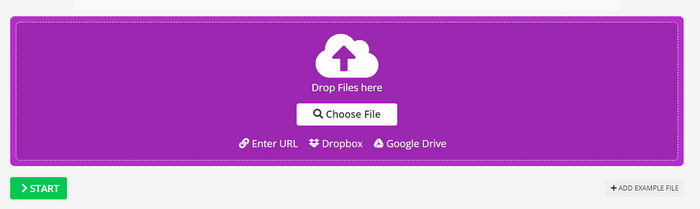
Video2Edit.com شبیه Aconvert است، اما این ابزار حتی بهتر است؛ زیرا میتوانید قبل از تبدیل OGV به WMV ویدئو را ویرایش کنید. همچنین میتوانید کُدک صدای خود را بین سه گزینه تغییر دهید. علاوه بر این، کارهای زیادی میتوانید با این مبدل انجام دهید. اما نقطهضعف این وبابزار این است که فرمتهای موجود در آن محدود است. همچنین دارای تبلیغات است و روند تبدیل نیز کند میباشد.
طرفداران
- مبدل چند منظوره
- در تمام وب موجود است تا برای هر کسی قابل دسترسی باشد.
- می تواند کدک های ویدئویی و صوتی را تغییر دهد.
منفی ها
- تبلیغات در رابط
- فرآیند تبدیل زمان زیادی می برد.
بالا 5. FVC رایگان تبدیل ویدئو آنلاین
FVC Free Video Converter Online فرایند تبدیل بهتری برای OGV به WMV نسبت به VLC، Aconvert و Video2Edit.com ارائه میدهد. زیرا این وبابزار مانند FVC Video Converter Ultimate خروجی حرفهای تولید میکند، هرچند همه فرمتهایی که ابزار Ultimate پشتیبانی میکند، در اینجا در دسترس نیست. علاوه بر این، میتوانید کیفیت را تنظیم کرده و آن را روی وضوح بالاتر برای خروجی بهتر قرار دهید. مزیت دیگر این است که هیچ تبلیغ آزاردهندهای هنگام تبدیل مزاحم شما نخواهد شد. بنابراین میتوانید بدون ظاهر شدن تبلیغات از فرایند تبدیل لذت ببرید، و در اینجا بدون محدودیت، حتی در اندازه فایل، میتوانید تبدیل انجام دهید.
طرفداران
- از فرمت های بیشتری نسبت به VLC، Adconvert و Video2Edit پشتیبانی می کند.
- می تواند مشخصات ویدیویی و صوتی شما را تغییر دهد.
- دسترسی آسان به مبدل وب در هر زمان و هر مکان با اتصال به اینترنت.
- بدون تبلیغات در رابط، و حرفه ای تر به نظر می رسد.
منفی ها
- اگر اینترنت ندارید، نمی توانید از این مبدل مانند دو مبدل آنلاین دیگر استفاده کنید.
- بدون ویژگی ویرایش
قسمت 2. نحوه تبدیل OGV به WMV با FVC Video Converter Ultimate
حالا اگر از امکانات دیگر FVC Video Converter Ultimate شگفتزده شدهاید، باید این بخش را بخوانید. برای اینکه ایدهای از تبدیل OGV به WMV با ابزار Ultimate داشته باشید، باید مراحل زیر را دنبال کنید.
مراحل تبدیل فرمت OGV به WMV با FVC Video Converter Ultimate:
مرحله ۱. نرمافزار مبدل را روی ویندوز یا مک خود دانلود کنید، دستورالعمل نصب را دنبال کرده و مبدل را باز کنید.
دانلود رایگانبرای ویندوز 7 یا بالاتردانلود امن
دانلود رایگانبرای MacOS 10.7 یا بالاتردانلود امن
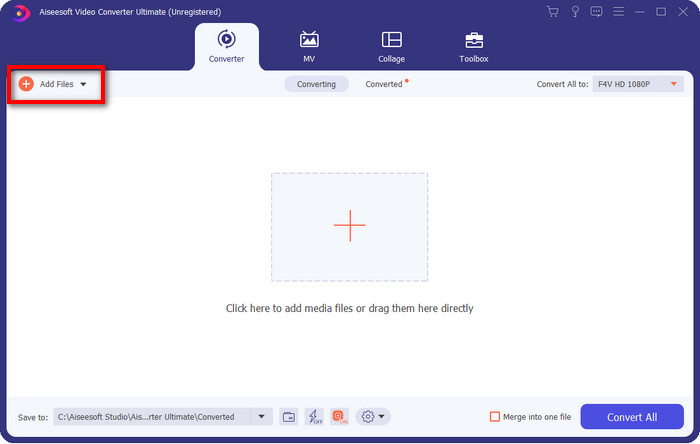
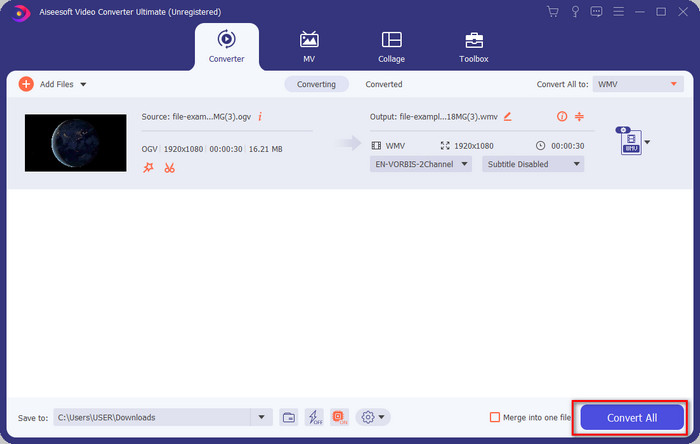
مرحله ۲. بعد از باز کردن مبدل، میتوانید با کلیک روی دکمه Add Files در بالای سمت چپ رابط و سپس زدن Open، فایل OGV را بارگذاری کنید.
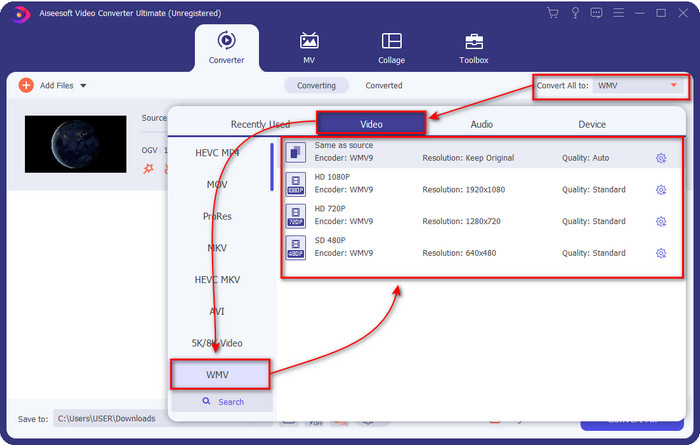
مرحله ۳. وقتی فایل OGV خود را بارگذاری کردید، زیر گزینه Convert All to، فرمت WMV مورد نظر خود را انتخاب کنید.
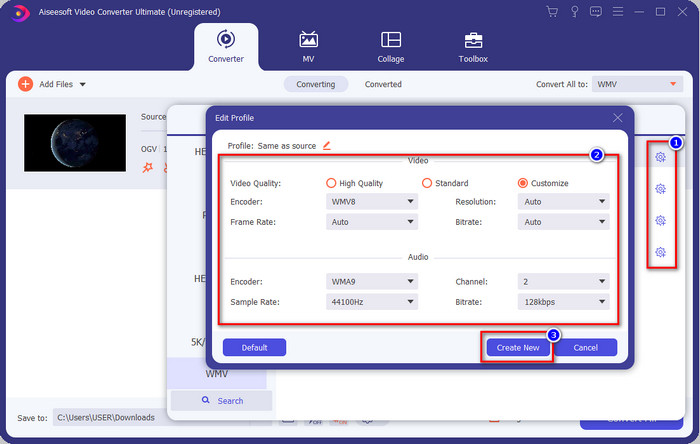
اختیاری: میخواهید خود پروفایل ویدئو را ویرایش کنید؟ پس روی آیکون چرخدنده (cog) کلیک کنید، انکدر، فریمریت یا سمپلریت ویدئو و صدا را تنظیم کنید. برای ذخیره تغییرات روی Create New کلیک کنید. بعد از تنظیم، متوجه خواهید شد که یک آیکون چرخدنده روی فرمت انتخابی شما ظاهر شده است.
مرحله ۴. روی Convert All کلیک کنید تا فرایند شروع شود. پس از پایان فرایند تبدیل، پوشهای در کامپیوتر باز میشود که فایل WMV در آن قرار دارد.
قسمت 3. نمودار مقایسه
| ویژگی های مبدل ها | FVC Video Converter Ultimate | VLC Media Player | تبدیل کردن | Video2Edit.com | مبدل ویدیوی رایگان FVC آنلاین |
| تبدیل فرمت ها |  | | | | |
| ویژگی های ویرایش | |  | | | |
| تنظیمات ویدیو و صدا را تغییر دهید | | | | | |
| وابسته به اینترنت | | | | | |
| تبلیغات رایگان | | | | | |
بخش 4. سوالات متداول در مورد تبدیل OGV به WMV
آیا می توانم از مبدل FFmpeg OGV به WMV استفاده کنم؟
بله، میتوانید از FFmpeg برای تبدیل OGV به WMV استفاده کنید، اما این مبدل مثل مبدلهای رایج و کاربرپسند نیست. حالا اگر میخواهید از این ابزار استفاده کنید، مراحل زیر را دنبال کنید. ابزار را اجرا کنید و مسیر FFmpeg.exe را روی سیستم خود اجرا کنید. Command Prompt را باز کنید و در CRM به محل فایل OGV که میخواهید تبدیل کنید، بروید. سپس این کد را وارد کنید: ffmpeg -i input.ogv -vn -ar 44100 -ac 2 -b:a 192k output.wmv و بعد برای شروع فرایند، کلید Enter را فشار دهید.
آیا OGV در مک قابل پخش است؟
اگر میخواهید فایلهای OGV را در QuickTime پخش کنید، این کار امکانپذیر نیست، زیرا انکودر این فرمت پشتیبانی نمیشود. اما راهی وجود دارد تا آن را در مک سازگار کنید، و آن راه تبدیل به فرمت MOV است. میخواهید بدانید چطور فایلهای OGV خود را به MOV تبدیل کنید؟ پس روی این لینک کلیک کنید.
آیا فرمت OGV و OGG یکسان است؟
OGV و OGG ظروف دقیق هستند، اما تفاوت هایی در محتوای آنها دارند. برای مثال، فایلهای OGG میتوانند صدای باکیفیت را ذخیره کنند، اما نه با ویدیو. در مقابل، OGV می تواند محتوای صوتی و تصویری با کیفیت بالا را حفظ کند.
نتیجه
حالا که مبدلهای OGV به WMV را که میتوانید استفاده کنید میشناسیم، وقت آن است که ابزار مناسب خود را انتخاب کنید. با اینکه تمام ابزارهای معرفیشده در اینجا به شما کمک میکنند، ما متوجه شدیم که FVC Video Converter Ultimate به کاربرانی که از آن استفاده میکنند، کیفیت برتر را تضمین میکند. باورکردنی نیست که این ابزار چه تواناییهایی دارد. اکنون انتخاب ابزار در دستان شماست، اما اگر هنوز تصمیم نگرفتهاید، ما پیشنهاد میکنیم از FVC Video Converter Ultimate استفاده کنید. میخواهید درباره خود این ابزار بیشتر بدانید؟ پس باید ابتدا آن را دانلود کنید و بدون هیچ محدودیتی از آن استفاده کنید.
-
 2 مبدل انتخابی قابل دسترسی برای تبدیل فایل OGV به AVI [2021]
 آیا می خواهید فایل های OGV را به AVI تبدیل کنید؟ این مقاله دو تا از بهترین راهحلهایی را ارائه میکند که میتوانید برای ایمن و سریع کردن تبدیل خود بدون از دست دادن اعتبار ویدیو استفاده کنید.
-
 تبدیل فوق العاده OGV به FLV که نباید از دست بدهید [اثبات شده]
 اگر نمیدانید چگونه فایلهای OGV را به سرعت به FLV تبدیل کنید، این مقاله تنها مبدلی را که تا به حال به آن نیاز دارید به شما نشان میدهد.
-
 3 روش برای تبدیل فایل های M2TS به WMV به صورت رایگان در ویندوز / مک / آنلاین
 در اینجا 3 روش آسان برای تبدیل M2TS به فیلم های WMV آورده شده است. به سرعت می توانید قالب ویدئو را از M2TS به WMV به صورت رایگان در ویندوز ، مک و آنلاین تغییر دهید. تبدیل دسته ای پشتیبانی می شود.
