


 Video Converter Ultimate
 ضبط صفحه
 تعمیر ویدیو
بهترین مبدل های آنلاین و آفلاین در تبدیل فایل های SWF به MKV
فایل SWF فرمتی برای فلش ادوبی است که شامل ویدیوها و انیمیشنهای برداری میشود. این نوع فایل معمولاً نمیتواند چندین استریم زیرنویس را پشتیبانی کند. بسیاری از افراد بهدنبال فرمتی هستند که بتواند چندین استریم زیرنویس و ترکهای صوتی را در زبانهای مختلف در خود جای دهد. بنابراین، اگر شما هم جزو افرادی هستید که بهدنبال راهحلی برای تبدیل SWF به MKV هستید، ما بهترین مبدلها را به شما معرفی میکنیم!

قسمت 1. تبدیل SWF به MKV آفلاین با استفاده از FVC Video Converter Ultimate
FVC Video Converter Ultimate یک ابزار آفلاین رایگان است که به شما اجازه میدهد فرمتهای مختلفی مانند SWF را به MKV، MP4، WMV، MOV، AVI، FLV و بسیاری فرمتهای دیگر تبدیل کنید. این مبدل امکانات فراوانی دارد که میتواند به بهبود فایلهای شما کمک کند. میتوانید فایل را برش دهید، افکت اضافه کنید، واترمارک بگذارید و زیرنویس اضافه کنید. نکته عالی این است که میتوانید چندین فایل SWF را به صورت دستهای تبدیل کنید. علاوه بر این، از تبدیل فوقالعاده سریع پشتیبانی میکند، بهطوریکه میتوانید در عرض چند ثانیه فایلها را تبدیل کنید. مراحل زیر قطعاً به شما کمک میکند تا فایل SWF خود را به MKV تبدیل کنید.
مرحله 1. در گام اول، با کلیک روی دکمه Download زیر برای ویندوز یا مک، مبدل را دانلود کنید. پس از اتمام دانلود، برنامه را باز کنید تا فرایند را شروع کنید.
دانلود رایگانبرای ویندوز 7 یا بالاتردانلود امن
دانلود رایگانبرای MacOS 10.7 یا بالاتردانلود امن
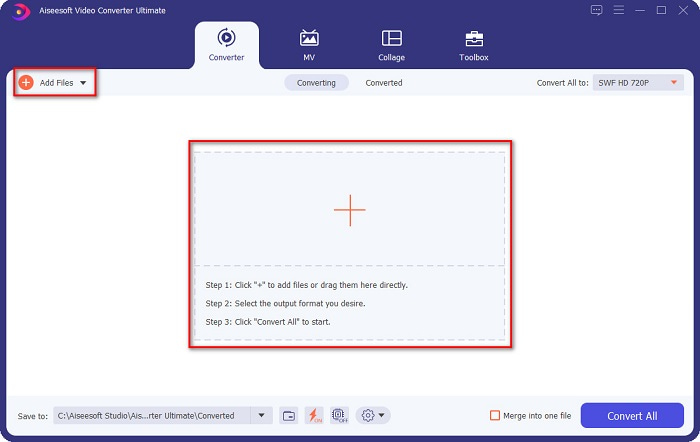
مرحله 2. پس از باز کردن مبدل، روی دکمه Add Files یا دکمه علامت + کلیک کنید تا فایل SWF خود را در رابط اول نرمافزار بارگذاری کنید.
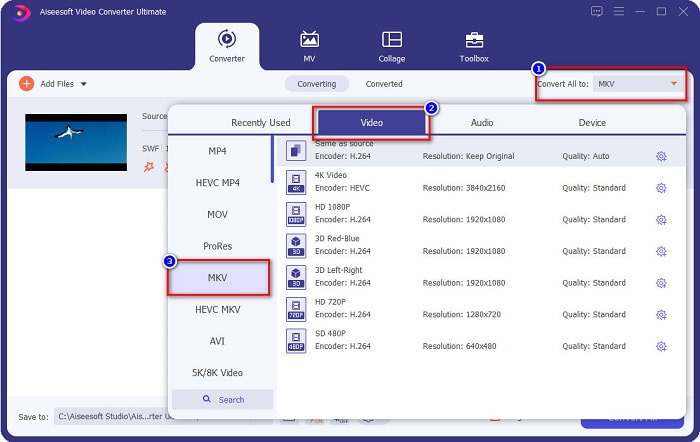
مرحله 3. سپس روی دکمه Convert All to کلیک کنید. بعد از کلیک روی دکمه Convert All to، فهرستی از فرمتهای فایل ظاهر میشود. سپس فرمت فایل MKV را انتخاب کنید.
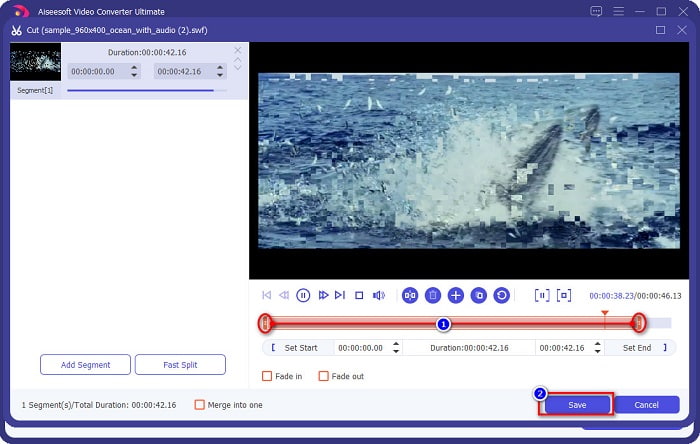
اختیاری. اگر میخواهید طول فایل خود را کوتاه کنید، روی دکمه scissor کلیک کنید. میتوانید با جابهجا کردن نشانگرهای پخش، طول فایل را به میزان دلخواه برش دهید. سپس روی دکمه Save کلیک کنید تا تغییرات ذخیره شوند.
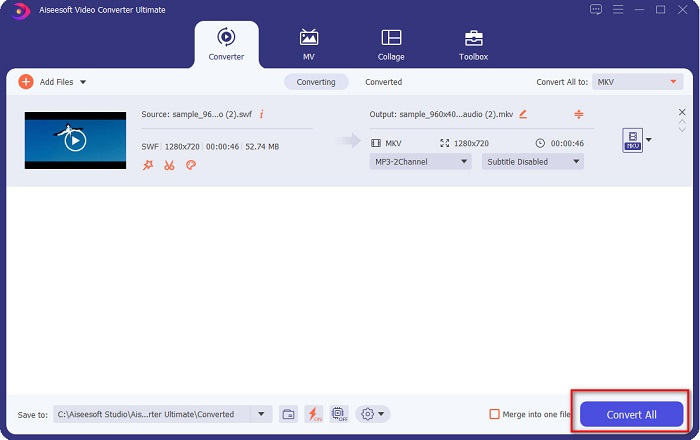
مرحله 4. و در نهایت، روی دکمه Convert All کلیک کنید تا فایل SWF خود را به فایل MKV تبدیل کنید. همین! پس از چند ثانیه، فایل شما آماده خواهد بود.
قسمت 2. تبدیل SWF به MKV آنلاین با استفاده از مبدل های آنلاین رایگان
نمی توان انکار کرد که تبدیل فایل ها با استفاده از ابزار آنلاین راحت تر است زیرا نیازی به دانلود چیزی نخواهید داشت. بنابراین، ما ابزارهای آنلاین رایگان را ارائه می دهیم که امروزه یکی از بهترین ها هستند.
FVC مبدل ویدیوی آنلاین رایگان
مراحل تبدیل با استفاده از FVC Free Online Video Converter:
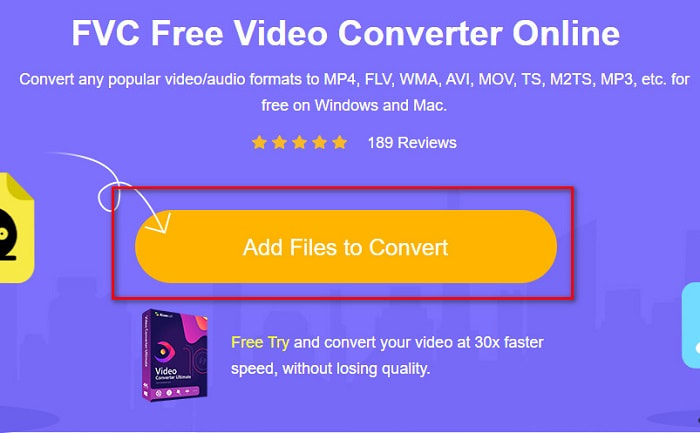
مرحله 1. برای استفاده از این مبدل، عبارت FVC Free Online Video Converter را جستجو کنید یا روی این لینک کلیک کنید تا به وبسایت آن هدایت شوید.
مرحله 2. پس از ورود به وبسایت، روی Add Files to Convert کلیک کنید. سپس مبدل را اجرا کرده و هنگامی که فایلهای رایانهتان نمایش داده شدند، فایل SWF خود را انتخاب کنید.
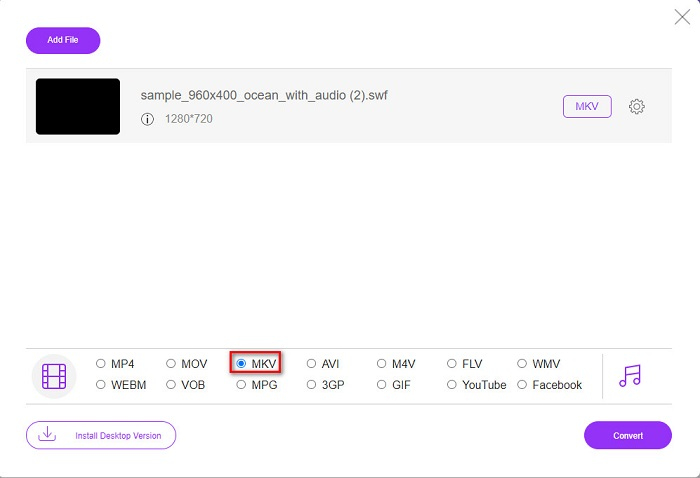
مرحله 3. فرمتهای فایل موجود در بخش دوم رابط نرمافزار فهرست شدهاند. روی فایل MKV کلیک کنید و سپس به مرحله بعد بروید.
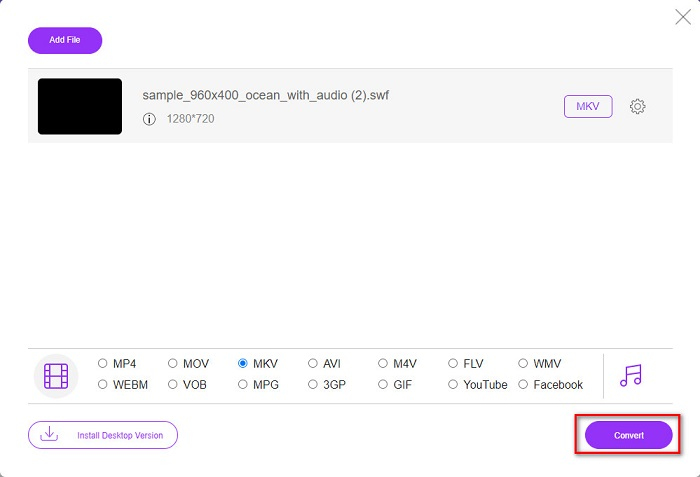
مرحله 4. برای پایان کار، روی دکمه Convert کلیک کنید تا تبدیل شما آغاز شود. سپس منتظر بمانید تا فرایند تبدیل کامل شود.
Aconvert.com
یکی دیگر از مبدلهای آنلاین رایگانی که باید امتحان کنید Aconvert.com است. این ابزار میتواند انواع فایلها را در سطح اینترنت تبدیل کند. استفاده از آن آسان است و بسته به سرعت اینترنتتان، امکان تبدیل سریع را فراهم میکند. از آنجا که این مبدل یک ابزار آنلاین است، ممکن است با تبدیل کند و نمایش تبلیغاتی آزاردهنده روبهرو شوید. با این حال، این مبدل به شما امکان میدهد بهراحتی SWF را به MKV تبدیل کنید.
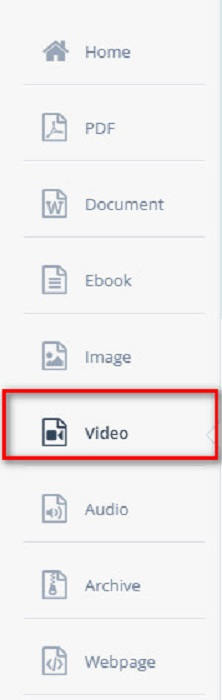
مرحله 1. در مرورگر خود عبارت Aconvert.com را جستجو کنید. سپس روی پنل Video در سمت چپ رابط نرمافزار کلیک کنید.
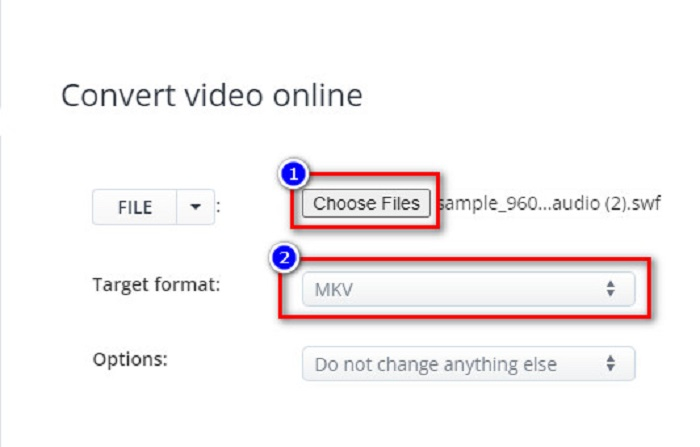
مرحله 2. سپس روی دکمه Choose Files کلیک کرده و فایل SWF خود را انتخاب کنید. سپس در بخش Target Format، فرمت فایل MKV را انتخاب کنید.
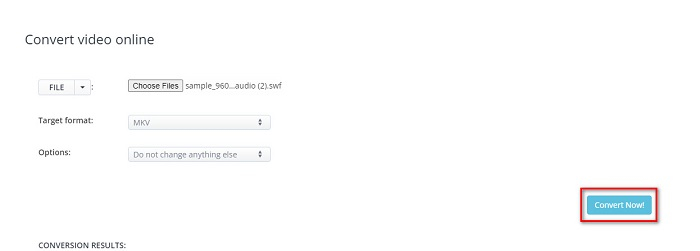
مرحله 3. در آخرین مرحله، روی دکمه Convert Now! کلیک کنید تا تبدیل فایل SWF به MKV آغاز شود.
FreeConvert.com
FreeConvert.com یک مبدل آنلاین برای تبدیل فایل SWF شما به فرمت MKV است. استفاده از آن آسان است؛ با این حال، تبلیغات مزاحم زیادی دارد. با این وجود، این مبدل از فرمتهای مختلف فایل که در وب موجود است پشتیبانی میکند.
مرحله 1. در مرورگر خود FreeConvert.com را جستجو کنید تا به وبسایت آن هدایت شوید. سپس روی دکمه Choose Files کلیک کنید. فایلهای رایانهتان نمایش داده میشوند، سپس فایل SWF خود را انتخاب کنید.

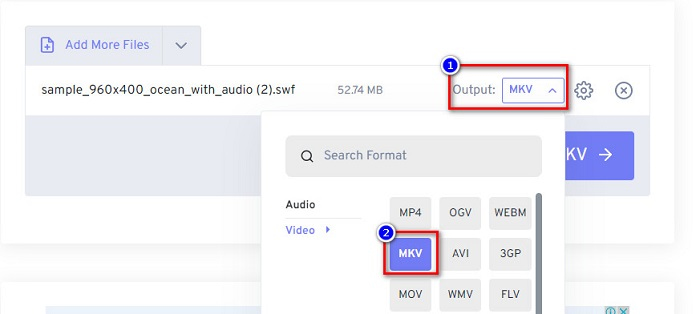
مرحله 2. روی دکمه drop-down کنار واژه Output کلیک کنید تا خروجی تبدیل خود را انتخاب کنید. فرمت MKV را بهعنوان فرمت خروجی فایل برگزینید.
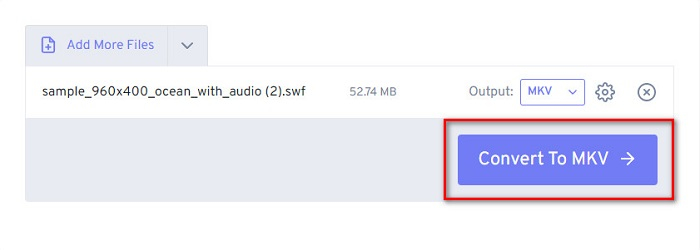
مرحله 3. سپس روی دکمه Convert to MKV کلیک کنید تا تبدیل فایل شما آغاز شود.
بخش 3. دانش گسترده SWF و MKV
SWF یا Shock Wave File یک فرمت فایل Adobe Flash است. Macromedia آن را توسعه داد، اما بعداً متعلق به Adobe شد. این فرمت فایل معمولاً از طریق شبکه استفاده می شود، اما می توانید با فعال کردن adobe flash در مرورگر خود، آن را باز کنید. فایلهای SWF نه تنها حاوی فیلمها، بلکه انیمیشنهای مبتنی بر برداری نیز هستند. علاوه بر این، این نوع فرمت فایل دارای فایل های صوتی، تصویری و انیمیشن فشرده است تا در وب در دسترس باشد.
در مقایسه، فایل MKV یا Matroska یک فرمت فایل است که توسط کدک های مختلف صوتی و تصویری پشتیبانی می شود. معمولاً برای ذخیره کلیپ های ویدیویی و فیلم های کوتاه استفاده می شود. اگرچه اندازه فایل MKV بزرگتر است، فایل MKV یک فایل مطمئن برای آینده است و این بدان معنی است که این نوع فایل به گونه ای طراحی شده است که قدیمی نباشد.
بخش 4. سوالات متداول در مورد تبدیل SWF به MKV
آیا می توانید SWF را بدون ضرر به MKV تبدیل کنید؟
آره. شما می توانید فایل های SWF خود را بدون افت کیفیت به فایل های MKV تبدیل کنید. برخی از مبدل ها می توانند SWF را به MKV بدون ضرر تغییر دهند، مانند FVC Video Converter Ultimate. این مبدل می تواند فایل ها را بدون تحت تاثیر قرار دادن کیفیت تبدیل کند.
آیا می توانید SWF را در ویندوز بازی کنید؟
بله، تو میتونی. با این حال، همچنان باید یک فلش پلیر مخفی برای adobe دانلود کنید زیرا adobe flash در حال حذف شدن است.
آیا Windows Media Player از فایل های SWF پشتیبانی می کند؟
خیر. Windows Media Player از فایلهای SWF پشتیبانی نمیکند. با این حال، باید یک کُدِک .swf نصب کنید تا بتوانید آن را در Windows Media Player پخش کنید. یا آسانترین گزینه این است که فایل SWF خود را به فایلی مانند MP4 تبدیل کنید که توسط بسیاری از پخشکنندههای رسانهای بهطور گستردهای پشتیبانی میشود. برای کسب اطلاعات بیشتر درباره تبدیل SWF به MP4، این مقاله را بخوانید: SWF to MP4: Free Convert SWF to MP4 Online and PC.
نتیجه
این مقاله به شما نشان میدهد چگونه با استفاده از مبدلهای آفلاین و آنلاین معرفیشده در بالا، SWF را به MKV تبدیل کنید. انکارناپذیر است که ابزارهای آنلاین استفاده راحتتری دارند؛ اما ممکن است هنگام استفاده از آنها با سرعت پایین در تبدیل روبهرو شوید. علاوه بر این، FVC Video Converter Ultimate امکانات بیشتری دارد که برای فایل شما و فرایند تبدیل مفید است — هنوز در مورد آن تردید دارید؟ همین حالا آن را دانلود کنید و امکانات منحصربهفردی را که این مبدل ارائه میدهد تجربه کنید!
-
 [رایگان و آسان] ابزارهای استثنایی برای استفاده در تبدیل SWF به MOV
 آیا سعی کرده اید SWF را به MOV تبدیل کنید زیرا نمی توانید ویدیوها را ویرایش کنید؟ چه کسی برای ناسازگاری ویرایشگر ویدیوی شما مقصر است؟ برای راه حل خود به خواندن ادامه دهید.
-
 4 مبدل مخفی که برای تبدیل SWF به FLV به صورت آنلاین و آفلاین به صورت رایگان استفاده می شود
 آیا می خواهید درباره مبدل های پنهانی که می توانید برای تبدیل فایل .swf به .flv استفاده کنید، بیشتر بدانید؟ اگر چنین است، باید این مقاله را بخوانید تا ایده ای برای انجام آن داشته باشید.
-
 مفیدترین ابزار برای تبدیل SWF به WMV (آنلاین و آفلاین)
 آیا برای پیدا کردن یک پخش کننده برای فایل های SWF خود تلاش می کنید؟ لازم نیست نگران باشید زیرا می توانید آن را به فرمت WMV تبدیل کنید تا تجربه مصرف ویدیویی بهتری داشته باشید. این مقاله را بخوانید تا در مورد این فرآیند تبدیل بیشتر بدانید.
