


 Video Converter Ultimate
 ضبط صفحه
 تعمیر ویدیو
3 روش بدون زحمت برای تبدیل TRP به MKV
آیا به خاطر اینکه نمیتوانید فایل TRP خود را در پخشکننده رسانه یا برنامههای دیگر اجرا کنید، با آن مشکل دارید؟ اگر یکی از کاربرانی هستید که با این نوع مشکل روبهرو میشوند، بهشدت توصیه میشود این مقاله را بخوانید. شما میتوانید فایل TRP خود را به MKV تبدیل کنید، چون بیشتر برنامهها از فرمت MKV پشتیبانی میکنند. این مقاله روشهای سادهای را برای تبدیل TRP به MKV در ویندوز، مک و بهصورت آنلاین به شما نشان میدهد. منتظر چه هستید؟ وقتتان را تلف نکنید و خواندن این مقاله را شروع کنید!

قسمت 1: تعریف TRP و MKV
TRP چیست؟
TRP یک فایل رسانهای با کیفیت بالا است که در قالب حملونقل MPEG-2 بخش ۱ کدگذاری شده است. این فرمت اغلب در پخش ویدیوی دیجیتال استفاده میشود. همچنین برای جریانهای صوتی، همگامسازی خروجی و مالتیپلکس دیجیتال ویدیو به کار میرود و قابلیتهای بسیار خوبی برای تصحیح خطا دارد. TRP همچنین شامل داده صوتی AC3 و ویدیوی H.264 است. این فرمت را میتوان با چندین برنامه پخش ویدیو اجرا کرد.
MKV چیست؟
MKV یا Matroska یک محفظه چندرسانهای است که میتواند چندین فایل صوتی، زیرنویس و ویدیو را در قالب یک فایل واحد مدیریت کند. MKV با استانداردهای چندرسانهای دیگر مانند MP4 و AVI تفاوت دارد، زیرا متنباز است و افراد میتوانند با استفاده از نرمافزارهای متنباز آن را سفارشیسازی کنند. در نهایت، فرمت فایل MKV بیشتر برای ویدیوهای HD و پخش آنلاین ویدیو استفاده میشود.
قسمت 2: ساده ترین راه برای تبدیل TRP به MKV آفلاین
استفاده از Video Converter Ultimate
شما باید Video Converter Ultimate را دانلود کرده و از آن برای تبدیل TRP به MKV بدون ضرر استفاده کنید. با استفاده از این اپلیکیشن می توانید هر فرمت فایل ویدئویی را که می خواهید تبدیل کنید، از جمله TRP و MKV. شما می توانید چندین فایل ویدئویی را در یک فرآیند واحد تبدیل کنید زیرا این ابزار دارای عملکرد تبدیل دسته ای است. علاوه بر این، فرآیند تبدیل آن 30 برابر سریعتر است، بنابراین نیازی به صرف زمان بیشتری برای تبدیل فایل های مختلف ندارید. این برنامه از چندین فرمت غیر از TRP و MKV مانند ویدیوی 5K/8K، ProRes، DV، ASF، M4V، MXF، MP4، MOV و غیره پشتیبانی می کند. بهترین بخش این است که می توانید از این برنامه با استفاده از ویندوز و مک خود استفاده کنید، که خبر خوبی برای همه کاربران است. علاوه بر این، اگر می خواهید سرعت ویدیوهای خود را تغییر دهید، می توانید از عملکرد Video Speed Controller استفاده کنید. می توانید سرعت ویدیوی خود را از 0.125 برابر کاهش دهید و سرعت آنها را تا 8 برابر سریعتر از سرعت اصلی افزایش دهید. همچنین، اگر می خواهید ویدیوی خود را برش دهید، می توانید این کار را انجام دهید. این ابزار همچنین یک عملکرد برش ویدئو را ارائه می دهد،
برای آشنایی بیشتر با این نرم افزار فوق العاده، باید آن را دانلود کرده و خودتان آن را امتحان کنید.
قابلیتها:
◆ تبدیل فرمت های فایل های متعدد.
◆ می تواند یک کلاژ خلاقانه بسازد.
◆ این برنامه ایجاد کننده موزیک ویدیو را ارائه می دهد.
◆ جعبه ابزار را برای بهبود ویدیوها فراهم می کند.
طرفداران
- 30 برابر سریعتر از سایر مبدل های نرم افزاری.
- دارای رابط کاربری دوستانه است که برای کاربران غیر حرفه ای مناسب است.
- ویژگی های متفاوتی به جز تبدیل دارد.
- در هر دو ویندوز و مک موجود است.
- تبدیل فرمت های مختلف فایل مانند FLV، MP4، MOV، WBM، GIF، AMV و غیره.
- می توانید جزئیات تاریخ را به صورت جداگانه یا به صورت دسته ای تغییر دهید.
منفی ها
- برای استفاده از ویژگی های پیشرفته تر، اشتراک را بخرید.
اگر مشتاق تبدیل TRP به MKV هستید، مراحل ساده زیر را دنبال کنید.
مرحله ۱: در ویندوز یا مک خود، با کلیک روی دکمه دانلود زیر، برنامه Video Converter Ultimate را دریافت کنید. پس از دانلود و نصب، برنامه را باز کنید.
دانلود رایگانبرای ویندوز 7 یا بالاتردانلود امن
دانلود رایگانبرای MacOS 10.7 یا بالاتردانلود امن
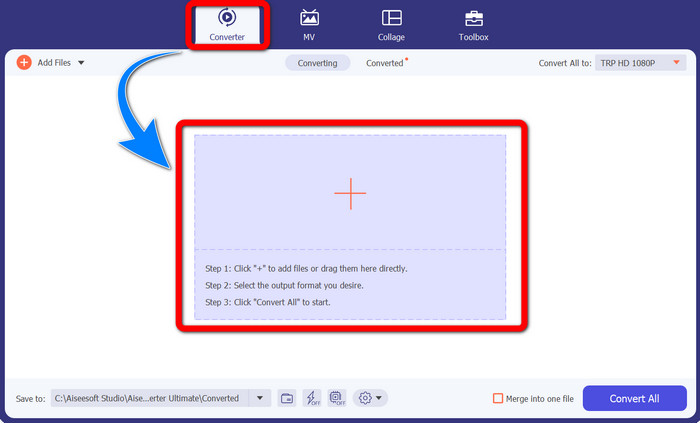
مرحله ۲: وقتی Video Converter Ultimate را اجرا کردید، پنل Converter را انتخاب کنید. سپس روی علامت + کلیک کنید تا ویدیوی خود با فرمت TRP را وارد کنید.
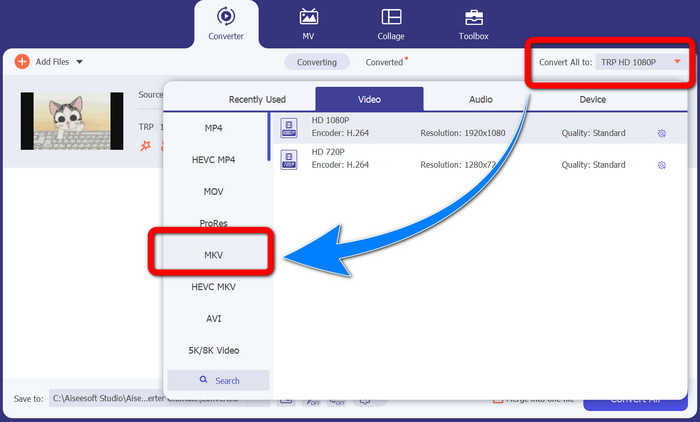
مرحله ۳: پس از وارد کردن ویدیو، روی آیکون Convert all to کلیک کنید. از میان گزینههای فرمت، فرمت MKV را پیدا کرده و روی آن کلیک کنید.
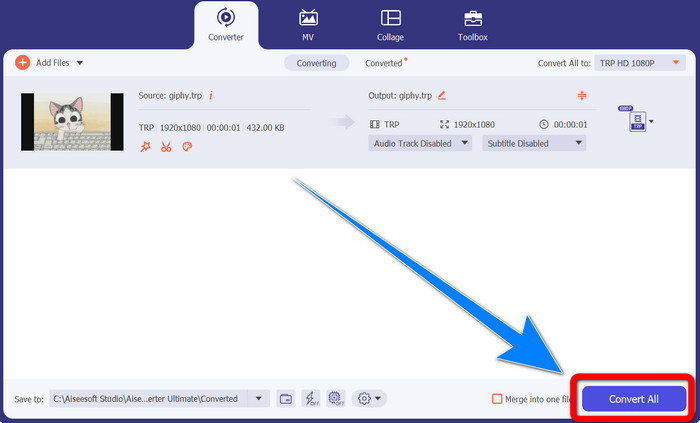
مرحله ۴: سپس روی دکمه Convert All کلیک کنید تا فایل TRP شما به فرمت MKV تبدیل شود.
استفاده از مبدل ویدیوی پریسم
Prism برنامه دیگری است که میتوانید روی ویندوز و مک خود دانلود کنید. این برنامه میتواند بهراحتی به شما کمک کند تا TRP را به MKV تبدیل کنید. همچنین از فرمتهای مختلفی مانند AMV، MP4، DVD، VOB، MOV، DIVX، AVI، 3GP و غیره پشتیبانی میکند. با این حال، این برنامه هنگام نصب روی ویندوز یا مک بسیار کند است. همچنین فرایند تبدیل کمی طول میکشد. افزون بر این، رابط کاربری پیچیدهای دارد که کاربران مبتدی را سردرگم میکند، بنابراین لازم است بهدنبال آموزشها باشید یا از کاربران حرفهای کمک بگیرید. اگر میخواهید این برنامه را دانلود و استفاده کنید، مراحل ساده زیر را دنبال کنید.
مرحله ۱: Prism Video Converter را روی مک یا ویندوز خود دانلود کنید.
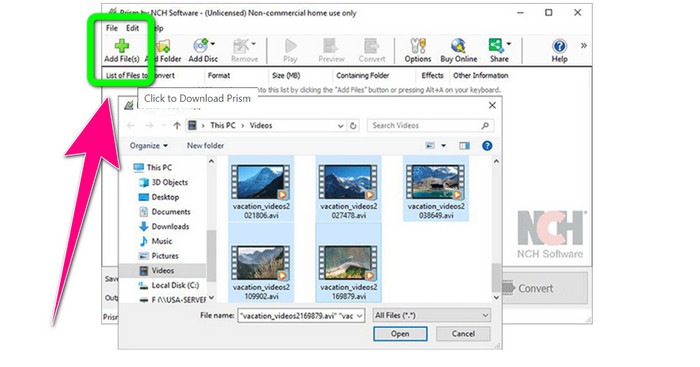
مرحله ۲: روی دکمه سبز Add Files کلیک کرده و فایل TRP خود را وارد کنید.
مرحله ۳: فرمت خروجی را تنظیم کنید. از میان گزینههای فرمت، فایل MKV را انتخاب کنید.
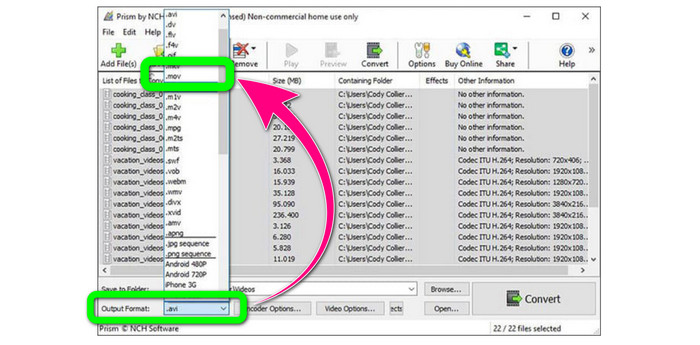
مرحله ۴: در نهایت روی دکمه Convert کلیک کنید تا فایل TRP شما به فرمت MKV تبدیل شود.
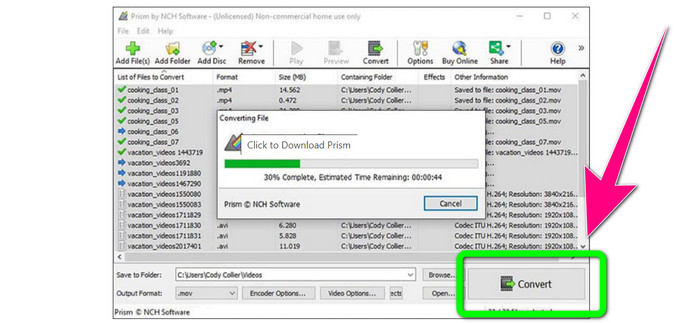
بخش 3: برنامه های آنلاین برای تبدیل TRP به MKV
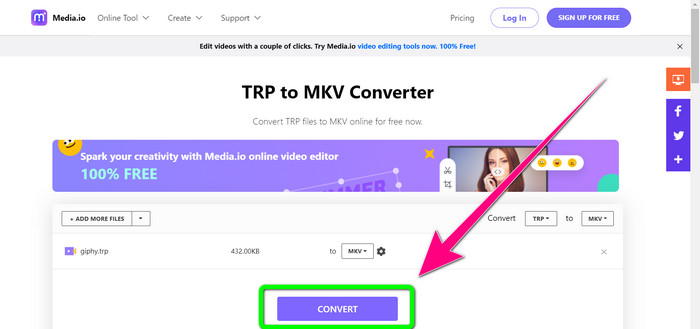
آیا به تبدیل آنلاین TRP به MKV علاقهمند هستید؟ پس میتوانید از Media.io استفاده کنید. با کمک این برنامه، میتوانید TRP را به MKV تبدیل کنید. علاوه بر این، از فرمتهای بیشتری مانند MP4، AVI، WMV، MOV، FLV، DIVX، XVID، 3GP و غیره پشتیبانی میکند. همچنین یک مبدل صوت و تصویر است.
علاوه بر این، قابلیت ویرایش ویدیو را نیز دارد. می توانید ویدیوها را برش دهید، برش دهید، ادغام کنید، حلقه بزنید و موارد دیگر. با این حال، وقتی نوبت به فرآیند تبدیل می رسد، کند است. برای تکمیل فرآیند باید کمی بیشتر صبر کنید. همچنین دارای تبلیغات آزاردهنده ای است که روی صفحه نمایش داده می شود. همچنین برای عملکرد خوب نیاز به اتصال اینترنت سریع دارد. اگر می خواهید TRP را با استفاده از Media.io به MKV تبدیل کنید، مراحل زیر را دنبال کنید.
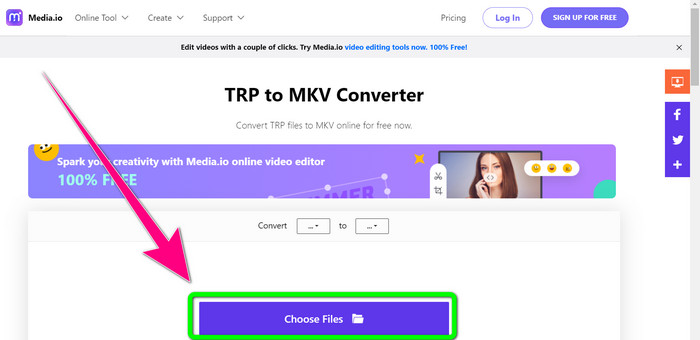
مرحله ۱: به وبسایت Media.io بروید. سپس روی دکمه Choose Files کلیک کنید تا ویدیوی خود با فرمت TRP را اضافه کنید.
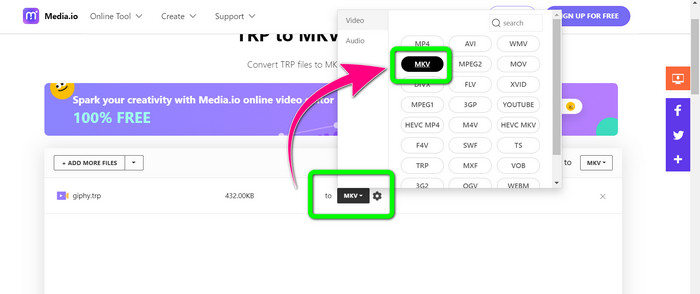
مرحله ۲: پس از افزودن ویدیو، به گزینههای فرمت بروید، فایل MKV را پیدا کرده و آن را انتخاب کنید.
مرحله ۳: در آخرین مرحله، روی دکمه Convert کلیک کنید. منتظر بمانید تا فرایند تبدیل کامل شود و سپس ویدیوی خود را در قالب فایل MKV ذخیره کنید.
مطالعه بیشتر
بهترین روشها برای تبدیل AMV به MKV بهصورت رایگان
بهراحتی MTV را با این مبدلهای نهایی به MKV تبدیل کنید
قسمت 4: سوالات متداول در مورد تبدیل TRP به MKV
چرا فایل MKV در تلویزیون من پشتیبانی نمی شود؟
یک فایل MKV فقط یک محفظه ویدیویی است که می تواند با بسیاری از کدک ها مانند HEVC، MPEG-4، VP9 و غیره رمزگذاری شود. تلویزیون با این کدک ها سازگاری ضعیفی دارد، به همین دلیل است که نمی توانید MKV را روی تلویزیون خود پخش کنید.
آیا فایل MKV کیفیت خوبی دارد؟
فرمت فایل MKV در فیلم های با کیفیت بالا محبوب است. همچنین حجم فایل بزرگتری دارد. یعنی MKV کانتینری است و تاثیری در کیفیت ندارد.
آیا مبدل سریعی وجود دارد که بتوانم از آن در رایانه خود استفاده کنم؟
قطعا، بله! اگر به دنبال یک مبدل نرم افزاری سریع هستید، Video Converter Ultimate بهترین برنامه است. شما می توانید فایل های خود را چندین برابر سریعتر و آسان تر تبدیل کنید.
نتیجه
با توجه به تمام برنامهها و روشهای تبدیل TRP به MKV که در بالا گفته شد، ما بهشدت استفاده از Video Converter Ultimate را پیشنهاد میکنیم. این برنامه میتواند تعداد زیادی فایل را بهطور همزمان و با سرعت فوقالعاده بالا تبدیل کند. پس منتظر چه هستید؟ خودتان امتحان کنید تا امکانات بیشتری را کشف کنید.
-
 2 تا از چشمگیرترین نرم افزارهای موجود برای تبدیل TRP به MOV
 آیا نمی توانید فایل های TRP را به MOV تبدیل کنید؟ سپس راهنمای ارائه شده در این مقاله را دنبال کنید. همانطور که ما بهترین ابزارهایی را که می توانید برای تبدیل فایل های TRP خود استفاده کنید، انتخاب می کنیم.
- 2 تا از چشمگیرترین نرم افزارهای موجود برای تبدیل TRP به MOV
آیا نمی توانید فایل های TRP را به MOV تبدیل کنید؟ سپس راهنمای ارائه شده در این مقاله را دنبال کنید. همانطور که ما بهترین ابزارهایی را که می توانید برای تبدیل فایل های TRP خود استفاده کنید، انتخاب می کنیم
-
 2 مبدل حرفه ای برای تبدیل فرمت TRP به WMV [راهنما]
 آیا شما یکی از کاربرانی هستید که زمان پیچیده ای با فایل TRP دارید؟ اگر چنین است، بیایید به خواندن این مقاله ادامه دهیم تا بدانیم چگونه TRP را به WMV تبدیل کنیم و بیشتر بدانیم
