


 Video Converter Ultimate
 ضبط صفحه
 تعمیر ویدیو
روش های برجسته برای تبدیل VOB به 3GP به راحتی [بهترین مبدل ها]
میخواهید فایل VOB خود را روی دستگاه نسل سوم (3G) پخش کنید اما نمیتوانید؟ بهترین راهحل این است که فایل VOB خود را به فایل 3GP تبدیل کنید. فایلهای 3GP فرمتهایی هستند که دستگاههای 3G از آنها پشتیبانی میکنند. بنابراین اگر به دنبال بهترین روش برای تبدیل (decode) فایل VOB به 3GP هستید، این مقاله میتواند پاسخ شما باشد. ما سادهترین و کاربردیترین روشها را برای تبدیل VOB به 3GP در اختیار شما گذاشتهایم.

قسمت 1. نحوه تبدیل با استفاده از FVC Video Converter Ultimate
FVC Video Converter Ultimate یکی از قدرتمندترین مبدلهای موجود در وب است. این مبدل آفلاین رایگان، فرمتهای متعددی از جمله VOB، 3GP، MP4، MKV، MOV، AVI، FLV و بیش از 1000 فرمت دیگر را تبدیل میکند. این مبدل همچنین به شما امکان میدهد طول ویدیو را کوتاه کنید و حتی برای بهبود کیفیت ویدیو، افکتهایی به آن اضافه کنید. علاوه بر این، اگر بخواهید چند فایل را با هم ادغام کنید، این برنامه از تبدیل دستهای پشتیبانی میکند. پس اگر میخواهید فایل VOB خود را بدون دردسر به 3GP تبدیل کنید، توضیحات زیر را بخوانید و آن را به صورت رایگان دانلود کنید.

FVC Video Converter Ultimate
5,689,200+ دانلود- می تواند بیش از 1000 فرمت فایل موجود در وب را تبدیل کند.
- می تواند چندین فرمت فایل را به صورت دسته ای تبدیل کند.
- دارای فرآیند تبدیل فوق العاده سریع و شتاب سخت افزاری است.
- دارای ویژگی های ویرایش پیشرفته برای برش، اضافه کردن زیرنویس و افزودن واترمارک به فایل شما.
- در تمام پلتفرم های رسانه ای مانند ویندوز و مک موجود است.
دانلود رایگانبرای ویندوز 7 یا بالاتردانلود امن
دانلود رایگانبرای MacOS 10.7 یا بالاتردانلود امن
در اینجا مراحل نحوه تبدیل VOB به 3GP با استفاده از FVC Video Converter Ultimate آمده است:
مرحله 1. ابتدا با کلیک روی دکمه Download برای ویندوز یا مک، برنامه را دانلود کنید. سپس مراحل نصب را دنبال کرده و برنامه را اجرا کنید.
دانلود رایگانبرای ویندوز 7 یا بالاتردانلود امن
دانلود رایگانبرای MacOS 10.7 یا بالاتردانلود امن
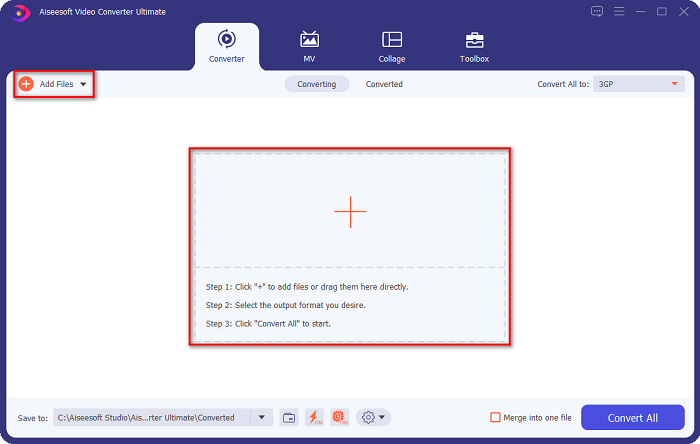
مرحله 2. روی دکمه Add Files یا دکمه علامت + کلیک کنید. فایلهای کامپیوترتان نمایش داده میشود، سپس فایل VOB خود را انتخاب کنید تا به صف تبدیل اضافه شود.
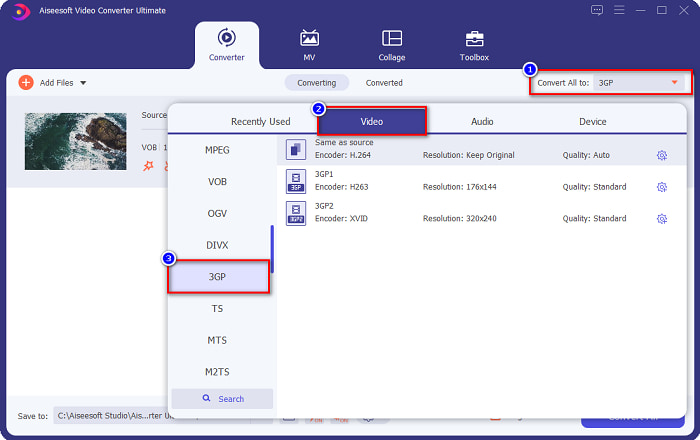
مرحله 3. در مرحله سوم، روی دکمه Convert All to کلیک کنید تا فرمت خروجی دلخواه خود را انتخاب کنید. روی 3GP کلیک کرده و به مرحله بعد بروید.
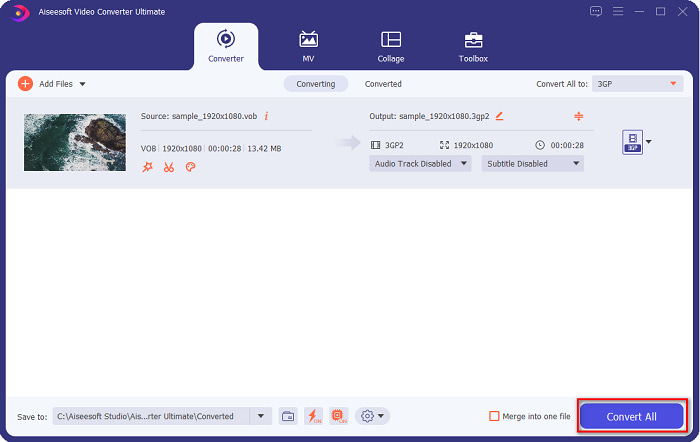
مرحله 4. پس از انتخاب فرمت خروجی موردنظر، روی دکمه Convert All کلیک کنید تا تبدیل آغاز شود. چند ثانیه صبر کنید و تمام! با همین چند مرحله ساده میتوانید بهراحتی فایل VOB خود را به 3GP تبدیل کنید.
قسمت 2. نحوه تبدیل VOB به 3GP به صورت آنلاین رایگان
اگر می خواهید فایل VOB خود را بدون دانلود به یک فایل 3GP تبدیل کنید، می توانید از مبدل های آنلاین موجود در وب استفاده کنید. راحتی و کارایی استفاده از مبدل آنلاین بدون شک خوب است. بنابراین، ما دو راه برای تبدیل فایل VOB شما به فرمت فایل 3GP ارائه کردیم.
FileProInfo
FileProInfo یک مبدل آنلاین با رابط کاربری ساده است که آن را به ابزاری مناسب برای مبتدیها تبدیل کرده است. این سایت تقریباً از تمام فرمتهای رایج موجود در اینترنت پشتیبانی میکند. با این حال، این نوع مبدلهای آنلاین معمولاً تبلیغات آزاردهنده زیادی دارند. با وجود این، هنوز هم افراد زیادی از این مبدل استفاده میکنند.
مرحله 1. در مرورگر خود، FileProInfo را جستوجو کنید تا وارد صفحه وب آن شوید. در رابط اصلی نرمافزار، روی دکمه Select VOB file کلیک کنید و فایل VOB موردنظر خود را برای آپلود انتخاب کنید.

مرحله 2. سپس در کادری که کنار کلمه to قرار دارد، فرمت خروجی دلخواه خود را انتخاب کنید.

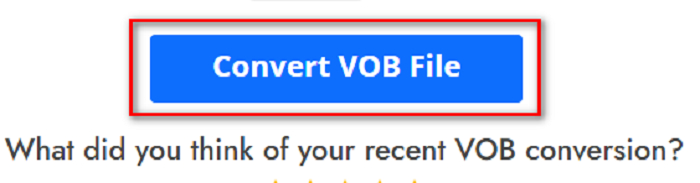
مرحله 3. در نهایت روی دکمه Convert VOB File در پایین رابط نرمافزار کلیک کنید و منتظر بمانید تا فرایند تبدیل به پایان برسد.
و همین است! بدون عرق کردن، می توانید فایل VOB خود را به 3GP تبدیل کنید.
Convert365
Convert365 یک مبدل آنلاین VOB به 3GP است که به شما اجازه میدهد اکثر فرمتهای استاندارد از جمله VOB، 3GP، AVI، MOV، MP4، MPEG و غیره را تبدیل کنید. اگر بهدنبال یک مبدل آنلاین هستید که بتواند بلندی صدای فایل صوتی را نرمال کند، این ابزار چنین قابلیتی را دارد. با این حال، چون یک ابزار آنلاین است، ممکن است به دلیل وابستگی به اینترنت، سرعت تبدیل پایین باشد. برای تبدیل فایل VOB به 3GP با استفاده از Convert365، مراحل زیر را دنبال کنید.
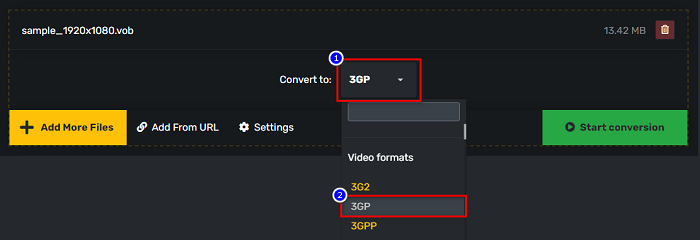
مرحله 1. در مرورگر خود Convert365 را جستوجو کنید، روی دکمه Add Files کلیک کرده و وقتی فایلهای کامپیوتر نمایش داده شد، فایل VOB خود را انتخاب کنید.

مرحله 2. سپس در دکمه drop-down کنار Convert to، فرمت خروجی را انتخاب کنید. روی فرمت فایل 3GP کلیک کنید.
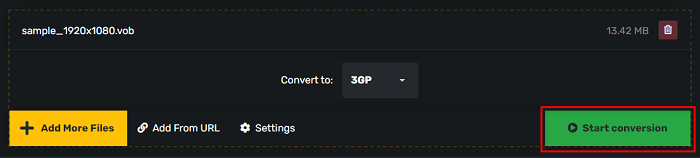
مرحله 3. و در نهایت روی Start conversion کلیک کنید. دکمه تبدیل VOB خود را به یک فایل 3GP.
قسمت 3. از کدام مبدل VOB به 3GP باید استفاده کنم
هنگام انتخاب بهترین مبدل برای تبدیل VOB به 3GP، همیشه باید سرعت، فایل های پشتیبانی شده و منحصر به فرد بودن ویژگی های مبدل را در نظر بگیرید. توصیه می کنیم از ابزار آفلاین FVC Video Converter Ultimate در میان بهترین مبدل های آنلاین و آفلاین که در بالا نشان داده شده است استفاده کنید. این مبدل بسیاری از ویژگیهای متمایز را ارائه میکند که مبدلهای دیگر ندارند، مانند GIF creator 3D maker، watermark remover و بسیاری دیگر.
علاوه بر این، با وجود اینکه میتواند خروجیهای حرفهای ارائه دهد، رابط کاربری آسانی نیز دارد تا کار سختی برای استفاده از آن نداشته باشید.
قسمت 4. اطلاعات بیشتر در مورد VOB و 3GP
VOB یا Video Object یک فرمت محفظه فایل است که دی وی دی ها از آن استفاده می کنند. این شامل ویدیو، صدا، زیرنویس و محتوای منو است. این نوع فایل دارای محدودیت ها و محدودیت های کپی برای محافظت از آنها در برابر کپی مستقیم است. در مقابل، فایل های 3GP فرمت های فایلی هستند که فقط در دستگاه های تلفن همراه نسل سوم قابل پخش هستند. این فرمت های فایل توسط پروژه مشارکت نسل سوم (3GPP) توسعه یافته است. علاوه بر این، این نوع فایل در مقایسه با فایلهای VOB، فقط دارای حجم فایل کوچکی است، زیرا برای اشتراکگذاری با دستگاههای 3G ساخته شدهاند. 3GP می تواند فایل های ویدئویی و صوتی را که معمولا در گوشی های 3G استفاده می شود ذخیره کند.
بخش 5. سوالات متداول در مورد تبدیل VOB به 3GP
آیا می توانید 3GP را در macOS بازی کنید؟
پخش فایلهای 3GP در macOS، بهویژه در نسخههای جدید QuickTime، عملاً امکانپذیر نیست. اما میتوانید فایل 3GP خود را به فرمتی تبدیل کنید که macOS از آن پشتیبانی میکند، یعنی MOV. برای آشنایی بیشتر با تبدیل فایلهای 3GP به MOV روی این لینک کلیک کنید.
آیا تبدیل VOB به 3GP بر کیفیت فایل شما تأثیر می گذارد؟
کاملا بله. هنگام تبدیل VOB به 3GP، اندازه فایل تحت تأثیر قرار می گیرد. از آنجایی که 3GP فقط حاوی فایل های ویدئویی و صوتی است و حجم فایل کمتری دارد، حجم فایل VOB شما کوچکتر خواهد بود.
آیا فرمت فایل 3GP یک فایل رایج است؟
متأسفانه امروزه، فرمتهای فایل 3GP چندان رایج نیستند، زیرا این روزها گوشیهای 3G کمتری وجود دارند. رایج ترین فایل برای کاربران موبایل امروزه فرمت فایل MP4 است.
نتیجه
همانطور که ما بهترین و سادهترین مبدلها را برای تبدیل VOB به MOV در ویندوز و مک ارائه میکنیم، نتیجه میگیریم که FVC Video Converter Ultimate بهترین در میان ابزارهای انتخابی مبدلهای آنلاین و آفلاین ارائه شده است. نه تنها ویژگی های منحصر به فردی برای امتحان دارد، بلکه تبدیل با سرعت بالا را نیز ارائه می دهد. هنوز در مورد این مبدل شک دارید، اکنون آن را دانلود کنید و بهترین مبدل VOB به 3GP را امتحان کنید.
-
 بهترین راه برای تبدیل VOB به FLV [رایگان و آنلاین شامل]
 آیا می خواهید یک فایل VOB را به یک فایل FLV تبدیل کنید؟ به راحتی می توانید کار را با مبدل های دسک تاپ یا آنلاین انجام دهید. این راهنما را بخوانید و یاد بگیرید که چگونه VOB را به راحتی و به سرعت به FLV تبدیل کنید.
-
 3 مبدل مفید برای تغییر فایل VOB به فرمت AVI [2021]
 آیا مشکلی دارید زیرا فایل های VOB برای پخش پشتیبانی نمی شوند؟ سپس بیایید سعی کنیم آن را با 3 روش ارائه شده در زیر با مراحل دقیق روی هر مبدل تبدیل کنیم.
-
 روش های عالی برای استفاده در تبدیل VOB به MOV
 دانلود ویدیوی آنلاین راحت است، اما اگر ویدیو با فرمت VOB باشد و پخش کننده شما از آن پشتیبانی نکند، چه؟ در این پست نحوه تبدیل VOB به MOV به شما آموزش داده می شود.
