


 Video Converter Ultimate
 ضبط صفحه
 تعمیر ویدیو
نحوه تبدیل VOB به MKV به صورت رایگان با این 3 مبدل [بهترین ابزار]
VOB or Video Object is a file format that DVDs usually use. This file is commonly kept in the VIDEO_TS folder, which is at the root of the DVD. However, a lot of media files are now available on the internet. And the use of DVDs is not common nowadays and is not supported by many devices. Therefore, you need a file format that is supported by a lot of devices. MKV is a file format that is widely supported by numerous devices. Below are the best ways to convert VOB to MKV for free.

قسمت 1. تبدیل VOB به MKV Losslessly
To convert your VOB files to MKV, you need a converter that is well suited for that job. FVC Video Converter Ultimate is a converter that is popular in the market nowadays. This converter has many special features where you can edit, enhance, compress, and do batch conversion of your VOB file. Moreover, this tool also supports ultra-fast conversion so that you can convert your VOB file to MKV real quick, without losing its quality.

FVC Video Converter Ultimate
5,689,200+ دانلود- تبدیل دسته ای را برای ادغام چندین فایل به یک ارائه می دهد.
- دارای رابط کاربری گرافیکی با کاربری آسان است که برای مبتدیان مناسب است.
- دارای قابلیت ساخت گیف و ساخت فیلم های سه بعدی است.
- به دلیل فرآیند تبدیل فوق سریع داخلی، به شما امکان می دهد به سرعت تبدیل کنید.
- در پلتفرم های مختلف از جمله ویندوز و مک موجود است.
دانلود رایگانبرای ویندوز 7 یا بالاتردانلود امن
دانلود رایگانبرای MacOS 10.7 یا بالاتردانلود امن
در اینجا مراحل نحوه تبدیل VOB به MKV با استفاده از FVC Video Converter Ultimate آمده است:
Step 1. Download this application by clicking the Download button below for Windows or Mac. Follow the installation process, then proceed to the next step.
دانلود رایگانبرای ویندوز 7 یا بالاتردانلود امن
دانلود رایگانبرای MacOS 10.7 یا بالاتردانلود امن
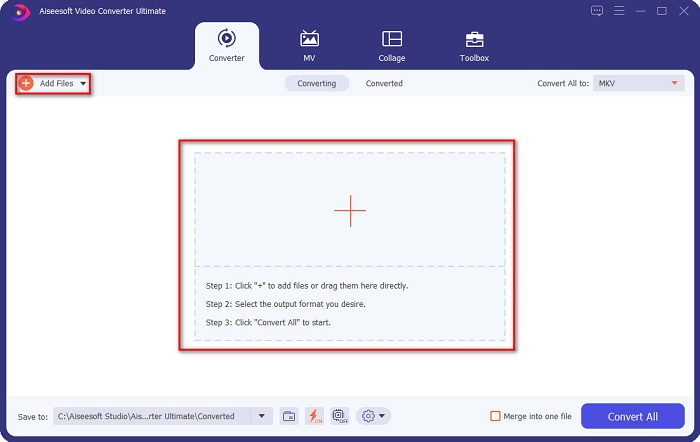
Step 2. After downloading the converter, click the Add Files button or the + button to upload your VOB file in the queue.
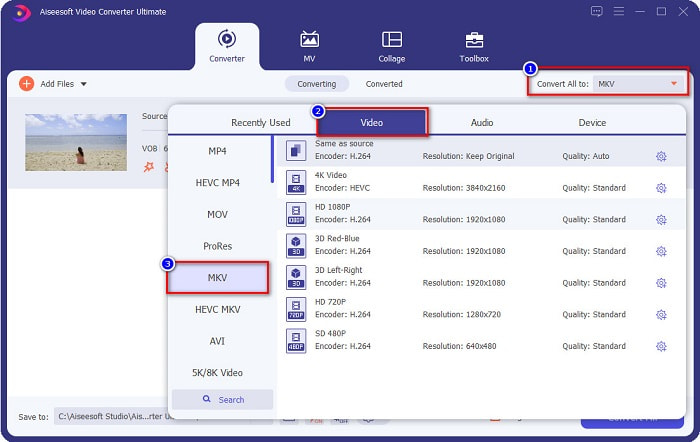
Step 3. And then click the Convert All to button located at the upper right corner of the software’s interface. A list of file formats will appear, then choose your desired file output.
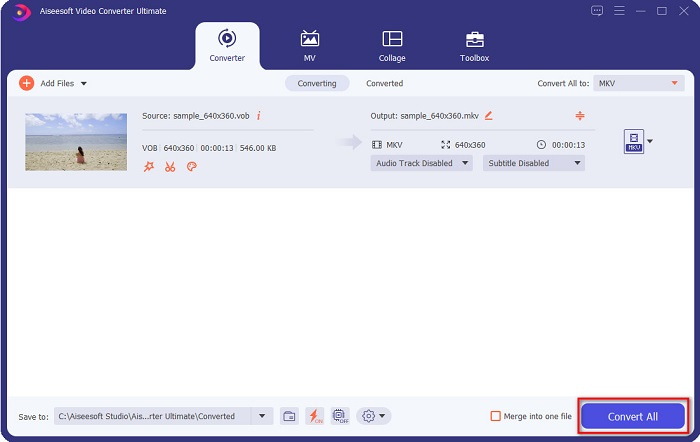
Step 4. After selecting MKV as your output file, click the Convert All button to convert your VOB to the MKV file. Then wait for a few seconds for your conversion to finish.
با دنبال کردن این مراحل ساده، می توانید VOB را بدون ضرر به MKV تبدیل کنید.
قسمت 2. تبدیل VOB به MKV با استفاده از مبدل های نرم افزار رایگان
شما همچنین می توانید VOB را با استفاده از نرم افزار رایگان به MKV تبدیل کنید. استفاده از نرم افزار رایگان به عنوان مبدل می تواند در زمان شما صرفه جویی کند زیرا برای استفاده از آن نیازی به اتصال به اینترنت ندارید. و وقتی نوبت به دانلود مبدل های نرم افزار رایگان می رسد، نیازی به خرید چیزی ندارید. در اینجا بهترین مبدل های نرم افزار رایگان وجود دارد که می توانید آنها را امتحان کنید.
VLC Media Player
هنگام انتخاب بهترین مبدل نرم افزار رایگان، نمی توان انکار کرد که VLC Media Player خواهد بود. بسیاری از افراد از این مبدل نرم افزار رایگان به دلیل راحتی استفاده از آن استفاده می کنند. این مدیا پلیر برای کاربران ویندوز بسیار معروف است و ثابت کرده است که راهی عالی برای تبدیل فایل هاست.
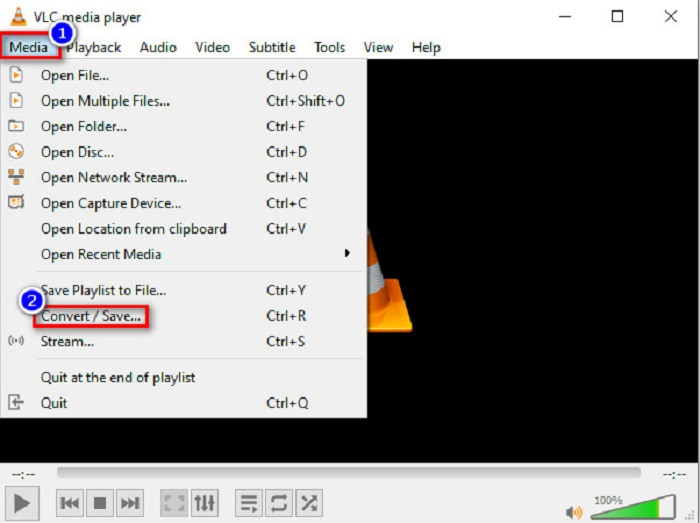
Step 1. First, if you do not have VLC Media Player on your device, download it by searching it in your browser. After downloading it, open the application. After opening the app, click the Media button, then select the Convert/Save button. Then you will be led to another interface.
Step 2. And then, click the + Add button to upload your VOB file. Then, click the Convert/Save button. Then proceed to the next step.
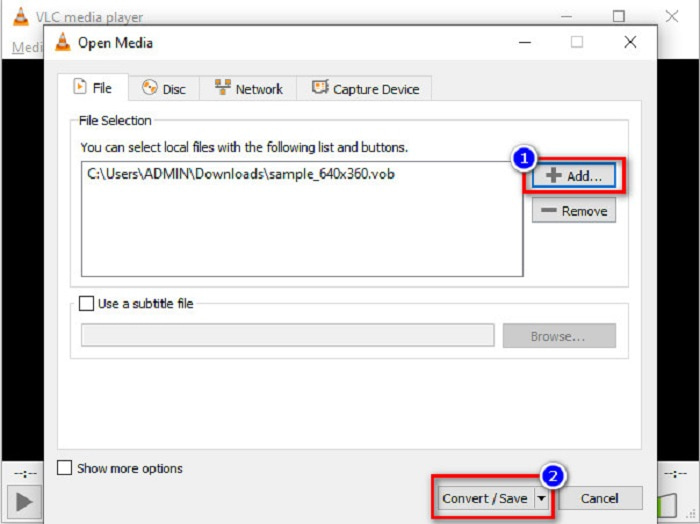
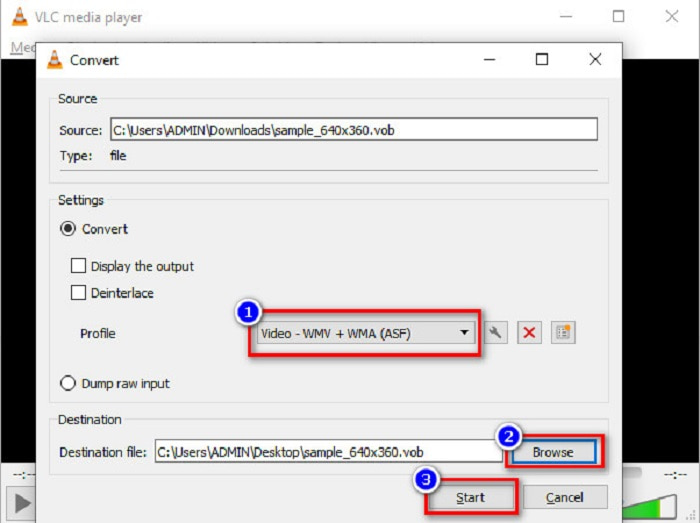
Step 3. Lastly, by clicking the drop-down button beside the Profile, select the MKV file as your output format. To choose your file destination, click the Browse button. And finally, tick the Start button to begin your conversion.
ترمز دستی
Another freeware converter that you can use to convert DVD VOB to MKV files is by using HandBrake. This converter is free when downloading. It also supports varieties of formats that are available on the web. However, its interface is complicated to understand for beginners. Still, this converter offers you distinct features that help convert your VOB file to MKV.
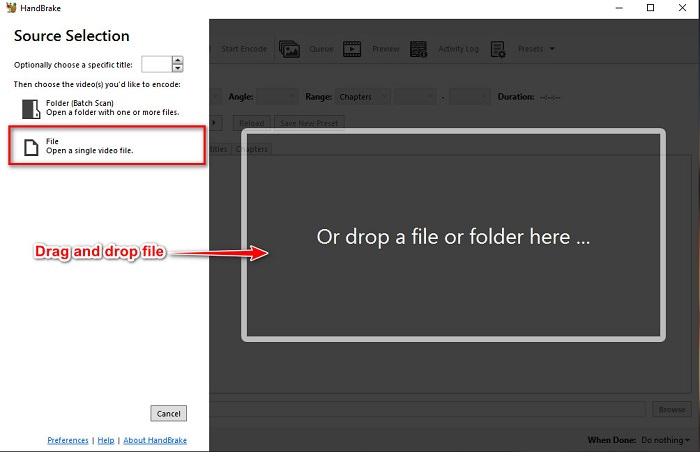
Step 1. Download the app by searching HandBrake in the browser that you use. After downloading, open the application. Then, click File, or drop your VOB file in the rectangular box in the middle of the software’s interface to upload it.
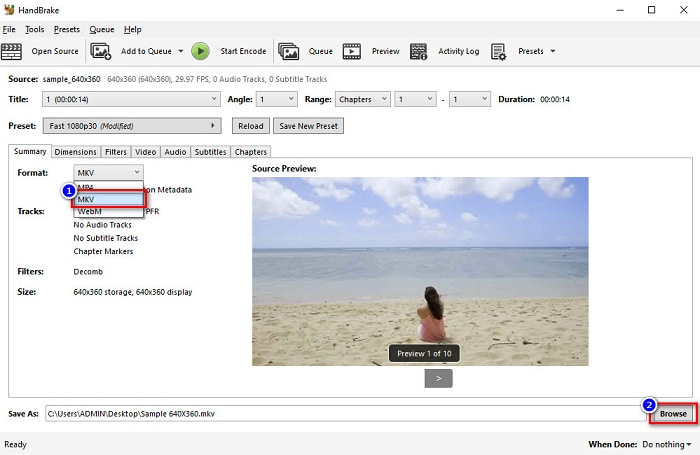
Step 2. After uploading your VOB file, choose MKV as your output file format by clicking the drop-down button beside Format. And for you to change the destination of your file on your computer files, click the Browse button.
Step 3. For the last step, click on the Start Encode button to convert your VOB to MKV using HandBrake.
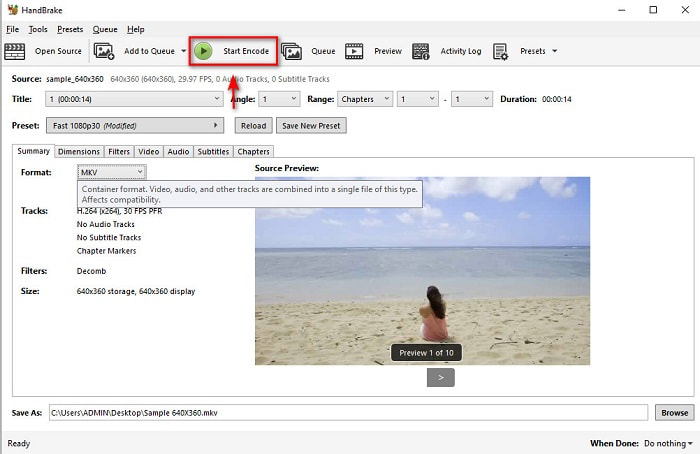
و این روشی است که با استفاده از نرم افزار رایگان VOB را به MKV تبدیل می کنید.
قسمت 3. تبدیل فایل VOB به فایل MKV با استفاده از یک ابزار آنلاین
Online converters are more convenient because you do not need to download anything. While there are many free online converters available on the web, Onlinefreeconvert.com is what we know as one of the best. This online converter is easy to use and free. Although you may experience slow conversion because it is web-based, many still use it for its convenience in using.
مراحل تبدیل فایل VOB به فایل MKV به صورت آنلاین:
Step 1. To convert a VOB file to MKV file format, search Onlinefreeconvert.com on your browser, then you will be directed to the converter’s website.
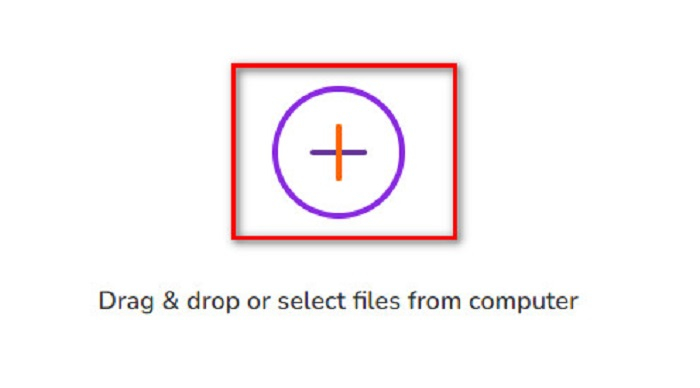
Step 2. Drag and drop your VOB file or select files from your computer by clicking the + button.
Step 3. Then beside the Output Format, click the drop-down button to select MKV as your output file format. Lastly, click the Start Now button to convert your VOB file to MKV.
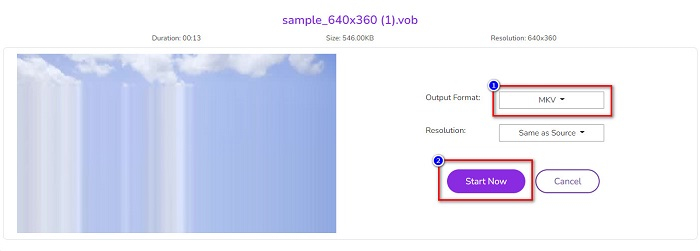
و به این صورت است که VOB را به صورت آنلاین با استفاده از یک مبدل آنلاین تبدیل به MKV می کنید.
بخش 4. اطلاعات بیشتر در مورد VOB و MKV
VOB یا Video Object فرمت فایلی است که ویدئوهای DVD پخش می کنند. این شامل داده هایی است که شامل صدا، ویدئو و زیرنویس می شود. این نوع فرمت فایل دارای محافظت از حق چاپ است تا از کپی شدن مستقیم آنها محافظت کند. در مقابل، فایلهای MKV یا Matroska فرمت فایلی است که معمولاً برای ذخیره کلیپهای ویدیویی و فیلمهای کوتاه استفاده میشود. همچنین توسط کدک های ویدیویی و صوتی متعددی پشتیبانی می شود. علاوه بر این، این یک فایل اثبات آینده است. بنابراین، ساخته شده است تا در آینده منسوخ نشود.
بخش 5. سوالات متداول در مورد تبدیل VOB به MKV
کدام یک حجم فایل بزرگتر دارد، VOB یا MKV؟
فایل های MKV در مقایسه با VOB اندازه فایل های بزرگ تری دارند. اگرچه تفاوت زیادی وجود ندارد، اما MKV کمی بزرگتر است.
آیا می توانید فایل های ویدئویی VOB را در مک پخش کنید؟
macOS does not support VOB files; therefore, you cannot play it directly on Mac. However, you can use a converter to convert your VOB file to a file supported by macOS. MOV file is a file format that is widely supported by it. Moreover, read this article to know more about converting VOB to MOV.
آیا اندازه فایل هنگام تبدیل VOB به MKV تحت تأثیر قرار می گیرد؟
Not necessarily. When converting VOB to MKV, the file size will not be affected, especially if you use FVC Video Converter Ultimate as your tool to convert.
نتیجه
همه مبدل های آنلاین، نرم افزار رایگان و آفلاین ارائه شده در بالا عملکرد امیدوارکننده ای را نشان می دهند. اگرچه آنها دارای ویژگی های متمایز در برابر یکدیگر هستند، اما همچنان ابزاری موثر و کارآمد برای تبدیل VOB به بدون MKV هستند. اما اگر می خواهید یک مبدل فوق سریع با بسیاری از ویژگی های برجسته را امتحان کنید، FVC Video Converter Ultimate بهترین ابزار مناسب برای آن است. بنابراین، اگر علاقه مند به امتحان این مبدل هستید، هم اکنون آن را دانلود کنید!
-
 بهترین راه برای تبدیل VOB به FLV [رایگان و آنلاین شامل]
 آیا می خواهید یک فایل VOB را به یک فایل FLV تبدیل کنید؟ به راحتی می توانید کار را با مبدل های دسک تاپ یا آنلاین انجام دهید. این راهنما را بخوانید و یاد بگیرید که چگونه VOB را به راحتی و به سرعت به FLV تبدیل کنید.
-
 VOB File چیست و چگونه فایل VOB را بصورت رایگان به GIF تبدیل کنیم
 آیا می خواهید در مورد فایل های VOB و نحوه اشتراک گذاری آن پس از ریپ شدن بیشتر بدانید؟ یا چرا باید VOB را به GIF تبدیل کنید؟ سپس این مقاله را با دقت بخوانید.
-
 3 مبدل مفید برای تغییر فایل VOB به فرمت AVI [2021]
 آیا مشکلی دارید زیرا فایل های VOB برای پخش پشتیبانی نمی شوند؟ سپس بیایید سعی کنیم آن را با 3 روش ارائه شده در زیر با مراحل دقیق روی هر مبدل تبدیل کنیم.
