


 Video Converter Ultimate
 ضبط صفحه
 تعمیر ویدیو
چگونه به راحتی فایل WebM را به WMV تبدیل کنیم
WebM is a media file format supported by most web browsers like Google Chrome, Mozilla Firefox, Microsoft Edge, Opera, and more. It is being used on HTML5 videos and HTML5 audios for streaming purposes. However, WebM files do not support Mac and iOS devices without using other tools. Therefore, if you want to open WebM files on any device, we recommend converting it to a WMV file widely supported by almost all devices and players. In this article, we listed the best WebM to WMV Converters for you to try.

بخش 1. 3 ابزار برتر برای تبدیل WebM به WMV فایل بدون از دست دادن
FVC Video Converter Ultimate
FVC Video Converter Ultimate is widely popular on the entire web when talking about file converters. This file converter allows you to convert your WebM file to a WMV file easily. It also has unique features in which you can edit your file, enhance, and even compress your file without the quality being ruined. In addition to that, this tool supports varieties of conversion that you need, including WMV files. Therefore, if you want to convert a WebM file to WMV efficiently, this is the app for you.
طرفداران
- به شما امکان می دهد فایل خود را ویرایش، تقویت و فشرده سازی کنید.
- می تواند فرمت های مختلف فایل از جمله WebM، WMV، MP4، M4V، MOV، AVI و غیره را تبدیل کند.
- رابط کاربری آسان.
منفی ها
- قبل از اینکه بتوانید از آن استفاده کنید، ابتدا باید برنامه را دانلود کنید.
مبدل ویدیوی رایگان FVC
FVC Free Video Converter is a free online converter that allows you to convert various file formats, including WebM to WMV, MP4, FLV, MOV, and more. This converter is also easy-to-use, because of its simple interface. Moreover, this converter does not need to be downloaded because it is web-based. However, since it is an online converter, you may experience slow conversion because it is an internet-dependent converter. Nevertheless, many have used this converter and approved it as one of the best online converters to convert your WebM to WMV free online.
طرفداران
- حاوی تبلیغات مزاحم نباشید.
- به شما امکان می دهد بسیاری از فرمت های فایل از جمله WebM، WMV، MP4، FLV، WMA و غیره را تبدیل کنید.
- شما نیازی به دانلود برنامه ندارید.
منفی ها
- ممکن است تبدیل آن کند باشد.
- فقط ویژگی های محدودی برای استفاده دارد.
SavetheVideo.com
SavetheVideo.com is a free online converter that converts major video file formats. With this converter, you can convert videos from famous social media applications like Facebook, Twitter, Instagram, TikTok, and more. Despite that, you may encounter converting files, mainly if the file is not supported.
طرفداران
- این می تواند ویدیوها را تا 420+ فرمت در هر دستگاهی تبدیل کند.
- می توانید از دستگاه های اندروید و آیفون تبدیل کنید.
منفی ها
- این رابط کاربری سختی دارد.
- ممکن است با تبدیل کند مواجه شوید.
قسمت 2. نحوه تبدیل WebM به WMV با استفاده از FVC Video Converter Ultimate
This part of the article will show you how to convert WebM files to WMV file format using the FVC Video Converter Ultimate. Because this converter is what we think is the best among the converters that trend in the market nowadays. Among other WebM to WMV converters available today, this online free converter shows promising performance, especially with its great features.

FVC Video Converter Ultimate
5,689,200+ دانلود- این برنامه از تبدیل WebM به فرمت های WMV، MP4، MOV، MKV یا به بیش از 200 فرمت با چند کلیک پشتیبانی می کند.
- این تبدیل دسته ای را برای تبدیل چندین فایل WebM به طور همزمان ارائه می دهد.
- تبدیل فوق سریع به شما این امکان را می دهد که در عرض چند ثانیه یک فرآیند تبدیل سریع برق آسا داشته باشید.
- دارای ویژگی های ویرایشی است که در آن می توانید بچرخانید، برش دهید، ادغام کنید و موارد دیگر.
دانلود رایگانبرای ویندوز 7 یا بالاتردانلود امن
دانلود رایگانبرای MacOS 10.7 یا بالاتردانلود امن
Steps in converting WebM to WMV using FVC Video Converter Ultimate:
Step 1. For you to download this converter, click the download button below. Follow the installation process, then open the app.
دانلود رایگانبرای ویندوز 7 یا بالاتردانلود امن
دانلود رایگانبرای MacOS 10.7 یا بالاتردانلود امن
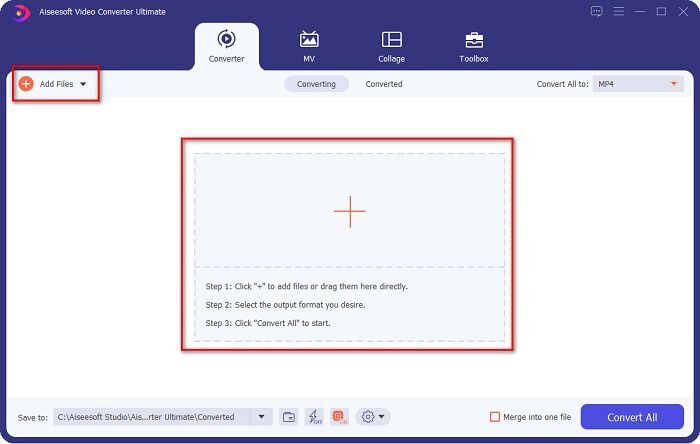
Step 2. After opening the application, click the Add Files button, or you may also click the + button to upload your WebM file in the tool's main interface. And a computer folder will appear, where you will locate your WebM file. Then press the Open button to upload your file. Additionally, you can add more WebM files because this tool supports batch conversion.
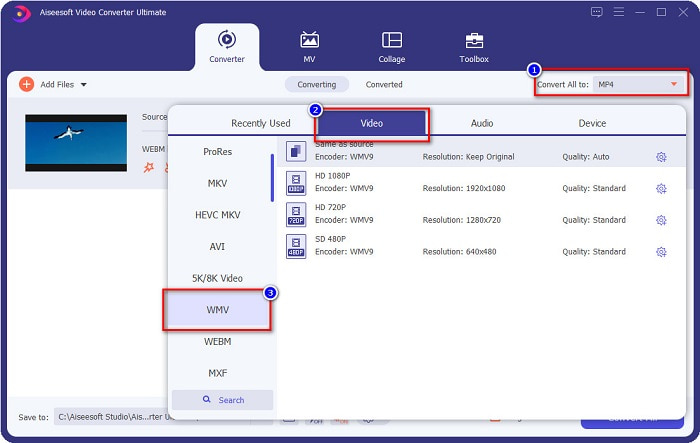
Step 3. In the upper right corner of the software, you will see the Convert All to button, click it, then select the WMV format on the list to change the file format from WebM to WMV format.
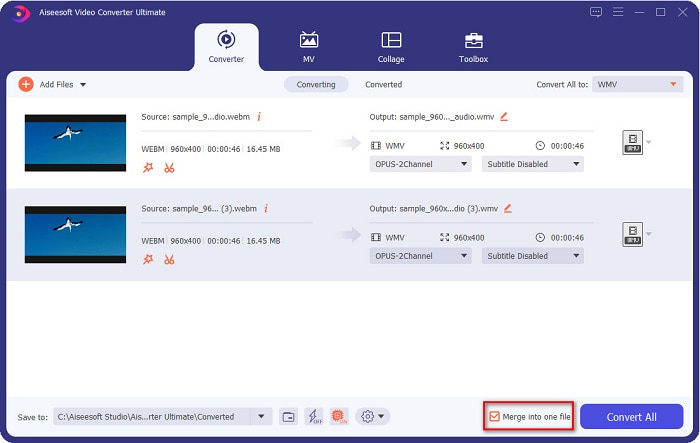
Optional. Do you want to know how to merge multiple WebM files into one? This ultimate tool has a compelling feature to merge them into one file. To do this, tick the box located in the bottom right corner of your software. In doing so, when you convert your files, they will automatically merge into one file. But if you do not wish to merge your files, you can skip this part and proceed to the next step.
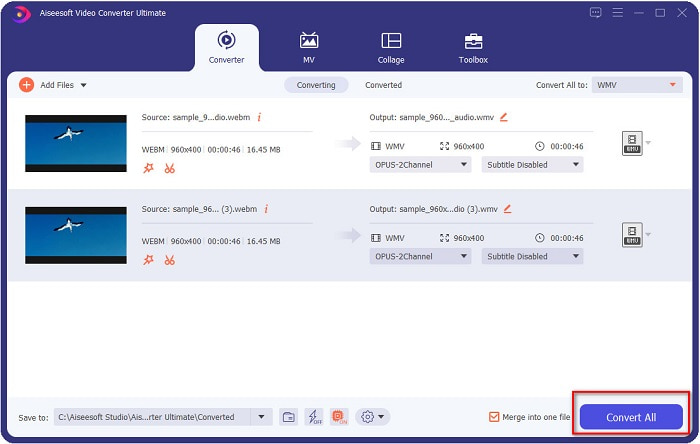
Step 4. When you select the file format that you want, click the Convert All button to start converting your WebM file to WMV. And voila! Your WebM file is now converted to a WMV file!
با این مراحل ساده می توانید به راحتی فایل WebM خود را به فایل WMV تبدیل کنید.
بخش 3. دانش گسترده در مورد WebM و WMV
برای درک بیشتر این دو فایل در این قسمت از مقاله به آنها می پردازیم.
WebM file is a video file format that widely supports web browsers. HTML5 websites use this format for video streaming purposes. Moreover, this type of file contains video streams compressed with VP8 or VP9 codecs. While on the other hand, Windows develops WMV or Windows Media Video; therefore, Windows System usually plays this type of file. Many encoders also support this type of file. In addition to that, this file format uses a compressor that helps your file make it smaller in size without ruining the quality.
بخش 4. سوالات متداول در مورد تبدیل WebM به WMV
آیا تبدیل کننده نهایی ویدیو می تواند فایل های WebM را به فرمت فایل MP4 تبدیل کند؟
Certainly. Using FVC Video Converter Ultimate can convert your WebM file into MP4. You can click this link and read thoroughly for more information about converting your WebM file to MP4 file format.
آیا QuickTime از فایل های WebM پشتیبانی می کند؟
QuickTime does not support WebM file formats. Because QuickTime does not contain many codecs like other media players, you can convert your WebM file to file formats like MOV, which is supported by the codecs of QuickTime. To have more Infos about converting WebM to MOV, click this link.
آیا اینترنت اکسپلورر از فایل های WebM پشتیبانی می کند؟
آره. اینترنت اکسپلورر از فایل های WebM پشتیبانی می کند. با این حال، اینترنت اکسپلورر قبلاً حذف شده است.
نتیجه
To sum it all up, the WebM to WMV converters presented above will help you convert your WebM files to WMV files easily. Moreover, the tools shown above have different features which allow you to do more when converting. But we believe that FVC Video Converter Ultimate is the best tool that helps you meet your needs. Still can't decide which converter to use? Download it now, and try it!
-
 3 راه برای تبدیل WebM به MP3 بدون از دست دادن کیفیت صدا
 آیا مشکلی دارید زیرا فایل های WebM نمی توانند برای پخش صدایی که ذخیره می کنید استفاده شوند؟ سپس این مقاله را بخوانید زیرا ما کمک موثری با تبدیل WebM به MP3 ارائه می کنیم.
-
 3 نرم افزار خیره کننده مورد استفاده برای تبدیل فایل WebM به فرمت AVI
 آیا هیچ ایده ای برای تبدیل WebM به AVI ندارید؟ سپس بیایید خواندن این مقاله را شروع کنیم. همانطور که تمام جزئیات WebM و سه مبدلی که می توانید برای تبدیل استفاده کنید را مشخص می کنیم.
-
 بهترین گزینه تبدیل WebM به FLV رایگان در وب و دسکتاپ
 آیا هنگام پخش فایل های WebM در تلفن های هوشمند خود نیز چنین مشکلی دارید؟ سپس 5 دقیقه را صرف خواندن این مقاله کنید تا بدانید چگونه WebM را به FLV تبدیل کنید.
