


 Video Converter Ultimate
 ضبط صفحه
 تعمیر ویدیو
در بررسی های دقیق درباره 3 مبدل وب و دسکتاپ مورد استفاده برای تبدیل فایل های WMV به AVI
زمانی پیش میآید که بخواهید فایل خود را به یک فرمت جدید تبدیل کنید، چون دیگر قابل پخش نیست. یک مثال عالی در این موقعیت، فرمت WMV است. اگر کاربر ویندوز هستید، قبلاً نام این فرمت را شنیدهاید. WMV انواع فایلهای ویدئویی و صوتی را در یک ظرف واحد ذخیره میکند. با این حال، این فرمت توسط بیشتر پخشکنندههای چندرسانهای پشتیبانی نمیشود. پس بهترین راه برای تماشای فایل ویدئویی با پسوند .wmv این است که آن را تبدیل کنید. اگر مثل بقیه این سؤال را دارید که «آیا میتوانید WMV را به AVI تبدیل کنید؟» پس ادامهی مطلب را بخوانید؛ در ادامه، مجموعهای از ابزارهای تحت وبی را که میتوانید همراه با مراحل توضیحدادهشده از آنها استفاده کنید، گردآوری کردهایم.
قسمت 1. 3 مبدل برتر به رایگان تبدیل WMV به AVI آنلاین
Top 1. FVC Free Video Converter Online
اگر به اینترنت دسترسی دارید، تبدیل کردن را میتوان خیلی سریع با استفاده از FVC Free Video Converter Online انجام داد. این نرمافزار، برخلاف بسیاری از ابزارهای تحت وب دیگر، از تبدیل بسیار سریعتر و بهتر پشتیبانی میکند. همچنین لازم نیست برای بارگذاری فایل منتظر بمانید، چون این ابزار نمیخواهد شما مدت زیادی در انتظار بمانید. نکتهی خوب دیگر دربارهی این ابزار تحت وب، کتابخانهی داخلی ویدئوهای تبدیلشده است که در اختیار شما میگذارد. با این کتابخانه میتوانید به ویدئو یا صوتی که تبدیل کردهاید، بهراحتی و با کارایی بالا دسترسی پیدا کنید. اما اگر به اینترنت دسترسی نداشته باشید، درست مثل دیگر ابزارهای تحت وبی که در ادامه میآیند، نمیتوانید از آن استفاده کنید. علاوه بر این، اگر میخواهید این ابزار را امتحان کنید، در ادامه چند مرحله ارائه شده که میتوانید برای تبدیل رایگان WMV به AVI به صورت آنلاین دنبال کنید.
گام 1. ابتدا با کلیک روی این لینک به وبسایت اصلی FVC بروید.
گام 2. سپس روی «Add Files to Convert» کلیک کنید تا لانچر ابزار تحت وب نصب شود. نگران نباشید، چون حجم آن فقط چند بایت است و امن نیز هست. اگر نصبکننده روی درایو شما قرار گرفت، دوباره روی «Add Files to Convert» کلیک کنید، فرمت .wmv را در پوشه انتخاب کرده و روی «Open» بزنید.
برای تبدیل دستهای فایلها، نسخهٔ دسکتاپ را دانلود کنید.
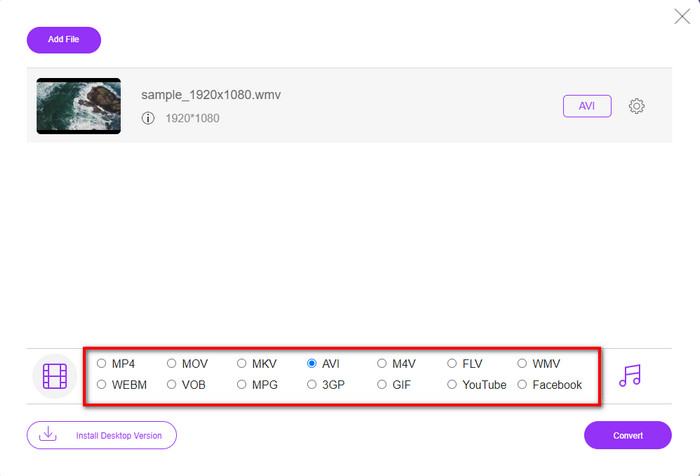
گام 3. وقتی فایل WMV روی رابط کاربری ظاهر شد، حالا باید از گزینههای موجود در پایین، فرمت «AVI» را انتخاب کنید.
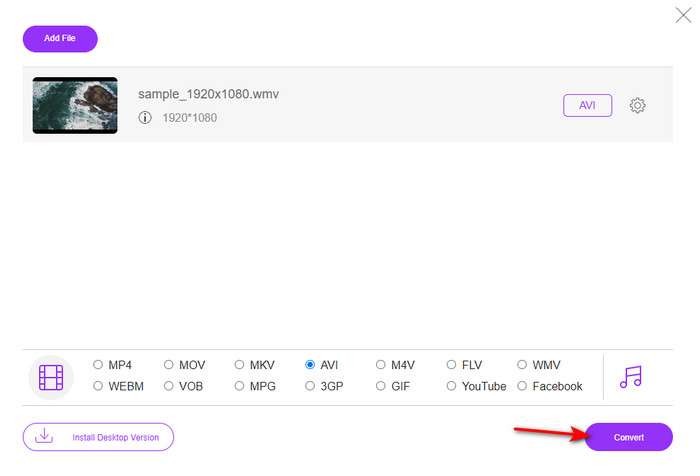
گام 4. بعد از انتخاب فرمت، اکنون زمان تبدیل است؛ برای این کار روی «Convert» کلیک کنید.
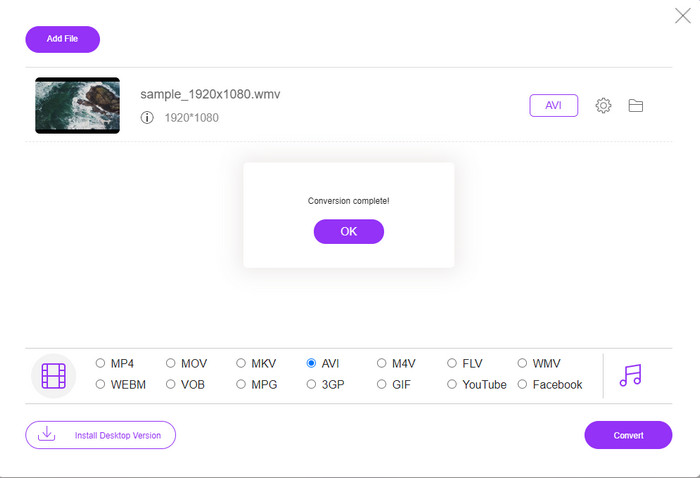
گام 5. چند دقیقه صبر کنید تا فرآیند به پایان برسد؛ اگر کار تمام شود، پوشهای حاوی فایل تبدیلشده روی صفحهی شما ظاهر میشود. سپس روی آن کلیک کنید تا فرمت جدید ویدئوی WMV را که با این ابزار ساختهاید تماشا کنید.
بالا 2. تبدیل
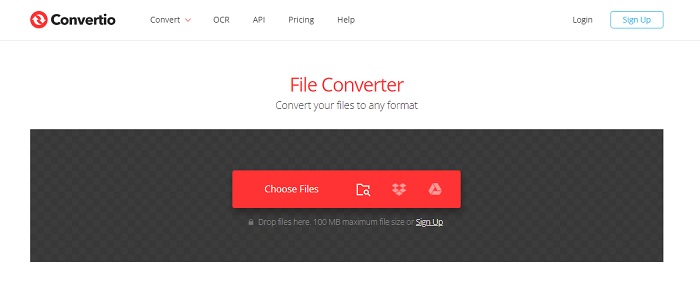
یک مبدل آنلاین دیگر که میتوانید برای تبدیل رایگان فایلهای WMV به AVI از آن استفاده کنید، Convertio است. برخلاف ابزار تحت وب اول، برای استفاده از آن نیازی به لانچر ندارید. همچنین میتوانید PDF، تصویر، صوت و موارد دیگر را نیز در این ابزار تبدیل کنید. با این حال، ایراد اصلی این است که بارگذاری و دانلود فایلها زمان زیادی میبرد. همچنین این ابزار، کتابخانهی داخلی برای نگهداری تمام فایلهای تبدیلشدهی شما ندارد. بنابراین اگر میخواهید از این ابزار بهعنوان مبدل خود استفاده کنید، مراحل زیر را دنبال کنید.
گام 1. مرورگر دلخواهتان را باز کنید و عبارت «Convertio.io» را جستوجو کنید.
گام 2. روی «Choose File» کلیک کرده و فایل WMV موردنظرتان را در پوشه پیدا کنید، سپس روی دکمهی کشویی کلیک کرده و AVI را انتخاب کنید.
گام 3. فرآیند بارگذاری زمانبر است؛ بعد از آن، روی «Download» کلیک کنید تا فرمت تبدیلشده را ذخیره کنید.
بالا 3. CloudConvert
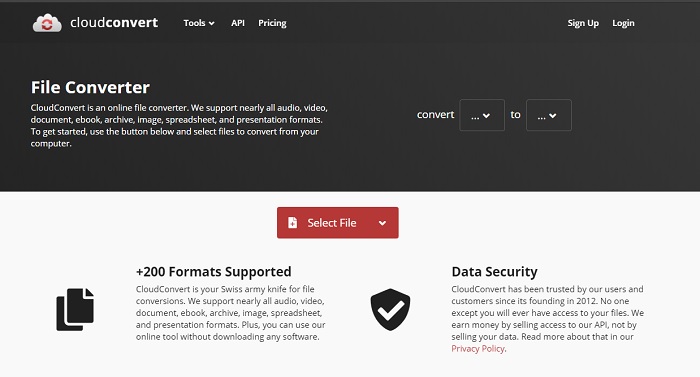
CloudConvert از طیف محدودی از فرمتها پشتیبانی میکند که میتوانید برای تبدیل انتخاب کنید. همچنین فرآیند تبدیل در اینجا امن است و هیچ سابقهای از فرآیند تبدیل شما نگه نمیدارد. درست مانند Convertio، این ابزار نیز کتابخانهای برای فایلهای تبدیلشده ندارد. علاوه بر این، فرآیند تبدیل در اینجا بسیار کندتر است، چون از شتابدهی سختافزاری برای افزایش سرعت تبدیل پشتیبانی نمیکند. با این حال، اگر میخواهید یک تبدیل رایگان WMV به AVI را بهصورت آنلاین تجربه کنید، مراحل زیر را دنبال کنید.
گام 1. مرورگر وب خود را باز کنید و CloudConvert را جستوجو کنید.
گام 2. روی «Select File» فشار دهید، سپس در پوشهای که روی صفحهتان باز میشود، بهدنبال فایل .wmv بگردید.
گام 3. روی «Convert to» کلیک کنید، فرمت «AVI» را انتخاب کنید، روی دکمهی «Convert» بزنید و پس از پایان تبدیل، روی «Download» کلیک کنید.
قسمت 2. نحوه تغییر WMV به AVI در مک و کامپیوتر با مبدل سرعت لایتنینگ
نرمافزارهای آنلاین ذکرشده در بالا نمیتوانند خدماتی را که FVC Video Converter Ultimate به کاربران خود ارائه میدهد، کپی کنند. اگر بهدنبال یک ابزار چندمنظوره هستید، این گزینه میتواند بهترین انتخاب باشد. همچنین میتوانید از این نرمافزار بهعنوان مبدل، ویرایشگر، سازندهی GIF و موارد دیگر استفاده کنید. علاوه بر این، این نرمافزار فراتر از انتظار شما عمل میکند؛ هم از نظر امکانات و هم از نظر سرعت اتمام کار. عملکرد کلی این ابزار ما را شگفتزده کرده است و اگر میخواهید شما هم شگفتزده شوید، این مبدل فوقالعاده را روی رایانهی خود دانلود کنید. حالا بیایید با دنبال کردن راهنمای گامبهگام زیر، تبدیل WMV به AVI را در مک و ویندوز انجام دهیم.
گام 1. پیش از آنکه بتوانید به ابزار دسترسی داشته باشید، باید ابتدا آن را دانلود کرده و پلتفرمی را که در حال حاضر از آن استفاده میکنید، انتخاب کنید. سپس نرمافزار را روی رایانهی خود نصب کنید؛ راهاندازی سریع آن کمتر از یک دقیقه طول میکشد.
دانلود رایگانبرای ویندوز 7 یا بالاتردانلود امن
دانلود رایگانبرای MacOS 10.7 یا بالاتردانلود امن
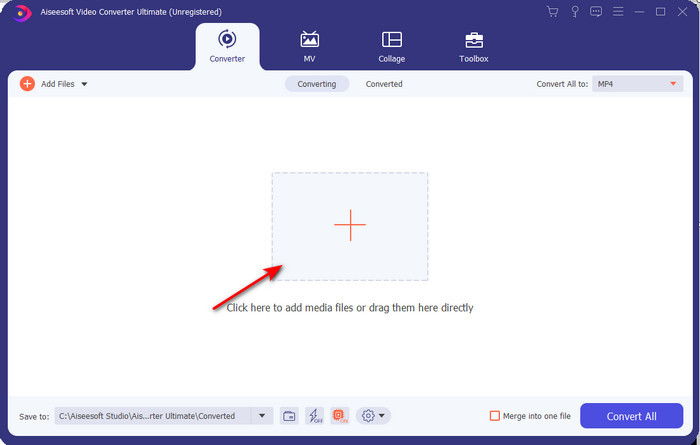
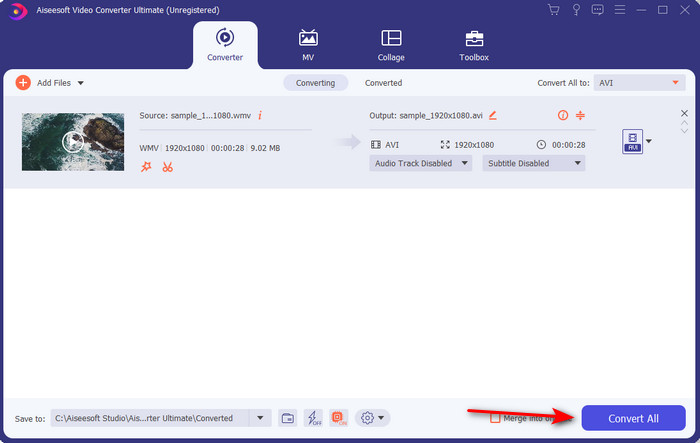
گام 2. نرمافزار را باز کنید تا به گام بعدی بروید؛ پس از اجرا، علامت «+» را خواهید دید؛ روی آن کلیک کنید تا فایلها را اضافه کرده و سپس «Open» را انتخاب کنید.
گام 3. برای تغییر فرمت، روی منوی کشویی «Convert All to» کلیک کنید و در زیرمنو، فرمت «AVI» را انتخاب کنید.
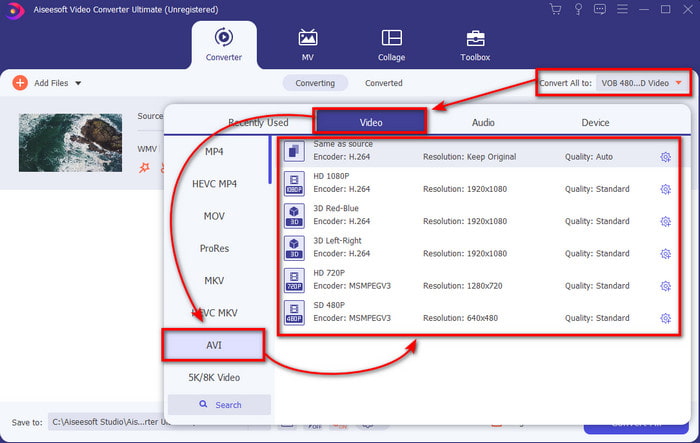
گام 4. اکنون برای اینکه فایل WMV را با موفقیت به AVI تبدیل کنید، روی «Convert All» کلیک کرده و چند ثانیه برای اتمام فرآیند صبر کنید.
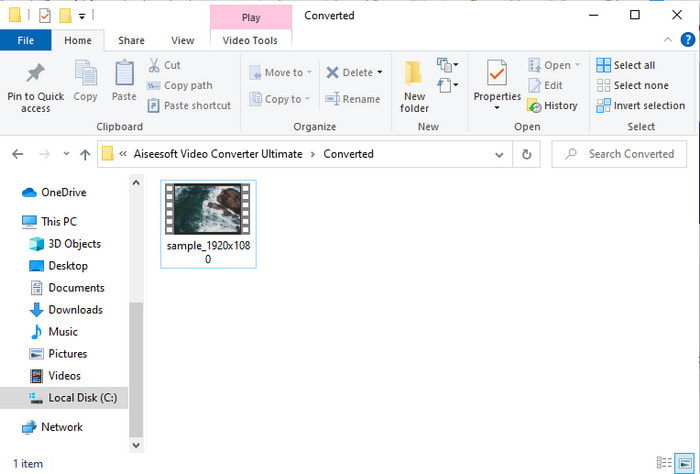
گام 5. بعد از تبدیل، پوشهای با فایل تبدیلشدهای که چند لحظه پیش ساختهاید روی صفحه نمایش داده میشود. برای تماشا، روی فایل ویدئویی کلیک کنید و از فایل WMV تبدیلشدهی خود بدون افت کیفیت لذت ببرید.
قسمت 3. WMV VS AVI; کدام فرمت بهترین عملکرد را دارد
WMV و AVI برخی از کانتینرهای فایل ویدیویی درجه یک هستند که دوست دارید از آنها استفاده کنید. دو فرمت ذکر شده می توانند حاوی ویدئو و صوت باکیفیت باشند، اما اکنون با مطالعه این نمودار مقایسه تفاوت های آنها را مشخص می کنیم.
| WMV | AVI | |
| همچنین به عنوان شناخته شده است | ویدیوی ویندوز مدیا | ارتباط صوتی تصویری |
| بهترین استفاده برای | برای پخش آنلاین ویدیویی با ساختار مناسب، یک فایل بزرگ را به یک فایل کوچکتر تبدیل می کرد. | برای ذخیره ویدئو و صدا به صورت جداگانه و پخش همزمان آنها بدون هیچ تاخیری استفاده می شود. |
| توسعه یافته توسط | مایکروسافت | مایکروسافت |
| معایب فرمت | توجه و حمایت کمتری از سوی پخش کننده های رسانه ای جلب می شود. | به یک کدک نیاز دارد تا این فایل بزرگ را به یک فایل بسیار کوچکتر اما در محدوده فشرده کند. |
WMV در مقابل AVI
WMV که توسط مایکروسافت تولید شد، یکی از رایج ترین فرمت های ویدئویی در دهه 2000 بود. می توان آن را از طریق وب مشاهده کرد و توسط پخش کننده های رسانه ای مختلف در ویندوز پخش شد. و همچنین فرمت پیش فرض فایل ویدئویی Windows Media Player است. اما اخیراً توسط فرمت های دیگر تصاحب شده است.
بر اساس فرمت فایل تبادل منابع (RIFF)، فرمت AVI توسط مایکروسافت در سال 1992 معرفی شد. این فرمت می تواند ویدئو/صوتی با کیفیت بالا را ذخیره کند زیرا از فشرده سازی کمتری استفاده می کند. اما این امر همچنین باعث بزرگی فایل AVI می شود که ممکن است در صورت وجود فضای محدود مشکل ساز شود.
بخش 4. سوالات متداول در مورد فرمت WMV و AVI
آیا تبدیل WMV به AVI روی کیفیت تأثیر می گذارد؟
کیفیت فایل WMV زمانی که آن را به AVI تبدیل می کنید نباید تغییر کند. با این حال، فرض کنید WMV شما تغییر کند و کیفیت پایین بیاید. در این صورت، مبدلی که استفاده میکنید از پیکسل باکیفیت ویدیوی شما پشتیبانی نمیکند.
آیا اندازه WMV من بعد از تبدیل تغییر می کند؟
اندازه فایل WMV ممکن است کمی متفاوت از اندازه فایل اصلی باشد. دلیلی برای تغییر آن وجود دارد. یکی از دلایل این است که فایل فشرده غیرفشرده می شود، بنابراین اندازه فایل تغییر می کند. اما تغییرات باید نزدیک به اندازه فایل اصلی باشد و نباید آنقدر دور یا بزرگ باشد.
آیا می توانم از WMV برای پیوست کردن یک ویدیو به ایمیل استفاده کنم؟
بله، به گفته مایکروسافت، استفاده از فرمت WMV و پیوست کردن ویدیو به ایمیل ایده آل است زیرا از فشرده سازی بهتر و سریعتر از MPEG-4 پشتیبانی می کند. همچنین، به دلیل کوچک بودن اندازه فایل، به عنوان یک فرمت مینیاتوری شناخته می شود. با این حال، کیفیت ویدیو همچنان باقی است.
نتیجه
همانطور که به پایان می رسیم، درک این موضوع برای ما آسان تر است که همه پلتفرم ها و نرم افزارها از WMV پشتیبانی نمی کنند. علاوه بر این، ابزار وب عملکرد خوبی دارد، اما یک ابزار وجود دارد که میتواند فایلهای دستهای را بسیار سریعتر و آسانتر تبدیل کند: FVC Video Converter Ultimate. فرض کنید می خواهید تبدیل فوق العاده ای را که این نرم افزار ارائه می دهد را تجربه کنید. در این صورت، شما باید هم اکنون این را بر روی دسکتاپ خود دانلود کرده و از آن استفاده کنید.
-
 نحوه تبدیل WMV به MP4 رایگان و آنلاین [حل شده]
 چگونه فایل های WMV را به MP4 تبدیل کنیم؟ در اینجا 4 روش آسان برای تبدیل WMV به MP4 در مک و ویندوز با مراحل ساده آورده شده است.
-
 WMV به MP3 – نحوه تبدیل ویدیو به صدا به صورت رایگان [رومیزی/آنلاین]
 هنگام تماشای یک ویدیوی WMV، بخش صوتی آن را جذاب مییابید. بنابراین، شما می خواهید آن را در پخش کننده MP3 خود پخش کنید. اما واضح است که پخش کننده شما فرمت WMV را پشتیبانی نمی کند. این باعث می شود شما تعجب کنید که آیا راهی برای تبدیل WMV به MP3 وجود دارد.
-
 2 ساده ترین راه برای تبدیل فایل های WMV به FLV در کامپیوتر / مک
 چگونه می توان WMV را به FLV تبدیل کرد؟ در مرحله اول ، شما باید توصیه ما را بخوانید و روش مورد علاقه خود را پیدا کنید و سپس برای انجام سریع کار راهنمای ما را دنبال کنید.

