


 Video Converter Ultimate
 ضبط صفحه
 تعمیر ویدیو
روش های عالی با استفاده از ابزارهای نهایی برای تبدیل XviD به 3GP
نمیتوانید فایل .xvid خود را روی تلفن همراه پخش کنید؟ ممکن است دلیلش این باشد که دستگاه شما از این فرمت پشتیبانی نمیکند. برای پخش ویدیوی خود روی گوشی، باید فایل XviD را به 3GP تبدیل کنید. وقتی صحبت از تلفن همراه میشود، رایجترین فرمتی که میتوانید برای پخش ویدیو استفاده کنید، فرمت 3GP است. این مطلب به شما دید خوبی درباره بهترین روشهای تبدیل XviD به 3GP بهصورت سریع و بدون دردسر، با استفاده از ابزارهای قدرتمندی که روی ویندوز، مک و بهصورت آنلاین در دسترس هستند، میدهد. بیایید بخوانیم و تا حد ممکن یاد بگیریم.

قسمت 1: بهترین راه برای تبدیل XviD به 3GP
بهترین راه برای تبدیل XviD به 3GP استفاده از Video Converter Ultimate است. این یکی از مبدلهای قدرتمندی است که میتوانید روی کامپیوترهای ویندوز و مک خود دانلود کنید. اگر این برنامه را داشته باشید، دیگر لازم نیست نگران تبدیل تعداد زیادی فایل باشید، چون Video Converter Ultimate میتواند بیش از 1000 فرمت را تبدیل کند، از جمله FLV، MKV، DIVX، XviD، 3GP، M4V، MTS، SWF، MP4 و غیره. علاوه بر این، سرعت تبدیل آن 30 برابر سریعتر از بسیاری از مبدلهای دیگر است که برای کاربران بسیار مفید است. همچنین میتوانید چندین فایل را بهطور همزمان تبدیل کنید، زیرا این برنامه از تبدیل دستهای پشتیبانی میکند و نیازی نیست هر فایل را بهصورت جداگانه تبدیل کنید. افزون بر این، اگر میخواهید ویدیوی XviD خود را بچرخانید، میتوانید از این ابزار استفاده کنید، چون امکان چرخاندن ویدیو (Video Rotator) را هم ارائه میدهد. با کمک این قابلیت، بهراحتی میتوانید ویدیو را در جهت دلخواه بچرخانید. علاوه بر این، با ابزار Video Trimmer میتوانید ویدیو را تا طول دلخواه برش دهید. با این امکانات میتوان گفت Video Converter Ultimate یک ابزار جامع برای تبدیل و ویرایش ویدیوهای شماست.
قابلیتها
◆ فرمت های ویدیویی مانند XviD، 3GP، MP4، M4V، DIVX، FLV، AVI، SWF، و بیش از 100 فرمت ویدیو را تبدیل کنید.
◆ قابلیت ساخت موزیک ویدیو را دارد.
◆ می تواند به ایجاد یک کلاژ کمک کند.
◆ دارای ابزارهای ویرایش عالی مانند تقویت کننده های ویدئویی، تصحیح رنگ، اصلاح کننده و غیره است.
◆ کنترل کننده سرعت ویدیو را تنظیم کنید.
◆ می تواند اندازه فایل فایل را با استفاده از کمپرسور تغییر دهد.
طرفداران
- این می تواند فایل های ویدئویی را 30 برابر سریعتر از مبدل های دیگر تبدیل کند.
- برای کاربران غیر حرفه ای مناسب است و رابط کاربری ساده ای دارد.
- می تواند فرمت تصویر را بین JPG، PNG، WEBP، BMP و TIFF تبدیل کند.
- می تواند چندین فایل را در یک حرکت تبدیل کند.
منفی ها
- نسخه پولی را دریافت کنید تا از ویژگی های عالی لذت ببرید.
بیایید فایل XviD شما را با استفاده از روش های مفید زیر به 3GP تبدیل کنیم.
مرحله 1: باید Video Converter Ultimate را با کلیک روی دکمه Download زیر روی ویندوز یا مک خود دانلود کنید. برنامه را نصب کرده و اجرا کنید.
دانلود رایگانبرای ویندوز 7 یا بالاتردانلود امن
دانلود رایگانبرای MacOS 10.7 یا بالاتردانلود امن
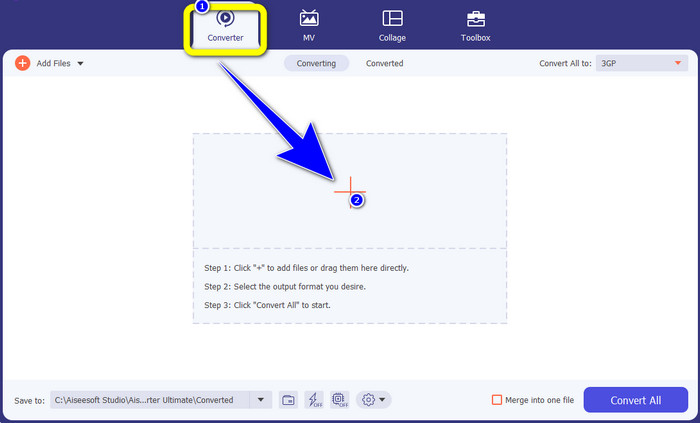
مرحله 2: در بخش بالایی رابط چهار گزینه وجود دارد: Converter، MV، Collage و Toolbox. پنل Converter را انتخاب کرده و روی آیکون Plus کلیک کنید تا فایل XviD مورد نظر برای تبدیل را اضافه کنید.
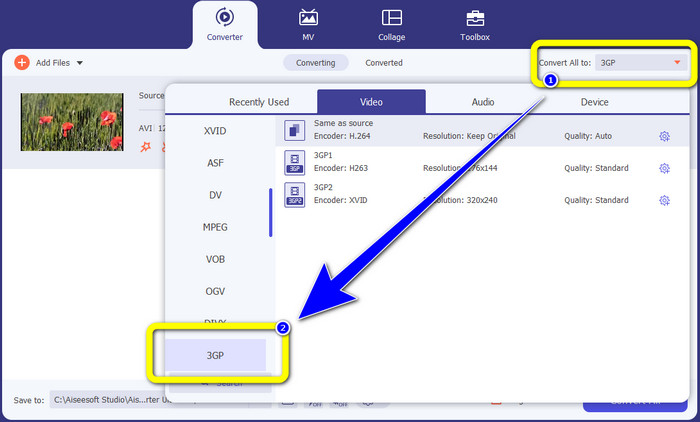
مرحله 3: پس از افزودن فایل XviD، به قسمت سمت راست رابط نگاه کنید و روی دکمه Convert all to کلیک کنید. گزینههای فرمت ظاهر میشوند؛ فرمت فایل 3GP را انتخاب کنید.
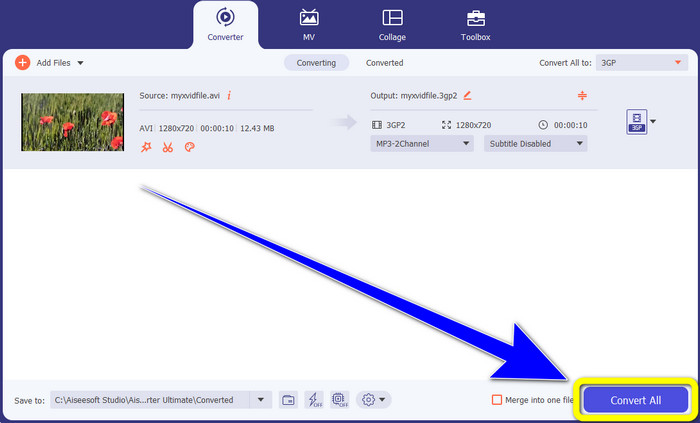
مرحله 4: در مرحله چهارم و نهایی، روی دکمه Convert All کلیک کنید تا فایل XviD شما به 3GP تبدیل شود. منتظر بمانید تا فرایند تبدیل کامل شود و سپس ویدیوی خود را ذخیره کنید.
قسمت 2: تبدیل XviD به 3GP آنلاین
استفاده از مبدل ویدیوی رایگان FVC به صورت آنلاین
علاوه بر بهترین مبدلی که در بخش اول با آن آشنا شدید، مبدلهای آنلاین رایگانی هم وجود دارند که میتوانید استفاده کنید. بهترین ابزار آنلاین FVC Free Video Converter Online است. این نرمافزار کاربردی به شما امکان میدهد بهآسانی XviD را به 3GP تبدیل کنید. این ابزار از فرمتهای مختلف ویدیو و صدا مانند MP4، M4V، WMV، AVI، MOV، VOB، WEBM، MP3، AAC، AC3، WMA، FLAC و غیره پشتیبانی میکند. افزون بر این، استفاده از این مبدل بسیار ساده است، زیرا فقط سه مرحله آسان برای تبدیل انواع فایلها دارد. به این ترتیب، هیچ کاربری در استفاده از این مبدل آنلاین دچار مشکل نخواهد شد. اگر میخواهید بدانید چگونه بهراحتی با استفاده از FVC Free Video Converter Online، XviD را به 3GP تبدیل کنید، از سه مرحله ساده زیر کمک بگیرید.
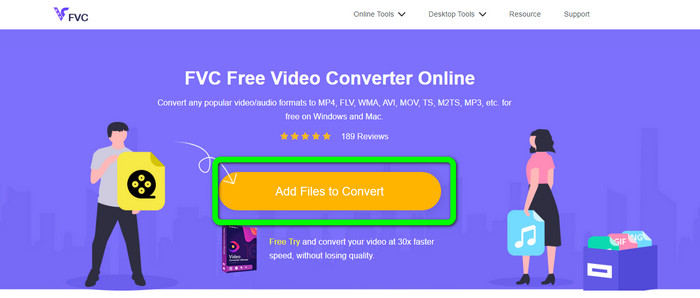
مرحله 1: به وبسایت FVC Free Video Converter Online مراجعه کنید. روی دکمه Add Files to Convert کلیک کرده و فایل XviD مورد نظر برای تبدیل به فرمت 3GP را آپلود کنید.
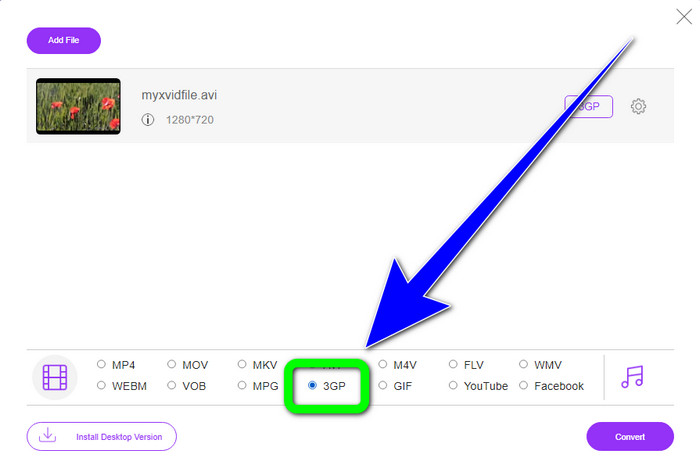
مرحله 2: پس از آپلود فایل، گزینههای فرمت را در بخش پایینی رابط مشاهده میکنید. فرمت فایل 3GP را انتخاب کنید.
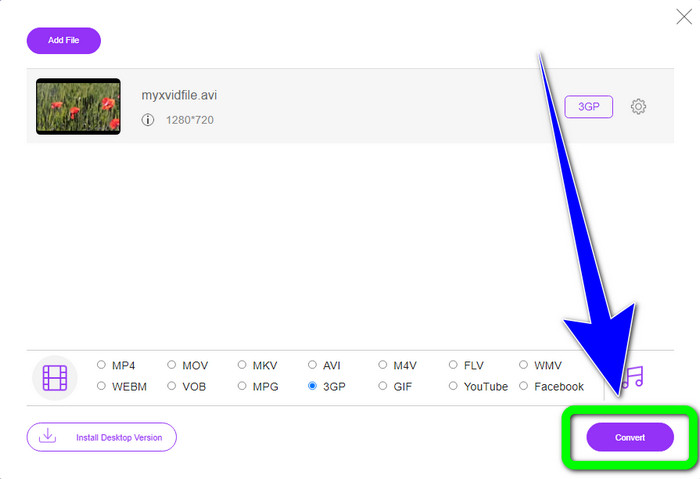
مرحله 3: باید روی دکمه Convert کلیک کنید تا فایل XviD به 3GP تبدیل شود. منتظر بمانید تا فرایند تبدیل کامل شود و سپس فایل نهایی را روی ویندوز یا مک خود ذخیره کنید.
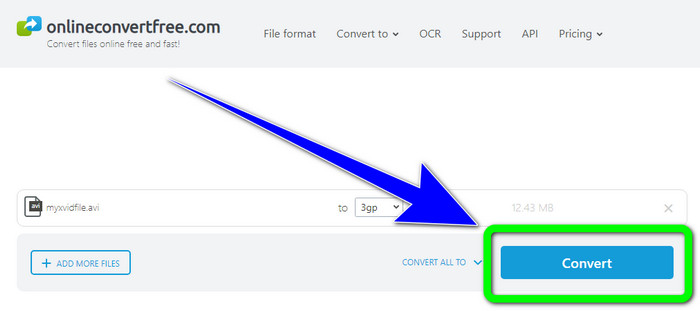
با استفاده از OnlineConvertFree.com
Onlineconvertfree.com یکی دیگر از ابزارهای آنلاین است که میتوانید برای تبدیل XviD به 3GP از آن استفاده کنید. این برنامه در تبدیل فایلهای صوتی، تصویری، اسناد و ویدیو نیز عملکرد خوبی دارد و همین موضوع آن را برای همه کاربران مناسب و راحت کرده است. همچنین از فرمتهای مختلفی مانند AVCHD، MT2S، MPEG، MKV، M4V، MP4، FLV، DIVX، XviD، 3GP و غیره پشتیبانی میکند. لازم نیست نگران فایل خود باشید، زیرا امنیت آن در این نرمافزار حفظ میشود و فایل ویدیویی شما پس از 24 ساعت بهطور خودکار حذف خواهد شد. همچنین میتوانید از این ابزار برای تبدیل XviD به FLV نیز استفاده کنید.
با این حال، باید در نظر داشته باشید که Onlineconverterfree.com یک ابزار مبتنی بر وب است، که در آن شما باید یک اتصال اینترنتی سریع برای کار با آن داشته باشید. همچنین محدودیت ذخیره سازی این نرم افزار تنها 100 مگابایت است، بنابراین برای افزایش محدودیت ذخیره سازی باید اشتراک خریداری کنید. برای تبدیل XviD به 3GP با استفاده از Onlineconverter.com مراحل زیر را دنبال کنید.
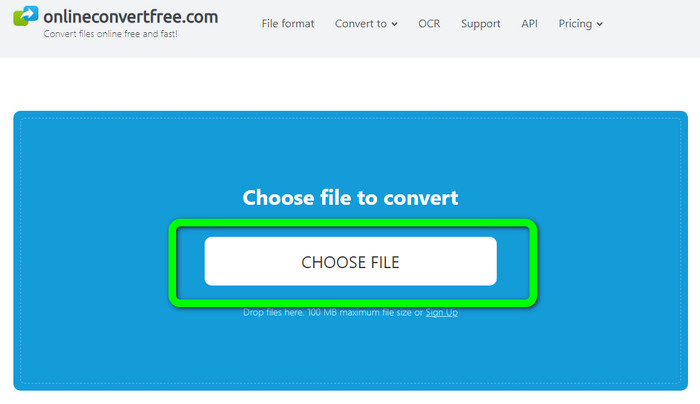
مرحله 1: به وبسایت Onlinecovnerter.com بروید. روی دکمه Choose File کلیک کنید تا فایل XviD را وارد کنید.
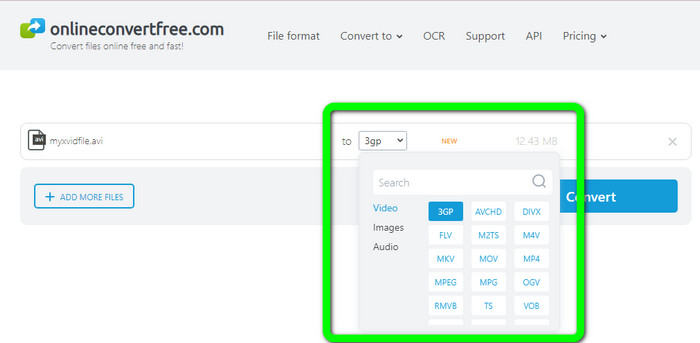
مرحله 2: از میان گزینههای فرمت، فایل 3GP را انتخاب کنید.
مرحله 3: در مرحله نهایی، روی دکمه Convert کلیک کنید. منتظر بمانید تا فرایند تبدیل انجام شود و خروجی نهایی را در دستگاه خود ذخیره کنید. برای آشنایی با روش تبدیل M4V به 3GP اینجا کلیک کنید.
بخش 3: دانش گسترده در مورد XviD
XviD چیست؟
این کدک، XviD، بر اساس استاندارد MPEG-4 است. با وجود اینکه رنگها را تاب میدهد، اما در صحنههای پویا تعریف بسیار خوبی دارد. از آنجایی که این یک کدک منبع باز است، علاقهمندان میتوانند به توسعه آن کمک کنند و بهروزرسانیهای مداوم را تشویق کنند. به لطف فشرده سازی فعال در Xvid، یک فیلم DVD را می توان به اندازه کافی فشرده کرد تا بر روی یک CD قرار گیرد و در عین حال کیفیت DVD را حفظ کند. برنامه Xvid داده های ویدئویی را به MPEG-4 ASP فشرده و از حالت فشرده خارج می کند. پسوند xvid. برای نگهداری ویدیوی فشرده استفاده می شود. وقتی صحبت از فایل های ویدیویی می شود، Xvid با ZIP قابل مقایسه است. Xvid ویدئو را با نسبت 200:1 یا بالاتر فشرده می کند. این امکان انتقال سریع تر شبکه و ذخیره سازی دیسک موثرتر را فراهم می کند.
بخش 4: سوالات متداول در مورد تبدیل XviD به 3GP
1. برای تبدیل XviD به 3GP چقدر باید صبر کنم؟
فرآیند تبدیل به مبدلی که استفاده می کنید و اندازه فایل ویدیو بستگی دارد. اگر می خواهید مبدل سریع تری داشته باشید، Video Converter Ultimate را در ویندوز یا مک خود دانلود کنید. سرعت تبدیل این اپلیکیشن 30 برابر بیشتر از مبدل های دیگر است.
2. آیا مبدل رایگانی وجود دارد که بتوانم با ذخیره سازی نامحدود فایل از آن استفاده کنم؟
بله، قطعاً! بهترین مبدل رایگانی که میتوانید استفاده کنید FVC Free Video Converter Online است. این ابزار آنلاین به شما اجازه میدهد تعداد نامحدودی فایل را تبدیل کنید، بنابراین لازم نیست نگران حداکثر اندازه فایل باشید.
3. Xvid یا 3GP کدام بهتر است؟
هر دوتاشون بهترن اگر می خواهید ویدیویی را در دستگاه 3G پخش کنید، بهتر است یک ویدیو با یک فایل ویدیویی 3GP پخش کنید. و اگر می خواهید ویدیوهای خود را در پخش کننده های ویدیو پخش کنید، یک ویدیو با یک فایل XviD عالی است.
نتیجه
این مقاله بهترین روشها برای تبدیل XviD به 3GP را در اختیار شما قرار داد. برای تبدیل فایلهای بیشتر در ویندوز و مک، میتوانید برنامه Video Converter Ultimate را دانلود کنید. همچنین اگر به یک مبدل آنلاین رایگان نیاز دارید، میتوانید از FVC Free Video Converter Online استفاده کنید.
-
 بهترین و ساده ترین روش ها را برای تبدیل TS به 3GP بیابید
 این مقاله دانلود رایگان مبدل TS به 3GP را ارائه می دهد که می توانید آن را روی دستگاه خود امتحان کنید. این مقاله را بخوانید تا جزئیات ضروری بیشتری را که نیاز دارید را کشف کنید
-
 با استفاده از این مبدل های نهایی، MTS را به 3GP تبدیل کنید
 آیا می خواهید یک فرآیند بدون عارضه برای تبدیل MTS به 3GP انجام دهید؟ دیگر نگران نباش! این مقاله مبدل های MTS به 3GP را ارائه می دهد که می توانید به صورت آنلاین و آفلاین از آنها استفاده کنید
-
 WebM به 3GP: موثرترین روش ها برای استفاده از این ابزارها
 آیا به دنبال تبدیل برجسته WebM به 3GP هستید؟ این مقاله به شما اطمینان می دهد که بهترین روش های موثر برای تبدیل WebM خود به 3GP را دریافت می کنید
