


 Video Converter Ultimate
 ضبط صفحه
 تعمیر ویدیو
آموزش نحوه ویرایش متادیتا MKV در دسکتاپ به ساده ترین روش
MKV پسوندی است که برای فرمتهای مالتیمدیا کانتینر Matroska بسیار محبوب است. چه چیزی باعث شده MKV نسبت به دیگر فرمتها محبوبتر باشد؟ بسیاری از کاربران فکر میکنند MKV یک فرمت فشردهسازی ویدیو برای صدا و تصویر است، در حالی که اینطور نیست. این فرمت به دلیل انعطافپذیری بالایش در بهکارگیری کدکهای مختلف برای صدا، ویدیو و زیرنویس، آن هم در یک فایل واحد، محبوب شده است. با این قابلیتها، این فرمت آیندهنگر (Future-proof) شده است؛ یعنی خودِ فرمت و حتی فراداده (متادیتا)ای که در آن ذخیره میشود، به این زودیها قدیمی نخواهد شد. پس اگر میخواهید متادیتای فایل MKV خود را اضافه، حذف یا ویرایش کنید، خواندن این مقاله را ادامه دهید تا سریعتر یاد بگیرید چطور متادیتای MKV را ویرایش کنید.

قسمت 1. نحوه ویرایش متادیتا فایل MKV با 3 بهترین نرم افزار روی دسکتاپ
FVC Video Converter Ultimate – قدرتمندترین ویرایشگر برچسب MKV در ویندوز و مک
FVC Video Converter Ultimate بهترین ویرایشگر متادیتای MKV است که میتوانید روی هر دو سیستمعامل دانلود کنید و مثل یک حرفهای کار را تمام کنید. این نرمافزار همهکاره بهراحتی از فایل MKV پشتیبانی میکند و آن را باز میکند تا در صورت نیاز، متادیتای آن را تغییر دهید. با پشتیبانی گسترده از فرمتهای ویدیو و صدا، آپلود هر نوع رسانه، از جمله MKV، دیگر اصلاً آزاردهنده نخواهد بود. هنگام استفاده از نرمافزار، روند یادگیری و درک کامل نحوه کار کردن با آن برایتان آسان خواهد بود. میخواهید از این ابزار استفاده کنید اما آموزشی که بتوانید به آن تکیه کنید ندارید؟ خوشبختانه اطلاعاتی که در ادامه آوردهایم کمک میکند مثل یک حرفهای کار را انجام دهید؛ جزئیات زیر را بخوانید تا یاد بگیرید چطور عنوان فایل MKV را در کمتر از یک دقیقه تغییر دهید.
مرحله ۱. ابتدا با کلیک روی دکمه دانلود، نرمافزار فوراً روی رایانه شما دانلود میشود؛ نسخه متناسب با سیستمعامل خود را انتخاب کنید. سپس آن را روی رایانه نصب و اجرا کنید تا بتوانید متادیتا را به فایلهای MKV خود اضافه کنید.
دانلود رایگانبرای ویندوز 7 یا بالاتردانلود امن
دانلود رایگانبرای MacOS 10.7 یا بالاتردانلود امن
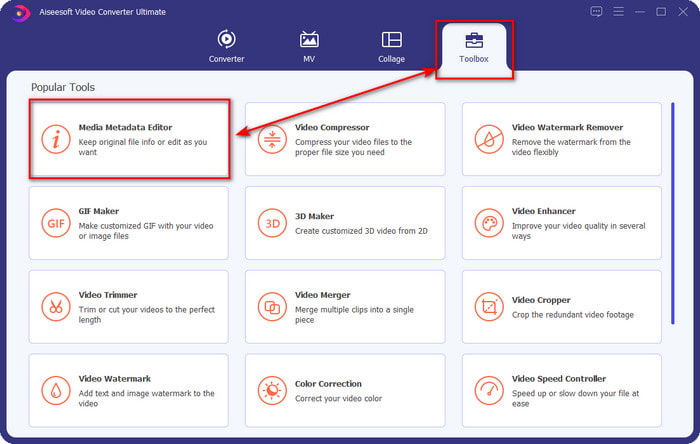
مرحله ۲. حالا که ابزار را اجرا کردهاید، باید به بخش Toolbox بروید و در فهرست نمایشدادهشده، گزینه Media Metadata Editor را پیدا کنید.
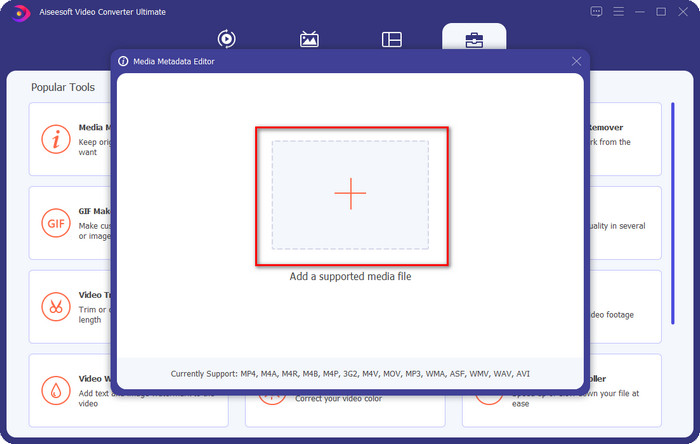
مرحله ۳. برای افزودن فایل MKV، روی دکمه + که روی صفحه ظاهر میشود کلیک کنید، فایل .mkv را در پوشه پیدا کرده و روی Open کلیک کنید تا به مرحله بعد بروید.
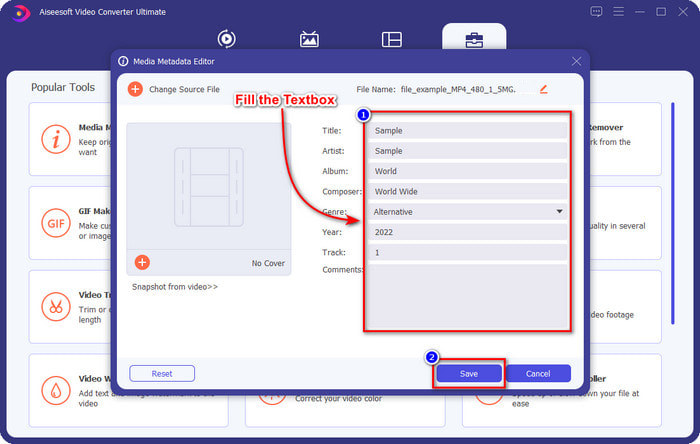
مرحله ۴. در این بخش، حالا میتوانید متادیتای مورد نیاز خود را روی فایل MKV اضافه کنید؛ آنها را مطابق خواسته خود پر کنید و اگر همه چیز را انجام دادهاید و آماده اِعمال تغییرات هستید، روی Save کلیک کنید. با این کار، برچسبها را به فایل MKV خود اضافه کردهاید تا بتوانید سریعتر تشخیص دهید داخل فایل چیست.
VLC Media Player – ویرایشگر رایگان MKV Metadata
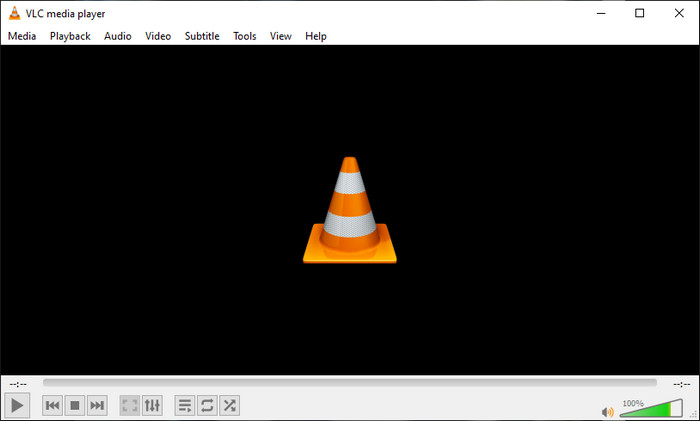
پلیر VLC Media Player میتواند بهراحتی فایل MKV را پخش کرده و برچسبهای آن را ویرایش کند. این ابزار متنباز است، بنابراین هنگام دانلود آن روی رایانه، نیازی به نگرانی ندارید، چون میتوانید تمام قابلیتهای آن را رایگان استفاده کنید؛ هرچند در صورت تمایل میتوانید کمک مالی (donate) کنید. هرچند این ابزار بهخوبی دیگر ویرایشگرهای متادیتا در این فهرست نیست، اما همچنان یک ابزار قابلاعتماد محسوب میشود که میتوانید روی دستگاه خود از آن استفاده کنید. علاوه بر این، شما آزادید اطلاعات پایهای را روی فایل MKV خود اضافه کنید؛ مثل نام نویسنده، عنوان، هنرمند، آلبوم و غیره. مراحل زیر را دنبال کنید و یاد بگیرید چطور با استفاده از این مدیا پلیر، متادیتای MKV را بهعنوان یک ویرایشگر متادیتا تغییر دهید.
مرحله ۱. VLC را دانلود کرده و سپس آن را روی رایانه خود باز کنید.
مرحله ۲. به منوی Tools بروید و روی Media Information کلیک کنید. اگر روش سادهتری میخواهید، میتوانید از کلید میانبر CTRL + I استفاده کنید. فرقی نمیکند کدام روش را انتخاب کنید، عملکرد هر دو یکسان است.
مرحله ۳. اطلاعات مورد نیاز خود را وارد کنید و برای اینکه متادیتا بهصورت خودکار ذخیره شود، روی Close کلیک کنید.
MKVToolNix GUI – ویرایشگر اختصاصی برچسب MKV
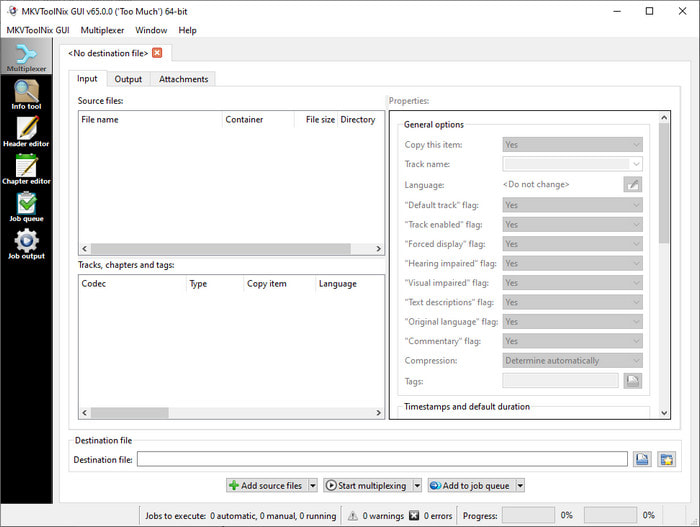
رابط گرافیکی MKVToolNix GUI یک راهحل اختصاصی برای فایلهای MKV است؛ هرچند میتوانید فرمتهای دیگر را نیز بارگذاری کنید، اما نرمافزار آنها را به فرمت MKV تبدیل میکند. این ابزار بهعنوان یک راهحل همهجانبه برای MKV شناخته شده است، زیرا یک مجموعهابزار در اختیارتان میگذارد، یعنی علاوه بر ویرایش متادیتا، قابلیتهای دیگری هم دارید. با رابط کاربری ساده و سرراستش، چیز زیادی برای یاد گرفتن وجود ندارد؛ در عمل میتوانید ظرف چند دقیقه کار با آن را یاد بگیرید. با وجود سادگی ابزار، بعضی کاربرانی که قبلاً از ویرایشگرهای متادیتای حرفهایتر استفاده کردهاند، رابط آن را با دیگران مقایسه کرده و گفتهاند که بهاندازه کافی برایشان شهودی (intuitive) نیست. با وجود تمام این انتقادها، هنوز هم شکی نیست که این ابزار میتواند به ما نشان بدهد چطور عنوان فایل MKV را تغییر دهیم.
مرحله ۱. نرمافزار را روی رایانه خود دانلود کنید، آن را باز کنید، روی Add Source File کلیک کرده و فایل MKV را در پوشه پیدا کنید.
مرحله ۲. روی Output بزنید و متادیتا را در این بخش تغییر دهید.
مرحله ۳. اگر همه این کارها را انجام دادهاید، حالا میتوانید با کلیک روی Start Multiplexing آن را ذخیره کنید.
بخش 2. سؤالات متداول در مورد ویرایشگر فراداده MKV
آیا می توانم VOB را به MKV تبدیل کنم؟
بهسادگی میتوانید با کلیک روی این لینک، VOB را به MKV تبدیل کنید؛ با این کار یک برگه جدید باز میشود که مستقیماً به شما کمک میکند VOB را به MKV تبدیل کنید. اگر میخواهید اطلاعات بیشتری درباره VOB و MKV داشته باشید، این مقاله مناسب شماست.
چرا فایل های MKV من حجم فایل بیشتری دارند؟
دلیل بزرگ بودن فایلهای MKV این است که این فرمت فقط شامل ویدیو و صدا نیست. بلکه عناصر متعددی مثل زیرنویس، متادیتا، نرخبیت متغیر و موارد بسیار دیگر را هم در خود جای میدهد. پس اگر بخواهید فایل MKV را بدون افت کیفیت فشرده کنید و حجمش را کم کنید، چه باید بکنید؟ ابزارهای فشردهسازی ویدیوی واقعاً مطمئن زیاد نیستند، و به همین دلیل ما تحقیقی انجام دادیم تا به شما کمک کنیم بهآسانی MKV را بدون از دست دادن کیفیت فشرده کنید.
اشکالات فرمت MKV چیست؟
با وجود اینکه فرمت فایل مشخص است، برخی از پخشکنندههای رسانه و ویرایشگرها به دلیل مشکل کدک و عناصر همچنان میتوانند فرمت را مدیریت کنند. همچنین، فرمت حجم بسیار زیادی دارد و همه نرم افزارها از آپلود فایل با اندازه بزرگ پشتیبانی نمی کنند زیرا وارد کردن و صادر کردن آن زمان زیادی را صرف می کند. اندازه فایل نیز افزایش می یابد زیرا بخشی از فایل است، مانند فرمت دیگری که متادیتا اضافه کرده اید. حتی ضعف خود را دارد، اما همچنان در مورد ذخیره فایل رسانه و ایمن نگه داشتن آنها برای اهداف آینده رقابتی است.
نتیجه
شگفت انگیز نیست؟ این سه نرم افزار دسکتاپ چه چیزی می توانند به شما ارائه دهند؟ دیگری یک پخش کننده رسانه است، در حالی که دیگری یک ویرایشگر اختصاصی برای MKV است، اما از کدام ابزار باید استفاده کنید؟ اگر بهترین ها را می خواهید، ما با کمال میل ابزار نهایی را برای شما به ارمغان می آوریم. یادگیری نحوه ویرایش ابرداده MKV با FVC Video Converter Ultimate آسان و موثر شد. پس برای چی منتظری؟ ابزار را در دسترس خود داشته باشید و از آن برای رفع ابرداده روی فایل های MKV خود مانند یک حرفه ای با چند کلیک استفاده کنید.
-
 2 بهترین راه برای ویرایش فراداده OGG که باید به صورت رایگان امتحان کنید
 آیا نیاز به ویرایش فراداده OGG دارید؟ خوب، شما به راحتی می توانید با استفاده از نرم افزار صحیح، ویرایش برچسب ها را انجام دهید. اگر کسی ندارید خواندن این مقاله ضروری است.
-
 بررسی اجمالی درباره ویرایشگر فراداده پنتاهو [به روز شده در سال 2022]
 آیا مقاله قابل اعتمادی در مورد ویرایشگر فراداده پنتاهو پیدا نکردید؟ خوشبختانه، ما خودمان این ابزار را بررسی کردیم تا حقایقی را ارائه کنیم که در مورد ابزار میدانید.
-
 نکات و ترفندهایی درباره ویرایشگر فراداده VLC که باید در سال 2022 بدانید
 آیا می خواهید از VLC به عنوان یک ویرایشگر ابرداده استفاده کنید؟ در این مورد، می توانید این مقاله را بخوانید زیرا ما یک بررسی بی طرفانه از ویرایشگر ابرداده VLC ارائه می دهیم.
